- Introduction to JBoss Seam
- 1. Seam Tutorial
- 1.1. Using the Seam examples
- 1.2. Your first Seam application: the registration example
- 1.3. Clickable lists in Seam: the messages example
- 1.4. Seam and jBPM: the todo list example
- 1.5. Seam pageflow: the numberguess example
- 1.6. A complete Seam application: the Hotel Booking example
- 1.7. Nested conversations: extending the Hotel Booking example
- 1.8. A complete application featuring Seam and jBPM: the DVD Store example
- 1.9. Bookmarkable URLs with the Blog example
- 2. Getting started with Seam, using seam-gen
- 2.1. Before you start
- 2.2. Setting up a new project
- 2.3. Creating a new action
- 2.4. Creating a form with an action
- 2.5. Generating an application from an existing database
- 2.6. Generating an application from existing JPA/EJB3 entities
- 2.7. Deploying the application as an EAR
- 2.8. Seam and incremental hot deployment
- 2.9. Using Seam with JBoss 4.0
- 3. Getting started with Seam, using JBoss Tools
- 4. The contextual component model
- 5. Configuring Seam components
- 6. Events, interceptors and exception handling
- 6.1. Seam events
- 6.2. Page actions
- 6.3. Page parameters
- 6.4. Propagating request parameters
- 6.5. URL rewriting with page parameters
- 6.6. Conversion and Validation
- 6.7. Navigation
- 6.8. Fine-grained files for definition of navigation, page actions and parameters
- 6.9. Component-driven events
- 6.10. Contextual events
- 6.11. Seam interceptors
- 6.12. Managing exceptions
- 7. Conversations and workspace management
- 7.1. Seam's conversation model
- 7.2. Nested conversations
- 7.3. Starting conversations with GET requests
- 7.4. Requiring a long-running conversation
- 7.5. Using
<s:link>and<s:button> - 7.6. Success messages
- 7.7. Natural conversation ids
- 7.8. Creating a natural conversation
- 7.9. Redirecting to a natural conversation
- 7.10. Workspace management
- 7.11. Conversational components and JSF component bindings
- 7.12. Concurrent calls to conversational components
- 8. Pageflows and business processes
- 9. Seam and Object/Relational Mapping
- 10. JSF form validation in Seam
- 11. Groovy integration
- 12. Writing your presentation layer using Apache Wicket
- 13. The Seam Application Framework
- 14. Seam and JBoss Rules
- 15. Security
- 15.1. Overview
- 15.2. Disabling Security
- 15.3. Authentication
- 15.4. Identity Management
- 15.5. Error Messages
- 15.6. Authorization
- 15.6.1. Core concepts
- 15.6.2. Securing components
- 15.6.3. Security in the user interface
- 15.6.4. Securing pages
- 15.6.5. Securing Entities
- 15.6.6. Typesafe Permission Annotations
- 15.6.7. Typesafe Role Annotations
- 15.6.8. The Permission Authorization Model
- 15.6.9. RuleBasedPermissionResolver
- 15.6.10. PersistentPermissionResolver
- 15.7. Permission Management
- 15.8. SSL Security
- 15.9. CAPTCHA
- 15.10. Security Events
- 15.11. Run As
- 15.12. Extending the Identity component
- 15.13. OpenID
- 16. Internationalization, localization and themes
- 17. Seam Text
- 18. iText PDF generation
- 19. The Microsoft® Excel® spreadsheet application
- 19.1. The Microsoft® Excel® spreadsheet application support
- 19.2. Creating a simple workbook
- 19.3. Workbooks
- 19.4. Worksheets
- 19.5. Columns
- 19.6. Cells
- 19.7. Formulas
- 19.8. Images
- 19.9. Hyperlinks
- 19.10. Headers and footers
- 19.11. Print areas and titles
- 19.12. Worksheet Commands
- 19.13. Datatable exporter
- 19.14. Fonts and layout
- 19.15. Internationalization
- 19.16. Links and further documentation
- 20. RSS support
- 21. Email
- 22. Asynchronicity and messaging
- 23. Caching
- 24. Web Services
- 25. Remoting
- 25.1. Configuration
- 25.2. The "Seam" object
- 25.3. Evaluating EL Expressions
- 25.4. Client Interfaces
- 25.5. The Context
- 25.6. Batch Requests
- 25.7. Working with Data types
- 25.8. Debugging
- 25.9. Handling Exceptions
- 25.10. The Loading Message
- 25.11. Controlling what data is returned
- 25.12. Transactional Requests
- 25.13. JMS Messaging
- 26. Seam and the Google Web Toolkit
- 27. Spring Framework integration
- 27.1. Injecting Seam components into Spring beans
- 27.2. Injecting Spring beans into Seam components
- 27.3. Making a Spring bean into a Seam component
- 27.4. Seam-scoped Spring beans
- 27.5. Using Spring PlatformTransactionManagement
- 27.6. Using a Seam Managed Persistence Context in Spring
- 27.7. Using a Seam Managed Hibernate Session in Spring
- 27.8. Spring Application Context as a Seam Component
- 27.9. Using a Spring TaskExecutor for @Asynchronous
- 28. Guice integration
- 29. Hibernate Search
- 30. Configuring Seam and packaging Seam applications
- 30.1. Basic Seam configuration
- 30.2. Using Alternate JPA Providers
- 30.3. Configuring Seam in Java EE 5
- 30.4. Configuring Seam in J2EE
- 30.5. Configuring Seam in Java SE, without JBoss Embedded
- 30.6. Configuring Seam in Java SE, with JBoss Embedded
- 30.7. Configuring jBPM in Seam
- 30.8. Configuring SFSB and Session Timeouts in JBoss AS
- 30.9. Running Seam in a Portlet
- 30.10. Deploying custom resources
- 31. Seam annotations
- 31.1. Annotations for component definition
- 31.2. Annotations for bijection
- 31.3. Annotations for component lifecycle methods
- 31.4. Annotations for context demarcation
- 31.5. Annotations for use with Seam JavaBean components in a J2EE environment
- 31.6. Annotations for exceptions
- 31.7. Annotations for Seam Remoting
- 31.8. Annotations for Seam interceptors
- 31.9. Annotations for asynchronicity
- 31.10. Annotations for use with JSF
- 31.11. Meta-annotations for databinding
- 31.12. Annotations for packaging
- 31.13. Annotations for integrating with the servlet container
- 32. Built-in Seam components
- 32.1. Context injection components
- 32.2. JSF-related components
- 32.3. Utility components
- 32.4. Components for internationalization and themes
- 32.5. Components for controlling conversations
- 32.6. jBPM-related components
- 32.7. Security-related components
- 32.8. JMS-related components
- 32.9. Mail-related components
- 32.10. Infrastructural components
- 32.11. Miscellaneous components
- 32.12. Special components
- 33. Seam JSF controls
- 34. JBoss EL
- 35. Clustering and EJB Passivation
- 36. Performance Tuning
- 37. Testing Seam applications
- 38. Seam tools
- 39. Seam on BEA's Weblogic
- 40. Seam on IBM's Websphere AS
- 41. Seam on GlassFish application server
- 42. Dependencies
Seam is an application framework for Enterprise Java. It is inspired by the following principles:
- One kind of "stuff"
Seam defines a uniform component model for all business logic in your application. A Seam component may be stateful, with the state associated with any one of several well-defined contexts, including the long-running, persistent, business process context and the conversation context, which is preserved across multiple web requests in a user interaction.
There is no distinction between presentation tier components and business logic components in Seam. You can layer your application according to whatever architecture you devise, rather than being forced to shoehorn your application logic into an unnatural layering scheme forced upon you by whatever combination of stovepipe frameworks you're using today.
Unlike plain Java EE or J2EE components, Seam components may simultaneously access state associated with the web request and state held in transactional resources (without the need to propagate web request state manually via method parameters). You might object that the application layering imposed upon you by the old J2EE platform was a Good Thing. Well, nothing stops you creating an equivalent layered architecture using Seam — the difference is that you get to architect your own application and decide what the layers are and how they work together.
- Integrate JSF with EJB 3.0
JSF and EJB 3.0 are two of the best new features of Java EE 5. EJB3 is a brand new component model for server side business and persistence logic. Meanwhile, JSF is a great component model for the presentation tier. Unfortunately, neither component model is able to solve all problems in computing by itself. Indeed, JSF and EJB3 work best used together. But the Java EE 5 specification provides no standard way to integrate the two component models. Fortunately, the creators of both models foresaw this situation and provided standard extension points to allow extension and integration with other frameworks.
Seam unifies the component models of JSF and EJB3, eliminating glue code, and letting the developer think about the business problem.
It is possible to write Seam applications where "everything" is an EJB. This may come as a surprise if you're used to thinking of EJBs as coarse-grained, so-called "heavyweight" objects. However, version 3.0 has completely changed the nature of EJB from the point of view of the developer. An EJB is a fine-grained object — nothing more complex than an annotated JavaBean. Seam even encourages you to use session beans as JSF action listeners!
On the other hand, if you prefer not to adopt EJB 3.0 at this time, you don't have to. Virtually any Java class may be a Seam component, and Seam provides all the functionality that you expect from a "lightweight" container, and more, for any component, EJB or otherwise.
- Integrated AJAX
Seam supports the best open source JSF-based AJAX solutions: JBoss RichFaces and ICEfaces. These solutions let you add AJAX capability to your user interface without the need to write any JavaScript code.
Alternatively, Seam provides a built-in JavaScript remoting layer that lets you call components asynchronously from client-side JavaScript without the need for an intermediate action layer. You can even subscribe to server-side JMS topics and receive messages via AJAX push.
Neither of these approaches would work well, were it not for Seam's built-in concurrency and state management, which ensures that many concurrent fine-grained, asynchronous AJAX requests are handled safely and efficiently on the server side.
- Business process as a first class construct
Optionally, Seam provides transparent business process management via jBPM. You won't believe how easy it is to implement complex workflows, collaboration and and task management using jBPM and Seam.
Seam even allows you to define presentation tier pageflow using the same language (jPDL) that jBPM uses for business process definition.
JSF provides an incredibly rich event model for the presentation tier. Seam enhances this model by exposing jBPM's business process related events via exactly the same event handling mechanism, providing a uniform event model for Seam's uniform component model.
- Declarative state management
We're all used to the concept of declarative transaction management and declarative security from the early days of EJB. EJB 3.0 even introduces declarative persistence context management. These are three examples of a broader problem of managing state that is associated with a particular context, while ensuring that all needed cleanup occurs when the context ends. Seam takes the concept of declarative state management much further and applies it to application state. Traditionally, J2EE applications implement state management manually, by getting and setting servlet session and request attributes. This approach to state management is the source of many bugs and memory leaks when applications fail to clean up session attributes, or when session data associated with different workflows collides in a multi-window application. Seam has the potential to almost entirely eliminate this class of bugs.
Declarative application state management is made possible by the richness of the context model defined by Seam. Seam extends the context model defined by the servlet spec — request, session, application — with two new contexts — conversation and business process — that are more meaningful from the point of view of the business logic.
You'll be amazed at how many things become easier once you start using conversations. Have you ever suffered pain dealing with lazy association fetching in an ORM solution like Hibernate or JPA? Seam's conversation-scoped persistence contexts mean you'll rarely have to see a
LazyInitializationException. Have you ever had problems with the refresh button? The back button? With duplicate form submission? With propagating messages across a post-then-redirect? Seam's conversation management solves these problems without you even needing to really think about them. They're all symptoms of the broken state management architecture that has been prevalent since the earliest days of the web.- Bijection
The notion of Inversion of Control or dependency injection exists in both JSF and EJB3, as well as in numerous so-called "lightweight containers". Most of these containers emphasize injection of components that implement stateless services. Even when injection of stateful components is supported (such as in JSF), it is virtually useless for handling application state because the scope of the stateful component cannot be defined with sufficient flexibility, and because components belonging to wider scopes may not be injected into components belonging to narrower scopes.
Bijection differs from IoC in that it is dynamic, contextual, and bidirectional. You can think of it as a mechanism for aliasing contextual variables (names in the various contexts bound to the current thread) to attributes of the component. Bijection allows auto-assembly of stateful components by the container. It even allows a component to safely and easily manipulate the value of a context variable, just by assigning it to an attribute of the component.
- Workspace management and multi-window browsing
Seam applications let the user freely switch between multiple browser tabs, each associated with a different, safely isolated, conversation. Applications may even take advantage of workspace management, allowing the user to switch between conversations (workspaces) in a single browser tab. Seam provides not only correct multi-window operation, but also multi-window-like operation in a single window!
- Prefer annotations to XML
Traditionally, the Java community has been in a state of deep confusion about precisely what kinds of meta-information counts as configuration. J2EE and popular "lightweight" containers have provided XML-based deployment descriptors both for things which are truly configurable between different deployments of the system, and for any other kinds or declaration which can not easily be expressed in Java. Java 5 annotations changed all this.
EJB 3.0 embraces annotations and "configuration by exception" as the easiest way to provide information to the container in a declarative form. Unfortunately, JSF is still heavily dependent on verbose XML configuration files. Seam extends the annotations provided by EJB 3.0 with a set of annotations for declarative state management and declarative context demarcation. This lets you eliminate the noisy JSF managed bean declarations and reduce the required XML to just that information which truly belongs in XML (the JSF navigation rules).
- Integration testing is easy
Seam components, being plain Java classes, are by nature unit testable. But for complex applications, unit testing alone is insufficient. Integration testing has traditionally been a messy and difficult task for Java web applications. Therefore, Seam provides for testability of Seam applications as a core feature of the framework. You can easily write JUnit or TestNG tests that reproduce a whole interaction with a user, exercising all components of the system apart from the view (the JSP or Facelets page). You can run these tests directly inside your IDE, where Seam will automatically deploy EJB components using JBoss Embedded.
- The specs ain't perfect
We think the latest incarnation of Java EE is great. But we know it's never going to be perfect. Where there are holes in the specifications (for example, limitations in the JSF lifecycle for GET requests), Seam fixes them. And the authors of Seam are working with the JCP expert groups to make sure those fixes make their way back into the next revision of the standards.
- There's more to a web application than serving HTML pages
Today's web frameworks think too small. They let you get user input off a form and into your Java objects. And then they leave you hanging. A truly complete web application framework should address problems like persistence, concurrency, asynchronicity, state management, security, email, messaging, PDF and chart generation, workflow, wikitext rendering, webservices, caching and more. Once you scratch the surface of Seam, you'll be amazed at how many problems become simpler...
Seam integrates JPA and Hibernate3 for persistence, the EJB Timer Service and Quartz for lightweight asychronicity, jBPM for workflow, JBoss Rules for business rules, Meldware Mail for email, Hibernate Search and Lucene for full text search, JMS for messaging and JBoss Cache for page fragment caching. Seam layers an innovative rule-based security framework over JAAS and JBoss Rules. There's even JSF tag libraries for rendering PDF, outgoing email, charts and wikitext. Seam components may be called synchronously as a Web Service, asynchronously from client-side JavaScript or Google Web Toolkit or, of course, directly from JSF.
- Get started now!
Seam works in any Java EE application server, and even works in Tomcat. If your environment supports EJB 3.0, great! If it doesn't, no problem, you can use Seam's built-in transaction management with JPA or Hibernate3 for persistence. Or, you can deploy JBoss Embedded in Tomcat, and get full support for EJB 3.0.
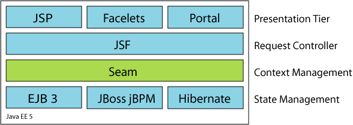
It turns out that the combination of Seam, JSF and EJB3 is the simplest way to write a complex web application in Java. You won't believe how little code is required!
Visit SeamFramework.org to find out how to contribute to Seam!
- 1.1. Using the Seam examples
- 1.2. Your first Seam application: the registration example
- 1.3. Clickable lists in Seam: the messages example
- 1.4. Seam and jBPM: the todo list example
- 1.5. Seam pageflow: the numberguess example
- 1.6. A complete Seam application: the Hotel Booking example
- 1.7. Nested conversations: extending the Hotel Booking example
- 1.8. A complete application featuring Seam and jBPM: the DVD Store example
- 1.9. Bookmarkable URLs with the Blog example
Seam provides a number of example applications demonstrating how to use the various features
of Seam. This tutorial will guide you through a few of those examples to help you get started
learning Seam. The Seam examples are located in the examples subdirectory
of the Seam distribution. The registration example, which will be the first example we look at,
is in the examples/registration directory.
Each example has the same directory structure:
The
viewdirectory contains view-related files such as web page templates, images and stylesheets.The
resourcesdirectory contains deployment descriptors and other configuration files.The
srcdirectory contains the application source code.
The example applications run both on JBoss AS and Tomcat with no additional configuration.
The following sections will explain the procedure in both cases. Note that all the examples
are built and run from the Ant build.xml, so you'll need a recent version
of Ant installed before you get started.
The examples are configured for use on JBoss AS 4.2 or 5.0. You'll need to set jboss.home,
in the shared build.properties file in the root folder of your Seam
installation, to the location of your JBoss AS installation.
Once you've set the location of JBoss AS and started the application server, you can build and deploy
any example by typing ant explode in the the directory for that example. Any example
that is packaged as an EAR deploys to a URL like
/seam-, where exampleexample is
the name of the example folder, with one exception. If the example folder begins with seam, the prefix
"seam" is ommitted. For instance, if JBoss AS is running on port 8080, the URL for the registration
example is
http://localhost:8080/seam-registration/, whereas the URL for the seamspace
example is
http://localhost:8080/seam-space/.
If, on the other hand, the example gets packaged as a WAR, then it deploys to a URL like
/jboss-seam-. Most of the examples can be deployed as a WAR
to Tomcat with Embedded JBoss by typing exampleant tomcat.deploy. Several of the examples
can only be deployed as a WAR. Those examples are groovybooking, hibernate, jpa, and spring.
The examples are also configured for use on Tomcat 6.0. You will need to follow the instructions in Section 30.6.1, “Installing Embedded JBoss” for installing JBoss Embedded on Tomcat 6.0. JBoss Embedded is only required to run the Seam demos that use EJB3 components on Tomcat. There are also examples of non-EJB3 applications that can be run on Tomcat without the use of JBoss Embedded.
You'll need to
set tomcat.home, in the shared build.properties file in
the root folder of your Seam installation, to the location of your Tomcat installation.
make sure you set the location of your Tomcat.
You'll need to use a different Ant target when using Tomcat. Use
ant tomcat.deploy in example subdirectory to build and deploy
any example for Tomcat.
On Tomcat, the examples deploy to URLs like
/jboss-seam-, so for the registration
example the URL would be
examplehttp://localhost:8080/jboss-seam-registration/. The same is true
for examples that deploy as a WAR, as mentioned in the previous section.
Most of the examples come with a suite of TestNG integration tests. The easiest way to run the tests is
to run ant test. It is also possible to run the tests inside your IDE using the
TestNG plugin. Consult the readme.txt in the examples directory of the Seam distribution for more
information.
The registration example is a simple application that lets a new user store his username, real name and password in the database. The example isn't intended to show off all of the cool functionality of Seam. However, it demonstrates the use of an EJB3 session bean as a JSF action listener, and basic configuration of Seam.
We'll go slowly, since we realize you might not yet be familiar with EJB 3.0.
The start page displays a very basic form with three input fields. Try filling them in and then submitting the form. This will save a user object in the database.

The example is implemented with two Facelets templates, one entity bean and one stateless session bean. Let's take a look at the code, starting from the "bottom".
We need an EJB entity bean for user data. This class defines persistence and validation declaratively, via annotations. It also needs some extra annotations that define the class as a Seam component.
Example 1.1. User.java
@Entity

@Name("user")

@Scope(SESSION)

@Table(name="users")

public class User implements Serializable

{

   private static final long serialVersionUID = 1881413500711441951L;


   private String username;

   private String password;

   private String name;


   public User(String name, String password, String username)

   {

      this.name = name;

      this.password = password;

      this.username = username;

   }


   public User() {}


   @NotNull @Length(min=5, max=15)

   public String getPassword()

   {

      return password;

   }


   public void setPassword(String password)

   {

      this.password = password;

   }


   @NotNull

   public String getName()

   {

      return name;

   }


   public void setName(String name)

   {

      this.name = name;

   }


   @Id @NotNull @Length(min=5, max=15)

   public String getUsername()

   {

      return username;

   }


   public void setUsername(String username)

   {

      this.username = username;

   }


}
| The EJB3 standard |
| A Seam component needs a component name specified by the
|
| Whenever Seam instantiates a component, it binds the new instance to a context
variable in the component's default context. The default
context is specified using the
|
| The EJB standard |
|
|
| An empty constructor is both required by both the EJB specification and by Seam. |
| The |
| The EJB standard |
The most important things to notice in this example are the @Name and
@Scope annotations. These annotations establish that this class is a Seam component.
We'll see below that the properties of our User class are bound
directly to JSF components and are populated by JSF during the update model values phase. We
don't need any tedious glue code to copy data back and forth between the JSP pages and the
entity bean domain model.
However, entity beans shouldn't do transaction management or database access. So we can't use this component as a JSF action listener. For that we need a session bean.
Most Seam application use session beans as JSF action listeners (you can use JavaBeans instead if you like).
We have exactly one JSF action in our application, and one session bean method attached to it. In
this case, we'll use a stateless session bean, since all the state associated with our action is
held by the User bean.
This is the only really interesting code in the example!
Example 1.2. RegisterAction.java
@Statelessn null; } } }
| The EJB |
| The
|
| The EJB standard |
| The Seam |
| The action listener method uses the standard EJB3
|
| Notice that Seam lets you use a JSF EL expression inside EJB-QL. Under the
covers, this results in an ordinary JPA |
| The |
| JSF action listener methods return a string-valued outcome that determines what page will be displayed next. A null outcome (or a void action listener method) redisplays the previous page. In plain JSF, it is normal to always use a JSF navigation rule to determine the JSF view id from the outcome. For complex application this indirection is useful and a good practice. However, for very simple examples like this one, Seam lets you use the JSF view id as the outcome, eliminating the requirement for a navigation rule. Note that when you use a view id as an outcome, Seam always performs a browser redirect. |
| Seam provides a number of built-in components to help solve
common problems. The |
Note that we did not explicitly specify a @Scope this time. Each Seam
component type has a default scope if not explicitly specified. For stateless session beans, the
default scope is the stateless context, which is the only sensible value.
Our session bean action listener performs the business and persistence logic for our mini-application. In more complex applications, we might need require a separate service layer. This is easy to achieve with Seam, but it's overkill for most web applications. Seam does not force you into any particular strategy for application layering, allowing your application to be as simple, or as complex, as you want.
Note that in this simple application, we've actually made it far more complex than it needs to be. If we had used the Seam application framework controllers, we would have eliminated all of our application code. However, then we wouldn't have had much of an application to explain.
Naturally, our session bean needs a local interface.
That's the end of the Java code. Now we'll look at the view.
The view pages for a Seam application could be implemented using any technology that supports JSF. In this example we use Facelets, because we think it's better than JSP.
Example 1.4. register.xhtml
<?xml version="1.0" encoding="utf-8"?>

<!DOCTYPE html PUBLIC "-//W3C//DTD XHTML 1.0 Transitional//EN"

    "http://www.w3.org/TR/xhtml1/DTD/xhtml1-transitional.dtd">

<html xmlns="http://www.w3.org/1999/xhtml"

    xmlns:s="http://jboss.com/products/seam/taglib"

    xmlns:h="http://java.sun.com/jsf/html"

    xmlns:f="http://java.sun.com/jsf/core">


   <head>

      <title>Register New User</title>

   </head>

   <body>

      <f:view>

         <h:form>

            <s:validateAll>

               <h:panelGrid columns="2">

                  Username: <h:inputText value="#{user.username}" required="true"/>

                  Real Name: <h:inputText value="#{user.name}" required="true"/>

                  Password: <h:inputSecret value="#{user.password}" required="true"/>

               </h:panelGrid>

            </s:validateAll>

            <h:messages/>

            <h:commandButton value="Register" action="#{register.register}"/>

         </h:form>

      </f:view>

   </body>


</html>
The only thing here that is specific to Seam is the
<s:validateAll> tag. This JSF component tells JSF to validate all
the contained input fields against the Hibernate Validator annotations specified on the entity bean.
Example 1.5. registered.xhtml
<?xml version="1.0" encoding="utf-8"?>

<!DOCTYPE html PUBLIC "-//W3C//DTD XHTML 1.0 Transitional//EN"

    "http://www.w3.org/TR/xhtml1/DTD/xhtml1-transitional.dtd">

<html xmlns="http://www.w3.org/1999/xhtml"

    xmlns:f="http://java.sun.com/jsf/core">


    <head>

        <title>Successfully Registered New User</title>

    </head>

    <body>

        <f:view>

            Welcome, #{user.name}, you are successfully registered as #{user.username}.

        </f:view>

    </body>


</html>
This is a simple Facelets page using some inline EL. There's nothing specific to Seam here.
Since this is the first Seam app we've seen, we'll take a look at the deployment descriptors. Before we get into them, it is worth noting that Seam strongly values minimal configuration. These configuration files will be created for you when you create a Seam application. You'll never need to touch most of these files. We're presenting them now only to help you understand what all the pieces in the example are doing.
If you've used many Java frameworks before, you'll be used to having to declare all your component classes in some kind of XML file that gradually grows more and more unmanageable as your project matures. You'll be relieved to know that Seam does not require that application components be accompanied by XML. Most Seam applications require a very small amount of XML that does not grow very much as the project gets bigger.
Nevertheless, it is often useful to be able to provide for some external
configuration of some components (particularly the components built in to
Seam). You have a couple of options here, but the most flexible option is to provide this
configuration in a file called components.xml, located in the
WEB-INF directory. We'll use the components.xml file to tell
Seam how to find our EJB components in JNDI:
Example 1.6. components.xml
<?xml version="1.0" encoding="UTF-8"?>

<components xmlns="http://jboss.com/products/seam/components"

    xmlns:core="http://jboss.com/products/seam/core"

    xmlns:xsi="http://www.w3.org/2001/XMLSchema-instance"

    xsi:schemaLocation="

        http://jboss.com/products/seam/core

        http://jboss.com/products/seam/core-2.1.xsd

        http://jboss.com/products/seam/components

        http://jboss.com/products/seam/components-2.1.xsd">


    <core:init jndi-pattern="@jndiPattern@"/>


</components>
This code configures a property named jndiPattern of a built-in Seam component
named org.jboss.seam.core.init. The funny @ symbols are
there because our Ant build script puts the correct JNDI pattern in when we deploy the application,
which it reads from the components.properties file. You learn more about how this process works in
Section 5.2, “Configuring components via components.xml”.
The presentation layer for our mini-application will be deployed in a WAR. So we'll need a web deployment descriptor.
Example 1.7. web.xml
<?xml version="1.0" encoding="UTF-8"?>

<web-app xmlns="http://java.sun.com/xml/ns/javaee"

    xmlns:xsi="http://www.w3.org/2001/XMLSchema-instance"

    xsi:schemaLocation="

        http://java.sun.com/xml/ns/javaee

        http://java.sun.com/xml/ns/javaee/web-app_2_5.xsd"

    version="2.5">


    <listener>

        <listener-class>org.jboss.seam.servlet.SeamListener</listener-class>

    </listener>


    <context-param>

        <param-name>javax.faces.DEFAULT_SUFFIX</param-name>

        <param-value>.xhtml</param-value>

    </context-param>


    <servlet>

        <servlet-name>Faces Servlet</servlet-name>

        <servlet-class>javax.faces.webapp.FacesServlet</servlet-class>

        <load-on-startup>1</load-on-startup>

    </servlet>


    <servlet-mapping>

        <servlet-name>Faces Servlet</servlet-name>

        <url-pattern>*.seam</url-pattern>

    </servlet-mapping>


    <session-config>

        <session-timeout>10</session-timeout>

    </session-config>


</web-app>
This web.xml file configures Seam and JSF. The configuration you see here is
pretty much identical in all Seam applications.
Most Seam applications use JSF views as the presentation layer. So usually we'll need
faces-config.xml. In our case, we are going to use Facelets for
defining our views, so we need to tell JSF to use Facelets as its templating engine.
Example 1.8. faces-config.xml
<?xml version="1.0" encoding="UTF-8"?>

<faces-config xmlns="http://java.sun.com/xml/ns/javaee"

    xmlns:xsi="http://www.w3.org/2001/XMLSchema-instance"

    xsi:schemaLocation="

        http://java.sun.com/xml/ns/javaee

        http://java.sun.com/xml/ns/javaee/web-facesconfig_1_2.xsd"

    version="1.2">


    <application>

        <view-handler>com.sun.facelets.FaceletViewHandler</view-handler>

    </application>


</faces-config>
Note that we don't need
any JSF managed bean declarations! Our managed beans are annotated Seam components. In Seam applications,
the faces-config.xml is used much less often than in plain JSF. Here, we are simply
using it to enable Facelets as the view handler instead of JSP.
In fact, once you have all the basic descriptors set up, the only XML you need to write as you add new functionality to a Seam application is orchestration: navigation rules or jBPM process definitions. Seam's stand is that process flow and configuration data are the only things that truly belong in XML.
In this simple example, we don't even need a navigation rule, since we decided to embed the view id in our action code.
The ejb-jar.xml file integrates Seam with EJB3, by attaching the
SeamInterceptor to all session beans in the archive.
<?xml version="1.0" encoding="UTF-8"?>

<ejb-jar xmlns="http://java.sun.com/xml/ns/javaee"

    xmlns:xsi="http://www.w3.org/2001/XMLSchema-instance"

    xsi:schemaLocation="

        http://java.sun.com/xml/ns/javaee

        http://java.sun.com/xml/ns/javaee/ejb-jar_3_0.xsd"

    version="3.0">


    <interceptors>

        <interceptor>

            <interceptor-class>org.jboss.seam.ejb.SeamInterceptor</interceptor-class>

        </interceptor>

    </interceptors>


    <assembly-descriptor>

        <interceptor-binding>

            <ejb-name>*</ejb-name>

            <interceptor-class>org.jboss.seam.ejb.SeamInterceptor</interceptor-class>

        </interceptor-binding>

    </assembly-descriptor>


</ejb-jar>
The persistence.xml file tells the EJB persistence provider where to find the
datasource, and contains some vendor-specific settings. In this case, enables automatic schema
export at startup time.
<?xml version="1.0" encoding="UTF-8"?>

<persistence xmlns="http://java.sun.com/xml/ns/persistence"

    xmlns:xsi="http://www.w3.org/2001/XMLSchema-instance"

    xsi:schemaLocation="

        http://java.sun.com/xml/ns/persistence

        http://java.sun.com/xml/ns/persistence/persistence_1_0.xsd"

    version="1.0">


    <persistence-unit name="userDatabase">

        <provider>org.hibernate.ejb.HibernatePersistence</provider>

        <jta-data-source>java:/DefaultDS</jta-data-source>

        <properties>

            <property name="hibernate.hbm2ddl.auto" value="create-drop"/>

        </properties>

    </persistence-unit>


</persistence>
Finally, since our application is deployed as an EAR, we need a deployment descriptor there, too.
Example 1.9. registration application
<?xml version="1.0" encoding="UTF-8"?>

<application xmlns="http://java.sun.com/xml/ns/javaee"

    xmlns:xsi="http://www.w3.org/2001/XMLSchema-instance"

    xsi:schemaLocation="

        http://java.sun.com/xml/ns/javaee

        http://java.sun.com/xml/ns/javaee/application_5.xsd"

    version="5">


    <display-name>Seam Registration</display-name>


    <module>

        <web>

            <web-uri>jboss-seam-registration.war</web-uri>

            <context-root>/seam-registration</context-root>

        </web>

    </module>

    <module>

        <ejb>jboss-seam-registration.jar</ejb>

    </module>

    <module>

        <ejb>jboss-seam.jar</ejb>

    </module>

    <module>

        <java>jboss-el.jar</java>

    </module>


</application>
This deployment descriptor links modules in the enterprise archive and binds the web application
to the context root /seam-registration.
We've now seen all the files in the entire application!
When the form is submitted, JSF asks Seam to resolve the variable named user.
Since there is no value already bound to that name (in any Seam context), Seam instantiates the
user component, and returns the resulting User entity bean
instance to JSF after storing it in the Seam session context.
The form input values are now validated against the Hibernate Validator constraints specified on the
User entity. If the constraints are violated, JSF redisplays the page. Otherwise,
JSF binds the form input values to properties of the User entity bean.
Next, JSF asks Seam to resolve the variable named register. Seam uses the JNDI
pattern mentioned earlier to locate the stateless session bean, wraps it as a Seam component, and
returns it. Seam then presents this component to JSF and JSF invokes the register()
action listener method.
But Seam is not done yet. Seam intercepts the method call and injects the User
entity from the Seam session context, before allowing the invocation to continue.
The register() method checks if a user with the entered username already exists.
If so, an error message is queued with the FacesMessages component, and a null
outcome is returned, causing a page redisplay. The FacesMessages component
interpolates the JSF expression embedded in the message string and adds a JSF
FacesMessage to the view.
If no user with that username exists, the "/registered.xhtml" outcome triggers a
browser redirect to the registered.xhtml page. When JSF comes to render the page, it
asks Seam to resolve the variable named user and uses property values of the returned
User entity from Seam's session scope.
Clickable lists of database search results are such an important part of any online application that Seam
provides special functionality on top of JSF to make it easier to query data using EJB-QL or HQL and display
it as a clickable list using a JSF <h:dataTable>. The messages example
demonstrates this functionality.

The message list example has one entity bean, Message, one session bean,
MessageListBean and one JSP.
The Message entity defines the title, text, date and time of a message, and a
flag indicating whether the message has been read:
Example 1.10. Message.java
@Entity

@Name("message")

@Scope(EVENT)

public class Message implements Serializable

{

   private Long id;

   private String title;

   private String text;

   private boolean read;

   private Date datetime;


   @Id @GeneratedValue

   public Long getId()

   {

      return id;

   }

   public void setId(Long id)

   {

      this.id = id;

   }


   @NotNull @Length(max=100)

   public String getTitle()

   {

      return title;

   }

   public void setTitle(String title)

   {

      this.title = title;

   }


   @NotNull @Lob

   public String getText()

   {

      return text;

   }

   public void setText(String text)

   {

      this.text = text;

   }


   @NotNull

   public boolean isRead()

   {

      return read;

   }

   public void setRead(boolean read)

   {

      this.read = read;

   }


   @NotNull

   @Basic @Temporal(TemporalType.TIMESTAMP)

   public Date getDatetime()

   {

      return datetime;

   }

   public void setDatetime(Date datetime)

   {

      this.datetime = datetime;

   }


}
Just like in the previous example, we have a session bean, MessageManagerBean,
which defines the action listener methods for the two buttons on our form. One of the buttons
selects a message from the list, and displays that message. The other button deletes a message. So
far, this is not so different to the previous example.
But MessageManagerBean is also responsible for fetching the list of messages
the first time we navigate to the message list page. There are various ways the user could navigate
to the page, and not all of them are preceded by a JSF action — the user might have
bookmarked the page, for example. So the job of fetching the message list takes place in a Seam
factory method, instead of in an action listener method.
We want to cache the list of messages in memory between server requests, so we will make this a stateful session bean.
Example 1.11. MessageManagerBean.java
@Stateful
@Scope(SESSION)
@Name("messageManager")
public class MessageManagerBean implements Serializable, MessageManager
{
   @DataModel
   private List<Message> messageList;

   @DataModelSelection
   @Out(required=false)
   private Message message;

   @PersistenceContext(type=EXTENDED)
   private EntityManager em;

   @Factory("messageList")
   public void findMessages()
   {
      messageList = em.createQuery("select msg from Message msg order by msg.datetime desc")
                      .getResultList();
   }

   public void select()
   {
      message.setRead(true);
   }

   public void delete()
   {
      messageList.remove(message);
      em.remove(message);
      message=null;
   }

   @Remove
   public void destroy() {}

} | The |
| The |
| The |
| This stateful bean has an EJB3 extended persistence context.
The messages retrieved in the query remain in the managed state as long as the bean
exists, so any subsequent method calls to the stateful bean can update them without
needing to make any explicit call to the |
| The first time we navigate to the JSP page, there will be no value in the
|
| The |
| The |
| All stateful session bean Seam components must have a method
with no parameters marked |
Note that this is a session-scoped Seam component. It is associated with the user login session, and all requests from a login session share the same instance of the component. (In Seam applications, we usually use session-scoped components sparingly.)
All session beans have a business interface, of course.
Example 1.12. MessageManager.java
@Local

public interface MessageManager

{

   public void findMessages();

   public void select();

   public void delete();

   public void destroy();

}
From now on, we won't show local interfaces in our code examples.
Let's skip over components.xml, persistence.xml,
web.xml, ejb-jar.xml, faces-config.xml
and application.xml since they are much the same as the previous example, and go
straight to the JSP.
The JSP page is a straightforward use of the JSF <h:dataTable>
component. Again, nothing specific to Seam.
Example 1.13. messages.jsp
<%@ taglib uri="http://java.sun.com/jsf/html" prefix="h" %>

<%@ taglib uri="http://java.sun.com/jsf/core" prefix="f" %>

<html>

 <head>

  <title>Messages</title>

 </head>

 <body>

  <f:view>

   <h:form>

     <h2>Message List</h2>

     <h:outputText value="No messages to display"

                   rendered="#{messageList.rowCount==0}"/>

     <h:dataTable var="msg" value="#{messageList}"

                  rendered="#{messageList.rowCount>0}">

        <h:column>

           <f:facet name="header">

              <h:outputText value="Read"/>

           </f:facet>

           <h:selectBooleanCheckbox value="#{msg.read}" disabled="true"/>

        </h:column>

        <h:column>

           <f:facet name="header">

              <h:outputText value="Title"/>

           </f:facet>

           <h:commandLink value="#{msg.title}" action="#{messageManager.select}"/>

        </h:column>

        <h:column>

           <f:facet name="header">

              <h:outputText value="Date/Time"/>

           </f:facet>

           <h:outputText value="#{msg.datetime}">

              <f:convertDateTime type="both" dateStyle="medium" timeStyle="short"/>

           </h:outputText>

        </h:column>

        <h:column>

           <h:commandButton value="Delete" action="#{messageManager.delete}"/>

        </h:column>

     </h:dataTable>

     <h3><h:outputText value="#{message.title}"/></h3>

     <div><h:outputText value="#{message.text}"/></div>

   </h:form>

  </f:view>

 </body>

</html>
The first time we navigate to the messages.jsp page, the page will try to resolve the
messageList context variable. Since this context variable is not initialized,
Seam will call the factory method findMessages(), which performs a query against the
database and results in a DataModel being outjected. This
DataModel provides the row data needed for rendering the
<h:dataTable>.
When the user clicks the <h:commandLink>, JSF calls the
select() action listener. Seam intercepts this call and injects the selected row
data into the message attribute of the messageManager component.
The action listener fires, marking the selected Message as read. At the end of the
call, Seam outjects the selected Message to the context variable named
message. Next, the EJB container commits the transaction, and the change to the
Message is flushed to the database. Finally, the page is re-rendered,
redisplaying the message list, and displaying the selected message below it.
If the user clicks the <h:commandButton>, JSF calls the
delete() action listener. Seam intercepts this call and injects the selected row
data into the message attribute of the messageList component. The
action listener fires, removing the selected Message from the list, and also calling
remove() on the EntityManager. At the end of the call, Seam
refreshes the messageList context variable and clears the context variable named
message. The EJB container commits the transaction, and deletes the
Message from the database. Finally, the page is re-rendered, redisplaying the
message list.
jBPM provides sophisticated functionality for workflow and task management. To get a small taste of how jBPM integrates with Seam, we'll show you a simple "todo list" application. Since managing lists of tasks is such core functionality for jBPM, there is hardly any Java code at all in this example.

The center of this example is the jBPM process definition. There are also two JSPs and two trivial JavaBeans (There was no reason to use session beans, since they do not access the database, or have any other transactional behavior). Let's start with the process definition:
Example 1.14. todo.jpdl.xml
<process-definition name="todo"> <start-stat
| The |
| The |
| The |
| Tasks need to be assigned to a user or group of users when they are created. In this
case, the task is assigned to the current user, which we get from a built-in Seam
component named |
| The |
If we view this process definition using the process definition editor provided by JBossIDE, this is what it looks like:

This document defines our business process as a graph of nodes. This is the most trivial possible business process: there is one task to be performed, and when that task is complete, the business process ends.
The first JavaBean handles the login screen login.jsp. Its job is just to
initialize the jBPM actor id using the actor component. In a real application, it
would also need to authenticate the user.
Example 1.15. Login.java
@Name("login")
public class Login
{
@In
private Actor actor;
private String user;
public String getUser()
{
return user;
}
public void setUser(String user)
{
this.user = user;
}
public String login()
{
actor.setId(user);
return "/todo.jsp";
}
}
Here we see the use of @In to inject the built-in Actor
component.
The JSP itself is trivial:
Example 1.16. login.jsp
<%@ taglib uri="http://java.sun.com/jsf/html" prefix="h"%>
<%@ taglib uri="http://java.sun.com/jsf/core" prefix="f"%>
<html>
<head>
<title>Login</title>
</head>
<body>
<h1>Login</h1>
<f:view>
<h:form>
<div>
<h:inputText value="#{login.user}"/>
<h:commandButton value="Login" action="#{login.login}"/>
</div>
</h:form>
</f:view>
</body>
</html>
The second JavaBean is responsible for starting business process instances, and ending tasks.
Example 1.17. TodoList.java
@Name("todoList")
public class TodoList
{
private String description;
public String getDescription()
{
return description;
}
public void setDescription(String description)
{
this.description = description;
}
@CreateProcess(definition="todo")
public void createTodo() {}
@StartTask @EndTask
public void done() {}
} | The description property accepts user input from the JSP page, and exposes it to the process definition, allowing the task description to be set. |
| The Seam |
| The Seam |
In a more realistic example, @StartTask and @EndTask would not
appear on the same method, because there is usually work to be done using the application in order to
complete the task.
Finally, the core of the application is in todo.jsp:
Example 1.18. todo.jsp
<%@ taglib uri="http://java.sun.com/jsf/html" prefix="h" %>
<%@ taglib uri="http://java.sun.com/jsf/core" prefix="f" %>
<%@ taglib uri="http://jboss.com/products/seam/taglib" prefix="s" %>
<html>
<head>
<title>Todo List</title>
</head>
<body>
<h1>Todo List</h1>
<f:view>
<h:form id="list">
<div>
<h:outputText value="There are no todo items."
rendered="#{empty taskInstanceList}"/>
<h:dataTable value="#{taskInstanceList}" var="task"
rendered="#{not empty taskInstanceList}">
<h:column>
<f:facet name="header">
<h:outputText value="Description"/>
</f:facet>
<h:inputText value="#{task.description}"/>
</h:column>
<h:column>
<f:facet name="header">
<h:outputText value="Created"/>
</f:facet>
<h:outputText value="#{task.taskMgmtInstance.processInstance.start}">
<f:convertDateTime type="date"/>
</h:outputText>
</h:column>
<h:column>
<f:facet name="header">
<h:outputText value="Priority"/>
</f:facet>
<h:inputText value="#{task.priority}" style="width: 30"/>
</h:column>
<h:column>
<f:facet name="header">
<h:outputText value="Due Date"/>
</f:facet>
<h:inputText value="#{task.dueDate}" style="width: 100">
<f:convertDateTime type="date" dateStyle="short"/>
</h:inputText>
</h:column>
<h:column>
<s:button value="Done" action="#{todoList.done}" taskInstance="#{task}"/>
</h:column>
</h:dataTable>
</div>
<div>
<h:messages/>
</div>
<div>
<h:commandButton value="Update Items" action="update"/>
</div>
</h:form>
<h:form id="new">
<div>
<h:inputText value="#{todoList.description}"/>
<h:commandButton value="Create New Item" action="#{todoList.createTodo}"/>
</div>
</h:form>
</f:view>
</body>
</html>
Let's take this one piece at a time.
The page renders a list of tasks, which it gets from a built-in Seam component named
taskInstanceList. The list is defined inside a JSF form.
Example 1.19. todo.jsp
<h:form id="list">
<div>
<h:outputText value="There are no todo items." rendered="#{empty taskInstanceList}"/>
<h:dataTable value="#{taskInstanceList}" var="task"
rendered="#{not empty taskInstanceList}">
...
</h:dataTable>
</div>
</h:form>
Each element of the list is an instance of the jBPM class TaskInstance. The
following code simply displays the interesting properties of each task in the list. For the description,
priority and due date, we use input controls, to allow the user to update these values.
<h:column>
<f:facet name="header">
<h:outputText value="Description"/>
</f:facet>
<h:inputText value="#{task.description}"/>
</h:column>
<h:column>
<f:facet name="header">
<h:outputText value="Created"/>
</f:facet>
<h:outputText value="#{task.taskMgmtInstance.processInstance.start}">
<f:convertDateTime type="date"/>
</h:outputText>
</h:column>
<h:column>
<f:facet name="header">
<h:outputText value="Priority"/>
</f:facet>
<h:inputText value="#{task.priority}" style="width: 30"/>
</h:column>
<h:column>
<f:facet name="header">
<h:outputText value="Due Date"/>
</f:facet>
<h:inputText value="#{task.dueDate}" style="width: 100">
<f:convertDateTime type="date" dateStyle="short"/>
</h:inputText>
</h:column>
Note
Seam provides a default JSF date converter for converting a string to a date (no time). Thus, the converter is not necessary for the field bound to#{task.dueDate}. This button ends the task by calling the action method annotated @StartTask
@EndTask. It passes the task id to Seam as a request parameter:
<h:column>
<s:button value="Done" action="#{todoList.done}" taskInstance="#{task}"/>
</h:column>
Note that this is using a Seam <s:button> JSF control from the
seam-ui.jar package. This button is used to update the properties of the
tasks. When the form is submitted, Seam and jBPM will make any changes to the tasks persistent.
There is no need for any action listener method:
<h:commandButton value="Update Items" action="update"/>
A second form on the page is used to create new items, by calling the action method annotated
@CreateProcess.
<h:form id="new">
<div>
<h:inputText value="#{todoList.description}"/>
<h:commandButton value="Create New Item" action="#{todoList.createTodo}"/>
</div>
</h:form>
After logging in, todo.jsp uses the taskInstanceList component to display a table
of outstanding todo items for a the current user. Initially there are none. It
also presents a form to enter a new entry. When the user types the todo item and
hits the "Create New Item" button, #{todoList.createTodo} is called. This starts
the todo process, as defined in todo.jpdl.xml.
The process instance is created, starting in the start state and immediately transition to
the todo state, where a new task is created. The task description is set
based on the user's
input, which was saved to #{todoList.description}. Then, the task is
assigned to
the current user, which was stored in the seam actor component. Note that in
this example, the process has no extra process state. All the state in this example
is stored in the task definition. The process and task information is stored in the database
at the end of the request.
When todo.jsp is redisplayed, taskInstanceList now finds
the task that was just created.
The task is shown in an h:dataTable. The internal state of the task is
displayed in
each column: #{task.description}, #{task.priority},
#{task.dueDate}, etc... These fields
can all be edited and saved back to the database.
Each todo item also has "Done" button, which calls #{todoList.done}. The
todoList component
knows which task the button is for because each s:button specificies
taskInstance="#{task}", referring
to the task for that particular line of of the table. The @StartTast and
@EndTask annotations
cause seam to make the task active and immediately complete the task. The original process then
transitions into the done state, according to the process definition, where it ends.
The state of the task and process are both updated in the database.
When todo.jsp is displayed again, the now-completed task is no longer
displayed in the
taskInstanceList, since that component only display active tasks for the user.
For Seam applications with relatively freeform (ad hoc) navigation, JSF/Seam navigation rules are a perfectly good way to define the page flow. For applications with a more constrained style of navigation, especially for user interfaces which are more stateful, navigation rules make it difficult to really understand the flow of the system. To understand the flow, you need to piece it together from the view pages, the actions and the navigation rules.
Seam allows you to use a jPDL process definition to define pageflow. The simple number guessing example shows how this is done.

The example is implemented using one JavaBean, three JSP pages and a jPDL pageflow definition. Let's begin with the pageflow:
Example 1.20. pageflow.jpdl.xml
<pageflow-definition
xmlns="http://jboss.com/products/seam/pageflow"
xmlns:xsi="http://www.w3.org/2001/XMLSchema-instance"
xsi:schemaLocation="http://jboss.com/products/seam/pageflow
http://jboss.com/products/seam/pageflow-2.1.xsd"
name="numberGuess">
<start-page name="displayGuess" view-id="/numberGuess.jspx">
<redirect/>
<transition name="guess" to="evaluateGuess">
<action expression="#{numberGuess.guess}"/>
</transition>
<transition name="giveup" to="giveup"/>
<transition name="cheat" to="cheat"/>
</start-page>
<decision name="evaluateGuess" expression="#{numberGuess.correctGuess}">
<transition name="true" to="win"/>
<transition name="false" to="evaluateRemainingGuesses"/>
</decision>
<decision name="evaluateRemainingGuesses" expression="#{numberGuess.lastGuess}">
<transition name="true" to="lose"/>
<transition name="false" to="displayGuess"/>
</decision>
<page name="giveup" view-id="/giveup.jspx">
<redirect/>
<transition name="yes" to="lose"/>
<transition name="no" to="displayGuess"/>
</page>
<process-state name="cheat">
<sub-process name="cheat"/>
<transition to="displayGuess"/>
</process-state>
<page name="win" view-id="/win.jspx">
<redirect/>
<end-conversation/>
</page>
<page name="lose" view-id="/lose.jspx">
<redirect/>
<end-conversation/>
</page>
</pageflow-definition> | The |
| The |
| A transition |
| A |
Here is what the pageflow looks like in the JBoss Developer Studio pageflow editor:

Now that we have seen the pageflow, it is very, very easy to understand the rest of the application!
Here is the main page of the application, numberGuess.jspx:
Example 1.21. numberGuess.jspx
<<?xml version="1.0"?>
<jsp:root xmlns:jsp="http://java.sun.com/JSP/Page"
xmlns:h="http://java.sun.com/jsf/html"
xmlns:f="http://java.sun.com/jsf/core"
xmlns:s="http://jboss.com/products/seam/taglib"
xmlns="http://www.w3.org/1999/xhtml"
version="2.0">
<jsp:output doctype-root-element="html"
doctype-public="-//W3C//DTD XHTML 1.0 Transitional//EN"
doctype-system="http://www.w3c.org/TR/xhtml1/DTD/xhtml1-transitional.dtd"/>
<jsp:directive.page contentType="text/html"/>
<html>
<head>
<title>Guess a number...</title>
<link href="niceforms.css" rel="stylesheet" type="text/css" />
<script language="javascript" type="text/javascript" src="niceforms.js" />
</head>
<body>
<h1>Guess a number...</h1>
<f:view>
<h:form styleClass="niceform">
<div>
<h:messages globalOnly="true"/>
<h:outputText value="Higher!"
rendered="#{numberGuess.randomNumber gt numberGuess.currentGuess}"/>
<h:outputText value="Lower!"
rendered="#{numberGuess.randomNumber lt numberGuess.currentGuess}"/>
</div>
<div>
I'm thinking of a number between
<h:outputText value="#{numberGuess.smallest}"/> and
<h:outputText value="#{numberGuess.biggest}"/>. You have
<h:outputText value="#{numberGuess.remainingGuesses}"/> guesses.
</div>
<div>
Your guess:
<h:inputText value="#{numberGuess.currentGuess}" id="inputGuess"
required="true" size="3"
rendered="#{(numberGuess.biggest-numberGuess.smallest) gt 20}">
<f:validateLongRange maximum="#{numberGuess.biggest}"
minimum="#{numberGuess.smallest}"/>
</h:inputText>
<h:selectOneMenu value="#{numberGuess.currentGuess}"
id="selectGuessMenu" required="true"
rendered="#{(numberGuess.biggest-numberGuess.smallest) le 20 and
(numberGuess.biggest-numberGuess.smallest) gt 4}">
<s:selectItems value="#{numberGuess.possibilities}" var="i" label="#{i}"/>
</h:selectOneMenu>
<h:selectOneRadio value="#{numberGuess.currentGuess}" id="selectGuessRadio"
required="true"
rendered="#{(numberGuess.biggest-numberGuess.smallest) le 4}">
<s:selectItems value="#{numberGuess.possibilities}" var="i" label="#{i}"/>
</h:selectOneRadio>
<h:commandButton value="Guess" action="guess"/>
<s:button value="Cheat" view="/confirm.jspx"/>
<s:button value="Give up" action="giveup"/>
</div>
<div>
<h:message for="inputGuess" style="color: red"/>
</div>
</h:form>
</f:view>
</body>
</html>
</jsp:root>
Notice how the command button names the guess transition instead of calling an
action directly.
The win.jspx page is predictable:
Example 1.22. win.jspx
<jsp:root xmlns:jsp="http://java.sun.com/JSP/Page"
xmlns:h="http://java.sun.com/jsf/html"
xmlns:f="http://java.sun.com/jsf/core"
xmlns="http://www.w3.org/1999/xhtml"
version="2.0">
<jsp:output doctype-root-element="html"
doctype-public="-//W3C//DTD XHTML 1.0 Transitional//EN"
doctype-system="http://www.w3c.org/TR/xhtml1/DTD/xhtml1-transitional.dtd"/>
<jsp:directive.page contentType="text/html"/>
<html>
<head>
<title>You won!</title>
<link href="niceforms.css" rel="stylesheet" type="text/css" />
</head>
<body>
<h1>You won!</h1>
<f:view>
Yes, the answer was <h:outputText value="#{numberGuess.currentGuess}" />.
It took you <h:outputText value="#{numberGuess.guessCount}" /> guesses.
<h:outputText value="But you cheated, so it doesn't count!"
rendered="#{numberGuess.cheat}"/>
Would you like to <a href="numberGuess.seam">play again</a>?
</f:view>
</body>
</html>
</jsp:root>
The lose.jspx looks roughly the same, so we'll skip over it.
Finally, we'll look at the actual application code:
Example 1.23. NumberGuess.java
@Name("numberGuess")
@Scope(ScopeType.CONVERSATION)
public class NumberGuess implements Serializable {
private int randomNumber;
private Integer currentGuess;
private int biggest;
private int smallest;
private int guessCount;
private int maxGuesses;
private boolean cheated;
@Create
public void begin()
{
randomNumber = new Random().nextInt(100);
guessCount = 0;
biggest = 100;
smallest = 1;
}
public void setCurrentGuess(Integer guess)
{
this.currentGuess = guess;
}
public Integer getCurrentGuess()
{
return currentGuess;
}
public void guess()
{
if (currentGuess>randomNumber)
{
biggest = currentGuess - 1;
}
if (currentGuess<randomNumber)
{
smallest = currentGuess + 1;
}
guessCount ++;
}
public boolean isCorrectGuess()
{
return currentGuess==randomNumber;
}
public int getBiggest()
{
return biggest;
}
public int getSmallest()
{
return smallest;
}
public int getGuessCount()
{
return guessCount;
}
public boolean isLastGuess()
{
return guessCount==maxGuesses;
}
public int getRemainingGuesses() {
return maxGuesses-guessCount;
}
public void setMaxGuesses(int maxGuesses) {
this.maxGuesses = maxGuesses;
}
public int getMaxGuesses() {
return maxGuesses;
}
public int getRandomNumber() {
return randomNumber;
}
public void cheated()
{
cheated = true;
}
public boolean isCheat() {
return cheated;
}
public List<Integer> getPossibilities()
{
List<Integer> result = new ArrayList<Integer>();
for(int i=smallest; i<=biggest; i++) result.add(i);
return result;
}
}
| The first time a JSP page asks for a |
The pages.xml file starts a Seam
conversation (much more about that later), and specifies the
pageflow definition to use for the conversation's page flow.
Example 1.24. pages.xml
<?xml version="1.0" encoding="UTF-8"?>
<pages xmlns="http://jboss.com/products/seam/pages"
xmlns:xsi="http://www.w3.org/2001/XMLSchema-instance"
xsi:schemaLocation="http://jboss.com/products/seam/pages http://jboss.com/products/seam/pages-2.1.xsd">
<page view-id="/numberGuess.jspx">
<begin-conversation join="true" pageflow="numberGuess"/>
</page>
</pages>
As you can see, this Seam component is pure business logic! It doesn't need to know anything at all about the user interaction flow. This makes the component potentially more reuseable.
We'll step through basic flow of the application. The game starts with the
numberGuess.jspx view. When the page is first displayed, the
pages.xml configuration causes conversation to begin and associates
the numberGuess pageflow
with that conversation. The pageflow starts with a start-page tag,
which is a wait state, so the numberGuess.xhtml is rendered.
The view references the numberGuess component, causing a new
instance to be created and stored in the conversation. The @Create method
is called, initializing the state of the game. The view displays an h:form
that allows the user to edit #{numberGuess.currentGuess}.
The "Guess" button triggers the guess action. Seam defers to the pageflow
to handle the action, which says that the pageflow should transition to the evaluateGuess
state, first invoking #{numberGuess.guess}, which updates the guess count
and highest/lowest suggestions in the numberGuess component.
The evaluateGuess state checks the value of #{numberGuess.correctGuess}
and transitions either to the win or evaluatingRemainingGuesses
state. We'll assume the number was incorrect, in which case the pageflow transitions to
evaluatingRemainingGuesses. That is also a decision state, which
tests the #{numberGuess.lastGuess} state to determine whether or not the user has
more guesses. If there are more guesses (lastGuess is false),
we transition back to the original displayGuess state. Finally we've
reached a page state, so the associated page /numberGuess.jspx is displayed.
Since the page has a redirect element, Seam sends a redirect to the the user's browser,
starting the process over.
We won't follow the state any more except to note that if on a future request either the
win or the lose transition were taken, the user would
be taken to either the /win.jspx or /lose.jspx.
Both states specify that Seam should end the conversation, tossing away all the game state and
pageflow state, before redirecting the user to the
final page.
The numberguess example also contains Giveup and Cheat buttons. You should be able to
trace the pageflow state for both actions relatively easily. Pay particular attention
to the cheat transition, which loads a sub-process to handle that flow.
Although it's
overkill for this application, it does demonstrate how complex pageflows can be broken down into
smaller parts to make them easier to understand.
The booking application is a complete hotel room reservation system incorporating the following features:
User registration
Login
Logout
Set password
Hotel search
Hotel selection
Room reservation
Reservation confirmation
Existing reservation list

The booking application uses JSF, EJB 3.0 and Seam, together with Facelets for the view. There is also a port of this application to JSF, Facelets, Seam, JavaBeans and Hibernate3.
One of the things you'll notice if you play with this application for long enough is that it is extremely robust. You can play with back buttons and browser refresh and opening multiple windows and entering nonsensical data as much as you like and you will find it very difficult to make the application crash. You might think that we spent weeks testing and fixing bugs to achive this. Actually, this is not the case. Seam was designed to make it very straightforward to build robust web applications and a lot of robustness that you are probably used to having to code yourself comes naturally and automatically with Seam.
As you browse the sourcecode of the example application, and learn how the application works, observe how the declarative state management and integrated validation has been used to achieve this robustness.
The project structure is identical to the previous one, to install and deploy this application,
please refer to Section 1.1, “Using the Seam examples”. Once you've successfully started the application, you
can access it by pointing your browser to
http://localhost:8080/seam-booking/
The application uses six session beans for to implement the business logic for the listed features.
AuthenticatorActionprovides the login authentication logic.BookingListActionretrieves existing bookings for the currently logged in user.ChangePasswordActionupdates the password of the currently logged in user.HotelBookingActionimplements booking and confirmation functionality. This functionality is implemented as a conversation, so this is one of the most interesting classes in the application.HotelSearchingActionimplements the hotel search functionality.RegisterActionregisters a new system user.
Three entity beans implement the application's persistent domain model.
Hotelis an entity bean that represent a hotelBookingis an entity bean that represents an existing bookingUseris an entity bean to represents a user who can make hotel bookings
We encourage you browse the sourcecode at your pleasure. In this tutorial we'll concentrate upon one particular piece of functionality: hotel search, selection, booking and confirmation. From the point of view of the user, everything from selecting a hotel to confirming a booking is one continuous unit of work, a conversation. Searching, however, is not part of the conversation. The user can select multiple hotels from the same search results page, in different browser tabs.
Most web application architectures have no first class construct to represent a conversation. This
causes enormous problems managing conversational state. Usually, Java web applications
use a combination of several techniques. Some state can be transfered in the URL.
What can't is either thrown into the
HttpSession or flushed to the database after every
request, and reconstructed from the database at the beginning of each new request.
Since the database is the least scalable tier, this often results in an utterly unacceptable lack of scalability. Added latency is also a problem, due to the extra traffic to and from the database on every request. To reduce this redundant traffic, Java applications often introduce a data (second-level) cache that keeps commonly accessed data between requests. This cache is necessarily inefficient, because invalidation is based upon an LRU policy instead of being based upon when the user has finished working with the data. Furthermore, because the cache is shared between many concurrent transactions, we've introduced a whole raft of problem's associated with keeping the cached state consistent with the database.
Now consider the state held in the HttpSession. The HttpSession is great
place for true session data, data that is common to all requests that the user has with the application.
However, it's a bad place to store data related to individual series of requests. Using the session of
conversational quickly breaks down when dealing with the back button and multiple windows.
On top of that, without careful
programming, data in the HTTP Session can grow quite large, making the HTTP session difficult
to cluster. Developing mechanisms to isolate session state associated with different concurrent
conversations, and incorporating failsafes to ensure that conversation state is destroyed when
the user aborts one of the
conversations by closing a browser window or tab is not for the faint hearted. Fortunately, with Seam,
you don't have to worry about that.
Seam introduces the conversation context as a first class construct. You can safely keep conversational state in this context, and be assured that it will have a well-defined lifecycle. Even better, you won't need to be continually pushing data back and forth between the application server and the database, since the conversation context is a natural cache of data that the user is currently working with.
In this application, we'll use the conversation context to store stateful session beans.
There is an ancient canard in the Java
community that stateful session beans are a scalability killer. This may have been true in the
early days of enterprise Java, but it is no longer true today. Modern application servers have
extremely
sophisticated mechanisms for stateful session bean state replication. JBoss AS, for example, performs
fine-grained replication, replicating only those bean attribute values which actually
changed. Note that all the traditional technical arguments for why stateful beans are inefficient apply
equally to the HttpSession, so the practice of shifting state from business tier
stateful session bean components to the web session to try and improve performance is unbelievably
misguided. It is certainly possible to write unscalable applications using stateful session beans, by
using stateful beans incorrectly, or by using them for the wrong thing. But that doesn't mean you should
never use them.
If you remain unconvinced, Seam allows the use of POJOs instead of stateful session beans.
With Seam, the choice is yours.
The booking example application shows how stateful components with different scopes can collaborate together to achieve complex behaviors. The main page of the booking application allows the user to search for hotels. The search results are kept in the Seam session scope. When the user navigates to one of these hotels, a conversation begins, and a conversation scoped component calls back to the session scoped component to retrieve the selected hotel.
The booking example also demonstrates the use of RichFaces Ajax to implement rich client behavior without the use of handwritten JavaScript.
The search functionality is implemented using a session-scope stateful session bean, similar to the one we saw in the message list example.
Example 1.25. HotelSearchingAction.java
@Stateful
| The EJB standard |
| The |
| The
|
| The EJB standard |
The main page of the application is a Facelets page. Let's look at the fragment which relates to searching for hotels:
Example 1.26. main.xhtml
<div class="section">
<span class="errors">
<h:messages globalOnly="true"/>
</span>
<h1>Search Hotels</h1>
<h:form id="searchCriteria">
<fieldset>
<h:inputText id="searchString" value="#{hotelSearch.searchString}"
style="width: 165px;">
<a:support event="onkeyup" actionListener="#{hotelSearch.find}"
reRender="searchResults" />
</h:inputText>
 
<a:commandButton id="findHotels" value="Find Hotels" action="#{hotelSearch.find}"
reRender="searchResults"/>
 
<a:status>
<f:facet name="start">
<h:graphicImage value="/img/spinner.gif"/>
</f:facet>
</a:status>
<br/>
<h:outputLabel for="pageSize">Maximum results:</h:outputLabel> 
<h:selectOneMenu value="#{hotelSearch.pageSize}" id="pageSize">
<f:selectItem itemLabel="5" itemValue="5"/>
<f:selectItem itemLabel="10" itemValue="10"/>
<f:selectItem itemLabel="20" itemValue="20"/>
</h:selectOneMenu>
</fieldset>
</h:form>
</div>
<a:outputPanel id="searchResults">
<div class="section">
<h:outputText value="No Hotels Found"
rendered="#{hotels != null and hotels.rowCount==0}"/>
<h:dataTable id="hotels" value="#{hotels}" var="hot"
rendered="#{hotels.rowCount>0}">
<h:column>
<f:facet name="header">Name</f:facet>
#{hot.name}
</h:column>
<h:column>
<f:facet name="header">Address</f:facet>
#{hot.address}
</h:column>
<h:column>
<f:facet name="header">City, State</f:facet>
#{hot.city}, #{hot.state}, #{hot.country}
</h:column>
<h:column>
<f:facet name="header">Zip</f:facet>
#{hot.zip}
</h:column>
<h:column>
<f:facet name="header">Action</f:facet>
<s:link id="viewHotel" value="View Hotel"
action="#{hotelBooking.selectHotel(hot)}"/>
</h:column>
</h:dataTable>
<s:link value="More results" action="#{hotelSearch.nextPage}"
rendered="#{hotelSearch.nextPageAvailable}"/>
</div>
</a:outputPanel> | The RichFaces Ajax |
| The RichFaces Ajax |
| The RichFaces Ajax |
| The Seam If you're wondering how navigation occurs,
you can find all the rules in |
This page displays the search results dynamically as we type, and lets us choose a hotel and pass it
to the selectHotel() method of the HotelBookingAction, which is
where the really interesting stuff is going to happen.
Now let's see how the booking example application uses a conversation-scoped stateful session bean to achieve a natural cache of persistent data related to the conversation. The following code example is pretty long. But if you think of it as a list of scripted actions that implement the various steps of the conversation, it's understandable. Read the class from top to bottom, as if it were a story.
Example 1.27. HotelBookingAction.java
@Stateful
@Name("hotelBooking")
@Restrict("#{identity.loggedIn}")
public class HotelBookingAction implements HotelBooking
{
@PersistenceContext(type=EXTENDED)
private EntityManager em;
@In
private User user;
@In(required=false) @Out
private Hotel hotel;
@In(required=false)
@Out(required=false)
private Booking booking;
@In
private FacesMessages facesMessages;
@In
private Events events;
@Logger
private Log log;
private boolean bookingValid;
@Begin
public void selectHotel(Hotel selectedHotel)
{
hotel = em.merge(selectedHotel);
}
public void bookHotel()
{
booking = new Booking(hotel, user);
Calendar calendar = Calendar.getInstance();
booking.setCheckinDate( calendar.getTime() );
calendar.add(Calendar.DAY_OF_MONTH, 1);
booking.setCheckoutDate( calendar.getTime() );
}
public void setBookingDetails()
{
Calendar calendar = Calendar.getInstance();
calendar.add(Calendar.DAY_OF_MONTH, -1);
if ( booking.getCheckinDate().before( calendar.getTime() ) )
{
facesMessages.addToControl("checkinDate", "Check in date must be a future date");
bookingValid=false;
}
else if ( !booking.getCheckinDate().before( booking.getCheckoutDate() ) )
{
facesMessages.addToControl("checkoutDate",
"Check out date must be later than check in date");
bookingValid=false;
}
else
{
bookingValid=true;
}
}
public boolean isBookingValid()
{
return bookingValid;
}
@End
public void confirm()
{
em.persist(booking);
facesMessages.add("Thank you, #{user.name}, your confimation number " +
" for #{hotel.name} is #{booki g.id}");
log.info("New booking: #{booking.id} for #{user.username}");
events.raiseTransactionSuccessEvent("bookingConfirmed");
}
@End
public void cancel() {}
@Remove
public void destroy() {}
| This bean uses an EJB3 extended persistence context, so that any entity instances remain managed for the whole lifecycle of the stateful session bean. |
| The
|
| The
|
| The
|
| This EJB remove method will be called when Seam destroys the conversation context. Don't forget to define this method! |
HotelBookingAction contains all the action listener methods that implement selection,
booking and booking confirmation, and holds state related to this work in its instance variables. We
think you'll agree that this code is much cleaner and simpler than getting and setting
HttpSession attributes.
Even better, a user can have multiple isolated conversations per login session. Try it! Log in, run a search, and navigate to different hotel pages in multiple browser tabs. You'll be able to work on creating two different hotel reservations at the same time. If you leave any one conversation inactive for long enough, Seam will eventually time out that conversation and destroy its state. If, after ending a conversation, you backbutton to a page of that conversation and try to perform an action, Seam will detect that the conversation was already ended, and redirect you to the search page.
The WAR also includes seam-debug.jar. The Seam debug page will be available
if this jar is deployed in
WEB-INF/lib, along with the Facelets, and if you set the debug property
of the init component:
<core:init jndi-pattern="@jndiPattern@" debug="true"/>
This page lets you browse and inspect the Seam components
in any of the Seam contexts associated with your current login session. Just point your browser at
http://localhost:8080/seam-booking/debug.seam
.

Long-running conversations make it simple to maintain consistency of state in an application even in the face of multi-window operation and back-buttoning. Unfortunately, simply beginning and ending a long-running conversation is not always enough. Depending on the requirements of the application, inconsistencies between what the user's expectations and the reality of the application’s state can still result.
The nested booking application extends the features of the hotel booking application to incorporate the selection of rooms. Each hotel has available rooms with descriptions for a user to select from. This requires the addition of a room selection page in the hotel reservation flow.

The user now has the option to select any available room to be included in the booking. As with the
hotel booking application we saw previously, this can lead to issues with state consistency. As with storing state
in the HTTPSession, if a conversation variable changes it affects all windows operating within
the same conversation context.
To demonstrate this, let’s suppose the user clones the room selection screen in a new window. The user then selects the Wonderful Room and proceeds to the confirmation screen. To see just how much it would cost to live the high-life, the user returns to the original window, selects the Fantastic Suite for booking, and again proceeds to confirmation. After reviewing the total cost, the user decides that practicality wins out and returns to the window showing Wonderful Room to confirm.
In this scenario, if we simply store all state in the conversation, we are not protected from multi-window operation within the same conversation. Nested conversations allow us to achieve correct behavior even when context can vary within the same conversation.
Now let's see how the nested booking example extends the behavior of the hotel booking application through use of nested conversations. Again, we can read the class from top to bottom, as if it were a story.
Example 1.28. RoomPreferenceAction.java
@Stateful
@Name("roomPreference")
@Restrict("#{identity.loggedIn}")
public class RoomPreferenceAction implements RoomPreference
{
@Logger
private Log log;
@In private Hotel hotel;
@In private Booking booking;
@DataModel(value="availableRooms")
private List<Room> availableRooms;
@DataModelSelection(value="availableRooms")
private Room roomSelection;
@In(required=false, value="roomSelection")
@Out(required=false, value="roomSelection")
private Room room;
@Factory("availableRooms")
public void loadAvailableRooms()
{
availableRooms = hotel.getAvailableRooms(booking.getCheckinDate(), booking.getCheckoutDate());
log.info("Retrieved #0 available rooms", availableRooms.size());
}
public BigDecimal getExpectedPrice()
{
log.info("Retrieving price for room #0", roomSelection.getName());
return booking.getTotal(roomSelection);
}
@Begin(nested=true)
public String selectPreference()
{
log.info("Room selected");
this.room = this.roomSelection;
return "payment";
}
public String requestConfirmation()
{
// all validations are performed through the s:validateAll, so checks are already
// performed
log.info("Request confirmation from user");
return "confirm";
}
@End(beforeRedirect=true)
public String cancel()
{
log.info("ending conversation");
return "cancel";
}
@Destroy @Remove
public void destroy() {}
}
| The |
| When
|
| The |
| The
|
When we begin a nested conversation it is pushed onto the conversation stack. In the nestedbooking
example, the conversation stack consists of the outer long-running conversation (the booking) and each of the nested conversations (room
selections).
Example 1.29. rooms.xhtml
<div class="section">
<h1>Room Preference</h1>
</div>
<div class="section">
<h:form id="room_selections_form">
<div class="section">
<h:outputText styleClass="output"
value="No rooms available for the dates selected: "
rendered="#{availableRooms != null and availableRooms.rowCount == 0}"/>
<h:outputText styleClass="output"
value="Rooms available for the dates selected: "
rendered="#{availableRooms != null and availableRooms.rowCount > 0}"/>
<h:outputText styleClass="output" value="#{booking.checkinDate}"/> -
<h:outputText styleClass="output" value="#{booking.checkoutDate}"/>
<br/><br/>
<h:dataTable value="#{availableRooms}" var="room"
rendered="#{availableRooms.rowCount > 0}">
<h:column>
<f:facet name="header">Name</f:facet>
#{room.name}
</h:column>
<h:column>
<f:facet name="header">Description</f:facet>
#{room.description}
</h:column>
<h:column>
<f:facet name="header">Per Night</f:facet>
<h:outputText value="#{room.price}">
<f:convertNumber type="currency" currencySymbol="$"/>
</h:outputText>
</h:column>
<h:column>
<f:facet name="header">Action</f:facet>
<h:commandLink id="selectRoomPreference"
action="#{roomPreference.selectPreference}">Select</h:commandLink>
</h:column>
</h:dataTable>
</div>
<div class="entry">
<div class="label"> </div>
<div class="input">
<s:button id="cancel" value="Revise Dates" view="/book.xhtml"/>
</div>
</div>
</h:form>
</div>
| When requested from EL, the |
| Invoking the |
| Revising the dates simply returns to the |
Now that we have seen how to nest a conversation, let's see how we can confirm the booking once a room has been selected. This
can be achieved by simply extending the behavior of the HotelBookingAction.
Example 1.30. HotelBookingAction.java
@Stateful
@Name("hotelBooking")
@Restrict("#{identity.loggedIn}")
public class HotelBookingAction implements HotelBooking
{
@PersistenceContext(type=EXTENDED)
private EntityManager em;
@In
private User user;
@In(required=false) @Out
private Hotel hotel;
@In(required=false)
@Out(required=false)
private Booking booking;
@In(required=false)
private Room roomSelection;
@In
private FacesMessages facesMessages;
@In
private Events events;
@Logger
private Log log;
@Begin
public void selectHotel(Hotel selectedHotel)
{
log.info("Selected hotel #0", selectedHotel.getName());
hotel = em.merge(selectedHotel);
}
public String setBookingDates()
{
// the result will indicate whether or not to begin the nested conversation
// as well as the navigation. if a null result is returned, the nested
// conversation will not begin, and the user will be returned to the current
// page to fix validation issues
String result = null;
Calendar calendar = Calendar.getInstance();
calendar.add(Calendar.DAY_OF_MONTH, -1);
// validate what we have received from the user so far
if ( booking.getCheckinDate().before( calendar.getTime() ) )
{
facesMessages.addToControl("checkinDate", "Check in date must be a future date");
}
else if ( !booking.getCheckinDate().before( booking.getCheckoutDate() ) )
{
facesMessages.addToControl("checkoutDate", "Check out date must be later than check in date");
}
else
{
result = "rooms";
}
return result;
}
public void bookHotel()
{
booking = new Booking(hotel, user);
Calendar calendar = Calendar.getInstance();
booking.setCheckinDate( calendar.getTime() );
calendar.add(Calendar.DAY_OF_MONTH, 1);
booking.setCheckoutDate( calendar.getTime() );
}
@End(root=true)
public void confirm()
{
// on confirmation we set the room preference in the booking. the room preference
// will be injected based on the nested conversation we are in.
booking.setRoomPreference(roomSelection);
em.persist(booking);
facesMessages.add("Thank you, #{user.name}, your confimation number for #{hotel.name} is #{booking.id}");
log.info("New booking: #{booking.id} for #{user.username}");
events.raiseTransactionSuccessEvent("bookingConfirmed");
}
@End(root=true, beforeRedirect=true)
public void cancel() {}
@Destroy @Remove
public void destroy() {}
}
| Annotating an action with
|
| The |
| By simply annotating the cancellation action with
|
Feel free to deploy the application, open many windows or tabs and attempt combinations of various hotels with various room preferences. Confirming a booking always results in the correct hotel and room preference thanks to the nested conversation model.
The DVD Store demo application shows the practical usage of jBPM for both task management and pageflow.
The user screens take advantage of a jPDL pageflow to implement searching and shopping cart functionality.

The administration screens take use jBPM to manage the approval and shipping cycle for orders. The business process may even be changed dynamically, by selecting a different process definition!

The Seam DVD Store demo can be run from dvdstore directory,
just like the other demo applications.
Seam makes it very easy to implement applications which keep state on the server-side. However, server-side state is not always appropriate, especially in for functionality that serves up content. For this kind of problem we often want to keep application state in the URL so that any page can be accessed at any time through a bookmark. The blog example shows how to a implement an application that supports bookmarking throughout, even on the search results page. This example demonstrates how Seam can manage application state in the URL as well as how Seam can rewrite those URLs to be even

The Blog example demonstrates the use of "pull"-style MVC, where instead of using action listener methods to retrieve data and prepare the data for the view, the view pulls data from components as it is being rendered.
This snippet from the index.xhtml facelets page displays a list of recent blog
entries:
Example 1.31.
<h:dataTable value="#{blog.recentBlogEntries}" var="blogEntry" rows="3">
<h:column>
<div class="blogEntry">
<h3>#{blogEntry.title}</h3>
<div>
<s:formattedText value="#{blogEntry.excerpt==null ? blogEntry.body : blogEntry.excerpt}"/>
</div>
<p>
<s:link view="/entry.xhtml" rendered="#{blogEntry.excerpt!=null}" propagation="none"
value="Read more...">
<f:param name="blogEntryId" value="#{blogEntry.id}"/>
</s:link>
</p>
<p>
[Posted on 
<h:outputText value="#{blogEntry.date}">
<f:convertDateTime timeZone="#{blog.timeZone}" locale="#{blog.locale}" type="both"/>
</h:outputText>]
 
<s:link view="/entry.xhtml" propagation="none" value="[Link]">
<f:param name="blogEntryId" value="#{blogEntry.id}"/>
</s:link>
</p>
</div>
</h:column>
</h:dataTable>
If we navigate to this page from a bookmark, how does the #{blog.recentBlogEntries}
data used by the <h:dataTable> actually get initialized?
The Blog is retrieved lazily — "pulled" — when needed, by a Seam
component named blog. This is the opposite flow of control to what is used in
traditional action-based web frameworks like Struts.
Example 1.32.
@Name("blog")
@Scope(ScopeType.STATELESS)
@AutoCreate
public class BlogService
{
@In EntityManager entityManager;
@Unwrap
public Blog getBlog()
{
return (Blog) entityManager.createQuery("select distinct b from Blog b left join fetch b.blogEntries")
.setHint("org.hibernate.cacheable", true)
.getSingleResult();
}
} | This component uses a seam-managed persistence context. Unlike the other examples we've seen, this persistence context is managed by Seam, instead of by the EJB3 container. The persistence context spans the entire web request, allowing us to avoid any exceptions that occur when accessing unfetched associations in the view. |
| The |
This is good so far, but what about bookmarking the result of form submissions, such as a search results page?
The blog example has a tiny form in the top right of each page that allows the user to search for
blog entries. This is defined in a file, menu.xhtml, included by the facelets
template, template.xhtml:
Example 1.33.
<div id="search">
<h:form>
<h:inputText value="#{searchAction.searchPattern}"/>
<h:commandButton value="Search" action="/search.xhtml"/>
</h:form>
</div>
To implement a bookmarkable search results page, we need to perform a browser redirect after processing the search form submission. Because we used the JSF view id as the action outcome, Seam automatically redirects to the view id when the form is submitted. Alternatively, we could have defined a navigation rule like this:
<navigation-rule>
<navigation-case>
<from-outcome>searchResults</from-outcome>
<to-view-id>/search.xhtml</to-view-id>
<redirect/>
</navigation-case>
</navigation-rule>
Then the form would have looked like this:
<div id="search">
<h:form>
<h:inputText value="#{searchAction.searchPattern}"/>
<h:commandButton value="Search" action="searchResults"/>
</h:form>
</div>
But when we redirect, we need to include the values submitted with the form
in the URL to get a bookmarkable URL like
http://localhost:8080/seam-blog/search/. JSF does not provide
an easy way to do this, but Seam does. We use two Seam features
to accomplish this: page parameters and URL rewriting.
Both are defined in WEB-INF/pages.xml:
Example 1.34.
<pages>
<page view-id="/search.xhtml">
<rewrite pattern="/search/{searchPattern}"/>
<rewrite pattern="/search"/>
<param name="searchPattern" value="#{searchService.searchPattern}"/>
</page>
...
</pages>
The page parameter instructs Seam to link the request parameter named searchPattern
to the value of #{searchService.searchPattern}, both whenever a request for
the Search page comes in and whenever a link to the search page is generated. Seam
takes responsibility for maintaining the link between URL state and application state, and you,
the developer, don't have to worry about it.
Without URL rewriting, the URL for a search on the term book
would be http://localhost:8080/seam-blog/seam/search.xhtml?searchPattern=book.
This is nice, but Seam can make the URL even simpler using a rewrite rule. The first
rewrite rule, for the pattern /search/{searchPattern}, says that
any time we have a URL for search.xhtml with a searchPattern request parameter, we can
fold that URL into the simpler URL. So,the URL we saw earlier,
http://localhost:8080/seam-blog/seam/search.xhtml?searchPattern=book
can be written instead as http://localhost:8080/seam-blog/search/book.
Just like with page parameters, URL rewriting is bi-directional. That means that Seam
forwards requests for the simpler URL to the the right view, and it also automatically generates
the simpler view for you. You never need to worry about constructing URLs. It's
all handled transparently behind the scenes. The only requirement is that to use URL rewriting,
the rewrite filter needs to be enabled in components.xml.
<web:rewrite-filter view-mapping="/seam/*" />
The redirect takes us to the search.xhtml page:
<h:dataTable value="#{searchResults}" var="blogEntry">
<h:column>
<div>
<s:link view="/entry.xhtml" propagation="none" value="#{blogEntry.title}">
<f:param name="blogEntryId" value="#{blogEntry.id}"/>
</s:link>
posted on
<h:outputText value="#{blogEntry.date}">
<f:convertDateTime timeZone="#{blog.timeZone}" locale="#{blog.locale}" type="both"/>
</h:outputText>
</div>
</h:column>
</h:dataTable>
Which again uses "pull"-style MVC to retrieve the actual search results using Hibernate Search.
@Name("searchService")
public class SearchService
{
@In
private FullTextEntityManager entityManager;
private String searchPattern;
@Factory("searchResults")
public List<BlogEntry> getSearchResults()
{
if (searchPattern==null || "".equals(searchPattern) ) {
searchPattern = null;
return entityManager.createQuery("select be from BlogEntry be order by date desc").getResultList();
}
else
{
Map<String,Float> boostPerField = new HashMap<String,Float>();
boostPerField.put( "title", 4f );
boostPerField.put( "body", 1f );
String[] productFields = {"title", "body"};
QueryParser parser = new MultiFieldQueryParser(productFields, new StandardAnalyzer(), boostPerField);
parser.setAllowLeadingWildcard(true);
org.apache.lucene.search.Query luceneQuery;
try
{
luceneQuery = parser.parse(searchPattern);
}
catch (ParseException e)
{
return null;
}
return entityManager.createFullTextQuery(luceneQuery, BlogEntry.class)
.setMaxResults(100)
.getResultList();
}
}
public String getSearchPattern()
{
return searchPattern;
}
public void setSearchPattern(String searchPattern)
{
this.searchPattern = searchPattern;
}
}
Very occasionally, it makes more sense to use push-style MVC for processing RESTful pages, and so
Seam provides the notion of a page action. The Blog example uses a page action for
the blog entry page, entry.xhtml. Note that this is a little bit contrived, it would
have been easier to use pull-style MVC here as well.
The entryAction component works much like an action class in a traditional
push-MVC action-oriented framework like Struts:
@Name("entryAction")
@Scope(STATELESS)
public class EntryAction
{
@In Blog blog;
@Out BlogEntry blogEntry;
public void loadBlogEntry(String id) throws EntryNotFoundException
{
blogEntry = blog.getBlogEntry(id);
if (blogEntry==null) throw new EntryNotFoundException(id);
}
}
Page actions are also declared in pages.xml:
<pages>
...
<page view-id="/entry.xhtml">
<rewrite pattern="/entry/{blogEntryId}" />
<rewrite pattern="/entry" />
<param name="blogEntryId"
value="#{blogEntry.id}"/>
<action execute="#{entryAction.loadBlogEntry(blogEntry.id)}"/>
</page>
<page view-id="/post.xhtml" login-required="true">
<rewrite pattern="/post" />
<action execute="#{postAction.post}"
if="#{validation.succeeded}"/>
<action execute="#{postAction.invalid}"
if="#{validation.failed}"/>
<navigation from-action="#{postAction.post}">
<redirect view-id="/index.xhtml"/>
</navigation>
</page>
<page view-id="*">
<action execute="#{blog.hitCount.hit}"/>
</page>
</pages>
Notice that the example is using page actions for post validation and the pageview counter. Also notice the use of a parameter in the page action method binding. This is not a standard feature of JSF EL, but Seam lets you use it, not just for page actions but also in JSF method bindings.
When the entry.xhtml page is requested, Seam first binds the page parameter
blogEntryId to the model. Keep in mind that because of the URL rewriting,
the blogEntryId parameter name won't show up in the URL. Seam then runs the page action, which retrieves
the needed
data — the blogEntry — and places it in the Seam event context.
Finally, the following is rendered:
<div class="blogEntry">
<h3>#{blogEntry.title}</h3>
<div>
<s:formattedText value="#{blogEntry.body}"/>
</div>
<p>
[Posted on 
<h:outputText value="#{blogEntry.date}">
<f:convertDateTime timeZone="#{blog.timeZone}" locale="#{blog.locale}" type="both"/>
</h:outputText>]
</p>
</div>
If the blog entry is not found in the database, the EntryNotFoundException
exception is thrown. We want this exception to result in a 404 error, not a 505, so we annotate the
exception class:
@ApplicationException(rollback=true)
@HttpError(errorCode=HttpServletResponse.SC_NOT_FOUND)
public class EntryNotFoundException extends Exception
{
EntryNotFoundException(String id)
{
super("entry not found: " + id);
}
}
An alternative implementation of the example does not use the parameter in the method binding:
@Name("entryAction")
@Scope(STATELESS)
public class EntryAction
{
@In(create=true)
private Blog blog;
@In @Out
private BlogEntry blogEntry;
public void loadBlogEntry() throws EntryNotFoundException
{
blogEntry = blog.getBlogEntry( blogEntry.getId() );
if (blogEntry==null) throw new EntryNotFoundException(id);
}
}
<pages>
...
<page view-id="/entry.xhtml" action="#{entryAction.loadBlogEntry}">
<param name="blogEntryId" value="#{blogEntry.id}"/>
</page>
...
</pages>
It is a matter of taste which implementation you prefer.
The blog demo also demonstrates very simple password authentication, posting to the blog, page fragment caching and atom feed generation.
- 2.1. Before you start
- 2.2. Setting up a new project
- 2.3. Creating a new action
- 2.4. Creating a form with an action
- 2.5. Generating an application from an existing database
- 2.6. Generating an application from existing JPA/EJB3 entities
- 2.7. Deploying the application as an EAR
- 2.8. Seam and incremental hot deployment
- 2.9. Using Seam with JBoss 4.0
The Seam distribution includes a command line utility that makes it really easy to set up an Eclipse project, generate some simple Seam skeleton code, and reverse engineer an application from a preexisting database.
This is the easy way to get your feet wet with Seam, and gives you some ammunition for next time you find yourself trapped in an elevator with one of those tedious Ruby guys ranting about how great and wonderful his new toy is for building totally trivial applications that put things in databases.
In this release, seam-gen works best for people with JBoss AS. You can use the generated project with other J2EE or Java EE 5 application servers by making a few manual changes to the project configuration.
You can use seam-gen without Eclipse, but in this tutorial, we want to show you how to use it in conjunction with Eclipse for debugging and integration testing. If you don't want to install Eclipse, you can still follow along with this tutorial—all steps can be performed from the command line.
seam-gen is basically just an intricate Ant script wrapped around Hibernate Tools, together with some templates. That makes it easy to customize if you need to.
Make sure you have JDK 5 or JDK 6 (see Section 42.1, “JDK Dependencies” for details), JBoss AS 4.2 or 5.0 and Ant 1.7.0, along with recent versions of Eclipse, the JBoss IDE plugin for Eclipse and the TestNG plugin for Eclipse correctly installed before starting. Add your JBoss installation to the JBoss Server View in Eclipse. Start JBoss in debug mode. Finally, start a command prompt in the directory where you unzipped the Seam distribution.
JBoss has sophisticated support for hot re-deployment of WARs and EARs. Unfortunately, due to bugs in the JVM, repeated redeployment of an EAR—which is common during development—eventually causes the JVM to run out of perm gen space. For this reason, we recommend running JBoss in a JVM with a large perm gen space at development time. If you're running JBoss from JBoss IDE, you can configure this in the server launch configuration, under "VM arguments". We suggest the following values:
-Xms512m -Xmx1024m -XX:PermSize=256m -XX:MaxPermSize=512m
If you don't have so much memory available, the following is our minimum recommendation:
-Xms256m -Xmx512m -XX:PermSize=128m -XX:MaxPermSize=256m
If you're running JBoss from the command line, you can configure the JVM options in
bin/run.conf.
If you don't want to bother with this stuff now, you don't have to—come back to it later, when you get
your first OutOfMemoryException.
The first thing we need to do is configure seam-gen for your environment: JBoss AS installation directory, project workspace, and database connection. It's easy, just type:
cd jboss-seam-2.0.x seam setup
And you will be prompted for the needed information:
~/workspace/jboss-seam$ ./seam setup
Buildfile: build.xml
init:
setup:
[echo] Welcome to seam-gen :-)
[input] Enter your project workspace (the directory that contains your Seam projects) [C:/Projects] [C:/Projects]
/Users/pmuir/workspace
[input] Enter your JBoss home directory [C:/Program Files/jboss-4.2.3.GA] [C:/Program Files/jboss-4.2.3.GA]
/Applications/jboss-4.2.3.GA
[input] Enter the project name [myproject] [myproject]
helloworld
[echo] Accepted project name as: helloworld
[input] Select a RichFaces skin (not applicable if using ICEFaces) [blueSky] ([blueSky], classic, ruby, wine, deepMarine, emeraldTown, sakura, DEFAULT)
[input] Is this project deployed as an EAR (with EJB components) or a WAR (with no EJB support) [ear] ([ear], war, )
[input] Enter the Java package name for your session beans [com.mydomain.helloworld] [com.mydomain.helloworld]
org.jboss.helloworld
[input] Enter the Java package name for your entity beans [org.jboss.helloworld] [org.jboss.helloworld]
[input] Enter the Java package name for your test cases [org.jboss.helloworld.test] [org.jboss.helloworld.test]
[input] What kind of database are you using? [hsql] ([hsql], mysql, oracle, postgres, mssql, db2, sybase, enterprisedb, h2)
mysql
[input] Enter the Hibernate dialect for your database [org.hibernate.dialect.MySQLDialect] [org.hibernate.dialect.MySQLDialect]
[input] Enter the filesystem path to the JDBC driver jar [lib/hsqldb.jar] [lib/hsqldb.jar]
/Users/pmuir/java/mysql.jar
[input] Enter JDBC driver class for your database [com.mysql.jdbc.Driver] [com.mysql.jdbc.Driver]
[input] Enter the JDBC URL for your database [jdbc:mysql:///test] [jdbc:mysql:///test]
jdbc:mysql:///helloworld
[input] Enter database username [sa] [sa]
pmuir
[input] Enter database password [] []
[input] skipping input as property hibernate.default_schema.new has already been set.
[input] Enter the database catalog name (it is OK to leave this blank) [] []
[input] Are you working with tables that already exist in the database? [n] (y, [n], )
y
[input] Do you want to drop and recreate the database tables and data in import.sql each time you deploy? [n] (y, [n], )
n
[input] Enter your ICEfaces home directory (leave blank to omit ICEfaces) [] []
[propertyfile] Creating new property file: /Users/pmuir/workspace/jboss-seam/seam-gen/build.properties
[echo] Installing JDBC driver jar to JBoss server
[echo] Type 'seam create-project' to create the new project
BUILD SUCCESSFUL
Total time: 1 minute 32 seconds
~/workspace/jboss-seam $ The tool provides sensible defaults, which you can accept by just pressing enter at the prompt.
The most important choice you need to make is between EAR deployment and WAR deployment of your project.
EAR projects support EJB 3.0 and require Java EE 5. WAR projects do not support EJB 3.0, but may be deployed
to a J2EE environment. The packaging of a WAR is also simpler to understand. If you installed an EJB3-ready
application server like JBoss, choose ear. Otherwise, choose war.
We'll assume that you've chosen an EAR deployment for the rest of the tutorial, but you can follow exactly
the same steps for a WAR deployment.
If you are working with an existing data model, make sure you tell seam-gen that the tables already exist in the database.
The settings are stored in seam-gen/build.properties, but you can also modify them
simply by running seam setup a second time.
Now we can create a new project in our Eclipse workspace directory, by typing:
seam new-project
C:\Projects\jboss-seam>seam new-project
Buildfile: build.xml
...
new-project:
[echo] A new Seam project named 'helloworld' was created in the C:\Projects directory
[echo] Type 'seam explode' and go to http://localhost:8080/helloworld
[echo] Eclipse Users: Add the project into Eclipse using File > New > Project and select General > Project (not Java Project)
[echo] NetBeans Users: Open the project in NetBeans
BUILD SUCCESSFUL
Total time: 7 seconds
C:\Projects\jboss-seam>This copies the Seam jars, dependent jars and the JDBC driver jar to a new Eclipse project, and generates
all needed resources and configuration files, a facelets template file and stylesheet, along with Eclipse
metadata and an Ant build script. The Eclipse project will be automatically deployed to an exploded
directory structure in JBoss AS as soon as you add the project using New -> Project...
-> General -> Project -> Next, typing the Project name
(helloworld in this case), and then clicking Finish. Do not select
Java Project from the New Project wizard.
If your default JDK in Eclipse is not a Java SE 5 or Java SE 6 JDK, you will need to select a Java SE 5
compliant JDK using Project -> Properties -> Java Compiler.
Alternatively, you can deploy the project from outside Eclipse by typing seam explode.
Go to http://localhost:8080/helloworld to see a welcome page. This is a facelets page,
view/home.xhtml, using the template view/layout/template.xhtml.
You can edit this page, or the template, in Eclipse, and see the results immediately,
by clicking refresh in your browser.
Don't get scared by the XML configuration documents that were generated into the project directory. They are mostly standard Java EE stuff, the stuff you need to create once and then never look at again, and they are 90% the same between all Seam projects. (They are so easy to write that even seam-gen can do it.)
The generated project includes three database and persistence configurations. The
persistence-test.xml and
import-test.sql files are used when running the TestNG unit tests against HSQLDB. The
database schema and the test data in import-test.sql is always exported to the database
before running tests. The myproject-dev-ds.xml, persistence-dev.xmland
import-dev.sql files are for use when deploying the application to your development
database. The schema might be exported automatically at deployment, depending upon whether you told seam-gen
that you are working with an existing database. The myproject-prod-ds.xml,
persistence-prod.xmland import-prod.sql files are for use when
deploying the application to your production database. The schema is not exported automatically at
deployment.
If you're used to traditional action-style web frameworks, you're probably wondering how you can create a simple web page with a stateless action method in Java. If you type:
seam new-action
Seam will prompt for some information, and generate a new facelets page and Seam component for your project.
C:\Projects\jboss-seam>seam new-action
Buildfile: build.xml
validate-workspace:
validate-project:
action-input:
[input] Enter the Seam component name
ping
[input] Enter the local interface name [Ping]
[input] Enter the bean class name [PingBean]
[input] Enter the action method name [ping]
[input] Enter the page name [ping]
setup-filters:
new-action:
[echo] Creating a new stateless session bean component with an action method
[copy] Copying 1 file to C:\Projects\helloworld\src\hot\org\jboss\helloworld
[copy] Copying 1 file to C:\Projects\helloworld\src\hot\org\jboss\helloworld
[copy] Copying 1 file to C:\Projects\helloworld\src\hot\org\jboss\helloworld\test
[copy] Copying 1 file to C:\Projects\helloworld\src\hot\org\jboss\helloworld\test
[copy] Copying 1 file to C:\Projects\helloworld\view
[echo] Type 'seam restart' and go to http://localhost:8080/helloworld/ping.seam
BUILD SUCCESSFUL
Total time: 13 seconds
C:\Projects\jboss-seam>Because we've added a new Seam component, we need to restart the exploded directory deployment. You can do
this by typing seam restart, or by running the restart target in the
generated project build.xml file from inside Eclipse. Another way to force a restart is
to edit the file resources/META-INF/application.xml in Eclipse. Note that you
do not need to restart JBoss each time you change the application.
Now go to http://localhost:8080/helloworld/ping.seam and click the button. You can see
the code behind this action by looking in the project src directory. Put a breakpoint in
the ping() method, and click the button again.
Finally, locate the PingTest.xml file in the test package and run the integration tests
using the TestNG plugin for Eclipse. Alternatively, run the tests using seam test or the
test target of the generated build.
The next step is to create a form. Type:
seam new-form
C:\Projects\jboss-seam>seam new-form
Buildfile: C:\Projects\jboss-seam\seam-gen\build.xml
validate-workspace:
validate-project:
action-input:
[input] Enter the Seam component name
hello
[input] Enter the local interface name [Hello]
[input] Enter the bean class name [HelloBean]
[input] Enter the action method name [hello]
[input] Enter the page name [hello]
setup-filters:
new-form:
[echo] Creating a new stateful session bean component with an action method
[copy] Copying 1 file to C:\Projects\hello\src\hot\com\hello
[copy] Copying 1 file to C:\Projects\hello\src\hot\com\hello
[copy] Copying 1 file to C:\Projects\hello\src\hot\com\hello\test
[copy] Copying 1 file to C:\Projects\hello\view
[copy] Copying 1 file to C:\Projects\hello\src\hot\com\hello\test
[echo] Type 'seam restart' and go to http://localhost:8080/hello/hello.seam
BUILD SUCCESSFUL
Total time: 5 seconds
C:\Projects\jboss-seam>Restart the application again, and go to http://localhost:8080/helloworld/hello.seam.
Then take a look at the generated code. Run the test. Try adding some new fields to the form and Seam
component (remember to restart the deployment each time you change the Java code).
Manually create some tables in your database. (If you need to switch to a different database, just run
seam setup again.) Now type:
seam generate-entities
Restart the deployment, and go to http://localhost:8080/helloworld. You can browse the
database, edit existing objects, and create new objects. If you look at the generated code, you'll probably
be amazed how simple it is! Seam was designed so that data access code is easy to write by hand, even for
people who don't want to cheat by using seam-gen.
Place your existing, valid entity classes inside the src/main. Now type
seam generate-ui
Restart the deployment, and go to http://localhost:8080/helloworld.
Finally, we want to be able to deploy the application using standard Java EE 5 packaging. First, we need
to remove the exploded directory by running seam unexplode. To deploy the EAR, we can
type seam deploy at the command prompt, or run the deploy target of
the generated project build script. You can undeploy using seam undeploy or the
undeploy target.
By default, the application will be deployed with the dev profile. The EAR will
include the persistence-dev.xml and import-dev.sql files, and the
myproject-dev-ds.xml file will be deployed. You can change the profile, and use the
prod profile, by typing
seam -Dprofile=prod deploy
You can even define new deployment profiles for your application. Just add appropriately named files to
your project—for example, persistence-staging.xml, import-staging.sql
and myproject-staging-ds.xml—and select the name of the profile using
-Dprofile=staging.
When you deploy your Seam application as an exploded directory, you'll get some support for incremental
hot deployment at development time. You need to enable debug mode in both Seam and Facelets, by adding this
line to components.xml:
<core:init debug="true">
Now, the following files may be redeployed without requiring a full restart of the web application:
any facelets page
any
pages.xmlfile
But if we want to change any Java code, we still need to do a full restart of the application. (In JBoss
this may be accomplished by touching the top level deployment descriptor: application.xml
for an EAR deployment, or web.xml for a WAR deployment.)
But if you really want a fast edit/compile/test cycle, Seam supports incremental redeployment of JavaBean
components. To make use of this functionality, you must deploy the JavaBean components into the
WEB-INF/dev directory, so that they will be loaded by a special Seam classloader,
instead of by the WAR or EAR classloader.
You need to be aware of the following limitations:
the components must be JavaBean components, they cannot be EJB3 beans (we are working on fixing this limitation)
entities can never be hot-deployed
components deployed via
components.xmlmay not be hot-deployedthe hot-deployable components will not be visible to any classes deployed outside of
WEB-INF/devSeam debug mode must be enabled and
jboss-seam-debug.jarmust be inWEB-INF/libYou must have the Seam filter installed in web.xml
You may see errors if the system is placed under any load and debug is enabled.
If you create a WAR project using seam-gen, incremental hot deployment is available out of the box for
classes in the src/hot source directory. However, seam-gen does not support
incremental hot deployment for EAR projects.
Seam 2.0 was developed for JavaServer Faces 1.2. When using JBoss AS, we recommend using JBoss 4.2 or JBoss 5.0, both of which bundle the JSF 1.2 reference implementation. However, it is still possible to use Seam 2.0 on the JBoss 4.0 platform. There are two basic steps required to do this: install an EJB3-enabled version of JBoss 4.0 and replace MyFaces with the JSF 1.2 reference implementation. Once you complete these steps, Seam 2.0 applications can be deployed to JBoss 4.0.
JBoss 4.0 does not ship a default configuration compatible with Seam. To run Seam, you must install JBoss 4.0.5 using the JEMS 1.2 installer with the ejb3 profile selected. Seam will not run with an installation that doesn't include EJB3 support. The JEMS installer can be downloaded from http://labs.jboss.com/jemsinstaller/downloads.
The web configuration for JBoss 4.0 can be found in the
server/default/deploy/jbossweb-tomcat55.sar. You'll need to delete
myfaces-api.jar any myfaces-impl.jar from the
jsf-libs directory. Then, you'll need to copy jsf-api.jar,
jsf-impl.jar, el-api.jar, and el-ri.jar
to that directory. The JSF JARs can be found in the Seam lib directory. The el JARs
can be obtained from the Seam 1.2 release.
You'll also need to edit the conf/web.xml, replacing
myfaces-impl.jar with jsf-impl.jar.
JBoss Tools is a collection of Eclipse plugins. JBoss Tools a project creation wizard for Seam, Content Assist for the Unified Expression Language (EL) in both facelets and Java code, a graphical editor for jPDL, a graphical editor for Seam configuration files, support for running Seam integration tests from within Eclipse, and much more.
In short, if you are an Eclipse user, then you'll want JBoss Tools!
JBoss Tools, as with seam-gen, works best with JBoss AS, but it's possible with a few tweaks to get your app running on other application servers. The changes are much like those described for seam-gen later in this reference manual.
Make sure you have JDK 5, JBoss AS 4.2 or 5.0, Eclipse 3.3, the JBoss Tools plugins (at least Seam Tools, the Visual Page Editor, jBPM Tools and JBoss AS Tools) and the TestNG plugin for Eclipse correctly installed before starting.
Please see the official JBoss Tools installation page for the quickest way to get JBoss Tools setup in Eclipse. You can also check out the Installing JBoss Tools page on the JBoss community wiki for the gory details and a set of alternative installation approaches.
Start up Eclipse and select the Seam perspective.
Go to File -> New -> Seam Web Project.

First, enter a name for your new project. For this tutorial, we're
going to use
helloworld
.
Now, we need to tell JBoss Tools about JBoss AS. In this example we are using JBoss AS 4.2, though you can certainly use JBoss AS 5.0 as well. Selecting JBoss AS is a two step process. First we need to define a runtime. Again, we'll choose JBoss AS 4.2 in this case:

Enter a name for the runtime, and locate it on your hard drive:

Next, we need to define a server JBoss Tools can deploy the project to. Make sure to again select JBoss AS 4.2, and also the runtime you just defined:

On the next screen give the server a name, and hit Finish:

Make sure the runtime and server you just created are selected, select Dynamic Web Project with Seam 2.0 (technology preview) and hit Next:

The next 3 screens allow you to further customize your new project, but for us the defaults are fine. So just hit Next until you reach the final screen.
The first step here is to tell JBoss Tools about the Seam download you want to use. Add a new Seam Runtime - make sure to give it a name, and select 2.0 as the version:

The most important choice you need to make is between EAR deployment and WAR deployment of your project. EAR projects support EJB 3.0 and require Java EE 5. WAR projects do not support EJB 3.0, but may be deployed to a J2EE environment. The packaging of a WAR is also simpler to understand. If you installed an EJB3-ready application server like JBoss, choose EAR. Otherwise, choose WAR. We'll assume that you've chosen a WAR deployment for the rest of the tutorial, but you can follow exactly the same steps for a EAR deployment.
Next, select your database type. We'll assume you have MySQL installed, with an existing schema. You'll need to tell JBoss Tools about the database, select MySQL as the database, and create a new connection profile. Select Generic JDBC Connection:

Give it a name:

JBoss Tools doesn't come with drivers for any databases, so you need to tell JBoss Tools where the MySQL JDBC driver is. Tell it about the driver by clicking ....
Locate MySQL 5, and hit Add...:

Choose the MySQL JDBC Driver template:

Locate the jar on your computer by choosing Edit Jar/Zip:

Review the username and password used to connect, and if correct, hit Ok.
Finally, choose the newly created driver:

If you are working with an existing data model, make sure you tell JBoss Tools that the tables already exist in the database.
Review the username and password used to connect, test the connection using the Test Connection button, and if it works, hit Finish:
Finally, review the package names for your generated beans, and if you are happy, click Finish:

JBoss has sophisticated support for hot re-deployment of WARs and EARs. Unfortunately, due to bugs in the JVM, repeated redeployment of an EAR—which is common during development—eventually causes the JVM to run out of perm gen space. For this reason, we recommend running JBoss in a JVM with a large perm gen space at development time. We suggest the following values:
-Xms512m -Xmx1024m -XX:PermSize=256m -XX:MaxPermSize=512
If you don't have so much memory available, the following is our minimum recommendation:
-Xms256m -Xmx512m -XX:PermSize=128m -XX:MaxPermSize=256
Locate the server in the JBoss Server View, right click on the server and select Edit Launch Configuration:

Then, alter the VM arguements:

If you don't want to bother with this stuff now, you don't have to—come
back to it later, when you get your first
OutOfMemoryException.
To start JBoss, and deploy the project, just right click on the server you created, and click Start, (or Debug to start in debug mode):

Don't get scared by the XML configuration documents that were generated into the project directory. They are mostly standard Java EE stuff, the stuff you need to create once and then never look at again, and they are 90% the same between all Seam projects.
If you're used to traditional action-style web frameworks, you're probably wondering how you can create a simple web page with a stateless action method in Java.
First, select New -> Seam Action:

Now, enter the name of the Seam component. JBoss Tools selects sensible defaults for other fields:

Finally, hit Finish.
Now go to http://localhost:8080/helloworld/ping.seam
and click the button. You can see the code behind this action by
looking in the project src directory. Put a
breakpoint in the ping() method, and click the
button again.
Finally, open the helloworld-test project, locate
PingTest class, right click on it, and choose
Run As -> TestNG Test:

The first step is to create a form. Select New -> Seam Form:

Now, enter the name of the Seam component. JBoss Tools selects sensible defaults for other fields:

Go to http://localhost:8080/helloworld/hello.seam.
Then take a look at the generated code. Run the test. Try adding some
new fields to the form and Seam component (note, you don't need to
restart the app server each time you change the code in
src/action as Seam hot reloads the component for
you Section 3.6, “Seam and incremental hot deployment with JBoss Tools”).
Manually create some tables in your database. (If you need to switch to a different database, create a new project, and select the correct database). Then, select New -> Seam Generate Entities:

JBoss Tools gives you the option to either reverse engineer entities, components and views from a database schema or to reverse engineer components and views from existing JPA entities. We're going to do Reverse engieneer from database.
Restart the deployment:

Then go to http://localhost:8080/helloworld. You can
browse the database, edit existing objects, and create new objects. If
you look at the generated code, you'll probably be amazed how simple it
is! Seam was designed so that data access code is easy to write by
hand, even for people who don't want to cheat by using reverse
engineering.
JBoss Tools supports incremental hot deployment of:
any facelets page
any
pages.xmlfile
out of the box.
But if we want to change any Java code, we still need to do a full restart of the application by doing a Full Publish.
But if you really want a fast edit/compile/test cycle, Seam supports
incremental redeployment of JavaBean components. To make use of this
functionality, you must deploy the JavaBean components into the
WEB-INF/dev directory, so that they will be loaded
by a special Seam classloader, instead of by the WAR or EAR
classloader.
You need to be aware of the following limitations:
the components must be JavaBean components, they cannot be EJB3 beans (we are working on fixing this limitation)
entities can never be hot-deloyed
components deployed via
components.xmlmay not be hot-deployedthe hot-deployable components will not be visible to any classes deployed outside of
WEB-INF/devSeam debug mode must be enabled and
jboss-seam-debug.jarmust be inWEB-INF/libYou must have the Seam filter installed in web.xml
You may see errors if the system is placed under any load and debug is enabled.
If you create a WAR project using JBoss Tools, incremental hot deployment
is available out of the box for classes in the
src/action source directory. However, JBoss Tools
does not support incremental hot deployment for EAR projects.
The two core concepts in Seam are the notion of a context and the notion of a component. Components are stateful objects, usually EJBs, and an instance of a component is associated with a context, and given a name in that context. Bijection provides a mechanism for aliasing internal component names (instance variables) to contextual names, allowing component trees to be dynamically assembled, and reassembled by Seam.
Let's start by describing the contexts built in to Seam.
Seam contexts are created and destroyed by the framework. The application does not control context demarcation via explicit Java API calls. Context are usually implicit. In some cases, however, contexts are demarcated via annotations.
The basic Seam contexts are:
Stateless context
Event (i.e., request) context
Page context
Conversation context
Session context
Business process context
Application context
You will recognize some of these contexts from servlet and related specifications. However, two of them might be new to you: conversation context, and business process context. One reason state management in web applications is so fragile and error-prone is that the three built-in contexts (request, session and application) are not especially meaningful from the point of view of the business logic. A user login session, for example, is a fairly arbitrary construct in terms of the actual application work flow. Therefore, most Seam components are scoped to the conversation or business process contexts, since they are the contexts which are most meaningful in terms of the application.
Let's look at each context in turn.
Components which are truly stateless (stateless session beans, primarily) always live in the stateless context (which is basically the absense of a context since the instance Seam resolves is not stored). Stateless components are not very interesting, and are arguably not very object-oriented. Nevertheless, they do get developed and used and are thus an important part of any Seam application.
The event context is the "narrowest" stateful context, and is a generalization of the notion of the web request context to cover other kinds of events. Nevertheless, the event context associated with the lifecycle of a JSF request is the most important example of an event context, and the one you will work with most often. Components associated with the event context are destroyed at the end of the request, but their state is available and well-defined for at least the lifecycle of the request.
When you invoke a Seam component via RMI, or Seam Remoting, the event context is created and destroyed just for the invocation.
The page context allows you to associate state with a particular instance of a rendered page. You can initialize state in your event listener, or while actually rendering the page, and then have access to it from any event that originates from that page. This is especially useful for functionality like clickable lists, where the list is backed by changing data on the server side. The state is actually serialized to the client, so this construct is extremely robust with respect to multi-window operation and the back button.
The conversation context is a truly central concept in Seam. A conversation is a unit of work from the point of view of the user. It might span several interactions with the user, several requests, and several database transactions. But to the user, a conversation solves a single problem. For example, "book hotel", "approve contract", "create order" are all conversations. You might like to think of a conversation implementing a single "use case" or "user story", but the relationship is not necessarily quite exact.
A conversation holds state associated with "what the user is doing now, in this window". A single user may have multiple conversations in progress at any point in time, usually in multiple windows. The conversation context allows us to ensure that state from the different conversations does not collide and cause bugs.
It might take you some time to get used to thinking of applications in terms of conversations. But once you get used to it, we think you'll love the notion, and never be able to not think in terms of conversations again!
Some conversations last for just a single request. Conversations that span multiple requests must be demarcated using annotations provided by Seam.
Some conversations are also tasks. A task is a conversation that is significant in terms of a long-running business process, and has the potential to trigger a business process state transition when it is successfully completed. Seam provides a special set of annotations for task demarcation.
Conversations may be nested, with one conversation taking place "inside" a wider conversation. This is an advanced feature.
Usually, conversation state is actually held by Seam in the servlet session between requests. Seam implements configurable conversation timeout, automatically destroying inactive conversations, and thus ensuring that the state held by a single user login session does not grow without bound if the user abandons conversations.
Seam serializes processing of concurrent requests that take place in the same long-running conversation context, in the same process.
Alternatively, Seam may be configured to keep conversational state in the client browser.
A session context holds state associated with the user login session. While there are some cases where it is useful to share state between several conversations, we generally frown on the use of session context for holding components other than global information about the logged in user.
In a JSR-168 portal environment, the session context represents the portlet session.
The business process context holds state associated with the long running business process. This state is managed and made persistent by the BPM engine (JBoss jBPM). The business process spans multiple interactions with multiple users, so this state is shared between multiple users, but in a well-defined manner. The current task determines the current business process instance, and the lifecycle of the business process is defined externally using a process definition language, so there are no special annotations for business process demarcation.
The application context is the familiar servlet context from the servlet spec. Application context is mainly useful for holding static information such as configuration data, reference data or metamodels. For example, Seam stores its own configuration and metamodel in the application context.
A context defines a namespace, a set of context variables. These work much the same as session or request attributes in the servlet spec. You may bind any value you like to a context variable, but usually we bind Seam component instances to context variables.
So, within a context, a component instance is identified by the context variable name (this is
usually, but not always, the same as the component name). You may programatically access a named
component instance in a particular scope via the Contexts class, which provides
access to several thread-bound instances of the Context interface:
User user = (User) Contexts.getSessionContext().get("user");
You may also set or change the value associated with a name:
Contexts.getSessionContext().set("user", user);
Usually, however, we obtain components from a context via injection, and put component instances into a context via outjection.
Sometimes, as above, component instances are obtained from a particular known scope. Other times, all stateful scopes are searched, in priority order. The order is as follows:
Event context
Page context
Conversation context
Session context
Business process context
Application context
You can perform a priority search by calling Contexts.lookupInStatefulContexts().
Whenever you access a component by name from a JSF page, a priority search occurs.
Neither the servlet nor EJB specifications define any facilities for managing concurrent requests originating from the same client. The servlet container simply lets all threads run concurrently and leaves enforcing threadsafeness to application code. The EJB container allows stateless components to be accessed concurrently, and throws an exception if multiple threads access a stateful session bean.
This behavior might have been okay in old-style web applications which were based around fine-grained, synchronous requests. But for modern applications which make heavy use of many fine-grained, asynchronous (AJAX) requests, concurrency is a fact of life, and must be supported by the programming model. Seam weaves a concurrency management layer into its context model.
The Seam session and application contexts are multithreaded. Seam will allow concurrent requests in a context to be processed concurrently. The event and page contexts are by nature single threaded. The business process context is strictly speaking multi-threaded, but in practice concurrency is sufficiently rare that this fact may be disregarded most of the time. Finally, Seam enforces a single thread per conversation per process model for the conversation context by serializing concurrent requests in the same long-running conversation context.
Since the session context is multithreaded, and often contains volatile state, session scope
components are always protected by Seam from concurrent access so long as the Seam interceptors
are not disabled for that component. If interceptors are disabled, then any thread-safety that is
required must be implemented by the component itself. Seam serializes requests to session
scope session beans and JavaBeans by default (and detects and breaks any deadlocks that occur). This is
not the default behaviour for application scoped components however, since application scoped components
do not usually hold volatile state and because synchronization at the global level is
extremely expensive. However, you can force a serialized threading model on any
session bean or JavaBean component by adding the @Synchronized annotation.
This concurrency model means that AJAX clients can safely use volatile session and conversational state, without the need for any special work on the part of the developer.
Seam components are POJOs (Plain Old Java Objects). In particular, they are JavaBeans or EJB 3.0 enterprise beans. While Seam does not require that components be EJBs and can even be used without an EJB 3.0 compliant container, Seam was designed with EJB 3.0 in mind and includes deep integration with EJB 3.0. Seam supports the following component types.
EJB 3.0 stateless session beans
EJB 3.0 stateful session beans
EJB 3.0 entity beans (i.e., JPA entity classes)
JavaBeans
EJB 3.0 message-driven beans
Spring beans (see Chapter 27, Spring Framework integration)
Stateless session bean components are not able to hold state across multiple invocations. Therefore, they usually work by operating upon the state of other components in the various Seam contexts. They may be used as JSF action listeners, but cannot provide properties to JSF components for display.
Stateless session beans always live in the stateless context.
Stateless session beans can be accessed concurrently as a new instance is used for each request. Assigning the instance to the request is the responsibility of the EJB3 container (normally instances will be allocated from a reusable pool meaning that you may find any instance variables contain data from previous uses of the bean).
Stateless session beans are the least interesting kind of Seam component.
Seam stateless session bean components may be instantiated using Component.getInstance()
or @In(create=true). They should not be directly instantiated via JNDI lookup
or the new operator.
Stateful session bean components are able to hold state not only across multiple invocations of the
bean, but also across multiple requests. Application state that does not belong in the database should
usually be held by stateful session beans. This is a major difference between Seam and many other web
application frameworks. Instead of sticking information about the current conversation directly in the
HttpSession, you should keep it in instance variables of a stateful session bean
that is bound to the conversation context. This allows Seam to manage the lifecycle of this state for
you, and ensure that there are no collisions between state relating to different concurrent
conversations.
Stateful session beans are often used as JSF action listener, and as backing beans that provide properties to JSF components for display or form submission.
By default, stateful session beans are bound to the conversation context. They may never be bound to the page or stateless contexts.
Concurrent requests to session-scoped stateful session beans are always serialized by Seam as long as the Seam interceptors are not disabled for the bean.
Seam stateful session bean components may be instantiated using Component.getInstance()
or @In(create=true). They should not be directly instantiated via JNDI lookup
or the new operator.
Entity beans may be bound to a context variable and function as a seam component. Because entities have a persistent identity in addition to their contextual identity, entity instances are usually bound explicitly in Java code, rather than being instantiated implicitly by Seam.
Entity bean components do not support bijection or context demarcation. Nor does invocation of an entity bean trigger validation.
Entity beans are not usually used as JSF action listeners, but do often function as backing beans that provide properties to JSF components for display or form submission. In particular, it is common to use an entity as a backing bean, together with a stateless session bean action listener to implement create/update/delete type functionality.
By default, entity beans are bound to the conversation context. They may never be bound to the stateless context.
Note that it in a clustered environment is somewhat less efficient to bind an entity bean directly to a conversation or session scoped Seam context variable than it would be to hold a reference to the entity bean in a stateful session bean. For this reason, not all Seam applications define entity beans to be Seam components.
Seam entity bean components may be instantiated using Component.getInstance(),
@In(create=true) or directly using the new operator.
Javabeans may be used just like a stateless or stateful session bean. However, they do not provide the functionality of a session bean (declarative transaction demarcation, declarative security, efficient clustered state replication, EJB 3.0 persistence, timeout methods, etc).
In a later chapter, we show you how to use Seam and Hibernate without an EJB container. In this use case, components are JavaBeans instead of session beans. Note, however, that in many application servers it is somewhat less efficient to cluster conversation or session scoped Seam JavaBean components than it is to cluster stateful session bean components.
By default, JavaBeans are bound to the event context.
Concurrent requests to session-scoped JavaBeans are always serialized by Seam.
Seam JavaBean components may be instantiated using Component.getInstance()
or @In(create=true). They should not be directly instantiated using the
new operator.
Message-driven beans may function as a seam component. However, message-driven beans are called quite differently to other Seam components - instead of invoking them via the context variable, they listen for messages sent to a JMS queue or topic.
Message-driven beans may not be bound to a Seam context. Nor do they have access to the session or conversation state of their "caller". However, they do support bijection and some other Seam functionality.
Message-driven beans are never instantiated by the application. They are instantiated by the EJB container when a message is received.
In order to perform its magic (bijection, context demarcation, validation, etc), Seam must intercept component invocations. For JavaBeans, Seam is in full control of instantiation of the component, and no special configuration is needed. For entity beans, interception is not required since bijection and context demarcation are not defined. For session beans, we must register an EJB interceptor for the session bean component. We could use an annotation, as follows:
@Stateless
@Interceptors(SeamInterceptor.class)
public class LoginAction implements Login {
...
}
But a much better way is to define the interceptor in ejb-jar.xml.
<interceptors>
<interceptor>
<interceptor-class>org.jboss.seam.ejb.SeamInterceptor</interceptor-class>
</interceptor>
</interceptors>
<assembly-descriptor>
<interceptor-binding>
<ejb-name>*</ejb-name>
<interceptor-class>org.jboss.seam.ejb.SeamInterceptor</interceptor-class>
</interceptor-binding>
</assembly-descriptor>
All seam components need a name. We can assign a name to a component using the
@Name annotation:
@Name("loginAction")
@Stateless
public class LoginAction implements Login {
...
}
This name is the seam component name and is not related to any other name defined by the EJB specification. However, seam component names work just like JSF managed bean names and you can think of the two concepts as identical.
@Name is not the only way to define a component name, but we always need
to specify the name somewhere. If we don't, then none of the other
Seam annotations will function.
Whenever Seam instantiates a component, it binds the new instance to a variable in the scope configured
for the component that matches the component name. This behavior is identical to how JSF managed beans
work, except that Seam allows you to configure this mapping using annotations rather than XML. You can
also programmatically bind a component to a context variable. This is useful if a particular component
serves more than one role in the system. For example, the currently logged in User
might be bound to the currentUser session context variable, while a
User that is the subject of some administration functionality might be bound to the
user conversation context variable. Be careful, though, because through a
programmatic assignment, it's possible to overwrite a context variable that has a reference to a Seam
component, potentially confusing matters.
For very large applications, and for built-in seam components, qualified component names are often used to avoid naming conflicts.
@Name("com.jboss.myapp.loginAction")
@Stateless
public class LoginAction implements Login {
...
}
We may use the qualified component name both in Java code and in JSF's expression language:
<h:commandButton type="submit" value="Login"
action="#{com.jboss.myapp.loginAction.login}"/>
Since this is noisy, Seam also provides a means of aliasing a qualified name to a simple name. Add a
line like this to the components.xml file:
<factory name="loginAction" scope="STATELESS" value="#{com.jboss.myapp.loginAction}"/>
All of the built-in Seam components have qualified names but can be accessed through
their unqualified names due to the namespace import feature of Seam.
The components.xml file included in the Seam JAR defines the following
namespaces.
<components xmlns="http://jboss.com/products/seam/components">
<import>org.jboss.seam.core</import>
<import>org.jboss.seam.cache</import>
<import>org.jboss.seam.transaction</import>
<import>org.jboss.seam.framework</import>
<import>org.jboss.seam.web</import>
<import>org.jboss.seam.faces</import>
<import>org.jboss.seam.international</import>
<import>org.jboss.seam.theme</import>
<import>org.jboss.seam.pageflow</import>
<import>org.jboss.seam.bpm</import>
<import>org.jboss.seam.jms</import>
<import>org.jboss.seam.mail</import>
<import>org.jboss.seam.security</import>
<import>org.jboss.seam.security.management</import>
<import>org.jboss.seam.security.permission</import>
<import>org.jboss.seam.captcha</import>
<import>org.jboss.seam.excel.exporter</import>
<!-- ... --->
</components>
When attempting to resolve an unqualified name, Seam will check each of those namespaces, in order.
You can include additional namespaces in your application's components.xml file
for application-specific namespaces.
We can override the default scope (context) of a component using the @Scope
annotation. This lets us define what context a component instance is bound to, when it is instantiated
by Seam.
@Name("user")
@Entity
@Scope(SESSION)
public class User {
...
}
org.jboss.seam.ScopeType defines an enumeration of possible scopes.
Some Seam component classes can fulfill more than one role in the system. For example, we often have
a User class which is usually used as a session-scoped component representing the
current user but is used in user administration screens as a conversation-scoped component. The
@Role annotation lets us define an additional named role for a component, with a
different scope — it lets us bind the same component class to different context variables. (Any
Seam component instance may be bound to multiple context variables, but this lets
us do it at the class level, and take advantage of auto-instantiation.)
@Name("user")
@Entity
@Scope(CONVERSATION)
@Role(name="currentUser", scope=SESSION)
public class User {
...
}
The @Roles annotation lets us specify as many additional roles as we like.
@Name("user")
@Entity
@Scope(CONVERSATION)
@Roles({@Role(name="currentUser", scope=SESSION),
@Role(name="tempUser", scope=EVENT)})
public class User {
...
}
Like many good frameworks, Seam eats its own dogfood and is implemented mostly as a set of built-in
Seam interceptors (see later) and Seam components. This makes it easy for applications to interact with
built-in components at runtime or even customize the basic functionality of Seam by replacing the
built-in components with custom implementations. The built-in components are defined in the Seam
namespace org.jboss.seam.core and the Java package of the same name.
The built-in components may be injected, just like any Seam components, but they also provide
convenient static instance() methods:
FacesMessages.instance().add("Welcome back, #{user.name}!");
Dependency injection or inversion of control is by now a familiar concept to most Java developers. Dependency injection allows a component to obtain a reference to another component by having the container "inject" the other component to a setter method or instance variable. In all dependency injection implementations that we have seen, injection occurs when the component is constructed, and the reference does not subsequently change for the lifetime of the component instance. For stateless components, this is reasonable. From the point of view of a client, all instances of a particular stateless component are interchangeable. On the other hand, Seam emphasizes the use of stateful components. So traditional dependency injection is no longer a very useful construct. Seam introduces the notion of bijection as a generalization of injection. In contrast to injection, bijection is:
contextual - bijection is used to assemble stateful components from various different contexts (a component from a "wider" context may even have a reference to a component from a "narrower" context)
bidirectional - values are injected from context variables into attributes of the component being invoked, and also outjected from the component attributes back out to the context, allowing the component being invoked to manipulate the values of contextual variables simply by setting its own instance variables
dynamic - since the value of contextual variables changes over time, and since Seam components are stateful, bijection takes place every time a component is invoked
In essence, bijection lets you alias a context variable to a component instance variable, by specifying that the value of the instance variable is injected, outjected, or both. Of course, we use annotations to enable bijection.
The @In annotation specifies that a value should be injected, either into an instance
variable:
@Name("loginAction")
@Stateless
public class LoginAction implements Login {
@In User user;
...
}
or into a setter method:
@Name("loginAction")
@Stateless
public class LoginAction implements Login {
User user;
@In
public void setUser(User user) {
this.user=user;
}
...
}
By default, Seam will do a priority search of all contexts, using the name of the property or instance
variable that is being injected. You may wish to specify the context variable name explicitly, using, for
example, @In("currentUser").
If you want Seam to create an instance of the component when there is no existing component instance
bound to the named context variable, you should specify @In(create=true). If the value is
optional (it can be null), specify @In(required=false).
For some components, it can be repetitive to have to specify @In(create=true) everywhere
they are used. In such cases, you can annotate the component @AutoCreate, and then it
will always be created, whenever needed, even without the explicit use of create=true.
You can even inject the value of an expression:
@Name("loginAction")
@Stateless
public class LoginAction implements Login {
@In("#{user.username}") String username;
...
}
Injected values are disinjected (i.e., set to null) immediately after method
completion and outjection.
(There is much more information about component lifecycle and injection in the next chapter.)
The @Out annotation specifies that an attribute should be outjected, either from an
instance variable:
@Name("loginAction")
@Stateless
public class LoginAction implements Login {
@Out User user;
...
}
or from a getter method:
@Name("loginAction")
@Stateless
public class LoginAction implements Login {
User user;
@Out
public User getUser() {
return user;
}
...
}
An attribute may be both injected and outjected:
@Name("loginAction")
@Stateless
public class LoginAction implements Login {
@In @Out User user;
...
}
or:
@Name("loginAction")
@Stateless
public class LoginAction implements Login {
User user;
@In
public void setUser(User user) {
this.user=user;
}
@Out
public User getUser() {
return user;
}
...
}
Session bean and entity bean Seam components support all the usual EJB 3.0 lifecycle callback
(@PostConstruct, @PreDestroy, etc). But Seam also supports
the use of any of these callbacks with JavaBean components. However, since these annotations are
not available in a J2EE environment, Seam defines two additional component lifecycle callbacks,
equivalent to @PostConstruct and @PreDestroy.
The @Create method is called after Seam instantiates a component.
Components may define only one @Create method.
The @Destroy method is called when the context that the Seam component is bound to
ends. Components may define only one @Destroy method.
In addition, stateful session bean components must define a method with no parameters
annotated @Remove. This method is called by Seam when the context ends.
Finally, a related annotation is the @Startup annotation, which may be applied to any
application or session scoped component. The @Startup annotation tells Seam to
instantiate the component immediately, when the context begins, instead of waiting until it is first
referenced by a client. It is possible to control the order of instantiation of startup components by
specifying @Startup(depends={....}).
The @Install annotation lets you control conditional installation of components that
are required in some deployment scenarios and not in others. This is useful if:
You want to mock out some infrastructural component in tests.
You want change the implementation of a component in certain deployment scenarios.
You want to install some components only if their dependencies are available (useful for framework authors).
@Install works by letting you specify precedence
and dependencies.
The precedence of a component is a number that Seam uses to decide which component to install when there are multiple classes with the same component name in the classpath. Seam will choose the component with the higher precendence. There are some predefined precedence values (in ascending order):
BUILT_IN— the lowest precedece components are the components built in to Seam.FRAMEWORK— components defined by third-party frameworks may override built-in components, but are overridden by application components.APPLICATION— the default precedence. This is appropriate for most application components.DEPLOYMENT— for application components which are deployment-specific.MOCK— for mock objects used in testing.
Suppose we have a component named messageSender that talks to
a JMS queue.
@Name("messageSender")
public class MessageSender {
public void sendMessage() {
//do something with JMS
}
}
In our unit tests, we don't have a JMS queue available, so we would like to stub out this method. We'll create a mock component that exists in the classpath when unit tests are running, but is never deployed with the application:
@Name("messageSender")
@Install(precedence=MOCK)
public class MockMessageSender extends MessageSender {
public void sendMessage() {
//do nothing!
}
}
The precedence helps Seam decide which version to use when it finds
both components in the classpath.
This is nice if we are able to control exactly which classes are in the classpath. But
if I'm writing a reusable framework with many dependecies, I don't want to have to
break that framework across many jars. I want to be able to decide which components
to install depending upon what other components are installed, and upon what classes
are available in the classpath. The @Install annotation also
controls this functionality. Seam uses this mechanism internally to enable conditional
installation of many of the built-in components. However, you probably won't need to
use it in your application.
Who is not totally fed up with seeing noisy code like this?
private static final Log log = LogFactory.getLog(CreateOrderAction.class);
public Order createOrder(User user, Product product, int quantity) {
if ( log.isDebugEnabled() ) {
log.debug("Creating new order for user: " + user.username() +
" product: " + product.name()
+ " quantity: " + quantity);
}
return new Order(user, product, quantity);
}
It is difficult to imagine how the code for a simple log message could possibly be more verbose. There is more lines of code tied up in logging than in the actual business logic! I remain totally astonished that the Java community has not come up with anything better in 10 years.
Seam provides a logging API that simplifies this code significantly:
@Logger private Log log;
public Order createOrder(User user, Product product, int quantity) {
log.debug("Creating new order for user: #0 product: #1 quantity: #2", user.username(), product.name(), quantity);
return new Order(user, product, quantity);
}
It doesn't matter if you declare the log variable static or not — it will work
either way, except for entity bean components which require the log variable to be
static.
Note that we don't need the noisy if ( log.isDebugEnabled() ) guard, since string
concatenation happens inside the debug() method. Note also that we
don't usually need to specify the log category explicitly, since Seam knows what component it is injecting
the Log into.
If User and Product are Seam components available in the current
contexts, it gets even better:
@Logger private Log log;
public Order createOrder(User user, Product product, int quantity) {
log.debug("Creating new order for user: #{user.username} product: #{product.name} quantity: #0", quantity);
return new Order(user, product, quantity);
}
Seam logging automagically chooses whether to send output to log4j or JDK logging. If log4j is in the classpath, Seam with use it. If it is not, Seam will use JDK logging.
Many application servers feature an amazingly broken implementation of HttpSession
clustering, where changes to the state of mutable objects bound to the session are only replicated when the
application calls setAttribute() explicitly. This is a source of bugs that can not
effectively be tested for at development time, since they will only manifest when failover occurs.
Furthermore, the actual replication message contains the entire serialized object graph bound to the session
attribute, which is inefficient.
Of course, EJB stateful session beans must perform automatic dirty checking and replication of mutable state and a sophisticated EJB container can introduce optimizations such as attribute-level replication. Unfortunately, not all Seam users have the good fortune to be working in an environment that supports EJB 3.0. So, for session and conversation scoped JavaBean and entity bean components, Seam provides an extra layer of cluster-safe state management over the top of the web container session clustering.
For session or conversation scoped JavaBean components, Seam automatically forces replication to occur by
calling setAttribute() once in every request that the component was invoked by the
application. Of course, this strategy is inefficient for read-mostly components. You can control this
behavior by implementing the org.jboss.seam.core.Mutable interface, or by extending
org.jboss.seam.core.AbstractMutable, and writing your own dirty-checking logic inside
the component. For example,
@Name("account")
public class Account extends AbstractMutable
{
private BigDecimal balance;
public void setBalance(BigDecimal balance)
{
setDirty(this.balance, balance);
this.balance = balance;
}
public BigDecimal getBalance()
{
return balance;
}
...
}
Or, you can use the @ReadOnly annotation to achieve a similar effect:
@Name("account")
public class Account
{
private BigDecimal balance;
public void setBalance(BigDecimal balance)
{
this.balance = balance;
}
@ReadOnly
public BigDecimal getBalance()
{
return balance;
}
...
}
For session or conversation scoped entity bean components, Seam automatically forces replication to occur
by calling setAttribute() once in every request, unless the (conversation-scoped)
entity is currently associated with a Seam-managed persistence context, in which case no replication is
needed. This strategy is not necessarily efficient, so session or conversation scope entity beans
should be used with care. You can always write a stateful session bean or JavaBean component to "manage" the
entity bean instance. For example,
@Stateful
@Name("account")
public class AccountManager extends AbstractMutable
{
private Account account; // an entity bean
@Unwrap
public Account getAccount()
{
return account;
}
...
}
Note that the EntityHome class in the Seam Application Framework provides a great example
of managing an entity bean instance using a Seam component.
We often need to work with objects that are not Seam components. But we still want to be able to inject
them into our components using @In and use them in value and method binding expressions,
etc. Sometimes, we even need to tie them into the Seam context lifecycle (@Destroy, for
example). So the Seam contexts can contain objects which are not Seam components, and Seam provides a couple
of nice features that make it easier to work with non-component objects bound to contexts.
The factory component pattern lets a Seam component act as the instantiator for a
non-component object. A factory method will be called when a context variable is
referenced but has no value bound to it. We define factory methods using the @Factory
annotation. The factory method binds a value to the context variable, and determines the scope of the bound
value. There are two styles of factory method. The first style returns a value, which is bound to the
context by Seam:
@Factory(scope=CONVERSATION)
public List<Customer> getCustomerList() {
return ... ;
}
The second style is a method of type void which binds the value to the context
variable itself:
@DataModel List<Customer> customerList;
@Factory("customerList")
public void initCustomerList() {
customerList = ... ;
}
In both cases, the factory method is called when we reference the customerList context
variable and its value is null, and then has no further part to play in the lifecycle of the value. An even
more powerful pattern is the manager component pattern. In this case, we have a Seam
component that is bound to a context variable, that manages the value of the context variable, while
remaining invisible to clients.
A manager component is any component with an @Unwrap method. This method returns the
value that will be visable to clients, and is called every time a context variable is
referenced.
@Name("customerList")
@Scope(CONVERSATION)
public class CustomerListManager
{
...
@Unwrap
public List<Customer> getCustomerList() {
return ... ;
}
}
The manager component pattern is especially useful if we have an object where you need more control over the
lifecycle of the component. For example, if you have a heavyweight object that needs a cleanup operation when
the context ends you could @Unwrap the object, and perform cleanup in the
@Destroy method of the manager component.
@Name("hens")
@Scope(APPLICATION)
public class HenHouse
{
Set<Hen> hens;
@In(required=false) Hen hen;
@Unwrap
public List<Hen> getHens()
{
if (hens == null)
{
// Setup our hens
}
return hens;
}
@Observer({"chickBorn", "chickenBoughtAtMarket"})
public addHen()
{
hens.add(hen);
}
@Observer("chickenSoldAtMarket")
public removeHen()
{
hens.remove(hen);
}
@Observer("foxGetsIn")
public removeAllHens()
{
hens.clear();
}
...
}
Here the managed component observes many events which change the underlying object. The component manages these actions itself, and because the object is unwrapped on every access, a consistent view is provided.
The philosophy of minimizing XML-based configuration is extremely strong in Seam. Nevertheless,
there are various reasons why we might want to configure a Seam component using XML: to isolate
deployment-specific information from the Java code, to enable the creation of re-usable frameworks,
to configure Seam's built-in functionality, etc.
Seam provides two basic approaches to configuring components: configuration via property settings in a
properties file or in web.xml, and configuration via components.xml.
Seam components may be provided with configuration properties either via servlet context parameters, via
system properties, or via a properties file named seam.properties in the root of the classpath.
The configurable Seam component must expose JavaBeans-style property setter methods for the
configurable attributes. If a Seam component named com.jboss.myapp.settings has a
setter method named setLocale(), we can provide a property named
com.jboss.myapp.settings.locale in the seam.properties file, a system
property named org.jboss.seam.properties.com.jboss.myapp.settings.locale via -D at startup, or
as a servlet context parameter, and Seam will set the value of the locale attribute
whenever it instantiates the component.
The same mechanism is used to configure Seam itself. For example, to set the conversation timeout, we
provide a value for org.jboss.seam.core.manager.conversationTimeout in
web.xml, seam.properties, or via a system property prefixed with
org.jboss.seam.properties. (There is a built-in Seam
component named org.jboss.seam.core.manager with a setter method named
setConversationTimeout().)
The components.xml file is a bit more powerful than property settings. It lets
you:
Configure components that have been installed automatically — including both built-in components, and application components that have been annotated with the
@Nameannotation and picked up by Seam's deployment scanner.Install classes with no
@Nameannotation as Seam components — this is most useful for certain kinds of infrastructural components which can be installed multiple times with different names (for example Seam-managed persistence contexts).Install components that do have a
@Nameannotation but are not installed by default because of an@Installannotation that indicates the component should not be installed.Override the scope of a component.
A components.xml file may appear in one of three different places:
The
WEB-INFdirectory of awar.The
META-INFdirectory of ajar.Any directory of a
jarthat contains classes with an@Nameannotation.
Usually, Seam components are installed when the deployment scanner discovers a class with a
@Name annotation sitting in an archive with a seam.properties
file or a META-INF/components.xml file. (Unless the component has an
@Install annotation indicating it should not be installed by default.)
The components.xml file lets us handle special cases where we need
to override the annotations.
For example, the following components.xml file installs jBPM:
<components xmlns="http://jboss.com/products/seam/components"
xmlns:xsi="http://www.w3.org/2001/XMLSchema-instance"
xmlns:bpm="http://jboss.com/products/seam/bpm">
<bpm:jbpm/>
</components>
This example does the same thing:
<components>
<component class="org.jboss.seam.bpm.Jbpm"/>
</components>
This one installs and configures two different Seam-managed persistence contexts:
<components xmlns="http://jboss.com/products/seam/components"
xmlns:persistence="http://jboss.com/products/seam/persistence"
<persistence:managed-persistence-context name="customerDatabase"
persistence-unit-jndi-name="java:/customerEntityManagerFactory"/>
<persistence:managed-persistence-context name="accountingDatabase"
persistence-unit-jndi-name="java:/accountingEntityManagerFactory"/>
</components>
As does this one:
<components>
<component name="customerDatabase"
class="org.jboss.seam.persistence.ManagedPersistenceContext">
<property name="persistenceUnitJndiName">java:/customerEntityManagerFactory</property>
</component>
<component name="accountingDatabase"
class="org.jboss.seam.persistence.ManagedPersistenceContext">
<property name="persistenceUnitJndiName">java:/accountingEntityManagerFactory</property>
</component>
</components>
This example creates a session-scoped Seam-managed persistence context (this is not recommended in practice):
<components xmlns="http://jboss.com/products/seam/components"
xmlns:persistence="http://jboss.com/products/seam/persistence"
<persistence:managed-persistence-context name="productDatabase"
scope="session"
persistence-unit-jndi-name="java:/productEntityManagerFactory"/>
</components>
<components>
<component name="productDatabase"
scope="session"
class="org.jboss.seam.persistence.ManagedPersistenceContext">
<property name="persistenceUnitJndiName">java:/productEntityManagerFactory</property>
</component>
</components>
It is common to use the auto-create option for infrastructural
objects like persistence contexts, which saves you from having to explicitly
specify create=true when you use the @In
annotation.
<components xmlns="http://jboss.com/products/seam/components"
xmlns:persistence="http://jboss.com/products/seam/persistence"
<persistence:managed-persistence-context name="productDatabase"
auto-create="true"
persistence-unit-jndi-name="java:/productEntityManagerFactory"/>
</components>
<components>
<component name="productDatabase"
auto-create="true"
class="org.jboss.seam.persistence.ManagedPersistenceContext">
<property name="persistenceUnitJndiName">java:/productEntityManagerFactory</property>
</component>
</components>
The <factory> declaration lets you specify a value or method binding
expression that will be evaluated to initialize the value of a context variable when it is first
referenced.
<components>
<factory name="contact" method="#{contactManager.loadContact}" scope="CONVERSATION"/>
</components>
You can create an "alias" (a second name) for a Seam component like so:
<components>
<factory name="user" value="#{actor}" scope="STATELESS"/>
</components>
You can even create an "alias" for a commonly used expression:
<components>
<factory name="contact" value="#{contactManager.contact}" scope="STATELESS"/>
</components>
It is especially common to see the use of auto-create="true" with the
<factory> declaration:
<components>
<factory name="session" value="#{entityManager.delegate}" scope="STATELESS" auto-create="true"/>
</components>
Sometimes we want to reuse the same components.xml file with minor changes during
both deployment and testing. Seam lets you place wildcards of the form @wildcard@ in
the components.xml file which can be replaced either by your Ant build script (at
deployment time) or by providing a file named components.properties in the classpath
(at development time). You'll see this approach used in the Seam examples.
If you have a large number of components that need to be configured in XML, it makes much more sense
to split up the information in components.xml into many small files. Seam lets
you put configuration for a class named, for example, com.helloworld.Hello in a
resource named com/helloworld/Hello.component.xml. (You might be familiar with this
pattern, since it is the same one we use in Hibernate.) The root element of the file may be either a
<components> or <component>
element.
The first option lets you define multiple components in the file:
<components>
<component class="com.helloworld.Hello" name="hello">
<property name="name">#{user.name}</property>
</component>
<factory name="message" value="#{hello.message}"/>
</components>
The second option only lets you define or configure one component, but is less noisy:
<component name="hello">
<property name="name">#{user.name}</property>
</component>
In the second option, the class name is implied by the file in which the component definition appears.
Alternatively, you may put configuration for all classes in the com.helloworld
package in com/helloworld/components.xml.
Properties of string, primitive or primitive wrapper type may be configured just as you would expect:
org.jboss.seam.core.manager.conversationTimeout 60000
<core:manager conversation-timeout="60000"/>
<component name="org.jboss.seam.core.manager">
<property name="conversationTimeout">60000</property>
</component>
Arrays, sets and lists of strings or primitives are also supported:
org.jboss.seam.bpm.jbpm.processDefinitions order.jpdl.xml, return.jpdl.xml, inventory.jpdl.xml
<bpm:jbpm>
<bpm:process-definitions>
<value>order.jpdl.xml</value>
<value>return.jpdl.xml</value>
<value>inventory.jpdl.xml</value>
</bpm:process-definitions>
</bpm:jbpm>
<component name="org.jboss.seam.bpm.jbpm">
<property name="processDefinitions">
<value>order.jpdl.xml</value>
<value>return.jpdl.xml</value>
<value>inventory.jpdl.xml</value>
</property>
</component>
Even maps with String-valued keys and string or primitive values are supported:
<component name="issueEditor">
<property name="issueStatuses">
<key>open</key> <value>open issue</value>
<key>resolved</key> <value>issue resolved by developer</value>
<key>closed</key> <value>resolution accepted by user</value>
</property>
</component>
When configuring multi-valued properties, by default, Seam will preserve the order in which you place the attributes
in components.xml (unless you use a SortedSet/SortedMap
then Seam will use TreeMap/TreeSet). If the property has a concrete type (for
example LinkedList) Seam will use that type.
You can also override the type by specifying a fully qualified class name:
<component name="issueEditor">
<property name="issueStatusOptions" type="java.util.LinkedHashMap">
<key>open</key> <value>open issue</value>
<key>resolved</key> <value>issue resolved by developer</value>
<key>closed</key> <value>resolution accepted by user</value>
</property>
</component>
Finally, you may wire together components using a value-binding expression. Note that this is quite
different to injection using @In, since it happens at component instantiation time
instead of invocation time. It is therefore much more similar to the dependency injection facilities
offered by traditional IoC containers like JSF or Spring.
<drools:managed-working-memory name="policyPricingWorkingMemory"
rule-base="#{policyPricingRules}"/>
<component name="policyPricingWorkingMemory"
class="org.jboss.seam.drools.ManagedWorkingMemory">
<property name="ruleBase">#{policyPricingRules}</property>
</component>
Seam also resolves an EL expression string prior to assigning the initial value to the bean property of the component. So you can inject some contextual data into your components.
<component name="greeter" class="com.example.action.Greeter">
<property name="message">Nice to see you, #{identity.username}!</property>
</component>
However, there is one important exception. If the type of the property to which the initial value is
being assigned is either a Seam ValueExpression or
MethodExpression, then the evaluation of the EL is deferred. Instead, the appropriate
expression wrapper is created and assigned to the property. The message templates on the Home component
from the Seam Application Framework serve as an example.
<framework:entity-home name="myEntityHome"
class="com.example.action.MyEntityHome" entity-class="com.example.model.MyEntity"
created-message="'#{myEntityHome.instance.name}' has been successfully added."/>
Inside the component, you can access the expression string by calling
getExpressionString() on the ValueExpression or
MethodExpression. If the property is a ValueExpression, you can
resolve the value using getValue() and if the property is a
MethodExpression, you can invoke the method using invoke(Object
args...). Obviously, to assign a value to a MethodExpression property, the
entire initial value must be a single EL expression.
Throughout the examples, there have been two competing ways of declaring components: with and without
the use of XML namespaces. The following shows a typical components.xml file
without namespaces:
<?xml version="1.0" encoding="UTF-8"?>
<components xmlns="http://jboss.com/products/seam/components"
xsi:schemaLocation="http://jboss.com/products/seam/components http://jboss.com/products/seam/components-2.1.xsd">
<component class="org.jboss.seam.core.init">
<property name="debug">true</property>
<property name="jndiPattern">@jndiPattern@</property>
</component>
</components>
As you can see, this is somewhat verbose. Even worse, the component and attribute names cannot be validated at development time.
The namespaced version looks like this:
<?xml version="1.0" encoding="UTF-8"?>
<components xmlns="http://jboss.com/products/seam/components"
xmlns:core="http://jboss.com/products/seam/core"
xmlns:xsi="http://www.w3.org/2001/XMLSchema-instance"
xsi:schemaLocation=
"http://jboss.com/products/seam/core http://jboss.com/products/seam/core-2.1.xsd
http://jboss.com/products/seam/components http://jboss.com/products/seam/components-2.1.xsd">
<core:init debug="true" jndi-pattern="@jndiPattern@"/>
</components>
Even though the schema declarations are verbose, the actual XML content is lean and easy to understand.
The schemas provide detailed information about each component and the attributes available, allowing XML
editors to offer intelligent autocomplete. The use of namespaced elements makes generating and
maintaining correct components.xml files much simpler.
Now, this works great for the built-in Seam components, but what about user components? There are two options.
First, Seam supports mixing the two models, allowing the use of the generic <component>
declarations for user components, along with namespaced declarations for built-in components. But even better,
Seam allows you to quickly declare namespaces for your own components.
Any Java package can be associated with an XML namespace by annotating the package with the
@Namespace annotation. (Package-level annotations are declared in a file named
package-info.java in the package directory.) Here is an example from the seampay demo:
@Namespace(value="http://jboss.com/products/seam/examples/seampay")
package org.jboss.seam.example.seampay;
import org.jboss.seam.annotations.Namespace;
That is all you need to do to use the namespaced style in components.xml!
Now we can write:
<components xmlns="http://jboss.com/products/seam/components"
xmlns:pay="http://jboss.com/products/seam/examples/seampay"
... >
<pay:payment-home new-instance="#{newPayment}"
created-message="Created a new payment to #{newPayment.payee}" />
<pay:payment name="newPayment"
payee="Somebody"
account="#{selectedAccount}"
payment-date="#{currentDatetime}"
created-date="#{currentDatetime}" />
...
</components>
Or:
<components xmlns="http://jboss.com/products/seam/components"
xmlns:pay="http://jboss.com/products/seam/examples/seampay"
... >
<pay:payment-home>
<pay:new-instance>"#{newPayment}"</pay:new-instance>
<pay:created-message>Created a new payment to #{newPayment.payee}</pay:created-message>
</pay:payment-home>
<pay:payment name="newPayment">
<pay:payee>Somebody"</pay:payee>
<pay:account>#{selectedAccount}</pay:account>
<pay:payment-date>#{currentDatetime}</pay:payment-date>
<pay:created-date>#{currentDatetime}</pay:created-date>
</pay:payment>
...
</components>
These examples illustrate the two usage models of a namespaced element. In the first declaration,
the <pay:payment-home> references the paymentHome
component:
package org.jboss.seam.example.seampay;
...
@Name("paymentHome")
public class PaymentController
extends EntityHome<Payment>
{
...
}
The element name is the hyphenated form of the component name. The attributes of the element are the hyphenated form of the property names.
In the second declaration, the <pay:payment> element refers to the
Payment class in the org.jboss.seam.example.seampay package.
In this case Payment is an entity that is being declared as a Seam component:
package org.jboss.seam.example.seampay;
...
@Entity
public class Payment
implements Serializable
{
...
}
If we want validation and autocompletion to work for user-defined components, we will need a schema. Seam does not yet provide a mechanism to automatically generate a schema for a set of components, so it is necessary to generate one manually. The schema definitions for the standard Seam packages can be used for guidance.
The following are the the namespaces used by Seam:
components —
http://jboss.com/products/seam/componentscore —
http://jboss.com/products/seam/coredrools —
http://jboss.com/products/seam/droolsframework —
http://jboss.com/products/seam/frameworkjms —
http://jboss.com/products/seam/jmsremoting —
http://jboss.com/products/seam/remotingtheme —
http://jboss.com/products/seam/themesecurity —
http://jboss.com/products/seam/securitymail —
http://jboss.com/products/seam/mailweb —
http://jboss.com/products/seam/webpdf —
http://jboss.com/products/seam/pdfspring —
http://jboss.com/products/seam/spring
- 6.1. Seam events
- 6.2. Page actions
- 6.3. Page parameters
- 6.4. Propagating request parameters
- 6.5. URL rewriting with page parameters
- 6.6. Conversion and Validation
- 6.7. Navigation
- 6.8. Fine-grained files for definition of navigation, page actions and parameters
- 6.9. Component-driven events
- 6.10. Contextual events
- 6.11. Seam interceptors
- 6.12. Managing exceptions
Complementing the contextual component model, there are two further basic concepts that facilitate the extreme loose-coupling that is the distinctive feature of Seam applications. The first is a strong event model where events may be mapped to event listeners via JSF-like method binding expressions. The second is the pervasive use of annotations and interceptors to apply cross-cutting concerns to components which implement business logic.
The Seam component model was developed for use with event-driven applications, specifically to enable the development of fine-grained, loosely-coupled components in a fine-grained eventing model. Events in Seam come in several types, most of which we have already seen:
JSF events
jBPM transition events
Seam page actions
Seam component-driven events
Seam contextual events
All of these various kinds of events are mapped to Seam components via JSF EL method binding expressions. For a JSF event, this is defined in the JSF template:
<h:commandButton value="Click me!" action="#{helloWorld.sayHello}"/>
For a jBPM transition event, it is specified in the jBPM process definition or pageflow definition:
<start-page name="hello" view-id="/hello.jsp">
<transition to="hello">
<action expression="#{helloWorld.sayHello}"/>
</transition>
</start-page>
You can find out more information about JSF events and jBPM events elsewhere. Let's concentrate for now upon the two additional kinds of events defined by Seam.
A Seam page action is an event that occurs just before we render a page.
We declare page actions in WEB-INF/pages.xml. We
can define a page action for either a particular JSF view id:
<pages>
<page view-id="/hello.jsp" action="#{helloWorld.sayHello}"/>
</pages>
Or we can use a * wildcard as a suffix to the
view-id to specify an action that applies to all
view ids that match the pattern:
<pages>
<page view-id="/hello/*" action="#{helloWorld.sayHello}"/>
</pages>
Keep in mind that if the <page> element is defined in
a fine-grained page descriptor, the view-id attribute
can be left off since it is implied.
If multiple wildcarded page actions match the current view-id, Seam will call all the actions, in order of least-specific to most-specific.
The page action method can return a JSF outcome. If the outcome is non-null, Seam will use the defined navigation rules to navigate to a view.
Furthermore, the view id mentioned in the <page>
element need not correspond to a real JSP or Facelets page! So, we can
reproduce the functionality of a traditional action-oriented framework
like Struts or WebWork using page actions. This is quite useful if you want
to do complex things in response to non-faces requests (for example, HTTP GET
requests).
Multiple or conditional page actions my be specified using the <action>
tag:
<pages>
<page view-id="/hello.jsp">
<action execute="#{helloWorld.sayHello}" if="#{not validation.failed}"/>
<action execute="#{hitCount.increment}"/>
</page>
</pages>
Page actions are executed on both an initial (non-faces) request and a postback (faces) request. If you are using the page action to load data, this operation may conflict with the standard JSF action(s) being executed on a postback. One way to disable the page action is to setup a condition that resolves to true only on an initial request.
<pages>
<page view-id="/dashboard.xhtml">
<action execute="#{dashboard.loadData}"
if="#{not facesContext.renderKit.responseStateManager.isPostback(facesContext)}"/>
</page>
</pages>
This condition consults the ResponseStateManager#isPostback(FacesContext) to
determine if the request is a postback. The ResponseStateManager is accessed using
FacesContext.getCurrentInstance().getRenderKit().getResponseStateManager().
To save you from the verbosity of JSF's API, Seam offers a built-in condition that allows you to
accomplish the same result with a heck of a lot less typing. You can disable a page action on postback
by simply setting the on-postback to false:
<pages>
<page view-id="/dashboard.xhtml">
<action execute="#{dashboard.loadData}" on-postback="false"/>
</page>
</pages>
For backwards compatibility reasons, the default value of the on-postback attribute
is true, though likely you will end up using the opposite setting more often.
A JSF faces request (a form submission) encapsulates both an "action" (a method binding) and "parameters" (input value bindings). A page action might also needs parameters!
Since GET requests are bookmarkable, page parameters are passed as human-readable request parameters. (Unlike JSF form inputs, which are anything but!)
You can use page parameters with or without an action method.
Seam lets us provide a value binding that maps a named request parameter to an attribute of a model object.
<pages>
<page view-id="/hello.jsp" action="#{helloWorld.sayHello}">
<param name="firstName" value="#{person.firstName}"/>
<param name="lastName" value="#{person.lastName}"/>
</page>
</pages>
The <param> declaration is bidirectional, just
like a value binding for a JSF input:
When a non-faces (GET) request for the view id occurs, Seam sets the value of the named request parameter onto the model object, after performing appropriate type conversions.
Any
<s:link>or<s:button>transparently includes the request parameter. The value of the parameter is determined by evaluating the value binding during the render phase (when the<s:link>is rendered).Any navigation rule with a
<redirect/>to the view id transparently includes the request parameter. The value of the parameter is determined by evaluating the value binding at the end of the invoke application phase.The value is transparently propagated with any JSF form submission for the page with the given view id. This means that view parameters behave like
PAGE-scoped context variables for faces requests.
The essential idea behind all this is that however
we get from any other page to /hello.jsp (or from
/hello.jsp back to /hello.jsp),
the value of the model attribute referred to in the value binding is
"remembered", without the need for a conversation (or other server-side
state).
If just the name attribute is specified then the
request parameter is propagated using the PAGE context
(it isn't mapped to model property).
<pages>
<page view-id="/hello.jsp" action="#{helloWorld.sayHello}">
<param name="firstName" />
<param name="lastName" />
</page>
</pages>
Propagation of page parameters is especially useful if you want to build multi-layer master-detail CRUD pages. You can use it to "remember" which view you were previously on (e.g. when pressing the Save button), and which entity you were editing.
Any
<s:link>or<s:button>transparently propagates the request parameter if that parameter is listed as a page parameter for the view.The value is transparently propagated with any JSF form submission for the page with the given view id. (This means that view parameters behave like
PAGE-scoped context variables for faces requests.
This all sounds pretty complex, and you're probably wondering if such an exotic construct is really worth the effort. Actually, the idea is very natural once you "get it". It is definitely worth taking the time to understand this stuff. Page parameters are the most elegant way to propagate state across a non-faces request. They are especially cool for problems like search screens with bookmarkable results pages, where we would like to be able to write our application code to handle both POST and GET requests with the same code. Page parameters eliminate repetitive listing of request parameters in the view definition and make redirects much easier to code.
Rewriting occurs based on rewrite patterns found for views in pages.xml.
Seam URL rewriting does both incoming and outgoing URL rewriting based on the same pattern.
Here's a simple pattern:
<page view-id="/home.xhtml">
<rewrite pattern="/home" />
</page>
In this case, any incoming request for /home will be sent to
/home.xhtml. More interestingly,
any link generated that would normally point to /home.seam will
instead be rewritten as /home. Rewrite patterns only match the portion of the URL
before the query parameters. So, /home.seam?conversationId=13 and
/home.seam?color=red
will both be matched by this rewrite rule.
Rewrite rules can take these query paramters into consideration, as shown with the following rules.
<page view-id="/home.xhtml">
<rewrite pattern="/home/{color}" />
<rewrite pattern="/home" />
</page>
In this case, an incoming request for /home/red will be served as
if it were a request
for /home.seam?color=red. Similarly, if color is a page parameter an outgoing
URL that would normally show as /home.seam?color=blue would instead
be output as
/home/blue. Rules are processed in order, so it is important to list
more specific rules before more general rules.
Default Seam query parameters can also be mapped using URL rewriting, allowing for another
option for hiding Seam's fingerprints.
In the following example, /search.seam?conversationId=13 would
be written as /search-13.
<page view-id="/search.xhtml">
<rewrite pattern="/search-{conversationId}" />
<rewrite pattern="/search" />
</page>
Seam URL rewriting provides simple, bidirectional rewriting on a per-view basis. For more
complex rewriting rules that cover non-seam components, Seam applications can continue to
use the org.tuckey URLRewriteFilter or apply rewriting rules at the web server.
URL rewriting requires the Seam rewrite filter to be enable. Rewrite filter configuration is discussed in Section 30.1.4.3, “URL rewriting”.
You can specify a JSF converter for complex model propreties:
<pages>
<page view-id="/calculator.jsp" action="#{calculator.calculate}">
<param name="x" value="#{calculator.lhs}"/>
<param name="y" value="#{calculator.rhs}"/>
<param name="op" converterId="com.my.calculator.OperatorConverter" value="#{calculator.op}"/>
</page>
</pages>
Alternatively:
<pages>
<page view-id="/calculator.jsp" action="#{calculator.calculate}">
<param name="x" value="#{calculator.lhs}"/>
<param name="y" value="#{calculator.rhs}"/>
<param name="op" converter="#{operatorConverter}" value="#{calculator.op}"/>
</page>
</pages>
JSF validators, and required="true" may
also be used:
<pages>
<page view-id="/blog.xhtml">
<param name="date"
value="#{blog.date}"
validatorId="com.my.blog.PastDate"
required="true"/>
</page>
</pages>
Alternatively:
<pages>
<page view-id="/blog.xhtml">
<param name="date"
value="#{blog.date}"
validator="#{pastDateValidator}"
required="true"/>
</page>
</pages>
Even better, model-based Hibernate validator annotations are automatically recognized and validated. Seam also provides a default date converter to convert a string parameter value to a date and back.
When type conversion or validation fails, a global FacesMessage
is added to the FacesContext.
You can use standard JSF navigation rules defined in faces-config.xml
in a Seam application. However, JSF navigation rules have a number of annoying
limitations:
It is not possible to specify request parameters to be used when redirecting.
It is not possible to begin or end conversations from a rule.
Rules work by evaluating the return value of the action method; it is not possible to evaluate an arbitrary EL expression.
A further problem is that "orchestration" logic gets scattered between pages.xml
and faces-config.xml. It's better to unify this logic into pages.xml.
This JSF navigation rule:
<navigation-rule>
<from-view-id>/editDocument.xhtml</from-view-id>
<navigation-case>
<from-action>#{documentEditor.update}</from-action>
<from-outcome>success</from-outcome>
<to-view-id>/viewDocument.xhtml</to-view-id>
<redirect/>
</navigation-case>
</navigation-rule>
Can be rewritten as follows:
<page view-id="/editDocument.xhtml">
<navigation from-action="#{documentEditor.update}">
<rule if-outcome="success">
<redirect view-id="/viewDocument.xhtml"/>
</rule>
</navigation>
</page>
But it would be even nicer if we didn't have to pollute our DocumentEditor
component with string-valued return values (the JSF outcomes). So Seam lets us write:
<page view-id="/editDocument.xhtml">
<navigation from-action="#{documentEditor.update}"
evaluate="#{documentEditor.errors.size}">
<rule if-outcome="0">
<redirect view-id="/viewDocument.xhtml"/>
</rule>
</navigation>
</page>
Or even:
<page view-id="/editDocument.xhtml">
<navigation from-action="#{documentEditor.update}">
<rule if="#{documentEditor.errors.empty}">
<redirect view-id="/viewDocument.xhtml"/>
</rule>
</navigation>
</page>
The first form evaluates a value binding to determine the outcome value to be used by the subsequent rules. The second approach ignores the outcome and evaluates a value binding for each possible rule.
Of course, when an update succeeds, we probably want to end the current conversation. We can do that like this:
<page view-id="/editDocument.xhtml">
<navigation from-action="#{documentEditor.update}">
<rule if="#{documentEditor.errors.empty}">
<end-conversation/>
<redirect view-id="/viewDocument.xhtml"/>
</rule>
</navigation>
</page>
As we've ended conversation any subsequent requests won't know which document we are interested in. We can pass the document id as a request parameter which also makes the view bookmarkable:
<page view-id="/editDocument.xhtml">
<navigation from-action="#{documentEditor.update}">
<rule if="#{documentEditor.errors.empty}">
<end-conversation/>
<redirect view-id="/viewDocument.xhtml">
<param name="documentId" value="#{documentEditor.documentId}"/>
</redirect>
</rule>
</navigation>
</page>
Null outcomes are a special case in JSF. The null outcome is interpreted to mean "redisplay the page". The following navigation rule matches any non-null outcome, but not the null outcome:
<page view-id="/editDocument.xhtml">
<navigation from-action="#{documentEditor.update}">
<rule>
<render view-id="/viewDocument.xhtml"/>
</rule>
</navigation>
</page>
If you want to perform navigation when a null outcome occurs, use the following form instead:
<page view-id="/editDocument.xhtml">
<navigation from-action="#{documentEditor.update}">
<render view-id="/viewDocument.xhtml"/>
</navigation>
</page>
The view-id may be given as a JSF EL expression:
<page view-id="/editDocument.xhtml">
<navigation>
<rule if-outcome="success">
<redirect view-id="/#{userAgent}/displayDocument.xhtml"/>
</rule>
</navigation>
</page>
If you have a lot of different page actions and page parameters,
or even just a lot of navigation rules,
you will almost certainly want to split the declarations up over
multiple files. You can define actions and parameters for a page
with the view id /calc/calculator.jsp in a
resource named calc/calculator.page.xml. The
root element in this case is the <page>
element, and the view id is implied:
<page action="#{calculator.calculate}">
<param name="x" value="#{calculator.lhs}"/>
<param name="y" value="#{calculator.rhs}"/>
<param name="op" converter="#{operatorConverter}" value="#{calculator.op}"/>
</page>
Seam components can interact by simply calling each others methods. Stateful components may even implement the observer/observable pattern. But to enable components to interact in a more loosely-coupled fashion than is possible when the components call each others methods directly, Seam provides component-driven events.
We specify event listeners (observers) in components.xml.
<components>
<event type="hello">
<action execute="#{helloListener.sayHelloBack}"/>
<action execute="#{logger.logHello}"/>
</event>
</components>
Where the event type is just an arbitrary string.
When an event occurs, the actions registered for that event will be called
in the order they appear in components.xml. How does a
component raise an event? Seam provides a built-in component for this.
@Name("helloWorld")
public class HelloWorld {
public void sayHello() {
FacesMessages.instance().add("Hello World!");
Events.instance().raiseEvent("hello");
}
}
Or you can use an annotation.
@Name("helloWorld")
public class HelloWorld {
@RaiseEvent("hello")
public void sayHello() {
FacesMessages.instance().add("Hello World!");
}
}
Notice that this event producer has no dependency upon event consumers. The event listener may now be implemented with absolutely no dependency upon the producer:
@Name("helloListener")
public class HelloListener {
public void sayHelloBack() {
FacesMessages.instance().add("Hello to you too!");
}
}
The method binding defined in components.xml above
takes care of mapping the event to the consumer.
If you don't like futzing about in the components.xml
file, you can use an annotation instead:
@Name("helloListener")
public class HelloListener {
@Observer("hello")
public void sayHelloBack() {
FacesMessages.instance().add("Hello to you too!");
}
}
You might wonder why I've not mentioned anything about event objects in this discussion. In Seam, there is no need for an event object to propagate state between event producer and listener. State is held in the Seam contexts, and is shared between components. However, if you really want to pass an event object, you can:
@Name("helloWorld")
public class HelloWorld {
private String name;
public void sayHello() {
FacesMessages.instance().add("Hello World, my name is #0.", name);
Events.instance().raiseEvent("hello", name);
}
}
@Name("helloListener")
public class HelloListener {
@Observer("hello")
public void sayHelloBack(String name) {
FacesMessages.instance().add("Hello #0!", name);
}
}
Seam defines a number of built-in events that the application can use to perform special kinds of framework integration. The events are:
org.jboss.seam.validationFailed— called when JSF validation failsorg.jboss.seam.noConversation— called when there is no long running conversation and a long running conversation is requiredorg.jboss.seam.preSetVariable.<name>— called when the context variable <name> is setorg.jboss.seam.postSetVariable.<name>— called when the context variable <name> is setorg.jboss.seam.preRemoveVariable.<name>— called when the context variable <name> is unsetorg.jboss.seam.postRemoveVariable.<name>— called when the context variable <name> is unsetorg.jboss.seam.preDestroyContext.<SCOPE>— called before the <SCOPE> context is destroyedorg.jboss.seam.postDestroyContext.<SCOPE>— called after the <SCOPE> context is destroyedorg.jboss.seam.beginConversation— called whenever a long-running conversation beginsorg.jboss.seam.endConversation— called whenever a long-running conversation endsorg.jboss.seam.conversationTimeout— called when a conversation timeout occurs. The conversation id is passed as a parameter.org.jboss.seam.beginPageflow— called when a pageflow beginsorg.jboss.seam.beginPageflow.<name>— called when the pageflow <name> beginsorg.jboss.seam.endPageflow— called when a pageflow endsorg.jboss.seam.endPageflow.<name>— called when the pageflow <name> endsorg.jboss.seam.createProcess.<name>— called when the process <name> is createdorg.jboss.seam.endProcess.<name>— called when the process <name> endsorg.jboss.seam.initProcess.<name>— called when the process <name> is associated with the conversationorg.jboss.seam.initTask.<name>— called when the task <name> is associated with the conversationorg.jboss.seam.startTask.<name>— called when the task <name> is startedorg.jboss.seam.endTask.<name>— called when the task <name> is endedorg.jboss.seam.postCreate.<name>— called when the component <name> is createdorg.jboss.seam.preDestroy.<name>— called when the component <name> is destroyedorg.jboss.seam.beforePhase— called before the start of a JSF phaseorg.jboss.seam.afterPhase— called after the end of a JSF phaseorg.jboss.seam.postInitialization— called when Seam has initialized and started up all componentsorg.jboss.seam.postReInitialization— called when Seam has re-initialized and started up all components after a redeployorg.jboss.seam.exceptionHandled.<type>— called when an uncaught exception is handled by Seamorg.jboss.seam.exceptionHandled— called when an uncaught exception is handled by Seamorg.jboss.seam.exceptionNotHandled— called when there was no handler for an uncaught exceptionorg.jboss.seam.afterTransactionSuccess— called when a transaction succeeds in the Seam Application Frameworkorg.jboss.seam.afterTransactionSuccess.<name>— called when a transaction succeeds in the Seam Application Framework which manages an entity called<name>org.jboss.seam.security.loggedOut— called when a user logs outorg.jboss.seam.security.loginFailed— called when a user authentication attempt failsorg.jboss.seam.security.loginSuccessful— called when a user is successfully authenticatedorg.jboss.seam.security.notAuthorized— called when an authorization check failsorg.jboss.seam.security.notLoggedIn— called there is no authenticated user and authentication is requiredorg.jboss.seam.security.postAuthenticate.— called after a user is authenticatedorg.jboss.seam.security.preAuthenticate— called before attempting to authenticate a user
Seam components may observe any of these events in just the same way they observe any other component-driven events.
EJB 3.0 introduced a standard interceptor model for session bean components. To add an
interceptor to a bean, you need to write a class with a method annotated
@AroundInvoke and annotate the bean with an
@Interceptors annotation that specifies the name of the interceptor
class. For example, the following interceptor checks that the user is logged in before
allowing invoking an action listener method:
public class LoggedInInterceptor {
@AroundInvoke
public Object checkLoggedIn(InvocationContext invocation) throws Exception {
boolean isLoggedIn = Contexts.getSessionContext().get("loggedIn")!=null;
if (isLoggedIn) {
//the user is already logged in
return invocation.proceed();
}
else {
//the user is not logged in, fwd to login page
return "login";
}
}
}
To apply this interceptor to a session bean which acts as an action listener, we must
annotate the session bean @Interceptors(LoggedInInterceptor.class).
This is a somewhat ugly annotation. Seam builds upon the interceptor framework in
EJB3 by allowing you to use @Interceptors as a meta-annotation for class
level interceptors (those annotated @Target(TYPE)). In
our example, we would create an @LoggedIn annotation, as follows:
@Target(TYPE)
@Retention(RUNTIME)
@Interceptors(LoggedInInterceptor.class)
public @interface LoggedIn {}
We can now simply annotate our action listener bean with @LoggedIn
to apply the interceptor.
@Stateless
@Name("changePasswordAction")
@LoggedIn
@Interceptors(SeamInterceptor.class)
public class ChangePasswordAction implements ChangePassword {
...
public String changePassword() { ... }
}
If interceptor ordering is important (it usually is), you can add
@Interceptor annotations to your interceptor
classes to specify a partial order of interceptors.
@Interceptor(around={BijectionInterceptor.class,
ValidationInterceptor.class,
ConversationInterceptor.class},
within=RemoveInterceptor.class)
public class LoggedInInterceptor
{
...
}
You can even have a "client-side" interceptor, that runs around any of the built-in functionality of EJB3:
@Interceptor(type=CLIENT)
public class LoggedInInterceptor
{
...
}
EJB interceptors are stateful, with a lifecycle that is the same as the component
they intercept. For interceptors which do not need to maintain state, Seam lets
you get a performance optimization by specifying
@Interceptor(stateless=true).
Much of the functionality of Seam is implemented as a set of built-in Seam interceptors, including the interceptors named in the previous example. You don't have to explicitly specify these interceptors by annotating your components; they exist for all interceptable Seam components.
You can even use Seam interceptors with JavaBean components, not just EJB3 beans!
EJB defines interception not only for business methods (using @AroundInvoke),
but also for the lifecycle methods @PostConstruct, @PreDestroy,
@PrePassivate and @PostActive. Seam supports all these
lifecycle methods on both component and interceptor not only for EJB3 beans, but also for
JavaBean components (except @PreDestroy which is not meaningful for JavaBean
components).
JSF is surprisingly limited when it comes to exception handling. As a partial
workaround for this problem, Seam lets you define how a particular class of
exception is to be treated by annotating the exception class, or declaring
the exception class in an XML file. This facility is meant to be combined with
the EJB 3.0-standard @ApplicationException annotation which
specifies whether the exception should cause a transaction rollback.
EJB specifies well-defined rules that let us control whether an exception
immediately marks the current transaction for rollback when it is thrown by
a business method of the bean: system exceptions always
cause a transaction rollback, application exceptions do
not cause a rollback by default, but they do if
@ApplicationException(rollback=true)
is specified. (An application exception is any checked exception, or any
unchecked exception annotated @ApplicationException.
A system exception is any unchecked exception without an
@ApplicationException annotation.)
Note that there is a difference between marking a transaction for rollback, and actually rolling it back. The exception rules say that the transaction should be marked rollback only, but it may still be active after the exception is thrown.
Seam applies the EJB 3.0 exception rollback rules also to Seam JavaBean components.
But these rules only apply in the Seam component layer. What about an exception that is uncaught and propagates out of the Seam component layer, and out of the JSF layer? Well, it is always wrong to leave a dangling transaction open, so Seam rolls back any active transaction when an exception occurs and is uncaught in the Seam component layer.
To enable Seam's exception handling, we need to make sure we have the master servlet
filter declared in web.xml:
<filter>
<filter-name>Seam Filter</filter-name>
<filter-class>org.jboss.seam.servlet.SeamFilter</filter-class>
</filter>
<filter-mapping>
<filter-name>Seam Filter</filter-name>
<url-pattern>*.seam</url-pattern>
</filter-mapping>
You need to disable Facelets development mode in web.xml and
Seam debug mode in components.xml if you want your exception handlers
to fire.
The following exception results in a HTTP 404 error whenever it propagates out of the Seam component layer. It does not roll back the current transaction immediately when thrown, but the transaction will be rolled back if it the exception is not caught by another Seam component.
@HttpError(errorCode=404)
public class ApplicationException extends Exception { ... }
This exception results in a browser redirect whenever it propagates out of the Seam component layer. It also ends the current conversation. It causes an immediate rollback of the current transaction.
@Redirect(viewId="/failure.xhtml", end=true)
@ApplicationException(rollback=true)
public class UnrecoverableApplicationException extends RuntimeException { ... }
Note
It is important to note that Seam cannot handle exceptions that occur during JSF's RENDER_RESPONSE phase, as it is not possible to perform a redirect once the response has started being written to.
You can also use EL to specify the viewId to redirect to.
This exception results in a redirect, along with a message to the user, when it propagates out of the Seam component layer. It also immediately rolls back the current transaction.
@Redirect(viewId="/error.xhtml", message="Unexpected error")
public class SystemException extends RuntimeException { ... }
Since we can't add annotations to all the exception classes we are interested in,
Seam also lets us specify this functionality in pages.xml.
<pages>
<exception class="javax.persistence.EntityNotFoundException">
<http-error error-code="404"/>
</exception>
<exception class="javax.persistence.PersistenceException">
<end-conversation/>
<redirect view-id="/error.xhtml">
<message>Database access failed</message>
</redirect>
</exception>
<exception>
<end-conversation/>
<redirect view-id="/error.xhtml">
<message>Unexpected failure</message>
</redirect>
</exception>
</pages>
The last <exception> declaration does not specify a class,
and is a catch-all for any exception for which handling is not otherwise specified
via annotations or in pages.xml.
You can also use EL to specify the view-id to redirect to.
You can also access the handled exception instance through EL, Seam places it in the conversation context, e.g. to access the message of the exception:
...
throw new AuthorizationException("You are not allowed to do this!");
<pages>
<exception class="org.jboss.seam.security.AuthorizationException">
<end-conversation/>
<redirect view-id="/error.xhtml">
<message severity="WARN">#{org.jboss.seam.handledException.message}</message>
</redirect>
</exception>
</pages>
org.jboss.seam.handledException holds the nested exception that
was actually handled by an exception handler. The outermost (wrapper) exception is
also available, as org.jboss.seam.caughtException.
For the exception handlers defined in pages.xml, it is possible
to declare the logging level at which the exception will be logged, or to even
suppress the exception being logged altogether. The attributes log
and log-level can be used to control exception logging. By setting
log="false" as per the following example, then no log message will
be generated when the specified exception occurs:
<exception class="org.jboss.seam.security.NotLoggedInException" log="false">
<redirect view-id="/register.xhtml">
<message severity="warn">You must be a member to use this feature</message>
</redirect>
</exception>
If the log attribute is not specified, then it defaults to true
(i.e. the exception will be logged). Alternatively, you can specify the log-level
to control at which log level the exception will be logged:
<exception class="org.jboss.seam.security.NotLoggedInException" log-level="info">
<redirect view-id="/register.xhtml">
<message severity="warn">You must be a member to use this feature</message>
</redirect>
</exception>
The acceptable values for log-level are: fatal, error, warn, info, debug
or trace. If the log-level is not specified, or if an invalid value is
configured, then it will default to error.
If you are using JPA:
<exception class="javax.persistence.EntityNotFoundException">
<redirect view-id="/error.xhtml">
<message>Not found</message>
</redirect>
</exception>
<exception class="javax.persistence.OptimisticLockException">
<end-conversation/>
<redirect view-id="/error.xhtml">
<message>Another user changed the same data, please try again</message>
</redirect>
</exception>
If you are using the Seam Application Framework:
<exception class="org.jboss.seam.framework.EntityNotFoundException">
<redirect view-id="/error.xhtml">
<message>Not found</message>
</redirect>
</exception>
If you are using Seam Security:
<exception class="org.jboss.seam.security.AuthorizationException">
<redirect>
<message>You don't have permission to do this</message>
</redirect>
</exception>
<exception class="org.jboss.seam.security.NotLoggedInException">
<redirect view-id="/login.xhtml">
<message>Please log in first</message>
</redirect>
</exception>
And, for JSF:
<exception class="javax.faces.application.ViewExpiredException">
<redirect view-id="/error.xhtml">
<message>Your session has timed out, please try again</message>
</redirect>
</exception>
A ViewExpiredException occurs if the user posts back to a page once their session has
expired. The conversation-required and no-conversation-view-id
settings in the Seam page descriptor, discussed in Section 7.4, “Requiring a long-running conversation”, give you
finer-grained control over session expiration if you are accessing a page used within a conversation.
- 7.1. Seam's conversation model
- 7.2. Nested conversations
- 7.3. Starting conversations with GET requests
- 7.4. Requiring a long-running conversation
- 7.5. Using
<s:link>and<s:button> - 7.6. Success messages
- 7.7. Natural conversation ids
- 7.8. Creating a natural conversation
- 7.9. Redirecting to a natural conversation
- 7.10. Workspace management
- 7.11. Conversational components and JSF component bindings
- 7.12. Concurrent calls to conversational components
It's time to understand Seam's conversation model in more detail.
Historically, the notion of a Seam "conversation" came about as a merger of three different ideas:
The idea of a workspace, which I encountered in a project for the Victorian government in 2002. In this project I was forced to implement workspace management on top of Struts, an experience I pray never to repeat.
The idea of an application transaction with optimistic semantics, and the realization that existing frameworks based around a stateless architecture could not provide effective management of extended persistence contexts. (The Hibernate team is truly fed up with copping the blame for
LazyInitializationExceptions, which are not really Hibernate's fault, but rather the fault of the extremely limiting persistence context model supported by stateless architectures such as the Spring framework or the traditional stateless session facade (anti)pattern in J2EE.)The idea of a workflow task.
By unifying these ideas and providing deep support in the framework, we have a powerful construct that lets us build richer and more efficient applications with less code than before.
The examples we have seen so far make use of a very simple conversation model that follows these rules:
There is always a conversation context active during the apply request values, process validations, update model values, invoke application and render response phases of the JSF request lifecycle.
At the end of the restore view phase of the JSF request lifecycle, Seam attempts to restore any previous long-running conversation context. If none exists, Seam creates a new temporary conversation context.
When an
@Beginmethod is encountered, the temporary conversation context is promoted to a long running conversation.When an
@Endmethod is encountered, any long-running conversation context is demoted to a temporary conversation.At the end of the render response phase of the JSF request lifecycle, Seam stores the contents of a long running conversation context or destroys the contents of a temporary conversation context.
Any faces request (a JSF postback) will propagate the conversation context. By default, non-faces requests (GET requests, for example) do not propagate the conversation context, but see below for more information on this.
If the JSF request lifecycle is foreshortened by a redirect, Seam transparently stores and restores the current conversation context — unless the conversation was already ended via
@End(beforeRedirect=true).
Seam transparently propagates the conversation context (including the temporary conversation context) across JSF postbacks and redirects. If you don't do anything special, a non-faces request (a GET request for example) will not propagate the conversation context and will be processed in a new temporary conversation. This is usually - but not always - the desired behavior.
If you want to propagate a Seam conversation across a non-faces request, you need to explicitly code the Seam conversation id as a request parameter:
<a href="main.jsf?#{manager.conversationIdParameter}=#{conversation.id}">Continue</a>
Or, the more JSF-ish:
<h:outputLink value="main.jsf">
<f:param name="#{manager.conversationIdParameter}" value="#{conversation.id}"/>
<h:outputText value="Continue"/>
</h:outputLink>
If you use the Seam tag library, this is equivalent:
<h:outputLink value="main.jsf">
<s:conversationId/>
<h:outputText value="Continue"/>
</h:outputLink>
If you wish to disable propagation of the conversation context for a postback, a similar trick is used:
<h:commandLink action="main" value="Exit">
<f:param name="conversationPropagation" value="none"/>
</h:commandLink>
If you use the Seam tag library, this is equivalent:
<h:commandLink action="main" value="Exit">
<s:conversationPropagation type="none"/>
</h:commandLink>
Note that disabling conversation context propagation is absolutely not the same thing as ending the conversation.
The conversationPropagation request parameter, or
the <s:conversationPropagation> tag may even
be used to begin and end conversation, or begin a nested
conversation.
<h:commandLink action="main" value="Exit">
<s:conversationPropagation type="end"/>
</h:commandLink>
<h:commandLink action="main" value="Select Child">
<s:conversationPropagation type="nested"/>
</h:commandLink>
<h:commandLink action="main" value="Select Hotel">
<s:conversationPropagation type="begin"/>
</h:commandLink>
<h:commandLink action="main" value="Select Hotel">
<s:conversationPropagation type="join"/>
</h:commandLink>
This conversation model makes it easy to build applications which behave correctly with respect to multi-window operation. For many applications, this is all that is needed. Some complex applications have either or both of the following additional requirements:
A conversation spans many smaller units of user interaction, which execute serially or even concurrently. The smaller nested conversations have their own isolated set of conversation state, and also have access to the state of the outer conversation.
The user is able to switch between many conversations within the same browser window. This feature is called workspace management.
A nested conversation is created by invoking a method marked
@Begin(nested=true) inside the scope of an
existing conversation. A nested conversation has its own
conversation context, but can read values from the outer
conversation's context. The outer conversation's context is
read-only within a nested conversation, but because objects
are obtained by reference, changes to the objects themselves
will be reflected in the outer context.
Nesting a conversation through initializes a context that is stacked on the context of the original, or outer, conversation. The outer conversation is considered the parent.
Any values outjected or directly set into the nested conversation’s context do not affect the objects accessible in the parent conversation’s context.
Injection or a context lookup from the conversation context will first lookup the value in the current conversation context and, if no value is found, will proceed down the conversation stack if the conversation is nested. As you will see in moment, this behavior can be overriden.
When an @End is subsequently encountered,
the nested conversation will be destroyed, and the outer
conversation will resume, by "popping" the conversation stack.
Conversations may be nested to any arbitrary depth.
Certain user activity (workspace management, or the back button) can cause the outer conversation to be resumed before the inner conversation is ended. In this case it is possible to have multiple concurrent nested conversations belonging to the same outer conversation. If the outer conversation ends before a nested conversation ends, Seam destroys all nested conversation contexts along with the outer context.
The conversation at the bottom of the conversation stack is the root
conversation. Destroying this conversation always destroy all of its
descendents. You can achieve this declaratively by specifying
@End(root=true).
A conversation may be thought of as a continuable state. Nested conversations allow the application to capture a consistent continuable state at various points in a user interaction, thus ensuring truly correct behavior in the face of backbuttoning and workspace management.
As mentioned previously, if a component exists in a parent conversation of
the current nested conversation, the nested conversation will use
the same instance. Occasionally, it is useful to have a different
instance in each nested conversation, so that the component
instance that exists in the parent conversation is invisible to
its child conversations. You can achieve this behavior by
annotating the component @PerNestedConversation.
JSF does not define any kind of action listener that is triggered
when a page is accessed via a non-faces request (for example, a
HTTP GET request). This can occur if the user bookmarks the page,
or if we navigate to the page via an <h:outputLink>.
Sometimes we want to begin a conversation immediately the page is
accessed. Since there is no JSF action method, we can't solve the problem
in the usual way, by annotating the action with @Begin.
A further problem arises if the page needs some state to be fetched
into a context variable. We've already seen two ways to solve this
problem. If that state is held in a Seam component, we can fetch the
state in a @Create method. If not, we can define a
@Factory method for the context variable.
If none of these options works for you, Seam lets you define a
page action in the pages.xml
file.
<pages>
<page view-id="/messageList.jsp" action="#{messageManager.list}"/>
...
</pages>
This action method is called at the beginning of the render response phase, any time the page is about to be rendered. If a page action returns a non-null outcome, Seam will process any appropriate JSF and Seam navigation rules, possibly resulting in a completely different page being rendered.
If all you want to do before rendering the page is begin a conversation, you could use a built-in action method that does just that:
<pages>
<page view-id="/messageList.jsp" action="#{conversation.begin}"/>
...
</pages>
Note that you can also call this built-in action from a JSF
control, and, similarly, you can use
#{conversation.end} to end conversations.
If you want more control, to join existing conversations or
begin a nested conversion, to begin a pageflow or an atomic
conversation, you should use the
<begin-conversation> element.
<pages>
<page view-id="/messageList.jsp">
<begin-conversation nested="true" pageflow="AddItem"/>
<page>
...
</pages>
There is also an <end-conversation>
element.
<pages>
<page view-id="/home.jsp">
<end-conversation/>
<page>
...
</pages>
To solve the first problem, we now have five options:
Annotate the
@Createmethod with@BeginAnnotate the
@Factorymethod with@BeginAnnotate the Seam page action method with
@BeginUse
<begin-conversation>inpages.xml.Use
#{conversation.begin}as the Seam page action method
Certain pages are only relevant in the context of a long-running conversation. One way to "protect" such a page is to require a long-running conversation as a prerequisite to rendering the page. Fortunately, Seam has a built-in mechanism for enforcing this requirement.
In the Seam page descriptor, you can indicate that the current conversation must be long-running (or nested)
in order for a page to be rendered using the conversation-required attribute as follows:
<page view-id="/book.xhtml" conversation-required="true"/>
Note
The only downside is there's no built-in way to indicate which long-running conversation is required. You can build on this basic authorization by dually checking if a specific value is present in the conversation within a page action.
When Seam determines that this page is requested outside of a long-running conversation, the following actions are taken:
A contextual event named
org.jboss.seam.noConversationis raisedA warning status message is registered using the bundle key
org.jboss.seam.NoConversationThe user is redirected to an alternate page, if defined
The alternate page is defined in the no-conversation-view-id attribute on a
<pages> element in the Seam page descriptor as follows:
<pages no-conversation-view-id="/main.xhtml"/>
At the moment, you can only define one such page for the entire application.
JSF command links always perform a form submission via JavaScript,
which breaks the web browser's "open in new window" or "open in new tab"
feature. In plain JSF, you need to use an <h:outputLink>
if you need this functionality. But there are two major limitations to
<h:outputLink>.
JSF provides no way to attach an action listener to an
<h:outputLink>.JSF does not propagate the selected row of a
DataModelsince there is no actual form submission.
Seam provides the notion of a page action to help
solve the first problem, but this does nothing to help us with the second
problem. We could work around this by using the
RESTful approach of passing a request parameter and requerying
for the selected object on the server side. In some cases — such as the
Seam blog example application — this is indeed the best approach. The
RESTful style supports bookmarking, since it does not require server-side state.
In other cases, where we don't care about bookmarks, the use of
@DataModel and @DataModelSelection is
just so convenient and transparent!
To fill in this missing functionality, and to make conversation propagation
even simpler to manage, Seam provides the <s:link>
JSF tag.
The link may specify just the JSF view id:
<s:link view="/login.xhtml" value="Login"/>
Or, it may specify an action method (in which case the action outcome determines the page that results):
<s:link action="#{login.logout}" value="Logout"/>
If you specify both a JSF view id and an action method, the 'view' will be used unless the action method returns a non-null outcome:
<s:link view="/loggedOut.xhtml" action="#{login.logout}" value="Logout"/>
The link automatically propagates the selected row of a DataModel
using inside <h:dataTable>:
<s:link view="/hotel.xhtml" action="#{hotelSearch.selectHotel}" value="#{hotel.name}"/>
You can leave the scope of an existing conversation:
<s:link view="/main.xhtml" propagation="none"/>
You can begin, end, or nest conversations:
<s:link action="#{issueEditor.viewComment}" propagation="nest"/>
If the link begins a conversation, you can even specify a pageflow to be used:
<s:link action="#{documentEditor.getDocument}" propagation="begin"
pageflow="EditDocument"/>
The taskInstance attribute is for use in jBPM task lists:
<s:link action="#{documentApproval.approveOrReject}" taskInstance="#{task}"/>
(See the DVD Store demo application for examples of this.)
Finally, if you need the "link" to be rendered as a button, use <s:button>:
<s:button action="#{login.logout}" value="Logout"/>
It is quite common to display a message to the user indicating
success or failure of an action. It is convenient to use a JSF
FacesMessage for this. Unfortunately, a
successful action often requires a browser redirect, and JSF
does not propagate faces messages across redirects. This makes
it quite difficult to display success messages in plain JSF.
The built in conversation-scoped Seam component named
facesMessages solves this problem.
(You must have the Seam redirect filter installed.)
@Name("editDocumentAction")
@Stateless
public class EditDocumentBean implements EditDocument {
@In EntityManager em;
@In Document document;
@In FacesMessages facesMessages;
public String update() {
em.merge(document);
facesMessages.add("Document updated");
}
}
Any message added to facesMessages is
used in the very next render response phase for the current
conversation. This even works when there is no long-running
conversation since Seam preserves even temporary conversation
contexts across redirects.
You can even include JSF EL expressions in a faces message summary:
facesMessages.add("Document #{document.title} was updated");
You may display the messages in the usual way, for example:
<h:messages globalOnly="true"/>
When working with conversations that deal with persistent objects, it may be desirable to use the natural business key of the object instead of the standard, "surrogate" conversation id:
Easy redirect to existing conversation
It can be useful to redirect to an existing conversation if the user requests the same operation twice. Take this example: “ You are on ebay, half way through paying for an item you just won as a Christmas present for your parents. Lets say you're sending it straight to them - you enter your payment details but you can't remember their address. You accidentally reuse the same browser window finding out their address. Now you need to return to the payment for the item. ”
With a natural conversation it's really easy to have the user rejoin the existing conversation, and pick up where they left off - just have them to rejoin the payForItem conversation with the itemId as the conversation id.
User friendly URLs
For me this consists of a navigable hierarchy (I can navigate by editing the url) and a meaningful URL (like this Wiki uses - so don't identify things by random ids). For some applications user friendly URLs are less important, of course.
With a natural conversation, when you are building your hotel
booking system (or, of course, whatever your app is) you can
generate a URL like
http://seam-hotels/book.seam?hotel=BestWesternAntwerpen
(of course, whatever parameter hotel maps
to on your domain model must be unique) and with URLRewrite
easily transform this to
http://seam-hotels/book/BestWesternAntwerpen.
Much better!
Natural conversations are defined in pages.xml:
<conversation name="PlaceBid"
parameter-name="auctionId"
parameter-value="#{auction.auctionId}"/>
The first thing to note from the above definition is that the conversation
has a name, in this case PlaceBid. This name uniquely
identifies this particular named conversation, and is used by the
page definition to identify a named conversation to participate
in.
The next attribute, parameter-name defines the request parameter
that will contain the natural conversation id, in place of the default conversation
id parameter. In this example, the parameter-name is auctionId.
This means that instead of a conversation parameter like cid=123
appearing in the URL for your page, it will contain auctionId=765432
instead.
The last attribute in the above configuration, parameter-value,
defines an EL expression used to evaluate the value of the natural business key to
use as the conversation id. In this example, the conversation id will be the primary
key value of the auction instance currently in scope.
Next, we define which pages will participate in the named conversation.
This is done by specifying the conversation attribute for a
page definition:
<page view-id="/bid.xhtml" conversation="PlaceBid" login-required="true">
<navigation from-action="#{bidAction.confirmBid}">
<rule if-outcome="success">
<redirect view-id="/auction.xhtml">
<param name="id" value="#{bidAction.bid.auction.auctionId}"/>
</redirect>
</rule>
</navigation>
</page>
When starting, or redirecting to, a natural conversation there are a number of options for specifying the natural conversation name. Let's start by looking at the following page definition:
<page view-id="/auction.xhtml">
<param name="id" value="#{auctionDetail.selectedAuctionId}"/>
<navigation from-action="#{bidAction.placeBid}">
<redirect view-id="/bid.xhtml"/>
</navigation>
</page>
From here, we can see that invoking the action #{bidAction.placeBid}
from our auction view (by the way, all these examples are taken from the seamBay example in Seam),
that we will be redirected to /bid.xhtml, which, as we saw previously,
is configured with the natural conversation PlaceBid. The declaration for
our action method looks like this:
@Begin(join = true)
public void placeBid()
When named conversations are specified in the <page/> element,
redirection to the named conversation occurs as part of navigation rules, after the
action method has already been invoked. This is a problem when redirecting to an
existing conversation, as redirection needs to be occur before the action method is
invoked. Therefore it is necessary to specify the conversation name when
the action is invoked. One way of doing this is by using the s:conversationName
tag:
<h:commandButton id="placeBidWithAmount" styleClass="placeBid" action="#{bidAction.placeBid}">
<s:conversationName value="PlaceBid"/>
</h:commandButton>
Another alternative is to specify the conversationName attribute when
using either s:link or s:button:
<s:link value="Place Bid" action="#{bidAction.placeBid}" conversationName="PlaceBid"/>
Workspace management is the ability to "switch" conversations in a single window. Seam makes workspace management completely transparent at the level of the Java code. To enable workspace management, all you need to do is:
Provide description text for each view id (when using JSF or Seam navigation rules) or page node (when using jPDL pageflows). This description text is displayed to the user by the workspace switchers.
Include one or more of the standard workspace switcher JSP or facelets fragments in your pages. The standard fragments support workspace management via a drop down menu, a list of conversations, or breadcrumbs.
When you use JSF or Seam navigation rules, Seam switches to a
conversation by restoring the current view-id
for that conversation. The descriptive text for the
workspace is defined in a file called pages.xml
that Seam expects to find in the WEB-INF
directory, right next to faces-config.xml:
<pages>
<page view-id="/main.xhtml">
<description>Search hotels: #{hotelBooking.searchString}</description>
</page>
<page view-id="/hotel.xhtml">
<description>View hotel: #{hotel.name}</description>
</page>
<page view-id="/book.xhtml">
<description>Book hotel: #{hotel.name}</description>
</page>
<page view-id="/confirm.xhtml">
<description>Confirm: #{booking.description}</description>
</page>
</pages>
Note that if this file is missing, the Seam application will continue to work perfectly! The only missing functionality will be the ability to switch workspaces.
When you use a jPDL pageflow definition, Seam switches
to a conversation by restoring the current jBPM process
state. This is a more flexible model since it allows the
same view-id to have different
descriptions depending upon the current
<page> node. The description
text is defined by the <page>
node:
<pageflow-definition name="shopping">
<start-state name="start">
<transition to="browse"/>
</start-state>
<page name="browse" view-id="/browse.xhtml">
<description>DVD Search: #{search.searchPattern}</description>
<transition to="browse"/>
<transition name="checkout" to="checkout"/>
</page>
<page name="checkout" view-id="/checkout.xhtml">
<description>Purchase: $#{cart.total}</description>
<transition to="checkout"/>
<transition name="complete" to="complete"/>
</page>
<page name="complete" view-id="/complete.xhtml">
<end-conversation />
</page>
</pageflow-definition>
Include the following fragment in your JSP or facelets page to get a drop-down menu that lets you switch to any current conversation, or to any other page of the application:
<h:selectOneMenu value="#{switcher.conversationIdOrOutcome}">
<f:selectItem itemLabel="Find Issues" itemValue="findIssue"/>
<f:selectItem itemLabel="Create Issue" itemValue="editIssue"/>
<f:selectItems value="#{switcher.selectItems}"/>
</h:selectOneMenu>
<h:commandButton action="#{switcher.select}" value="Switch"/>
In this example, we have a menu that includes an item for each conversation, together with two additional items that let the user begin a new conversation.
Only conversations with a description (specified in
pages.xml) will be included in the drop-down
menu.

The conversation list is very similar to the conversation switcher, except that it is displayed as a table:
<h:dataTable value="#{conversationList}" var="entry"
rendered="#{not empty conversationList}">
<h:column>
<f:facet name="header">Workspace</f:facet>
<h:commandLink action="#{entry.select}" value="#{entry.description}"/>
<h:outputText value="[current]" rendered="#{entry.current}"/>
</h:column>
<h:column>
<f:facet name="header">Activity</f:facet>
<h:outputText value="#{entry.startDatetime}">
<f:convertDateTime type="time" pattern="hh:mm a"/>
</h:outputText>
<h:outputText value=" - "/>
<h:outputText value="#{entry.lastDatetime}">
<f:convertDateTime type="time" pattern="hh:mm a"/>
</h:outputText>
</h:column>
<h:column>
<f:facet name="header">Action</f:facet>
<h:commandButton action="#{entry.select}" value="#{msg.Switch}"/>
<h:commandButton action="#{entry.destroy}" value="#{msg.Destroy}"/>
</h:column>
</h:dataTable>
We imagine that you will want to customize this for your own application.

Only conversations with a description will be included in the list.
Notice that the conversation list lets the user destroy workspaces.
Breadcrumbs are useful in applications which use a nested conversation model. The breadcrumbs are a list of links to conversations in the current conversation stack:
<ui:repeat value="#{conversationStack}" var="entry">
<h:outputText value=" | "/>
<h:commandLink value="#{entry.description}" action="#{entry.select}"/>
</ui:repeat

Conversational components have one minor limitation: they cannot be used to hold bindings to JSF components. (We generally prefer not to use this feature of JSF unless absolutely necessary, since it creates a hard dependency from application logic to the view.) On a postback request, component bindings are updated during the Restore View phase, before the Seam conversation context has been restored.
To work around this use an event scoped component to store the component bindings and inject it into the conversation scoped component that requires it.
@Name("grid")
@Scope(ScopeType.EVENT)
public class Grid
{
private HtmlPanelGrid htmlPanelGrid;
// getters and setters
...
}
@Name("gridEditor")
@Scope(ScopeType.CONVERSATION)
public class GridEditor
{
@In(required=false)
private Grid grid;
...
}
Also, you can't inject a conversation scoped component into an event
scoped component which you bind a JSF control to. This includes Seam
built in components like facesMessages.
Alternatively, you can access the JSF component tree through the implicit uiComponent
handle. The following example accesses getRowIndex() of the
UIData component which backs the data table during iteration, it prints
the current row number:
<h:dataTable id="lineItemTable" var="lineItem" value="#{orderHome.lineItems}">
<h:column>
Row: #{uiComponent['lineItemTable'].rowIndex}
</h:column>
...
</h:dataTable>
JSF UI components are available with their client identifier in this map.
A general discussion of concurrent calls to Seam components can be found in Section 4.1.10, “Concurrency model”. Here we will discuss the most common situation in which you will encounter concurrency — accessing conversational components from AJAX requests. We're going to discuss the options that a Ajax client library should provide to control events originating at the client — and we'll look at the options RichFaces gives you.
Conversational components don't allow real concurrent access therefore Seam queues each request to process them serially. This allows each request to be executed in a deterministic fashion. However, a simple queue isn't that great — firstly, if a method is, for some reason, taking a very long time to complete, running it over and over again whenever the client generates a request is bad idea (potential for Denial of Service attacks), and, secondly, AJAX is often to used to provide a quick status update to the user, so continuing to run the action after a long time isn't useful.
Therefore, when you are working inside a long running conversation, Seam queues the action event for a period of time (the concurrent request timeout); if it can't process the event in time, it creates a temporary conversation and prints out a message to the user to let them know what's going on. It's therefore very important not to flood the server with AJAX events!
We can set a sensible default for the concurrent request timeout (in ms) in components.xml:
<core:manager concurrent-request-timeout="500" />
We can also fine tune the concurrent request timeout on a page-by-page basis:
<page view-id="/book.xhtml"
conversation-required="true"
login-required="true"
concurrent-request-timeout="2000" />
So far we've discussed AJAX requests which appear serial to the user - the client tells the server that an event has occur, and then rerenders part of the page based on the result. This approach is great when the AJAX request is lightweight (the methods called are simple e.g. calculating the sum of a column of numbers). But what if we need to do a complex computation thats going to take a minute?
For heavy computation we should use a poll based approach — the client sends an AJAX request to the server, which causes action to be executed asynchronously on the server (the response to the client is immediate) and the client then polls the server for updates. This is good approach when you have a long-running action for which it is important that every action executes (you don't want some to timeout).
Well first, you need to decide whether you want to use the simpler "serial" request or whether you want to use a polling approach.
If you go for a "serial" requests, then you need to estimate how long your request will take to complete - is it much shorter than the concurrent request timeout? If not, you probably want to alter the concurrent request timeout for this page (as discussed above). You probably want a queue on the client side to prevent flooding the server with requests. If the event occurs often (e.g. a keypress, onblur of input fields) and immediate update of the client is not a priority you should set a request delay on the client side. When working out your request delay, factor in that the event may also be queued on the server side.
Finally, the client library may provide an option to abort unfinished duplicate requests in favor of the most recent.
Using a poll-style design requires less fine-tuning. You just mark your
action method @Asynchronous and decide on a polling
interval:
int total;
// This method is called when an event occurs on the client
// It takes a really long time to execute
@Asynchronous
public void calculateTotal() {
total = someReallyComplicatedCalculation();
}
// This method is called as the result of the poll
// It's very quick to execute
public int getTotal() {
return total;
}
However carefully you design your application to queue concurrent
requests to your conversational component, there is a risk that the
server will become overloaded and be unable to process all the
requests before the request will have to wait longer than the
concurrent-request-timeout. In this case Seam will
throw a ConcurrentRequestTimeoutException which can
be handled in pages.xml. We recommend sending an
HTTP 503 error:
<exception class="org.jboss.seam.ConcurrentRequestTimeoutException" log-level="trace">
<http-error error-code="503" />
</exception>
503 Service Unavailable (HTTP/1.1 RFC)
The server is currently unable to handle the request due to a temporary overloading or maintenance of the server. The implication is that this is a temporary condition which will be alleviated after some delay.
Alternatively you could redirect to an error page:
<exception class="org.jboss.seam.ConcurrentRequestTimeoutException" log-level="trace">
<end-conversation/>
<redirect view-id="/error.xhtml">
<message>The server is too busy to process your request, please try again later</message>
</redirect>
</exception>
ICEfaces, RichFaces Ajax and Seam Remoting can all handle HTTP error codes. Seam Remoting will pop up a dialog box showing the HTTP error. ICEfaces will indicate the error in its connection status component. RichFaces provides the most complete support for handling HTTP errors by providing a user definable callback. For example, to show the error message to the user:
<script type="text/javascript">
A4J.AJAX.onError = function(req,status,message) {
alert("An error occurred");
};
</script>If instead of an error code, the server reports that the view has expired, perhaps because the session timed out, you use a separate callback function in RichFaces to handle this scenario.
<script type="text/javascript">
A4J.AJAX.onExpired = function(loc,message) {
alert("View expired");
};
</script>Alternatively, you can allow RichFaces handle the error, in which case the user will be presented with a prompt that reads "View state could't be restored - reload page?" You can customize this message globally by setting the following message key in an application resource bundle.
AJAX_VIEW_EXPIRED=View expired. Please reload the page.
RichFaces (Ajax4jsf) is the Ajax library most commonly used with Seam, and provides all the controls discussed above:
eventsQueue— provides a queue in which events are placed. All events are queued and requests are sent to the server serially. This is useful if the request to the server can take some time to execute (e.g. heavy computation, retrieving information from a slow source) as the server isn't flooded.ignoreDupResponses— ignores the response produced by the request if a more recent 'similar' request is already in the queue. ignoreDupResponses="true" does not cancel the processing of the request on the server side — just prevents unnecessary updates on the client side.This option should be used with care with Seam's conversations as it allows multiple concurrent requests to be made.
requestDelay— defines the time (in ms.) that the request will be remain on the queue. If the request has not been processed by after this time the request will be sent (regardless of whether a response has been received) or discarded (if there is a more recent similar event on the queue).This option should be used with care with Seam's conversations as it allows multiple concurrent requests to be made. You need to be sure that the delay you set (in combination with the concurrent request timeout) is longer than the action will take to execute.
<a:poll reRender="total" interval="1000" />— Polls the server, and rerenders an area as needed
JBoss jBPM is a business process management engine for any Java SE or EE environment. jBPM lets you represent a business process or user interaction as a graph of nodes representing wait states, decisions, tasks, web pages, etc. The graph is defined using a simple, very readable, XML dialect called jPDL, and may be edited and visualised graphically using an eclipse plugin. jPDL is an extensible language, and is suitable for a range of problems, from defining web application page flow, to traditional workflow management, all the way up to orchestration of services in a SOA environment.
Seam applications use jBPM for two different problems:
Defining the pageflow involved in complex user interactions. A jPDL process definition defines the page flow for a single conversation. A Seam conversation is considered to be a relatively short-running interaction with a single user.
Defining the overarching business process. The business process may span multiple conversations with multiple users. Its state is persistent in the jBPM database, so it is considered long-running. Coordination of the activities of multiple users is a much more complex problem than scripting an interaction with a single user, so jBPM offers sophisticated facilities for task management and dealing with multiple concurrent paths of execution.
Don't get these two things confused! They operate at very different levels or granularity. Pageflow, conversation and task all refer to a single interaction with a single user. A business process spans many tasks. Futhermore, the two applications of jBPM are totally orthogonal. You can use them together or independently or not at all.
You don't have to know jDPL to use Seam. If you're perfectly happy defining pageflow using JSF or Seam navigation rules, and if your application is more data-driven that process-driven, you probably don't need jBPM. But we're finding that thinking of user interaction in terms of a well-defined graphical representation is helping us build more robust applications.
There are two ways to define pageflow in Seam:
Using JSF or Seam navigation rules - the stateless navigation model
Using jPDL - the stateful navigation model
Very simple applications will only need the stateless navigation model. Very complex applications will use both models in different places. Each model has its strengths and weaknesses!
The stateless model defines a mapping from a set of named, logical outcomes of an event directly to the resulting page of the view. The navigation rules are entirely oblivious to any state held by the application other than what page was the source of the event. This means that your action listener methods must sometimes make decisions about the page flow, since only they have access to the current state of the application.
Here is an example page flow definition using JSF navigation rules:
<navigation-rule>
<from-view-id>/numberGuess.jsp</from-view-id>
<navigation-case>
<from-outcome>guess</from-outcome>
<to-view-id>/numberGuess.jsp</to-view-id>
<redirect/>
</navigation-case>
<navigation-case>
<from-outcome>win</from-outcome>
<to-view-id>/win.jsp</to-view-id>
<redirect/>
</navigation-case>
<navigation-case>
<from-outcome>lose</from-outcome>
<to-view-id>/lose.jsp</to-view-id>
<redirect/>
</navigation-case>
</navigation-rule>
Here is the same example page flow definition using Seam navigation rules:
<page view-id="/numberGuess.jsp">
<navigation>
<rule if-outcome="guess">
<redirect view-id="/numberGuess.jsp"/>
</rule>
<rule if-outcome="win">
<redirect view-id="/win.jsp"/>
</rule>
<rule if-outcome="lose">
<redirect view-id="/lose.jsp"/>
</rule>
</navigation>
</page>
If you find navigation rules overly verbose, you can return view ids directly from your action listener methods:
public String guess() {
if (guess==randomNumber) return "/win.jsp";
if (++guessCount==maxGuesses) return "/lose.jsp";
return null;
}
Note that this results in a redirect. You can even specify parameters to be used in the redirect:
public String search() {
return "/searchResults.jsp?searchPattern=#{searchAction.searchPattern}";
}
The stateful model defines a set of transitions between a set of named, logical application states. In this model, it is possible to express the flow of any user interaction entirely in the jPDL pageflow definition, and write action listener methods that are completely unaware of the flow of the interaction.
Here is an example page flow definition using jPDL:
<pageflow-definition name="numberGuess">
<start-page name="displayGuess" view-id="/numberGuess.jsp">
<redirect/>
<transition name="guess" to="evaluateGuess">
<action expression="#{numberGuess.guess}" />
</transition>
</start-page>
<decision name="evaluateGuess" expression="#{numberGuess.correctGuess}">
<transition name="true" to="win"/>
<transition name="false" to="evaluateRemainingGuesses"/>
</decision>
<decision name="evaluateRemainingGuesses" expression="#{numberGuess.lastGuess}">
<transition name="true" to="lose"/>
<transition name="false" to="displayGuess"/>
</decision>
<page name="win" view-id="/win.jsp">
<redirect/>
<end-conversation />
</page>
<page name="lose" view-id="/lose.jsp">
<redirect/>
<end-conversation />
</page>
</pageflow-definition>

There are two things we notice immediately here:
The JSF/Seam navigation rules are much simpler. (However, this obscures the fact that the underlying Java code is more complex.)
The jPDL makes the user interaction immediately understandable, without us needing to even look at the JSP or Java code.
In addition, the stateful model is more constrained. For each logical state (each step in the page flow), there are a constrained set of possible transitions to other states. The stateless model is an ad hoc model which is suitable to relatively unconstrained, freeform navigation where the user decides where he/she wants to go next, not the application.
The stateful/stateless navigation distinction is quite similar to the traditional view of modal/modeless interaction. Now, Seam applications are not usually modal in the simple sense of the word - indeed, avoiding application modal behavior is one of the main reasons for having conversations! However, Seam applications can be, and often are, modal at the level of a particular conversation. It is well-known that modal behavior is something to avoid as much as possible; it is very difficult to predict the order in which your users are going to want to do things! However, there is no doubt that the stateful model has its place.
The biggest contrast between the two models is the back-button behavior.
When JSF or Seam navigation rules are used, Seam lets the user freely
navigate via the back, forward and refresh buttons. It is the
responsibility of the application to ensure that conversational
state remains internally consistent when this occurs. Experience
with the combination of web application frameworks like Struts
or WebWork - that do not support a conversational model - and
stateless component models like EJB stateless session beans
or the Spring framework has taught many developers that this is
close to impossible to do! However, our experience is that in
the context of Seam, where there is a well-defined conversational
model, backed by stateful session beans, it is actually quite
straightforward. Usually it is as simple as combining the use
of no-conversation-view-id with null
checks at the beginning of action listener methods. We consider
support for freeform navigation to be almost always desirable.
In this case, the no-conversation-view-id
declaration goes in pages.xml. It tells
Seam to redirect to a different page if a request originates
from a page rendered during a conversation, and that conversation
no longer exists:
<page view-id="/checkout.xhtml"
no-conversation-view-id="/main.xhtml"/>
On the other hand, in the stateful model, using the back button is
interpreted as an undefined transition back to a previous state.
Since the stateful model enforces a defined set of transitions
from the current state, the back button is not permitted by default
in the stateful model! Seam transparently detects the use of the
back button, and blocks any attempt to perform an action from
a previous, "stale" page, and simply redirects the user to
the "current" page (and displays a faces message). Whether you
consider this a feature or a limitation of the stateful model
depends upon your point of view: as an application developer,
it is a feature; as a user, it might be frustrating! You can
enable backbutton navigation from a particular page node by
setting back="enabled".
<page name="checkout"
view-id="/checkout.xhtml"
back="enabled">
<redirect/>
<transition to="checkout"/>
<transition name="complete" to="complete"/>
</page>
This allows navigation via the back button from
the checkout state to any previous
state!
Note
If a page is set to redirect after a transition, it is not possible to use the back button to return to that page even when back is enabled on a page later in the flow. The reason is because Seam stores information about the pageflow in the page scope and the back button must result in a POST for that information to be restored (i.e., a Faces request). A redirect severs this linkage.
Of course, we still need to define what happens if a request
originates from a page rendered during a pageflow, and the
conversation with the pageflow no longer exists. In this case,
the no-conversation-view-id declaration
goes into the pageflow definition:
<page name="checkout"
view-id="/checkout.xhtml"
back="enabled"
no-conversation-view-id="/main.xhtml">
<redirect/>
<transition to="checkout"/>
<transition name="complete" to="complete"/>
</page>
In practice, both navigation models have their place, and you'll quickly learn to recognize when to prefer one model over the other.
We need to install the Seam jBPM-related components, and place the
pageflow definitions (using the standard .jpdl.xml
extension) inside a Seam archive (an archive which
contains a seam.properties file):
<bpm:jbpm />
We can also explicitly tell Seam where to find our pageflow
definition. We specify this in components.xml:
<bpm:jbpm>
<bpm:pageflow-definitions>
<value>pageflow.jpdl.xml</value>
</bpm:pageflow-definitions>
</bpm:jbpm>
We "start" a jPDL-based pageflow by specifying the name of the
process definition using a @Begin,
@BeginTask or @StartTask
annotation:
@Begin(pageflow="numberguess")
public void begin() { ... }
Alternatively we can start a pageflow using pages.xml:
<page>
<begin-conversation pageflow="numberguess"/>
</page>
If we are beginning the pageflow during the RENDER_RESPONSE
phase — during a @Factory or @Create
method, for example — we consider ourselves to be already at the page being
rendered, and use a <start-page> node as the first node
in the pageflow, as in the example above.
But if the pageflow is begun as the result of an action listener invocation,
the outcome of the action listener determines which is the first page to be
rendered. In this case, we use a <start-state> as
the first node in the pageflow, and declare a transition for each possible
outcome:
<pageflow-definition name="viewEditDocument">
<start-state name="start">
<transition name="documentFound" to="displayDocument"/>
<transition name="documentNotFound" to="notFound"/>
</start-state>
<page name="displayDocument" view-id="/document.jsp">
<transition name="edit" to="editDocument"/>
<transition name="done" to="main"/>
</page>
...
<page name="notFound" view-id="/404.jsp">
<end-conversation/>
</page>
</pageflow-definition>
Each <page> node represents a state where
the system is waiting for user input:
<page name="displayGuess" view-id="/numberGuess.jsp">
<redirect/>
<transition name="guess" to="evaluateGuess">
<action expression="#{numberGuess.guess}" />
</transition>
</page>
The view-id is the JSF view id. The <redirect/>
element has the same effect as <redirect/> in a
JSF navigation rule: namely, a post-then-redirect behavior, to overcome problems
with the browser's refresh button. (Note that Seam propagates conversation contexts
over these browser redirects. So there is no need for a Ruby on Rails style "flash"
construct in Seam!)
The transition name is the name of a JSF outcome triggered by clicking
a command button or command link in numberGuess.jsp.
<h:commandButton type="submit" value="Guess" action="guess"/>
When the transition is triggered by clicking this button, jBPM will activate the
transition action by calling the guess() method of the
numberGuess component. Notice that the syntax used for
specifying actions in the jPDL is just a familiar JSF EL expression, and that
the transition action handler is just a method of a Seam component in the
current Seam contexts. So we have exactly the same event model for jBPM events
that we already have for JSF events! (The One Kind of Stuff
principle.)
In the case of a null outcome (for example, a command button with no
action defined), Seam will signal the transition with no
name if one exists, or else simply redisplay the page if all transitions
have names. So we could slightly simplify our example pageflow and this button:
<h:commandButton type="submit" value="Guess"/>
Would fire the following un-named transition:
<page name="displayGuess" view-id="/numberGuess.jsp">
<redirect/>
<transition to="evaluateGuess">
<action expression="#{numberGuess.guess}" />
</transition>
</page>
It is even possible to have the button call an action method, in which case the action outcome will determine the transition to be taken:
<h:commandButton type="submit" value="Guess" action="#{numberGuess.guess}"/>
<page name="displayGuess" view-id="/numberGuess.jsp">
<transition name="correctGuess" to="win"/>
<transition name="incorrectGuess" to="evaluateGuess"/>
</page>
However, this is considered an inferior style, since it moves responsibility for controlling the flow out of the pageflow definition and back into the other components. It is much better to centralize this concern in the pageflow itself.
Usually, we don't need the more powerful features of jPDL when defining pageflows.
We do need the <decision> node, however:
<decision name="evaluateGuess" expression="#{numberGuess.correctGuess}">
<transition name="true" to="win"/>
<transition name="false" to="evaluateRemainingGuesses"/>
</decision>
A decision is made by evaluating a JSF EL expression in the Seam contexts.
We end the conversation using <end-conversation>
or @End. (In fact, for readability, use of
both is encouraged.)
<page name="win" view-id="/win.jsp">
<redirect/>
<end-conversation/>
</page>
Optionally, we can end a task, specify a jBPM transition
name. In this case, Seam will signal the end of the current task in the
overarching business process.
<page name="win" view-id="/win.jsp">
<redirect/>
<end-task transition="success"/>
</page>
It is possible to compose pageflows and have one pageflow pause
pause while another pageflow executes. The <process-state>
node pauses the outer pageflow, and begins execution of a named
pageflow:
<process-state name="cheat">
<sub-process name="cheat"/>
<transition to="displayGuess"/>
</process-state>
The inner flow begins executing at a <start-state>
node. When it reaches an <end-state> node,
execution of the inner flow ends, and execution of the outer flow
resumes with the transition defined by the <process-state>
element.
A business process is a well-defined set of tasks that must
be performed by users or software systems according to
well-defined rules about who can perform
a task, and when it should be performed.
Seam's jBPM integration makes it easy to display lists of
tasks to users and let them manage their tasks. Seam also
lets the application store state associated with the business
process in the BUSINESS_PROCESS context,
and have that state made persistent via jBPM variables.
A simple business process definition looks much the same as a
page flow definition (One Kind of Stuff),
except that instead of <page> nodes,
we have <task-node> nodes. In a
long-running business process, the wait states are where the
system is waiting for some user to log in and perform a task.
<process-definition name="todo">

   <start-state name="start">
      <transition to="todo"/>
   </start-state>

   <task-node name="todo">
      <task name="todo" description="#{todoList.description}">
         <assignment actor-id="#{actor.id}"/>
      </task>
      <transition to="done"/>
   </task-node>

   <end-state name="done"/>

</process-definition>

It is perfectly possible that we might have both jPDL business
process definitions and jPDL pageflow definitions in the
same project. If so, the relationship between the two is that
a single <task> in a business process
corresponds to a whole pageflow
<pageflow-definition>
We need to install jBPM, and tell it where to find the business process definitions:
<bpm:jbpm>
<bpm:process-definitions>
<value>todo.jpdl.xml</value>
</bpm:process-definitions>
</bpm:jbpm>
As jBPM processes are persistent across application restarts,
when using Seam in a production environment you won't want to
install the process definition every time the application starts.
Therefore, in a production environment, you'll need to deploy
the process to jBPM outside of Seam. In other words, only install
process definitions from components.xml when
developing your application.
We always need to know what user is currently logged in.
jBPM "knows" users by their actor id
and group actor ids. We specify the
current actor ids using the built in Seam component named
actor:
@In Actor actor;
public String login() {
...
actor.setId( user.getUserName() );
actor.getGroupActorIds().addAll( user.getGroupNames() );
...
}
To initiate a business process instance, we use the
@CreateProcess annotation:
@CreateProcess(definition="todo")
public void createTodo() { ... }
Alternatively we can initiate a business process using pages.xml:
<page>
<create-process definition="todo" />
</page>
When a process reaches a task node, task instances are created. These must be assigned to users or user groups. We can either hardcode our actor ids, or delegate to a Seam component:
<task name="todo" description="#{todoList.description}">
<assignment actor-id="#{actor.id}"/>
</task>
In this case, we have simply assigned the task to the current user. We can also assign tasks to a pool:
<task name="todo" description="#{todoList.description}">
<assignment pooled-actors="employees"/>
</task>
Several built-in Seam components make it easy to display task lists.
The pooledTaskInstanceList is a list of pooled tasks
that users may assign to themselves:
<h:dataTable value="#{pooledTaskInstanceList}" var="task">
<h:column>
<f:facet name="header">Description</f:facet>
<h:outputText value="#{task.description}"/>
</h:column>
<h:column>
<s:link action="#{pooledTask.assignToCurrentActor}" value="Assign" taskInstance="#{task}"/>
</h:column>
</h:dataTable>
Note that instead of <s:link> we could have used
a plain JSF <h:commandLink>:
<h:commandLink action="#{pooledTask.assignToCurrentActor}">
<f:param name="taskId" value="#{task.id}"/>
</h:commandLink>
The pooledTask component is a built-in component that
simply assigns the task to the current user.
The taskInstanceListForType component includes tasks of
a particular type that are assigned to the current user:
<h:dataTable value="#{taskInstanceListForType['todo']}" var="task">
<h:column>
<f:facet name="header">Description</f:facet>
<h:outputText value="#{task.description}"/>
</h:column>
<h:column>
<s:link action="#{todoList.start}" value="Start Work" taskInstance="#{task}"/>
</h:column>
</h:dataTable>
To begin work on a task, we use either @StartTask
or @BeginTask on the listener method:
@StartTask
public String start() { ... }
Alternatively we can begin work on a task using pages.xml:
<page>
<start-task />
</page>
These annotations begin a special kind of conversation that has significance in terms of the overarching business process. Work done by this conversation has access to state held in the business process context.
If we end the conversation using @EndTask, Seam
will signal the completion of the task:
@EndTask(transition="completed")
public String completed() { ... }
Alternatively we can use pages.xml:
<page>
<end-task transition="completed" />
</page>
You can also use EL to specify the transition in pages.xml.
At this point, jBPM takes over and continues executing the business process definition. (In more complex processes, several tasks might need to be completed before process execution can resume.)
Please refer to the jBPM documentation for a more thorough overview of the sophisticated features that jBPM provides for managing complex business processes.
Seam provides extensive support for the two most popular persistence architectures for Java: Hibernate3, and the Java Persistence API introduced with EJB 3.0. Seam's unique state-management architecture allows the most sophisticated ORM integration of any web application framework.
Seam grew out of the frustration of the Hibernate team with the statelessness typical of the previous generation of Java application architectures. The state management architecture of Seam was originally designed to solve problems relating to persistence — in particular problems associated with optimistic transaction processing. Scalable online applications always use optimistic transactions. An atomic (database/JTA) level transaction should not span a user interaction unless the application is designed to support only a very small number of concurrent clients. But almost all interesting work involves first displaying data to a user, and then, slightly later, updating the same data. So Hibernate was designed to support the idea of a persistence context which spanned an optimistic transaction.
Unfortunately, the so-called "stateless" architectures that preceded Seam and
EJB 3.0 had no construct for representing an optimistic transaction. So, instead,
these architectures provided persistence contexts scoped to the atomic
transaction. Of course, this resulted in many problems for users, and is the
cause of the number one user complaint about Hibernate: the dreaded
LazyInitializationException. What we need is a construct
for representing an optimistic transaction in the application tier.
EJB 3.0 recognizes this problem, and introduces the idea of a stateful component (a stateful session bean) with an extended persistence context scoped to the lifetime of the component. This is a partial solution to the problem (and is a useful construct in and of itself) however there are two problems:
The lifecycle of the stateful session bean must be managed manually via code in the web tier (it turns out that this is a subtle problem and much more difficult in practice than it sounds).
Propagation of the persistence context between stateful components in the same optimistic transaction is possible, but tricky.
Seam solves the first problem by providing conversations, and stateful session bean components scoped to the conversation. (Most conversations actually represent optimistic transactions in the data layer.) This is sufficient for many simple applications (such as the Seam booking demo) where persistence context propagation is not needed. For more complex applications, with many loosly-interacting components in each conversation, propagation of the persistence context across components becomes an important issue. So Seam extends the persistence context management model of EJB 3.0, to provide conversation-scoped extended persistence contexts.
EJB session beans feature declarative transaction management. The EJB container is able to start a transaction transparently when the bean is invoked, and end it when the invocation ends. If we write a session bean method that acts as a JSF action listener, we can do all the work associated with that action in one transaction, and be sure that it is committed or rolled back when we finish processing the action. This is a great feature, and all that is needed by some Seam applications.
However, there is a problem with this approach. A Seam application may not perform all data access for a request from a single method call to a session bean.
The request might require processing by several loosely-coupled components, each of which is called independently from the web layer. It is common to see several or even many calls per request from the web layer to EJB components in Seam.
Rendering of the view might require lazy fetching of associations.
The more transactions per request, the more likely we are to encounter atomicity and isolation problems when our application is processing many concurrent requests. Certainly, all write operations should occur in the same transaction!
Hibernate users developed the "open session in view" pattern to work
around this problem. In the Hibernate community, "open session in view" was historically
even more important because frameworks like Spring use transaction-scoped persistence contexts.
So rendering the view would cause LazyInitializationExceptions when
unfetched associations were accessed.
This pattern is usually implemented as a single transaction which spans the entire request. There are several problems with this implementation, the most serious being that we can never be sure that a transaction is successful until we commit it — but by the time the "open session in view" transaction is committed, the view is fully rendered, and the rendered response may already have been flushed to the client. How can we notify the user that their transaction was unsuccessful?
Seam solves both the transaction isolation problem and the association fetching problem, while working around the problems with "open session in view". The solution comes in two parts:
use an extended persistence context that is scoped to the conversation, instead of to the transaction
use two transactions per request; the first spans the beginning of the restore view phase (some transaction managers begin the transaction later at the beginning of the apply request vaues phase) until the end of the invoke application phase; the second spans the render response phase
In the next section, we'll tell you how to set up a conversation-scope persistence context. But first we need to tell you how to enable Seam transaction management. Note that you can use conversation-scoped persistence contexts without Seam transaction management, and there are good reasons to use Seam transaction management even when you're not using Seam-managed persistence contexts. However, the two facilities were designed to work together, and work best when used together.
Seam transaction management is useful even if you're using EJB 3.0 container-managed persistence contexts. But it is especially useful if you use Seam outside a Java EE 5 environment, or in any other case where you would use a Seam-managed persistence context.
Seam transaction management is enabled by default for all JSF requests.
If you want to disable this feature, you can do it
in components.xml:
<core:init transaction-management-enabled="false"/>
<transaction:no-transaction />
Seam provides a transaction management abstraction for beginning, committing, rolling back, and
synchronizing with a transaction. By default Seam uses a JTA transaction component that integrates with
Container Managed and programmatic EJB transactions. If you are working in a Java EE 5 environment, you
should install the EJB synchronization component in components.xml:
<transaction:ejb-transaction />
However, if you are working in a non EE 5 container, Seam will try auto detect the transaction synchronization mechanism to use. However, if Seam is unable to detect the correct transaction synchronization to use, you may find you need configure one of the following:
JPA RESOURCE_LOCAL transactions with the
javax.persistence.EntityTransactioninterface.EntityTransactionbegins the transaction at the beginning of the apply request values phase.Hibernate managed transactions with the
org.hibernate.Transactioninterface.HibernateTransactionbegins the transaction at the beginning of the apply request values phase.Spring managed transactions with the
org.springframework.transaction.PlatformTransactionManagerinterface. The SpringPlatformTransactionManagementmanager may begin the transaction at the beginning of the apply request values phase if theuserConversationContextattribute is set.Explicitly disable Seam managed transactions
Configure JPA RESOURCE_LOCAL transaction management by adding the following to your components.xml where
#{em}
is the name of the
persistence:managed-persistence-context
component. If your managed persistence context is named entityManager, you can
opt to leave out the entity-manager attribute. (see
Seam-managed persistence contexts
)
<transaction:entity-transaction entity-manager="#{em}"/>
To configure Hibernate managed transactions declare the following in your components.xml where
#{hibernateSession}
is the name of the project's
persistence:managed-hibernate-session
component. If your managed hibernate session is named session, you can
opt to leave out the session attribute. (see
Seam-managed persistence contexts
)
<transaction:hibernate-transaction session="#{hibernateSession}"/>
To explicitly disable Seam managed transactions declare the following in your components.xml:
<transaction:no-transaction />
For configuring Spring managed transactions see using Spring PlatformTransactionManagement .
Transaction synchronization provides callbacks for transaction related events
such as beforeCompletion() and afterCompletion().
By default, Seam uses it's own transaction synchronization component which requires explicit use of the
Seam transaction component when committing a transaction to ensure synchronization callbacks are
correctly executed. If in a Java EE 5 environment the
<transaction:ejb-transaction/>
component should be be declared in components.xml to ensure that Seam synchronization callbacks are
correctly called if the container commits a transaction outside of Seam's knowledge.
If you're using Seam outside of a Java EE 5 environment, you can't rely upon the container to manage the persistence context lifecycle for you. Even if you are in an EE 5 environment, you might have a complex application with many loosly coupled components that collaborate together in the scope of a single conversation, and in this case you might find that propagation of the persistence context between component is tricky and error-prone.
In either case, you'll need to use a managed persistence context
(for JPA) or a managed session (for Hibernate) in your components.
A Seam-managed persistence context is just a built-in Seam component that manages an
instance of EntityManager or Session in the
conversation context. You can inject it with @In.
Seam-managed persistence contexts are extremely efficient in a clustered environment. Seam is able to perform an optimization that EJB 3.0 specification does not allow containers to use for container-managed extended persistence contexts. Seam supports transparent failover of extended persisence contexts, without the need to replicate any persistence context state between nodes. (We hope to fix this oversight in the next revision of the EJB spec.)
Configuring a managed persistence context is easy. In components.xml,
we can write:
<persistence:managed-persistence-context name="bookingDatabase"
auto-create="true"
persistence-unit-jndi-name="java:/EntityManagerFactories/bookingData"/>
This configuration creates a conversation-scoped Seam component named
bookingDatabase that manages the lifecycle of EntityManager
instances for the persistence unit (EntityManagerFactory instance)
with JNDI name java:/EntityManagerFactories/bookingData.
Of course, you need to make sure that you have bound the EntityManagerFactory
into JNDI. In JBoss, you can do this by adding the following property setting to
persistence.xml.
<property name="jboss.entity.manager.factory.jndi.name"
value="java:/EntityManagerFactories/bookingData"/>
Now we can have our EntityManager injected using:
@In EntityManager bookingDatabase;
If you are using EJB3 and mark your class or method
@TransactionAttribute(REQUIRES_NEW) then the
transaction and persistence context shouldn't be propagated to method
calls on this object. However as the Seam-managed persistence
context is propagated to any component within the conversation, it
will be propagated to methods marked REQUIRES_NEW.
Therefore, if you mark a method REQUIRES_NEW then
you should access the entity manager using @PersistenceContext.
Seam-managed Hibernate sessions are similar. In components.xml:
<persistence:hibernate-session-factory name="hibernateSessionFactory"/>
<persistence:managed-hibernate-session name="bookingDatabase"
auto-create="true"
session-factory-jndi-name="java:/bookingSessionFactory"/>
Where java:/bookingSessionFactory is the name of the session factory
specified in hibernate.cfg.xml.
<session-factory name="java:/bookingSessionFactory">
<property name="transaction.flush_before_completion">true</property>
<property name="connection.release_mode">after_statement</property>
<property name="transaction.manager_lookup_class">org.hibernate.transaction.JBossTransactionManagerLookup</property>
<property name="transaction.factory_class">org.hibernate.transaction.JTATransactionFactory</property>
<property name="connection.datasource">java:/bookingDatasource</property>
...
</session-factory>
Note that Seam does not flush the session, so you should always enable
hibernate.transaction.flush_before_completion to
ensure that the session is automatically flushed before the JTA transaction
commits.
We can now have a managed Hibernate Session injected into our
JavaBean components using the following code:
@In Session bookingDatabase;
Persistence contexts scoped to the conversation allows you to program optimistic
transactions that span multiple requests to the server without the need to use the
merge() operation , without the need to re-load
data at the beginning of each request, and without the need to wrestle with the
LazyInitializationException or
NonUniqueObjectException.
As with any optimistic transaction management, transaction isolation and consistency
can be achieved via use of optimistic locking. Fortunately, both Hibernate and EJB
3.0 make it very easy to use optimistic locking, by providing the
@Version annotation.
By default, the persistence context is flushed (synchronized with the database)
at the end of each transaction. This is sometimes the desired behavior. But very
often, we would prefer that all changes are held in memory and only written to
the database when the conversation ends successfully. This allows for truly
atomic conversations. As the result of a truly stupid and shortsighted decision
by certain non-JBoss, non-Sun and non-Sybase members of the EJB 3.0 expert group,
there is currently no simple, usable and portable way to implement atomic
conversations using EJB 3.0 persistence. However, Hibernate provides this feature
as a vendor extension to the FlushModeTypes defined by the
specification, and it is our expectation that other vendors will soon provide
a similar extension.
Seam lets you specify FlushModeType.MANUAL when beginning a
conversation. Currently, this works only when Hibernate is the underlying
persistence provider, but we plan to support other equivalent vendor extensions.
@In EntityManager em; //a Seam-managed persistence context
@Begin(flushMode=MANUAL)
public void beginClaimWizard() {
claim = em.find(Claim.class, claimId);
}
Now, the claim object remains managed by the persistence context
for the rest ot the conversation. We can make changes to the claim:
public void addPartyToClaim() {
Party party = ....;
claim.addParty(party);
}
But these changes will not be flushed to the database until we explicitly force the flush to occur:
@End
public void commitClaim() {
em.flush();
}
Of course, you could set the flushMode to MANUAL
from pages.xml, for example in a navigation rule:
<begin-conversation flush-mode="MANUAL" />
You can set any Seam Managed Persistence Context to use manual flush mode:
<components xmlns="http://jboss.com/products/seam/components" xmlns:core="http://jboss.com/products/seam/core"> <core:manager conversation-timeout="120000" default-flush-mode="manual" /> </components>
The EntityManager interface lets you access a vendor-specific
API via the getDelegate() method. Naturally, the most interesting
vendor is Hibernate, and the most powerful delegate interface is
org.hibernate.Session. You'd be nuts to use anything else. Trust
me, I'm not biased at all. If you must use a different JPA provider see
Using Alternate JPA Providers.
But regardless of whether you're using Hibernate (genius!) or something else (masochist, or just not very bright), you'll almost certainly want to use the delegate in your Seam components from time to time. One approach would be the following:
@In EntityManager entityManager;
@Create
public void init() {
( (Session) entityManager.getDelegate() ).enableFilter("currentVersions");
}
But typecasts are unquestionably the ugliest syntax in the Java language, so most
people avoid them whenever possible. Here's a different way to get at the
delegate. First, add the following line to components.xml:
<factory name="session"
scope="STATELESS"
auto-create="true"
value="#{entityManager.delegate}"/>
Now we can inject the session directly:
@In Session session;
@Create
public void init() {
session.enableFilter("currentVersions");
}
Seam proxies the EntityManager or Session
object whenever you use a Seam-managed persistence context or inject a container
managed persistence context using @PersistenceContext. This
lets you use EL expressions in your query strings, safely and efficiently. For
example, this:
User user = em.createQuery("from User where username=#{user.username}")
.getSingleResult();
is equivalent to:
User user = em.createQuery("from User where username=:username")
.setParameter("username", user.getUsername())
.getSingleResult();
Of course, you should never, ever write it like this:
User user = em.createQuery("from User where username=" + user.getUsername()) //BAD!
.getSingleResult();
(It is inefficient and vulnerable to SQL injection attacks.)
The coolest, and most unique, feature of Hibernate is filters. Filters let you provide a restricted view of the data in the database. You can find out more about filters in the Hibernate documentation. But we thought we'd mention an easy way to incorporate filters into a Seam application, one that works especially well with the Seam Application Framework.
Seam-managed persistence contexts may have a list of filters defined, which will be
enabled whenever an EntityManager or Hibernate Session
is first created. (Of course, they may only be used when Hibernate is the underlying
persistence provider.)
<persistence:filter name="regionFilter">
<persistence:name>region</persistence:name>
<persistence:parameters>
<key>regionCode</key>
<value>#{region.code}</value>
</persistence:parameters>
</persistence:filter>
<persistence:filter name="currentFilter">
<persistence:name>current</persistence:name>
<persistence:parameters>
<key>date</key>
<value>#{currentDate}</value>
</persistence:parameters>
</persistence:filter>
<persistence:managed-persistence-context name="personDatabase"
persistence-unit-jndi-name="java:/EntityManagerFactories/personDatabase">
<persistence:filters>
<value>#{regionFilter}</value>
<value>#{currentFilter}</value>
</persistence:filters>
</persistence:managed-persistence-context>
In plain JSF, validation is defined in the view:
<h:form>
<h:messages/>
<div>
Country:
<h:inputText value="#{location.country}" required="true">
<my:validateCountry/>
</h:inputText>
</div>
<div>
Zip code:
<h:inputText value="#{location.zip}" required="true">
<my:validateZip/>
</h:inputText>
</div>
<h:commandButton/>
</h:form>
In practice, this approach usually violates DRY, since most "validation" actually enforces constraints that are part of the data model, and exist all the way down to the database schema definition. Seam provides support for model-based constraints defined using Hibernate Validator.
Let's start by defining our constraints, on our
Location class:
public class Location {
private String country;
private String zip;
@NotNull
@Length(max=30)
public String getCountry() { return country; }
public void setCountry(String c) { country = c; }
@NotNull
@Length(max=6)
@Pattern("^\d*$")
public String getZip() { return zip; }
public void setZip(String z) { zip = z; }
}
Well, that's a decent first cut, but in practice it might be more elegant to use custom constraints instead of the ones built into Hibernate Validator:
public class Location {
private String country;
private String zip;
@NotNull
@Country
public String getCountry() { return country; }
public void setCountry(String c) { country = c; }
@NotNull
@ZipCode
public String getZip() { return zip; }
public void setZip(String z) { zip = z; }
}
Whichever route we take, we no longer need to specify the
type of validation to be used in the JSF page. Instead, we
can use <s:validate> to validate
against the constraint defined on the model object.
<h:form>
<h:messages/>
<div>
Country:
<h:inputText value="#{location.country}" required="true">
<s:validate/>
</h:inputText>
</div>
<div>
Zip code:
<h:inputText value="#{location.zip}" required="true">
<s:validate/>
</h:inputText>
</div>
<h:commandButton/>
</h:form>
Note: specifying @NotNull
on the model does not eliminate the requirement
for required="true" to appear on the control!
This is due to a limitation of the JSF validation architecture.
This approach defines constraints on the model, and presents constraint violations in the view — a significantly better design.
However, it is not much less verbose than what we started with,
so let's try <s:validateAll>:
<h:form>
<h:messages/>
<s:validateAll>
<div>
Country:
<h:inputText value="#{location.country}" required="true"/>
</div>
<div>
Zip code:
<h:inputText value="#{location.zip}" required="true"/>
</div>
<h:commandButton/>
</s:validateAll>
</h:form>
This tag simply adds an <s:validate>
to every input in the form. For a large form, it can save a lot
of typing!
Now we need to do something about displaying feedback to the
user when validation fails. Currently we are displaying all
messages at the top of the form. In order for the user to correlate the message with an input, you need to define a label using the standard label attribute on the input component.
<h:inputText value="#{location.zip}" required="true" label="Zip:">
<s:validate/>
</h:inputText>
You can then inject this value into the message string using the placeholder {0} (the first and only parameter passed to a JSF message for a Hiberate Validator restriction). See the internationalization section for more information regarding where to define these messages.
validator.length={0} length must be between {min} and {max}What we would really like to do, though, is display the message next to the field with the error (this is possible in plain JSF), highlight the field and label (this is not possible) and, for good measure, display some image next to the field (also not possible). We also want to display a little colored asterisk next to the label for each required form field. Using this approach, the identifying label is not necessary.
That's quite a lot of functionality we need for each field of our form. We wouldn't want to have to specify higlighting and the layout of the image, message and input field for every field on the form. So, instead, we'll specify the common layout in a facelets template:
<ui:composition xmlns="http://www.w3.org/1999/xhtml"
xmlns:ui="http://java.sun.com/jsf/facelets"
xmlns:h="http://java.sun.com/jsf/html"
xmlns:f="http://java.sun.com/jsf/core"
xmlns:s="http://jboss.com/products/seam/taglib">
<div>
<s:label styleClass="#{invalid?'error':''}">
<ui:insert name="label"/>
<s:span styleClass="required" rendered="#{required}">*</s:span>
</s:label>
<span class="#{invalid?'error':''}">
<h:graphicImage value="/img/error.gif" rendered="#{invalid}"/>
<s:validateAll>
<ui:insert/>
</s:validateAll>
</span>
<s:message styleClass="error"/>
</div>
</ui:composition>
We can include this template for each of our form fields using
<s:decorate>.
<h:form>
<h:messages globalOnly="true"/>
<s:decorate template="edit.xhtml">
<ui:define name="label">Country:</ui:define>
<h:inputText value="#{location.country}" required="true"/>
</s:decorate>
<s:decorate template="edit.xhtml">
<ui:define name="label">Zip code:</ui:define>
<h:inputText value="#{location.zip}" required="true"/>
</s:decorate>
<h:commandButton/>
</h:form>
Finally, we can use RichFaces Ajax to display validation messages as the user is navigating around the form:
<h:form>
<h:messages globalOnly="true"/>
<s:decorate id="countryDecoration" template="edit.xhtml">
<ui:define name="label">Country:</ui:define>
<h:inputText value="#{location.country}" required="true">
<a:support event="onblur" reRender="countryDecoration" bypassUpdates="true"/>
</h:inputText>
</s:decorate>
<s:decorate id="zipDecoration" template="edit.xhtml">
<ui:define name="label">Zip code:</ui:define>
<h:inputText value="#{location.zip}" required="true">
<a:support event="onblur" reRender="zipDecoration" bypassUpdates="true"/>
</h:inputText>
</s:decorate>
<h:commandButton/>
</h:form>
It's better style to define explicit ids for important controls on the page, especially if you want to do automated testing for the UI, using some toolkit like Selenium. If you don't provide explicit ids, JSF will generate them, but the generated values will change if you change anything on the page.
<h:form id="form">
<h:messages globalOnly="true"/>
<s:decorate id="countryDecoration" template="edit.xhtml">
<ui:define name="label">Country:</ui:define>
<h:inputText id="country" value="#{location.country}" required="true">
<a:support event="onblur" reRender="countryDecoration" bypassUpdates="true"/>
</h:inputText>
</s:decorate>
<s:decorate id="zipDecoration" template="edit.xhtml">
<ui:define name="label">Zip code:</ui:define>
<h:inputText id="zip" value="#{location.zip}" required="true">
<a:support event="onblur" reRender="zipDecoration" bypassUpdates="true"/>
</h:inputText>
</s:decorate>
<h:commandButton/>
</h:form>
And what if you want to specify a different message to be displayed when validation fails? You can use the Seam message bundle (and all it's goodies like el expressions inside the message, and per-view message bundles) with the Hibernate Validator:
public class Location {
private String name;
private String zip;
// Getters and setters for name
@NotNull
@Length(max=6)
@ZipCode(message="#{messages['location.zipCode.invalid']}")
public String getZip() { return zip; }
public void setZip(String z) { zip = z; }
}
location.zipCode.invalid = The zip code is not valid for #{location.name}
One aspect of JBoss Seam is its RAD (Rapid Application Development) capability. While not synonymous with RAD, one interesting tool in this space is dynamic languages. Until recently, choosing a dynamic language was required choosing a completely different development platform (a development platform with a set of APIs and a runtime so great that you would no longer want to use you old legacy Java [sic] APIs anymore, which would be lucky because you would be forced to use those proprietary APIs anyway). Dynamic languages built on top of the Java Virtual Machine, and Groovy in particular broke this approach in silos.
JBoss Seam now unites the dynamic language world with the Java EE world by seamlessly integrating both static and dynamic languages. JBoss Seam lets the application developer use the best tool for the task, without context switching. Writing dynamic Seam components is exactly like writing regular Seam components. You use the same annotations, the same APIs, the same everything.
Groovy is an agile dynamic language based on the Java language but with additional features inspired by Python, Ruby and Smalltalk. The strengths of Groovy are twofold:
Java syntax is supported in Groovy: Java code is Groovy code, making the learning curve very smooth
Groovy objects are Java objects, and Groovy classes are Java classes: Groovy integrates smoothly with existing Java libraries and frameworks.
TODO: write a quick overview of the Groovy syntax add-on
There is not much to say about it. Since a Groovy object is a Java object, you can virtually write any Seam component, or any class for what it worth, in Groovy and deploy it. You can also mix Groovy classes and Java classes in the same application.
As you should have noticed by now, Seam uses annotations heavily. Be sure to use Groovy 1.1 or above for annotation support. Here are some example of groovy code used in a Seam application.
@Entity
@Name("hotel")
class Hotel implements Serializable
{
@Id @GeneratedValue
Long id
@Length(max=50) @NotNull
String name
@Length(max=100) @NotNull
String address
@Length(max=40) @NotNull
String city
@Length(min=2, max=10) @NotNull
String state
@Length(min=4, max=6) @NotNull
String zip
@Length(min=2, max=40) @NotNull
String country
@Column(precision=6, scale=2)
BigDecimal price
@Override
String toString()
{
return "Hotel(${name},${address},${city},${zip})"
}
}
Groovy natively support the notion of properties (getter/setter), so there is no need to
explicitly write verbose getters and setters: in the previous example, the hotel class can be
accessed from Java as hotel.getCity(), the getters and setters being generated by the
Groovy compiler. This type of syntactic sugar makes the entity code very concise.
Writing Seam components in Groovy is in no way different than in Java: annotations are used to mark the class as a Seam component.
@Scope(ScopeType.SESSION)
@Name("bookingList")
class BookingListAction implements Serializable
{
@In EntityManager em
@In User user
@DataModel List<Booking> bookings
@DataModelSelection Booking booking
@Logger Log log
@Factory public void getBookings()
{
bookings = em.createQuery('''
select b from Booking b
where b.user.username = :username
order by b.checkinDate''')
.setParameter("username", user.username)
.getResultList()
}
public void cancel()
{
log.info("Cancel booking: #{bookingList.booking.id} for #{user.username}")
Booking cancelled = em.find(Booking.class, booking.id)
if (cancelled != null) em.remove( cancelled )
getBookings()
FacesMessages.instance().add("Booking cancelled for confirmation number #{bookingList.booking.id}", new Object[0])
}
}
Seam gen has a transparent integration with Groovy. You can write Groovy code in seam-gen backed
projects without any additional infrastructure requirement. When writing a Groovy entity, simply place
your .groovy files in src/main. Unsurprisingly, when writing
an action, simply place your .groovy files in
src/hot.
Deploying Groovy classes is very much like deploying Java classes (surprisingly, no need to write nor comply with a 3-letter composite specification to support a multi-language component framework).
Beyond standard deployments, JBoss Seam has the ability, at development time, to redeploy JavaBeans Seam
component classes without having to restart the application, saving a lot of time in the development / test
cycle. The same support is provided for GroovyBeans Seam components when the .groovy
files are deployed.
A Groovy class is a Java class, with a bytecode representation just like a Java
class. To deploy, a Groovy entity, a Groovy Session bean or a Groovy Seam component, a compilation step
is necessary. A common approach is to use the groovyc ant task. Once compiles, a
Groovy class is in no way different than a Java class and the application server will treat them
equally. Note that this allow a seamless mix of Groovy and Java code.
JBoss Seam natively supports the deployment of .groovy files (ie without
compilation) in incremental hotdeployment mode (development only). This enables a very fast edit/test
cycle. To set up .groovy deployments, follow the configuration at Section 2.8, “Seam and incremental hot deployment” and deploy your Groovy code (.groovy
files) into the WEB-INF/dev directory. The GroovyBean components will be picked up
incrementally with no need to restart the application (and obviously not the application server either).
Be aware that the native .groovy file deployment suffers the same limitations as the regular Seam hotdeployment:
The components must be JavaBeans or GroovyBeans. They cannot be EJB3 bean
Entities cannot be hotdeployed
The hot-deployable components will not be visible to any classes deployed outside of
WEB-INF/devSeam debug mode must be enabled
Seam-gen transparently supports Groovy files deployment and compilation. This includes the native
.groovy file deployment in development mode (compilation-less). If you create a
seam-gen project of type WAR, Java and Groovy classes in src/hot will
automatically be candidate for the incremental hot deployment. If you are in production mode, the Groovy
files will simply be compiled before deployment.
You will find a live example of the Booking demo written completely in Groovy and supporting
incremental hot deployment in examples/groovybooking.
Seam supports Wicket as an alternative presentation layer to JSF. Take a
look at the wicket example in Seam which shows the Booking
Example ported to Wicket.
Note
Wicket support is new to Seam, so some features which are available in JSF are not yet available when you use Wicket (e.g. pageflow). You'll also notice that the documentation is very JSF-centric and needs reorganization to reflect the first class support for Wicket.
The features added to your Wicket application can be split into two categories: bijection and orchestration; these are discussed in detail below.
Extensive use of inner classes is common when building Wicket applications, with the component tree being built in the constructor. Seam fully supports the use of annotation based control in inner classes and constructors (unlike regular Seam components).
Annotations are processed after any call to
a superclass. This mean's that any injected attributes cannot be
passed as an argument in a call to this() or
super().
Note
We are working to improve this.
When a method is called in an inner class, bijection occurs for any class which encloses it. This allows you to place your bijected variables in the outer class, and refer to them in any inner class.
A Seam enabled Wicket application has full access to the all the
standard Seam contexts (EVENT, CONVERSATION,
SESSION, APPLICATION and
BUSINESS_PROCESS).
To access Seam component's from Wicket, you just need to inject it
using @In:
@In(create=true)
private HotelBooking hotelBooking;
Tip
As your Wicket class isn't a full Seam component, there is no
need to annotate it @Name.
You can also outject an object into the Seam contexts from a Wicket component:
@Out(scope=ScopeType.EVENT, required=false)
private String verify;
TODO Make this more use case driven
You can secure a Wicket component by using the
@Restrict annotation. This can be placed on the outer
component or any inner components. If @Restrict is
specified, the component will automatically be restricted to logged
in users. You can optionally use an EL expression in the
value attribute to specify a restriction to be applied.
For more refer to the Chapter 15, Security.
For example:
@Restrict
public class Main extends WebPage {
...
Tip
Seam will automatically apply the restriction to any nested classes.
You can demarcate conversations from within a Wicket component
through the use of @Begin and @End. The
semantics for these annotations are the same as when used in a Seam
component. You can place @Begin and @End
on any method.
Note
The deprecated ifOutcome attribute is not supported.
For example:
item.add(new Link("viewHotel") {
@Override
@Begin
public void onClick() {
hotelBooking.selectHotel(hotel);
setResponsePage(org.jboss.seam.example.wicket.Hotel.class);
}
};
You may have pages in your application which can only be accessed
when the user has a long-running conversation active. To enforce
this you can use the @NoConversationPage annotation:
@Restrict
@NoConversationPage(Main.class)
public class Hotel extends WebPage {
If you want to further decouple your application classes, you can
use Seam events. Of course, you can raise an event using
Events.instance().raiseEvent("foo"). Alternatively, you
can annotate a method @RaiseEvent("foo"); if the method
returns a non-null outcome without exception, the event will be
raised.
You can also control tasks and processes in Wicket classes through
the use of @CreateProcess, @ResumeTask,
@BeginTask, @EndTask,
@StartTask and @Transition.
TODO - Implement BPM control - JBSEAM-3194
Seam needs to instrument the bytecode of your Wicket classes to be able to intercept the annotations you use. The first decision to make is: do you want your code instrumented at runtime as your app is running, or at compile time? The former requires no integration with your build environment, but has a performance penalty when loading each instrumented class for the first time. The latter is faster, but requires you to integrate this instrumentation into your build environment.
There are two ways to achieve runtime instrumentation. One relies on placing wicket components to be instrumented in a special folder in your WAR deployment. If this is not acceptable or possible, you can also use an instrumentation "agent," which you specify in the command line for launching your container.
Any classes placed in the WEB-INF/wicket folder within your
WAR deployment will be automatically instrumented by the seam-wicket runtime.
You can arrange to place your wicket pages and components here by specifying
a separate output folder for those classes in your IDE, or through the use of
ant scripts.
The jar file jboss-seam-wicket.jar can be used as an iinstrumentation
agent through the Java Instrumentation api. This is accomplished through the following
steps:
Arrange for the
jboss-seam-wicket.jarfile to live in a location for which you have an absolute path, as the Java Instrumentation API does not allow relative paths when specifying the location of an agent lib.Add
javaagent:/path/to/jboss-seam-wicket.jarto the command line options when launching your webapp container:In addition, you will need to add an environment variable that specifies packages that the agent should instrument. This is accomplished by a comma separated list of package names:
-Dorg.jboss.seam.wicket.instrumented-packages=my.package.one,my.other.package
Note that if a package A is specified, classes in subpackages of A are also examined. The classes chosen for instrumentation can be further limited by specifying:
-Dorg.jboss.seam.wicket.scanAnnotations=true
and then marking instrumentable classes with the
@SeamWicketComponentannotation, see Section 12.2.3, “The@SeamWicketComponentannotation”.
Seam supports instrumentation at compile time through either Apache Ant or Apache Maven.
Seam provides an ant task in the jboss-seam-wicket-ant.jar . This is used
in the following manner:
<!-- XML : generated by JHighlight v1.0 (http://jhighlight.dev.java.net) -->
<span class="xml_tag_symbols"><</span><span class="xml_tag_name">taskdef</span><span class="xml_plain"> </span><span class="xml_attribute_name">name</span><span class="xml_tag_symbols">=</span><span class="xml_attribute_value">"instrumentWicket"</span><span class="xml_plain"> </span><br />
<span class="xml_plain"> </span><span class="xml_attribute_name">classname</span><span class="xml_tag_symbols">=</span><span class="xml_attribute_value">"org.jboss.seam.wicket.ioc.WicketInstrumentationTask"</span><span class="xml_tag_symbols">></span><span class="xml_plain"></span><br />
<span class="xml_plain"> </span><span class="xml_tag_symbols"><</span><span class="xml_tag_name">classpath</span><span class="xml_tag_symbols">></span><span class="xml_plain"></span><br />
<span class="xml_plain"> </span><span class="xml_tag_symbols"><</span><span class="xml_tag_name">pathelement</span><span class="xml_plain"> </span><span class="xml_attribute_name">location</span><span class="xml_tag_symbols">=</span><span class="xml_attribute_value">"lib/jboss-seam-wicket-ant.jar"</span><span class="xml_tag_symbols">/></span><span class="xml_plain"></span><br />
<span class="xml_plain"> </span><span class="xml_tag_symbols"><</span><span class="xml_tag_name">pathelement</span><span class="xml_plain"> </span><span class="xml_attribute_name">location</span><span class="xml_tag_symbols">=</span><span class="xml_attribute_value">"web/WEB-INF/lib/jboss-seam-wicket.jar"</span><span class="xml_tag_symbols">/></span><span class="xml_plain"></span><br />
<span class="xml_plain"> </span><span class="xml_tag_symbols"><</span><span class="xml_tag_name">pathelement</span><span class="xml_plain"> </span><span class="xml_attribute_name">location</span><span class="xml_tag_symbols">=</span><span class="xml_attribute_value">"lib/javassist.jar"</span><span class="xml_tag_symbols">/></span><span class="xml_plain"></span><br />
<span class="xml_plain"> </span><span class="xml_tag_symbols"><</span><span class="xml_tag_name">pathelement</span><span class="xml_plain"> </span><span class="xml_attribute_name">location</span><span class="xml_tag_symbols">=</span><span class="xml_attribute_value">"lib/jboss-seam.jar"</span><span class="xml_tag_symbols">/></span><span class="xml_plain"></span><br />
<span class="xml_plain"> </span><span class="xml_tag_symbols"></</span><span class="xml_tag_name">classpath</span><span class="xml_tag_symbols">></span><span class="xml_plain"></span><br />
<span class="xml_tag_symbols"></</span><span class="xml_tag_name">taskdef</span><span class="xml_tag_symbols">></span><span class="xml_plain"></span><br />
<span class="xml_plain"></span><br />
<span class="xml_tag_symbols"><</span><span class="xml_tag_name">instrumentWicket</span><span class="xml_plain"> </span><span class="xml_attribute_name">outputDirectory</span><span class="xml_tag_symbols">=</span><span class="xml_attribute_value">"${build.instrumented}"</span><span class="xml_plain"> </span><span class="xml_attribute_name">useAnnotations</span><span class="xml_tag_symbols">=</span><span class="xml_attribute_value">"true"</span><span class="xml_tag_symbols">></span><span class="xml_plain"></span><br />
<span class="xml_plain"> </span><span class="xml_tag_symbols"><</span><span class="xml_tag_name">classpath</span><span class="xml_plain"> </span><span class="xml_attribute_name">refid</span><span class="xml_tag_symbols">=</span><span class="xml_attribute_value">"build.classpath"</span><span class="xml_tag_symbols">/></span><span class="xml_plain"></span><br />
<span class="xml_plain"> </span><span class="xml_tag_symbols"><</span><span class="xml_tag_name">fileset</span><span class="xml_plain"> </span><span class="xml_attribute_name">dir</span><span class="xml_tag_symbols">=</span><span class="xml_attribute_value">"${build.classes}"</span><span class="xml_plain"> </span><span class="xml_attribute_name">includes</span><span class="xml_tag_symbols">=</span><span class="xml_attribute_value">"**/*.class"</span><span class="xml_tag_symbols">/></span><span class="xml_plain"></span><br />
<span class="xml_tag_symbols"></</span><span class="xml_tag_name">instrumentWicket</span><span class="xml_tag_symbols">></span><span class="xml_plain"></span><br />
This results in the instrumented classes being placed in the directory
specified by ${build.instrumented}. You will then
need to instruct ant to copy these classes into WEB-INF/classes.
If you want to hot deploy the Wicket components, you can copy the instrumented classes to
WEB-INF/dev; if you use hot deploy, make sure that
your WicketApplication class is also hot-deployed.
Upon a reload of hot-deployed classes, the entire WicketApplication
instance has to be re-initialized, in order to pick up new references
to the classes of mounted pages.
The useAnnotations attribute is used to make the ant task only include
classes that have been marked with the @SeamWicketComponent annotation,
see Section 12.2.3, “The @SeamWicketComponent annotation”.
The jboss maven repository repository.jboss.org provides a plugin named
seam-instrument-wicket with a process-classes mojo. An
example configuration in your pom.xml might look like:
<!-- XML : generated by JHighlight v1.0 (http://jhighlight.dev.java.net) --> <span class="xml_tag_symbols"><</span><span class="xml_tag_name">build</span><span class="xml_tag_symbols">></span><span class="xml_plain"></span><br /> <span class="xml_plain"> </span><span class="xml_tag_symbols"><</span><span class="xml_tag_name">plugins</span><span class="xml_tag_symbols">></span><span class="xml_plain"></span><br /> <span class="xml_plain"> </span><span class="xml_tag_symbols"><</span><span class="xml_tag_name">plugin</span><span class="xml_tag_symbols">></span><span class="xml_plain"></span><br /> <span class="xml_plain"> </span><span class="xml_tag_symbols"><</span><span class="xml_tag_name">groupId</span><span class="xml_tag_symbols">></span><span class="xml_plain">org.jboss.seam</span><span class="xml_tag_symbols"></</span><span class="xml_tag_name">groupId</span><span class="xml_tag_symbols">></span><span class="xml_plain"></span><br /> <span class="xml_plain"> </span><span class="xml_tag_symbols"><</span><span class="xml_tag_name">artifactId</span><span class="xml_tag_symbols">></span><span class="xml_plain">seam-instrument-wicket</span><span class="xml_tag_symbols"></</span><span class="xml_tag_name">artifactId</span><span class="xml_tag_symbols">></span><span class="xml_plain"></span><br /> <span class="xml_plain"> </span><span class="xml_tag_symbols"><</span><span class="xml_tag_name">version</span><span class="xml_tag_symbols">></span><span class="xml_plain">2.1.2</span><span class="xml_tag_symbols"></</span><span class="xml_tag_name">version</span><span class="xml_tag_symbols">></span><span class="xml_plain"></span><br /> <span class="xml_plain"> </span><span class="xml_tag_symbols"><</span><span class="xml_tag_name">configuration</span><span class="xml_tag_symbols">></span><span class="xml_plain"></span><br /> <span class="xml_plain"> </span><span class="xml_tag_symbols"><</span><span class="xml_tag_name">scanAnnotations</span><span class="xml_tag_symbols">></span><span class="xml_plain">true</span><span class="xml_tag_symbols"></</span><span class="xml_tag_name">scanAnnotations</span><span class="xml_tag_symbols">></span><span class="xml_plain"></span><br /> <span class="xml_plain"> </span><span class="xml_tag_symbols"><</span><span class="xml_tag_name">includes</span><span class="xml_tag_symbols">></span><span class="xml_plain"></span><br /> <span class="xml_plain"> </span><span class="xml_tag_symbols"><</span><span class="xml_tag_name">include</span><span class="xml_tag_symbols">></span><span class="xml_plain">your.package.name</span><span class="xml_tag_symbols"></</span><span class="xml_tag_name">include</span><span class="xml_tag_symbols">></span><span class="xml_plain"></span><br /> <span class="xml_plain"> </span><span class="xml_tag_symbols"></</span><span class="xml_tag_name">includes</span><span class="xml_tag_symbols">></span><span class="xml_plain"></span><br /> <span class="xml_plain"> </span><span class="xml_tag_symbols"></</span><span class="xml_tag_name">configuration</span><span class="xml_tag_symbols">></span><span class="xml_plain"></span><br /> <span class="xml_plain"> </span><span class="xml_tag_symbols"><</span><span class="xml_tag_name">executions</span><span class="xml_tag_symbols">></span><span class="xml_plain"></span><br /> <span class="xml_plain"> </span><span class="xml_tag_symbols"><</span><span class="xml_tag_name">execution</span><span class="xml_tag_symbols">></span><span class="xml_plain"></span><br /> <span class="xml_plain"> </span><span class="xml_tag_symbols"><</span><span class="xml_tag_name">id</span><span class="xml_tag_symbols">></span><span class="xml_plain">instrument</span><span class="xml_tag_symbols"></</span><span class="xml_tag_name">id</span><span class="xml_tag_symbols">></span><span class="xml_plain"></span><br /> <span class="xml_plain"> </span><span class="xml_tag_symbols"><</span><span class="xml_tag_name">phase</span><span class="xml_tag_symbols">></span><span class="xml_plain">process-classes</span><span class="xml_tag_symbols"></</span><span class="xml_tag_name">phase</span><span class="xml_tag_symbols">></span><span class="xml_plain"></span><br /> <span class="xml_plain"> </span><span class="xml_tag_symbols"><</span><span class="xml_tag_name">goals</span><span class="xml_tag_symbols">></span><span class="xml_plain"></span><br /> <span class="xml_plain"> </span><span class="xml_tag_symbols"><</span><span class="xml_tag_name">goal</span><span class="xml_tag_symbols">></span><span class="xml_plain">instrument</span><span class="xml_tag_symbols"></</span><span class="xml_tag_name">goal</span><span class="xml_tag_symbols">></span><span class="xml_plain"></span><br /> <span class="xml_plain"> </span><span class="xml_tag_symbols"></</span><span class="xml_tag_name">goals</span><span class="xml_tag_symbols">></span><span class="xml_plain"></span><br /> <span class="xml_plain"> </span><span class="xml_tag_symbols"></</span><span class="xml_tag_name">execution</span><span class="xml_tag_symbols">></span><span class="xml_plain"></span><br /> <span class="xml_plain"> </span><span class="xml_tag_symbols"></</span><span class="xml_tag_name">executions</span><span class="xml_tag_symbols">></span><span class="xml_plain"></span><br /> <span class="xml_plain"> </span><span class="xml_tag_symbols"></</span><span class="xml_tag_name">plugin</span><span class="xml_tag_symbols">></span><span class="xml_plain"></span><br /> <span class="xml_plain"> </span><span class="xml_tag_symbols"></</span><span class="xml_tag_name">plugins</span><span class="xml_tag_symbols">></span><span class="xml_plain"></span><br /> <span class="xml_tag_symbols"></</span><span class="xml_tag_name">build</span><span class="xml_tag_symbols">></span><span class="xml_plain"></span><br />
The above example illustrates that the instrumentation is limited to classes specified by
the includes element. In this example, the scanAnnotations
is specified, see Section 12.2.3, “The @SeamWicketComponent annotation”.
Classes placed in WEB-INF/wicket will unconditionally be instrumented. The other instrumentation
mechanisms all allow you to specify that instrumentation should only be applied to classes
annotated with the @SeamWicketComponent annotation. This annotation is inherited,
which means all subclasses of an annotated class will also be instrumented. An example usage is:
<!-- <br/> --><span class="java_keyword">import</span><!-- <br/> --><span class="java_plain"> org</span><!-- <br/> --><span class="java_separator">.</span><!-- <br/> --><span class="java_plain">jboss</span><!-- <br/> --><span class="java_separator">.</span><!-- <br/> --><span class="java_plain">seam</span><!-- <br/> --><span class="java_separator">.</span><!-- <br/> --><span class="java_plain">wicket</span><!-- <br/> --><span class="java_separator">.</span><!-- <br/> --><span class="java_plain">ioc</span><!-- <br/> --><span class="java_separator">.</span><!-- <br/> --><span class="java_type">SeamWicketComponent</span><!-- <br/> --><span class="java_separator">;</span>
<!-- --><br/><span class="java_plain">@</span><span class="java_type">SeamWicketComponent</span>
<!-- --><br/><span class="java_keyword">public</span><span class="java_plain"> </span><span class="java_keyword">class</span><span class="java_plain"> </span><span class="java_type">MyPage</span><span class="java_plain"> </span><span class="java_keyword">extends</span><span class="java_plain"> </span><span class="java_type">WebPage</span><span class="java_separator">{</span>
<!-- --><br/><span class="java_plain"> </span><span class="java_separator">...</span>
<!-- --><br/><span class="java_separator">}</span>
A Wicket web application which uses Seam should use
SeamWebApplication as the base class; this creates hooks
into the Wicket lifecycle allowing Seam to automagically propagate the
conversation as needed. It also adds status messages to the page.
For example:
The SeamAuthorizationStrategy delegates authorization
to Seam Security, allowing the use of @Restrict on Wicket
components. SeamWebApplication installs the authorization
strategy for you. You can specify the login page by implementing the
getLoginPage() method.
You'll also need to set the home page of the application by
implementing the getHomePage() method.
public class WicketBookingApplication extends SeamWebApplication {
@Override
public Class getHomePage() {
return Home.class;
}
@Override
protected Class getLoginPage() {
return Home.class;
}
}
Seam automatically installs the Wicket filter for you (ensuring that
it is inserted in the correct place for you). But you still need to
tell Wicket which WebApplication class to use.
<components xmlns="http://jboss.com/products/seam/components"
xmlns:wicket="http://jboss.com/products/seam/wicket"
xsi:schemaLocation=
"http://jboss.com/products/seam/wicket
http://jboss.com/products/seam/wicket-2.1.xsd">
<wicket:web-application
application-class="org.jboss.seam.example.wicket.WicketBookingApplication" />
</components
In addition, if you plan to use JSF-based pages in the same application as wicket pages, you'll need to ensure that the jsf exception filter is only enabled for jsf urls:
<components xmlns="http://jboss.com/products/seam/components"
xmlns:web="http://jboss.com/products/seam/web"
xmlns:wicket="http://jboss.com/products/seam/wicket"
xsi:schemaLocation=
"http://jboss.com/products/seam/web
http://jboss.com/products/seam/web-2.1.xsd">
<!-- Only map the seam jsf exception filter to jsf paths, which we identify with the *.seam path -->
<web:exception-filter url-pattern="*.seam"/>
</components
Tip
Take a look at the Wicket documentation for more on authorization
strategies and other methods you can override on the
Application class.
Seam makes it really easy to create applications by writing
plain Java classes with annotations, which don't need to extend
any special interfaces or superclasses. But we can simplify
some common programming tasks even further, by providing a set
of pre-built components which can be re-used either by
configuration in components.xml (for very
simple cases) or extension.
The Seam Application Framework can reduce the amount of code you need to write when doing basic database access in a web application, using either Hibernate or JPA.
We should emphasize that the framework is extremely simple, just a handful of simple classes that are easy to understand and extend. The "magic" is in Seam itself — the same magic you use when creating any Seam application even without using this framework.
The components provided by the Seam application framework
may be used in one of two different approaches. The first
way is to install and configure an instance of the component
in components.xml, just like we have
done with other kinds of built-in Seam components. For
example, the following fragment from
components.xml installs a component
which can perform basic CRUD operations for a
Person entity:
<framework:entity-home name="personHome"
entity-class="eg.Person"
entity-manager="#{personDatabase}">
<framework:id>#{param.personId}</framework:id>
</framework:entity-home>
If that looks a bit too much like "programming in XML" for your taste, you can use extension instead:
@Name("personHome")
public class PersonHome extends EntityHome<Person> {
@In EntityManager personDatabase;
public EntityManager getEntityManager() {
return personDatabase;
}
}
The second approach has one huge advantage: you can easily add extra functionality, and override the built-in functionality (the framework classes were carefully designed for extension and customization).
A second advantage is that your classes may be EJB stateful session beans, if you like. (They do not have to be, they can be plain JavaBean components if you prefer.) If you are using JBoss AS, you'll need 4.2.2.GA or later:
@Stateful
@Name("personHome")
public class PersonHome extends EntityHome<Person> implements LocalPersonHome {
}
You can also make your classes stateless session beans. In this case
you must use injection to provide the
persistence context, even if it is called
entityManager:
@Stateless
@Name("personHome")
public class PersonHome extends EntityHome<Person> implements LocalPersonHome {
@In EntityManager entityManager;
public EntityManager getPersistenceContext() {
entityManager;
}
}
At this time, the Seam Application Framework provides four main
built-in components: EntityHome and
HibernateEntityHome for CRUD, along with
EntityQuery and HibernateEntityQuery
for queries.
The Home and Query components are written so that they can function with a scope of session, event or conversation. Which scope you use depends upon the state model you wish to use in your application.
The Seam Application Framework only works with Seam-managed
persistence contexts. By default, the components will look
for a persistence context named entityManager.
A Home object provides persistence operations for a particular entity
class. Suppose we have our trusty Person class:
@Entity
public class Person {
@Id private Long id;
private String firstName;
private String lastName;
private Country nationality;
//getters and setters...
}
We can define a personHome component either via
configuration:
<framework:entity-home name="personHome" entity-class="eg.Person" />
Or via extension:
@Name("personHome")
public class PersonHome extends EntityHome<Person> {}
A Home object provides the following operations: persist(),
remove(), update() and
getInstance(). Before you can call the
remove(), or update() operations, you
must first set the identifier of the object you are interested in, using the
setId() method.
We can use a Home directly from a JSF page, for example:
<h1>Create Person</h1>
<h:form>
<div>First name: <h:inputText value="#{personHome.instance.firstName}"/></div>
<div>Last name: <h:inputText value="#{personHome.instance.lastName}"/></div>
<div>
<h:commandButton value="Create Person" action="#{personHome.persist}"/>
</div>
</h:form>
Usually, it is much nicer to be able to refer to the Person
merely as person, so let's make that possible by adding a
line to components.xml:
<factory name="person"
value="#{personHome.instance}"/>
<framework:entity-home name="personHome"
entity-class="eg.Person" />
(If we are using configuration.)
Or by adding a @Factory method to PersonHome:
@Name("personHome")
public class PersonHome extends EntityHome<Person> {
@Factory("person")
public Person initPerson() { return getInstance(); }
}
(If we are using extension.) This change simplifies our JSF page to the following:
<h1>Create Person</h1>
<h:form>
<div>First name: <h:inputText value="#{person.firstName}"/></div>
<div>Last name: <h:inputText value="#{person.lastName}"/></div>
<div>
<h:commandButton value="Create Person" action="#{personHome.persist}"/>
</div>
</h:form>
Well, that lets us create new Person entries. Yes,
that is all the code that is required! Now, if we want to be able to
display, update and delete pre-existing Person
entries in the database, we need to be able to pass the entry
identifier to the PersonHome. Page parameters
are a great way to do that:
<pages>
<page view-id="/editPerson.jsp">
<param name="personId" value="#{personHome.id}"/>
</page>
</pages>
Now we can add the extra operations to our JSF page:
<h1>
<h:outputText rendered="#{!personHome.managed}" value="Create Person"/>
<h:outputText rendered="#{personHome.managed}" value="Edit Person"/>
</h1>
<h:form>
<div>First name: <h:inputText value="#{person.firstName}"/></div>
<div>Last name: <h:inputText value="#{person.lastName}"/></div>
<div>
<h:commandButton value="Create Person" action="#{personHome.persist}" rendered="#{!personHome.managed}"/>
<h:commandButton value="Update Person" action="#{personHome.update}" rendered="#{personHome.managed}"/>
<h:commandButton value="Delete Person" action="#{personHome.remove}" rendered="#{personHome.managed}"/>
</div>
</h:form>
When we link to the page with no request parameters, the page will
be displayed as a "Create Person" page. When we provide a value for
the personId request parameter, it will be an
"Edit Person" page.
Suppose we need to create Person entries with their
nationality initialized. We can do that easily, via configuration:
<factory name="person"
value="#{personHome.instance}"/>
<framework:entity-home name="personHome"
entity-class="eg.Person"
new-instance="#{newPerson}"/>
<component name="newPerson"
class="eg.Person">
<property name="nationality">#{country}</property>
</component>
Or by extension:
@Name("personHome")
public class PersonHome extends EntityHome<Person> {
@In Country country;
@Factory("person")
public Person initPerson() { return getInstance(); }
protected Person createInstance() {
return new Person(country);
}
}
Of course, the Country could be an object managed by
another Home object, for example, CountryHome.
To add more sophisticated operations (association management, etc), we can
just add methods to PersonHome.
@Name("personHome")
public class PersonHome extends EntityHome<Person> {
@In Country country;
@Factory("person")
public Person initPerson() { return getInstance(); }
protected Person createInstance() {
return new Person(country);
}
public void migrate()
{
getInstance().setCountry(country);
update();
}
}
The Home object raises an org.jboss.seam.afterTransactionSuccess
event when a transaction succeeds (a call to persist(),
update() or remove() succeeds). By observing
this event we can refresh our queries when the underlying entities are changed. If
we only want to refresh certain queries when a particular entity is persisted,
updated or removed we can observe the
org.jboss.seam.afterTransactionSuccess.<name>
event (where <name> is the simple name of the entity, e.g. an entity called "org.foo.myEntity" has "myEntity" as simple name).
The Home object automatically displays faces messages when an operation is successful. To customize these messages we can, again, use configuration:
<factory name="person"
value="#{personHome.instance}"/>
<framework:entity-home name="personHome"
entity-class="eg.Person"
new-instance="#{newPerson}">
<framework:created-message>New person #{person.firstName} #{person.lastName} created</framework:created-message>
<framework:deleted-message>Person #{person.firstName} #{person.lastName} deleted</framework:deleted-message>
<framework:updated-message>Person #{person.firstName} #{person.lastName} updated</framework:updated-message>
</framework:entity-home>
<component name="newPerson"
class="eg.Person">
<property name="nationality">#{country}</property>
</component>
Or extension:
@Name("personHome")
public class PersonHome extends EntityHome<Person> {
@In Country country;
@Factory("person")
public Person initPerson() { return getInstance(); }
protected Person createInstance() {
return new Person(country);
}
protected String getCreatedMessage() { return createValueExpression("New person #{person.firstName} #{person.lastName} created"); }
protected String getUpdatedMessage() { return createValueExpression("Person #{person.firstName} #{person.lastName} updated"); }
protected String getDeletedMessage() { return createValueExpression("Person #{person.firstName} #{person.lastName} deleted"); }
}
But the best way to specify the messages is to put them in a resource
bundle known to Seam (the bundle named messages,
by default).
Person_created=New person #{person.firstName} #{person.lastName} created
Person_deleted=Person #{person.firstName} #{person.lastName} deleted
Person_updated=Person #{person.firstName} #{person.lastName} updatedThis enables internationalization, and keeps your code and configuration clean of presentation concerns.
The final step is to add validation functionality to the page, using
<s:validateAll> and <s:decorate>,
but I'll leave that for you to figure out.
If we need a list of all Person instance in the database, we
can use a Query object. For example:
<framework:entity-query name="people"
ejbql="select p from Person p"/>
We can use it from a JSF page:
<h1>List of people</h1>
<h:dataTable value="#{people.resultList}" var="person">
<h:column>
<s:link view="/editPerson.jsp" value="#{person.firstName} #{person.lastName}">
<f:param name="personId" value="#{person.id}"/>
</s:link>
</h:column>
</h:dataTable>
We probably need to support pagination:
<framework:entity-query name="people"
ejbql="select p from Person p"
order="lastName"
max-results="20"/>
We'll use a page parameter to determine the page to display:
<pages>
<page view-id="/searchPerson.jsp">
<param name="firstResult" value="#{people.firstResult}"/>
</page>
</pages>
The JSF code for a pagination control is a bit verbose, but manageable:
<h1>Search for people</h1>
<h:dataTable value="#{people.resultList}" var="person">
<h:column>
<s:link view="/editPerson.jsp" value="#{person.firstName} #{person.lastName}">
<f:param name="personId" value="#{person.id}"/>
</s:link>
</h:column>
</h:dataTable>
<s:link view="/search.xhtml" rendered="#{people.previousExists}" value="First Page">
<f:param name="firstResult" value="0"/>
</s:link>
<s:link view="/search.xhtml" rendered="#{people.previousExists}" value="Previous Page">
<f:param name="firstResult" value="#{people.previousFirstResult}"/>
</s:link>
<s:link view="/search.xhtml" rendered="#{people.nextExists}" value="Next Page">
<f:param name="firstResult" value="#{people.nextFirstResult}"/>
</s:link>
<s:link view="/search.xhtml" rendered="#{people.nextExists}" value="Last Page">
<f:param name="firstResult" value="#{people.lastFirstResult}"/>
</s:link>
Real search screens let the user enter a bunch of optional search criteria to narrow the list of results returned. The Query object lets you specify optional "restrictions" to support this important usecase:
<component name="examplePerson" class="Person"/>
<framework:entity-query name="people"
ejbql="select p from Person p"
order="lastName"
max-results="20">
<framework:restrictions>
<value>lower(firstName) like lower( concat(#{examplePerson.firstName},'%') )</value>
<value>lower(lastName) like lower( concat(#{examplePerson.lastName},'%') )</value>
</framework:restrictions>
</framework:entity-query>
Notice the use of an "example" object.
<h1>Search for people</h1>
<h:form>
<div>First name: <h:inputText value="#{examplePerson.firstName}"/></div>
<div>Last name: <h:inputText value="#{examplePerson.lastName}"/></div>
<div><h:commandButton value="Search" action="/search.jsp"/></div>
</h:form>
<h:dataTable value="#{people.resultList}" var="person">
<h:column>
<s:link view="/editPerson.jsp" value="#{person.firstName} #{person.lastName}">
<f:param name="personId" value="#{person.id}"/>
</s:link>
</h:column>
</h:dataTable>
To refresh the query when the underlying entities change we observe the
org.jboss.seam.afterTransactionSuccess event:
<event type="org.jboss.seam.afterTransactionSuccess">
<action execute="#{people.refresh}" />
</event>
Or, to just refresh the query when the person entity is persisted, updated or
removed through PersonHome:
<event type="org.jboss.seam.afterTransactionSuccess.Person">
<action execute="#{people.refresh}" />
</event>
Unfortunately Query objects don't work well with
join fetch queries - the use of pagination with
these queries is not recommended, and you'll have to implement your own
method of calculating the total number of results (by overriding
getCountEjbql().
The examples in this section have all shown reuse by configuration. However, reuse by extension is equally possible for Query objects.
A totally optional part of the Seam Application Framework is the class
Controller and its subclasses
EntityController
HibernateEntityController and
BusinessProcessController. These classes provide
nothing more than some convenience methods for access to commonly
used built-in components and methods of built-in components. They help
save a few keystrokes (characters can add up!) and provide a great
launchpad for new users to explore the rich functionality built in
to Seam.
For example, here is what RegisterAction from the
Seam registration example would look like:
@Stateless
@Name("register")
public class RegisterAction extends EntityController implements Register
{
@In private User user;
public String register()
{
List existing = createQuery("select u.username from User u where u.username=:username")
.setParameter("username", user.getUsername())
.getResultList();
if ( existing.size()==0 )
{
persist(user);
info("Registered new user #{user.username}");
return "/registered.jspx";
}
else
{
addFacesMessage("User #{user.username} already exists");
return null;
}
}
}
As you can see, its not an earthshattering improvement...
Seam makes it easy to call JBoss Rules (Drools) rulebases from Seam components or jBPM process definitions.
The first step is to make an instance of org.drools.RuleBase
available in a Seam context variable. For testing purposes, Seam provides a built-in component
that compiles a static set of rules from the classpath. You can install
this component via components.xml:
<drools:rule-base name="policyPricingRules">
<drools:rule-files>
<value>policyPricingRules.drl</value>
</drools:rule-files>
</drools:rule-base>
This component compiles rules from a set of .drl
files and caches an instance of org.drools.RuleBase
in the Seam APPLICATION context. Note that it is
quite likely that you will need to install multiple rule bases in a
rule-driven application.
If you want to use a Drools DSL, you alse need to specify the DSL definition:
<drools:rule-base name="policyPricingRules" dsl-file="policyPricing.dsl">
<drools:rule-files>
<value>policyPricingRules.drl</value>
</drools:rule-files>
</drools:rule-base>
In most rules-driven applications,
rules need to be dynamically deployable, so a production application will want to use a
Drools RuleAgent to manage the RuleBase. The RuleAgent can connect to a Drools rule server (BRMS)
or hot deploy rules packages from a local file repository. The RulesAgent-managed RuleBase is
also configurable in components.xml:
<drools:rule-agent name="insuranceRules"
configurationFile="/WEB-INF/deployedrules.properties" />
The properties file contains properties specific to the RulesAgent. Here is an example configuration file from the Drools example distribution.
newInstance=true url=http://localhost:8080/drools-jbrms/org.drools.brms.JBRMS/package/org.acme.insurance/fmeyer localCacheDir=/Users/fernandomeyer/projects/jbossrules/drools-examples/drools-examples-brms/cache poll=30 name=insuranceconfig
It is also possible to configure the options on the component directly, bypassing the configuration file.
<drools:rule-agent name="insuranceRules"
url="http://localhost:8080/drools-jbrms/org.drools.brms.JBRMS/package/org.acme.insurance/fmeyer"
local-cache-dir="/Users/fernandomeyer/projects/jbossrules/drools-examples/drools-examples-brms/cache"
poll="30"
configuration-name="insuranceconfig" />
Next, we need to make an instance of org.drools.WorkingMemory
available to each conversation. (Each WorkingMemory
accumulates facts relating to the current conversation.)
<drools:managed-working-memory name="policyPricingWorkingMemory" auto-create="true" rule-base="#{policyPricingRules}"/>
Notice that we gave the policyPricingWorkingMemory a
reference back to our rule base via the ruleBase
configuration property.
We can now inject our WorkingMemory into any Seam component,
assert facts, and fire rules:
@In WorkingMemory policyPricingWorkingMemory;
@In Policy policy;
@In Customer customer;
public void pricePolicy() throws FactException
{
policyPricingWorkingMemory.assertObject(policy);
policyPricingWorkingMemory.assertObject(customer);
policyPricingWorkingMemory.fireAllRules();
}
You can even allow a rule base to act as a jBPM action handler, decision handler, or assignment handler — in either a pageflow or business process definition.
<decision name="approval">
<handler class="org.jboss.seam.drools.DroolsDecisionHandler">
<workingMemoryName>orderApprovalRulesWorkingMemory</workingMemoryName>
<assertObjects>
<element>#{customer}</element>
<element>#{order}</element>
<element>#{order.lineItems}</element>
</assertObjects>
</handler>
<transition name="approved" to="ship">
<action class="org.jboss.seam.drools.DroolsActionHandler">
<workingMemoryName>shippingRulesWorkingMemory</workingMemoryName>
<assertObjects>
<element>#{customer}</element>
<element>#{order}</element>
<element>#{order.lineItems}</element>
</assertObjects>
</action>
</transition>
<transition name="rejected" to="cancelled"/>
</decision>
The <assertObjects> element specifies EL expressions that
return an object or collection of objects to be asserted as facts into the
WorkingMemory.
There is also support for using Drools for jBPM task assignments:
<task-node name="review">
<task name="review" description="Review Order">
<assignment handler="org.jboss.seam.drools.DroolsAssignmentHandler">
<workingMemoryName>orderApprovalRulesWorkingMemory</workingMemoryName>
<assertObjects>
<element>#{actor}</element>
<element>#{customer}</element>
<element>#{order}</element>
<element>#{order.lineItems}</element>
</assertObjects>
</assignment>
</task>
<transition name="rejected" to="cancelled"/>
<transition name="approved" to="approved"/>
</task-node>
Certain objects are available to the rules as Drools globals, namely
the jBPM Assignable, as assignable
and a Seam Decision object, as decision.
Rules which handle decisions should call decision.setOutcome("result")
to determine the result of the decision. Rules which perform assignments should
set the actor id using the Assignable.
package org.jboss.seam.examples.shop
import org.jboss.seam.drools.Decision
global Decision decision
rule "Approve Order For Loyal Customer"
when
Customer( loyaltyStatus == "GOLD" )
Order( totalAmount <= 10000 )
then
decision.setOutcome("approved");
endpackage org.jboss.seam.examples.shop
import org.jbpm.taskmgmt.exe.Assignable
global Assignable assignable
rule "Assign Review For Small Order"
when
Order( totalAmount <= 100 )
then
assignable.setPooledActors( new String[] {"reviewers"} );
endNote
You can find out more about Drools at http://www.drools.org
Caution
Seam comes with enough of Drools' dependencies to implement some simple rules. If you want to add extra capabilities to Drools you should download the full distribution and add in extra dependencies as needed.
Tip
Drools comes with MVEL compiled for Java 1.4, which is compatible with Java 1.4, Java 5 and Java 6. You may want to change your MVEL jar with one compiled for the version of Java you are using
- 15.1. Overview
- 15.2. Disabling Security
- 15.3. Authentication
- 15.4. Identity Management
- 15.5. Error Messages
- 15.6. Authorization
- 15.6.1. Core concepts
- 15.6.2. Securing components
- 15.6.3. Security in the user interface
- 15.6.4. Securing pages
- 15.6.5. Securing Entities
- 15.6.6. Typesafe Permission Annotations
- 15.6.7. Typesafe Role Annotations
- 15.6.8. The Permission Authorization Model
- 15.6.9. RuleBasedPermissionResolver
- 15.6.10. PersistentPermissionResolver
- 15.7. Permission Management
- 15.8. SSL Security
- 15.9. CAPTCHA
- 15.10. Security Events
- 15.11. Run As
- 15.12. Extending the Identity component
- 15.13. OpenID
The Seam Security API provides a multitude of security-related features for your Seam-based application, covering such areas as:
Authentication - an extensible, JAAS-based authentication layer that allows users to authenticate against any security provider.
Identity Management - an API for managing a Seam application's users and roles at runtime.
Authorization - an extremely comprehensive authorization framework, supporting user roles, persistent and rule-based permissions, and a pluggable permission resolver for easily implementing customised security logic.
Permission Management - a set of built-in Seam components to allow easy management of an application's security policy.
CAPTCHA support - to assist in the prevention of automated software/scripts abusing your Seam-based site.
And much more
This chapter will cover each of these features in detail.
In some situations it may be necessary to disable Seam Security, for instances during unit tests or because you
are using a different approach to security, such as native JAAS. Simply call the static method
Identity.setSecurityEnabled(false) to disable the security infrastructure. Of course, it's not
very convenient to have to call a static method when you want to configure the application, so as an alternative
you can control this setting in components.xml:
Entity Security
Hibernate Security Interceptor
Seam Security Interceptor
Page restrictions
Servlet API security integration
Assuming you are planning to take advantage of what Seam Security has to offer, the rest of this chapter documents the plethora of options you have for giving your user an identity in the eyes of the security model (authentication) and locking down the application by establishing constraints (authorization). Let's begin with the task of authentication since that's the foundation of any security model.
The authentication features provided by Seam Security are built upon JAAS (Java Authentication and Authorization Service), and as such provide a robust and highly configurable API for handling user authentication. However, for less complex authentication requirements Seam offers a much more simplified method of authentication that hides the complexity of JAAS.
Note
If you use Seam's Identity Management features (discussed later in this chapter) then it is not necessary to create an authenticator component (and you can skip this section).
The simplified authentication method provided by Seam uses a built-in JAAS login module, SeamLoginModule, which
delegates authentication to one of your own Seam components. This login module is already configured inside Seam as
part of a default application policy and as such does not require any additional configuration files. It allows you to
write an authentication method using the entity classes that are provided by your own application, or alternatively to
authenticate with some other third party provider. Configuring this simplified form of authentication requires the
identity component to be configured in components.xml:
<components xmlns="http://jboss.com/products/seam/components"
xmlns:core="http://jboss.com/products/seam/core"
xmlns:security="http://jboss.com/products/seam/security"
xmlns:xsi="http://www.w3.org/2001/XMLSchema-instance"
xsi:schemaLocation=
"http://jboss.com/products/seam/components http://jboss.com/products/seam/components-2.1.xsd
http://jboss.com/products/seam/security http://jboss.com/products/seam/security-2.1.xsd">
<security:identity authenticate-method="#{authenticator.authenticate}"/>
</components>
The EL expression #{authenticator.authenticate} is a method binding that indicates
the authenticate method of the authenticator component will be used
to authenticate the user.
The authenticate-method property specified for identity in
components.xml specifies which method will be used by SeamLoginModule
to authenticate users. This method takes no parameters, and is expected to return a boolean, which indicates
whether authentication is successful or not. The user's username and password can be obtained from
Credentials.getUsername() and Credentials.getPassword(),
respectively (you can get a reference to the credentials component via
Identity.instance().getCredentials()). Any roles that the user is a member of
should be assigned using Identity.addRole(). Here's a complete example of an
authentication method inside a POJO component:
@Name("authenticator")
public class Authenticator {
@In EntityManager entityManager;
@In Credentials credentials;
@In Identity identity;
public boolean authenticate() {
try {
User user = (User) entityManager.createQuery(
"from User where username = :username and password = :password")
.setParameter("username", credentials.getUsername())
.setParameter("password", credentials.getPassword())
.getSingleResult();
if (user.getRoles() != null) {
for (UserRole mr : user.getRoles())
identity.addRole(mr.getName());
}
return true;
}
catch (NoResultException ex) {
return false;
}
}
}
In the above example, both User and UserRole are application-specific
entity beans. The roles parameter is populated with the roles that the user is a member
of, which should be added to the Set as literal string values, e.g. "admin", "user".
In this case, if the user record is not found and a NoResultException thrown, the
authentication method returns false to indicate the authentication failed.
Tip
When writing an authenticator method, it is important that it is kept minimal and free from any side-effects. This is because there is no guarantee as to how many times the authenticator method will be called by the security API, and as such it may be invoked multiple times during a single request. Because of this, any special code that should execute upon a successful or failed authentication should be written by implementing an event observer. See the section on Security Events further down in this chapter for more information about which events are raised by Seam Security.
The Identity.addRole() method behaves differently depending on whether the current
session is authenticated or not. If the session is not authenticated, then addRole()
should only be called during the authentication process. When called here, the
role name is placed into a temporary list of pre-authenticated roles. Once authentication is successful,
the pre-authenticated roles then become "real" roles, and calling Identity.hasRole()
for those roles will then return true. The following sequence diagram represents the list of pre-authenticated
roles as a first class object to show more clearly how it fits in to the authentication process.

If the current session is already authenticated, then calling Identity.addRole() will
have the expected effect of immediately granting the specified role to the current user.
Say for example, that upon a successful login that some user statistics must be
updated. This would be done by writing an event observer for the
org.jboss.seam.security.loginSuccessful event, like this:
@In UserStats userStats;
@Observer("org.jboss.seam.security.loginSuccessful")
public void updateUserStats()
{
userStats.setLastLoginDate(new Date());
userStats.incrementLoginCount();
}
This observer method can be placed anywhere, even in the Authenticator component itself. You can find more information about security-related events later in this chapter.
The credentials component provides both username and password
properties, catering for the most common authentication scenario. These properties can be bound directly to the
username and password fields on a login form. Once these properties are set, calling
identity.login() will authenticate the user using the provided credentials.
Here's an example of a simple login form:
<div>
<h:outputLabel for="name" value="Username"/>
<h:inputText id="name" value="#{credentials.username}"/>
</div>
<div>
<h:outputLabel for="password" value="Password"/>
<h:inputSecret id="password" value="#{credentials.password}"/>
</div>
<div>
<h:commandButton value="Login" action="#{identity.login}"/>
</div>
Similarly, logging out the user is done by calling #{identity.logout}. Calling this
action will clear the security state of the currently authenticated user, and invalidate the user's session.
So to sum up, there are the three easy steps to configure authentication:
Configure an authentication method in
components.xml.Write an authentication method.
Write a login form so that the user can authenticate.
Seam Security supports the same kind of "Remember Me" functionality that is commonly encountered in many online web-based applications. It is actually supported in two different "flavours", or modes - the first mode allows the username to be stored in the user's browser as a cookie, and leaves the entering of the password up to the browser (many modern browsers are capable of remembering passwords).
The second mode supports the storing of a unique token in a cookie, and allows a user to authenticate automatically upon returning to the site, without having to provide a password.
Warning
Automatic client authentication with a persistent cookie stored on the client machine is dangerous. While convenient for users, any cross-site scripting security hole in your website would have dramatically more serious effects than usual. Without the authentication cookie, the only cookie to steal for an attacker with XSS is the cookie of the current session of a user. This means the attack only works when the user has an open session - which should be a short timespan. However, it is much more attractive and dangerous if an attacker has the possibility to steal a persistent Remember Me cookie that allows him to login without authentication, at any time. Note that this all depends on how well you protect your website against XSS attacks - it's up to you to make sure that your website is 100% XSS safe - a non-trival achievement for any website that allows user input to be rendered on a page.
Browser vendors recognized this issue and introduced a "Remember Passwords" feature - today almost all browsers support this. Here, the browser remembers the login username and password for a particular website and domain, and fills out the login form automatically when you don't have an active session with the website. If you as a website designer then offer a convenient login keyboard shortcut, this approach is almost as convenient as a "Remember Me" cookie and much safer. Some browsers (e.g. Safari on OS X) even store the login form data in the encrypted global operation system keychain. Or, in a networked environment, the keychain can be transported with the user (between laptop and desktop for example), while browser cookies are usually not synchronized.
To summarize: While everyone is doing it, persistent "Remember Me" cookies with automatic authentication are a bad practice and should not be used. Cookies that "remember" only the users login name, and fill out the login form with that username as a convenience, are not an issue.
To enable the remember me feature for the default (safe, username only) mode, no special configuration is required.
In your login form, simply bind the remember me checkbox to rememberMe.enabled, like in the following
example:
<div>
<h:outputLabel for="name" value="User name"/>
<h:inputText id="name" value="#{credentials.username}"/>
</div>
<div>
<h:outputLabel for="password" value="Password"/>
<h:inputSecret id="password" value="#{credentials.password}" redisplay="true"/>
</div>
<div class="loginRow">
<h:outputLabel for="rememberMe" value="Remember me"/>
<h:selectBooleanCheckbox id="rememberMe" value="#{rememberMe.enabled}"/>
</div>
To use the automatic, token-based mode of the remember me feature, you must first configure a token store. The
most common scenario is to store these authentication tokens within a database (which Seam supports), however it
is possible to implement your own token store by implementing the org.jboss.seam.security.TokenStore
interface. This section will assume you will be using the provided JpaTokenStore implementation
to store authentication tokens inside a database table.
The first step is to create a new Entity which will contain the tokens. The following example shows a possible structure that you may use:
@Entity
public class AuthenticationToken implements Serializable {
private Integer tokenId;
private String username;
private String value;
@Id @GeneratedValue
public Integer getTokenId() {
return tokenId;
}
public void setTokenId(Integer tokenId) {
this.tokenId = tokenId;
}
@TokenUsername
public String getUsername() {
return username;
}
public void setUsername(String username) {
this.username = username;
}
@TokenValue
public String getValue() {
return value;
}
public void setValue(String value) {
this.value = value;
}
}
As you can see from this listing, a couple of special annotations, @TokenUsername and
@TokenValue are used to configure the username and token properties of the entity. These
annotations are required for the entity that will contain the authentication tokens.
The next step is to configure JpaTokenStore to use this entity bean to store and retrieve
authentication tokens. This is done in components.xml by specifying the token-class
attribute:
<security:jpa-token-store token-class="org.jboss.seam.example.seamspace.AuthenticationToken"/>
Once this is done, the last thing to do is to configure the RememberMe component in
components.xml also. Its mode should be set to autoLogin:
<security:remember-me mode="autoLogin"/>
That is all that is required - automatic authentication will now occur for users revisiting your site (as long as they check the "remember me" checkbox).
To ensure that users are automatically authenticated when returning to the site, the following section should be placed in components.xml:
<event type="org.jboss.seam.security.notLoggedIn">
<action execute="#{redirect.captureCurrentView}"/>
<action execute="#{identity.tryLogin()}"/>
</event>
<event type="org.jboss.seam.security.loginSuccessful">
<action execute="#{redirect.returnToCapturedView}"/>
</event>
To prevent users from receiving the default error page in response to a security error, it's recommended that
pages.xml is configured to redirect security errors to a more "pretty" page. The two
main types of exceptions thrown by the security API are:
NotLoggedInException- This exception is thrown if the user attempts to access a restricted action or page when they are not logged in.AuthorizationException- This exception is only thrown if the user is already logged in, and they have attempted to access a restricted action or page for which they do not have the necessary privileges.
In the case of a NotLoggedInException, it is recommended that the user is redirected to
either a login or registration page so that they can log in. For an AuthorizationException,
it may be useful to redirect the user to an error page. Here's an example of a pages.xml
file that redirects both of these security exceptions:
<pages>
...
<exception class="org.jboss.seam.security.NotLoggedInException">
<redirect view-id="/login.xhtml">
<message>You must be logged in to perform this action</message>
</redirect>
</exception>
<exception class="org.jboss.seam.security.AuthorizationException">
<end-conversation/>
<redirect view-id="/security_error.xhtml">
<message>You do not have the necessary security privileges to perform this action.</message>
</redirect>
</exception>
</pages>
Most web applications require even more sophisticated handling of login redirection, so Seam includes some special functionality for handling this problem.
You can ask Seam to redirect the user to a login screen when an unauthenticated user tries to access a particular view (or wildcarded view id) as follows:
<pages login-view-id="/login.xhtml">
<page view-id="/members/*" login-required="true"/>
...
</pages>
Tip
This is less of a blunt instrument than the exception handler shown above, but should probably be used in conjunction with it.
After the user logs in, we want to automatically send them back where they came from, so
they can retry the action that required logging in. If you add the following event listeners
to components.xml, attempts to access a restricted view while not logged
in will be remembered, so that upon the user successfully logging in they will be redirected
to the originally requested view, with any page parameters that existed in the original
request.
<event type="org.jboss.seam.security.notLoggedIn">
<action execute="#{redirect.captureCurrentView}"/>
</event>
<event type="org.jboss.seam.security.postAuthenticate">
<action execute="#{redirect.returnToCapturedView}"/>
</event>
Note that login redirection is implemented as a conversation-scoped mechanism, so don't end
the conversation in your authenticate() method.
Although not recommended for use unless absolutely necessary, Seam provides means for authenticating
using either HTTP Basic or HTTP Digest (RFC 2617) methods. To use either form of authentication,
the authentication-filter component must be enabled in components.xml:
<web:authentication-filter url-pattern="*.seam" auth-type="basic"/>
To enable the filter for basic authentication, set auth-type to basic,
or for digest authentication, set it to digest. If using digest authentication, the
key and realm must also be set:
<web:authentication-filter url-pattern="*.seam" auth-type="digest" key="AA3JK34aSDlkj" realm="My App"/>
The key can be any String value. The realm is the name of the
authentication realm that is presented to the user when they authenticate.
If using digest authentication, your authenticator class should extend the abstract class
org.jboss.seam.security.digest.DigestAuthenticator, and use the
validatePassword() method to validate the user's plain text password
against the digest request. Here is an example:
public boolean authenticate()
{
try
{
User user = (User) entityManager.createQuery(
"from User where username = :username")
.setParameter("username", identity.getUsername())
.getSingleResult();
return validatePassword(user.getPassword());
}
catch (NoResultException ex)
{
return false;
}
}
This section explores some of the advanced features provided by the security API for addressing more complex security requirements.
If you would rather not use the simplified JAAS configuration provided by the Seam Security API, you may
instead delegate to the default system JAAS configuration by providing a jaas-config-name
property in components.xml. For example, if you are using JBoss AS and wish to use
the other policy (which uses the UsersRolesLoginModule login module
provided by JBoss AS), then the entry in components.xml would look like this:
<security:identity jaas-config-name="other"/>
Please keep in mind that doing this does not mean that your user will be authenticated in whichever container your Seam application is deployed in. It merely instructs Seam Security to authenticate itself using the configured JAAS security policy.
Identity Management provides a standard API for the management of a Seam application's users and roles,
regardless of which identity store (database, LDAP, etc) is used on the backend. At the center
of the Identity Management API is the identityManager component, which provides
all the methods for creating, modifying and deleting users, granting and revoking roles, changing passwords,
enabling and disabling user accounts, authenticating users and listing users and roles.
Before it may be used, the identityManager must first be configured with one or more
IdentityStores. These components do the actual work of interacting with the backend
security provider, whether it be a database, LDAP server, or something else.

The identityManager component allows for separate identity stores to be configured
for authentication and authorization operations. This means that it is possible for users to
be authenticated against one identity store, for example an LDAP directory, yet have their roles
loaded from another identity store, such as a relational database.
Seam provides two IdentityStore implementations out of the box;
JpaIdentityStore uses a relational database to store user and role information,
and is the default identity store that is used if nothing is explicitly configured in the
identityManager component. The other implementation that is provided is
LdapIdentityStore, which uses an LDAP directory to store users and roles.
There are two configurable properties for the identityManager component -
identityStore and roleIdentityStore. The value for these
properties must be an EL expression referring to a Seam component implementing the
IdentityStore interface. As already mentioned,
if left unconfigured then JpaIdentityStore will be assumed by default. If
only the identityStore property is configured, then the same value will be used for
roleIdentityStore also. For example, the following entry in
components.xml will configure identityManager to use
an LdapIdentityStore for both user-related and role-related operations:
<security:identity-manager identity-store="#{ldapIdentityStore}"/>
The following example configures identityManager to use an LdapIdentityStore
for user-related operations, and JpaIdentityStore for role-related operations:
<security:identity-manager
identity-store="#{ldapIdentityStore}"
role-identity-store="#{jpaIdentityStore}"/>
The following sections explain both of these identity store implementations in greater detail.
This identity store allows for users and roles to be stored inside a relational database. It is designed to be as unrestrictive as possible in regards to database schema design, allowing a great deal of flexibility in the underlying table structure. This is achieved through the use of a set of special annotations, allowing entity beans to be configured to store user and role records.
JpaIdentityStore requires that both the user-class and
role-class properties are configured. These properties should refer to the
entity classes that are to be used to store both user and role records, respectively. The following
example shows the configuration from components.xml in the SeamSpace example:
<security:jpa-identity-store
user-class="org.jboss.seam.example.seamspace.MemberAccount"
role-class="org.jboss.seam.example.seamspace.MemberRole"/>
As already mentioned, a set of special annotations are used to configure entity beans for storing users and roles. The following table lists each of the annotations, and their descriptions.
Table 15.1. User Entity Annotations
|
Annotation |
Status |
Description |
|---|---|---|
|
|
Required |
This annotation marks the field or method containing the user's username. |
|
|
Required |
This annotation marks the field or method containing the user's password. It allows a @UserPassword(hash = "md5")
If an application requires a hash algorithm that isn't supported natively by Seam, it
is possible to extend the |
|
|
Optional |
This annotation marks the field or method containing the user's first name. |
|
|
Optional |
This annotation marks the field or method containing the user's last name. |
|
|
Optional |
This annotation marks the field or method containing the enabled status of the user. This should be a boolean property, and if not present then all user accounts are assumed to be enabled. |
|
|
Required |
This annotation marks the field or method containing the roles of the user. This property will be described in more detail further down. |
Table 15.2. Role Entity Annotations
|
Annotation |
Status |
Description |
|---|---|---|
|
|
Required |
This annotation marks the field or method containing the name of the role. |
|
|
Optional |
This annotation marks the field or method containing the group memberships of the role. |
|
|
Optional |
This annotation marks the field or method indicating whether the role is conditional or not. Conditional roles are explained later in this chapter. |
As mentioned previously, JpaIdentityStore is designed to be as flexible as possible when
it comes to the database schema design of your user and role tables. This section looks at a number of
possible database schemas that can be used to store user and role records.
In this bare minimal example, a simple user and role table are linked via a
many-to-many relationship using a cross-reference table named UserRoles.

@Entity
public class User {
private Integer userId;
private String username;
private String passwordHash;
private Set<Role> roles;
@Id @GeneratedValue
public Integer getUserId() { return userId; }
public void setUserId(Integer userId) { this.userId = userId; }
@UserPrincipal
public String getUsername() { return username; }
public void setUsername(String username) { this.username = username; }
@UserPassword(hash = "md5")
public String getPasswordHash() { return passwordHash; }
public void setPasswordHash(String passwordHash) { this.passwordHash = passwordHash; }
@UserRoles
@ManyToMany(targetEntity = Role.class)
@JoinTable(name = "UserRoles",
joinColumns = @JoinColumn(name = "UserId"),
inverseJoinColumns = @JoinColumn(name = "RoleId"))
public Set<Role> getRoles() { return roles; }
public void setRoles(Set<Role> roles) { this.roles = roles; }
}
@Entity
public class Role {
private Integer roleId;
private String rolename;
@Id @Generated
public Integer getRoleId() { return roleId; }
public void setRoleId(Integer roleId) { this.roleId = roleId; }
@RoleName
public String getRolename() { return rolename; }
public void setRolename(String rolename) { this.rolename = rolename; }
}This example builds on the above minimal example by including all of the optional fields, and allowing group memberships for roles.

@Entity
public class User {
private Integer userId;
private String username;
private String passwordHash;
private Set<Role> roles;
private String firstname;
private String lastname;
private boolean enabled;
@Id @GeneratedValue
public Integer getUserId() { return userId; }
public void setUserId(Integer userId) { this.userId = userId; }
@UserPrincipal
public String getUsername() { return username; }
public void setUsername(String username) { this.username = username; }
@UserPassword(hash = "md5")
public String getPasswordHash() { return passwordHash; }
public void setPasswordHash(String passwordHash) { this.passwordHash = passwordHash; }
@UserFirstName
public String getFirstname() { return firstname; }
public void setFirstname(String firstname) { this.firstname = firstname; }
@UserLastName
public String getLastname() { return lastname; }
public void setLastname(String lastname) { this.lastname = lastname; }
@UserEnabled
public boolean isEnabled() { return enabled; }
public void setEnabled(boolean enabled) { this.enabled = enabled; }
@UserRoles
@ManyToMany(targetEntity = Role.class)
@JoinTable(name = "UserRoles",
joinColumns = @JoinColumn(name = "UserId"),
inverseJoinColumns = @JoinColumn(name = "RoleId"))
public Set<Role> getRoles() { return roles; }
public void setRoles(Set<Role> roles) { this.roles = roles; }
}
@Entity
public class Role {
private Integer roleId;
private String rolename;
private boolean conditional;
@Id @Generated
public Integer getRoleId() { return roleId; }
public void setRoleId(Integer roleId) { this.roleId = roleId; }
@RoleName
public String getRolename() { return rolename; }
public void setRolename(String rolename) { this.rolename = rolename; }
@RoleConditional
public boolean isConditional() { return conditional; }
public void setConditional(boolean conditional) { this.conditional = conditional; }
@RoleGroups
@ManyToMany(targetEntity = Role.class)
@JoinTable(name = "RoleGroups",
joinColumns = @JoinColumn(name = "RoleId"),
inverseJoinColumns = @JoinColumn(name = "GroupId"))
public Set<Role> getGroups() { return groups; }
public void setGroups(Set<Role> groups) { this.groups = groups; }
}
When using JpaIdentityStore as the identity store implementation with IdentityManager,
a few events are raised as a result of invoking certain IdentityManager methods.
This event is raised in response to calling IdentityManager.createUser(). Just before the user
entity is persisted to the database, this event will be raised passing the entity instance as an event parameter.
The entity will be an instance of the user-class configured for JpaIdentityStore.
Writing an observer for this event may be useful for setting additional field values on the entity, which aren't set
as part of the standard createUser() functionality.
This event is also raised in response to calling IdentityManager.createUser(). However, it is
raised after the user entity has already been persisted to the database. Like the EVENT_PRE_PERSIST_USER
event, it also passes the entity instance as an event parameter. It may be useful to observe this event if you also
need to persist other entities that reference the user entity, for example contact detail records or other user-specific
data.
This identity store implementation is designed for working with user records stored in an LDAP directory. It is very highly configurable, allowing great flexibility in how both users and roles are stored in the directory. The following sections describe the configuration options for this identity store, and provide some configuration examples.
The following table describes the available properties that can be configured in components.xml for
LdapIdentityStore.
Table 15.3. LdapIdentityStore Configuration Properties
|
Property |
Default Value |
Description |
|---|---|---|
|
|
|
The address of the LDAP server. |
|
|
|
The port number that the LDAP server is listening on. |
|
|
|
The Distinguished Name (DN) of the context containing user records. |
|
|
|
This value is prefixed to the front of the username to locate the user's record. |
|
|
|
This value is appended to the end of the username to locate the user's record. |
|
|
|
The DN of the context containing role records. |
|
|
|
This value is prefixed to the front of the role name to form the DN for locating the role record. |
|
|
|
This value is appended to the role name to form the DN for locating the role record. |
|
|
|
This is the context used to bind to the LDAP server. |
|
|
|
These are the credentials (the password) used to bind to the LDAP server. |
|
|
|
This is the name of the attribute of the user record that contains the list of roles that the user is a member of. |
|
|
|
This boolean property indicates whether the role attribute of the user record is itself a distinguished name. |
|
|
|
Indicates which attribute of the user record contains the username. |
|
|
|
Indicates which attribute of the user record contains the user's password. |
|
|
|
Indicates which attribute of the user record contains the user's first name. |
|
|
|
Indicates which attribute of the user record contains the user's last name. |
|
|
|
Indicates which attribute of the user record contains the user's full (common) name. |
|
|
|
Indicates which attribute of the user record determines whether the user is enabled. |
|
|
|
Indicates which attribute of the role record contains the name of the role. |
|
|
|
Indicates which attribute determines the class of an object in the directory. |
|
|
|
An array of the object classes that new role records should be created as. |
|
|
|
An array of the object classes that new user records should be created as. |
The following configuration example shows how LdapIdentityStore may be configured for
an LDAP directory running on fictional host directory.mycompany.com. The users are stored
within this directory under the context ou=Person,dc=mycompany,dc=com, and are identified
using the uid attribute (which corresponds to their username). Roles are stored in their
own context, ou=Roles,dc=mycompany,dc=com and referenced from the user's entry via the
roles attribute. Role entries are identified by their common name (the cn attribute)
, which corresponds to the role name. In this example, users may be disabled by setting the value of their
enabled attribute to false.
<security:ldap-identity-store
server-address="directory.mycompany.com"
bind-DN="cn=Manager,dc=mycompany,dc=com"
bind-credentials="secret"
user-DN-prefix="uid="
user-DN-suffix=",ou=Person,dc=mycompany,dc=com"
role-DN-prefix="cn="
role-DN-suffix=",ou=Roles,dc=mycompany,dc=com"
user-context-DN="ou=Person,dc=mycompany,dc=com"
role-context-DN="ou=Roles,dc=mycompany,dc=com"
user-role-attribute="roles"
role-name-attribute="cn"
user-object-classes="person,uidObject"
enabled-attribute="enabled"
/>
Writing your own identity store implementation allows you to authenticate and perform identity management
operations against security providers that aren't supported out of the box by Seam. Only a single class is
required to achieve this, and it must implement the
org.jboss.seam.security.management.IdentityStore interface.
Please refer to the JavaDoc for IdentityStore for a description of the methods that
must be implemented.
If you are using the Identity Management features in your Seam application, then it is not required
to provide an authenticator component (see previous Authentication section) to enable authentication.
Simply omit the authenticator-method from the identity configuration
in components.xml, and the SeamLoginModule will by default
use IdentityManager to authenticate your application's users, without any special
configuration required.
The IdentityManager can be accessed either by injecting it into your Seam
component as follows:
@In IdentityManager identityManager;
or by accessing it through its static instance() method:
IdentityManager identityManager = IdentityManager.instance();
The following table describes IdentityManager's API methods:
Table 15.4. Identity Management API
|
Method |
Returns |
Description |
|---|---|---|
|
|
|
Creates a new user account, with the specified name and password. Returns |
|
|
|
Deletes the user account with the specified name. Returns |
|
|
|
Creates a new role, with the specified name. Returns |
|
|
|
Deletes the role with the specified name. Returns |
|
|
|
Enables the user account with the specified name. Accounts that are not enabled are
not able to authenticate. Returns |
|
|
|
Disables the user account with the specified name. Returns |
|
|
|
Changes the password for the user account with the specified name. Returns
|
|
|
|
Returns |
|
|
|
Grants the specified role to the specified user or role. The role must already exist for it to
be granted. Returns |
|
|
|
Revokes the specified role from the specified user or role. Returns |
|
|
|
Returns |
|
|
|
Returns a list of all user names, sorted in alpha-numeric order. |
|
|
|
Returns a list of all user names filtered by the specified filter parameter, sorted in alpha-numeric order. |
|
|
|
Returns a list of all role names. |
|
|
|
Returns a list of the names of all the roles explicitly granted to the specified user name. |
|
|
|
Returns a list of the names of all the roles implicitly granted to the specified user name.
Implicitly granted roles include those that are not directly granted to a user, rather they are
granted to the roles that the user is a member of. For example, is the |
|
|
|
Authenticates the specified username and password using the configured Identity Store. Returns
|
|
|
|
Adds the specified role as a member of the specified group. Returns true if the operation is successful. |
|
|
|
Removes the specified role from the specified group. Returns true if the operation is successful. |
|
|
|
Lists the names of all roles. |
Using the Identity Management API requires that the calling user has the appropriate authorization to invoke
its methods. The following table describes the permission requirements for each of the methods in
IdentityManager. The permission targets listed below are literal String values.
Table 15.5. Identity Management Security Permissions
|
Method |
Permission Target |
Permission Action |
|---|---|---|
|
|
|
|
|
|
|
|
|
|
|
|
|
|
|
|
|
|
|
|
|
|
|
|
|
|
|
|
|
|
|
|
|
|
|
|
|
|
|
|
|
|
|
|
|
|
|
|
|
|
|
|
|
|
|
|
|
|
|
|
The following code listing provides an example set of security rules that grants access to all
Identity Management-related methods to members of the admin role:
rule ManageUsers no-loop activation-group "permissions" when check: PermissionCheck(name == "seam.user", granted == false) Role(name == "admin") then check.grant(); end rule ManageRoles no-loop activation-group "permissions" when check: PermissionCheck(name == "seam.role", granted == false) Role(name == "admin") then check.grant(); end
The security API produces a number of default faces messages for various security-related events.
The following table lists the message keys that can be used to override these messages by specifying
them in a message.properties resource file. To suppress the message, just put the
key with an empty value in the resource file.
Table 15.6. Security Message Keys
|
Message Key |
Description |
|---|---|
|
|
This message is produced when a user successfully logs in via the security API. |
|
|
This message is produced when the login process fails, either because the user provided an incorrect username or password, or because authentication failed in some other way. |
|
|
This message is produced when a user attempts to perform an action or access a page that requires a security check, and the user is not currently authenticated. |
|
|
This message is produced when a user that is already authenticated attempts to log in again. |
There are a number of authorization mechanisms provided by the Seam Security API for securing access to
components, component methods, and pages. This section describes each of these. An important thing to
note is that if you wish to use any of the advanced features (such as rule-based permissions) then
your components.xml may need to be configured to support this - see the Configuration section
above.
Seam Security is built around the premise of users being granted roles and/or permissions, allowing them to perform operations that may not otherwise be permissible for users without the necessary security privileges. Each of the authorization mechanisms provided by the Seam Security API are built upon this core concept of roles and permissions, with an extensible framework providing multiple ways to secure application resources.
A role is a group, or type, of user that may have been granted certain privileges for performing one or more specific actions within an application. They are simple constructs, consisting of just a name such as "admin", "user", "customer", etc. They can be granted either to users (or in some cases to other roles), and are used to create logical groups of users for the convenient assignment of specific application privileges.

A permission is a privilege (sometimes once-off) for performing a single, specific action. It is entirely possible to build an application using nothing but permissions, however roles offer a higher level of convenience when granting privileges to groups of users. They are slightly more complex in structure than roles, essentially consisting of three "aspects"; a target, an action, and a recipient. The target of a permission is the object (or an arbitrary name or class) for which a particular action is allowed to be performed by a specific recipient (or user). For example, the user "Bob" may have permission to delete customer objects. In this case, the permission target may be "customer", the permission action would be "delete" and the recipient would be "Bob".

Within this documentation, permissions are generally represented in the form target:action
(omitting the recipient, although in reality one is always required).
Let's start by examining the simplest form of authorization, component security, starting with the
@Restrict annotation.
@Restrict vs Typesafe security annotations
While using the @Restrict annotation provides a powerful and flexible method for security component methods
due to its ability to support EL expressions, it is recommended that the typesafe equivalent (described later) be
used, at least for the compile-time safety it provides.
Seam components may be secured either at the method or the class level, using the @Restrict
annotation. If both a method and it's declaring class are annotated with @Restrict,
the method restriction will take precedence (and the class restriction will not apply). If a method
invocation fails a security check, then an exception will be thrown as per the contract for
Identity.checkRestriction() (see Inline Restrictions). A @Restrict
on just the component class itself is equivalent to adding @Restrict to each of its
methods.
An empty @Restrict implies a permission check of componentName:methodName.
Take for example the following component method:
@Name("account")
public class AccountAction {
@Restrict public void delete() {
...
}
}
In this example, the implied permission required to call the delete() method is
account:delete. The equivalent of this would be to write
@Restrict("#{s:hasPermission('account','delete')}"). Now let's look at
another example:
@Restrict @Name("account")
public class AccountAction {
public void insert() {
...
}
@Restrict("#{s:hasRole('admin')}")
public void delete() {
...
}
}
This time, the component class itself is annotated with @Restrict. This means that
any methods without an overriding @Restrict annotation require an implicit permission check.
In the case of this example, the insert() method requires a permission of
account:insert, while the delete() method requires that the user is a
member of the admin role.
Before we go any further, let's address the #{s:hasRole()} expression seen in the above
example. Both s:hasRole and s:hasPermission are EL functions, which
delegate to the correspondingly named methods of the Identity class. These
functions can be used within any EL expression throughout the entirety of the security API.
Being an EL expression, the value of the @Restrict annotation may reference any objects that
exist within a Seam context. This is extremely useful when performing permission checks for a specific
object instance. Look at this example:
@Name("account")
public class AccountAction {
@In Account selectedAccount;
@Restrict("#{s:hasPermission(selectedAccount,'modify')}")
public void modify() {
selectedAccount.modify();
}
}
The interesting thing to note from this example is the reference to selectedAccount
seen within the hasPermission() function call. The value of this variable will be
looked up from within the Seam context, and passed to the hasPermission() method
in Identity, which in this case can then determine if the user has the required
permission for modifying the specified Account object.
Sometimes it might be desirable to perform a security check in code, without using the
@Restrict annotation. In this situation, simply use
Identity.checkRestriction() to evaluate a security expression, like this:
public void deleteCustomer() {
Identity.instance().checkRestriction("#{s:hasPermission(selectedCustomer,'delete')}");
}
If the expression specified doesn't evaluate to true, either
if the user is not logged in, a
NotLoggedInExceptionexception is thrown orif the user is logged in, an
AuthorizationExceptionexception is thrown.
It is also possible to call the hasRole() and hasPermission()
methods directly from Java code:
if (!Identity.instance().hasRole("admin"))
throw new AuthorizationException("Must be admin to perform this action");
if (!Identity.instance().hasPermission("customer", "create"))
throw new AuthorizationException("You may not create new customers");
One indication of a well designed user interface is that the user is not presented with options for which they don't have the necessary privileges to use. Seam Security allows conditional rendering of either 1) sections of a page or 2) individual controls, based upon the privileges of the user, using the very same EL expressions that are used for component security.
Let's take a look at some examples of interface security. First of all, let's pretend that we have a
login form that should only be rendered if the user is not already logged in. Using the
identity.isLoggedIn() property, we can write this:
<h:form class="loginForm" rendered="#{not identity.loggedIn}">
If the user isn't logged in, then the login form will be rendered - very straight forward so far.
Now let's pretend there is a menu on the page that contains some actions which should only be accessible
to users in the manager role. Here's one way that these could be written:
<h:outputLink action="#{reports.listManagerReports}" rendered="#{s:hasRole('manager')}">
Manager Reports
</h:outputLink>
This is also quite straight forward. If the user is not a member of the manager
role, then the outputLink will not be rendered. The rendered attribute can
generally be used on the control itself, or on a surrounding <s:div> or
<s:span> control.
Now for something more complex. Let's say you have a h:dataTable control on a
page listing records for which you may or may not wish to render action links depending on the
user's privileges. The s:hasPermission EL function allows us to pass in an
object parameter which can be used to determine whether the user has the requested permission
for that object or not. Here's how a dataTable with secured links might look:
<h:dataTable value="#{clients}" var="cl">
<h:column>
<f:facet name="header">Name</f:facet>
#{cl.name}
</h:column>
<h:column>
<f:facet name="header">City</f:facet>
#{cl.city}
</h:column>
<h:column>
<f:facet name="header">Action</f:facet>
<s:link value="Modify Client" action="#{clientAction.modify}"
rendered="#{s:hasPermission(cl,'modify')"/>
<s:link value="Delete Client" action="#{clientAction.delete}"
rendered="#{s:hasPermission(cl,'delete')"/>
</h:column>
</h:dataTable>
Page security requires that the application is using a pages.xml file, however is
extremely simple to configure. Simply include a <restrict/> element within
the page elements that you wish to secure. If no explicit restriction is specified
by the restrict element, an implied permission of /viewId.xhtml:render
will be checked when the page is accessed via a non-faces (GET) request, and a permission of
/viewId.xhtml:restore will be required when any JSF postback (form submission) originates
from the page. Otherwise, the specified restriction will be evaluated as a standard security expression.
Here's a couple of examples:
<page view-id="/settings.xhtml">
<restrict/>
</page>
This page has an implied permission of /settings.xhtml:render required for non-faces
requests and an implied permission of /settings.xhtml:restore for faces requests.
<page view-id="/reports.xhtml">
<restrict>#{s:hasRole('admin')}</restrict>
</page>
Both faces and non-faces requests to this page require that the user is a member of the
admin role.
Seam security also makes it possible to apply security restrictions to read, insert, update and delete actions for entities.
To secure all actions for an entity class, add a @Restrict annotation on the class
itself:
@Entity
@Name("customer")
@Restrict
public class Customer {
...
}
If no expression is specified in the @Restrict annotation, the default security check
that is performed is a permission check of entity:action, where the permission target
is the entity instance, and the action is either read, insert,
update or delete.
It is also possible to only restrict certain actions, by placing a @Restrict annotation
on the relevent entity lifecycle method (annotated as follows):
@PostLoad- Called after an entity instance is loaded from the database. Use this method to configure areadpermission.@PrePersist- Called before a new instance of the entity is inserted. Use this method to configure aninsertpermission.@PreUpdate- Called before an entity is updated. Use this method to configure anupdatepermission.@PreRemove- Called before an entity is deleted. Use this method to configure adeletepermission.
Here's an example of how an entity would be configured to perform a security check for any insert
operations. Please note that the method is not required to do anything, the only important thing in regard to
security is how it is annotated:
@PrePersist @Restrict
public void prePersist() {}
Using /META-INF/orm.xml
You can also specify the call back method in /META-INF/orm.xml:
<?xml version="1.0" encoding="UTF-8"?>
<entity-mappings xmlns="http://java.sun.com/xml/ns/persistence/orm"
xmlns:xsi="http://www.w3.org/2001/XMLSchema-instance"
xsi:schemaLocation="http://java.sun.com/xml/ns/persistence/orm http://java.sun.com/xml/ns/persistence/orm_1_0.xsd"
version="1.0">
<entity class="Customer">
<pre-persist method-name="prePersist" />
</entity>
</entity-mappings>
Of course, you still need to annotate the prePersist()
method on Customer with @Restrict
And here's an example of an entity permission rule that checks if the authenticated user is allowed to insert
a new MemberBlog record (from the seamspace example). The entity for which the security
check is being made is automatically inserted into the working memory (in this case MemberBlog):
rule InsertMemberBlog no-loop activation-group "permissions" when principal: Principal() memberBlog: MemberBlog(member : member -> (member.getUsername().equals(principal.getName()))) check: PermissionCheck(target == memberBlog, action == "insert", granted == false) then check.grant(); end;
This rule will grant the permission memberBlog:insert if the currently authenticated
user (indicated by the Principal fact) has the same name as the member for which the
blog entry is being created. The "principal: Principal()" structure that can be seen in the
example code is a variable binding - it binds the instance of the Principal object from the
working memory (placed there during authentication) and assigns it to a variable called principal.
Variable bindings allow the value to be referred to in other places, such as the following line which compares the
member's username to the Principal name. For more details, please refer to the JBoss Rules documentation.
Finally, we need to install a listener class that integrates Seam security with your JPA provider.
Security checks for EJB3 entity beans are performed with an EntityListener.
You can install this listener by using the following META-INF/orm.xml file:
<?xml version="1.0" encoding="UTF-8"?>
<entity-mappings xmlns="http://java.sun.com/xml/ns/persistence/orm"
xmlns:xsi="http://www.w3.org/2001/XMLSchema-instance"
xsi:schemaLocation="http://java.sun.com/xml/ns/persistence/orm http://java.sun.com/xml/ns/persistence/orm_1_0.xsd"
version="1.0">
<persistence-unit-metadata>
<persistence-unit-defaults>
<entity-listeners>
<entity-listener class="org.jboss.seam.security.EntitySecurityListener"/>
</entity-listeners>
</persistence-unit-defaults>
</persistence-unit-metadata>
</entity-mappings>
Seam provides a number of annotations that may be used as an alternative to @Restrict, which have
the added advantage of providing compile-time safety as they don't support arbitrary EL expressions in the same way
that @Restrict does.
Out of the box, Seam comes with annotations for standard CRUD-based permissions, however it is a simple matter to
add your own. The following annotations are provided in the org.jboss.seam.annotations.security package:
@Insert
@Read
@Update
@Delete
To use these annotations, simply place them on the method or parameter for which you wish to perform a security check. If placed on a method, then they should specify a target class for which the permission will be checked. Take the following example:
@Insert(Customer.class)
public void createCustomer() {
...
}
In this example, a permission check will be performed for the user to ensure that they have the rights to create
new Customer objects. The target of the permission check will be Customer.class
(the actual java.lang.Class instance itself), and the action is the lower case representation of the
annotation name, which in this example is insert.
It is also possible to annotate the parameters of a component method in the same way. If this is done, then it is not required to specify a permission target (as the parameter value itself will be the target of the permission check):
public void updateCustomer(@Update Customer customer) {
...
}
To create your own security annotation, you simply need to annotate it with @PermissionCheck, for example:
@Target({METHOD, PARAMETER})
@Documented
@Retention(RUNTIME)
@Inherited
@PermissionCheck
public @interface Promote {
Class value() default void.class;
}
If you wish to override the default permisison action name (which is the lower case version of the annotation name) with
another value, you can specify it within the @PermissionCheck annotation:
@PermissionCheck("upgrade")
In addition to supporting typesafe permission annotation, Seam Security also provides typesafe role annotations that
allow you to restrict access to component methods based on the role memberships of the currently authenticated user.
Seam provides one such annotation out of the box, org.jboss.seam.annotations.security.Admin, used
to restrict access to a method to users that are a member of the admin role (so long as your
own application supports such a role). To create your own role annotations, simply meta-annotate them with
org.jboss.seam.annotations.security.RoleCheck, like in the following example:
@Target({METHOD})
@Documented
@Retention(RUNTIME)
@Inherited
@RoleCheck
public @interface User {
}
Any methods subsequently annotated with the @User annotation as shown in the above example
will be automatically intercepted and the user checked for the membership of the corresponding role name
(which is the lower case version of the annotation name, in this case user).
Seam Security provides an extensible framework for resolving application permissions. The following class diagram shows an overview of the main components of the permission framework:

The relevant classes are explained in more detail in the following sections.
This is actually an interface, which provides methods for resolving individual object permissions. Seam provides
the following built-in PermissionResolver implementations, which are described in more detail later
in the chapter:
RuleBasedPermissionResolver- This permission resolver uses Drools to resolve rule-based permission checks.PersistentPermissionResolver- This permission resolver stores object permissions in a persistent store, such as a relational database.
It is very simple to implement your own permission resolver. The PermissionResolver
interface defines only two methods that must be implemented, as shown by the following table. By deploying
your own PermissionResolver implementation in your Seam project, it will be automatically
scanned during deployment and registered with the default ResolverChain.
Table 15.7. PermissionResolver interface
|
Return type |
Method |
Description |
|---|---|---|
|
|
|
This method must resolve whether the currently authenticated user (obtained via a call to
|
|
|
|
This method should remove any objects from the specified set, that would
return |
Note
As they are cached in the user's session, any custom PermissionResolver
implementations must adhere to a couple of restrictions. Firstly, they may not contain any
state that is finer-grained than session scope (and the scope of the component itself should
either be application or session). Secondly, they must not use dependency
injection as they may be accessed from multiple threads simultaneously. In fact, for
performance reasons it is recommended that they are annotated with
@BypassInterceptors to bypass Seam's interceptor stack altogether.
A ResolverChain contains an ordered list of PermissionResolvers, for the
purpose of resolving object permissions for a particular object class or permission target.
The default ResolverChain consists of all permission resolvers discovered during
application deployment. The org.jboss.seam.security.defaultResolverChainCreated
event is raised (and the ResolverChain instance passed as an event parameter)
when the default ResolverChain is created. This allows additional resolvers that
for some reason were not discovered during deployment to be added, or for resolvers that are in the
chain to be re-ordered or removed.
The following sequence diagram shows the interaction between the components of the permission framework during a
permission check (explanation follows). A permission check can originate from a number of possible sources,
for example - the security interceptor, the s:hasPermission EL function, or via an API
call to Identity.checkPermission:

1. A permission check is initiated somewhere (either in code or via an EL expression) resulting in a call to
Identity.hasPermission().1.1.
IdentityinvokesPermissionMapper.resolvePermission(), passing in the permission to be resolved.1.1.1.
PermissionMappermaintains aMapofResolverChaininstances, keyed by class. It uses this map to locate the correctResolverChainfor the permission's target object. Once it has the correctResolverChain, it retrieves the list ofPermissionResolvers it contains via a call toResolverChain.getResolvers().1.1.2. For each
PermissionResolverin theResolverChain, thePermissionMapperinvokes itshasPermission()method, passing in the permission instance to be checked. If any of thePermissionResolvers returntrue, then the permission check has succeeded and thePermissionMapperalso returnstruetoIdentity. If none of thePermissionResolvers return true, then the permission check has failed.
One of the built-in permission resolvers provided by Seam, RuleBasedPermissionResolver
allows permissions to be evaluated based on a set of Drools (JBoss Rules) security rules. A couple of the
advantages of using a rule engine are 1) a centralized location for the business logic that is used to
evaluate user permissions, and 2) speed - Drools uses very efficient algorithms for evaluating large
numbers of complex rules involving multiple conditions.
If using the rule-based permission features provided by Seam Security, the following jar files are required by Drools to be distributed with your project:
drools-compiler.jar
drools-core.jar
janino.jar
antlr-runtime.jar
mvel14.jar
The configuration for RuleBasedPermissionResolver requires that a Drools rule base is first
configured in components.xml. By default, it expects that the rule base is named
securityRules, as per the following example:
<components xmlns="http://jboss.com/products/seam/components"
xmlns:core="http://jboss.com/products/seam/core"
xmlns:security="http://jboss.com/products/seam/security"
xmlns:drools="http://jboss.com/products/seam/drools"
xmlns:xsi="http://www.w3.org/2001/XMLSchema-instance"
xsi:schemaLocation=
"http://jboss.com/products/seam/core http://jboss.com/products/seam/core-2.1.xsd
http://jboss.com/products/seam/components http://jboss.com/products/seam/components-2.1.xsd
http://jboss.com/products/seam/drools http://jboss.com/products/seam/drools-2.1.xsd"
http://jboss.com/products/seam/security http://jboss.com/products/seam/security-2.1.xsd">
<drools:rule-base name="securityRules">
<drools:rule-files>
<value>/META-INF/security.drl</value>
</drools:rule-files>
</drools:rule-base>
</components>
The default rule base name can be overridden by specifying the security-rules
property for RuleBasedPermissionResolver:
<security:rule-based-permission-resolver security-rules="#{prodSecurityRules}"/>
Once the RuleBase component is configured, it's time to write the security rules.
The first step to writing security rules is to create a new rule file in the /META-INF
directory of your application's jar file. Usually this file would be named something like
security.drl, however you can name it whatever you like as long as it is configured
correspondingly in components.xml.
So what should the security rules file contain? At this stage it might be a good idea to at least skim through the Drools documentation, however to get started here's an extremely simple example:
package MyApplicationPermissions;
import org.jboss.seam.security.permission.PermissionCheck;
import org.jboss.seam.security.Role;
rule CanUserDeleteCustomers
when
c: PermissionCheck(target == "customer", action == "delete")
Role(name == "admin")
then
c.grant();
endLet's break this down step by step. The first thing we see is the package declaration. A package in Drools is essentially a collection of rules. The package name can be anything you want - it doesn't relate to anything else outside the scope of the rule base.
The next thing we can notice is a couple of import statements for the PermissionCheck
and Role classes. These imports inform the rules engine that we'll be referencing
these classes within our rules.
Finally we have the code for the rule. Each rule within a package should be given a unique name (usually
describing the purpose of the rule). In this case our rule is called CanUserDeleteCustomers
and will be used to check whether a user is allowed to delete a customer record.
Looking at the body of the rule definition we can notice two distinct sections. Rules have what is known
as a left hand side (LHS) and a right hand side (RHS). The LHS consists of the conditional part of the
rule, i.e. a list of conditions which must be satisfied for the rule to fire. The LHS is represented by
the when section. The RHS is the consequence, or action section of the rule that will
only be fired if all of the conditions in the LHS are met. The RHS is represented by the
then section. The end of the rule is denoted by the end line.
If we look at the LHS of the rule, we see two conditions listed there. Let's examine the first condition:
c: PermissionCheck(target == "customer", action == "delete")
In plain english, this condition is stating that there must exist a PermissionCheck object
with a target property equal to "customer", and an action property equal
to "delete" within the working memory.
So what is the working memory? Also known as a "stateful session" in Drools terminology, the working memory
is a session-scoped object that contains the contextual information that is required by the rules engine to
make a decision about a permission check. Each time the hasPermission() method is called,
a temporary PermissionCheck object, or Fact, is inserted into the
working memory. This PermissionCheck corresponds exactly to the permission that is being
checked, so for example if you call hasPermission("account", "create") then a
PermissionCheck object with a target equal to "account" and
action equal to "create" will be inserted into the working memory for the duration of the
permission check.
Besides the PermissionCheck facts, there is also a org.jboss.seam.security.Role
fact for each of the roles that the authenticated user is a member of. These Role facts
are synchronized with the user's authenticated roles at the beginning of every permission check. As a consequence,
any Role object that is inserted into the working memory during the course of a permission
check will be removed before the next permission check occurs, if the authenticated user is not actually a member of
that role. Besides the PermissionCheck and Role facts, the working
memory also contains the java.security.Principal object that was created as a result of
the authentication process.
It is also possible to insert additional long-lived facts into the working memory by calling
RuleBasedPermissionResolver.instance().getSecurityContext().insert(),
passing the object as a parameter. The exception to this is Role objects, which as
already discussed are synchronized at the start of each permission check.
Getting back to our simple example, we can also notice that the first line of our LHS is prefixed with
c:. This is a variable binding, and is used to refer back to the object that is
matched by the condition (in this case, the PermissionCheck). Moving on to the
second line of our LHS, we see this:
Role(name == "admin")
This condition simply states that there must be a Role object with a
name of "admin" within the working memory. As already mentioned, user roles are inserted into
the working memory at the beginning of each permission check. So, putting both conditions together, this
rule is essentially saying "I will fire if you are checking for the customer:delete
permission and the user is a member of the admin role".
So what is the consequence of the rule firing? Let's take a look at the RHS of the rule:
c.grant()
The RHS consists of Java code, and in this case is invoking the grant()
method of the c object, which as already mentioned is a variable binding
for the PermissionCheck object. Besides the name and
action properties of the PermissionCheck object, there
is also a granted property which is initially set to false.
Calling grant() on a PermissionCheck sets the
granted property to true, which means that the permission
check was successful, allowing the user to carry out whatever action the permission check was
intended for.
So far we have only seen permission checks for String-literal permission targets. It is of course also
possible to write security rules for permission targets of more complex types. For example, let's say that you wish
to write a security rule to allow your users to create blog comments. The following rule demonstrates
how this may be expressed, by requiring the target of the permission check to be an instance of
MemberBlog, and also requiring that the currently authenticated user is a member of the
user role:
rule CanCreateBlogComment no-loop activation-group "permissions" when blog: MemberBlog() check: PermissionCheck(target == blog, action == "create", granted == false) Role(name == "user") then check.grant(); end
It is possible to implement a wildcard permission check (which allows all actions for a given permission
target), by omitting the action constraint for the PermissionCheck in
your rule, like this:
rule CanDoAnythingToCustomersIfYouAreAnAdmin
when
c: PermissionCheck(target == "customer")
Role(name == "admin")
then
c.grant();
end;
This rule allows users with the admin role to perform any action for
any customer permission check.
Another built-in permission resolver provided by Seam, PersistentPermissionResolver
allows permissions to be loaded from persistent storage, such as a relational database. This permission
resolver provides ACL style instance-based security, allowing for specific object permissions to be assigned
to individual users and roles. It also allows for persistent, arbitrarily-named permission targets (not
necessarily object/class based) to be assigned in the same way.
Before it can be used, PersistentPermissionResolver must be configured with a
valid PermissionStore in components.xml. If not configured,
it will attempt to use the default permission store, JpaIdentityStore (see section
further down for details). To use a permission store other than the default, configure the
permission-store property as follows:
<security:persistent-permission-resolver permission-store="#{myCustomPermissionStore}"/>
A permission store is required for PersistentPermissionResolver to connect to the
backend storage where permissions are persisted. Seam provides one PermissionStore
implementation out of the box, JpaPermissionStore, which is used to store
permissions inside a relational database. It is possible to write your own permission store
by implementing the PermissionStore interface, which defines the following
methods:
Table 15.8. PermissionStore interface
|
Return type |
Method |
Description |
|---|---|---|
|
|
|
This method should return a |
|
|
|
This method should return a |
|
|
|
This method should return a |
|
|
|
This method should persist the specified |
|
|
|
This method should persist all of the |
|
|
|
This method should remove the specified |
|
|
|
This method should remove all of the |
|
|
|
This method should return a list of all the available actions (as Strings) for the class of the specified target object. It is used in conjunction with permission management to build the user interface for granting specific class permissions (see section further down). |
This is the default PermissionStore implementation (and the only one provided by Seam), which
uses a relational database to store permissions. Before it can be used it must be configured with either one or
two entity classes for storing user and role permissions. These entity classes must be annotated with a special
set of security annotations to configure which properties of the entity correspond to various aspects of the
permissions being stored.
If you wish to use the same entity (i.e. a single database table) to store both user and role permissions, then
only the user-permission-class property is required to be configured. If you wish to use
separate tables for storing user and role permissions, then in addition to the user-permission-class
property you must also configure the role-permission-class property.
For example, to configure a single entity class to store both user and role permissions:
<security:jpa-permission-store user-permission-class="com.acme.model.AccountPermission"/>
To configure separate entity classes for storing user and role permissions:
<security:jpa-permission-store user-permission-class="com.acme.model.UserPermission"
role-permission-class="com.acme.model.RolePermission"/>
As mentioned, the entity classes that contain the user and role permissions must be configured with a
special set of annotations, contained within the org.jboss.seam.annotations.security.permission package.
The following table lists each of these annotations along with a description of how they are used:
Table 15.9. Entity Permission annotations
|
Annotation |
Target |
Description |
|---|---|---|
|
|
|
This annotation identifies the property of the entity that will contain the permission target. The property
should be of type |
|
|
|
This annotation identifies the property of the entity that will contain the permission action. The property
should be of type |
|
|
|
This annotation identifies the property of the entity that will contain the recipient user for the permission. It should
be of type |
|
|
|
This annotation identifies the property of the entity that will contain the recipient role for the permission. It should
be of type |
|
|
|
This annotation should be used when the same entity/table is used to store both user and role permissions. It identifies
the property of the entity that is used to discriminate between user and role permissions. By default, if the column
value contains the string literal @PermissionDiscriminator(userValue = "u", roleValue = "r") |
Here is an example of an entity class that is used to store both user and role permissions. The following class can be found inside the SeamSpace example:
@Entity
public class AccountPermission implements Serializable {
private Integer permissionId;
private String recipient;
private String target;
private String action;
private String discriminator;
@Id @GeneratedValue
public Integer getPermissionId() {
return permissionId;
}
public void setPermissionId(Integer permissionId) {
this.permissionId = permissionId;
}
@PermissionUser @PermissionRole
public String getRecipient() {
return recipient;
}
public void setRecipient(String recipient) {
this.recipient = recipient;
}
@PermissionTarget
public String getTarget() {
return target;
}
public void setTarget(String target) {
this.target = target;
}
@PermissionAction
public String getAction() {
return action;
}
public void setAction(String action) {
this.action = action;
}
@PermissionDiscriminator
public String getDiscriminator() {
return discriminator;
}
public void setDiscriminator(String discriminator) {
this.discriminator = discriminator;
}
}
As can be seen in the above example, the getDiscriminator() method has been annotated
with the @PermissionDiscriminator annotation, to allow JpaPermissionStore to
determine which records represent user permissions and which represent role permissions. In addition, it
can also be seen that the getRecipient() method is annotated with both
@PermissionUser and @PermissionRole annotations. This is perfectly valid,
and simply means that the recipient property of the entity will either contain the name
of the user or the name of the role, depending on the value of the discriminator property.
A further set of class-specific annotations can be used to configure a specific set of allowable permissions
for a target class. These permissions can be found in the org.jboss.seam.annotation.security.permission
package:
Table 15.10. Class Permission Annotations
|
Annotation |
Target |
Description |
|---|---|---|
|
|
|
A container annotation, this annotation may contain an array of |
|
|
|
This annotation defines a single allowable permission action for the target class. Its |
Here's an example of the above annotations in action. The following class can also be found in the SeamSpace example:
@Permissions({
@Permission(action = "view"),
@Permission(action = "comment")
})
@Entity
public class MemberImage implements Serializable {
This example demonstrates how two allowable permission actions, view and comment
can be declared for the entity class MemberImage.
By default, multiple permissions for the same target object and recipient will be persisted as a single database record,
with the action property/column containing a comma-separated list of the granted actions. To reduce
the amount of physical storage required to persist a large number of permissions, it is possible to use a bitmasked
integer value (instead of a comma-separated list) to store the list of permission actions.
For example, if recipient "Bob" is granted both the view and comment permissions
for a particular MemberImage (an entity bean) instance, then by default the action property of the
permission entity will contain "view,comment", representing the two granted permission actions.
Alternatively, if using bitmasked values for the permission actions, as defined like so:
@Permissions({
@Permission(action = "view", mask = 1),
@Permission(action = "comment", mask = 2)
})
@Entity
public class MemberImage implements Serializable {
The action property will instead simply contain "3" (with both the 1 bit and 2 bit switched on). Obviously
for a large number of allowable actions for any particular target class, the storage required for the permission records
is greatly reduced by using bitmasked actions.
Obviously, it is very important that the mask values specified are powers of 2.
When storing or looking up permissions, JpaPermissionStore must be able to uniquely identify specific
object instances to effectively operate on its permissions. To achieve this, an identifier strategy
may be assigned to each target class for the generation of unique identifier values. Each identifier strategy
implementation knows how to generate unique identifiers for a particular type of class, and it is a simple matter to
create new identifier strategies.
The IdentifierStrategy interface is very simple, declaring only two methods:
public interface IdentifierStrategy {
boolean canIdentify(Class targetClass);
String getIdentifier(Object target);
}
The first method, canIdentify() simply returns true if the identifier strategy
is capable of generating a unique identifier for the specified target class. The second method,
getIdentifier() returns the unique identifier value for the specified target object.
Seam provides two IdentifierStrategy implementations, ClassIdentifierStrategy
and EntityIdentifierStrategy (see next sections for details).
To explicitly configure a specific identifier strategy to use for a particular class, it should be annotated with
org.jboss.seam.annotations.security.permission.Identifier, and the value should be set to
a concrete implementation of the IdentifierStrategy interface. An optional name
property can also be specified, the effect of which is dependent upon the actual IdentifierStrategy
implementation used.
This identifier strategy is used to generate unique identifiers for classes, and will use the value of the
name (if specified) in the @Identifier annotation. If there is no
name property provided, then it will attempt to use the component name of the class
(if the class is a Seam component), or as a last resort it will create an identifier based on the name
of the class (excluding the package name). For example, the identifier for the following class will
be "customer":
@Identifier(name = "customer")
public class Customer {
The identifier for the following class will be "customerAction":
@Name("customerAction")
public class CustomerAction {
Finally, the identifier for the following class will be "Customer":
public class Customer {
This identifier strategy is used to generate unique identifiers for entity beans. It does so by
concatenating the entity name (or otherwise configured name) with a string representation of the
primary key value of the entity. The rules for generating the name section of the identifier are
similar to ClassIdentifierStrategy. The primary key value (i.e. the
id of the entity) is obtained using the PersistenceProvider
component, which is able to correctly determine the value regardless of which persistence implementation
is used within the Seam application. For entities not annotated with @Entity, it is
necessary to explicitly configure the identifier strategy on the entity class itself, for example:
@Identifier(value = EntityIdentifierStrategy.class)
public class Customer {
For an example of the type of identifier values generated, assume we have the following entity class:
@Entity
public class Customer {
private Integer id;
private String firstName;
private String lastName;
@Id
public Integer getId() { return id; }
public void setId(Integer id) { this.id = id; }
public String getFirstName() { return firstName; }
public void setFirstName(String firstName) { this.firstName = firstName; }
public String getLastName() { return lastName; }
public void setLastName(String lastName) { this.lastName = lastName; }
}
For a Customer instance with an id value of 1,
the value of the identifier would be "Customer:1". If the entity class is annotated
with an explicit identifier name, like so:
@Entity
@Identifier(name = "cust")
public class Customer {
Then a Customer with an id value of 123
would have an identifier value of "cust:123".
In much the same way that Seam Security provides an Identity Management API for the management of users and roles,
it also provides a Permissions Management API for the management of persistent user permissions, via the
PermissionManager component.
The PermissionManager component is an application-scoped Seam component that provides a number of
methods for managing permissions. Before it can be used, it must be configured with a permission store (although by
default it will attempt to use JpaPermissionStore if it is available). To explicitly configure a
custom permission store, specify the permission-store property in components.xml:
<security:permission-manager permission-store="#{ldapPermissionStore}"/>
The following table describes each of the available methods provided by PermissionManager:
Table 15.11. PermissionManager API methods
|
Return type |
Method |
Description |
|---|---|---|
|
|
|
Returns a list of |
|
|
|
Returns a list of |
|
|
|
Persists (grants) the specified |
|
|
|
Persists (grants) the specified list of |
|
|
|
Removes (revokes) the specified |
|
|
|
Removes (revokes) the specified list of |
|
|
|
Returns a list of the available actions for the specified target object. The actions that this
method returns are dependent on the |
Invoking the methods of PermissionManager requires that the currently-authenticated user
has the appropriate authorization to perform that management operation. The following table lists the required
permissions that the current user must have.
Table 15.12. Permission Management Security Permissions
|
Method |
Permission Target |
Permission Action |
|---|---|---|
|
|
The specified |
|
|
|
The target of the specified |
|
|
|
The target of the specified |
|
|
|
Each of the targets of the specified list of |
|
|
|
The target of the specified |
|
|
|
Each of the targets of the specified list of |
|
Seam includes basic support for serving sensitive pages via the HTTPS protocol. This is easily
configured by specifying a scheme for the page in pages.xml.
The following example shows how the view /login.xhtml is configured to use
HTTPS:
<page view-id="/login.xhtml" scheme="https"/>
This configuration is automatically extended to both s:link and
s:button JSF controls, which (when specifying the view)
will also render the link using the correct protocol. Based on the previous example, the following
link will use the HTTPS protocol because /login.xhtml is configured to use it:
<s:link view="/login.xhtml" value="Login"/>
Browsing directly to a view when using the incorrect protocol will cause a
redirect to the same view using the correct protocol. For example, browsing
to a page that has scheme="https" using HTTP will cause a redirect to the same
page using HTTPS.
It is also possible to configure a default scheme for all pages. This is useful
if you wish to use HTTPS for a only few pages. If no default scheme is specified then the normal
behavior is to continue use the current scheme. So once the user accessed a page that required
HTTPS, then HTTPS would continue to be used after the user navigated away to other non-HTTPS pages.
(While this is good for security, it is not so great for performance!). To define HTTP as the
default scheme, add this line to pages.xml:
<page view-id="*" scheme="http" />
Of course, if none of the pages in your application use HTTPS then it is not required to specify a default scheme.
You may configure Seam to automatically invalidate the current HTTP session each time the scheme
changes. Just add this line to components.xml:
<web:session invalidate-on-scheme-change="true"/>
This option helps make your system less vulnerable to sniffing of the session id or leakage of sensitive data from pages using HTTPS to other pages using HTTP.
If you wish to configure the HTTP and HTTPS ports manually, they may be configured in
pages.xml by specifying the http-port and
https-port attributes on the pages element:
<pages xmlns="http://jboss.com/products/seam/pages"
xmlns:xsi="http://www.w3.org/2001/XMLSchema-instance"
xsi:schemaLocation="http://jboss.com/products/seam/pages http://jboss.com/products/seam/pages-2.1.xsd"
no-conversation-view-id="/home.xhtml"
login-view-id="/login.xhtml"
http-port="8080"
https-port="8443">
Though strictly not part of the security API, Seam provides a built-in CAPTCHA (Completely Automated Public Turing test to tell Computers and Humans Apart) algorithm to prevent automated processes from interacting with your application.
To get up and running, it is necessary to configure the Seam Resource Servlet, which will provide the Captcha
challenge images to your pages. This requires the following entry in web.xml:
<servlet>
<servlet-name>Seam Resource Servlet</servlet-name>
<servlet-class>org.jboss.seam.servlet.SeamResourceServlet</servlet-class>
</servlet>
<servlet-mapping>
<servlet-name>Seam Resource Servlet</servlet-name>
<url-pattern>/seam/resource/*</url-pattern>
</servlet-mapping>
Adding a CAPTCHA challenge to a form is extremely easy. Here's an example:
<h:graphicImage value="/seam/resource/captcha"/>
<h:inputText id="verifyCaptcha" value="#{captcha.response}" required="true">
<s:validate />
</h:inputText>
<h:message for="verifyCaptcha"/>
That's all there is to it. The graphicImage control displays the CAPTCHA challenge,
and the inputText receives the user's response. The response is automatically
validated against the CAPTCHA when the form is submitted.
You may customize the CAPTCHA algorithm by overriding the built-in component:
@Name("org.jboss.seam.captcha.captcha")
@Scope(SESSION)
public class HitchhikersCaptcha extends Captcha
{
@Override @Create
public void init()
{
setChallenge("What is the answer to life, the universe and everything?");
setCorrectResponse("42");
}
@Override
public BufferedImage renderChallenge()
{
BufferedImage img = super.renderChallenge();
img.getGraphics().drawOval(5, 3, 60, 14); //add an obscuring decoration
return img;
}
}
The following table describes a number of events (see Chapter 6, Events, interceptors and exception handling) raised by Seam Security in response to certain security-related events.
Table 15.13. Security Events
|
Event Key |
Description |
|---|---|
|
|
Raised when a login attempt is successful. |
|
|
Raised when a login attempt fails. |
|
|
Raised when a user that is already authenticated attempts to log in again. |
|
|
Raised when a security check fails when the user is not logged in. |
|
|
Raised when a security check fails when the user is logged in however doesn't have sufficient privileges. |
|
|
Raised just prior to user authentication. |
|
|
Raised just after user authentication. |
|
|
Raised after the user has logged out. |
|
|
Raised when the user's credentials have been changed. |
|
|
Raised when the Identity's rememberMe property is changed. |
Sometimes it may be necessary to perform certain operations with elevated privileges, such
as creating a new user account as an unauthenticated user. Seam Security supports such a
mechanism via the RunAsOperation class. This class allows either the
Principal or Subject, or the user's roles to be
overridden for a single set of operations.
The following code example demonstrates how RunAsOperation is used, by
calling its addRole() method to provide a set of roles to masquerade
as for the duration of the operation. The execute() method contains the
code that will be executed with the elevated privileges.
new RunAsOperation() {
public void execute() {
executePrivilegedOperation();
}
}.addRole("admin")
.run();
In a similar way, the getPrincipal() or getSubject()
methods can also be overriden to specify the Principal and
Subject instances to use for the duration of the operation.
Finally, the run() method is used to carry out the
RunAsOperation.
Sometimes it might be necessary to extend the Identity component if your application has
special security requirements. The following example (contrived, as credentials would normally
be handled by the Credentials component instead) shows an extended Identity
component with an additional companyCode field. The install precendence of APPLICATION
ensures that this extended Identity gets installed in preference to the built-in Identity.
@Name("org.jboss.seam.security.identity")
@Scope(SESSION)
@Install(precedence = APPLICATION)
@BypassInterceptors
@Startup
public class CustomIdentity extends Identity
{
private static final LogProvider log = Logging.getLogProvider(CustomIdentity.class);
private String companyCode;
public String getCompanyCode()
{
return companyCode;
}
public void setCompanyCode(String companyCode)
{
this.companyCode = companyCode;
}
@Override
public String login()
{
log.info("###### CUSTOM LOGIN CALLED ######");
return super.login();
}
}
Warning
Note that an Identity component must be marked @Startup, so that it is
available immediately after the SESSION context begins. Failing to do this may render
certain Seam functionality inoperable in your application.
OpenID is a community standard for external web-based authentication. The basic idea is that any web application can supplement (or replace) its local handling of authentication by delegating responsibility to an external OpenID server of the user's chosing. This benefits the user, who no longer has to remember a name and password for every web application he uses, and the developer, who is relieved of some of the burden of maintaining a complex authentication system.
When using OpenID, the user selects an OpenID provider, and the provider assigns the user
an OpenID. The id will take the form of a URL, for example http://maximoburrito.myopenid.com however,
it's acceptable to leave off the http:// part of the identifier when logging into a site. The web application
(known as a relying party in OpenID-speak) determines which OpenID server to contact and redirects the user to the remote
site for authentication. Upon successful authentication the user is given
the (cryptographically secure) token proving his identity and is redirected back to the original web application.The
local web application can then be sure the user accessing the application controls the OpenID he presented.
It's important to realize at this point that authentication does not imply authorization. The web application still needs to make a determination of how to use that information. The web application could treat the user as instantly logged in and give full access to the system or it could try and map the presented OpenID to a local user account, prompting the user to register if he hasn't already. The choice of how to handle the OpenID is left as a design decision for the local application.
Seam uses the openid4java package and requires four additional JARs to make use of the Seam integration. These
are: htmlparser.jar, openid4java.jar, openxri-client.jar
and openxri-syntax.jar.
OpenID processing requires the use of the OpenIdPhaseListener, which should be added to your
faces-config.xml file. The phase listener processes the callback from the OpenID provider, allowing
re-entry into the local application.
<lifecycle>
<phase-listener>org.jboss.seam.security.openid.OpenIdPhaseListener</phase-listener>
</lifecycle>
With this configuration, OpenID support is available to your application.
The OpenID support component, org.jboss.seam.security.openid.openid, is installed automatically if the openid4java
classes are on the classpath.
To initiate an OpenID login, you can present a simply form to the user asking for the user's OpenID. The #{openid.id}
value
accepts the user's OpenID and the #{openid.login} action initiates an authentication request.
<h:form>
<h:inputText value="#{openid.id}" />
<h:commandButton action="#{openid.login}" value="OpenID Login"/>
</h:form>
When the user submits the login form, he will be redirected to his OpenID provider. The user will eventually
return to your application through the Seam pseudo-view /openid.xhtml, which is
provided by the OpenIdPhaseListener. Your application can handle the OpenID response by means
of a pages.xml navigation from that view, just as if the user had never left your application.
The simplest strategy is to simply login the user immediately. The following navigation rule shows how to handle this using
the #{openid.loginImmediately()} action.
<page view-id="/openid.xhtml">
<navigation evaluate="#{openid.loginImmediately()}">
<rule if-outcome="true">
<redirect view-id="/main.xhtml">
<message>OpenID login successful...</message>
</redirect>
</rule>
<rule if-outcome="false">
<redirect view-id="/main.xhtml">
<message>OpenID login rejected...</message>
</redirect>
</rule>
</navigation>
</page>
Thie loginImmediately() action checks to see if the OpenID is valid. If it is valid, it adds an
OpenIDPrincipal to the identity component, marks the user as logged in (i.e. #{identity.loggedIn} will be true)
and returns true. If the OpenID was not validated, the method returns false, and the user re-enters the application un-authenticated.
If the user's OpenID is valid, it will be accessible using the expression #{openid.validatedId} and
#{openid.valid} will be true.
You may not want the user to be immediately logged in to your application. In that case, your navigation
should check the #{openid.valid} property and redirect the user to a local registration or processing
page. Actions you might take would be asking for more information and creating a local user account or presenting a captcha
to avoid programmatic registrations. When you are done processing, if you want to log the user in, you can call
the loginImmediately method, either through EL as shown previously or by directly interaction with the
org.jboss.seam.security.openid.OpenId component. Of course, nothing prevents you from writing custom
code to interact with the Seam identity component on your own for even more customized behaviour.
Logging out (forgetting an OpenID association) is done by calling #{openid.logout}. If you
are not using Seam security, you can call this method directly. If you are using Seam security, you should
continue to use #{identity.logout} and install an event handler to capture the logout event, calling
the OpenID logout method.
<event type="org.jboss.seam.security.loggedOut">
<action execute="#{openid.logout}" />
</event>
It's important that you do not leave this out or the user will not be able to login again in the same session.
Seam makes it easy to build internationalized applications. First, let's walk through all the stages needed to internationalize and localize your app. Then we'll take a look at the components Seam bundles.
A JEE application consists of many components and all of them must be configured properly for your application to be localized.
Starting at the bottom, the first step is to ensure that your database server and client is using the correct character encoding for your locale. Normally you'll want to use UTF-8. How to do this is outside the scope of this tutorial.
To ensure that the application server receives the request
parameters in the correct encoding from client requests you have to
configure the tomcat connector. If you use Tomcat or JBoss AS, add
the URIEncoding="UTF-8" attribute to the
connector configuration. For JBoss AS 4.2 change
${JBOSS_HOME}/server/(default)/deploy/jboss-web.deployer/server.xml:
<Connector port="8080" URIEncoding="UTF-8"/>
There is alternative which is probably better. You can tell JBoss AS that the encoding for the request parameters will be taken from the request:
<Connector port="8080" useBodyEncodingForURI="true"/>
You'll also need localized strings for all the messages in your application (for example field labels on your views). First you need to ensure that your resource bundle is encoded using the desired character encoding. By default ASCII is used. Although ASCII is enough for many languages, it doesn't provide characters for all languages.
Resource bundles must be created in ASCII, or use Unicode escape codes to represent Unicode characters. Since you don't compile a property file to byte code, there is no way to tell the JVM which character set to use. So you must use either ASCII characters or escape characters not in the ASCII character set. You can represent a Unicode character in any Java file using \uXXXX, where XXXX is the hexidecimal representation of the character.
You can write your translation of labels
(Section 16.3, “”) to your messages resource
bundle in the native encoding and then convert the content of the
file into the escaped format through the tool native2ascii
provided in the JDK. This tool will convert a file written in your
native encoding to one that represents non-ASCII characters as
Unicode escape sequences.
Usage of this tool is described here for Java 5 or here for Java 6. For example, to convert a file from UTF-8:
$ native2ascii -encoding UTF-8 messages_cs.properties > messages_cs_escaped.propertiesWe need to make sure that the view displays your localized data and messages using the correct character set and also any data submitted uses the correct encoding.
To set the display character encoding, you need to use the
<f:view locale="cs_CZ"/> tag (here we tell
JSF to use the Czech locale). You may want to change the encoding of
the xml document itself if you want to embed localized strings in the
xml. To do this alter the encoding attribute in xml declaration
<?xml version="1.0" encoding="UTF-8"?> as
required.
Also JSF/Facelets should submit any requests using the specified
character encoding, but to make sure any requests that don't specify
an encoding you can force the request encoding using a servlet
filter. Configure this in components.xml:
<web:character-encoding-filter encoding="UTF-8"
override-client="true"
url-pattern="*.seam" />
Each user login session has an associated instance of
java.util.Locale (available to the application as a
component named locale). Under normal circumstances,
you won't need to do any special configuration to set the locale. Seam
just delegates to JSF to determine the active locale:
If there is a locale associated with the HTTP request (the browser locale), and that locale is in the list of supported locales from
faces-config.xml, use that locale for the rest of the session.Otherwise, if a default locale was specified in the
faces-config.xml, use that locale for the rest of the session.Otherwise, use the default locale of the server.
It is possible to set the locale manually via
the Seam configuration properties
org.jboss.seam.international.localeSelector.language,
org.jboss.seam.international.localeSelector.country and
org.jboss.seam.international.localeSelector.variant,
but we can't think of any good reason to ever do this.
It is, however, useful to allow the user to set the locale manually via the application user interface. Seam provides built-in functionality for overriding the locale determined by the algorithm above. All you have to do is add the following fragment to a form in your JSP or Facelets page:
<h:selectOneMenu value="#{localeSelector.language}">
<f:selectItem itemLabel="English" itemValue="en"/>
<f:selectItem itemLabel="Deutsch" itemValue="de"/>
<f:selectItem itemLabel="Francais" itemValue="fr"/>
</h:selectOneMenu>
<h:commandButton action="#{localeSelector.select}"
value="#{messages['ChangeLanguage']}"/>
Or, if you want a list of all supported locales from
faces-config.xml, just use:
<h:selectOneMenu value="#{localeSelector.localeString}">
<f:selectItems value="#{localeSelector.supportedLocales}"/>
</h:selectOneMenu>
<h:commandButton action="#{localeSelector.select}"
value="#{messages['ChangeLanguage']}"/>
When the user selects an item from the drop-down, then clicks the command button, the Seam and JSF locales will be overridden for the rest of the session.
The brings us to the question of where the supported locales are
defined. Typically, you provide a list of locales for which you have
matching resource bundles in the <locale-config>
element of the JSF configuration file (/META-INF/faces-config.xml). However,
you have learned to appreciate that Seam's component configuration
mechanism is more powerful than what is provided in Java EE. For that
reason, you can configure the supported locales, and the default locale of
the server, using the built-in component named
org.jboss.seam.international.localeConfig. To use it,
you first declare an XML namespace for Seam's international package in the
Seam component descriptor. You then define the default locale and supported
locales as follows:
<international:locale-config default-locale="fr_CA" supported-locales="en fr_CA fr_FR"/>
Naturally, if you pronounce that you support a locale, you better provide a resource bundle to match it! Up next, you'll learn how to define the language-specific labels.
JSF supports internationalization of user interface labels and
descriptive text via the use of <f:loadBundle />.
You can use this approach in Seam applications. Alternatively, you can
take advantage of the Seam messages component to
display templated labels with embedded EL expressions.
Seam provides a java.util.ResourceBundle
(available to the application as a
org.jboss.seam.core.resourceBundle). You'll need to make your
internationalized labels available via this special resource bundle. By
default, the resource bundle used by Seam is named
messages and so you'll need to define your labels in
files named messages.properties,
messages_en.properties,
messages_en_AU.properties, etc. These files usually belong in
the WEB-INF/classes directory.
So, in messages_en.properties:
Hello=Hello
And in messages_en_AU.properties:
Hello=G'day
You can select a different name for the resource bundle by setting
the Seam configuration property named
org.jboss.seam.core.resourceLoader.bundleNames. You can even
specify a list of resource bundle names to be searched (depth first) for
messages.
<core:resource-loader>
<core:bundle-names>
<value>mycompany_messages</value>
<value>standard_messages</value>
</core:bundle-names>
</core:resource-loader>
If you want to define a message just for a particular page, you
can specify it in a resource bundle with the same name as the JSF view
id, with the leading / and trailing file extension
removed. So we could put our message in
welcome/hello_en.properties if we only needed to display the
message on /welcome/hello.jsp.
You can even specify an explicit bundle name in
pages.xml:
<page view-id="/welcome/hello.jsp" bundle="HelloMessages"/>
Then we could use messages defined in
HelloMessages.properties on
/welcome/hello.jsp.
If you define your labels using the Seam resource bundle, you'll
be able to use them without having to type <f:loadBundle
... /> on every page. Instead, you can simply type:
<h:outputText value="#{messages['Hello']}"/>
or:
<h:outputText value="#{messages.Hello}"/>
Even better, the messages themselves may contain EL expressions:
Hello=Hello, #{user.firstName} #{user.lastName}Hello=G'day, #{user.firstName}You can even use the messages in your code:
@In private Map<String, String> messages;
@In("#{messages['Hello']}") private String helloMessage;
The facesMessages component is a
super-convenient way to display success or failure messages to the user.
The functionality we just described also works for faces
messages:
@Name("hello")
@Stateless
public class HelloBean implements Hello {
@In FacesMessages facesMessages;
public String sayIt() {
facesMessages.addFromResourceBundle("Hello");
}
}
This will display Hello, Gavin King or
G'day, Gavin, depending upon the user's
locale.
There is also a session-scoped instance of
java.util.Timezone, named
org.jboss.seam.international.timezone, and a Seam component for
changing the timezone named
org.jboss.seam.international.timezoneSelector. By default, the
timezone is the default timezone of the server. Unfortunately, the JSF
specification says that all dates and times should be assumed to be UTC,
and displayed as UTC, unless a timezone is explicitly specified using
<f:convertDateTime>. This is an extremely
inconvenient default behavior.
Seam overrides this behavior, and defaults all dates and times to
the Seam timezone. In addition, Seam provides the
<s:convertDateTime> tag which always performs conversions
in the Seam timezone.
Seam also provides a default date converter to convert a string value to a date. This saves you from having to specify a converter on input fields that are simply capturing a date. The pattern is selected according the the user's locale and the time zone is selected as described above.
Seam applications are also very easily skinnable. The theme API is very similar to the localization API, but of course these two concerns are orthogonal, and some applications support both localization and themes.
First, configure the set of supported themes:
<theme:theme-selector cookie-enabled="true">
<theme:available-themes>
<value>default</value>
<value>accessible</value>
<value>printable</value>
</theme:available-themes>
</theme:theme-selector>
Note that the first theme listed is the default theme.
Themes are defined in a properties file with the same name as the
theme. For example, the default theme is defined as a
set of entries in default.properties. For example,
default.properties might define:
css ../screen.css template /template.xhtml
Usually the entries in a theme resource bundle will be paths to CSS styles or images and names of facelets templates (unlike localization resource bundles which are usually text).
Now we can use these entries in our JSP or facelets pages. For example, to theme the stylesheet in a facelets page:
<link href="#{theme.css}" rel="stylesheet" type="text/css" />
Or, when the page definition resides in a subdirectory:
<link href="#{facesContext.externalContext.requestContextPath}#{theme.css}"
rel="stylesheet" type="text/css" />
Most powerfully, facelets lets us theme the template used by a
<ui:composition>:
<ui:composition xmlns="http://www.w3.org/1999/xhtml"
xmlns:ui="http://java.sun.com/jsf/facelets"
xmlns:h="http://java.sun.com/jsf/html"
xmlns:f="http://java.sun.com/jsf/core"
template="#{theme.template}">
Just like the locale selector, there is a built-in theme selector to allow the user to freely switch themes:
<h:selectOneMenu value="#{themeSelector.theme}">
<f:selectItems value="#{themeSelector.themes}"/>
</h:selectOneMenu>
<h:commandButton action="#{themeSelector.select}" value="Select Theme"/>
The locale selector, theme selector and timezone selector all
support persistence of locale and theme preference to a cookie. Simply set
the cookie-enabled property in
components.xml:
<theme:theme-selector cookie-enabled="true">
<theme:available-themes>
<value>default</value>
<value>accessible</value>
<value>printable</value>
</theme:available-themes>
</theme:theme-selector>
<international:locale-selector cookie-enabled="true"/>
Collaboration-oriented websites require a human-friendly markup language for easy entry
of formatted text in forum posts, wiki pages, blogs, comments, etc. Seam provides the
<s:formattedText/> control for display of formatted text that
conforms to the Seam Text language. Seam Text is implemented using
an ANTLR-based parser. You don't need to know anything about ANTLR to use it, however.
Here is a simple example:
It's easy to make *emphasis*, |monospace|, ~deleted text~, super^scripts^ or _underlines_.
If we display this using <s:formattedText/>, we will get
the following HTML produced:
<p>
It's easy to make <i>emphasis</i>, <tt>monospace</tt>
<del>deleted text</del>, super<sup>scripts</sup> or <u>underlines</u>.
</p>
We can use a blank line to indicate a new paragraph, and + to
indicate a heading:
+This is a big heading You /must/ have some text following a heading! ++This is a smaller heading This is the first paragraph. We can split it across multiple lines, but we must end it with a blank line. This is the second paragraph.
(Note that a simple newline is ignored, you need an additional blank line to wrap text into a new paragraph.) This is the HTML that results:
<h1>This is a big heading</h1>
<p>
You <i>must</i> have some text following a heading!
</p>
<h2>This is a smaller heading</h2>
<p>
This is the first paragraph. We can split it across multiple
lines, but we must end it with a blank line.
</p>
<p>
This is the second paragraph.
</p>
Ordered lists are created using the # character. Unordered lists
use the = character:
An ordered list:
#first item
#second item
#and even the /third/ item
An unordered list:
=an item
=another item<p>
An ordered list:
</p>
<ol>
<li>first item</li>
<li>second item</li>
<li>and even the <i>third</i> item</li>
</ol>
<p>
An unordered list:
</p>
<ul>
<li>an item</li>
<li>another item</li>
</ul>
Quoted sections should be surrounded in double quotes:
The other guy said:
"Nyeah nyeah-nee
/nyeah/ nyeah!"
But what do you think he means by "nyeah-nee"?<p>
The other guy said:
</p>
<q>Nyeah nyeah-nee
<i>nyeah</i> nyeah!</q>
<p>
But what do you think he means by <q>nyeah-nee</q>?
</p>
Special characters such as *, |
and #, along with HTML characters such as
<, > and &
may be escaped using \:
You can write down equations like 2\*3\=6 and HTML tags like \<body\> using the escape character: \\.
<p>
You can write down equations like 2*3=6 and HTML tags
like <body> using the escape character: \.
</p>
And we can quote code blocks using backticks:
My code doesn't work:
`for (int i=0; i<100; i--)
{
doSomething();
}`
Any ideas?<p>
My code doesn't work:
</p>
<pre>for (int i=0; i<100; i--)
{
doSomething();
}</pre>
<p>
Any ideas?
</p>
Note that inline monospace formatting always escapes (most monospace formatted text is in fact code or tags with many special characters). So you can, for example, write:
This is a |<tag attribute="value"/>| example.
without escaping any of the characters inside the monospace bars. The downside is that you can't format inline monospace text in any other way (italics, underscore, and so on).
A link may be created using the following syntax:
Go to the Seam website at [=>http://jboss.com/products/seam].
Or, if you want to specify the text of the link:
Go to [the Seam website=>http://jboss.com/products/seam].
For advanced users, it is even possible to customize the Seam Text parser to understand wikiword links written using this syntax.
Text may even include a certain limited subset of HTML (don't worry, the subset is chosen to be safe from cross-site scripting attacks). This is useful for creating links:
You might want to link to <a href="http://jboss.com/products/seam">something
cool</a>, or even include an image: <img src="/logo.jpg"/>
And for creating tables:
<table>
<tr><td>First name:</td><td>Gavin</td></tr>
<tr><td>Last name:</td><td>King</td></tr>
</table>
But you can do much more if you want!
Seam now includes a component set for generating documents using iText. The primary focus of Seam's iText document support is for the generation of PDF documents, but Seam also offers basic support for RTF document generation.
iText support is provided by jboss-seam-pdf.jar. This JAR contains the iText JSF
controls, which are used to construct views that can render to PDF, and the DocumentStore component, which
serves the rendered documents to the user. To include PDF support in your application, put
jboss-seam-pdf.jar in your WEB-INF/lib directory along with the
iText JAR file. There is no further configuration needed to use Seam's iText support.
The Seam iText module requires the use of Facelets as the view technology. Future versions of the library may also support the use of JSP. Additionally, it requires the use of the seam-ui package.
The examples/itext project contains an example of the PDF support in action. It
demonstrates proper deployment packaging, and it contains a number examples that demonstrate the key PDF
generation features current supported.
|
|
Description Documents are generated by facelet XHTML files using tags in the
Attributes
Metadata Attributes
Usage <p:document xmlns:p="http://jboss.com/products/seam/pdf"> |
Useful documents will need to contain more than just text; however, the standard UI components are
geared towards HTML generation and are not useful for generating PDF content. Instead, Seam provides a
special UI components for generating suitable PDF content. Tags like
<p:image> and <p:paragraph> are the
basic foundations of simple documents. Tags like <p:font> provide style
information to all the content surrounding them.
|
|
Description Most uses of text should be sectioned into paragraphs so that text fragments can be flowed, formatted and styled in logical groups. Attributes
Usage <p:paragraph alignment="justify"> |
|
|
Description The Attributes
Usage <p:paragraph> |
|
|
Description The Attributes
Usage
|
|
|
Description The font tag defines the default font to be used for all text inside of it. Attributes
Usage <p:font name="courier" style="bold" size="24"> |
|
|
Description
Usage <p:newPage /> |
|
|
Description
Resources can also be dynamically generated by application code. The
Attributes
Usage <p:image value="/jboss.jpg" /> <p:image value="#{images.chart}" /> |
|
|
Description
Attributes
Usage <p:listItem><p:anchor reference="#reason1">Reason 1</p:anchor></p:listItem> |
|
|
Description The Attributes
Usage <f:facet name="header"> |
|
|
Description The current page number can be placed inside of a header or footer using the
Usage <p:footer borderWidthTop="1" borderColorTop="blue" |
|
|
Description If the generated document follows a book/article structure, the
Attributes
Usage <p:document xmlns:p="http://jboss.com/products/seam/pdf" |
|
|
Description Any chapter or section can contain a |
List structures can be displayed using the p:list and p:listItem
tags. Lists may contain arbitrarily-nested sublists. List items may not be used outside of a list. The
following document uses the ui:repeat tag to to display a list of values retrieved
from a Seam component.
<p:document xmlns:p="http://jboss.com/products/seam/pdf"
xmlns:ui="http://java.sun.com/jsf/facelets"
title="Hello">
<p:list style="numbered">
<ui:repeat value="#{documents}" var="doc">
<p:listItem>#{doc.name}</p:listItem>
</ui:repeat>
</p:list>
</p:document>
|
|
Attributes
Usage <p:list style="numbered"> |
|
|
Description
Attributes
Usage ... |
Table structures can be created using the p:table and p:cell
tags. Unlike many table structures, there is no explicit row declaration. If a table has 3 columns, then
every 3 cells will automatically form a row. Header and footer rows can be declared, and the headers and
footers will be repeated in the event a table structure spans multiple pages.
|
|
Description
Attributes
Usage <p:table columns="3" headerRows="1"> |
|
|
Description
Attributes
Usage <p:cell>...</p:cell> |
This section documents some of the constants shared by attributes on multiple tags.
Several ways of specifying colors are provided. A limited number of colors are
supported by name. They are: white, gray,
lightgray, darkgray, black,
red, pink, yellow,
green, magenta, cyan and
blue. Colors can be specified as an integer value, as
definied by java.awt.Color. Finally a color value may be specified
as rgb(r,g,b) or rgb(r,g,b,a) with the red, green, blue
alpha values specified as an integer between 0 and 255 or as a floating point percentages
followed by a '%' sign.
Charting support is also provided with jboss-seam-pdf.jar. Charts can be used in PDF
documents or can be used as images in an HTML page. Charting requires the JFreeChart library
(jfreechart.jar and jcommon.jar) to be added to the
WEB-INF/lib directory.
Four types of charts are currently supported: pie charts, bar
charts and line charts. Where greater variety or control is needed, it is possible to construct charts
using Java code.
|
|
Description Displays a chart created in Java by a Seam component. Attributes
Usage <p:chart chart="#{mycomponent.chart}" width="500" height="500" /> |
|
|
Description Displays a bar chart. Attributes
Usage <p:barchart title="Bar Chart" legend="true" |
|
|
Description Displays a line chart. Attributes
Usage <p:linechart title="Line Chart" |
|
|
Description Displays a pie chart. Attributes
Usage <p:piechart title="Pie Chart" circular="false" direction="anticlockwise" |
|
|
Description Category data can be broken down into series. The series tag is used to categorize a set of data with a series and apply styling to the entire series. Attributes
Usage <p:series key="data1"> |
|
|
Description The data tag describes each data point to be displayed in the graph. Attributes
Usage <p:data key="foo" value="20" sectionPaint="#111111" |
|
|
Description The color component declares a color or gradient than can be referenced when drawing filled shapes. Attributes
Usage <p:color id="foo" color="#0ff00f"/> |
|
|
Description Describes a stroke used to draw lines in a chart. Attributes
Usage <p:stroke id="dot2" width="2" cap="round" join="bevel" dash="2 3" /> |
Seam can use iText to generate barcodes in a wide variety of formats. These barcodes can be embedded in a PDF document or displayed as an image on a web page. Note that when used with HTML images, barcodes can not currently display barcode text in the barcode.
|
|
Description Displays a barcode image. Attributes
Usage <p:barCode type="code128" |
If you have a complex, pre-generated PDF with named fields, you can easily fill in the values from your application and present it to the user.
|
|
Description Defines a form template to populate Attributes
|
|
|
Description Connects a field name to its value Attributes
|
<p:form
xmlns:p="http://jboss.com/products/seam/pdf"
URL="http://localhost/Concept/form.pdf">
<p:field name="person.name" value="Me, myself and I"/>
</p:form>
Seam now provides experimental support for rendering Swing components to into a PDF image. Some Swing look and feels supports, notably ones that use native widgets, will not render correctly.
|
|
Description Renders a Swing component into a PDF document. Attributes
Usage <p:swing width="310" height="120" component="#{aButton}" /> |
Document generation works out of the box with no additional configuration needed. However, there are a few points of configuration that are needed for more serious applications.
The default implementation serves PDF documents from a generic URL,
/seam-doc.seam. Many browsers (and users) would prefer to see URLs that contain the
actual PDF name like /myDocument.pdf. This capability requires some configuration. To
serve PDF files, all *.pdf resources should be mapped to the DocumentStoreServlet:
<servlet>
<servlet-name>Document Store Servlet</servlet-name>
<servlet-class>org.jboss.seam.document.DocumentStoreServlet</servlet-class>
</servlet>
<servlet-mapping>
<servlet-name>Document Store Servlet</servlet-name>
<url-pattern>*.pdf</url-pattern>
</servlet-mapping>
The use-extensions option on the document store component completes the
functionality by instructing the document store to generate URLs with the correct filename extension for
the document type being generated.
<components xmlns="http://jboss.com/products/seam/components"
xmlns:document="http://jboss.com/products/seam/document"
xmlns:xsi="http://www.w3.org/2001/XMLSchema-instance"
xsi:schemaLocation="
http://jboss.com/products/seam/document http://jboss.com/products/seam/document-2.1.xsd
http://jboss.com/products/seam/components http://jboss.com/products/seam/components-2.1.xsd">
<document:document-store use-extensions="true"/>
</components>
The document store stores documents in conversation scope, and documents will expire when the conversation ends. At
that point, references to the document will be invalid. You can specify a default view to be shown
when a document does not exist using the error-page property of the documentStore.
<document:document-store use-extensions="true" error-page="/documentMissing.seam" />
- 19.1. The Microsoft® Excel® spreadsheet application support
- 19.2. Creating a simple workbook
- 19.3. Workbooks
- 19.4. Worksheets
- 19.5. Columns
- 19.6. Cells
- 19.7. Formulas
- 19.8. Images
- 19.9. Hyperlinks
- 19.10. Headers and footers
- 19.11. Print areas and titles
- 19.12. Worksheet Commands
- 19.13. Datatable exporter
- 19.14. Fonts and layout
- 19.15. Internationalization
- 19.16. Links and further documentation
Seam also supports generation of the Microsoft® Excel® spreadsheet application spreadsheets through the excellent JExcelAPI library. The generated document is compatible with the Microsoft® Excel® spreadsheet application versions 95, 97, 2000, XP and 2003. Currently a limited subset of the library functionality is exposed but the ultimate goal is to be able to do everything the library allows for. Please refer to the JExcelAPI documentation for more information on capabilities and limitations.
The Microsoft® Excel® spreadsheet application jboss-seam-excel.jar. This JAR contains
the the Microsoft® Excel® spreadsheet application JSF controls, which are used to construct views that can
render the document, and the DocumentStore component, which serves
the rendered document to the user. To include the Microsoft® Excel® spreadsheet application support in
your application, include jboss-seam-excel.jar
in your WEB-INF/lib directory along with the
jxl.jar JAR file. Furthermore, you need to
configure the DocumentStore servlet in your web.xml
The Microsoft® Excel® spreadsheet application Seam module requires the use of Facelets as the view technology. Additionally, it requires the use of the seam-ui package.
The examples/excel project contains an example of
the Microsoft® Excel® spreadsheet application support in action. It demonstrates proper deployment
packaging, and it shows the exposed functionality.
Customizing the module to support other kinds of the Microsoft® Excel® spreadsheet application spreadsheet
API's has been made very easy. Implement the ExcelWorkbook
interface, and register in components.xml.
<excel:excelFactory>
<property name="implementations">
<key>myExcelExporter</key>
<value>my.excel.exporter.ExcelExport</value>
</property>
</excel:excelFactory>
and register the excel namespace in the components tag with
xmlns:excel="http://jboss.com/products/seam/excel"
Then set the UIWorkbook type to myExcelExporter and your
own exporter will be used. Default is "jxl", but support for CSV has also been
added, using the type "csv".
See Section 18.6, “Configuring iText” for information on how to configure the document servlet for serving the documents with an .xls extension.
If you are having problems accessing the generated file under IE (especially with https), make sure you are not using too strict restrictions in the browser (see http://www.nwnetworks.com/iezones.htm/), too strict security constraint in web.xml or a combination of both.
Basic usage of the worksheet support is simple; it is used like a
familiar <h:dataTable> and you can bind to a
List, Set,
Map, Array or
DataModel.
<e:workbook xmlns:e="http://jboss.com/products/seam/excel">
<e:worksheet>
<e:cell column="0" row="0" value="Hello world!"/>
</e:worksheet>
</e:workbook>
That's not terribly useful, so lets have a look at a more common case:
<e:workbook xmlns:e="http://jboss.com/products/seam/excel">
<e:worksheet value="#{data}" var="item">
<e:column>
<e:cell value="#{item.value}"/>
</e:column>
</e:worksheet>
</e:workbook>
First we have the top-level workbook element which serves as the container and it doesn't have any attributes. The child-element worksheet has two attributes; value="#{data}" is the EL-binding to the data and var="item" is the name of the current item. Nested inside the worksheet is a single column and within it you see the cell which is the final bind to the data within the currently iterated item
This is all you know to get started dumping your data to worksheets!
Workbooks are the top-level parents of worksheets and stylesheet links.
|
|
Attributes
Child elements
Facets
|
<e:workbook>
<e:worksheet>
<e:cell value="Hello World" row="0" column="0"/>
</e:worksheet>
<e:workbook>
defines a workbook with a worksheet and a greeting at A1
Worksheets are the children of workbooks and the parent of columns and worksheet commands. They can also contain explicitly placed cells, formulas, images and hyperlinks. They are the pages that make up the workbook.
|
|
Child elemenents
Facets
|
<e:workbook>
<e:worksheet name="foo" startColumn="1" startRow="1">
<e:column value="#{personList}" var="person">
<f:facet name="header">
<e:cell value="Last name"/>
</f:facet>
<e:cell value="#{person.lastName}"/>
</e:column>
</e:worksheet>
<e:workbook>
defines a worksheet with the name "foo", starting at B2.
Columns are the children of worksheets and the parents of cells, images, formulas and hyperlinks. They are the structure that control the iteration of the worksheet data. See Section 19.14.5, “Column settings” for formatting.
|
|
Attributes
Child elemenents
Facets
|
<e:workbook>
<e:worksheet>
<e:column value="#{personList}" var="person">
<f:facet name="header">
<e:cell value="Last name"/>
</f:facet>
<e:cell value="#{person.lastName}"/>
</e:column>
</e:worksheet>
<e:workbook>
defines a column with a header and an iterated output
Cells are nested within columns (for iteration) or inside worksheets
(for direct placement using the column and
row attributes) and are responsible for outputting
the value (usually through an EL-expression involving the
var-attribute of the datatable. See
???
|
|
Attributes
Child elemenents
Facets
|
<e:workbook>
<e:worksheet>
<e:column value="#{personList}" var="person">
<f:facet name="header">
<e:cell value="Last name"/>
</f:facet>
<e:cell value="#{person.lastName}"/>
</e:column>
</e:worksheet>
</e:workbook>
defines a column with a header and an iterated output
Validations are nested inside cells or formulas. They add constrains for the cell data.
|
|
Attributes
Child elemenents
Facets
|
<e:workbook>
<e:worksheet>
<e:column value="#{personList}" var="person">
<e:cell value="#{person.age">
<e:numericValidation condition="between" value="4"
value2="18"/>
</e:cell>
</e:column>
</e:worksheet>
</e:workbook>
adds numeric validation to a cell specifying that the value must be between 4 and 18.
|
|
Attributes
Child elemenents
Facets
|
<e:workbook>
<e:worksheet>
<e:column value="#{personList}" var="person">
<e:cell value="#{person.position">
<e:rangeValidation startColumn="0" startRow="0"
endColumn="0" endRow="10"/>
</e:cell>
</e:column>
</e:worksheet>
</e:workbook>
adds validation to a cell specifying that the value must be in the values specified in range A1:A10.
|
|
Attributes
Child elemenents
Facets
|
e:listValidation is a just a container for holding multiple e:listValidationItem tags.
|
|
Attributes
Child elemenents
Facets
|
<e:workbook>
<e:worksheet>
<e:column value="#{personList}" var="person">
<e:cell value="#{person.position">
<e:listValidation>
<e:listValidationItem value="manager"/>
<e:listValidationItem value="employee"/>
</e:listValidation>
</e:cell>
</e:column>
</e:worksheet>
</e:workbook>
adds validation to a cell specifying that the value must be "manager" or "employee".
Format masks are defined in the mask attribute in cells or formulas. There are two types of format masks, one for numbers and one for dates
When encountering a format mask, first it is checked if it is in internal form, e.g "format1", "accounting_float" and so on (see jxl.write.NumberFormats ).
if the mask is not in the list, it is treated as a custom mask (see java.text.DecimalFormat ). e.g "0.00" and automatically converted to the closest match.
When encountering a format mask, first it is checked if it is in internal form, e.g "format1", "format2" and so on (see jxl.write.DecimalFormats ).
if the mask is not in the list, it is treated as a custom mask (see java.text.DateFormat )., e.g "dd.MM.yyyy" and automatically converted to the closest match.
Formulas are nested within columns (for iteration) or inside worksheets
(for direct placement using the column and
row attributes) and add calculations or functions to
ranges of cells. They are essentially cells, see
Section 19.6, “Cells” for available attributes. Note that they
can apply templates and have own font definitions etc just as normal
cells.
The formula of the cell is placed in the value
-attribute as a normal the Microsoft® Excel® spreadsheet application notation. Note that when doing
cross-sheet formulas, the worksheets must exist before referencing
a formula against them. The value is a string.
<e:workbook>
<e:worksheet name="fooSheet">
<e:cell column="0" row="0" value="1"/>
</e:worksheet>
<e:worksheet name="barSheet">
<e:cell column="0" row="0" value="2"/>
<e:formula column="0" row="1"
value="fooSheet!A1+barSheet1!A1">
<e:font fontSize="12"/>
</e:formula>
</e:worksheet>
</e:workbook>
defines an formula in B2 summing cells A1 in worksheets FooSheet and BarSheet
Images are nested within columns (for iteration) or inside worksheets
(for direct placement using the startColumn/startRow
and rowSpan/columnSpan attributes). The spans are
optional and if omitted, the image will be inserted without resizing.
|
|
Attributes
Child elemenents
Facets
|
<e:workbook>
<e:worksheet>
<e:image startRow="0" startColumn="0" rowSpan="4"
columnSpan="4" URI="http://foo.org/logo.jpg"/>
</e:worksheet>
</e:workbook>
defines an image in A1:E5 based on the given data
Hyperlinks are nested within columns (for iteration) or inside
worksheets (for direct placement using the
startColumn/startRow and
endColumn/endRow attributes). They add link
navigation to URIs
|
|
Attributes
Child elemenents
Facets
|
<e:workbook>
<e:worksheet>
<e:hyperLink startRow="0" startColumn="0" endRow="4"
endColumn="4" URL="http://seamframework.org"
description="The Seam Framework"/>
</e:worksheet>
</e:workbook>
defines a described hyperlink pointing to SFWK in the area A1:E5
Headers and footers are childrens of worksheets and contain facets which in turn contains a string with commands that are parsed.
|
|
Attributes
Child elemenents
Facets
|
|
|
Attributes
Child elemenents
Facets
|
The content of the facets is a string that can contain various #-delimited commands as follows:
|
#date# |
Inserts the current date |
|
#page_number# |
Inserts the current page number |
|
#time# |
Inserts the current time |
|
#total_pages# |
Inserts the total page count |
|
#worksheet_name# |
Inserts the worksheet name |
|
#workbook_name# |
Inserts the workbook name |
|
#bold# |
Toggles bold font, use another #bold# to turn it off |
|
#italics# |
Toggles italic font, use another #italic# to turn it off |
|
#underline# |
Toggles underlining, use another #underline# to turn it off |
|
#double_underline# |
Toggles double underlining, use another #double_underline# to turn it off |
|
#outline# |
Toggles outlined font, use another #outline# to turn it off |
|
#shadow# |
Toggles shadowed font, use another #shadow# to turn it off |
|
#strikethrough# |
Toggles strikethrough font, use another #strikethrough# to turn it off |
|
#subscript# |
Toggles subscripted font, use another #subscript# to turn it off |
|
#superscript# |
Toggles superscript font, use another #superscript# to turn it off |
|
#font_name# |
Sets font name, used like #font_name=Verdana" |
|
#font_size# |
Sets font size, use like #font_size=12# |
<e:workbook>
<e:worksheet>
<e:header>
<f:facet name="left">
This document was made on #date# and has #total_pages# pages
</f:facet>
<f:facet name="right">
#time#
</f:facet>
</e:header>
<e:worksheet>
</e:workbook>
Print areas and titles childrens of worksheets and worksheet templates and provide... print areas and titles.
|
|
Attributes
Child elemenents
Facets
|
<e:workbook>
<e:worksheet>
<e:printTitles firstRow="0" firstColumn="0"
lastRow="0" lastColumn="9"/>
<e:printArea firstRow="1" firstColumn="0"
lastRow="9" lastColumn="9"/>
</e:worksheet>
</e:workbook>
defines a print title between A1:A10 and a print area between B2:J10.
Worksheet commands are children of workbooks and are usually executed only once.
Provides grouping of columns and rows.
|
|
Attributes
Child elements
Facets
|
|
|
Attributes
Child elements
Facets
|
<e:workbook>
<e:worksheet>
<e:groupRows startRow="4" endRow="9" collapse="true"/>
<e:groupColumns startColumn="0" endColumn="9" collapse="false"/>
</e:worksheet>
</e:workbook>
groups rows 5 through 10 and columns 5 through 10 so that the rows are initially collapsed (but not the columns).
Provides page breaks
|
|
Attributes
Child elements
Facets
|
<e:workbook>
<e:worksheet>
<e:rowPageBreak row="4"/>
</e:worksheet>
</e:workbook>
breaks page at row 5.
Provides cell merging
|
|
Attributes
Child elements
Facets
|
<e:workbook>
<e:worksheet>
<e:mergeCells startRow="0" startColumn="0" endRow="9" endColumn="9"/>
</e:worksheet>
</e:workbook>
merges the cells in the range A1:J10
If you prefer to export an existing JSF datatable instead of writing a
dedicated XHTML document, this can also be achieved easily by executing
the org.jboss.seam.excel.excelExporter.export
component, passing in the id of the datatable as an Seam EL parameter.
Consider you have a data table
<h:form id="theForm">
<h:dataTable id="theDataTable" value="#{personList.personList}"
var="person">
...
</h:dataTable>
</h:form>
that you want to view as an Microsoft® Excel® spreadsheet. Place a
<h:commandLink
value="Export"
action="#{excelExporter.export('theForm:theDataTable')}"
/>
in the form and you're done. You can of course execute the exporter with a button, s:link or other preferred method. There are also plans for a dedicated export tag that can be placed inside the datatable tag so you won't have to refer to the datatable by ID.
See Section 19.14, “Fonts and layout” for formatting.
Controlling how the output look is done with a combination of CSSish style attributes and tag attributes. The most common ones (fonts, borders, backgrounds etc) are CSS and some more general settings are in tag attributes.
The CSS attributes cascade down from parent to children and within one tag
cascades over the CSS classes referenced in the styleClass
attributes and finally over the CSS attributes defined in the
style attribute. You can place them pretty much anywhere but
e.g. placing a column width setting in a cell nested within that column makes
little sense.
External stylesheets are references with the e:link tag. They are placed as children of the workbook.
|
|
Attributes
Child elemenents
Facets
|
<e:workbook>
<e:link URL="/css/excel.css"/>
</e:workbook>
References a stylesheet that can be found at /css/excel.css
This group of XLS-CSS attributes define a font and its attributes
|
xls-font-family |
The name of the font. Make sure that it's one that is supported by your system. |
|
xls-font-size |
The font size. Use a plain number |
|
xls-font-color |
The color of the font (see jxl.format.Colour ). |
|
xls-font-bold |
Should the font be bold? Valid values are "true" and "false" |
|
xls-font-italic |
Should the font be italic? Valid values are "true" and "false" |
|
xls-font-script-style |
The script style of the font (see jxl.format.ScriptStyle ). |
|
xls-font-underline-style |
The underline style of the font (see jxl.format.UnderlineStyle ). |
|
xls-font-struck-out |
Should the font be struck out? Valid values are "true" and "false" |
|
xls-font |
A shorthand notation for setting all the values. Place the font name last and use tick marks for fonts with spaces in them, e.g. 'Times New Roman'. Use "italic", "bold" and "struckout". Example style="xls-font: red bold italic 22 Verdana" |
This group of XLS-CSS attributes defines the borders of the cell
|
xls-border-left-color |
The border color of the left edge of the cell (see jxl.format.Colour ). |
|
xls-border-left-line-style |
The border line style of the left edge of the cell (see jxl.format.LineStyle ). |
|
xls-border-left |
A shorthand for setting line style and color of the left edge of the cell, e.g style="xls-border-left: thick red" |
|
xls-border-top-color |
The border color of the top edge of the cell (see jxl.format.Colour ). |
|
xls-border-top-line-style |
The border line style of the top edge of the cell (see jxl.format.LineStyle ). |
|
xls-border-top |
A shorthand for setting line style and color of the top edge of the cell, e.g style="xls-border-top: red thick" |
|
xls-border-right-color |
The border color of the right edge of the cell (see jxl.format.Colour ). |
|
xls-border-right-line-style |
The border line style of the right edge of the cell (see jxl.format.LineStyle ). |
|
xls-border-right |
A shorthand for setting line style and color of the right edge of the cell, e.g style="xls-border-right: thick red" |
|
xls-border-bottom-color |
The border color of the bottom edge of the cell (see jxl.format.Colour ). |
|
xls-border-bottom-line-style |
The border line style of the bottom edge of the cell (see jxl.format.LineStyle ). |
|
xls-border-bottom |
A shorthand for setting line style and color of the bottom edge of the cell, e.g style="xls-border-bottom: thick red" |
|
xls-border |
A shorthand for setting line style and color for all edges of the cell, e.g style="xls-border: thick red" |
This group of XLS-CSS attributes defines the background of the cell
|
xls-background-color |
The color of the background (see jxl.format.LineStyle ). |
|
xls-background-pattern |
The pattern of the background (see jxl.format.Pattern ). |
|
xls-background |
A shorthand for setting the background color and pattern. See above for rules. |
This group of XLS-CSS attributes defines the column widths etc.
|
xls-column-width |
The width of the column. Use largeish values (~5000) to start with. Used by the e:column in xhtml mode. |
|
xls-column-widths |
The width of the column. Use largeish values (~5000) to start with. Used by the excel exporter, placed in the datatable style attribute. Use numerical values or * to bypass a column. Example style="xls-column-widths: 5000, 5000, *, 10000" |
|
xls-column-autosize |
Should an attempt be made to autosize the column? Valid values are "true" and "false". |
|
xls-column-hidden |
Should the column be hidden? Valid values are "true" and "false". |
|
xls-column-export |
Should the column be shown in export? Valid values are "true" and "false". Default is "true". |
This group of XLS-CSS attributes defines the cell properties
|
xls-alignment |
The alignment of the cell value (see jxl.format.Alignment ). |
|
xls-force-type |
The forced type of the cell data. The value is a string that can be one of "general", "number", "text", "date", "formula" or "bool". The type is automatically detected so there is rarely any use for this attribute. |
|
xls-format-mask |
The format mask of the cell, see Section 19.6.2, “Format masks” |
|
xls-indentation |
The indentation of the cell value. The value is numeric. |
|
xls-locked |
Should the cell be locked. Use with workbook level locked. Valid values are "true" and "false". |
|
xls-orientation |
The orientation of the cell value (see jxl.format.Orientation ). |
|
xls-vertical-alignment |
The vertical alignment of the cell value (see jxl.format.VerticalAlignment ). |
|
xls-shrink-to-fit |
Should the cell values shrink to fit? Valid values are "true" and "false". |
|
xls-wrap |
Should the cell wrap with newlines? Valid values are "true" and "false". |
The datatable exporter uses the same xls-css attributes as the xhtml
document with the exception that column widths are defined with the
xls-column-widths attribute on the datatable (since
the UIColumn doesn't support the style or styleClass attributes).
In the current version there are some known limitations regarding CSS support
When using .xhtml documents, stylesheets must be referenced through the
<e:link>tagWhen using the datatable exporter, CSS must be entered through style-attributes, external stylesheets are not supported
There are only two resources bundle keys used, both for invalid data format and both take a parameter (the invalid value)
org.jboss.seam.excel.not_a_number— When a value thought to be a number could not be treated as suchorg.jboss.seam.excel.not_a_date— When a value thought to be a date could not be treated as such
The core of the the Microsoft® Excel® spreadsheet application functionality is based on the excellent JExcelAPI library which can be found on http://jexcelapi.sourceforge.net/ and most features and possible limitations are inherited from here.
If you use the forum or mailing list, please remember that they don't know anything about Seam and the usage of their library, any issues are best reported in the JBoss Seam JIRA under the "excel" module.
It is now easy to integrate RSS feeds in Seam through the YARFRAW library. The RSS support is currently in the state of "tech preview" in the current release.
To enable RSS support, include the jboss-seam-rss.jar
in your applications WEB-INF/lib directory. The RSS
library also has some dependent libraries that should be placed in the
same directory. See Section 42.2.6, “Seam RSS support” for a list of
libraries to include.
The Seam RSS support requires the use of Facelets as the view technology.
The examples/rss project contains an example of
RSS support in action. It demonstrates proper deployment
packaging, and it shows the exposed functionality.
A feed is a xhtml-page that consist of a feed and a list of nested entry items.
<r:feed
xmlns="http://www.w3.org/1999/xhtml"
xmlns:ui="http://java.sun.com/jsf/facelets"
xmlns:r="http://jboss.com/products/seam/rss"
title="#{rss.feed.title}"
uid="#{rss.feed.uid}"
subtitle="#{rss.feed.subtitle}"
updated="#{rss.feed.updated}"
link="#{rss.feed.link}">
<ui:repeat value="#{rss.feed.entries}" var="entry">
<r:entry
uid="#{entry.uid}"
title="#{entry.title}"
link="#{entry.link}"
author="#{entry.author}"
summary="#{entry.summary}"
published="#{entry.published}"
updated="#{entry.updated}"
/>
</ui:repeat>
</r:feed>
Feeds are the top-level entities that describe the properties of the information source. It contains zero or more nested entries.
|
|
Attributes
Child elemenents
Facets
|
Entries are the "headlines" in the feed.
|
|
Attributes
Child elemenents
Facets
|
The core of the RSs functionality is based on the YARFRAW library which can be found on http://yarfraw.sourceforge.net/ and most features and possible limitations are inherited from here.
For details on the ATOM 1.0 format, have a look at the specs
For details on the RSS 2.0 format, have a look at the specs
Seam now includes an optional components for templating and sending emails.
Email support is provided by jboss-seam-mail.jar. This
JAR contains the mail JSF controls, which are used to construct emails,
and the mailSession manager component.
The examples/mail project contains an example of the email support in action. It demonstrates proper packaging, and it contains a number of example that demonstrate the key features currently supported.
You can also test your mail's using Seam's integration testing environment. See Section 37.3.4, “Integration Testing Seam Mail”.
You don't need to learn a whole new templating language to use Seam Mail — an email is just facelet!
<m:message xmlns="http://www.w3.org/1999/xhtml"
xmlns:m="http://jboss.com/products/seam/mail"
xmlns:h="http://java.sun.com/jsf/html">
<m:from name="Peter" address="peter@example.com" />
<m:to name="#{person.firstname} #{person.lastname}">#{person.address}</m:to>
<m:subject>Try out Seam!</m:subject>
<m:body>
<p><h:outputText value="Dear #{person.firstname}" />,</p>
<p>You can try out Seam by visiting
<a href="http://labs.jboss.com/jbossseam">http://labs.jboss.com/jbossseam</a>.</p>
<p>Regards,</p>
<p>Pete</p>
</m:body>
</m:message>
The <m:message> tag wraps the whole message,
and tells Seam to start rendering an email. Inside the <m:message>
tag we use an <m:from> tag to set who the
message is from, a <m:to> tag to specify a
sender (notice how we use EL as we would in a normal facelet), and a
<m:subject> tag.
The <m:body> tag wraps the body of the email.
You can use regular HTML tags inside the body as well as JSF components.
So, now you have your email template, how do you go about sending it?
Well, at the end of rendering the m:message the
mailSession is called to send the email, so all you
have to do is ask Seam to render the view:
@In(create=true)
private Renderer renderer;
public void send() {
try {
renderer.render("/simple.xhtml");
facesMessages.add("Email sent successfully");
}
catch (Exception e) {
facesMessages.add("Email sending failed: " + e.getMessage());
}
}
If, for example, you entered an invalid email address, then an exception would be thrown, which is caught and then displayed to the user.
Seam makes it easy to attach files to an email. It supports most of the standard java types used when working with files.
If you wanted to email the jboss-seam-mail.jar:
<m:attachment value="/WEB-INF/lib/jboss-seam-mail.jar"/>
Seam will load the file from the classpath, and attach it to the email.
By default it would be attached as jboss-seam-mail.jar;
if you wanted it to have another name you would just add the fileName attribute:
<m:attachment value="/WEB-INF/lib/jboss-seam-mail.jar" fileName="this-is-so-cool.jar"/>
You could also attach a java.io.File, a java.net.URL:
<m:attachment value="#{numbers}"/>
Or a byte[] or a java.io.InputStream:
<m:attachment value="#{person.photo}" contentType="image/png"/>
You'll notice that for a byte[] and a java.io.InputStream
you need to specify the MIME type of the attachment (as that
information is not carried as part of the file).
And it gets even better, you can attach a Seam generated PDF, or any
standard JSF view, just by wrapping a <m:attachment>
around the normal tags you would use:
<m:attachment fileName="tiny.pdf">
<p:document>
A very tiny PDF
</p:document>
</m:attachment>
If you had a set of files you wanted to attach (for example a set of
pictures loaded from a database) you can just use a <ui:repeat>:
<ui:repeat value="#{people}" var="person">
<m:attachment value="#{person.photo}" contentType="image/jpeg" fileName="#{person.firstname}_#{person.lastname}.jpg"/>
</ui:repeat>
And if you want to display an attached image inline:
<m:attachment
value="#{person.photo}"
contentType="image/jpeg"
fileName="#{person.firstname}_#{person.lastname}.jpg"
status="personPhoto"
disposition="inline" />
<img src="cid:#{personPhoto.contentId}" />
You may be wondering what cid:#{...} does. Well, the
IETF specified that by putting this as the src for your image, the
attachments will be looked at when trying to locate the image (the
Content-ID's must match) — magic!
You must declare the attachment before trying to access the status object.
Whilst most mail readers nowadays support HTML, some don't, so you can add a plain text alternative to your email body:
<m:body>
<f:facet name="alternative">Sorry, your email reader can't show our fancy email,
please go to http://labs.jboss.com/jbossseam to explore Seam.</f:facet>
</m:body>
Often you'll want to send an email to a group of recipients (for
example your users). All of the recipient mail tags can be placed
inside a <ui:repeat>:
<ui:repeat value="#{allUsers} var="user">
<m:to name="#{user.firstname} #{user.lastname}" address="#{user.emailAddress}" />
</ui:repeat>
Sometimes, however, you need to send a slightly different message to
each recipient (e.g. a password reset). The best way to do this is to
place the whole message inside a <ui:repeat>:
<ui:repeat value="#{people}" var="p">
<m:message>
<m:from name="#{person.firstname} #{person.lastname}">#{person.address}</m:from>
<m:to name="#{p.firstname}">#{p.address}</m:to>
...
</m:message>
</ui:repeat>
The mail templating example shows that facelets templating just works with the Seam mail tags.
Our template.xhtml contains:
<m:message>
<m:from name="Seam" address="do-not-reply@jboss.com" />
<m:to name="#{person.firstname} #{person.lastname}">#{person.address}</m:to>
<m:subject>#{subject}</m:subject>
<m:body>
<html>
<body>
<ui:insert name="body">This is the default body, specified by the template.</ui:insert>
</body>
</html>
</m:body>
</m:message>
Our templating.xhtml contains:
<ui:param name="subject" value="Templating with Seam Mail"/>
<ui:define name="body">
<p>This example demonstrates that you can easily use <i>facelets templating</i> in email!</p>
</ui:define>
You can also use facelets source tags in your email, but you must place
them in a jar in WEB-INF/lib - referencing the
.taglib.xml from web.xml isn't
reliable when using Seam Mail (if you send your mail asynchrounously
Seam Mail doesn't have access to the full JSF or Servlet context, and
so doesn't know about web.xml configuration
parameters).
If you do need more configure Facelets or JSF when sending mail, you'll need to override the Renderer component and do the configuration programmatically - only for advanced users!
Seam supports sending internationalised messages. By default, the encoding provided by JSF is used, but this can be overridden on the template:
<m:message charset="UTF-8">
...
</m:message>
The body, subject and recipient (and from) name will be encoded. You'll need to make sure facelets uses the correct charset for parsing your pages by setting encoding of the template:
<?xml version="1.0" encoding="UTF-8"?>
Sometimes you'll want to add other headers to your email. Seam provides support for some (see Section 21.5, “Tags”). For example, we can set the importance of the email, and ask for a read receipt:
<m:message xmlns:m="http://jboss.com/products/seam/mail"
importance="low"
requestReadReceipt="true"/>
Otherwise you can add any header to the message using the
<m:header> tag:
<m:header name="X-Sent-From" value="JBoss Seam"/>
If you are using EJB then you can use a MDB (Message Driven Bean) to
receive email. JBoss provides a JCA adaptor —
mail-ra.rar — but the version distributed with
JBoss AS has a number of limitations (and isn't bundled in some versions)
therefore we recommend using the mail-ra.rar
distributed with Seam (it's in the extras/
directory in the Seam bundle). mail-ra.rar should
be placed in $JBOSS_HOME/server/default/deploy; if the
version of JBoss AS you use already has this file, replace it.
You can configure it like this:
@MessageDriven(activationConfig={
@ActivationConfigProperty(propertyName="mailServer", propertyValue="localhost"),
@ActivationConfigProperty(propertyName="mailFolder", propertyValue="INBOX"),
@ActivationConfigProperty(propertyName="storeProtocol", propertyValue="pop3"),
@ActivationConfigProperty(propertyName="userName", propertyValue="seam"),
@ActivationConfigProperty(propertyName="password", propertyValue="seam")
})
@ResourceAdapter("mail-ra.rar")
@Name("mailListener")
public class MailListenerMDB implements MailListener {
@In(create=true)
private OrderProcessor orderProcessor;
public void onMessage(Message message) {
// Process the message
orderProcessor.process(message.getSubject());
}
}
Each message received will cause onMessage(Message message)
to be called. Most Seam annotations will work inside a MDB but you
musn't access the persistence context.
You can find more information on mail-ra.rar
at http://www.jboss.org/community/wiki/InboundJavaMail.
If you aren't using JBoss AS you can still use mail-ra.rar
or you may find your application server includes a similar adapter.
To include Email support in your application, include jboss-seam-mail.jar
in your WEB-INF/lib directory. If you are using JBoss
AS there is no further configuration needed to use Seam's email support.
Otherwise you need to make sure you have the JavaMail API, an
implementation of the JavaMail API present (the API and impl used in
JBoss AS are distributed with seam as lib/mail.jar),
and a copy of the Java Activation Framework (distributed with Seam as
lib/activation.jar.
Note
The Seam Mail module requires the use of Facelets as the view technology. Future versions of the library may also support the use of JSP. Additionally, it requires the use of the seam-ui package.
The mailSession component uses JavaMail to talk to a
'real' SMTP server.
A JavaMail Session may be available via a JNDI lookup if you are working in an JEE environment or you can use a Seam configured Session.
The mailSession component's properties are described in more detail in Section 32.9, “Mail-related components”.
The JBossAS deploy/mail-service.xml configures a
JavaMail session binding into JNDI. The default service
configuration will need altering for your network.
http://www.jboss.org/community/wiki/JavaMail
describes the service in more detail.
<components xmlns="http://jboss.com/products/seam/components"
xmlns:core="http://jboss.com/products/seam/core"
xmlns:mail="http://jboss.com/products/seam/mail">
<mail:mail-session session-jndi-name="java:/Mail"/>
</components>
Here we tell Seam to get the mail session bound to
java:/Mail from JNDI.
A mail session can be configured via components.xml.
Here we tell Seam to use smtp.example.com as the
smtp server:
<components xmlns="http://jboss.com/products/seam/components"
xmlns:core="http://jboss.com/products/seam/core"
xmlns:mail="http://jboss.com/products/seam/mail">
<mail:mail-session host="smtp.example.com"/>
</components>
Seam's mail examples use Meldware (from buni.org)
as a mail server. Meldware is a groupware package that provides
SMTP, POP3, IMAP,
webmail, a shared calendar and an graphical admin tool; it's written as a
JEE application so can be deployed onto JBoss AS alongside your Seam
application.
Caution
The version of Meldware distributed with Seam (downloaded on demand) is specially tailored for development - mailboxes, users and aliases (email addresses) are created every time the application deploys. If you want to use Meldware in production you should install the latest release from buni.org.
Emails are generated using tags in the http://jboss.com/products/seam/mail
namespace. Documents should always have the message
tag at the root of the message. The message tag prepares Seam to generate
an email.
The standard templating tags of facelets can be used as normal. Inside
the body you can use any JSF tag; if it requires access to external
resources (stylesheets, javascript) then be sure to set the
urlBase.
- <m:message>
Root tag of a mail message
importance— low, normal or high. By default normal, this sets the importance of the mail message.precedence— sets the precedence of the message (e.g. bulk).requestReadReceipt— by default false, if set, a read receipt request will be will be added, with the read receipt being sent to theFrom:address.urlBase— If set, the value is prepended to therequestContextPathallowing you to use components such as<h:graphicImage>in your emails.messageId— Sets the Message-ID explicitly
- <m:from>
Set's the From: address for the email. You can only have one of these per email.
name— the name the email should come from.address— the email address the email should come from.
- <m:replyTo>
Set's the Reply-to: address for the email. You can only have one of these per email.
address— the email address the email should come from.
- <m:to>
Add a recipient to the email. Use multiple <m:to> tags for multiple recipients. This tag can be safely placed inside a repeat tag such as <ui:repeat>.
name— the name of the recipient.address— the email address of the recipient.
- <m:cc>
Add a cc recipient to the email. Use multiple <m:cc> tags for multiple ccs. This tag can be safely placed inside a iterator tag such as <ui:repeat>.
name— the name of the recipient.address— the email address of the recipient.
- <m:bcc>
Add a bcc recipient to the email. Use multiple <m:bcc> tags for multiple bccs. This tag can be safely placed inside a repeat tag such as <ui:repeat>.
name— the name of the recipient.address— the email address of the recipient.
- <m:header>
Add a header to the email (e.g.
X-Sent-From: JBoss Seam)name— The name of the header to add (e.g.X-Sent-From).value— The value of the header to add (e.g.JBoss Seam).
- <m:attachment>
Add an attachment to the email.
value— The file to attach:String— AStringis interpreted as a path to file within the classpathjava.io.File— An EL expression can reference aFileobjectjava.net.URL— An EL expression can reference aURLobjectjava.io.InputStream— An EL expression can reference anInputStream. In this case both afileNameand acontentTypemust be specified.byte[]— An EL expression can reference anbyte[]. In this case both afileNameand acontentTypemust be specified.
If the value attribute is ommitted:
If this tag contains a
<p:document>tag, the document described will be generated and attached to the email. AfileNameshould be specified.If this tag contains other JSF tags a HTML document will be generated from them and attached to the email. A
fileNameshould be specified.
fileName— Specify the file name to use for the attached file.contentType— Specify the MIME type of the attached file
- <m:subject>
Set's the subject for the email.
- <m:body>
Set's the body for the email. Supports an
alternativefacet which, if an HTML email is generated can contain alternative text for a mail reader which doesn't support html.type— If set toplainthen a plain text email will be generated otherwise an HTML email is generated.
Seam makes it very easy to perform work asynchronously from a web request. When most people think of asynchronicity in Java EE, they think of using JMS. This is certainly one way to approach the problem in Seam, and is the right way when you have strict and well-defined quality of service requirements. Seam makes it easy to send and receive JMS messages using Seam components.
But for many use cases, JMS is overkill. Seam layers a simple asynchronous method and event facility over your choice of dispatchers:
java.util.concurrent.ScheduledThreadPoolExecutor(by default)the EJB timer service (for EJB 3.0 environments)
Quartz
Asynchronous events and method calls have the same quality of service expectations as
the underlying dispatcher mechanism. The default dispatcher, based upon a
ScheduledThreadPoolExecutor performs efficiently but provides no
support for persistent asynchronous tasks, and hence no guarantee that a task
will ever actually be executed. If you're working in an environment that supports
EJB 3.0, and add the following line to components.xml:
<async:timer-service-dispatcher/>
then your asynchronous tasks will be processed by the container's EJB timer service. If you're not familiar with the Timer service, don't worry, you don't need to interact with it directly if you want to use asynchronous methods in Seam. The important thing to know is that any good EJB 3.0 implementation will have the option of using persistent timers, which gives some guarantee that the tasks will eventually be processed.
Another alternative is to use the open source Quartz library to manage asynchronous method.
You need to bundle the Quartz library JAR (found in the lib directory)
in your EAR and declare it as a Java module in application.xml.
The Quartz dispatcher may be configured by adding a Quartz property file to the classpath.
It must be named seam.quartz.properties. In addition,
you need to add the following line to components.xml to install the
Quartz dispatcher.
<async:quartz-dispatcher/>
The Seam API for the default ScheduledThreadPoolExecutor, the EJB3
Timer, and the Quartz Scheduler are largely the
same. They can just "plug and play" by adding a line to components.xml.
In simplest form, an asynchronous call just lets a method call be processed asynchronously (in a different thread) from the caller. We usually use an asynchronous call when we want to return an immediate response to the client, and let some expensive work be processed in the background. This pattern works very well in applications which use AJAX, where the client can automatically poll the server for the result of the work.
For EJB components, we annotate the local interface to specify that a method is processed asynchronously.
@Local
public interface PaymentHandler
{
@Asynchronous
public void processPayment(Payment payment);
}
(For JavaBean components we can annotate the component implementation class if we like.)
The use of asynchronicity is transparent to the bean class:
@Stateless
@Name("paymentHandler")
public class PaymentHandlerBean implements PaymentHandler
{
public void processPayment(Payment payment)
{
//do some work!
}
}
And also transparent to the client:
@Stateful
@Name("paymentAction")
public class CreatePaymentAction
{
@In(create=true) PaymentHandler paymentHandler;
@In Bill bill;
public String pay()
{
paymentHandler.processPayment( new Payment(bill) );
return "success";
}
}
The asynchronous method is processed in a completely new event context and does not have access to the session or conversation context state of the caller. However, the business process context is propagated.
Asynchronous method calls may be scheduled for later execution using the
@Duration, @Expiration and
@IntervalDuration annotations.
@Local
public interface PaymentHandler
{
@Asynchronous
public void processScheduledPayment(Payment payment, @Expiration Date date);
@Asynchronous
public void processRecurringPayment(Payment payment,
@Expiration Date date,
@IntervalDuration Long interval)'
}
@Stateful
@Name("paymentAction")
public class CreatePaymentAction
{
@In(create=true) PaymentHandler paymentHandler;
@In Bill bill;
public String schedulePayment()
{
paymentHandler.processScheduledPayment( new Payment(bill), bill.getDueDate() );
return "success";
}
public String scheduleRecurringPayment()
{
paymentHandler.processRecurringPayment( new Payment(bill), bill.getDueDate(),
ONE_MONTH );
return "success";
}
}
Both client and server may access the Timer object associated with
the invocation. The Timer object shown below is the EJB3 timer when you use the EJB3 dispatcher. For the default ScheduledThreadPoolExecutor, the returned object is Future from the JDK. For the Quartz dispatcher, it returns QuartzTriggerHandle, which we will discuss in the next section.
@Local
public interface PaymentHandler
{
@Asynchronous
public Timer processScheduledPayment(Payment payment, @Expiration Date date);
}
@Stateless
@Name("paymentHandler")
public class PaymentHandlerBean implements PaymentHandler
{
@In Timer timer;
public Timer processScheduledPayment(Payment payment, @Expiration Date date)
{
//do some work!
return timer; //note that return value is completely ignored
}
}
@Stateful
@Name("paymentAction")
public class CreatePaymentAction
{
@In(create=true) PaymentHandler paymentHandler;
@In Bill bill;
public String schedulePayment()
{
Timer timer = paymentHandler.processScheduledPayment( new Payment(bill),
bill.getDueDate() );
return "success";
}
}
Asynchronous methods cannot return any other value to the caller.
The Quartz dispatcher (see earlier on how to install it) allows you to use the @Asynchronous, @Duration, @Expiration, and @IntervalDuration annotations as above. But it has some powerful additional features. The Quartz dispatcher supports three new annotations.
The @FinalExpiration annotation specifies an end date for the recurring task. Note that you can inject the QuartzTriggerHandle.
@In QuartzTriggerHandle timer;
// Defines the method in the "processor" component
@Asynchronous
public QuartzTriggerHandle schedulePayment(@Expiration Date when,
@IntervalDuration Long interval,
@FinalExpiration Date endDate,
Payment payment)
{
// do the repeating or long running task until endDate
}
... ...
// Schedule the task in the business logic processing code
// Starts now, repeats every hour, and ends on May 10th, 2010
Calendar cal = Calendar.getInstance ();
cal.set (2010, Calendar.MAY, 10);
processor.schedulePayment(new Date(), 60*60*1000, cal.getTime(), payment);
Note that the method returns the QuartzTriggerHandle object, which you can use later to stop, pause, and resume the scheduler. The QuartzTriggerHandle object is serializable, so you can save it into the database if you need to keep it around for extended period of time.
QuartzTriggerHandle handle =
processor.schedulePayment(payment.getPaymentDate(),
payment.getPaymentCron(),
payment);
payment.setQuartzTriggerHandle( handle );
// Save payment to DB
// later ...
// Retrieve payment from DB
// Cancel the remaining scheduled tasks
payment.getQuartzTriggerHandle().cancel();
The @IntervalCron annotation supports Unix cron job syntax for task scheduling. For instance, the following asynchronous method runs at 2:10pm and at 2:44pm every Wednesday in the month of March.
// Define the method
@Asynchronous
public QuartzTriggerHandle schedulePayment(@Expiration Date when,
@IntervalCron String cron,
Payment payment)
{
// do the repeating or long running task
}
... ...
// Schedule the task in the business logic processing code
QuartzTriggerHandle handle =
processor.schedulePayment(new Date(), "0 10,44 14 ? 3 WED", payment);
The @IntervalBusinessDay annotation supports invocation on the "nth Business Day" scenario. For instance, the following asynchronous method runs at 14:00 on the 2nd business day of each month. By default, it excludes all weekends and US federal holidays until 2010 from the business days.
// Define the method
@Asynchronous
public QuartzTriggerHandle schedulePayment(@Expiration Date when,
@IntervalBusinessDay NthBusinessDay nth,
Payment payment)
{
// do the repeating or long running task
}
... ...
// Schedule the task in the business logic processing code
QuartzTriggerHandle handle =
processor.schedulePayment(new Date(),
new NthBusinessDay(2, "14:00", WEEKLY), payment);
The NthBusinessDay object contains the configuration of the invocation trigger. You can specify more holidays (e.g., company holidays, non-US holidays etc.) via the additionalHolidays property.
public class NthBusinessDay implements Serializable
{
int n;
String fireAtTime;
List <Date> additionalHolidays;
BusinessDayIntervalType interval;
boolean excludeWeekends;
boolean excludeUsFederalHolidays;
public enum BusinessDayIntervalType { WEEKLY, MONTHLY, YEARLY }
public NthBusinessDay ()
{
n = 1;
fireAtTime = "12:00";
additionalHolidays = new ArrayList <Date> ();
interval = BusinessDayIntervalType.WEEKLY;
excludeWeekends = true;
excludeUsFederalHolidays = true;
}
... ...
}
The @IntervalDuration, @IntervalCron, and @IntervalNthBusinessDay annotations are mutually exclusive. If they are used in the same method, a RuntimeException will be thrown.
Component-driven events may also be asynchronous. To raise an event for asynchronous
processing, simply call the raiseAsynchronousEvent() method of
the Events class. To schedule a timed event, call the
raiseTimedEvent() method, passing a schedule
object (for the default dispatcher or timer service dispatcher, use TimerSchedule).
Components may observe asynchronous events in the usual way, but remember that only the
business process context is propagated to the asynchronous thread.
Each asynchronous dispatcher behaves differently when an
exception propagates through it. For example, the
java.util.concurrent dispatcher will suspend
further executions of a call which repeats, and the EJB3 timer
service will swallow the exception. Seam therefore catches any
exception which propagates out of the asynchronous call before
it reaches the dispatcher.
By default, any exception which propagates out from an
asynchronous execution will be caught and logged at error level.
You can customize this behavior globally by overriding the
org.jboss.seam.async.asynchronousExceptionHandler
component:
@Scope(ScopeType.STATELESS)
@Name("org.jboss.seam.async.asynchronousExceptionHandler")
public class MyAsynchronousExceptionHandler extends AsynchronousExceptionHandler {
@Logger Log log;
@In Future timer;
@Override
public void handleException(Exception exception) {
log.debug(exception);
timer.cancel(false);
}
}
Here, for example, using java.util.concurrent
dispatcher, we inject its control object and cancel all future
invocations when an exception is encountered
You can also alter this behavior for an individual component by
implementing the method
public void handleAsynchronousException(Exception exception);
on the component. For example:
public void handleAsynchronousException(Exception exception) {
log.fatal(exception);
}
Seam makes it easy to send and receive JMS messages to and from Seam components.
To configure Seam's infrastructure for sending JMS messages,
you need to tell Seam about any topics and queues you want to
send messages to, and also tell Seam where to find the
QueueConnectionFactory and/or
TopicConnectionFactory.
Seam defaults to using UIL2ConnectionFactory
which is the usual connection factory for use with JBossMQ. If
you are using some other JMS provider, you need to set one or
both of queueConnection.queueConnectionFactoryJndiName
and topicConnection.topicConnectionFactoryJndiName
in seam.properties, web.xml
or components.xml.
You also need to list topics and queues in components.xml
to install Seam managed TopicPublishers and
QueueSenders:
<jms:managed-topic-publisher name="stockTickerPublisher"
auto-create="true"
topic-jndi-name="topic/stockTickerTopic"/>
<jms:managed-queue-sender name="paymentQueueSender"
auto-create="true"
queue-jndi-name="queue/paymentQueue"/>
Now, you can inject a JMS TopicPublisher and
TopicSession into any component:
@In
private TopicPublisher stockTickerPublisher;
@In
private TopicSession topicSession;
public void publish(StockPrice price) {
try
{
stockTickerPublisher.publish( topicSession.createObjectMessage(price) );
}
catch (Exception ex)
{
throw new RuntimeException(ex);
}
}
Or, for working with a queue:
@In
private QueueSender paymentQueueSender;
@In
private QueueSession queueSession;
public void publish(Payment payment) {
try
{
paymentQueueSender.send( queueSession.createObjectMessage(payment) );
}
catch (Exception ex)
{
throw new RuntimeException(ex);
}
}
You can process messages using any EJB3 message driven bean. Message-driven beans may even be Seam components, in which case it is possible to inject other event and application scoped Seam components.
Seam Remoting lets you subscribe to a JMS topic from client-side JavaScript. This is described in Chapter 25, Remoting.
In almost all enterprise applications, the database is the primary bottleneck, and the least scalable tier of the runtime environment. People from a PHP/Ruby environment will try to tell you that so-called "shared nothing" architectures scale well. While that may be literally true, I don't know of many interesting multi-user applications which can be implemented with no sharing of resources between different nodes of the cluster. What these silly people are really thinking of is a "share nothing except for the database" architecture. Of course, sharing the database is the primary problem with scaling a multi-user application — so the claim that this architecture is highly scalable is absurd, and tells you a lot about the kind of applications that these folks spend most of their time working on.
Almost anything we can possibly do to share the database less often is worth doing.
This calls for a cache. Well, not just one cache. A well designed Seam application will feature a rich, multi-layered caching strategy that impacts every layer of the application:
The database, of course, has its own cache. This is super-important, but can't scale like a cache in the application tier.
Your ORM solution (Hibernate, or some other JPA implementation) has a second-level cache of data from the database. This is a very powerful capability, but is often misused. In a clustered environment, keeping the data in the cache transactionally consistent across the whole cluster, and with the database, is quite expensive. It makes most sense for data which is shared between many users, and is updated rarely. In traditional stateless architectures, people often try to use the second-level cache for conversational state. This is always bad, and is especially wrong in Seam.
The Seam conversation context is a cache of conversational state. Components you put into the conversation context can hold and cache state relating to the current user interaction.
In particular, the Seam-managed persistence context (or an extended EJB container-managed persistence context associated with a conversation-scoped stateful session bean) acts as a cache of data that has been read in the current conversation. This cache tends to have a pretty high hitrate! Seam optimizes the replication of Seam-managed persistence contexts in a clustered environment, and there is no requirement for transactional consistency with the database (optimistic locking is sufficient) so you don't need to worry too much about the performance implications of this cache, unless you read thousands of objects into a single persistence context.
The application can cache non-transactional state in the Seam application context. State kept in the application context is of course not visible to other nodes in the cluster.
The application can cache transactional state using the Seam
cacheProvidercomponent, which integrates JBossCache, JBoss POJO Cache or EHCache into the Seam environment. This state will be visible to other nodes if your cache supports running in a clustered mode.Finally, Seam lets you cache rendered fragments of a JSF page. Unlike the ORM second-level cache, this cache is not automatically invalidated when data changes, so you need to write application code to perform explicit invalidation, or set appropriate expiration policies.
For more information about the second-level cache, you'll need to refer to
the documentation of your ORM solution, since this is an extremely complex
topic. In this section we'll discuss the use of caching directly, via
the cacheProvider component, or as the page fragment cache,
via the <s:cache> control.
The built-in cacheProvider component manages an instance
of:
- JBoss Cache 1.x (suitable for use in JBoss 4.2.x or later and other containers)
org.jboss.cache.TreeCache- JBoss Cache 2.x (suitable for use in JBoss 5.x and other containers)
org.jboss.cache.Cache- JBoss POJO Cache 1.x (suitable for use in JBoss 4.2.x or later and other containers)
org.jboss.cache.aop.PojoCache- EHCache (suitable for use in any container)
net.sf.ehcache.CacheManager
You can safely put any immutable Java object in the cache, and it will be stored in the cache and replicated across the cluster (assuming that replication is supported and enabled). If you want to keep mutable objects in the cache read the documentation of the underling caching project documentation to discover how to notify the cache of changes to the cache.
To use cacheProvider, you need to include the jars
of the cache implementation in your project:
- JBoss Cache 1.x
jboss-cache.jar- JBoss Cache 1.4.1jgroups.jar- JGroups 2.4.1
- JBoss Cache 2.x
jboss-cache.jar- JBoss Cache 2.2.0jgroups.jar- JGroups 2.6.2
- JBoss POJO Cache 1.x
jboss-cache.jar- JBoss Cache 1.4.1jgroups.jar- JGroups 2.4.1jboss-aop.jar- JBoss AOP 1.5.0
- EHCache
ehcache.jar- EHCache 1.2.3
Tip
If you are using JBoss Cache in containers other than JBoss Application Server, look at the JBoss Cache wiki page for more dependencies.
For an EAR depoyment of Seam, we recommend that the cache jars and configuration go directly into the EAR.
You'll also need to provide a configuration file for JBossCache. Place
treecache.xml with an appropriate cache
configuration into the classpath (e.g. the ejb jar or
WEB-INF/classes). JBossCache has many scary and
confusing configuration settings, so we won't discuss them here. Please
refer to the JBossCache documentation for more information.
You can find a sample treecache.xml in
examples/blog/resources/treecache.xml.
EHCache will run in it's default configuration without a configuration file
To alter the configuration file in use, configure your cache in
components.xml:
<components xmlns="http://jboss.com/products/seam/components"
xmlns:cache="http://jboss.com/products/seam/cache">
<cache:jboss-cache-provider configuration="META-INF/cache/treecache.xml" />
</components>
Now you can inject the cache into any Seam component:
@Name("chatroomUsers")
@Scope(ScopeType.STATELESS)
public class ChatroomUsers
{
@In CacheProvider cacheProvider;
@Unwrap
public Set<String> getUsers() throws CacheException {
Set<String> userList = (Set<String>) cacheProvider.get("chatroom", "userList");
if (userList==null) {
userList = new HashSet<String>();
cacheProvider.put("chatroom", "userList", userList);
}
return userList;
}
}
If you want to have multiple cache configurations in your
application, use components.xml to configure
multiple cache providers:
<components xmlns="http://jboss.com/products/seam/components"
xmlns:cache="http://jboss.com/products/seam/cache">
<cache:jboss-cache-provider name="myCache" configuration="myown/cache.xml"/>
<cache:jboss-cache-provider name="myOtherCache" configuration="myother/cache.xml"/>
</components>
The most interesting use of caching in Seam is the
<s:cache> tag, Seam's solution to the problem
of page fragment caching in JSF. <s:cache>
uses pojoCache internally, so you need to follow the
steps listed above before you can use it. (Put the jars in the EAR,
wade through the scary configuration options, etc.)
<s:cache> is used for caching some rendered
content which changes rarely. For example, the welcome page of our blog
displays the recent blog entries:
<s:cache key="recentEntries-#{blog.id}" region="welcomePageFragments">
<h:dataTable value="#{blog.recentEntries}" var="blogEntry">
<h:column>
<h3>#{blogEntry.title}</h3>
<div>
<s:formattedText value="#{blogEntry.body}"/>
</div>
</h:column>
</h:dataTable>
</s:cache>
The key let's you have multiple cached versions of
each page fragment. In this case, there is one cached version per blog.
The region determines the cache or region node that
all version will be stored in. Different nodes may have different
expiry policies. (That's the stuff you set up using the aforementioned
scary configuration options.)
Of course, the big problem with <s:cache> is
that it is too stupid to know when the underlying data changes (for
example, when the blogger posts a new entry). So you need to evict the
cached fragment manually:
public void post() {
...
entityManager.persist(blogEntry);
cacheProvider.remove("welcomePageFragments", "recentEntries-" + blog.getId() );
}
Alternatively, if it is not critical that changes are immediately visible to the user, you could set a short expiry time on the cache node.
Seam integrates with JBossWS to allow standard JEE web services to take full advantage of Seam's contextual framework, including support for conversational web services. This chapter walks through the steps required to allow web services to run within a Seam environment.
To allow Seam to intercept web service requests so that the necessary Seam contexts can be created for the request,
a special SOAP handler must be configured; org.jboss.seam.webservice.SOAPRequestHandler
is a SOAPHandler implementation that does the work of managing Seam's lifecycle during the scope
of a web service request.
A special configuration file, standard-jaxws-endpoint-config.xml should be placed
into the META-INF directory of the jar file that contains the
web service classes. This file contains the following SOAP handler configuration:
<jaxws-config xmlns="urn:jboss:jaxws-config:2.0"
xmlns:xsi="http://www.w3.org/2001/XMLSchema-instance"
xmlns:javaee="http://java.sun.com/xml/ns/javaee"
xsi:schemaLocation="urn:jboss:jaxws-config:2.0 jaxws-config_2_0.xsd">
<endpoint-config>
<config-name>Seam WebService Endpoint</config-name>
<pre-handler-chains>
<javaee:handler-chain>
<javaee:protocol-bindings>##SOAP11_HTTP</javaee:protocol-bindings>
<javaee:handler>
<javaee:handler-name>SOAP Request Handler</javaee:handler-name>
<javaee:handler-class>org.jboss.seam.webservice.SOAPRequestHandler</javaee:handler-class>
</javaee:handler>
</javaee:handler-chain>
</pre-handler-chains>
</endpoint-config>
</jaxws-config>
So how are conversations propagated between web service requests? Seam uses a SOAP header element present in both the SOAP request and response messages to carry the conversation ID from the consumer to the service, and back again. Here's an example of a web service request that contains a conversation ID:
<soapenv:Envelope xmlns:soapenv="http://schemas.xmlsoap.org/soap/envelope/"
xmlns:seam="http://seambay.example.seam.jboss.org/">
<soapenv:Header>
<seam:conversationId xmlns:seam='http://www.jboss.org/seam/webservice'>2</seam:conversationId>
</soapenv:Header>
<soapenv:Body>
<seam:confirmAuction/>
</soapenv:Body>
</soapenv:Envelope>
As you can see in the above SOAP message, there is a conversationId element within the
SOAP header that contains the conversation ID for the request, in this case 2.
Unfortunately, because web services may be consumed by a variety of web service clients written in a
variety of languages, it is up to the developer to implement conversation ID propagation between individual
web services that are intended to be used within the scope of a single conversation.
An important thing to note is that the conversationId header element must be qualified
with a namespace of http://www.jboss.org/seam/webservice, otherwise Seam will not be
able to read the conversation ID from the request. Here's an example of a response to the above request message:
<env:Envelope xmlns:env='http://schemas.xmlsoap.org/soap/envelope/'>
<env:Header>
<seam:conversationId xmlns:seam='http://www.jboss.org/seam/webservice'>2</seam:conversationId>
</env:Header>
<env:Body>
<confirmAuctionResponse xmlns="http://seambay.example.seam.jboss.org/"/>
</env:Body>
</env:Envelope>
As you can see, the response message contains the same conversationId element as the request.
As web services must be implemented as either a stateless session bean or POJO, it is recommended that for conversational web services, the web service acts as a facade to a conversational Seam component.

If the web service is written as a stateless session bean, then it is also possible to make it a Seam
component by giving it a @Name. Doing this allows Seam's bijection (and other)
features to be used in the web service class itself.
Let's walk through an example web service. The code in this section all comes from the seamBay example
application in Seam's /examples directory, and follows the recommended strategy as
described in the previous section. Let's first take a look at the web service class and one of its web
service methods:
@Stateless
@WebService(name = "AuctionService", serviceName = "AuctionService")
public class AuctionService implements AuctionServiceRemote
{
@WebMethod
public boolean login(String username, String password)
{
Identity.instance().setUsername(username);
Identity.instance().setPassword(password);
Identity.instance().login();
return Identity.instance().isLoggedIn();
}
// snip
}
As you can see, our web service is a stateless session bean, and is annotated using the JWS annotations
from the javax.jws package, as defined by JSR-181. The @WebService
annotation tells the container that this class implements a web service, and the @WebMethod
annotation on the login() method identifies the method as a web service method.
The name and serviceName attributes in the @WebService
annotation are optional.
As is required by the specification, each method that is to be exposed as a web service method must also be
declared in the remote interface of the web service class (when the web service is a stateless session bean).
In the above example, the AuctionServiceRemote interface must declare the login()
method as it is annotated as a @WebMethod.
As you can see in the above code, the web service implements a login() method that
delegates to Seam's built-in Identity component. In keeping with our recommended strategy,
the web service is written as a simple facade, passing off the real work to a Seam component. This allows
for the greatest reuse of business logic between web services and other clients.
Let's look at another example. This web service method begins a new conversation by delegating to the
AuctionAction.createAuction() method:
@WebMethod
public void createAuction(String title, String description, int categoryId)
{
AuctionAction action = (AuctionAction) Component.getInstance(AuctionAction.class, true);
action.createAuction();
action.setDetails(title, description, categoryId);
}
And here's the code from AuctionAction:
@Begin
public void createAuction()
{
auction = new Auction();
auction.setAccount(authenticatedAccount);
auction.setStatus(Auction.STATUS_UNLISTED);
durationDays = DEFAULT_AUCTION_DURATION;
}
From this we can see how web services can participate in long running conversations, by acting as a facade and delegating the real work to a conversational Seam component.
Seam integrates the RESTEasy implementation of the JAX-RS specification (JSR 311). You can decide how "deep" the integration into your Seam application is going to be:
Seamless integration of RESTEasy bootstrap and configuration, automatic detection of resources and providers.
Serving HTTP/REST requests with the SeamResourceServlet, no external servlet or configuration in web.xml required.
Writing resources as Seam components, with full Seam lifecycle management and interception (bijection).
First, get the RESTEasy libraries and the jaxrs-api.jar, deploy them with the
other libraries of your application. Also deploy the integration library,
jboss-seam-resteasy.jar.
On startup, all classes annotated @javax.ws.rs.Path will be discovered automatically
and registered as HTTP resources. Seam automatically accepts and serves HTTP requests with its built-in
SeamResourceServlet. The URI of a resource is build as follows:
The URI starts with the pattern mapped in
web.xmlfor theSeamResourceServlet, e.g/seam/resourceif you follow the common examples. Change this setting to expose your RESTful resources under a different base. Note that this is a global change and other Seam resources (e.g.s:graphicImage) are then also served under that base path.The RESTEasy integration for Seam then appends a configurable string to the base path, by default this is
/rest. Hence, the full base path of your resources would e.g. be/seam/resource/rest. We recommend that you change this string in your application, you could for example add a version number to prepare for a future REST API upgrade of your services (old clients would keep the old URI base):/seam/resource/restv1.Finally, the actual resource is available under the defined
@Path, e.g. a resource mapped with@Path("/customer")would be available under/seam/resource/rest/customer.
As an example, the following resource definition would return a plaintext representation for any
GET requests using the URI http://your.hostname/seam/resource/rest/customer/123:
@Path("/customer")
public class MyCustomerResource {
@GET
@Path("/{customerId}")
@Produces("text/plain")
public String getCustomer(@PathParam("customerId") int id) {
return ...;
}
}
No additional configuration is required, you do not have to edit web.xml or any
other setting if these defauls are acceptable. However, you can configure RESTEasy in your Seam application.
First import the resteasy namespace into your XML configuration file header:
<components
xmlns="http://jboss.com/products/seam/components"
xmlns:resteasy="http://jboss.com/products/seam/resteasy"
xmlns:xsi="http://www.w3.org/2001/XMLSchema-instance"
xsi:schemaLocation=
http://jboss.com/products/seam/resteasy
http://jboss.com/products/seam/resteasy-2.1.xsd
http://jboss.com/products/seam/components
http://jboss.com/products/seam/components-2.1.xsd">
You can then change the /rest prefix as mentioned earlier:
<resteasy:application resource-path-prefix="/restv1"/>
The full base path to your resources is now /seam/resource/restv1/{resource} - note
that your @Path definitions and mappings do NOT change. This is an application-wide
switch usually used for versioning of the HTTP API.
You can disable stripping of the base path if you'd like to map the full path in your resources:
<resteasy:application strip-seam-resource-path="false"/>
The path of a resource is now mapped with e.g.
@Path("/seam/resource/rest/customer"). We do not recommend disabling this feature,
as your resource class mappings are then bound to a particular deployment scenario.
Seam will scan your classpath for any deployed @javax.ws.rs.Path resources and any
@javax.ws.rs.ext.Provider classes. You can disable scanning and configure these
classes manually:
<resteasy:application
scan-providers="false"
scan-resources="false"
use-builtin-providers="true">
<resteasy:resource-class-names>
<value>org.foo.MyCustomerResource</value>
<value>org.foo.MyOrderResource</value>
<value>org.foo.MyStatelessEJBImplementation</value>
</resteasy:resource-class-names>
<resteasy:provider-class-names>
<value>org.foo.MyFancyProvider</value>
</resteasy:provider-class-names>
</resteasy:application>
The use-built-in-providers switch enables (default) or disables the RESTEasy built-in
providers. We recommend you leave them enabled, as they provide plaintext, JSON, and JAXB marshalling
out of the box.
RESTEasy supports plain EJBs (EJBs that are not Seam components) as resources. Instead of configuring the
JNDI names in a non-portable fashion in web.xml (see RESTEasy documentation), you can
simply list the EJB implementation classes, not the business interfaces, in components.xml
as shown above. Note that you have to annotate the @Local interface of the EJB with
@Path, @GET, and so on - not the bean implementation class. This allows
you to keep your application deployment-portable with the global Seam jndi-pattern switch
on <core:init/>. Note that EJB resources will not be found even if scanning of
resources is enabled, you always have to list them manually. Again, this is only relevant for EJB resources
that are not also Seam components and that do not have a @Name annotation.
Finally, you can configure media type and language URI extensions:
<resteasy:application>
<resteasy:media-type-mappings>
<key>txt</key><value>text/plain</value>
</resteasy:media-type-mappings>
<resteasy:language-mappings>
<key>deutsch</key><value>de-DE</value>
</resteasy:language-mappings>
</resteasy:application>
This definition would map the URI suffix of .txt.deutsch to
additional Accept and Accept-Language header values
text/plain and de-DE.
Any resource and provider instances are managed by RESTEasy by default. That means a resource class will be instantiated by RESTEasy and serve a single request, after which it will be destroyed. This is the default JAX-RS lifecycle. Providers are instantiated once for the whole application and are effectively singletons and supposed to be stateless.
You can write resources and providers as Seam components and benefit from the richer lifecycle management of Seam, and interception for bijection, security, and so on. Simply make your resource class a Seam component:
@Name("customerResource")
@Path("/customer")
public class MyCustomerResource {
@In
CustomerDAO customerDAO;
@GET
@Path("/{customerId}")
@Produces("text/plain")
public String getCustomer(@PathParam("customerId") int id) {
return customerDAO.find(id).getName();
}
}
An instance of customerResource is now handled by Seam when a request hits the
server. This is a Seam JavaBean component that is EVENT-scoped, hence no different
than the default JAX-RS lifecycle. You get full Seam injection and interception support, and all other Seam
components and contexts are available to you. Currently also supported are APPLICATION
and STATELESS resource Seam components. These three scopes allow you to create an effectively
stateless Seam middle-tier HTTP request-processing application.
You can annotate an interface and keep the implementation free from JAX-RS annotations:
@Path("/customer")
public interface MyCustomerResource {
@GET
@Path("/{customerId}")
@Produces("text/plain")
public String getCustomer(@PathParam("customerId") int id);
}
@Name("customerResource")
@Scope(ScopeType.STATELESS)
public class MyCustomerResourceBean implements MyCustomerResource {
@In
CustomerDAO customerDAO;
public String getCustomer(int id) {
return customerDAO.find(id).getName();
}
}
You can use SESSION-scoped Seam components. By default, the session will however be shortened
to a single request. In other words, when an HTTP request is being processed by the RESTEasy integration code,
an HTTP session will be created so that Seam components can utilize that context. When the request has
been processed, Seam will look at the session and decide if the session was created only to serve that
single request (no session identifier has been provided with the request, or no session existed for the request).
If the session has been created only to serve this request, the session will be destroyed after the request!
Assuming that your Seam application only uses event, application, or stateless components, this procedure prevents exhaustion of available HTTP sessions on the server. The RESTEasy integration with Seam assumes by default that sessions are not used, hence anemic sessions would add up as every REST request would start a session that will only be removed when timed out.
If your RESTful Seam application has to preserve session state across REST HTTP requests, disable this behavior in your configuration file:
<resteasy:application destroy-session-after-request="false"/>
Every REST HTTP request will now create a new session that will only be removed by timeout or explicit
invalidation in your code through Session.instance().invalidate().
It is your responsibility to pass a valid session identifier along with your HTTP requests, if you want
to utilize the session context across requests.
CONVERSATION-scoped resource components and mapping of conversations to temporary HTTP
resources and paths is planned but currently not supported.
EJB Seam components are supported. Always annotate the local business interface, not the EJB implementation
class, with JAX-RS annotations. The EJB has to be STATELESS.
Provider classes can also be Seam components, only APPLICATION-scoped
provider components are supported. You can annotate the bean interface or implementation with JAX-RS annotations.
EJB Seam components as providers are currently NOT supported, only POJOs!
You can enable the Seam authentication filter for HTTP Basic and Digest authentication in
components.xml:
<web:authentication-filter url-pattern="/seam/resource/rest/*" auth-type="basic"/>
See the Seam security chapter on how to write an authentication routine.
After successful authentication, authorization rules with the common
@Restrict and @PermissionCheck annotations are in effect. You can
also access the client Identity, work with permission mapping, and so on. All
regular Seam security features for authorization are available.
Section 3.3.4 of the JAX-RS specification defines how checked or unchecked exceptions are handled by the
JAX RS implementation. In addition to using an exception mapping provider as defined by JAX-RS, the integration
of RESTEasy with Seam allows you to map exceptions to HTTP response codes within Seam's pages.xml
facility. If you are already using pages.xml declarations, this is easier to maintain than
potentially many JAX RS exception mapper classes.
Exception handling within Seam requires that the Seam filter is executed for your HTTP request. Ensure that
you do filter all requests in your web.xml, not - as
some Seam examples might show - a request URI pattern that doesn't cover your REST request paths.
The following example intercepts all HTTP requests and enables Seam exception handling:
<filter>
<filter-name>Seam Filter</filter-name>
<filter-class>org.jboss.seam.servlet.SeamFilter</filter-class>
</filter>
<filter-mapping>
<filter-name>Seam Filter</filter-name>
<url-pattern>/*</url-pattern>
</filter-mapping>
To convert the unchecked UnsupportedOperationException thrown by your resource
methods to a 501 Not Implemented HTTP status response, add the following to your
pages.xml descriptor:
<exception class="java.lang.UnsupportedOperationException">
<http-error error-code="501">
<message>The requested operation is not supported</message>
</http-error>
</exception>
Custom or checked exceptions are handled the same:
<exception class="my.CustomException" log="false">
<http-error error-code="503">
<message>Service not available: #{org.jboss.seam.handledException.message}</message>
</http-error>
</exception>
You do not have to send an HTTP error to the client if an exception occurs. Seam allows you to map the
exception as a redirect to a view of your Seam application. As this feature is typically used for human
clients (web browsers) and not for REST API remote clients, you should pay extra attention to conflicting
exception mappings in pages.xml.
Note that the HTTP response still passes through the servlet container, so an additional mapping might apply
if you have <error-page> mappings in your web.xml configuration.
The HTTP status code would then be mapped to a rendered HTML error page with status 200 OK!
Seam includes an extended unit testing superclass that helps you in creating unit tests for a RESTful
architecture. Extend the ResourceSeamTest class to emulate HTTP requests/response cycles:
import org.jboss.seam.resteasy.testfwk.ResourceSeamTest;
import org.jboss.seam.resteasy.testfwk.MockHttpServletResponse;
import org.jboss.seam.resteasy.testfwk.MockHttpServletRequest;
public class MyTest extends ResourceSeamTest {
@Override
public Map<String, Object> getDefaultHeaders()
{
return new HashMap<String, Object>()
{{
put("Accept", "text/plain");
}};
}
@Test
public void test() throws Exception
{
new ResourceRequest(Method.GET, "/my/relative/uri)
{
@Override
protected void prepareRequest(MockHttpServletRequest request)
{
request.addQueryParameter("foo", "123");
request.addHeader("Accept-Language", "en_US, de");
}
@Override
protected void onResponse(MockHttpServletResponse response)
{
assert response.getStatus() == 200;
assert response.getContentAsString().equals("foobar");
}
}.run();
}
}
This test only executes local calls, it does not communicate with the SeamResourceServlet
through TCP. The mock request is passed through the Seam servlet and filters and the response is then
available for test assertions. Overriding the getDefaultHeaders() method allows you
to set request headers for every test method in the test class.
Note that a ResourceRequest has to be executed in a @Test method
or in a @BeforeMethod callback. You can and should not execute it in any other callback,
such as @BeforeClass. (This is an implementation limitation we will remove in a future
update.)
Also note that the imported mock objects are not the same as the mock objects you use in other Seam unit
tests, which are in the package org.jboss.seam.mock. The
org.jboss.seam.resteasy.testfwk variations mimic real requests and responses much
more closely.
- 25.1. Configuration
- 25.2. The "Seam" object
- 25.3. Evaluating EL Expressions
- 25.4. Client Interfaces
- 25.5. The Context
- 25.6. Batch Requests
- 25.7. Working with Data types
- 25.8. Debugging
- 25.9. Handling Exceptions
- 25.10. The Loading Message
- 25.11. Controlling what data is returned
- 25.12. Transactional Requests
- 25.13. JMS Messaging
Seam provides a convenient method of remotely accessing components from a web page, using AJAX (Asynchronous Javascript and XML). The framework for this functionality is provided with almost no up-front development effort - your components only require simple annotating to become accessible via AJAX. This chapter describes the steps required to build an AJAX-enabled web page, then goes on to explain the features of the Seam Remoting framework in more detail.
To use remoting, the Seam Resource servlet must first be configured in your web.xml file:
<servlet>
<servlet-name>Seam Resource Servlet</servlet-name>
<servlet-class>org.jboss.seam.servlet.SeamResourceServlet</servlet-class>
</servlet>
<servlet-mapping>
<servlet-name>Seam Resource Servlet</servlet-name>
<url-pattern>/seam/resource/*</url-pattern>
</servlet-mapping>
The next step is to import the necessary Javascript into your web page. There are a minimum of two scripts that must be imported. The first one contains all the client-side framework code that enables remoting functionality:
<script type="text/javascript" src="seam/resource/remoting/resource/remote.js"></script>
The second script contains the stubs and type definitions for the components you wish to call. It is
generated dynamically based on the local interface of your components, and includes type definitions for all of
the classes that can be used to call the remotable methods of the interface. The name of the script reflects the
name of your component. For example, if you have a stateless session bean annotated with
@Name("customerAction"), then your script tag should look like this:
<script type="text/javascript"
src="seam/resource/remoting/interface.js?customerAction"></script>
If you wish to access more than one component from the same page, then include them all as parameters of your script tag:
<script type="text/javascript"
src="seam/resource/remoting/interface.js?customerAction&accountAction"></script>
Alternatively, you may use the s:remote tag to import the required Javascript. Separate each
component or class name you wish to import with a comma:
<s:remote include="customerAction,accountAction"/>
Client-side interaction with your components is all performed via the Seam Javascript
object. This object is defined in remote.js, and you'll be using it to make asynchronous calls
against your component. It is split into two areas of functionality; Seam.Component contains
methods for working with components and Seam.Remoting contains methods for executing remote
requests. The easiest way to become familiar with this object is to start with a simple example.
Let's step through a simple example to see how the Seam object works. First of all,
let's create a new Seam component called helloAction.
@Stateless
@Name("helloAction")
public class HelloAction implements HelloLocal {
public String sayHello(String name) {
return "Hello, " + name;
}
}
You also need to create a local interface for our new component - take special note of the
@WebRemote annotation, as it's required to make our method accessible via remoting:
@Local
public interface HelloLocal {
@WebRemote
public String sayHello(String name);
}
That's all the server-side code we need to write.
Note
If you are performing a persistence operation in the method marked @WebRemote you will
also need to add a @Transactional annotation to the method. Otherwise, your method would
execute outside of a transaction without this extra hint.That's because unlike a JSF request, Seam does not
wrap the remoting request in a transaction automatically.
Now for our web page - create a new page and import the
helloAction component:
<s:remote include="helloAction"/>
To make this a fully interactive user experience, let's add a button to our page:
<button onclick="javascript:sayHello()">Say Hello</button>
We'll also need to add some more script to make our button actually do something when it's clicked:
<script type="text/javascript">
//<![CDATA[
function sayHello() {
var name = prompt("What is your name?");
Seam.Component.getInstance("helloAction").sayHello(name, sayHelloCallback);
}
function sayHelloCallback(result) {
alert(result);
}
// ]]>
</script>
We're done! Deploy your application and browse to your page. Click the button, and enter a name when
prompted. A message box will display the hello message confirming that the call was successful. If you want to
save some time, you'll find the full source code for this Hello World example in Seam's
/examples/remoting/helloworld directory.
So what does the code of our script actually do? Let's break it down into smaller pieces. To start with, you can see from the Javascript code listing that we have implemented two methods - the first method is responsible for prompting the user for their name and then making a remote request. Take a look at the following line:
Seam.Component.getInstance("helloAction").sayHello(name, sayHelloCallback);
The first section of this line, Seam.Component.getInstance("helloAction") returns a
proxy, or "stub" for our helloAction component. We can invoke the methods of our component
against this stub, which is exactly what happens with the remainder of the line: sayHello(name,
sayHelloCallback);.
What this line of code in its completeness does, is invoke the sayHello method of our
component, passing in name as a parameter. The second parameter,
sayHelloCallback isn't a parameter of our component's sayHello method,
instead it tells the Seam Remoting framework that once it receives the response to our request, it should pass
it to the sayHelloCallback Javascript method. This callback parameter is entirely optional,
so feel free to leave it out if you're calling a method with a void return type or if you
don't care about the result.
The sayHelloCallback method, once receiving the response to our remote request then pops
up an alert message displaying the result of our method call.
The Seam.Component Javascript object provides a number of client-side methods for
working with your Seam components. The two main methods, newInstance() and
getInstance() are documented in the following sections however their main difference is
that newInstance() will always create a new instance of a component type, and
getInstance() will return a singleton instance.
Use this method to create a new instance of an entity or Javabean component. The object returned by this method will have the same getter/setter methods as its server-side counterpart, or alternatively if you wish you can access its fields directly. Take the following Seam entity component for example:
@Name("customer")
@Entity
public class Customer implements Serializable
{
private Integer customerId;
private String firstName;
private String lastName;
@Column public Integer getCustomerId() {
return customerId;
}
public void setCustomerId(Integer customerId} {
this.customerId = customerId;
}
@Column public String getFirstName() {
return firstName;
}
public void setFirstName(String firstName) {
this.firstName = firstName;
}
@Column public String getLastName() {
return lastName;
}
public void setLastName(String lastName) {
this.lastName = lastName;
}
}
To create a client-side Customer you would write the following code:
var customer = Seam.Component.newInstance("customer");
Then from here you can set the fields of the customer object:
customer.setFirstName("John");
// Or you can set the fields directly
customer.lastName = "Smith";
The getInstance() method is used to get a reference to a Seam session bean component
stub, which can then be used to remotely execute methods against your component. This method returns a
singleton for the specified component, so calling it twice in a row with the same component name will return
the same instance of the component.
To continue our example from before, if we have created a new customer and we now wish
to save it, we would pass it to the saveCustomer() method of our
customerAction component:
Seam.Component.getInstance("customerAction").saveCustomer(customer);
Passing an object into this method will return its component name if it is a component, or
null if it is not.
if (Seam.Component.getComponentName(instance) == "customer")
alert("Customer");
else if (Seam.Component.getComponentName(instance) == "staff")
alert("Staff member");
Most of the client side functionality for Seam Remoting is contained within the
Seam.Remoting object. While you shouldn't need to directly call most of its methods, there
are a couple of important ones worth mentioning.
If your application contains or uses Javabean classes that aren't Seam components, you may need to create
these types on the client side to pass as parameters into your component method. Use the
createType() method to create an instance of your type. Pass in the fully qualified Java
class name as a parameter:
var widget = Seam.Remoting.createType("com.acme.widgets.MyWidget");
Seam Remoting also supports the evaluation of EL expressions, which provides another convenient method for retrieving
data from the server. Using the Seam.Remoting.eval() function, an EL expression can be remotely
evaluated on the server and the resulting value returned to a client-side callback method. This function accepts two
parameters, the first being the EL expression to evaluate, and the second being the callback method to invoke with the
value of the expression. Here's an example:
function customersCallback(customers) {
for (var i = 0; i < customers.length; i++) {
alert("Got customer: " + customers[i].getName());
}
}
Seam.Remoting.eval("#{customers}", customersCallback);
In this example, the expression #{customers} is evaluated by Seam, and the value of the expression
(in this case a list of Customer objects) is returned to the customersCallback() method. It is
important to remember that the objects returned this way must have their types imported (via s:remote)
to be able to work with them in Javascript. So to work with a list of customer objects,
it is required to import the customer type:
<s:remote include="customer"/>
In the configuration section above, the interface, or "stub" for our component is imported into our page
either via seam/resource/remoting/interface.js: or using the s:remote
tag:
<script type="text/javascript"
src="seam/resource/remoting/interface.js?customerAction"></script>
<s:remote include="customerAction"/>
By including this script in our page, the interface definitions for our component, plus any other components or types that are required to execute the methods of our component are generated and made available for the remoting framework to use.
There are two types of client stub that can be generated, "executable" stubs and "type" stubs. Executable stubs are behavioural, and are used to execute methods against your session bean components, while type stubs contain state and represent the types that can be passed in as parameters or returned as a result.
The type of client stub that is generated depends on the type of your Seam component. If the component is a session bean, then an executable stub will be generated, otherwise if it's an entity or JavaBean, then a type stub will be generated. There is one exception to this rule; if your component is a JavaBean (ie it is not a session bean nor an entity bean) and any of its methods are annotated with @WebRemote, then an executable stub will be generated for it instead of a type stub. This allows you to use remoting to call methods of your JavaBean components in a non-EJB environment where you don't have access to session beans.
The Seam Remoting Context contains additional information which is sent and received as part of a remoting request/response cycle. At this stage it only contains the conversation ID but may be expanded in the future.
If you intend on using remote calls within the scope of a conversation then you need to be able to read or
set the conversation ID in the Seam Remoting Context. To read the conversation ID after making a remote request
call Seam.Remoting.getContext().getConversationId(). To set the conversation ID before making a
request, call Seam.Remoting.getContext().setConversationId().
If the conversation ID hasn't been explicitly set with
Seam.Remoting.getContext().setConversationId(), then it will be automatically assigned the
first valid conversation ID that is returned by any remoting call. If you are working with multiple conversations
within your page, then you may need to explicitly set the conversation ID before each call. If you are working
with just a single conversation, then you don't need to do anything special.
In some circumstances it may be required to make a remote call within the scope of the current view's conversation. To do this, you must explicitly set the conversation ID to that of the view before making the remote call. This small snippet of JavaScript will set the conversation ID that is used for remoting calls to the current view's conversation ID:
Seam.Remoting.getContext().setConversationId( #{conversation.id} );
Seam Remoting allows multiple component calls to be executed within a single request. It is recommended that this feature is used wherever it is appropriate to reduce network traffic.
The method Seam.Remoting.startBatch() will start a new batch, and any component calls
executed after starting a batch are queued, rather than being sent immediately. When all the desired component
calls have been added to the batch, the Seam.Remoting.executeBatch() method will send a single
request containing all of the queued calls to the server, where they will be executed in order. After the calls
have been executed, a single response containining all return values will be returned to the client and the
callback functions (if provided) triggered in the same order as execution.
If you start a new batch via the startBatch() method but then decide you don't want to
send it, the Seam.Remoting.cancelBatch() method will discard any calls that were queued and
exit the batch mode.
To see an example of a batch being used, take a look at /examples/remoting/chatroom.
This section describes the support for basic data types. On the server side these values are generally compatible with either their primitive type or their corresponding wrapper class.
There is support for all number types supported by Java. On the client side, number values are always
serialized as their String representation and then on the server side they are converted to the correct
destination type. Conversion into either a primitive or wrapper type is supported for Byte,
Double, Float, Integer, Long and
Short types.
In general these will be either Seam entity or JavaBean components, or some other non-component class. Use
the appropriate method (either Seam.Component.newInstance() for Seam components or
Seam.Remoting.createType() for everything else) to create a new instance of the object.
It is important to note that only objects that are created by either of these two methods should be used as parameter values, where the parameter is not one of the other valid types mentioned anywhere else in this section. In some situations you may have a component method where the exact parameter type cannot be determined, such as:
@Name("myAction")
public class MyAction implements MyActionLocal {
public void doSomethingWithObject(Object obj) {
// code
}
}
In this case you might want to pass in an instance of your myWidget component, however
the interface for myAction won't include myWidget as it is not directly
referenced by any of its methods. To get around this, MyWidget needs to be explicitly
imported:
<s:remote include="myAction,myWidget"/>
This will then allow a myWidget object to be created with
Seam.Component.newInstance("myWidget"), which can then be passed to
myAction.doSomethingWithObject().
Date values are serialized into a String representation that is accurate to the millisecond. On the client
side, use a Javascript Date object to work with date values. On the server side, use any
java.util.Date (or descendent, such as java.sql.Date or
java.sql.Timestamp class.
On the client side, enums are treated the same as Strings. When setting the value for an enum parameter, simply use the String representation of the enum. Take the following component as an example:
@Name("paintAction")
public class paintAction implements paintLocal {
public enum Color {red, green, blue, yellow, orange, purple};
public void paint(Color color) {
// code
}
}
To call the paint() method with the color red, pass the parameter
value as a String literal:
Seam.Component.getInstance("paintAction").paint("red");
The inverse is also true - that is, if a component method returns an enum parameter (or contains an enum field anywhere in the returned object graph) then on the client-side it will be represented as a String.
Bags cover all collection types including arrays, collections, lists, sets, (but excluding Maps - see the next section for those), and are implemented client-side as a Javascript array. When calling a component method that accepts one of these types as a parameter, your parameter should be a Javascript array. If a component method returns one of these types, then the return value will also be a Javascript array. The remoting framework is clever enough on the server side to convert the bag to an appropriate type for the component method call.
As there is no native support for Maps within Javascript, a simple Map implementation is provided with
the Seam Remoting framework. To create a Map which can be used as a parameter to a remote call, create a new
Seam.Remoting.Map object:
var map = new Seam.Remoting.Map();
This Javascript implementation provides basic methods for working with Maps: size(),
isEmpty(), keySet(), values(),
get(key), put(key, value), remove(key) and
contains(key). Each of these methods are equivalent to their Java counterpart. Where the
method returns a collection, such as keySet() and values(), a Javascript
Array object will be returned that contains the key or value objects (respectively).
To aid in tracking down bugs, it is possible to enable a debug mode which will display the contents of all
the packets send back and forth between the client and server in a popup window. To enable debug mode, either
execute the setDebug() method in Javascript:
Seam.Remoting.setDebug(true);
Or configure it via components.xml:
<remoting:remoting debug="true"/>
To turn off debugging, call setDebug(false). If you want to write your own messages to the
debug log, call Seam.Remoting.log(message).
When invoking a remote component method, it is possible to specify an exception handler which will process the response in the event of an exception during component invocation. To specify an exception handler function, include a reference to it after the callback parameter in your JavaScript:
var callback = function(result) { alert(result); };
var exceptionHandler = function(ex) { alert("An exception occurred: " + ex.getMessage()); };
Seam.Component.getInstance("helloAction").sayHello(name, callback, exceptionHandler);
If you do not have a callback handler defined, you must specify null in its place:
var exceptionHandler = function(ex) { alert("An exception occurred: " + ex.getMessage()); };
Seam.Component.getInstance("helloAction").sayHello(name, null, exceptionHandler);
The exception object that is passed to the exception handler exposes one method, getMessage()
that returns the exception message which is produced by the exception thrown by the @WebRemote
method.
The default loading message that appears in the top right corner of the screen can be modified, its rendering customised or even turned off completely.
To change the message from the default "Please Wait..." to something different, set the value of
Seam.Remoting.loadingMessage:
Seam.Remoting.loadingMessage = "Loading...";
To completely suppress the display of the loading message, override the implementation of
displayLoadingMessage() and hideLoadingMessage() with functions that
instead do nothing:
// don't display the loading indicator
Seam.Remoting.displayLoadingMessage = function() {};
Seam.Remoting.hideLoadingMessage = function() {};
It is also possible to override the loading indicator to display an animated icon, or anything else that
you want. To do this override the displayLoadingMessage() and
hideLoadingMessage() messages with your own implementation:
Seam.Remoting.displayLoadingMessage = function() {
// Write code here to display the indicator
};
Seam.Remoting.hideLoadingMessage = function() {
// Write code here to hide the indicator
};
When a remote method is executed, the result is serialized into an XML response that is returned to the client. This response is then unmarshaled by the client into a Javascript object. For complex types (i.e. Javabeans) that include references to other objects, all of these referenced objects are also serialized as part of the response. These objects may reference other objects, which may reference other objects, and so forth. If left unchecked, this object "graph" could potentially be enormous, depending on what relationships exist between your objects. And as a side issue (besides the potential verbosity of the response), you might also wish to prevent sensitive information from being exposed to the client.
Seam Remoting provides a simple means to "constrain" the object graph, by specifying the
exclude field of the remote method's @WebRemote annotation. This field
accepts a String array containing one or more paths specified using dot notation. When invoking a remote method,
the objects in the result's object graph that match these paths are excluded from the serialized result packet.
For all our examples, we'll use the following Widget class:
@Name("widget")
public class Widget
{
private String value;
private String secret;
private Widget child;
private Map<String,Widget> widgetMap;
private List<Widget> widgetList;
// getters and setters for all fields
}
If your remote method returns an instance of Widget, but you don't want to expose the
secret field because it contains sensitive information, you would constrain it like this:
@WebRemote(exclude = {"secret"})
public Widget getWidget();
The value "secret" refers to the secret field of the returned object. Now, suppose that
we don't care about exposing this particular field to the client. Instead, notice that the
Widget value that is returned has a field child that is also a
Widget. What if we want to hide the child's secret
value instead? We can do this by using dot notation to specify this field's path within the result's object
graph:
@WebRemote(exclude = {"child.secret"})
public Widget getWidget();
The other place that objects can exist within an object graph are within a Map or some
kind of collection (List, Set, Array, etc). Collections
are easy, and are treated like any other field. For example, if our Widget contained a list
of other Widgets in its widgetList field, to constrain the
secret field of the Widgets in this list the annotation would look like
this:
@WebRemote(exclude = {"widgetList.secret"})
public Widget getWidget();
To constrain a Map's key or value, the notation is slightly different. Appending
[key] after the Map's field name will constrain the
Map's key object values, while [value] will constrain the value object
values. The following example demonstrates how the values of the widgetMap field have their
secret field constrained:
@WebRemote(exclude = {"widgetMap[value].secret"})
public Widget getWidget();
There is one last notation that can be used to constrain the fields of a type of object no matter where in the result's object graph it appears. This notation uses either the name of the component (if the object is a Seam component) or the fully qualified class name (only if the object is not a Seam component) and is expressed using square brackets:
@WebRemote(exclude = {"[widget].secret"})
public Widget getWidget();
By default there is no active transaction during a remoting request, so if you wish to perform database updates
during a remoting request, you need to annotate the @WebRemote method with
@Transactional, like so:
@WebRemote @Transactional(TransactionPropagationType.REQUIRED)
public void updateOrder(Order order) {
entityManager.merge(order);
}Seam Remoting provides experimental support for JMS Messaging. This section describes the JMS support that is currently implemented, but please note that this may change in the future. It is currently not recommended that this feature is used within a production environment.
Before you can subscribe to a JMS topic, you must first configure a list of the topics that can be
subscribed to by Seam Remoting. List the topics under
org.jboss.seam.remoting.messaging.subscriptionRegistry.allowedTopics in
seam.properties, web.xml or components.xml.
<remoting:remoting poll-timeout="5" poll-interval="1"/>
The following example demonstrates how to subscribe to a JMS Topic:
function subscriptionCallback(message)
{
if (message instanceof Seam.Remoting.TextMessage)
alert("Received message: " + message.getText());
}
Seam.Remoting.subscribe("topicName", subscriptionCallback);
The Seam.Remoting.subscribe() method accepts two parameters, the first being the name of
the JMS Topic to subscribe to, the second being the callback function to invoke when a message is received.
There are two types of messages supported, Text messages and Object messages. If you need to test for the
type of message that is passed to your callback function you can use the instanceof operator
to test whether the message is a Seam.Remoting.TextMessage or
Seam.Remoting.ObjectMessage. A TextMessage contains the text value in
its text field (or alternatively call getText() on it), while an
ObjectMessage contains its object value in its value field (or call its
getValue() method).
To unsubscribe from a topic, call Seam.Remoting.unsubscribe() and pass in the topic
name:
Seam.Remoting.unsubscribe("topicName");
There are two parameters which you can modify to control how polling occurs. The first one is
Seam.Remoting.pollInterval, which controls how long to wait between subsequent polls for
new messages. This parameter is expressed in seconds, and its default setting is 10.
The second parameter is Seam.Remoting.pollTimeout, and is also expressed as seconds. It
controls how long a request to the server should wait for a new message before timing out and sending an empty
response. Its default is 0 seconds, which means that when the server is polled, if there are no messages ready
for delivery then an empty response will be immediately returned.
Caution should be used when setting a high pollTimeout value; each request that has to
wait for a message means that a server thread is tied up until a message is received, or until the request times
out. If many such requests are being served simultaneously, it could mean a large number of threads become tied
up because of this reason.
It is recommended that you set these options via components.xml, however they can be overridden via Javascript if desired. The following example demonstrates how to configure the polling to occur much more aggressively. You should set these parameters to suitable values for your application:
Via components.xml:
<remoting:remoting poll-timeout="5" poll-interval="1"/>
Via JavaScript:
// Only wait 1 second between receiving a poll response and sending the next poll request.
Seam.Remoting.pollInterval = 1;
// Wait up to 5 seconds on the server for new messages
Seam.Remoting.pollTimeout = 5;
For those that prefer to use the Google Web Toolkit (GWT) to develop dynamic AJAX applications, Seam provides an integration layer that allows GWT widgets to interact directly with Seam components.
To use GWT, we assume that you are already familiar with the GWT tools - more information can be found at http://code.google.com/webtoolkit/. This chapter does not attempt to explain how GWT works or how to use it.
There is no special configuration required to use GWT in a Seam application, however the Seam resource servlet must be installed. See Chapter 30, Configuring Seam and packaging Seam applications for details.
The first step in preparing a Seam component to be called via GWT, is to create both synchronous and
asynchronous service interfaces for the methods you wish to call. Both of these interfaces should extend the
GWT interface com.google.gwt.user.client.rpc.RemoteService:
public interface MyService extends RemoteService {
public String askIt(String question);
}
The asynchronous interface should be identical, except that it also contains an additional
AsyncCallback parameter for each of the methods it declares:
public interface MyServiceAsync extends RemoteService {
public void askIt(String question, AsyncCallback callback);
}
The asynchronous interface, in this example MyServiceAsync, will be implemented by GWT and
should never be implemented directly.
The next step, is to create a Seam component that implements the synchronous interface:
@Name("org.jboss.seam.example.remoting.gwt.client.MyService")
public class ServiceImpl implements MyService {
@WebRemote
public String askIt(String question) {
if (!validate(question)) {
throw new IllegalStateException("Hey, this shouldn't happen, I checked on the client, " +
"but its always good to double check.");
}
return "42. Its the real question that you seek now.";
}
public boolean validate(String q) {
ValidationUtility util = new ValidationUtility();
return util.isValid(q);
}
}
The name of the seam component must match the fully
qualified name of the GWT client interface (as shown), or the seam
resource servlet will not be able to find it when a client makes a GWT
call. The methods that are to be made accessible via GWT also need to be
annotated with the @WebRemote annotation.
The next step, is to write a method that returns the asynchronous interface to the component. This method can be located inside the widget class, and will be used by the widget to obtain a reference to the asynchronous client stub:
private MyServiceAsync getService() {
String endpointURL = GWT.getModuleBaseURL() + "seam/resource/gwt";
MyServiceAsync svc = (MyServiceAsync) GWT.create(MyService.class);
((ServiceDefTarget) svc).setServiceEntryPoint(endpointURL);
return svc;
}
The final step is to write the widget code that invokes the method on the client stub. The following example creates a simple user interface with a label, text input and a button:
public class AskQuestionWidget extends Composite {
private AbsolutePanel panel = new AbsolutePanel();
public AskQuestionWidget() {
Label lbl = new Label("OK, what do you want to know?");
panel.add(lbl);
final TextBox box = new TextBox();
box.setText("What is the meaning of life?");
panel.add(box);
Button ok = new Button("Ask");
ok.addClickListener(new ClickListener() {
public void onClick(Widget w) {
ValidationUtility valid = new ValidationUtility();
if (!valid.isValid(box.getText())) {
Window.alert("A question has to end with a '?'");
} else {
askServer(box.getText());
}
}
});
panel.add(ok);
initWidget(panel);
}
private void askServer(String text) {
getService().askIt(text, new AsyncCallback() {
public void onFailure(Throwable t) {
Window.alert(t.getMessage());
}
public void onSuccess(Object data) {
Window.alert((String) data);
}
});
}
...
When clicked, the button invokes the askServer() method passing the contents of the input text (in this
example, validation is also performed to ensure that the input is a valid question). The askServer()
method acquires a reference to the asynchronous client stub (returned by the getService() method)
and invokes the askIt() method. The result (or error message if the call fails) is shown in an alert window.

The complete code for this example can be found in the Seam distribution in the examples/remoting/gwt
directory.
For deployment of GWT apps, there is a compile-to-Javascript step (which compacts and obfuscates the code). There is an ant utility which can be used instead of the command line or GUI utility that GWT provides. To use this, you will need to have the ant task jar in your ant classpath, as well as GWT downloaded (which you will need for hosted mode anyway).
Then, in your ant file, place (near the top of your ant file):
<taskdef uri="antlib:de.samaflost.gwttasks"
resource="de/samaflost/gwttasks/antlib.xml"
classpath="./lib/gwttasks.jar"/>
<property file="build.properties"/>
Create a build.properties file, which has the contents:
gwt.home=/gwt_home_dir
This of course should point to the directory where GWT is installed. Then to use it, create a target:
<!-- the following are are handy utilities for doing GWT development.
To use GWT, you will of course need to download GWT seperately -->
<target name="gwt-compile">
<!-- in this case, we are "re homing" the gwt generated stuff, so in this case
we can only have one GWT module - we are doing this deliberately to keep the URL short -->
<delete>
<fileset dir="view"/>
</delete>
<gwt:compile outDir="build/gwt"
gwtHome="${gwt.home}"
classBase="${gwt.module.name}"
sourceclasspath="src"/>
<copy todir="view">
<fileset dir="build/gwt/${gwt.module.name}"/>
</copy>
</target>
This target when called will compile the GWT application, and copy it to the specified directory (which would be
in the webapp part of your war - remember GWT generates HTML and Javascript artifacts). You
never edit the resulting code that gwt-compile generates - you always edit in the GWT source
directory.
Remember that GWT comes with a hosted mode browser - you should be using that if you are developing with GWT. If you aren't using that, and are just compiling it each time, you aren't getting the most out of the toolkit (in fact, if you can't or won't use the hosted mode browser, I would go far as to say you should NOT be using GWT at all - it's that valuable!).
- 27.1. Injecting Seam components into Spring beans
- 27.2. Injecting Spring beans into Seam components
- 27.3. Making a Spring bean into a Seam component
- 27.4. Seam-scoped Spring beans
- 27.5. Using Spring PlatformTransactionManagement
- 27.6. Using a Seam Managed Persistence Context in Spring
- 27.7. Using a Seam Managed Hibernate Session in Spring
- 27.8. Spring Application Context as a Seam Component
- 27.9. Using a Spring TaskExecutor for @Asynchronous
The Spring integration (part of the Seam IoC module) allows easy migration of Spring-based projects to Seam and allows Spring applications to take advantage of key Seam features like conversations and Seam's more sophisticated persistence context management.
Note! The Spring integration code is included in the jboss-seam-ioc library. This dependency is required for all seam-spring integration techniques covered in this chapter.
Seam's support for Spring provides the ability to:
inject Seam component instances into Spring beans
inject Spring beans into Seam components
turn Spring beans into Seam components
allow Spring beans to live in any Seam context
start a spring WebApplicationContext with a Seam component
Support for Spring PlatformTransactionManagement
provides a Seam managed replacement for Spring's
OpenEntityManagerInViewFilterandOpenSessionInViewFilterSupport for Spring
TaskExecutorsto back@Asynchronouscalls
Injecting Seam component instances into Spring beans is accomplished using the
<seam:instance/> namespace handler. To enable the Seam namespace
handler, the Seam namespace must be added to the Spring beans definition file:
<beans xmlns="http://www.springframework.org/schema/beans"
xmlns:seam="http://jboss.com/products/seam/spring-seam"
xmlns:xsi="http://www.w3.org/2001/XMLSchema-instance"
xsi:schemaLocation="http://www.springframework.org/schema/beans
http://www.springframework.org/schema/beans/spring-beans-2.0.xsd
http://jboss.com/products/seam/spring-seam
http://jboss.com/products/seam/spring-seam-2.1.xsd">
Now any Seam component may be injected into any Spring bean:
<bean id="someSpringBean" class="SomeSpringBeanClass" scope="prototype">
<property name="someProperty">
<seam:instance name="someComponent"/>
</property>
</bean>
An EL expression may be used instead of a component name:
<bean id="someSpringBean" class="SomeSpringBeanClass" scope="prototype">
<property name="someProperty">
<seam:instance name="#{someExpression}"/>
</property>
</bean>
Seam component instances may even be made available for injection into Spring beans by a Spring bean id.
<seam:instance name="someComponent" id="someSeamComponentInstance"/>
<bean id="someSpringBean" class="SomeSpringBeanClass" scope="prototype">
<property name="someProperty" ref="someSeamComponentInstance">
</bean>
Now for the caveat!
Seam was designed from the ground up to support a stateful component model with multiple contexts. Spring
was not. Unlike Seam bijection, Spring injection does not occur at method invocation time. Instead,
injection happens only when the Spring bean is instantiated. So the instance available when the bean is
instantiated will be the same instance that the bean uses for the entire life of the bean. For example, if a
Seam CONVERSATION-scoped component instance is directly injected into a singleton Spring
bean, that singleton will hold a reference to the same instance long after the conversation is over! We call
this problem scope impedance. Seam bijection ensures that scope impedance is maintained
naturally as an invocation flows through the system. In Spring, we need to inject a proxy of the Seam
component, and resolve the reference when the proxy is invoked.
The <seam:instance/> tag lets us automatically proxy the Seam component.
<seam:instance id="seamManagedEM" name="someManagedEMComponent" proxy="true"/>
<bean id="someSpringBean" class="SomeSpringBeanClass">
<property name="entityManager" ref="seamManagedEM">
</bean>
This example shows one way to use a Seam-managed persistence context from a Spring bean. (For a more robust
way to use Seam-managed persistence contexts as a replacement for the Spring
OpenEntityManagerInView filter see section on
Using a Seam Managed Persistence Context in Spring)
It is even easier to inject Spring beans into Seam component instances. Actually, there are two possible approaches:
inject a Spring bean using an EL expression
make the Spring bean a Seam component
We'll discuss the second option in the next section. The easiest approach is to access the Spring beans via EL.
The Spring DelegatingVariableResolver is an integration point Spring provides for
integrating Spring with JSF. This VariableResolver makes all Spring beans available in EL
by their bean id. You'll need to add the DelegatingVariableResolver to
faces-config.xml:
<application>
<variable-resolver>
org.springframework.web.jsf.DelegatingVariableResolver
</variable-resolver>
</application>
Then you can inject Spring beans using @In:
@In("#{bookingService}")
private BookingService bookingService;
The use of Spring beans in EL is not limited to injection. Spring beans may be used anywhere that EL expressions are used in Seam: process and pageflow definitions, working memory assertions, etc...
The <seam:component/> namespace handler can be used to make any Spring
bean a Seam component. Just place the <seam:component/> tag within the
declaration of the bean that you wish to be a Seam component:
<bean id="someSpringBean" class="SomeSpringBeanClass" scope="prototype">
<seam:component/>
</bean>
By default, <seam:component/> will create a STATELESS
Seam component with class and name provided in the bean definition. Occasionally, such as when a
FactoryBean is used, the class of the Spring bean may not be the class appearing in
the bean definition. In such cases the class should be explicitly specified. A Seam
component name may be explicitly specified in cases where there is potential for a naming conflict.
The scope attribute of <seam:component/> may be used
if you wish the Spring bean to be managed in a particular Seam scope. The Spring bean must be scoped to
prototype if the Seam scope specified is anything other than
STATELESS. Pre-existing Spring beans usually have a fundamentally stateless character, so
this attribute is not usually needed.
The Seam integration package also lets you use Seam's contexts as Spring 2.0 style custom scopes. This lets you declare any Spring bean in any of Seam's contexts. However, note once again that Spring's component model was never architected to support statefulness, so please use this feature with great care. In particular, clustering of session or conversation scoped Spring beans is deeply problematic, and care must be taken when injecting a bean or component from a wider scope into a bean of a narrower scope.
By specifying <seam:configure-scopes/> once in a Spring bean factory
configuration, all of the Seam scopes will be available to Spring beans as custom scopes. To associate a
Spring bean with a particular Seam scope, specify the Seam scope in the scope attribute
of the bean definition.
<!-- Only needs to be specified once per bean factory-->
<seam:configure-scopes/>
...
<bean id="someSpringBean" class="SomeSpringBeanClass" scope="seam.CONVERSATION"/>
The prefix of the scope name may be changed by specifying the prefix attribute in the
configure-scopes definition. (The default prefix is seam.)
By default an instance of a Spring Component registered in this way is not automatically created when
referenced using @In. To have an instance auto-created you must either specify @In(create=true)
at the injection point to identify a specific bean to be auto created or you can use the default-auto-create
attribute of configure-scopes to make all spring beans who use a seam scope auto created.
Seam-scoped Spring beans defined this way can be injected into other Spring beans without the use of
<seam:instance/>. However, care must be taken to ensure scope impedance
is maintained. The normal approach used in Spring is to specify
<aop:scoped-proxy/> in the bean definition. However, Seam-scoped Spring
beans are not compatible with <aop:scoped-proxy/>. So
if you need to inject a Seam-scoped Spring bean into a singleton,
<seam:instance/> must be used:
<bean id="someSpringBean" class="SomeSpringBeanClass" scope="seam.CONVERSATION"/>
...
<bean id="someSingleton">
<property name="someSeamScopedSpringBean">
<seam:instance name="someSpringBean" proxy="true"/>
</property>
</bean>
Spring provides an extensible transaction management abstraction with support for many transaction APIs (JPA, Hibernate, JDO, and JTA) Spring also provides tight integrations with many application server TransactionManagers such as Websphere and Weblogic. Spring transaction management exposes support for many advanced features such as nested transactions and supports full Java EE transaction propagation rules like REQUIRES_NEW and NOT_SUPPORTED. For more information see the spring documentation here.
To configure Seam to use Spring transactions enable the SpringTransaction component like so:
<spring:spring-transaction platform-transaction-manager="#{transactionManager}"/>
The spring:spring-transaction component will utilize Springs transaction synchronization
capabilities for synchronization callbacks.
One of the most powerful features of Seam is its conversation scope and the ability to
have an EntityManager open for the life of a conversation. This eliminates many
of the problems associated with the detachment and re-attachment of entities as well as mitigates occurrences
of the dreaded LazyInitializationException. Spring does not provide a way to manage
an persistence context beyond the scope of a single web request
(OpenEntityManagerInViewFilter). So, it would be nice if Spring developers
could have access to a Seam managed persistence context using all of the same tools Spring provides
for integration with JPA(e.g. PersistenceAnnotationBeanPostProcessor,
JpaTemplate, etc.)
Seam provides a way for Spring to access a Seam managed persistence context with Spring's provided JPA tools bringing conversation scoped persistence context capabilities to Spring applications.
This integration work provides the following functionality:
transparent access to a Seam managed persistence context using Spring provided tools
access to Seam conversation scoped persistence contexts in a non web request (e.g. asynchronous quartz job)
allows for using Seam managed persistence contexts with Spring managed transactions (will need to flush the persistence context manually)
Spring's persistence context propagation model allows only one open EntityManager per EntityManagerFactory so the Seam integration works by wrapping an EntityManagerFactory around a Seam managed persistence context.
<bean id="seamEntityManagerFactory" class="org.jboss.seam.ioc.spring.SeamManagedEntityManagerFactoryBean">
<property name="persistenceContextName" value="entityManager"/>
</bean>
Where 'persistenceContextName' is the name of the Seam managed persistence context component. By default this EntityManagerFactory has a unitName equal to the Seam component name or in this case 'entityManager'. If you wish to provide a different unitName you can do so by providing a persistenceUnitName like so:
<bean id="seamEntityManagerFactory" class="org.jboss.seam.ioc.spring.SeamManagedEntityManagerFactoryBean">
<property name="persistenceContextName" value="entityManager"/>
<property name="persistenceUnitName" value="bookingDatabase:extended"/>
</bean>
This EntityManagerFactory can then be used in any Spring provided tools. For example,
using Spring's PersistenceAnnotationBeanPostProcessor is the exact same as before.
<bean class="org.springframework.orm.jpa.support.PersistenceAnnotationBeanPostProcessor"/>
If you define your real EntityManagerFactory in Spring but wish to use a Seam managed persistence context
you can tell the PersistenceAnnotationBeanPostProcessor which persistenctUnitName you wish
to use by default by specifying the defaultPersistenceUnitName property.
The applicationContext.xml might look like:
<bean id="entityManagerFactory" class="org.springframework.orm.jpa.LocalEntityManagerFactoryBean">
<property name="persistenceUnitName" value="bookingDatabase"/>
</bean>
<bean id="seamEntityManagerFactory" class="org.jboss.seam.ioc.spring.SeamManagedEntityManagerFactoryBean">
<property name="persistenceContextName" value="entityManager"/>
<property name="persistenceUnitName" value="bookingDatabase:extended"/>
</bean>
<bean class="org.springframework.orm.jpa.support.PersistenceAnnotationBeanPostProcessor">
<property name="defaultPersistenceUnitName" value="bookingDatabase:extended"/>
</bean>
The component.xml might look like:
<persistence:managed-persistence-context name="entityManager"
auto-create="true" entity-manager-factory="#{entityManagerFactory}"/>
JpaTemplate and JpaDaoSupport are configured the same way for a
Seam managed persistence context as they would be fore a Seam managed persistence context.
<bean id="bookingService" class="org.jboss.seam.example.spring.BookingService">
<property name="entityManagerFactory" ref="seamEntityManagerFactory"/>
</bean>
The Seam Spring integration also provides support for complete access to a Seam managed Hibernate session using spring's tools. This integration is very similar to the JPA integration.
Like Spring's JPA integration spring's propagation model allows only one open EntityManager per EntityManagerFactory per transaction??? to be available to spring tools. So, the Seam Session integration works by wrapping a proxy SessionFactory around a Seam managed Hibernate session context.
<bean id="seamSessionFactory" class="org.jboss.seam.ioc.spring.SeamManagedSessionFactoryBean">
<property name="sessionName" value="hibernateSession"/>
</bean>
Where 'sessionName' is the name of the persistence:managed-hibernate-session component.
This SessionFactory can then be used in any Spring provided tools. The integration
also provides support for calls to SessionFactory.getCurrentInstance() as long as you call
getCurrentInstance() on the SeamManagedSessionFactory.
Although it is possible to use the Spring ContextLoaderListener to start your
application's Spring ApplicationContext there are a couple of limitations.
the Spring ApplicationContext must be started after the
SeamListenerit can be tricky starting a Spring ApplicationContext for use in Seam unit and integration tests
To overcome these two limitations the Spring integration includes a Seam component that will start a
Spring ApplicationContext. To use this Seam component place the
<spring:context-loader/> definition in the components.xml.
Specify your Spring context file location in the config-locations attribute. If more
than one config file is needed you can place them in the nested
<spring:config-locations/> element following standard
components.xml multi value practices.
<components xmlns="http://jboss.com/products/seam/components"
xmlns:spring="http://jboss.com/products/seam/spring"
xmlns:xsi="http://www.w3.org/2001/XMLSchema-instance"
xsi:schemaLocation="http://jboss.com/products/seam/components
http://jboss.com/products/seam/components-2.1.xsd
http://jboss.com/products/seam/spring
http://jboss.com/products/seam/spring-2.1.xsd">
<spring:context-loader config-locations="/WEB-INF/applicationContext.xml"/>
</components>
Spring provides an abstraction for executing code asynchronously called a TaskExecutor.
The Spring Seam integration allows for the use of a Spring TaskExecutor for executing
immediate @Asynchronous method calls. To enable this functionality install the
SpringTaskExecutorDispatchor and provide a spring bean defined taskExecutor like so:
<spring:task-executor-dispatcher task-executor="#{springThreadPoolTaskExecutor}"/>
Because a Spring TaskExecutor does not support scheduling of an asynchronous event
a fallback Seam Dispatcher can be provided to handle scheduled asynchronous event like so:
<!-- Install a ThreadPoolDispatcher to handle scheduled asynchronous event -->
<core:thread-pool-dispatcher name="threadPoolDispatcher"/>
<!-- Install the SpringDispatcher as default -->
<spring:task-executor-dispatcher task-executor="#{springThreadPoolTaskExecutor}" schedule-dispatcher="#{threadPoolDispatcher}"/>
Google Guice is a library that provides lightweight dependency injection through type-safe
resolution. The Guice integration (part of the Seam IoC module) allows use of Guice injection
for all Seam components annotated with the @Guice annotation. In addition
to the regular bijection that Seam performs (which becomes optional), Seam also delegates
to known Guice injectors to satisify the dependencies of the component. Guice may be useful to
tie non-Seam parts of large or legacy applications together with Seam.
Note
The Guice integration is bundled in the jboss-seam-ioc library. This dependency is required for all integration techniques covered in this chapter. You will also need the Guice JAR file on the classpath.
The goal is to create a hybrid Seam-Guice component. The rule for how to do this is very
simple. If you want to use Guice injection in your Seam component, annotate it with the
@Guice annotation (after importing the type
org.jboss.seam.ioc.guice.Guice).
@Name("myGuicyComponent")
@Guice public class MyGuicyComponent
{
@Inject MyObject myObject;
@Inject @Special MyObject mySpecialObject;
...
}
This Guice injection will happen on every method call, just like with bijection. Guice
injects based on type and binding. To satisify the dependencies in the previous example,
you might have bound the following implementations in a Guice module, where
@Special is an annotation you define in your application.
public class MyGuicyModule implements Module
{
public void configure(Binder binder)
{
binder.bind(MyObject.class)
.toInstance(new MyObject("regular"));
binder.bind(MyObject.class).annotatedWith(Special.class)
.toInstance(new MyObject("special"));
}
}
Great, but which Guice injector will be used to inject the dependencies? Well, you need to perform some setup first.
You tell Seam which Guice injector to use by hooking it into the injection property of the Guice initization component in the Seam component descriptor (components.xml):
<components xmlns="http://jboss.com/products/seam/components"
xmlns:xsi="http://www.w3.org/2001/XMLSchema-instance"
xmlns:guice="http://jboss.org/products/seam/guice"
xsi:schemaLocation="
http://jboss.com/products/seam/guice
http://jboss.com/products/seam/guice-2.1.xsd
http://jboss.com/products/seam/components
http://jboss.com/products/seam/components-2.1.xsd">
<guice:init injector="#{myGuiceInjector}"/>
</components>
myGuiceInjector must resolve to a Seam component that implements the
Guice Injector interface.
Having to create an injector is boiler-plate code, though. What you really want to be able
to do is simply hook up Seam to your Guice modules. Fortunately, there is a built-in Seam
component that implements the Injector interface to do exactly that. You
can configure it in the Seam component descriptor with this additional stanza.
<guice:injector name="myGuiceInjector">
<guice:modules>
<value>com.example.guice.GuiceModule1</value>
<value>com.example.guice.GuiceModule2</value>
</guice:modules>
</guice:injector>
Of course you can also use an injector that is already used in other, possibly non-Seam part of you application. That's one of the main motivations for creating this integration. Since the injector is defined with EL expression, you can obtain it in whatever way you like. For instance, you may use the Seam factory component pattern to provide injector.
@Name("myGuiceInjectorFactory")
public InjectorFactory
{
@Factory(name = "myGuiceInjector", scope = APPLICATION, create = true)
public Injector getInjector()
{
// Your code that returns injector
}
}
By default, an injector configured in the Seam component descriptor is used. If you really
need to use multiple injectors (AFAIK, you should use multiple modules instead), you can
specify different injector for every Seam component in the @Guice
annotation.
@Name("myGuicyComponent")
@Guice("myGuiceInjector")
public class MyGuicyComponent
{
@Inject MyObject myObject;
...
}
That's all there is to it! Check out the guice example in the Seam distribution to see the Seam Guice integration in action!
Full text search engines like Apache Lucene™ are a very powerful technology that bring full text and efficient queries to applications. Hibernate Search, which uses Apache Lucene under the covers, indexes your domain model with the addition of a few annotations, takes care of the database / index synchronization and returns regular managed objects that are matched by full text queries. Keep in mind, thought, that there are mismatches that arise when dealing with an object domain model over a text index (keeping the index up to date, mismatch between the index structure and the domain model, and querying mismatch). But the benefits of speed and efficiency far outweigh these limitations.
Hibernate Search has been designed to integrates nicely and as naturally as possible with JPA and Hibernate. As a natural extension, JBoss Seam provides an Hibernate Search integration.
Please refer to the Hibernate Search documentation for information specific to the Hibernate Search project.
Hibernate Search is configured either in the
META-INF/persistence.xml or
hibernate.cfg.xml file.
Hibernate Search configuration has sensible defaults for most configuration parameters. Here is a minimal persistence unit configuration to get started.
<persistence-unit name="sample">
<jta-data-source>java:/DefaultDS</jta-data-source>
<properties>
[...]
<!-- use a file system based index -->
<property name="hibernate.search.default.directory_provider"
value="org.hibernate.search.store.FSDirectoryProvider"/>
<!-- directory where the indexes will be stored -->
<property name="hibernate.search.default.indexBase"
value="/Users/prod/apps/dvdstore/dvdindexes"/>
</properties>
</persistence-unit>
If you plan to target Hibernate Annotations or EntityManager 3.2.x (embedded into JBoss AS 4.2.x and later), you also need to configure the appropriate event listeners.
<persistence-unit name="sample">
<jta-data-source>java:/DefaultDS</jta-data-source>
<properties>
[...]
<!-- use a file system based index -->
<property name="hibernate.search.default.directory_provider"
value="org.hibernate.search.store.FSDirectoryProvider"/>
<!-- directory where the indexes will be stored -->
<property name="hibernate.search.default.indexBase"
value="/Users/prod/apps/dvdstore/dvdindexes"/>
<property name="hibernate.ejb.event.post-insert"
value="org.hibernate.search.event.FullTextIndexEventListener"/>
<property name="hibernate.ejb.event.post-update"
value="org.hibernate.search.event.FullTextIndexEventListener"/>
<property name="hibernate.ejb.event.post-delete"
value="org.hibernate.search.event.FullTextIndexEventListener"/>
</properties>
</persistence-unit>
Note
This step is no longer necessary if Hibernate Annotation or EntityManager 3.3.x are used.
In addition to the configuration file, the following jars have to be deployed:
hibernate-search.jar
hibernate-commons-annotations.jar
lucene-core.jar
Note
If you deploy those in a EAR, don't forget to update
application.xml
Hibernate Search uses annotations to map entities to a Lucene index, check the reference documentation for more informations.
Hibernate Search is fully integrated with the API and semantic of
JPA / Hibernate. Switching from a HQL or Criteria based query requires
just a few lines of code. The main API the application interacts with is
the FullTextSession API (subclass of Hibernate's
Session).
When Hibernate Search is present, JBoss Seam injects a
FullTextSession.
@Stateful
@Name("search")
public class FullTextSearchAction implements FullTextSearch, Serializable {
@In FullTextSession session;
public void search(String searchString) {
org.apache.lucene.search.Query luceneQuery = getLuceneQuery();
org.hibernate.Query query session.createFullTextQuery(luceneQuery, Product.class);
searchResults = query
.setMaxResults(pageSize + 1)
.setFirstResult(pageSize * currentPage)
.list();
}
[...]
}
Note
FullTextSession extends
org.hibernate.Session so that it can be used as a
regular Hibernate Session
If the Java Persistence API is used, a smoother integration is proposed.
@Stateful
@Name("search")
public class FullTextSearchAction implements FullTextSearch, Serializable {
@In FullTextEntityManager em;
public void search(String searchString) {
org.apache.lucene.search.Query luceneQuery = getLuceneQuery();
javax.persistence.Query query = em.createFullTextQuery(luceneQuery, Product.class);
searchResults = query
.setMaxResults(pageSize + 1)
.setFirstResult(pageSize * currentPage)
.getResultList();
}
[...]
}
When Hibernate Search is present, a
FulltextEntityManager is injected.
FullTextEntityManager extends
EntityManager with search specific methods, the
same way FullTextSession extends
Session.
When an EJB 3.0 Session or Message Driven Bean injection is used (i.e.
via the @PersistenceContext annotation), it is not possible to replace the
EntityManager interface by the
FullTextEntityManager interface in the declaration
statement. However, the implementation injected will be a
FullTextEntityManager implementation: downcasting
is then possible.
@Stateful
@Name("search")
public class FullTextSearchAction implements FullTextSearch, Serializable {
@PersistenceContext EntityManager em;
public void search(String searchString) {
org.apache.lucene.search.Query luceneQuery = getLuceneQuery();
FullTextEntityManager ftEm = (FullTextEntityManager) em;
javax.persistence.Query query = ftEm.createFullTextQuery(luceneQuery, Product.class);
searchResults = query
.setMaxResults(pageSize + 1)
.setFirstResult(pageSize * currentPage)
.getResultList();
}
[...]
}
Caution
For people accustomed to Hibernate Search out of Seam, note that
using Search.createFullTextSession is not
necessary.
Check the DVDStore or the blog examples of the JBoss Seam distribution for a concrete use of Hibernate Search.
- 30.1. Basic Seam configuration
- 30.2. Using Alternate JPA Providers
- 30.3. Configuring Seam in Java EE 5
- 30.4. Configuring Seam in J2EE
- 30.5. Configuring Seam in Java SE, without JBoss Embedded
- 30.6. Configuring Seam in Java SE, with JBoss Embedded
- 30.7. Configuring jBPM in Seam
- 30.8. Configuring SFSB and Session Timeouts in JBoss AS
- 30.9. Running Seam in a Portlet
- 30.10. Deploying custom resources
Configuration is a very boring topic and an extremely tedious pastime. Unfortunately, several lines of XML are required to integrate Seam into your JSF implementation and servlet container. There's no need to be too put off by the following sections; you'll never need to type any of this stuff yourself, since you can just use seam-gen to start your application or you can copy and paste from the example applications!
First, let's look at the basic configuration that is needed whenever we use Seam with JSF.
Of course, you need a faces servlet!
<servlet>
<servlet-name>Faces Servlet</servlet-name>
<servlet-class>javax.faces.webapp.FacesServlet</servlet-class>
<load-on-startup>1</load-on-startup>
</servlet>
<servlet-mapping>
<servlet-name>Faces Servlet</servlet-name>
<url-pattern>*.seam</url-pattern>
</servlet-mapping>
(You can adjust the URL pattern to suit your taste.)
In addition, Seam requires the following entry in your web.xml file:
<listener>
<listener-class>org.jboss.seam.servlet.SeamListener</listener-class>
</listener>
This listener is responsible for bootstrapping Seam, and for destroying session and application contexts.
Some JSF implementations have a broken implementation of server-side state saving that interferes
with Seam's conversation propagation. If you have problems with conversation propagation during form
submissions, try switching to client-side state saving. You'll need this in web.xml:
<context-param>
<param-name>javax.faces.STATE_SAVING_METHOD</param-name>
<param-value>client</param-value>
</context-param>
There is a minor gray area in the JSF specification regarding the mutability of view state values. Since Seam uses the JSF view state to back its PAGE scope this can become an issue in some cases. If you're using server side state saving with the JSF-RI and you want a PAGE scoped bean to keep its exact value for a given view of a page you will need to specify the following context-param. Otherwise if a user uses the "back" button a PAGE scoped component will have the latest value if it has changed not the value of the "back" page. (see Spec Issue ). This setting is not enabled by default because of the performance hit of serializing the JSF view with every request.
<context-param>
<param-name>com.sun.faces.serializeServerState</param-name>
<param-value>true</param-value>
</context-param>
If you want follow our advice and use Facelets instead of JSP, add the following lines to
faces-config.xml:
<application>
<view-handler>com.sun.facelets.FaceletViewHandler</view-handler>
</application>
And the following lines to web.xml:
<context-param>
<param-name>javax.faces.DEFAULT_SUFFIX</param-name>
<param-value>.xhtml</param-value>
</context-param>
If you are using facelets in JBoss AS, you'll find that Facelets logging is broken (the log messages
don't make it to the server log). Seam provides a bridge to fix this, to use it copy
lib/interop/jboss-seam-jul.jar to
$JBOSS_HOME/server/default/deploy/jboss-web.deployer/jsf-libs/ and include the
jboss-seam-ui.jar in the WEB-INF/lib of your application. The
Facelets logging catagories are itemized in the Facelets Developer
Documentation.
The Seam Resource Servlet provides resources used by Seam Remoting, captchas (see the security
chapter) and some JSF UI controls. Configuring the Seam Resource Servlet requires the following entry in
web.xml:
<servlet>
<servlet-name>Seam Resource Servlet</servlet-name>
<servlet-class>org.jboss.seam.servlet.SeamResourceServlet</servlet-class>
</servlet>
<servlet-mapping>
<servlet-name>Seam Resource Servlet</servlet-name>
<url-pattern>/seam/resource/*</url-pattern>
</servlet-mapping>
Seam doesn't need any servlet filters for basic operation. However, there are several features which
depend upon the use of filters. To make things easier, Seam lets you add and configure
servlet filters just like you would configure other built-in Seam components. To take advantage of this
feature, we must first install a master filter in web.xml:
<filter>
<filter-name>Seam Filter</filter-name>
<filter-class>org.jboss.seam.servlet.SeamFilter</filter-class>
</filter>
<filter-mapping>
<filter-name>Seam Filter</filter-name>
<url-pattern>/*</url-pattern>
</filter-mapping>
The Seam master filter must be the first filter specified in
web.xml. This ensures it is run first.
The Seam filters share a number of common attributes, you can set these in
components.xml in addition to any parameters discussed
below:
url-pattern— Used to specify which requests are filtered, the default is all requests.url-patternis a Tomcat style pattern which allows a wildcard suffix.regex-url-pattern— Used to specify which requests are filtered, the default is all requests.regex-url-patternis a true regular expression match for request path.disabled— Used to disable a built in filter.
Note that the patterns are matched against the URI path of the request (see
HttpServletRequest.getURIPath()) and that the name of the servlet context is
removed before matching.
Adding the master filter enables the following built-in filters.
This filter provides the exception mapping functionality in pages.xml (almost
all applications will need this). It also takes care of rolling back uncommitted transactions when
uncaught exceptions occur. (According to the Java EE specification, the web container should do this
automatically, but we've found that this behavior cannot be relied upon in all application servers.
And it is certainly not required of plain servlet engines like Tomcat.)
By default, the exception handling filter will process all requests, however this behavior may be
adjusted by adding a <web:exception-filter> entry to
components.xml, as shown in this example:
<components xmlns="http://jboss.com/products/seam/components"
xmlns:web="http://jboss.com/products/seam/web">
<web:exception-filter url-pattern="*.seam"/>
</components>
This filter allows Seam to propagate the conversation context across browser redirects. It intercepts any browser redirects and adds a request parameter that specifies the Seam conversation identifier.
The redirect filter will process all requests by default, but this behavior can also be adjusted
in components.xml:
<web:redirect-filter url-pattern="*.seam"/>
This filter allows Seam to apply URL rewriting for views based on configuration in the
pages.xml file. This filter is not activate by default, but can be
activated
by adding the configuration to components.xml:
<web:rewrite-filter view-mapping="*.seam"/>
The view-mapping parameter must match the servlet mapping defined for the Faces Servlet
in the web.xml file. If ommitted, the rewrite filter assumes
the pattern *.seam.
This feature is necessary when using the Seam file upload JSF control. It detects multipart form
requests and processes them according to the multipart/form-data specification (RFC-2388). To
override the default settings, add the following entry to components.xml:
<web:multipart-filter create-temp-files="true"
max-request-size="1000000"
url-pattern="*.seam"/>
create-temp-files— If set totrue, uploaded files are written to a temporary file (instead of held in memory). This may be an important consideration if large file uploads are expected. The default setting isfalse.max-request-size— If the size of a file upload request (determined by reading theContent-Lengthheader in the request) exceeds this value, the request will be aborted. The default setting is 0 (no size limit).
Sets the character encoding of submitted form data.
This filter is not installed by default and requires an entry in
components.xml to enable it:
<web:character-encoding-filter encoding="UTF-16"
override-client="true"
url-pattern="*.seam"/>
encoding— The encoding to use.override-client— If this is set totrue, the request encoding will be set to whatever is specified byencodingno matter whether the request already specifies an encoding or not. If set tofalse, the request encoding will only be set if the request doesn't already specify an encoding. The default setting isfalse.
If RichFaces is used in your project, Seam will install the
RichFaces Ajax filter for you, making sure to install it
before all other built-in filters. You don't need to install
the RichFaces Ajax filter in web.xml
yourself.
The RichFaces Ajax filter is only installed if the RichFaces jars are present in your project.
To override the default settings, add the following entry to components.xml.
The options are the same as those specified in the RichFaces Developer Guide:
<web:ajax4jsf-filter force-parser="true"
enable-cache="true"
log4j-init-file="custom-log4j.xml"
url-pattern="*.seam"/>
force-parser— forces all JSF pages to be validated by Richfaces's XML syntax checker. Iffalse, only AJAX responses are validated and converted to well-formed XML. Settingforce-parsertofalseimproves performance, but can provide visual artifacts on AJAX updates.enable-cache— enables caching of framework-generated resources (e.g. javascript, CSS, images, etc). When developing custom javascript or CSS, setting to true prevents the browser from caching the resource.log4j-init-file— is used to setup per-application logging. A path, relative to web application context, to the log4j.xml configuration file should be provided.
This filter adds the authenticated user name to the log4j mapped diagnostic context so that it can be included in formatted log output if desired, by adding %X{username} to the pattern.
By default, the logging filter will process all requests, however this behavior may be
adjusted by adding a <web:logging-filter> entry to
components.xml, as shown in this example:
<components xmlns="http://jboss.com/products/seam/components"
xmlns:web="http://jboss.com/products/seam/web">
<web:logging-filter url-pattern="*.seam"/>
</components>
Requests sent direct to some servlet other than the JSF servlet are not processed through the JSF lifecycle, so Seam provides a servlet filter that can be applied to any other servlet that needs access to Seam components.
This filter allows custom servlets to interact with the Seam contexts. It sets up the Seam
contexts at the beginning of each request, and tears them down at the end of the request. You should
make sure that this filter is never applied to the JSF
FacesServlet. Seam uses the phase listener for context management in a JSF
request.
This filter is not installed by default and requires an entry in
components.xml to enable it:
<web:context-filter url-pattern="/media/*"/>
The context filter expects to find the conversation id of any conversation context in a request
parameter named conversationId. You are responsible for ensuring that it gets
sent in the request.
You are also responsible for ensuring propagation of any new conversation id back to the client.
Seam exposes the conversation id as a property of the built in component
conversation.
Seam can install your filters for you, allowing you to specify where in the
chain your filter is placed (the servlet specification doesn't provide a well defined order if you
specify your filters in a web.xml). Just add the @Filter
annotation to your Seam component (which must implement javax.servlet.Filter):
@Startup
@Scope(APPLICATION)
@Name("org.jboss.seam.web.multipartFilter")
@BypassInterceptors
@Filter(within="org.jboss.seam.web.ajax4jsfFilter")
public class MultipartFilter extends AbstractFilter {
Adding the @Startup annotation means thar the component is available during
Seam startup; bijection isn't available here (@BypassInterceptors); and the filter
should be further down the chain than the RichFaces filter
(@Filter(within="org.jboss.seam.web.ajax4jsfFilter")).
In a Seam application, EJB components have a certain duality, as they are managed by both the EJB container and Seam. Actually, it's more that Seam resolves EJB component references, manages the lifetime of stateful session bean components, and also participates in each method call via interceptors. Let's start with the configuration of the Seam interceptor chain.
We need to apply the SeamInterceptor to our Seam EJB components. This interceptor
delegates to a set of built-in server-side interceptors that handle such concerns as bijection,
conversation demarcation, and business process signals. The simplest way to do this across an entire
application is to add the following interceptor configuration in ejb-jar.xml:
<interceptors>

   <interceptor>

      <interceptor-class>org.jboss.seam.ejb.SeamInterceptor</interceptor-class>

   </interceptor>

</interceptors>


<assembly-descriptor>

   <interceptor-binding>

      <ejb-name>*</ejb-name>

      <interceptor-class>org.jboss.seam.ejb.SeamInterceptor</interceptor-class>

   </interceptor-binding>

</assembly-descriptor>
Seam needs to know where to go to find session beans in JNDI. One way to do this is specify the
@JndiName annotation on every session bean Seam component. However, this is quite
tedious. A better approach is to specify a pattern that Seam can use to calculate the JNDI name from the
EJB name. Unfortunately, there is no standard mapping to global JNDI defined in the EJB3 specification,
so this mapping is vendor-specific (and may depend on your own naming conventions as well). We usually
specify this option in components.xml.
For JBoss AS, the following pattern is correct:
<core:init jndi-name="earName/#{ejbName}/local" />
In this case, earName is the name of the EAR in which the bean is deployed, Seam
replaces #{ejbName} with the name of the EJB, and the final segment represents the
type of interface (local or remote).
Outside the context of an EAR (when using the JBoss Embeddable EJB3 container), the first segment is dropped since there is no EAR, leaving us with the following pattern:
<core:init jndi-name="#{ejbName}/local" />
How these JNDI names are resolved and somehow locate an EJB component might appear a bit like black magic at this point, so let's dig into the details. First, let's talk about how the EJB components get into JNDI.
The folks at JBoss don't care much for XML, if you can't tell. So when they designed JBoss AS, they decided that EJB components would get assigned a global JNDI name automatically, using the pattern just described (i.e., EAR name/EJB name/interface type). The EJB name is the first non-empty value from the following list:
The value of the
<ejb-name>element in ejb-jar.xmlThe value of the
nameattribute in the @Stateless or @Stateful annotationThe simple name of the bean class
Let's look at an example. Assume that you have the following EJB bean and interface defined.
package com.example.myapp;
import javax.ejb.Local;
@Local
public class Authenticator
{
boolean authenticate();
}
package com.example.myapp;
import javax.ejb.Stateless;
@Stateless
@Name("authenticator")
public class AuthenticatorBean implements Authenticator
{
public boolean authenticate() { ... }
}
Assuming your EJB bean class is deployed in an EAR named myapp, the global JNDI name
myapp/AuthenticatorBean/local will be assigned to it on JBoss AS. As you learned, you can reference this
EJB component as a Seam component with the name authenticator and Seam will take care
of finding it in JNDI according to the JNDI pattern (or @JndiName annotation).
So what about the rest of the application servers? Well, according to the Java EE spec, which most vendors try to adhere to religiously, you have to declare an EJB reference for your EJB in order for it to be assigned a JNDI name. That requires some XML. It also means that it is up to you to establish a JNDI naming convention so that you can leverage the Seam JNDI pattern. You might find the JBoss convention a good one to follow.
There are two places you have to define the EJB reference when using Seam on non-JBoss application servers. If you are going to be looking up the Seam EJB component through JSF (in a JSF view or as a JSF action listener) or a Seam JavaBean component, then you must declare the EJB reference in web.xml. Here is the EJB reference for the example component just shown:
<ejb-local-ref>
<ejb-ref-name>myapp/AuthenticatorBean/local</ejb-ref-name>
<ejb-ref-type>Session</ejb-ref-type>
<local>org.example.vehicles.action.Authenticator</local>
</ejb-local-ref>
This reference will cover most uses of the component in a Seam application. However, if you want to
be able to inject a Seam EJB component into another Seam EJB component using @In, you
need to define this EJB reference in another location. This time, it must be defined in ejb-jar.xml, and
it's a bit tricker.
Within the context of an EJB method call, you have to deal with a somewhat sheltered JNDI context.
When Seam attempts to find another Seam EJB component to satisfy an injection point defined using
@In, whether or not it finds it depends on whether an EJB reference exists in
JNDI. Strictly speaking, you cannot simply resolve JNDI names as you please. You have to define
the references explicitly. Fortunately, JBoss recognized how aggrevating this would be for the
developer and all versions of JBoss automatically register EJBs so they are always available in
JNDI, both to the web container and the EJB container. So if you are using JBoss, you can skip the next
few paragraphs. However, if you are deploying to GlassFish, pay close attention.
For application servers that stubbornly adhere to the EJB specification, EJB references must always be defined explicitly. But unlike with the web context, where a single resource reference covers all uses of the EJB from the web environment, you cannot declare EJB references globally in the EJB container. Instead, you have to specify the JNDI resources for a given EJB component one-by-one.
Let's assume that we have an EJB named RegisterAction (the name is resolved using the three steps mentioned previously). That EJB has the following Seam injection:
@In(create = true)
Authenticator authenticator;
In order for this injection to work, the link must be established in the ejb-jar.xml file as follows:
<ejb-jar>
<enterprise-beans>
<session>
<ejb-name>RegisterAction</ejb-name>
<ejb-local-ref>
<ejb-ref-name>myapp/AuthenticatorAction/local</ejb-ref-name>
<ejb-ref-type>Session</ejb-ref-type>
<local>com.example.myapp.Authenticator</local>
</ejb-local-ref>
</session>
</enterprise-beans>
...
</ejb-jar>
Notice that the contents of the <ejb-local-ref> are identical to what we
defined in web.xml. What we are doing is bringing the reference into the EJB context where it can be
used by the RegisterAction bean. You will need to add one of these references for any injection of a
Seam EJB compoenent into another Seam EJB component using @In. (You can see an
example of this setup in the jee5/booking example).
But what about @EJB? It's true that you can inject one EJB into another using
@EJB. However, by doing so, you are injecting the actual EJB reference rather than the
Seam EJB component instance. In this case, some Seam features will work, while others won't. That's
because Seam's interceptor is invoked on any method call to an EJB component. But that only invokes
Seam's server-side interceptor chain. What you lose is Seam's state management and Seam's client-side
interceptor chain. Client-side interceptors handle concerns such as security and concurrency. Also, when
injecting a SFSB, there is no guarantee that you will get the SFSB bound to the active session or
conversation, whatever the case may be. Thus, you definitely want to inject the Seam EJB component using
@In.
That covers how JNDI names are defined and used. The lesson is that with some application servers, such as GlassFish, you are going to have to specify JNDI names for all EJB components explicitly, and sometimes twice! And even if you are following the same naming convention as JBoss AS, the JNDI pattern in Seam may need to be altered. For instance, the global JNDI names are automatically prefixed with java:comp/env on GlassFish, so you need to define the JNDI pattern as follows:
<core:init jndi-name="java:comp/env/earName/#{ejbName}/local" />
Finally, let's talk about transactions. In an EJB3 environment, we recommend the use of a special
built-in component for transaction management, that is fully aware of container transactions, and can
correctly process transaction success events registered with the Events component. If
you don't add this line to your components.xml file, Seam won't know when
container-managed transactions end:
<transaction:ejb-transaction/>
There is one final item you need to know about. You must place a seam.properties,
META-INF/seam.properties or META-INF/components.xml file in
any archive in which your Seam components are deployed (even an empty properties file will do). At
startup, Seam will scan any archives with seam.properties files for seam components.
In a web archive (WAR) file, you must place a seam.properties file in the
WEB-INF/classes directory if you have any Seam components included here.
That's why all the Seam examples have an empty seam.properties file. You can't
just delete this file and expect everything to still work!
You might think this is silly and what kind of idiot framework designers would make an empty file
affect the behavior of their software?? Well, this is a workaround for a limitation of the
JVM — if we didn't use this mechanism, our next best option would be to force you to list every
component explicitly in components.xml, just like some other competing frameworks do!
I think you'll like our way better.
Seam comes packaged and configured with Hibernate as the default JPA provider.
If you require using a different JPA provider you must tell seam
about it.
This is a workaround
Configuration of the JPA provider will be easier in the future and will not require configuration changes, unless you are adding a custom persistence provider implementation.
Telling seam about a different JPA provider can be be done in one of two ways:
Update your application's components.xml
so that the generic PersistenceProvider takes
precedence over the hibernate version. Simply add the following
to the file:
<component name="org.jboss.seam.persistence.persistenceProvider"
class="org.jboss.seam.persistence.PersistenceProvider"
scope="stateless">
</component>
If you want to take advantage of your JPA provider's
non-standard features you will need to write you own implementation of
the PersistenceProvider. Use
HibernatePersistenceProvider as a starting
point (don't forget to give back to the community :). Then you
will need to tell seam to use it as before.
<component name="org.jboss.seam.persistence.persistenceProvider"
class="org.your.package.YourPersistenceProvider">
</component>
All that is left is updating the persistence.xml
file with the correct provider class, and what ever properties your
provider needs. Don't forget to package your new provider's jar files in the
application if they are needed.

If you're running in a Java EE 5 environment, this is all the configuration required to start using Seam!
Once you've packaged all this stuff together into an EAR, the archive structure will look something like this:
my-application.ear/
jboss-seam.jar
lib/
jboss-el.jar
META-INF/
MANIFEST.MF
application.xml
my-application.war/
META-INF/
MANIFEST.MF
WEB-INF/
web.xml
components.xml
faces-config.xml
lib/
jsf-facelets.jar
jboss-seam-ui.jar
login.jsp
register.jsp
...
my-application.jar/
META-INF/
MANIFEST.MF
persistence.xml
seam.properties
org/
jboss/
myapplication/
User.class
Login.class
LoginBean.class
Register.class
RegisterBean.class
...
You should declare jboss-seam.jar as an ejb module in META-INF/application.xml;
jboss-el.jar should be placed in the EAR's lib directory (putting it in the EAR classpath.
If you want to use jBPM or Drools, you must include the needed jars in the EAR's lib directory.
If you want to use facelets (our recommendation), you must include
jsf-facelets.jar in the WEB-INF/lib directory of the WAR.
If you want to use the Seam tag library (most Seam applications do), you must include
jboss-seam-ui.jar in the WEB-INF/lib directory of the WAR. If
you want to use the PDF or email tag libraries, you need to put jboss-seam-pdf.jar or
jboss-seam-mail.jar in WEB-INF/lib.
If you want to use the Seam debug page (only works for applications using facelets), you must include
jboss-seam-debug.jar in the WEB-INF/lib directory of the WAR.
Seam ships with several example applications that are deployable in any Java EE container that supports EJB 3.0.
I really wish that was all there was to say on the topic of configuration but unfortunately we're only about a third of the way there. If you're too overwhelmed by all this tedious configuration stuff, feel free to skip over the rest of this section and come back to it later.
Seam is useful even if you're not yet ready to take the plunge into EJB 3.0. In this case you would use Hibernate3 or JPA instead of EJB 3.0 persistence, and plain JavaBeans instead of session beans. You'll miss out on some of the nice features of session beans but it will be very easy to migrate to EJB 3.0 when you're ready and, in the meantime, you'll be able to take advantage of Seam's unique declarative state management architecture.

Seam JavaBean components do not provide declarative transaction demarcation like session beans do. You
could manage your transactions manually using the JTA
UserTransaction or declaratively using Seam's @Transactional
annotation. But most applications will just use Seam managed transactions when using Hibernate with
JavaBeans.
The Seam distribution includes a version of the booking example application that uses Hibernate3 and JavaBeans instead of EJB3, and another version that uses JPA and JavaBeans. These example applications are ready to deploy into any J2EE application server.
Seam will bootstrap a Hibernate SessionFactory from your
hibernate.cfg.xml file if you install a built-in component:
<persistence:hibernate-session-factory name="hibernateSessionFactory"/>
You will also need to configure a managed session if you want a Seam managed
Hibernate Session to be available via injection.
<persistence:managed-hibernate-session name="hibernateSession"
session-factory="#{hibernateSessionFactory}"/>
Seam will bootstrap a JPA EntityManagerFactory from your
persistence.xml file if you install this built-in component:
<persistence:entity-manager-factory name="entityManagerFactory"/>
You will also need to configure a managed persistence context if you want a
Seam managed JPA EntityManager to be available via injection.
<persistence:managed-persistence-context name="entityManager"
entity-manager-factory="#{entityManagerFactory}"/>
We can package our application as a WAR, in the following structure:
my-application.war/
META-INF/
MANIFEST.MF
WEB-INF/
web.xml
components.xml
faces-config.xml
lib/
jboss-seam.jar
jboss-seam-ui.jar
jboss-el.jar
jsf-facelets.jar
hibernate3.jar
hibernate-annotations.jar
hibernate-validator.jar
...
my-application.jar/
META-INF/
MANIFEST.MF
seam.properties
hibernate.cfg.xml
org/
jboss/
myapplication/
User.class
Login.class
Register.class
...
login.jsp
register.jsp
...If we want to deploy Hibernate in a non-EE environment like Tomcat or TestNG, we need to do a little bit more work.
It is possible to use Seam completely outside of an EE environment. In this case, you need to tell Seam
how to manage transactions, since there will be no JTA available. If you're using JPA, you can tell
Seam to use JPA resource-local transactions, ie. EntityTransaction, like so:
<transaction:entity-transaction entity-manager="#{entityManager}"/>
If you're using Hibernate, you can tell Seam to use the Hibernate transaction API like this:
<transaction:hibernate-transaction session="#{session}"/>
Of course, you'll also need to define a datasource.
A better alternative is to use JBoss Embedded to get access to the EE APIs.
JBoss Embedded lets you run EJB3 components outside the context of the Java EE 5 application server. This is especially, but not only, useful for testing.
The Seam booking example application includes a TestNG integration test suite that runs on JBoss Embedded
via SeamTest.

The booking example application may even be deployed to Tomcat.

Embedded JBoss must by installed into Tomcat for Seam applications to run correctly on it. Embedded JBoss runs with JDK 5 or JDK 6 ( see Section 42.1, “JDK Dependencies” for details on using JDK 6). Embedded JBoss can be downloaded here. The process for installing Embedded JBoss into Tomcat 6 is quite simple. First, you should copy the Embedded JBoss JARs and configuration files into Tomcat.
Copy all files and directories under the Embedded JBoss
bootstrapandlibdirectories, except for thejndi.propertiesfile, into the Tomcatlibdirectory.Remove the
annotations-api.jarfile from the Tomcatlibdirectory.
Next, two configuration files need to be updated to add Embedded JBoss-specific functionality.
Add the Embedded JBoss listener
EmbeddedJBossBootstrapListenertoconf/server.xml. It must appear after all other listeners in the file:<Server port="8005" shutdown="SHUTDOWN">
<!-- Comment these entries out to disable JMX MBeans support used for the
administration web application -->
<Listener className="org.apache.catalina.core.AprLifecycleListener" />
<Listener className="org.apache.catalina.mbeans.ServerLifecycleListener" />
<Listener className="org.apache.catalina.mbeans.GlobalResourcesLifecycleListener" />
<Listener className="org.apache.catalina.storeconfig.StoreConfigLifecycleListener" />
<!-- Add this listener -->
<Listener className="org.jboss.embedded.tomcat.EmbeddedJBossBootstrapListener" />
WAR file scanning should be enabled by adding the
WebinfScannerlistener toconf/context.xml:<Context>
<!-- Default set of monitored resources -->
<WatchedResource>WEB-INF/web.xml</WatchedResource>
<!-- Uncomment this to disable session persistence across Tomcat restarts -->
<!--
<Manager pathname="" />
-->
<!-- Add this listener -->
<Listener className="org.jboss.embedded.tomcat.WebinfScanner" />
</Context>
If you are using Sun JDK 6, you need to set the Java option
sun.lang.ClassLoader.allowArraySyntaxtotruein the JAVA_OPTS environment variable used by the Catalina startup script (catalina.bat on Windows or catalina.sh on Unix).Open the script appropriate for your operating system in a text editor. Add a new line immediately below the comments at the top of the file where you will define the JAVA_OPTS environment variable. On Windows, use the following syntax:
set JAVA_OPTS=%JAVA_OPTS% -Dsun.lang.ClassLoader.allowArraySyntax=true
On Unix, use this syntax instead:
JAVA_OPTS="$JAVA_OPTS -Dsun.lang.ClassLoader.allowArraySyntax=true"
For more configuration options, please see the Embedded JBoss Tomcat integration wiki entry.
The archive structure of a WAR-based deployment on an servlet engine like Tomcat will look something like this:
my-application.war/
META-INF/
MANIFEST.MF
WEB-INF/
web.xml
components.xml
faces-config.xml
lib/
jboss-seam.jar
jboss-seam-ui.jar
jboss-el.jar
jsf-facelets.jar
jsf-api.jar
jsf-impl.jar
...
my-application.jar/
META-INF/
MANIFEST.MF
persistence.xml
seam.properties
org/
jboss/
myapplication/
User.class
Login.class
LoginBean.class
Register.class
RegisterBean.class
...
login.jsp
register.jsp
... Most of the Seam example applications may be deployed to Tomcat by running ant
deploy.tomcat.
Seam's jBPM integration is not installed by default, so you'll need to enable jBPM by installing a
built-in component. You'll also need to explicitly list your process and pageflow definitions. In
components.xml:
<bpm:jbpm>
<bpm:pageflow-definitions>
<value>createDocument.jpdl.xml</value>
<value>editDocument.jpdl.xml</value>
<value>approveDocument.jpdl.xml</value>
</bpm:pageflow-definitions>
<bpm:process-definitions>
<value>documentLifecycle.jpdl.xml</value>
</bpm:process-definitions>
</bpm:jbpm>
No further special configuration is needed if you only have pageflows. If you do have business process
definitions, you need to provide a jBPM configuration, and a Hibernate configuration for jBPM. The Seam DVD
Store demo includes example jbpm.cfg.xml and hibernate.cfg.xml files
that will work with Seam:
<jbpm-configuration>
<jbpm-context>
<service name="persistence">
<factory>
<bean class="org.jbpm.persistence.db.DbPersistenceServiceFactory">
<field name="isTransactionEnabled"><false/></field>
</bean>
</factory>
</service>
<service name="tx" factory="org.jbpm.tx.TxServiceFactory" />
<service name="message" factory="org.jbpm.msg.db.DbMessageServiceFactory" />
<service name="scheduler" factory="org.jbpm.scheduler.db.DbSchedulerServiceFactory" />
<service name="logging" factory="org.jbpm.logging.db.DbLoggingServiceFactory" />
<service name="authentication"
factory="org.jbpm.security.authentication.DefaultAuthenticationServiceFactory" />
</jbpm-context>
</jbpm-configuration>
The most important thing to notice here is that jBPM transaction control is disabled. Seam or EJB3 should control the JTA transactions.
There is not yet any well-defined packaging format for jBPM configuration and process/pageflow definition files. In the Seam examples we've decided to simply package all these files into the root of the EAR. In future, we will probably design some other standard packaging format. So the EAR looks something like this:
my-application.ear/
jboss-seam.jar
lib/
jboss-el.jar
jbpm-3.1.jar
META-INF/
MANIFEST.MF
application.xml
my-application.war/
META-INF/
MANIFEST.MF
WEB-INF/
web.xml
components.xml
faces-config.xml
lib/
jsf-facelets.jar
jboss-seam-ui.jar
login.jsp
register.jsp
...
my-application.jar/
META-INF/
MANIFEST.MF
persistence.xml
seam.properties
org/
jboss/
myapplication/
User.class
Login.class
LoginBean.class
Register.class
RegisterBean.class
...
jbpm.cfg.xml
hibernate.cfg.xml
createDocument.jpdl.xml
editDocument.jpdl.xml
approveDocument.jpdl.xml
documentLifecycle.jpdl.xml It is very important that the timeout for Stateful Session Beans is set higher than the timeout for HTTP
Sessions, otherwise SFSB's may time out before the user's HTTP session has ended. JBoss Application Server
has a default session bean timeout of 30 minutes, which is configured in
server/default/conf/standardjboss.xml (replace default with your
own configuration).
The default SFSB timeout can be adjusted by modifying the value of max-bean-life in
the LRUStatefulContextCachePolicy cache configuration:
<container-cache-conf>
<cache-policy>org.jboss.ejb.plugins.LRUStatefulContextCachePolicy</cache-policy>
<cache-policy-conf>
<min-capacity>50</min-capacity>
<max-capacity>1000000</max-capacity>
<remover-period>1800</remover-period>
<!-- SFSB timeout in seconds; 1800 seconds == 30 minutes -->
<max-bean-life>1800</max-bean-life>
<overager-period>300</overager-period>
<max-bean-age>600</max-bean-age>
<resizer-period>400</resizer-period>
<max-cache-miss-period>60</max-cache-miss-period>
<min-cache-miss-period>1</min-cache-miss-period>
<cache-load-factor>0.75</cache-load-factor>
</cache-policy-conf>
</container-cache-conf>
The default HTTP session timeout can be modified in
server/default/deploy/jbossweb-tomcat55.sar/conf/web.xml for JBoss 4.0.x, or in
server/default/deploy/jboss-web.deployer/conf/web.xml for JBoss 4.2.x or later. The following
entry in this file controls the default session timeout for all web applications:
<session-config>
<!-- HTTP Session timeout, in minutes -->
<session-timeout>30</session-timeout>
</session-config>
To override this value for your own application, simply include this entry in your application's own
web.xml.
If you want to run your Seam application in a portlet, take a look at the JBoss Portlet Bridge, an implementation of JSR-301 that supports JSF within a portlet, with extensions for Seam and RichFaces. See http://labs.jboss.com/portletbridge for more.
Seam scans all jars containing /seam.properties,
/META-INF/components.xml or /META-INF/seam.properties
on startup for resources. For example, all classes annotated with
@Name are registered with Seam as Seam components.
You may also want Seam to handle custom resources. A common use case
is to handle a specific annotation and Seam provides specific
support for this. First, tell Seam which annotations to handle in
/META-INF/seam-deployment.properties:
# A colon-separated list of annotation types to handle org.jboss.seam.deployment.annotationTypes=com.acme.Foo:com.acme.Bar
Then, during application startup you can get hold of all classes
annotated with @Foo:
@Name("fooStartup")
@Scope(APPLICATION)
@Startup
public class FooStartup {
@In("#{deploymentStrategy.annotatedClasses['com.acme.Foo']}")
private Set<Class<Object>> fooClasses;
@In("#{hotDeploymentStrategy.annotatedClasses['com.acme.Foo']}")
private Set<Class<Object>> hotFooClasses;
@Create
public void create() {
for (Class clazz: fooClasses) {
handleClass(clazz);
}
for (Class clazz: hotFooClasses) {
handleClass(clazz);
}
}
public void handleClass(Class clazz) {
// ...
}
}
You can also handle any resource. For example,
you process any files with the extension .foo.xml.
To do this, we need to write a custom deployment handler:
public class FooDeploymentHandler implements DeploymentHandler {
private static DeploymentMetadata FOO_METADATA = new DeploymentMetadata()
{
public String getFileNameSuffix() {
return ".foo.xml";
}
};
public String getName() {
return "fooDeploymentHandler";
}
public DeploymentMetadata getMetadata() {
return FOO_METADATA;
}
}
Here we are just building a list of any files with the suffix
.foo.xml.
Then, we need to register the deployment handler with Seam in
/META-INF/seam-deployment.properties.
You can register multiple deployment handler using a comma
separated list.
# For standard deployment org.jboss.seam.deployment.deploymentHandlers=com.acme.FooDeploymentHandler # For hot deployment org.jboss.seam.deployment.hotDeploymentHandlers=com.acme.FooDeploymentHandler
Seam uses deployment handlers internally to install components and
namespaces. You can easily access the deployment handler during an
APPLICATION scoped component's startup:
@Name("fooStartup")
@Scope(APPLICATION)
@Startup
public class FooStartup {
@In("#{deploymentStrategy.deploymentHandlers['fooDeploymentHandler']}")
private FooDeploymentHandler myDeploymentHandler;
@In("#{hotDeploymentStrategy.deploymentHandlers['fooDeploymentHandler']}")
private FooDeploymentHandler myHotDeploymentHandler;
@Create
public void create() {
for (FileDescriptor fd: myDeploymentHandler.getResources()) {
handleFooXml(fd);
}
for (FileDescriptor f: myHotDeploymentHandler.getResources()) {
handleFooXml(fd);
}
}
public void handleFooXml(FileDescriptor fd) {
// ...
}
}- 31.1. Annotations for component definition
- 31.2. Annotations for bijection
- 31.3. Annotations for component lifecycle methods
- 31.4. Annotations for context demarcation
- 31.5. Annotations for use with Seam JavaBean components in a J2EE environment
- 31.6. Annotations for exceptions
- 31.7. Annotations for Seam Remoting
- 31.8. Annotations for Seam interceptors
- 31.9. Annotations for asynchronicity
- 31.10. Annotations for use with JSF
- 31.11. Meta-annotations for databinding
- 31.12. Annotations for packaging
- 31.13. Annotations for integrating with the servlet container
When you write a Seam application, you'll use a lot of annotations. Seam lets you use annotations to achieve a declarative style of programming. Most of the annotations you'll use are defined by the EJB 3.0 specification. The annotations for data validation are defined by the Hibernate Validator package. Finally, Seam defines its own set of annotations, which we'll describe in this chapter.
All of these annotations are defined in the package
org.jboss.seam.annotations.
The first group of annotations lets you define a Seam component. These annotations appear on the component class.
-
@Name @Name("componentName")
Defines the Seam component name for a class. This annotation is required for all Seam components.
-
@Scope @Scope(ScopeType.CONVERSATION)
Defines the default context of the component. The possible values are defined by the
ScopeTypeenumeration:EVENT, PAGE, CONVERSATION, SESSION, BUSINESS_PROCESS, APPLICATION, STATELESS.When no scope is explicitly specified, the default depends upon the component type. For stateless session beans, the default is
STATELESS. For entity beans and stateful session beans, the default isCONVERSATION. For JavaBeans, the default isEVENT.-
@Role @Role(name="roleName", scope=ScopeType.SESSION)
Allows a Seam component to be bound to multiple contexts variables. The
@Name/@Scopeannotations define a "default role". Each@Roleannotation defines an additional role.name— the context variable name.scope— the context variable scope. When no scope is explicitly specified, the default depends upon the component type, as above.
-
@Roles @Roles({
@Role(name="user", scope=ScopeType.CONVERSATION),
@Role(name="currentUser", scope=ScopeType.SESSION)
})Allows specification of multiple additional roles.
-
@BypassInterceptors @BypassInterceptors
Disables Seam all interceptors on a particular component or method of a component.
-
@JndiName @JndiName("my/jndi/name")
Specifies the JNDI name that Seam will use to look up the EJB component. If no JNDI name is explicitly specified, Seam will use the JNDI pattern specified by
org.jboss.seam.core.init.jndiPattern.-
@Conversational @Conversational
Specifies that a conversation scope component is conversational, meaning that no method of the component may be called unless a long-running conversation is active.
-
@PerNestedConversation @PerNestedConversation
Limits the scope of a CONVERSATION-scoped component to just the parent conversation in which it was instantiated. The component instance will not be visible to nested child conversations, which will get their own instance.
Warning: this is ill-defined, since it implies that a component will be visible for some part of a request cycle, and invisible after that. It is not recommended that applications use this feature!
-
@Startup @Scope(APPLICATION) @Startup(depends="org.jboss.seam.bpm.jbpm")
Specifies that an application scope component is started immediately at initialization time. This is mainly used for certain built-in components that bootstrap critical infrastructure such as JNDI, datasources, etc.
@Scope(SESSION) @Startup
Specifies that a session scope component is started immediately at session creation time.
depends— specifies that the named components must be started first, if they are installed.
-
@Install @Install(false)
Specifies whether or not a component should be installed by default. The lack of an
@Installannotation indicates a component should be installed.@Install(dependencies="org.jboss.seam.bpm.jbpm")
Specifies that a component should only be stalled if the components listed as dependencies are also installed.
@Install(genericDependencies=ManagedQueueSender.class)
Specifies that a component should only be installed if a component that is implemented by a certain class is installed. This is useful when the dependency doesn't have a single well-known name.
@Install(classDependencies="org.hibernate.Session")
Specifies that a component should only be installed if the named class is in the classpath.
@Install(precedence=BUILT_IN)
Specifies the precedence of the component. If multiple components with the same name exist, the one with the higher precedence will be installed. The defined precendence values are (in ascending order):
BUILT_IN— Precedence of all built-in Seam componentsFRAMEWORK— Precedence to use for components of frameworks which extend SeamAPPLICATION— Precedence of application components (the default precedence)DEPLOYMENT— Precedence to use for components which override application components in a particular deploymentMOCK— Precedence for mock objects used in testing
-
@Synchronized @Synchronized(timeout=1000)
Specifies that a component is accessed concurrently by multiple clients, and that Seam should serialize requests. If a request is not able to obtain its lock on the component in the given timeout period, an exception will be raised.
-
@ReadOnly @ReadOnly
Specifies that a JavaBean component or component method does not require state replication at the end of the invocation.
-
@AutoCreate @AutoCreate
Specifies that a component will be automatically created, even if the client does not specify
create=true.
The next two annotations control bijection. These attributes occur on component instance variables or property accessor methods.
-
@In @In
Specifies that a component attribute is to be injected from a context variable at the beginning of each component invocation. If the context variable is null, an exception will be thrown.
@In(required=false)
Specifies that a component attribute is to be injected from a context variable at the beginning of each component invocation. The context variable may be null.
@In(create=true)
Specifies that a component attribute is to be injected from a context variable at the beginning of each component invocation. If the context variable is null, an instance of the component is instantiated by Seam.
@In(value="contextVariableName")
Specifies the name of the context variable explicitly, instead of using the annotated instance variable name.
@In(value="#{customer.addresses['shipping']}")
Specifies that a component attribute is to be injected by evaluating a JSF EL expression at the beginning of each component invocation.
value— specifies the name of the context variable. Default to the name of the component attribute. Alternatively, specifies a JSF EL expression, surrounded by#{...}.create— specifies that Seam should instantiate the component with the same name as the context variable if the context variable is undefined (null) in all contexts. Default to false.required— specifies Seam should throw an exception if the context variable is undefined in all contexts.
-
@Out @Out
Specifies that a component attribute that is a Seam component is to be outjected to its context variable at the end of the invocation. If the attribute is null, an exception is thrown.
@Out(required=false)
Specifies that a component attribute that is a Seam component is to be outjected to its context variable at the end of the invocation. The attribute may be null.
@Out(scope=ScopeType.SESSION)
Specifies that a component attribute that is not a Seam component type is to be outjected to a specific scope at the end of the invocation.
Alternatively, if no scope is explicitly specified, the scope of the component with the
@Outattribute is used (or theEVENTscope if the component is stateless).@Out(value="contextVariableName")
Specifies the name of the context variable explicitly, instead of using the annotated instance variable name.
value— specifies the name of the context variable. Default to the name of the component attribute.required— specifies Seam should throw an exception if the component attribute is null during outjection.
Note that it is quite common for these annotations to occur together, for example:
@In(create=true) @Out private User currentUser;
The next annotation supports the manager component pattern; a Seam component manages the lifecycle of an instance of some other class that is to be injected. It appears on a component getter method.
The next annotation supports the factory component pattern; a Seam component is responsible for initializing the value of a context variable. This is especially useful for initializing any state needed for rendering the response to a non-faces request. It appears on a component method.
-
@Factory @Factory("processInstance") public void createProcessInstance() { ... }
Specifies that the method of the component is used to initialize the value of the named context variable, when the context variable has no value. This style is used with methods that return
void.@Factory("processInstance", scope=CONVERSATION) public ProcessInstance createProcessInstance() { ... }
Specifies that the method returns a value that Seam should use to initialize the value of the named context variable, when the context variable has no value. This style is used with methods that return a value. If no scope is explicitly specified, the scope of the component with the
@Factorymethod is used (unless the component is stateless, in which case theEVENTcontext is used).value— specifies the name of the context variable. If the method is a getter method, default to the JavaBeans property name.scope— specifies the scope that Seam should bind the returned value to. Only meaningful for factory methods which return a value.autoCreate— specifies that this factory method should be automatically called whenever the variable is asked for, even if@Indoes not specifycreate=true.
This annotation lets you inject a Log:
The last annotation lets you inject a request parameter value:
These annotations allow a component to react to its own lifecycle events. They occur on methods of the component. There may be only one of each per component class.
-
@Create @Create
Specifies that the method should be called when an instance of the component is instantiated by Seam. Note that create methods are only supported for JavaBeans and stateful session beans.
-
@Destroy @Destroy
Specifies that the method should be called when the context ends and its context variables are destroyed. Note that destroy methods are only supported for JavaBeans and stateful session beans.
Destroy methods should be used only for cleanup. Seam catches, logs and swallows any exception that propagates out of a destroy method.
-
@Observer @Observer("somethingChanged")
Specifies that the method should be called when a component-driven event of the specified type occurs.
@Observer(value="somethingChanged",create=false)
Specifies that the method should be called when an event of the specified type occurs but that an instance should not be created if one doesn't exist. If an instance does not exist and create is false, the event will not be observed. The default value for create is true.
These annotations provide declarative conversation demarcation. They appear on methods of Seam components, usually action listener methods.
Every web request has a conversation context associated with it. Most
of these conversations end at the end of the request. If you want a
conversation that span multiple requests, you must "promote" the
current conversation to a long-running conversation
by calling a method marked with @Begin.
-
@Begin @Begin
Specifies that a long-running conversation begins when this method returns a non-null outcome without exception.
@Begin(join=true)
Specifies that if a long-running conversation is already in progress, the conversation context is simply propagated.
@Begin(nested=true)
Specifies that if a long-running conversation is already in progress, a new nested conversation context begins. The nested conversation will end when the next
@Endis encountered, and the outer conversation will resume. It is perfectly legal for multiple nested conversations to exist concurrently in the same outer conversation.@Begin(pageflow="process definition name")
Specifies a jBPM process definition name that defines the pageflow for this conversation.
@Begin(flushMode=FlushModeType.MANUAL)
Specify the flush mode of any Seam-managed persistence contexts.
flushMode=FlushModeType.MANUALsupports the use of atomic conversations where all write operations are queued in the conversation context until an explicit call toflush()(which usually occurs at the end of the conversation).join— determines the behavior when a long-running conversation is already in progress. Iftrue, the context is propagated. Iffalse, an exception is thrown. Default tofalse. This setting is ignored whennested=trueis specified.nested— specifies that a nested conversation should be started if a long-running conversation is already in progress.flushMode— set the flush mode of any Seam-managed Hibernate sessions or JPA persistence contexts that are created during this conversation.pageflow— a process definition name of a jBPM process definition deployed viaorg.jboss.seam.bpm.jbpm.pageflowDefinitions.
-
@End @End
Specifies that a long-running conversation ends when this method returns a non-null outcome without exception.
beforeRedirect— by default, the conversation will not actually be destroyed until after any redirect has occurred. SettingbeforeRedirect=truespecifies that the conversation should be destroyed at the end of the current request, and that the redirect will be processed in a new temporary conversation context.root— by default, ending a nested conversation simply pops the conversation stack and resumes the outer conversation. Settingroot=truespecifies that the root conversation should be destroyed which effectively destroys the entire conversation stack. If the conversation is not nested, the current conversation is simply ended.
-
@StartTask @StartTask
"Starts" a jBPM task. Specifies that a long-running conversation begins when this method returns a non-null outcome without exception. This conversation is associated with the jBPM task specified in the named request parameter. Within the context of this conversation, a business process context is also defined, for the business process instance of the task instance.
The jBPM
TaskInstancewill be available in a request context variable namedtaskInstance. The jBPMProcessInstancewill be available in a request context variable namedprocessInstance. (Of course, these objects are available for injection via@In.)taskIdParameter— the name of a request parameter which holds the id of the task. Default to"taskId", which is also the default used by the SeamtaskListJSF component.flushMode— set the flush mode of any Seam-managed Hibernate sessions or JPA persistence contexts that are created during this conversation.
-
@BeginTask @BeginTask
Resumes work on an incomplete jBPM task. Specifies that a long-running conversation begins when this method returns a non-null outcome without exception. This conversation is associated with the jBPM task specified in the named request parameter. Within the context of this conversation, a business process context is also defined, for the business process instance of the task instance.
The jBPM
org.jbpm.taskmgmt.exe.TaskInstancewill be available in a request context variable namedtaskInstance. The jBPMorg.jbpm.graph.exe.ProcessInstancewill be available in a request context variable namedprocessInstance.taskIdParameter— the name of a request parameter which holds the id of the task. Default to"taskId", which is also the default used by the SeamtaskListJSF component.flushMode— set the flush mode of any Seam-managed Hibernate sessions or JPA persistence contexts that are created during this conversation.
-
@EndTask @EndTask
"Ends" a jBPM task. Specifies that a long-running conversation ends when this method returns a non-null outcome, and that the current task is complete. Triggers a jBPM transition. The actual transition triggered will be the default transition unless the application has called
Transition.setName()on the built-in component namedtransition.@EndTask(transition="transitionName")
Triggers the given jBPM transition.
transition— the name of the jBPM transition to be triggered when ending the task. Defaults to the default transition.beforeRedirect— by default, the conversation will not actually be destroyed until after any redirect has occurred. SettingbeforeRedirect=truespecifies that the conversation should be destroyed at the end of the current request, and that the redirect will be processed in a new temporary conversation context.
-
@CreateProcess @CreateProcess(definition="process definition name")
Creates a new jBPM process instance when the method returns a non-null outcome without exception. The
ProcessInstanceobject will be available in a context variable namedprocessInstance.definition— the name of the jBPM process definition deployed viaorg.jboss.seam.bpm.jbpm.processDefinitions.
-
@ResumeProcess @ResumeProcess(processIdParameter="processId")
Re-enters the scope of an existing jBPM process instance when the method returns a non-null outcome without exception. The
ProcessInstanceobject will be available in a context variable namedprocessInstance.processIdParameter— the name a request parameter holding the process id. Default to"processId".
-
@Transition @Transition("cancel")
Marks a method as signalling a transition in the current jBPM process instance whenever the method returns a non-null result.
Seam provides an annotation that lets you force a rollback of the JTA transaction for certain action listener outcomes.
-
@Transactional @Transactional
Specifies that a JavaBean component should have a similar transactional behavior to the default behavior of a session bean component. ie. method invocations should take place in a transaction, and if no transaction exists when the method is called, a transaction will be started just for that method. This annotation may be applied at either class or method level.
Do not use this annotation on EJB 3.0 components, use
@TransactionAttribute!-
@ApplicationException @ApplicationException
Synonym for javax.ejb.ApplicationException, for use in a pre Java EE 5 environment. Applied to an exception to denote that it is an application exception and should be reported to the client directly(i.e., unwrapped).
Do not use this annotation on EJB 3.0 components, use
@javax.ejb.ApplicationExceptioninstead.rollback— by defaultfalse, iftruethis exception should set the transaction to rollback onlyend— by defaultfalse, iftruethis exception should end the current long-running conversation
-
@Interceptors @Interceptors({DVDInterceptor, CDInterceptor})
Synonym for javax.interceptors.Interceptors, for use in a pre Java EE 5 environment. Note that this may only be used as a meta-annotation. Declares an ordered list of interceptors for a class or method.
Do not use this annotations on EJB 3.0 components, use
@javax.interceptor.Interceptorsinstead.
These annotations are mostly useful for JavaBean Seam components. If you use EJB 3.0 components, you should use the standard Java EE5 annotation.
These annotations let you specify how Seam should handle an exception that propagates out of a Seam component.
-
@Redirect @Redirect(viewId="error.jsp")
Specifies that the annotated exception causes a browser redirect to a specified view id.
viewId— specifies the JSF view id to redirect to. You can use EL here.message— a message to be displayed, default to the exception message.end— specifies that the long-running conversation should end, default tofalse.
-
@HttpError @HttpError(errorCode=404)
Specifies that the annotated exception causes a HTTP error to be sent.
errorCode— the HTTP error code, default to500.message— a message to be sent with the HTTP error, default to the exception message.end— specifies that the long-running conversation should end, default tofalse.
Seam Remoting requires that the local interface of a session bean be annotated with the following annotation:
-
@WebRemote @WebRemote(exclude="path.to.exclude")
Indicates that the annotated method may be called from client-side JavaScript. The
excludeproperty is optional and allows objects to be excluded from the result's object graph (see the Chapter 25, Remoting chapter for more details).
The following annotations appear on Seam interceptor classes.
Please refer to the documentation for the EJB 3.0 specification for information about the annotations required for EJB interceptor definition.
-
@Interceptor @Interceptor(stateless=true)
Specifies that this interceptor is stateless and Seam may optimize replication.
@Interceptor(type=CLIENT)
Specifies that this interceptor is a "client-side" interceptor that is called before the EJB container.
@Interceptor(around={SomeInterceptor.class, OtherInterceptor.class})
Specifies that this interceptor is positioned higher in the stack than the given interceptors.
@Interceptor(within={SomeInterceptor.class, OtherInterceptor.class})
Specifies that this interceptor is positioned deeper in the stack than the given interceptors.
The following annotations are used to declare an asynchronous method, for example:
@Asynchronous public void scheduleAlert(Alert alert, @Expiration Date date) { ... }
@Asynchronous public Timer scheduleAlerts(Alert alert,
@Expiration Date date,
@IntervalDuration long interval) { ... }
-
@Asynchronous @Asynchronous
Specifies that the method call is processed asynchronously.
-
@Duration @Duration
Specifies that a parameter of the asynchronous call is the duration before the call is processed (or first processed for recurring calls).
-
@Expiration @Expiration
Specifies that a parameter of the asynchronous call is the datetime at which the call is processed (or first processed for recurring calls).
-
@IntervalDuration @IntervalDuration
Specifies that an asynchronous method call recurs, and that the annotationed parameter is duration between recurrences.
The following annotations make working with JSF easier.
-
@Converter Allows a Seam component to act as a JSF converter. The annotated class must be a Seam component, and must implement
javax.faces.convert.Converter.id— the JSF converter id. Defaults to the component name.forClass— if specified, register this component as the default converter for a type.
-
@Validator Allows a Seam component to act as a JSF validator. The annotated class must be a Seam component, and must implement
javax.faces.validator.Validator.id— the JSF validator id. Defaults to the component name.
The following annotations make it easy to implement clickable lists backed by a stateful session bean. They appear on attributes.
-
@DataModel @DataModel("variableName")
Outjects a property of type
List,Map,SetorObject[]as a JSFDataModelinto the scope of the owning component (or theEVENTscope if the owning component isSTATELESS). In the case ofMap, each row of theDataModelis aMap.Entry.value— name of the conversation context variable. Default to the attribute name.scope— ifscope=ScopeType.PAGEis explicitly specified, theDataModelwill be kept in thePAGEcontext.
-
@DataModelSelection @DataModelSelection
Injects the selected value from the JSF
DataModel(this is the element of the underlying collection, or the map value). If only one@DataModelattribute is defined for a component, the selected value from thatDataModelwill be injected. Otherwise, the component name of each@DataModelmust be specified in the value attribute for each@DataModelSelection.If
PAGEscope is specified on the associated@DataModel, then, in addition to the DataModel Selection being injected, the associated DataModel will also be injected. In this case, if the property annotated with@DataModelis a getter method, then a setter method for the property must also be part of the Business API of the containing Seam Component.value— name of the conversation context variable. Not needed if there is exactly one@DataModelin the component.
-
@DataModelSelectionIndex @DataModelSelectionIndex
Exposes the selection index of the JSF
DataModelas an attribute of the component (this is the row number of the underlying collection, or the map key). If only one@DataModelattribute is defined for a component, the selected value from thatDataModelwill be injected. Otherwise, the component name of each@DataModelmust be specified in the value attribute for each@DataModelSelectionIndex.value— name of the conversation context variable. Not needed if there is exactly one@DataModelin the component.
These meta-annotations make it possible to implement similar
functionality to @DataModel and
@DataModelSelection for other datastructures apart
from lists.
This annotation provides a mechanism for declaring information about a set of components that are packaged together. It can be applied to any Java package.
-
@Namespace @Namespace(value="http://jboss.com/products/seam/example/seampay")
Specifies that components in the current package are associated with the given namespace. The declared namespace can be used as an XML namespace in a
components.xmlfile to simplify application configuration.@Namespace(value="http://jboss.com/products/seam/core", prefix="org.jboss.seam.core")
Specifies a namespace to associate with a given package. Additionally, it specifies a component name prefix to be applied to component names specified in the XML file. For example, an XML element named
initthat is associated with this namespace would be understood to actually refer to a component namedorg.jboss.seam.core.init.
These annotations allow you to integrate your Seam components with the servlet container.
-
@Filter Use the Seam component (which implements
javax.servlet.Filter) annotated with@Filteras a servlet filter. It will be executed by Seam's master filter.@Filter(around={"seamComponent", "otherSeamComponent"})
Specifies that this filter is positioned higher in the stack than the given filters.
@Filter(within={"seamComponent", "otherSeamComponent"})
Specifies that this filter is positioned deeper in the stack than the given filters.
- 32.1. Context injection components
- 32.2. JSF-related components
- 32.3. Utility components
- 32.4. Components for internationalization and themes
- 32.5. Components for controlling conversations
- 32.6. jBPM-related components
- 32.7. Security-related components
- 32.8. JMS-related components
- 32.9. Mail-related components
- 32.10. Infrastructural components
- 32.11. Miscellaneous components
- 32.12. Special components
This chapter describes Seam's built-in components, and their
configuration properties. The built-in components will be created even if they
are not listed in your components.xml file, but if you need to
override default properties or specify more than one component of a certain type,
components.xml is used.
Note that you can replace any of the built in components with
your own implementations simply by specifying the name of one
of the built in components on your own class using
@Name.
The first set of built in components exist purely to support injection of various contextual objects. For example, the following component instance variable would have the Seam session context object injected:
@In private Context sessionContext;
org.jboss.seam.core.contextsComponent that provides access to Seam Context objects, for example
org.jboss.seam.core.contexts.sessionContext['user'].org.jboss.seam.faces.facesContextManager component for the
FacesContextcontext object (not a true Seam context)
All of these components are always installed.
The following set of components are provided to supplement JSF.
org.jboss.seam.faces.dateConverterProvides a default JSF converter for properties of type
java.util.Date.This converter is automatically registered with JSF. It is provided to save a developer from having to specify a DateTimeConverter on an input field or page parameter. By default, it assumes the type to be a date (as opposed to a time or date plus time) and uses the short input style adjusted to the Locale of the user. For Locale.US, the input pattern is mm/DD/yy. However, to comply with Y2K, the year is changed from two digits to four (e.g., mm/DD/yyyy).
It's possible to override the input pattern globally using component configuration. Consult the JavaDoc for this class to see examples.
org.jboss.seam.faces.facesMessagesAllows faces success messages to propagate across a browser redirect.
add(FacesMessage facesMessage)— add a faces message, which will be displayed during the next render response phase that occurs in the current conversation.add(String messageTemplate)— add a faces message, rendered from the given message template which may contain EL expressions.add(Severity severity, String messageTemplate)— add a faces message, rendered from the given message template which may contain EL expressions.addFromResourceBundle(String key)— add a faces message, rendered from a message template defined in the Seam resource bundle which may contain EL expressions.addFromResourceBundle(Severity severity, String key)— add a faces message, rendered from a message template defined in the Seam resource bundle which may contain EL expressions.clear()— clear all messages.
org.jboss.seam.faces.redirectA convenient API for performing redirects with parameters (this is especially useful for bookmarkable search results screens).
redirect.viewId— the JSF view id to redirect to.redirect.conversationPropagationEnabled— determines whether the conversation will propagate across the redirect.redirect.parameters— a map of request parameter name to value, to be passed in the redirect request.execute()— perform the redirect immediately.captureCurrentRequest()— stores the view id and request parameters of the current GET request (in the conversation context), for later use by callingexecute().
org.jboss.seam.faces.httpErrorA convenient API for sending HTTP errors.
org.jboss.seam.ui.renderStampStoreA component (session-scoped by default) responsible for maintaining a collection of render stamps. A render stamp is an indicator as to whether a form which was rendered has been submitted. This store is useful when the client-side state saving method of JSF is being used because it puts the determination of whether a form has been posted in the control of the server rather than in the component tree which is maintained on the client.
To unbind this check from the session (which is one of the main design goals of client-side state saving) an implementation must be provided that stores the render stamps in the application (valid as long as the application is running) or the database (valid across server restarts).
maxSize— The maximum number of stamps to be kept in the store. Default: 100
These components are installed when the class javax.faces.context.FacesContext
is available on the classpath.
These components are merely useful.
org.jboss.seam.core.eventsAn API for raising events that can be observed via
@Observermethods, or method bindings incomponents.xml.raiseEvent(String type)— raise an event of a particular type and distribute to all observers.raiseAsynchronousEvent(String type)— raise an event to be processed asynchronously by the EJB3 timer service.raiseTimedEvent(String type, ....)— schedule an event to be processed asynchronously by the EJB3 timer service.addListener(String type, String methodBinding)— add an observer for a particular event type.
org.jboss.seam.core.interpolatorAn API for interpolating the values of JSF EL expressions in Strings.
interpolate(String template)— scan the template for JSF EL expressions of the form#{...}and replace them with their evaluated values.
org.jboss.seam.core.expressionsAn API for creating value and method bindings.
createValueBinding(String expression)— create a value binding object.createMethodBinding(String expression)— create a method binding object.
org.jboss.seam.core.pojoCacheManager component for a JBoss Cache
PojoCacheinstance.pojoCache.cfgResourceName— the name of the configuration file. Default totreecache.xml.
All of these components are always installed.
The next group of components make it easy to build internationalized user interfaces using Seam.
org.jboss.seam.core.localeThe Seam locale.
org.jboss.seam.international.timezoneThe Seam timezone. The timezone is session scoped.
org.jboss.seam.core.resourceBundleThe Seam resource bundle. The resource bundle is stateless. The Seam resource bundle performs a depth-first search for keys in a list of Java resource bundles.
org.jboss.seam.core.resourceLoaderThe resource loader provides access to application resources and resource bundles.
resourceLoader.bundleNames— the names of the Java resource bundles to search when the Seam resource bundle is used. Default tomessages.
org.jboss.seam.international.localeSelectorSupports selection of the locale either at configuration time, or by the user at runtime.
select()— select the specified locale.localeSelector.locale— the actualjava.util.Locale.localeSelector.localeString— the stringified representation of the locale.localeSelector.language— the language for the specified locale.localeSelector.country— the country for the specified locale.localeSelector.variant— the variant for the specified locale.localeSelector.supportedLocales— a list ofSelectItems representing the supported locales listed injsf-config.xml.localeSelector.cookieEnabled— specifies that the locale selection should be persisted via a cookie.
org.jboss.seam.international.timezoneSelectorSupports selection of the timezone either at configuration time, or by the user at runtime.
select()— select the specified locale.timezoneSelector.timezone— the actualjava.util.TimeZone.timezoneSelector.timeZoneId— the stringified representation of the timezone.timezoneSelector.cookieEnabled— specifies that the timezone selection should be persisted via a cookie.
org.jboss.seam.international.messagesA map containing internationalized messages rendered from message templates defined in the Seam resource bundle.
org.jboss.seam.theme.themeSelectorSupports selection of the theme either at configuration time, or by the user at runtime.
select()— select the specified theme.theme.availableThemes— the list of defined themes.themeSelector.theme— the selected theme.themeSelector.themes— a list ofSelectItems representing the defined themes.themeSelector.cookieEnabled— specifies that the theme selection should be persisted via a cookie.
org.jboss.seam.theme.themeA map containing theme entries.
All of these components are always installed.
The next group of components allow control of conversations by the application or user interface.
org.jboss.seam.core.conversationAPI for application control of attributes of the current Seam conversation.
getId()— returns the current conversation idisNested()— is the current conversation a nested conversation?isLongRunning()— is the current conversation a long-running conversation?getId()— returns the current conversation idgetParentId()— returns the conversation id of the parent conversationgetRootId()— returns the conversation id of the root conversationsetTimeout(int timeout)— sets the timeout for the current conversationsetViewId(String outcome)— sets the view id to be used when switching back to the current conversation from the conversation switcher, conversation list, or breadcrumbs.setDescription(String description)— sets the description of the current conversation to be displayed in the conversation switcher, conversation list, or breadcrumbs.redirect()— redirect to the last well-defined view id for this conversation (useful after login challenges).leave()— exit the scope of this conversation, without actually ending the conversation.begin()— begin a long-running conversation (equivalent to@Begin).beginPageflow(String pageflowName)— begin a long-running conversation with a pageflow (equivalent to@Begin(pageflow="...")).end()— end a long-running conversation (equivalent to@End).pop()— pop the conversation stack, returning to the parent conversation.root()— return to the root conversation of the conversation stack.changeFlushMode(FlushModeType flushMode)— change the flush mode of the conversation.
org.jboss.seam.core.conversationListManager component for the conversation list.
org.jboss.seam.core.conversationStackManager component for the conversation stack (breadcrumbs).
org.jboss.seam.faces.switcherThe conversation switcher.
All of these components are always installed.
These components are for use with jBPM.
org.jboss.seam.pageflow.pageflowAPI control of Seam pageflows.
isInProcess()— returnstrueif there is currently a pageflow in processgetProcessInstance()— returns jBPMProcessInstancefor the current pageflowbegin(String pageflowName)— begin a pageflow in the context of the current conversationreposition(String nodeName)— reposition the current pageflow to a particular node
org.jboss.seam.bpm.actorAPI for application control of attributes of the jBPM actor associated with the current session.
setId(String actorId)— sets the jBPM actor id of the current user.getGroupActorIds()— returns aSetto which jBPM actor ids for the current users groups may be added.
org.jboss.seam.bpm.transitionAPI for application control of the jBPM transition for the current task.
setName(String transitionName)— sets the jBPM transition name to be used when the current task is ended via@EndTask.
org.jboss.seam.bpm.businessProcessAPI for programmatic control of the association between the conversation and business process.
businessProcess.taskId— the id of the task associated with the current conversation.businessProcess.processId— the id of the process associated with the current conversation.businessProcess.hasCurrentTask()— is a task instance associated with the current conversation?businessProcess.hasCurrentProcess()— is a process instance associated with the current conversation.createProcess(String name)— create an instance of the named process definition and associate it with the current conversation.startTask()— start the task associated with the current conversation.endTask(String transitionName)— end the task associated with the current conversation.resumeTask(Long id)— associate the task with the given id with the current conversation.resumeProcess(Long id)— associate the process with the given id with the current conversation.transition(String transitionName)— trigger the transition.
org.jboss.seam.bpm.taskInstanceManager component for the jBPM
TaskInstance.org.jboss.seam.bpm.processInstanceManager component for the jBPM
ProcessInstance.org.jboss.seam.bpm.jbpmContextManager component for an event-scoped
JbpmContext.org.jboss.seam.bpm.taskInstanceListManager component for the jBPM task list.
org.jboss.seam.bpm.pooledTaskInstanceListManager component for the jBPM pooled task list.
org.jboss.seam.bpm.taskInstanceListForTypeManager component for the jBPM task lists.
org.jboss.seam.bpm.pooledTaskAction handler for pooled task assignment.
org.jboss.seam.bpm.processInstanceFinderManager for the process instance task list.
org.jboss.seam.bpm.processInstanceListThe process instance task list.
All of these components are installed whenever the component
org.jboss.seam.bpm.jbpm is installed.
These components relate to web-tier security.
org.jboss.seam.web.userPrincipalManager component for the current user
Principal.org.jboss.seam.web.isUserInRoleAllows JSF pages to choose to render a control, depending upon the roles available to the current principal.
<h:commandButton value="edit" rendered="#{isUserInRole['admin']}"/>.
These components are for use with managed TopicPublishers
and QueueSenders (see below).
org.jboss.seam.jms.queueSessionManager component for a JMS
QueueSession.org.jboss.seam.jms.topicSessionManager component for a JMS
TopicSession.
These components are for use with Seam's Email support
org.jboss.seam.mail.mailSessionManager component for a JavaMail
Session. The session can be either looked up in the JNDI context (by setting thesessionJndiNameproperty) or it can created from the configuration options in which case thehostis mandatory.org.jboss.seam.mail.mailSession.host— the hostname of the SMTP server to useorg.jboss.seam.mail.mailSession.port— the port of the SMTP server to useorg.jboss.seam.mail.mailSession.username— the username to use to connect to the SMTP server.org.jboss.seam.mail.mailSession.password— the password to use to connect to the SMTP serverorg.jboss.seam.mail.mailSession.debug— enable JavaMail debugging (very verbose)org.jboss.seam.mail.mailSession.ssl— enable SSL connection to SMTP (will default to port 465)org.jboss.seam.mail.mailSession.tls— by default true, enable TLS support in the mail sessionorg.jboss.seam.mail.mailSession.sessionJndiName— name under which a javax.mail.Session is bound to JNDI. If supplied, all other properties will be ignored.
These components provide critical platform infrastructure. You can install a component
which isn't installed by default by setting install="true" on the
component in components.xml.
org.jboss.seam.core.initInitialization settings for Seam. Always installed.
org.jboss.seam.core.init.jndiPattern— the JNDI pattern used for looking up session beansorg.jboss.seam.core.init.debug— enable Seam debug mode. This should be set to false when in production. You may see errors if the system is placed under any load and debug is enabled.org.jboss.seam.core.init.clientSideConversations— if set totrue, Seam will save conversation context variables in the client instead of in theHttpSession.
org.jboss.seam.core.managerInternal component for Seam page and conversation context management. Always installed.
org.jboss.seam.core.manager.conversationTimeout— the conversation context timeout in milliseconds.org.jboss.seam.core.manager.concurrentRequestTimeout— maximum wait time for a thread attempting to gain a lock on the long-running conversation context.org.jboss.seam.core.manager.conversationIdParameter— the request parameter used to propagate the conversation id, default toconversationId.org.jboss.seam.core.manager.conversationIsLongRunningParameter— the request parameter used to propagate information about whether the conversation is long-running, default toconversationIsLongRunning.org.jboss.seam.core.manager.defaultFlushMode— set the flush mode set by default on any Seam Managed Persistence Context. By defaultAUTO.
org.jboss.seam.navigation.pagesInternal component for Seam workspace management. Always installed.
org.jboss.seam.navigation.pages.noConversationViewId— global setting for the view id to redirect to when a conversation entry is not found on the server side.org.jboss.seam.navigation.pages.loginViewId— global setting for the view id to redirect to when an unauthenticated user tries to access a protected view.org.jboss.seam.navigation.pages.httpPort— global setting for the port to use when the http scheme is requested.org.jboss.seam.navigation.pages.httpsPort— global setting for the port to use when the https scheme is requested.org.jboss.seam.navigation.pages.resources— a list of resources to search forpages.xmlstyle resources. Defaults toWEB-INF/pages.xml.
org.jboss.seam.bpm.jbpmBootstraps a
JbpmConfiguration. Install as classorg.jboss.seam.bpm.Jbpm.org.jboss.seam.bpm.jbpm.processDefinitions— a list of resource names of jPDL files to be used for orchestration of business processes.org.jboss.seam.bpm.jbpm.pageflowDefinitions— a list of resource names of jPDL files to be used for orchestration of conversation page flows.
org.jboss.seam.core.conversationEntriesInternal session-scoped component recording the active long-running conversations between requests.
org.jboss.seam.faces.facesPageInternal page-scoped component recording the conversation context associated with a page.
org.jboss.seam.persistence.persistenceContextsInternal component recording the persistence contexts which were used in the current conversation.
org.jboss.seam.jms.queueConnectionManages a JMS
QueueConnection. Installed whenever managedQueueSenderis installed.org.jboss.seam.jms.queueConnection.queueConnectionFactoryJndiName— the JNDI name of a JMSQueueConnectionFactory. Default toUIL2ConnectionFactory
org.jboss.seam.jms.topicConnectionManages a JMS
TopicConnection. Installed whenever managedTopicPublisheris installed.org.jboss.seam.jms.topicConnection.topicConnectionFactoryJndiName— the JNDI name of a JMSTopicConnectionFactory. Default toUIL2ConnectionFactory
org.jboss.seam.persistence.persistenceProviderAbstraction layer for non-standardized features of JPA provider.
org.jboss.seam.core.validatorsCaches instances of Hibernate Validator
ClassValidator.org.jboss.seam.faces.validationAllows the application to determine whether validation failed or was successful.
org.jboss.seam.debug.introspectorSupport for the Seam Debug Page.
org.jboss.seam.debug.contextsSupport for the Seam Debug Page.
org.jboss.seam.exception.exceptionsInternal component for exception handling.
org.jboss.seam.transaction.transactionAPI for controlling transactions and abstracting the underlying transaction management implementation behind a JTA-compatible interface.
org.jboss.seam.faces.safeActionsDecides if an action expression in an incoming URL is safe. This is done by checking that the action expression exists in the view.
These components don't fit into
org.jboss.seam.async.dispatcherDispatcher stateless session bean for asynchronous methods.
org.jboss.seam.core.imageImage manipulation and interrogation.
org.jboss.seam.core.pojoCacheManager component for a PojoCache instance.
org.jboss.seam.core.uiComponentManages a map of UIComponents keyed by component id.
Certain special Seam component classes are installable multiple times under names
specified in the Seam configuration. For example, the following lines in
components.xml install and configure two Seam components:
<component name="bookingDatabase"
class="org.jboss.seam.persistence.ManagedPersistenceContext">
<property name="persistenceUnitJndiName">java:/comp/emf/bookingPersistence</property>
</component>
<component name="userDatabase"
class="org.jboss.seam.persistence.ManagedPersistenceContext">
<property name="persistenceUnitJndiName">java:/comp/emf/userPersistence</property>
</component>
The Seam component names are bookingDatabase and
userDatabase.
- <entityManager>,
org.jboss.seam.persistence.ManagedPersistenceContext Manager component for a conversation scoped managed
EntityManagerwith an extended persistence context.<entityManager>.entityManagerFactory — a value binding expression that evaluates to an instance of
EntityManagerFactory.<entityManager>.persistenceUnitJndiName — the JNDI name of the entity manager factory, default to java:/<managedPersistenceContext>.
- <entityManagerFactory>,
org.jboss.seam.persistence.EntityManagerFactory Manages a JPA
EntityManagerFactory. This is most useful when using JPA outside of an EJB 3.0 supporting environment.entityManagerFactory.persistenceUnitName— the name of the persistence unit.
See the API JavaDoc for further configuration properties.
- <session>,
org.jboss.seam.persistence.ManagedSession Manager component for a conversation scoped managed Hibernate
Session.<session>.sessionFactory — a value binding expression that evaluates to an instance of
SessionFactory.<session>.sessionFactoryJndiName — the JNDI name of the session factory, default to java:/<managedSession>.
- <sessionFactory>,
org.jboss.seam.persistence.HibernateSessionFactory Manages a Hibernate
SessionFactory.<sessionFactory>.cfgResourceName— the path to the configuration file. Default tohibernate.cfg.xml.
See the API JavaDoc for further configuration properties.
- <managedQueueSender>,
org.jboss.seam.jms.ManagedQueueSender Manager component for an event scoped managed JMS
QueueSender.<managedQueueSender>.queueJndiName — the JNDI name of the JMS queue.
- <managedTopicPublisher>,
org.jboss.seam.jms.ManagedTopicPublisher Manager component for an event scoped managed JMS
TopicPublisher.<managedTopicPublisher>.topicJndiName — the JNDI name of the JMS topic.
- <managedWorkingMemory>,
org.jboss.seam.drools.ManagedWorkingMemory Manager component for a conversation scoped managed Drools
WorkingMemory.<managedWorkingMemory>.ruleBase — a value expression that evaluates to an instance of
RuleBase.
- <ruleBase>,
org.jboss.seam.drools.RuleBase Manager component for an application scoped Drools
RuleBase. Note that this is not really intended for production usage, since it does not support dynamic installation of new rules.<ruleBase>.ruleFiles — a list of files containing Drools rules.
<ruleBase>.dslFile — a Drools DSL definition.
- <entityHome>,
org.jboss.seam.framework.EntityHome - <hibernateEntityHome>,
org.jboss.seam.framework.HibernateEntityHome - <entityQuery>,
org.jboss.seam.framework.EntityQuery - <hibernateEntityQuery>,
org.jboss.seam.framework.HibernateEntityQuery
Seam includes a number of JSF controls that are useful for working with Seam. These are intended to complement the built-in JSF controls, and controls from other third-party libraries. We recommend JBoss RichFaces, ICEsoft ICEfaces and Apache MyFaces Trinidad tag libraries for use with Seam. We do not recommend the use of the Tomahawk tag library.
To use these tags, define the "s" namespace in your page
as follows (facelets only):
<html xmlns="http://www.w3.org/1999/xhtml"
xmlns:s="http://jboss.com/products/seam/taglib">
The ui example demonstrates the use of a number of these tags.
Description
A button that supports invocation of an action with control over conversation propagation. Does not submit the form.
Attributes
value— the label.action— a method binding that specified the action listener.view— the JSF view id to link to.fragment— the fragment identifier to link to.disabled— is the link disabled?propagation— determines the conversation propagation style:begin,join,nest,noneorend.pageflow— a pageflow definition to begin. (This is only useful whenpropagation="begin"orpropagation="join"is used).
Usage
<s:button id="cancel"
value="Cancel"
action="#{hotelBooking.cancel}"/>
You can specify both view and
action on <s:link />.
In this case, the action will be called once the redirect to the
specified view has occured.
The use of action listeners (including the default JSF action
listener) is not supported with <s:button />.
Description
Add the conversation id to JSF link or button (e.g.
<h:commandLink /> ,
<s:button />).
Attributes
None
Description
Add the task id to an output link (or similar JSF control),
when the task is available via #{task}.
Attributes
None.
Description
A link that supports invocation of an action with control over conversation propagation. Does not submit the form.
The use of action listeners (including the default JSF action
listener) is not supported with <s:link />.
Attributes
value— the label.action— a method binding that specified the action listener.view— the JSF view id to link to.fragment— the fragment identifier to link to.disabled— is the link disabled?propagation— determines the conversation propagation style:begin,join,nest,noneorend.pageflow— a pageflow definition to begin. (This is only useful when usingpropagation="begin"orpropagation="join".)
Usage
<s:link id="register" view="/register.xhtml"
value="Register New User"/>
You can specify both view and
action on <s:link />.
In this case, the action will be called once the redirect to the
specified view has occured.
Description
Customize the conversation propagation for a command link or button (or similar JSF control). Facelets only.
Attributes
type— determines the conversation propagation style:begin,join,nest,noneorend.pageflow— a pageflow definition to begin. (This is only useful when usingpropagation="begin"orpropagation="join".)
Usage
<h:commandButton value="Apply" action="#{personHome.update}">
<s:conversationPropagation type="join" />
</h:commandButton>
Description
Specify the default action to run when the form is submitted using the enter key.
Currently you can only nest it inside buttons (e.g.
<h:commandButton />,
<a:commandButton /> or
<tr:commandButton />).
You must specify an id on the action source. You can only have one default action per form.
Attributes
None.
Usage
<h:commandButton id="foo" value="Foo" action="#{manager.foo}">
<s:defaultAction />
</h:commandButton>
Description
Perform date or time conversions in the Seam timezone.
Attributes
None.
Usage
<h:outputText value="#{item.orderDate}">
<s:convertDateTime type="both" dateStyle="full"/>
</h:outputText>
Description
Assigns an entity converter to the current component. This is useful for radio button and dropdown controls.
The converter works with any managed entity - either simple or composite. The converter should be able to find the items declared in the JSF controls on form submission, otherwise you will receive a validation error.
Attributes
None.
Configuration
You must use Seam managed transactions (see
Section 9.2, “Seam managed transactions”) with
<s:convertEntity />.
If your Managed Persistence Context isn't
called entityManager, then you need to set it
in components.xml:
<components xmlns="http://jboss.com/products/seam/components"
xmlns:ui="http://jboss.com/products/seam/ui">
<ui:jpa-entity-loader entity-manager="#{em}" />If you are using a Managed Hibernate Session then you need to set it in components.xml:
<components xmlns="http://jboss.com/products/seam/components"
xmlns:ui="http://jboss.com/products/seam/ui">
<ui:hibernate-entity-loader />
If your Managed Hibernate Session isn't
called session, then you need to set it
in components.xml:
<components xmlns="http://jboss.com/products/seam/components"
xmlns:ui="http://jboss.com/products/seam/ui">
<ui:hibernate-entity-loader session="#{hibernateSession}" />
If you want to use more than one entity manager with the entity
converter, you can create a copy of the entity converter for each
entity manager in components.xml - note how
the entity converter delegates to the entity loader to perform
persistence operations:
<components xmlns="http://jboss.com/products/seam/components"
xmlns:ui="http://jboss.com/products/seam/ui">
<ui:entity-converter name="standardEntityConverter" entity-loader="#{standardEntityLoader}" />
<ui:jpa-entity-loader name="standardEntityLoader" entity-manager="#{standardEntityManager}" />
<ui:entity-converter name="restrictedEntityConverter" entity-loader="#{restrictedEntityLoader}" />
<ui:jpa-entity-loader name="restrictedEntityLoader" entity-manager="#{restrictedEntityManager}" /><h:selectOneMenu value="#{person.continent}">
<s:selectItems value="#{continents.resultList}" var="continent"
label="#{continent.name}" />
<f:converter converterId="standardEntityConverter" />
</h:selectOneMenu>Usage
<h:selectOneMenu value="#{person.continent}" required="true">
<s:selectItems value="#{continents.resultList}" var="continent"
label="#{continent.name}"
noSelectionLabel="Please Select..."/>
<s:convertEntity />
</h:selectOneMenu>
Description
Assigns an enum converter to the current component. This is primarily useful for radio button and dropdown controls.
Attributes
None.
Usage
<h:selectOneMenu value="#{person.honorific}">
<s:selectItems value="#{honorifics}" var="honorific"
label="#{honorific.label}"
noSelectionLabel="Please select" />
<s:convertEnum />
</h:selectOneMenu>
Description
javax.faces.convert.Converter for
java.util.concurrent.atomic.AtomicBoolean.
Attributes
None.
Usage
<h:outputText value="#{item.valid}">
<s:convertAtomicBoolean />
</h:outputText>Description
javax.faces.convert.Converter for
java.util.concurrent.atomic.AtomicInteger.
Attributes
None.
Usage
<h:outputText value="#{item.id}">
<s:convertAtomicInteger />
</h:outputText>Description
javax.faces.convert.Converter for
java.util.concurrent.atomic.AtomicLong.
Attributes
None.
Usage
<h:outputText value="#{item.id}">
<s:convertAtomicLong />
</h:outputText>Description
Tag to nest inside an input control to validate that its parent's value is equal (or not equal!) to the referenced control's value.
Attributes
for— The id of a control to validate against.message— Message to show on failure.messageId— Message id to show on failure.operator— What operator to use when comparing the values Valid operators are:equal— Validates that value.equals(forValue)not_equal— Validates that !value.equals(forValue)greater— Validates that ((Comparable)value).compareTo(forValue) > 0greater_or_equal— Validates that ((Comparable)value).compareTo(forValue) >= 0less— Validates that ((Comparable)value).compareTo(forValue) < 0less_or_equal— Validates that ((Comparable)value).compareTo(forValue) <= 0
Usage
<h:inputText id="name" value="#{bean.name}"/>
<h:inputText id="nameVerification" >
<s:validateEquality for="name" />
</h:inputText>Description
A non-visual control, validates a JSF input field against the bound property using Hibernate Validator.
Attributes
None.
Usage
<h:inputText id="userName" required="true"
value="#{customer.userName}">
<s:validate />
</h:inputText>
<h:message for="userName" styleClass="error" />
Description
A non-visual control, validates all child JSF input fields against their bound properties using Hibernate Validator.
Attributes
None.
Usage
<s:validateAll>
<div class="entry">
<h:outputLabel for="username">Username:</h:outputLabel>
<h:inputText id="username" value="#{user.username}"
required="true"/>
<h:message for="username" styleClass="error" />
</div>
<div class="entry">
<h:outputLabel for="password">Password:</h:outputLabel>
<h:inputSecret id="password" value="#{user.password}"
required="true"/>
<h:message for="password" styleClass="error" />
</div>
<div class="entry">
<h:outputLabel for="verify">Verify Password:</h:outputLabel>
<h:inputSecret id="verify" value="#{register.verify}"
required="true"/>
<h:message for="verify" styleClass="error" />
</div>
</s:validateAll>
Description
"Decorate" a JSF input field when validation fails or when
required="true" is set.
Attributes
template— the facelets template to use to decorate the componentenclose— if true, the template used to decorate the input field is enclosed by the element specified with the "element" attribute. By default this is a div element.element— the element to enclose the template used to decorate the input field. By default, the template is enclosed with a div element.
#{invalid} and #{required}
are available inside s:decorate;
#{required} evaluates to
true if you have set the input component being
decorated as required, and #{invalid}
evaluates to true if a validation error occurs.
Usage
<s:decorate template="edit.xhtml">
<ui:define name="label">Country:</ui:define>
<h:inputText value="#{location.country}" required="true"/>
</s:decorate>
<ui:composition xmlns="http://www.w3.org/1999/xhtml"
xmlns:ui="http://java.sun.com/jsf/facelets"
xmlns:h="http://java.sun.com/jsf/html"
xmlns:f="http://java.sun.com/jsf/core"
xmlns:s="http://jboss.com/products/seam/taglib">
<div>
<s:label styleClass="#{invalid?'error':''}">
<ui:insert name="label"/>
<s:span styleClass="required" rendered="#{required}">*</s:span>
</s:label>
<span class="#{invalid?'error':''}">
<s:validateAll>
<ui:insert/>
</s:validateAll>
</span>
<s:message styleClass="error"/>
</div>
</ui:composition>
Description
Render a HTML <div>.
Attributes
None.
Usage
<s:div rendered="#{selectedMember == null}">
Sorry, but this member does not exist.
</s:div>
Description
Render a HTML <span>.
Attributes
title— Title for a span.
Usage
<s:span styleClass="required" rendered="#{required}" title="Small tooltip">*</s:span>
Description
A non-rendering component useful for enabling/disabling rendering of it's children.
Attributes
None.
Usage
<s:fragment rendered="#{auction.highBidder ne null}">
Current bid:
</s:fragment>
Description
"Decorate" a JSF input field with the label. The label is placed
inside the HTML <label> tag, and is
associated with the nearest JSF input component. It is often
used with <s:decorate>.
Attributes
style— The control's stylestyleClass— The control's style class
Usage
<s:label styleClass="label">
Country:
</s:label>
<h:inputText value="#{location.country}" required="true"/>
Description
Checks that the submitted value is valid Seam Text
Attributes
None.
Description
Outputs Seam Text, a rich text markup useful for blogs, wikis and other applications that might use rich text. See the Seam Text chapter for full usage.
Attributes
value— an EL expression specifying the rich text markup to render.
Usage
<s:formattedText value="#{blog.text}"/>
Example

Description
Produces a random token that is inserted into a hidden form field to help to secure JSF form posts against cross-site request forgery (XSRF) attacks. Note that the browser must have cookies enabled to submit forms that include this component.
Attributes
requireSession— indicates whether the session id should be included in the form signature, hence binding the token to the session. This value can be set to false if the "build before restore" mode of Facelets is activated (the default in JSF 2.0). (default: false)enableCookieNotice— indicates that a JavaScript check should be inserted into the page to verify that cookies are enabled in the browser. If cookies are not enabled, present a notice to the user that form posts will not work. (default: false)allowMultiplePosts— indicates whether to allow the same form to be submitted multiple times with the same signature (as long as the view does not change). This is a common need if the form is perform Ajax calls but not rerendering itself or, at the very least, the UIToken component. The preferred approach is to have the UIToken component rerendered on any Ajax call where the UIToken component would be processed. (default: false)
Usage
<h:form>
<s:token enableCookieNotice="true" requireSession="false"/>
...
</h:form>
Description
Creates a SelectItem from an enum value.
Attributes
enumValue— the string representation of the enum value.label— the label to be used when rendering theSelectItem.
Usage
<h:selectOneRadio id="radioList"
layout="lineDirection"
value="#{newPayment.paymentFrequency}">
<s:convertEnum />
<s:enumItem enumValue="ONCE" label="Only Once" />
<s:enumItem enumValue="EVERY_MINUTE" label="Every Minute" />
<s:enumItem enumValue="HOURLY" label="Every Hour" />
<s:enumItem enumValue="DAILY" label="Every Day" />
<s:enumItem enumValue="WEEKLY" label="Every Week" />
</h:selectOneRadio>
Description
Creates a List<SelectItem> from a List, Set, DataModel or Array.
Attributes
value— an EL expression specifying the data that backs theList<SelectItem>var— defines the name of the local variable that holds the current object during iterationlabel— the label to be used when rendering theSelectItem. Can reference thevarvariable.itemValue— Value to return to the server if this option is selected. Optional, by default thevarobject is used. Can reference thevarvariable.disabled— if true theSelectItemwill be rendered disabled. Can reference thevarvariable.noSelectionLabel— specifies the (optional) label to place at the top of list (ifrequired="true"is also specified then selecting this value will cause a validation error).hideNoSelectionLabel— if true, thenoSelectionLabelwill be hidden when a value is selected
Usage
<h:selectOneMenu value="#{person.age}"
converter="ageConverter">
<s:selectItems value="#{ages}" var="age" label="#{age}" />
</h:selectOneMenu>
Description
Renders a file upload control. This control must be used within
a form with an encoding type of
multipart/form-data, i.e:
<h:form enctype="multipart/form-data">
For multipart requests, the Seam Multipart servlet filter must
also be configured in web.xml:
<filter>
<filter-name>Seam Filter</filter-name>
<filter-class>org.jboss.seam.servlet.SeamFilter</filter-class>
</filter>
<filter-mapping>
<filter-name>Seam Filter</filter-name>
<url-pattern>/*</url-pattern>
</filter-mapping>
Configuration
The following configuration options for multipart requests may be configured in components.xml:
createTempFiles— if this option is set to true, uploaded files are streamed to a temporary file instead of in memory.maxRequestSize— the maximum size of a file upload request, in bytes.
Here's an example:
<component class="org.jboss.seam.web.MultipartFilter">
<property name="createTempFiles">true</property>
<property name="maxRequestSize">1000000</property>
</component>
Attributes
data— this value binding receives the binary file data. The receiving field should be declared as abyte[]orInputStream(required).contentType— this value binding receives the file's content type (optional).fileName— this value binding receives the filename (optional).fileSize— this value binding receives the file size (optional).accept— a comma-separated list of content types to accept, may not be supported by the browser. E.g."images/png,images/jpg","images/*".style— The control's stylestyleClass— The control's style class
Usage
<s:fileUpload id="picture" data="#{register.picture}"
accept="image/png"
contentType="#{register.pictureContentType}" />
Description
Cache the rendered page fragment using JBoss Cache. Note that
<s:cache> actually uses the instance
of JBoss Cache managed by the built-in
pojoCache component.
Attributes
key— the key to cache rendered content, often a value expression. For example, if we were caching a page fragment that displays a document, we might usekey="Document-#{document.id}".enabled— a value expression that determines if the cache should be used.region— a JBoss Cache node to use (different nodes can have different expiry policies).
Usage
<s:cache key="entry-#{blogEntry.id}" region="pageFragments">
<div class="blogEntry">
<h3>#{blogEntry.title}</h3>
<div>
<s:formattedText value="#{blogEntry.body}"/>
</div>
<p>
[Posted on 
<h:outputText value="#{blogEntry.date}">
<f:convertDateTime timezone="#{blog.timeZone}" locale="#{blog.locale}"
type="both"/>
</h:outputText>]
</p>
</div>
</s:cache>
Description
A tag that acts a file download provider. It must be alone in the JSF page. To be able to use this contol, web.xml must be set up as follows.
Configuration
<servlet>
<servlet-name>Document Store Servlet</servlet-name>
<servlet-class>org.jboss.seam.document.DocumentStoreServlet</servlet-class>
</servlet>
<servlet-mapping>
<servlet-name>Document Store Servlet</servlet-name>
<url-pattern>/seam/docstore/*</url-pattern>
</servlet-mapping>
Attributes
data— Data that should be downloaded. May be a java.util.File, an InputStream or a byte array.fileName— Filename of the file to be servedcontentType— content type of the file to be downloadeddisposition— disposition to use. Default is inline
Usage
Here is an example on how to use the tag:
<s:resource xmlns="http://www.w3.org/1999/xhtml"
xmlns:s="http://jboss.com/products/seam/taglib"
data="#{resources.data}"
contentType="#{resources.contentType}"
fileName="#{resources.fileName}" />
The bean named resources is some backing bean that given
some request parameters servers a specific file, see s:download.
Description
Builds a RESTful link to a <s:resource>.
Nested f:param build up the url.
src— Resource file serving files.
Attributes
<s:download src="/resources.xhtml">
<f:param name="fileId" value="#{someBean.downloadableFileId}"/>
</s:download>
Will produce something like:
http://localhost/resources.seam?fileId=1
Description
An extended <h:graphicImage> that allows
the image to be created in a Seam Component; further transforms
can be applied to the image.
All attributes for <h:graphicImage> are
supported, as well as:
Attributes
value— image to display. Can be a pathString(loaded from the classpath), abyte[], ajava.io.File, ajava.io.InputStreamor ajava.net.URL. Currently supported image formats areimage/png,image/jpegandimage/gif.fileName— if not specified the served image will have a generated file name. If you want to name your file, you should specify it here. This name should be unique
Transformations
To apply a transform to the image, you would nest a tag specifying the transform to apply. Seam currently supports these transforms:
-
<s:transformImageSize> width— new width of the imageheight— new height of the imagemaintainRatio— iftrue, and one ofwidth/heightare specified, the image will be resized with the dimension not specified being calculated to maintain the aspect ratio.factor— scale the image by the given factor
-
<s:transformImageBlur> radius— perform a convolution blur with the given radius
-
<s:transformImageType> contentType— alter the type of the image to eitherimage/jpegorimage/png
It's easy to create your own transform - create a
UIComponent which implements
org.jboss.seam.ui.graphicImage.ImageTransform.
Inside the applyTransform()method use
image.getBufferedImage() to get the original
image and image.setBufferedImage() to set your
transformed image. Transforms are applied in the order specified
in the view.
Usage
<s:graphicImage rendered="#{auction.image ne null}"
value="#{auction.image.data}">
<s:transformImageSize width="200" maintainRatio="true"/>
</s:graphicImage>
Description
Generates the Javascript stubs required to use Seam Remoting.
Attributes
include— a comma-separated list of the component names (or fully qualified class names)for which to generate Seam Remoting Javascript stubs. See Chapter 25, Remoting for more details.
Usage
<s:remote include="customerAction,accountAction,com.acme.MyBean"/>
Seam also provides annotations to allow you to use Seam components as JSF converters and validators:
-
@Converter @Name("itemConverter")
@BypassInterceptors
@Converter
public class ItemConverter implements Converter {
@Transactional
public Object getAsObject(FacesContext context, UIComponent cmp, String value) {
EntityManager entityManager = (EntityManager) Component.getInstance("entityManager");
entityManager.joinTransaction();
// Do the conversion
}
public String getAsString(FacesContext context, UIComponent cmp, Object value) {
// Do the conversion
}
}<h:inputText value="#{shop.item}" converter="itemConverter" />
Registers the Seam component as a JSF converter. Shown here is a converter which is able to access the JPA EntityManager inside a JTA transaction, when converting the value back to it's object representation.
-
@Validator @Name("itemValidator")
@BypassInterceptors
@org.jboss.seam.annotations.faces.Validator
public class ItemValidator implements javax.faces.validator.Validator {
public void validate(FacesContext context, UIComponent cmp, Object value)
throws ValidatorException {
ItemController ItemController = (ItemController) Component.getInstance("itemController");
boolean valid = itemController.validate(value);
if (!valid) {
throw ValidatorException("Invalid value " + value);
}
}
}<h:inputText value="#{shop.item}" validator="itemValidator" />
Registers the Seam component as a JSF validator. Shown here is a validator which injects another Seam component; the injected component is used to validate the value.
Seam uses JBoss EL which provides an extension to the standard Unified Expression Language (EL). JBoss EL provides a number of enhancements that increase the expressiveness and power of EL expressions.
Standard EL does not allow you to use a method with user defined
parameters — of course, JSF listener methods (e.g. a
valueChangeListener) take parameters provided by JSF.
JBoss EL removes this restriction. For example:
<h:commandButton action="#{hotelBooking.bookHotel(hotel)}" value="Book Hotel"/>
@Name("hotelBooking")
public class HotelBooking {
public String bookHotel(Hotel hotel) {
// Book the hotel
}
}
Just as in calls to method from Java, parameters are surrounded by parentheses, and separated by commas:
<h:commandButton action="#{hotelBooking.bookHotel(hotel, user)}" value="Book Hotel"/>
The parameters hotel and user
will be evaluated as value expressions and passed to the
bookHotel() method of the component.
Any value expression may be used as a parameter:
<h:commandButton
action="#{hotelBooking.bookHotel(hotel.id, user.username)}"
value="Book Hotel"/>
It's important to fully understand how this extension to EL works.
When the page is rendered, the parameter names
are stored (for example, hotel.id and
user.username), and evaluated (as value
expressions) when the page is submitted. You can't pass objects as
parameters!
You must ensure that the parameters are available not only when the
page is rendered, but also when it is submittedIf the arguments can
not be resolved when the page is submitted the action method will be
called with null arguments!
You can also pass literal strings using single quotes:
<h:commandLink action="#{printer.println('Hello world!')}" value="Hello"/>
Unified EL also supports value expressions, used to bind a field to
a backing bean. Value expressions use JavaBean naming conventions
and expect a getter/setter pair. Often JSF expects a value
expression where only retrieval (get) is needed (e.g. the
rendered attribute). Many objects, however, don't
have appropriately named property accessors or require parameters.
JBoss EL removes this restriction by allowing values to be retrieved using the method syntax. For example:
<h:outputText value="#{person.name}" rendered="#{person.name.length() > 5}" />
You can access the size of a collection in a similar manner:
#{searchResults.size()}In general any expression of the form #{obj.property} would be identical to the expression #{obj.getProperty()}.
Parameters are also allowed. The following example calls the
productsByColorMethod with a literal string
argument:
#{controller.productsByColor('blue')}When using JBoss EL you should keep the following points in mind:
Incompatibility with JSP 2.1 — JBoss EL can't currently be used with JSP 2.1 as the compiler rejects expressions with parameters in. So, if you want to use this extension with JSF 1.2, you will need to use Facelets. The extension works correctly with JSP 2.0.
Use inside iterative components — Components like
<c:forEach />and<ui:repeat />iterate over a List or array, exposing each item in the list to nested components. This works great if you are selecting a row using a<h:commandButton />or<h:commandLink />:@Factory("items")
public List<Item> getItems() {
return entityManager.createQuery("select ...").getResultList();
}<h:dataTable value="#{items}" var="item">
<h:column>
<h:commandLink value="Select #{item.name}" action="#{itemSelector.select(item})" />
</h:column>
</h:dataTable>
However if you want to use
<s:link />or<s:button />you must expose the items as aDataModel, and use a<dataTable />(or equivalent from a component set like<rich:dataTable />). Neither<s:link />or<s:button />submit the form (and therefore produce a bookmarkable link) so a "magic" parameter is needed to recreate the item when the action method is called. This magic parameter can only be added when a data table backed by aDataModelis used.Calling a
MethodExpressionfrom Java code — Normally, when aMethodExpressionis created, the parameter types are passed in by JSF. In the case of a method binding, JSF assumes that there are no parameters to pass. With this extension, we can't know the parameter types until after the expression has been evaluated. This has two minor consequences:When you invoke a
MethodExpressionin Java code, parameters you pass may be ignored. Parameters defined in the expression will take precedence.Ordinarily, it is safe to call
methodExpression.getMethodInfo().getParamTypes()at any time. For an expression with parameters, you must first invoke theMethodExpressionbefore callinggetParamTypes().
Both of these cases are exceedingly rare and only apply when you want to invoke the
MethodExpressionby hand in Java code.
JBoss EL supports a limited projection syntax. A projection expression maps a sub-expression across a multi-valued (list, set, etc...) expression. For instance, the expression:
#{company.departments}might return a list of departments. If you only need a list of department names, your only option is to iterate over the list to retrieve the values. JBoss EL allows this with a projection expression:
#{company.departments.{d|d.name}}
The subexpression is enclosed in braces. In this example, the
expression d.name is evaluated for each department,
using d as an alias to the department object. The
result of this expression will be a list of String values.
Any valid expression can be used in an expression, so it would be perfectly valid to write the following, assuming you had a use for the lengths of all the department names in a company:
#{company.departments.{d|d.size()}}Projections can be nested. The following expression returns the last names of every employee in every department:
#{company.departments.{d|d.employees.{emp|emp.lastName}}}Nested projections can be slightly tricky, however. The following expression looks like it returns a list of all the employees in all the departments:
#{company.departments.{d|d.employees}}However, it actually returns a list containing a list of the employees for each individual department. To combine the values, it is necessary to use a slightly longer expression:
#{company.departments.{d|d.employees.{e|e}}}It is important to note that this syntax cannot be parsed by Facelets or JSP and thus cannot be used in xhtml or JSP files. We anticipate that the projection syntax will change in future versions of JBoss EL.
Please note that this chapter is still being reviewed. Tread carefully.
This chapter covers two distinct topics that happen share a common solution in Seam, (web) clustering and EJB passivation. Therefore, they are addressed together in this reference manual. Although performance tends to be grouped in this category as well, it's kept separate because the focus of this chapter is on the programming model and how it's affected by the use of the aforementioned features.
In this chapter you will learn how Seam manages the passivation of Seam components and entity instances, how to activate this feature, and how this feature is related to clustering. You will also learn how to deploy a Seam application into a cluster and verify that HTTP session replication is working properly. Let's start with a little background on clustering and see an example of how you deploy a Seam application to a JBoss AS cluster.
Clustering (more formally web clustering) allows an application to run on two or more parallel servers (i.e., nodes) while providing a uniform view of the application to clients. Load is distributed across the servers in such a way that if one or more of the servers fails, the application is still accessible via any of the surviving nodes. This topology is crucial for building scalable enterprise applications as performance and availability can be improved simply by adding nodes. But it brings up an important question. What happens to the state that was on the server that failed?
Since day one, Seam has always provided support for stateful applications running in a cluster. Up to this point, you have learned that Seam provides state management in the form of additional scopes and by governing the life cycle of stateful (scoped) components. But state management in Seam goes beyond creating, storing and destroying instances. Seam tracks changes to JavaBean components and stores the changes at strategic points during the request so that the changes can be restored when the request shifts to a secondary node in the cluster. Fortunately, monitoring and replication of stateful EJB components is already handled by the EJB server, so this feature of Seam is intended to put stateful JavaBeans on par with their EJB cohorts.
But wait, there's more! Seam also offers an incredibly unique feature for clustered applications. In addition to monitoring JavaBean components, Seam ensures that managed entity instances (i.e. JPA and Hibernate entities) don't become detached during replication. Seam keeps a record of the entities that are loaded and automatically loads them on the secondary node. You must, however, be using a Seam-managed persistence context to get this feature. More in depth information about this feature is provided in the second half of this chapter.
Now that you understand what features Seam offers to support a clustered environment, let's look at how you program for clustering.
Any session- or conversation-scoped mutable JavaBean component that will be used in a clustered
environment must implement the org.jboss.seam.core.Mutable interface from the Seam API. As part of the
contract, the component must maintain a dirty flag that is reported and reset by the
clearDirty() method. Seam calls this method to determine if it is necessary to
replicate the component. This avoids having to use the more cumbersome Servlet API to add and remove the
session attribute on every change of the object.
You also must ensure that all session- and conversation-scoped JavaBean components are Serializable.
Additional, all fields of a stateful component (EJB or JavaBean) must Serializable unless the field is
marked transient or set to null in a @PrePassivate method. You can restore the value
of a transient or nullified field in a @PostActivate method.
One area where people often get bitten is by using List.subList to create a list. The
resulting list is not Serializable. So watch out for situations like that. If hit a
java.io.NotSerializableException and cannot locate the culprit at first glance, you
can put a breakpoint on this exception, run the application server in debug mode and attach a debugger
(such as Eclipse) to see what deserialization is choking on.
Note
Please note that clustering does not work with hot deployable components. But then again, you shouldn't be using hot deployable components in a non-development environment anyway.
The procedure outlined in this tutorial has been validated with an seam-gen application and the Seam booking example.
In the tutorial, I assume that the IP addresses of the master and slave servers are 192.168.1.2 and 192.168.1.3, respectively. I am intentionally not using the mod_jk load balancer so that it's easier to validate that both nodes are responding to requests and can share sessions.
I'm using the farm deployment method in these instructions, though you could also deploy the application normally and allow the two servers to negotiate a master/slave relationship based on startup order.
Note
JBoss AS clustering relies on UDP multicasting provided by jGroups. The SELinux configuration that ships with RHEL/Fedora blocks these packets by default. You can allow them to pass by modifying the iptables rules (as root). The following commands apply to an IP address that matches 192.168.1.x.
/sbin/iptables -I RH-Firewall-1-INPUT 5 -p udp -d 224.0.0.0/4 -j ACCEPT /sbin/iptables -I RH-Firewall-1-INPUT 9 -p udp -s 192.168.1.0/24 -j ACCEPT /sbin/iptables -I RH-Firewall-1-INPUT 10 -p tcp -s 192.168.1.0/24 -j ACCEPT /etc/init.d/iptables save
Detailed information can be found on this page on the JBoss Wiki.
Create two instances of JBoss AS (just extract the zip twice)
Deploy the JDBC driver to server/all/lib/ on both instances if not using HSQLDB
Add
<distributable/>as the first child element in WEB-INF/web.xmlSet the
distributableproperty onorg.jboss.seam.core.initto true to enable the ManagedEntityInterceptor (i.e.,<core:init distributable="true"/>)Ensure you have two IP addresses available (two computers, two network cards, or two IP addressses bound to the same interface). I'll assume the two IP address are 192.168.1.2 and 192.168.1.3
Start the master JBoss AS instance on the first IP
./bin/run.sh -c all -b 192.168.1.2
The log should report that there are 1 cluster members and 0 other members.
Verify that the server/all/farm directory is empty in the slave JBoss AS instance
Start the slave JBoss AS instance on the second IP
./bin/run.sh -c all -b 192.168.1.3
The log should report that there are 2 cluster members and 1 other members. It should also show the state being retrieved from the master.
Deploy the -ds.xml to server/all/farm of the master instance
In the log of the master you should see acknowledgement of the deployment. In the log of the slave you should see a corresponding message acknowledging the deployment to the slave.
Deploy the application to the server/all/farm directory
In the log of the master you should see acknowledgement of the deployment. In the log of the slave you should see a corresponding message acknowledging the deployment to the slave. Note that you may have to wait up to 3 minutes for the deployed archive to be transfered.
You're application is now running in a cluster with HTTP session replication! But, of course, you are going to want to validate that the clustering actually works.
It's all well and fine to see the application start successfully on two different JBoss AS servers, but seeing is believing. You likely want to validate that the two instances are exchanging HTTP sessions to allow the slave to take over when the master instance is stopped.
Start off by visiting the application running on the master instance in your browser. That will produce the first HTTP session. Now, open up the JBoss AS JMX console on that instance and navigate to the following MBean:
Category: jboss.cache
Entry: service=TomcatClusteringCache
Method: printDetails()
Invoke the printDetails() method. You will see a tree of active HTTP sessions. Verify that the session your browser is using corresponds to one of the sessions in this tree.
Now switch over to the slave instance and invoke the same method in the JMX console. You should see an identical list (at least underneath this application's context path).
So you can see that at least both servers claim to have identical sessions. Now, time to test that the data is serializing and unserializing properly.
Sign in using using the URL of the master instance. Then, construct a URL for the second instance by putting the ;jsessionid=XXXX immediately after the servlet path and changing the IP address. You should see that the session has carried over to the other instance. Now kill the master instance and see that you can continue to use the application from the slave instance. Remove the deployments from the server/all/farm directory and start the instance again. Switch the IP in the URL back to that of the master instance and visit the URL. You'll see that the original session is still being used.
One way to watch objects passivate and activate is to create a session- or conversation-scoped Seam component and implement the appropriate life-cycle methods. You can either use methods from the HttpSessionActivationListener interface (Seam automatically registers this interface on all non-EJB components):
public void sessionWillPassivate(HttpSessionEvent e);
public void sessionDidActivate(HttpSessionEvent e);
Or you can simply mark two no-argument public void methods with @PrePassivate and
@PostActivate, respectively. Note that the passivation step occurs at the end of
every request, while the activation step occurs when a node is called upon.
Now that you understand the big picture of running Seam in a cluster, it's time to address Seam's most mysterious, yet remarkable agent, the ManagedEntityInterceptor.
The ManagedEntityInterceptor (MEI) is an optional interceptor in Seam that gets applied to conversation-scoped components when enabled. Enabling it is simple. You just set the distributable property on the org.jboss.seam.init.core component to true. More simply put, you add (or update) the following component declaration in the component descriptor (i.e., components.xml).
<core:init distributable="true"/>
Note that this doesn't enable replication of HTTP sessions, but it does prepare Seam to be able to deal with passivation of either EJB components or components in the HTTP session.
The MEI serves two distinct scenarios (EJB passivation and HTTP session passivation), although to accomplish the same overall goal. It ensures that throughout the life of a conversation using at least one extended persistence context, the entity instances loaded by the persistence context(s) remain managed (they do not become detached prematurally by a passivation event). In short, it ensures the integrity of the extended persistence context (and therefore its guarantees).
The previous statement implies that there is a challenge that threatens this contract. In fact, there are two. One case is when a stateful session bean (SFSB) that hosts an extended persistence context is passivated (to save memory or to migrate it to another node in the cluster) and the second is when the HTTP session is passivated (to prepare it to be migrated to another node in the cluster).
I first want to discuss the general problem of passivation and then look at the two challenges cited individually.
The persistence context is where the persistence manager (i.e., JPA EntityManager or Hibernate Session) stores entity instances (i.e., objects) it has loaded from the database (via the object-relational mappings). Within a persistence context, there is no more than one object per unique database record. The persistence context is often referred to as the first-level cache because if the application asks for a record by its unique identifier that has already been loaded into the persistence context, a call to the database is avoided. But it's about more than just caching.
Objects held in the persistence context can be modified, which the persistence manager tracks. When an object is modified, it's considered "dirty". The persistence manager will migrate these changes to the database using a technique known as write-behind (which basically means only when necessary). Thus, the persistence context maintains a set of pending changes to the database.
Database-oriented applications do much more than just read from and write to the database. They capture transactional bits of information that need to be tranfered into the database atomically (at once). It's not always possible to capture this information all on one screen. Additionally, the user might need to make a judgement call about whether to approve or reject the pending changes.
What we are getting at here is that the idea of a transaction from the user's perspective needs to be
extended. And that is why the extended persistence context fits so perfectly with this requirement. It
can hold such changes for as long as the application can keep it open and then use the built-in
capabilities of the persistence manager to push these pending changes to the database without requiring
the application developer to worry about the low-level details (a simple call to
EntityManager#flush() does the trick).
The link between the persistence manager and the entity instances is maintained using object references. The entity instances are serializable, but the persistence manager (and in turn its persistence context) is not. Therefore, the process of serialization works against this design. Serialization can occur either when a SFSB or the HTTP session is passivated. In order to sustain the activity in the application, the persistence manager and the entity instances it manages must weather serialization without losing their relationship. That's the aid that the MEI provides.
Conversations were initially designed with stateful session beans (SFSBs) in mind, primarily because the EJB 3 specification designates SFSBs as hosts of the extended persistence context. Seam introduces a complement to the extended persistence context, known as a Seam-managed persistence context, which works around a number of limitations in the specification (complex propagation rules and lack of manual flushing). Both can be used with a SFSB.
A SFSB relies on a client to hold a reference to it in order to keep it active. Seam has provided an ideal place for this reference in the conversation context. Thus, for as long as the conversation context is active, the SFSB is active. If an EntityManager is injected into that SFSB using the annotation @PersistenceContext(EXTENDED), then that EntityManager will be bound to the SFSB and remain open throughout its lifetime, the lifetime of the conversation. If an EntityManager is injected using @In, then that EntityManager is maintained by Seam and stored directly in the conversation context, thus living for the lifetime of the conversation independent of the lifetime of the SFSB.
With all of that said, the Java EE container can passivate a SFSB, which means it will serialize the object to an area of storage external to the JVM. When this happens depends on the settings of the individual SFSB. This process can even be disabled. However, the persistence context is not serialized (is this only true of SMPC?). In fact, what happens depends highly on the Java EE container. The spec is not very clear about this situation. Many vendors just tell you not to let it happen if you need the guarantees of the extended persistence context. Seam's approach is more conservative. Seam basically doesn't trust the SFSB with the persistence context or the entity instances. After each invocation of the SFSB, Seam moves the reference to entity instance held by the SFSB into the current conversation (and therefore into the HTTP session), nullifying those fields on the SFSB. It then restores this references at the beginning of the next invocation. Of course, Seam is already storing the persistence manager in the conversation. Thus, when the SFSB passivates and later activates, it has absolutely no averse affect on the application.
Note
If you are using SFSBs in your application that hold references to extended persistence contexts, and those SFSBs can passivate, then you must use the MEI. This requirement holds even if you are using a single instance (not a cluster). However, if you are using clustered SFSB, then this requirement also applies.
It is possible to disable passivation on a SFSB. See the Ejb3DisableSfsbPassivation page on the JBoss Wiki for details.
Dealing with passivation of a SFSB works by leveraging the HTTP session. But what happens when the HTTP session passivates? This happens in a clustered environment with session replication enabled. This case is much tricker to deal with and is where a bulk of the MEI infrastructure comes into play. In thise case, the persistence manager is going to be destroyed because it cannot be serialized. Seam handles this deconstruction (hence ensuring that the HTTP session serializes properly). But what happens on the other end. Well, when the MEI sticks an entity instance into the conversation, it embeds the instance in a wrapper that provides information on how to reassociate the instance with a persistence manager post-serialization. So when the application jumps to another node in the cluster (presumably because the target node went down) the MEI infrastruture essentially reconstructs the persistence context. The huge drawback here is that since the persistence context is being reconstructed (from the database), pending changes are dropped. However, what Seam does do is ensure that if the entity instance is versioned, that the guarantees of optimistic locking are upheld. (why isn't the dirty state transfered?)
Note
If you are deploying your application in a cluster and using HTTP session replication, you must use the MEI.
The important point of this section is that the MEI is there for a reason. It's there to ensure that the extended persistence context can retain intact in the face of passivation (of either a SFSB or the HTTP session). This matters because the natural design of Seam applications (and conversational state in general) revolve around the state of this resource.
This chapter is an attempt to document in one place all the tips for getting the best performance from your Seam application.
For repetitive value bindings such as those found in a JSF dataTable or other iterative control
(like ui:repeat), the full interceptor stack will be invoked for every invocation of
the referenced Seam component. The effect of this can result in a substantial performance hit, especially
if the component is accessed many times. A significant performance gain can be achieved by disabling the
interceptor stack for the Seam component being invoked. To disable interceptors for the component, add the
@BypassInterceptors annotation to the component class.
Warning
It is very important to be aware of the implications of disabling interceptors for a Seam component.
Features such as bijection, annotated security restrictions, synchronization and others are
unavailable for a component marked with @BypassInterceptors. While in most cases
it is possible to compensate for the loss of these features (e.g. instead of injecting a component
using @In, you can use Component.getInstance() instead) it is
important to be aware of the consequences.
The following code listing demonstrates a Seam component with its interceptors disabled:
@Name("foo")
@Scope(EVENT)
@BypassInterceptors
public class Foo
{
public String getRowActions()
{
// Role-based security check performed inline instead of using @Restrict or other security annotation
Identity.instance().checkRole("user");
// Inline code to lookup component instead of using @In
Bar bar = (Bar) Component.getInstance("bar");
String actions;
// some code here that does something
return actions;
}
}Most Seam applications will need at least two kinds of automated tests: unit tests, which test a particular Seam component in isolation, and scripted integration tests which exercise all Java layers of the application (that is, everything except the view pages).
Both kinds of tests are very easy to write.
All Seam components are POJOs. This is a great place to start if you want easy unit testing. And since Seam emphasises the use of bijection for inter-component interactions and access to contextual objects, it's very easy to test a Seam component outside of its normal runtime environment.
Consider the following Seam Component which creates a statement of account for a customer:
@Stateless
@Scope(EVENT)
@Name("statementOfAccount")
public class StatementOfAccount {
@In(create=true) EntityManager entityManager
private double statementTotal;
@In
private Customer customer;
@Create
public void create() {
List<Invoice> invoices = entityManager
.createQuery("select invoice from Invoice invoice where invoice.customer = :customer")
.setParameter("customer", customer)
.getResultList();
statementTotal = calculateTotal(invoices);
}
public double calculateTotal(List<Invoice> invoices) {
double total = 0.0;
for (Invoice invoice: invoices)
{
double += invoice.getTotal();
}
return total;
}
// getter and setter for statementTotal
}
We could write a unit test for the calculateTotal method (which tests the business logic of the component) as follows:
public class StatementOfAccountTest {
@Test
public testCalculateTotal {
List<Invoice> invoices = generateTestInvoices(); // A test data generator
double statementTotal = new StatementOfAccount().calculateTotal(invoices);
assert statementTotal = 123.45;
}
}
You'll notice we aren't testing retrieving data from or persisting data to the database; nor are we testing any functionality provided by Seam. We are just testing the logic of our POJOs. Seam components don't usually depend directly upon container infrastructure, so most unit testing are as easy as that!
However, if you want to test the entire application, read on.
Integration testing is slightly more difficult. In this case, we can't eliminate the container infrastructure; indeed, that is part of what is being tested! At the same time, we don't want to be forced to deploy our application to an application server to run the automated tests. We need to be able to reproduce just enough of the container infrastructure inside our testing environment to be able to exercise the whole application, without hurting performance too much.
The approach taken by Seam is to let you write tests that exercise your components while running inside a pruned down container environment (Seam, together with the JBoss Embedded container; see Section 30.6.1, “Installing Embedded JBoss” for configuration details)
public class RegisterTest extends SeamTest
{
@Test
public void testRegisterComponent() throws Exception
{
new ComponentTest() {
protected void testComponents() throws Exception
{
setValue("#{user.username}", "1ovthafew");
setValue("#{user.name}", "Gavin King");
setValue("#{user.password}", "secret");
assert invokeMethod("#{register.register}").equals("success");
assert getValue("#{user.username}").equals("1ovthafew");
assert getValue("#{user.name}").equals("Gavin King");
assert getValue("#{user.password}").equals("secret");
}
}.run();
}
...
}
Occasionally, we need to be able to replace the implementation of some Seam component that depends upon resources which are not available in the integration test environment. For example, suppose we have some Seam component which is a facade to some payment processing system:
@Name("paymentProcessor")
public class PaymentProcessor {
public boolean processPayment(Payment payment) { .... }
}
For integration tests, we can mock out this component as follows:
@Name("paymentProcessor")
@Install(precedence=MOCK)
public class MockPaymentProcessor extends PaymentProcessor {
public boolean processPayment(Payment payment) {
return true;
}
}
Since the MOCK precedence is higher than the default
precedence of application components, Seam will install the mock
implementation whenever it is in the classpath. When deployed into
production, the mock implementation is absent, so the real component
will be installed.
An even harder problem is emulating user interactions. A third problem is where to put our assertions. Some test frameworks let us test the whole application by reproducing user interactions with the web browser. These frameworks have their place, but they are not appropriate for use at development time.
SeamTest lets you write scripted tests,
in a simulated JSF environment. The role of a scripted test is to reproduce
the interaction between the view and the Seam components. In other words, you
get to pretend you are the JSF implementation!
This approach tests everything except the view.
Let's consider a JSP view for the component we unit tested above:
<html>
<head>
<title>Register New User</title>
</head>
<body>
<f:view>
<h:form>
<table border="0">
<tr>
<td>Username</td>
<td><h:inputText value="#{user.username}"/></td>
</tr>
<tr>
<td>Real Name</td>
<td><h:inputText value="#{user.name}"/></td>
</tr>
<tr>
<td>Password</td>
<td><h:inputSecret value="#{user.password}"/></td>
</tr>
</table>
<h:messages/>
<h:commandButton type="submit" value="Register" action="#{register.register}"/>
</h:form>
</f:view>
</body>
</html>
We want to test the registration functionality of our application (the stuff that happens when the user clicks the Register button). We'll reproduce the JSF request lifecycle in an automated TestNG test:
public class RegisterTest extends SeamTest
{
@Test
public void testRegister() throws Exception
{
new FacesRequest() {
@Override
protected void processValidations() throws Exception
{
validateValue("#{user.username}", "1ovthafew");
validateValue("#{user.name}", "Gavin King");
validateValue("#{user.password}", "secret");
assert !isValidationFailure();
}
@Override
protected void updateModelValues() throws Exception
{
setValue("#{user.username}", "1ovthafew");
setValue("#{user.name}", "Gavin King");
setValue("#{user.password}", "secret");
}
@Override
protected void invokeApplication()
{
assert invokeMethod("#{register.register}").equals("success");
}
@Override
protected void renderResponse()
{
assert getValue("#{user.username}").equals("1ovthafew");
assert getValue("#{user.name}").equals("Gavin King");
assert getValue("#{user.password}").equals("secret");
}
}.run();
}
...
}
Notice that we've extended SeamTest, which provides a
Seam environment for our components, and written our test script as an
anonymous class that extends SeamTest.FacesRequest,
which provides an emulated JSF request lifecycle. (There is also a
SeamTest.NonFacesRequest for testing GET requests.)
We've written our code in methods which are named for the various JSF
phases, to emulate the calls that JSF would make to our components. Then
we've thrown in various assertions.
You'll find plenty of integration tests for the Seam example applications which demonstrate more complex cases. There are instructions for running these tests using Ant, or using the TestNG plugin for eclipse:

If you used seam-gen to create your project you are ready to start writing tests. Otherwise you'll need to setup the testing environment in your favorite build tool (e.g. ant, maven, eclipse).
First, lets look at the dependencies you need at a minimum:
Table 37.1.
| Group Id | Artifact Id | Location in Seam |
|---|---|---|
org.jboss.seam.embedded
|
hibernate-all
|
lib/test/hibernate-all.jar
|
org.jboss.seam.embedded
|
jboss-embedded-all
|
lib/test/jboss-embedded-all.jar
|
org.jboss.seam.embedded
|
thirdparty-all
|
lib/test/thirdparty-all.jar
|
org.jboss.seam.embedded
|
jboss-embedded-api
|
lib/jboss-embedded-api.jar
|
org.jboss.seam
|
jboss-seam
|
lib/jboss-seam.jar
|
org.jboss.el
|
jboss-el
|
lib/jboss-el.jar
|
javax.faces
|
jsf-api
|
lib/jsf-api.jar
|
javax.el
|
el-api
|
lib/el-api.jar
|
javax.activation
|
javax.activation
|
lib/activation.jar
|
It's very important you don't put the compile time JBoss AS
dependencies from lib/ (e.g.
jboss-system.jar) on the classpath, these
will cause Embedded JBoss to not boot. So, just add the
dependencies (e.g. Drools, jBPM)you need as you go.
You also need to include the bootstrap/
directory on the classpath; bootstrap/ contains
the configuration for Embedded JBoss.
And, of course you need to put your built project and tests onto
the classpath as well as jar for your test framework. Don't forget
to put all the correct configuration files for JPA and Seam onto
the classpath as well.Seam asks Embedded JBoss to deploy any
resource (jar or directory) which has
seam.properties in it's root. Therefore, if you
don't assemble a directory structure that resembles a deployable
archive containing your built project, you must put a
seam.properties in each resource.
By default, a generated project will use the
java:/DefaultDS (a built in HSQL datasource in
Embedded JBoss) for testing. If you want to use another datasource
place the foo-ds.xml into
bootstrap/deploy directory.
Seam provides TestNG support out of the box, but you can also use another test framework, such as JUnit, if you want.
You'll need to provide an implementation of
AbstractSeamTest which does the following:
Calls
super.begin()before every test method.Calls
super.end()after every test method.Calls
super.setupClass()to setup integration test environment. This should be called before any test methods are called.Calls
super.cleanupClass()to clean up the integration test environment.Calls
super.startSeam()to start Seam at the start of integration testing.Calls
super.stopSeam()to cleanly shut down Seam at the end of integration testing.
If you need to insert or clean data in your database before each
test you can use Seam's integration with DBUnit. To do this, extend
DBUnitSeamTest rather than SeamTest.
You need to provide a dataset for DBUnit.
Caution
DBUnit supports two formats for dataset files, flat and XML. Seam'sDBUnitSeamTest assumes the flat format is used, so make sure that
your dataset is in this format.
<dataset>
<ARTIST
id="1"
dtype="Band"
name="Pink Floyd" />
<DISC
id="1"
name="Dark Side of the Moon"
artist_id="1" />
</dataset>
and tell Seam about it by overriding prepareDBUnitOperations():
protected void prepareDBUnitOperations() {
beforeTestOperations.add(
new DataSetOperation("my/datasets/BaseData.xml")
);
}
DataSetOperation defaults to DatabaseOperation.CLEAN_INSERT
if no other operation is specified as a constructor argument. The
above example cleans all tables defined BaseData.xml,
then inserts all rows declared in BaseData.xml
before each @Test method is invoked.
If you require extra cleanup after a test method executes, add
operations to afterTestOperations list.
You need to tell DBUnit about the datasource you are using by
setting a TestNG test parameter named datasourceJndiName:
<parameter name="datasourceJndiName" value="java:/seamdiscsDatasource"/>
DBUnitSeamTest has support for MySQL and HSQL - you need to tell it which database is being used:
<parameter name="database" value="HSQL" />
It also allows you to insert binary data into the test data set (n.b. this is untested on Windows). You need to tell it where to locate these resources:
<parameter name="binaryDir" value="images/" />
You must specify these three parameters in your
testng.xml.
If you want to use DBUnitSeamTest with another database, you'll need
to implement some methods. Read the javadoc of
AbstractDBUnitSeamTest for more.
Caution
Warning! This feature is still under development.It's very easy to integration test your Seam Mail:
public class MailTest extends SeamTest {
@Test
public void testSimpleMessage() throws Exception {
new FacesRequest() {
@Override
protected void updateModelValues() throws Exception {
setValue("#{person.firstname}", "Pete");
setValue("#{person.lastname}", "Muir");
setValue("#{person.address}", "test@example.com");
}
@Override
protected void invokeApplication() throws Exception {
MimeMessage renderedMessage = getRenderedMailMessage("/simple.xhtml");
assert renderedMessage.getAllRecipients().length == 1;
InternetAddress to = (InternetAddress) renderedMessage.getAllRecipients()[0];
assert to.getAddress().equals("test@example.com");
}
}.run();
}
}
We create a new FacesRequest as normal. Inside
the invokeApplication hook we render the message using
getRenderedMailMessage(viewId);, passing the
viewId of the message to render. The method returns the rendered
message on which you can do your tests. You can of course also use
any of the standard JSF lifecycle methods.
There is no support for rendering standard JSF components so you can't test the content body of the mail message easily.
The jBPM designer and viewer will let you design and view in a nice way your business processes and your pageflows. This convenient tool is part of JBoss Eclipse IDE and more details can be found in the jBPM's documentation
This tool lets you design your own business process in a graphical way.


Weblogic 10.3 is BEA's latest stable JEE5 server offering. Seam applications can be deployed and developed on Weblogic servers, and this chapter will show you how. There are some known issues with the Weblogic servers that will need to be worked around, and configuration changes that are needed specific to Weblogic.
First step is to get Weblogic downloaded, installed and running. Then
we'll talk about Seam's JEE5 example and the hurdles to
getting it running. After that, the JPA example will
be deployed to the server. Then finally we will create a
seam-gen application and get it up and running to
provide a jump start to your own application.
First things first we need to get the server installed. There are some outstanding issues that were not addressed in 10.3, but it does solve some of the issues discussed below without the need for BEA patches. The previous release 10.0.MP1 is also available, but requires some BEA patches to function correctly.
Weblogic 10.0.MP1— Download page10.0.MP1 has some known issues with EJBs that use
varargsin their methods (it confuses them astransient), as well as some others. See Section 39.2.1, “EJB3 Issues with Weblogic” for full details on the issues and the work around.Weblogic 10.3— Download pageThis is the latest stable release of the Weblogic server, and the one that will be used with the examples below. This version has addressed some of the issues with EJBs that were in 10.0.MP1. However one of the changes did not make it into this release. See Section 39.2.1, “EJB3 Issues with Weblogic” for the details, but because of this we still need to use the special Weblogic seam jar discussed below.
Special jboss-seam.jar for Weblogic EJB
Support
Starting with Seam 2.0.2.CR2 a special Weblogic specific jar has
been created that does not contain the TimerServiceDispatcher
. This is the EJB that uses varargs and
exposes the second EJB issue. We will be using this jar for the
jee5/booking example, as it avoids the known BEA
issues.
Here are the quick steps to installing Weblogic 10.3. For more details or if you are having any issues please check with the BEA docs at the Weblogic 10.3 Doc Center . Here we install the RHEL 5 version using the graphical installer:
Follow the link given above for 10.3 and download the correct version for your environment. You will need to sign up for an account with Oracle in order to do this.
You may need to change the the
server103_XX.binfile to be executable:chmod a+x server103_XX.bin
Execute the install:
./server103_XX.bin
When the graphical install loads, you need to set the BEA home location. This is where all BEA applications are installed. This location will be known as
$BEA_HOMEin this document e.g.:/jboss/apps/bea
Select
Completeas the installation type. You do not need all the extras of the complete install (such as struts and beehive libraries), but it will not hurt.You can leave the defaults for the component installation locations on the next page.
A Weblogic domain is similar to a JBoss server configuration - it is a self contained server instance. The Weblogic server you just installed has some example domains, but we are going to create one just for the seam examples. You can use the existing domains if you wish (modify the instructions as needed).
Start up the Weblogic configuration wizard:
$BEA_HOME/wlserver_10.3/common/bin/config.shChoose to create a new domain, configured to support
Weblogic Server. Note that this is the default domain option.Set a username and password for this domain.
Next choose
Development Modeand the default JDK when given the option.The next screen asks if you want to customize any setting. Select
No.Finally set the name of the domain to
seam_examplesand leave the default domain location.
Now that the server is installed and the domain is created you need to know how to start and stop it, plus how to access its configuration console.
Starting the domain:
This is the easy part - go to the
$BEA_HOME/user_projects/domains/seam_examples/bindirectory and run the./startWeblogic.shscript.Accessing the configuration console:
Launch
http://127.0.0.1:7001/consolein your web browser. It will ask for your username and password that you entered before. We won't get into this much now, but this is the starting point for a lot of the various configurations that are needed later.Stopping the domain:
There are a couple of options here:
The recommended way is through the configuration console:
Select
seam_exampleson the left hand side of the console.Choose the
Controltab in the middle of the page.Select the check box
AdminServerin the table.Choose
Shutdownjust above the table, and select eitherWhen work completesorForce shutdown nowas appropriate.
Hitting
Ctrl-Cin the terminal where you started the domain.No negative effects have been seen, but we would not recommend doing this while in the middle of configuration changes in the console.
A note on Weblogic classloading
When using the
/autodeploydirectory as described in this chapter you may seeNoClassDefFoundexceptions during redeployment's. If you see this try restarting the Weblogic server. If you still see it remove the auto-deployed EAR/WAR files, restart the server, and redeploy. We could not find a specific reason for this, but others seem to be having this issue as well.
These are the instructions to deploy and configure Weblogic's JSF 1.2 libraries. Out of the box Weblogic does not come with its own JSF libraries active. For complete details see Weblogic 10.3 Configuring JSF and JSTL Libraries
In the administration console navigate to the
Deploymentspage using the left hand menu.Then select the
Installbutton at the top of the deployments tableUsing the directory browser navigate to the
$BEA_HOME/wlserver_10.3/common/deployable-librariesdirectory. Then select thejsf-1.2.wararchive, and click theNextbutton.Make sure that the
Install this deployment as a libraryis selected. Click theNextbutton on theInstall Application Assistantpage.Click the
Nextbutton on theOptional Settingspage.Make sure that the
Yes, take me to the deployment's configuration screen.is selected. Click theFinishbutton on theReview your choices and click Finishpage.On the
Settings for jsf(1.2,1.2.3.1)page set theDeployment Orderto99so that it is deployed prior to auto deployed applications. Then click theSavebutton.
There is another step that is needed for this to work. For
some reason, even with the steps above classes in the
jsf-api.jar are not found during application deployment.
The only way for this to work is to put the
javax.jsf_1.2.0.0.jar (the jsf-api.jar) from
jsf-1.2.war in the domains shared library.
This requires a restart of the server.
Do you want to run Seam using EJB's on Weblogic? If so there
are some obstacles that you will have to avoid, or some patches that
are needed from BEA. This section describes those obstacles and what
changes are needed to the jee5/booking
example to get it deployed and functioning.
For several releases of Weblogic there has been an issue with how Weblogic generates stubs and compiles EJB's that use variable arguments in their methods. This is confirmed in the Weblogic 9.X and 10.0.MP1 versions. Unfortunately the 10.3 version only partially addresses the issue as detailed below.
The basic explanation of the issue is that the Weblogic EJB
compiler mistakes methods that use varargs
as having the transient modifier. When
BEA generates its own stub class from those classes during
deployment it fails and the deployment does not succeed. Seam uses
variable arguments in one of its internal EJB's (
TimerServiceDispatcher). If you see exceptions
like below during deployment you are running an unpatched version
of 10.0.MP1.
java.io.IOException: Compiler failed executable.exec:
/jboss/apps/bea/wlserver_10.0/user_projects/domains/seam_examples/servers/AdminServer
/cache/EJBCompilerCache/5yo5dk9ti3yo/org/jboss/seam/async/
TimerServiceDispatcher_qzt5w2_LocalTimerServiceDispatcherImpl.java:194: modifier transient
not allowed here
public transient javax.ejb.Timer scheduleAsynchronousEvent(java.lang.String arg0,
java.lang.Object[] arg1)
^
/jboss/apps/bea/wlserver_10.0/user_projects/domains/seam_examples/servers/AdminServer
/cache/EJBCompilerCache/5yo5dk9ti3yo/org/jboss/seam/async/
TimerServiceDispatcher_qzt5w2_LocalTimerServiceDispatcherImpl.java:275: modifier transient
not allowed here
public transient javax.ejb.Timer scheduleTimedEvent(java.lang.String arg0,
org.jboss.seam.async.TimerSchedule arg1, java.lang.Object[] arg2)
This issue has been fixed in Weblogic 10.3, and BEA has created
a patch for Weblogic 10.0.MP1 (
CR327275
) for this issue that can be requested from their
support.
Unfortunately a second issue has been reported and verified by BEA.
This issue was only found once the CR327275
patch had been applied to 10.0.MP1. This new issue has been
confirmed by BEA and they created a patch for 10.0.MP1 that
addresses this issue. This patch has been referred to as both
CR370259 and CR363182. As
with the other patch this can be requested through the BEA support.
This issue causes certain EJB methods to be incorrectly left out of Weblogic's generated internal stub classes. This results in the following error messages during deployment.
<<Error> <EJB> <BEA-012036> <Compiling generated EJB classes produced the following Java compiler error message: <Compilation Error> TimerServiceDispatcher_qzt5w2_Impl.java: The type TimerServiceDispatcher_qzt5w2_Impl must implement the inherited abstract method TimerServiceDispatcher_qzt5w2_Intf.scheduleTimedEvent(String, Schedule, Object[]) <Compilation Error> TimerServiceDispatcher_qzt5w2_LocalTimerServiceDispatcherImpl.java: Type mismatch: cannot convert from Object to Timer <Compilation Error> TimerServiceDispatcher_qzt5w2_LocalTimerServiceDispatcherImpl.java: Type mismatch: cannot convert from Object to Timer> <Error> <Deployer> <BEA-149265> <Failure occurred in the execution of deployment request with ID '1223409267344' for task '0'. Error is: 'weblogic.application.ModuleException: Exception preparing module: EJBModule(jboss-seam.jar)
It appears that when Weblogic 10.3 was released the neglected to include this fix!! This means that Weblogic 10.0.MP1 with patches will function correctly, but 10.3 will still require the special Seam jar described below. Not all users have seen this and there may be certain combinations of OS/JRE that do not see this, however is has been seen many times. Hopefully Oracle/BEA will release an updated patch for this issue on 10.3. When they do we will update this reference guide as needed.
So that Seam's users can deploy an EJB application to
Weblogic a special Weblogic specific jar has been
created, starting with Seam 2.0.2.CR2. It is located in
the
$SEAM/lib/interop
directory and is called
jboss-seam-wls-compatible.jar
. The only difference between this jar and the
jboss-seam.jar
is that it does not contain the
TimerServiceDispatcher
EJB. To use this jar simply rename the
jboss-seam-wls-compatible.jar
to
jboss-seam.jar
and replace the original in your applications
EAR
file. The
jee5/booking
example demonstrates this. Obviously with this jar you will not
be able to use the TimerServiceDispatcher
functionality.
In this section we will go over the steps needed to get
the jee5/booking example to up and running.
This example uses the in memory hypersonic database, and the correct data source needs to be set up. The admin console uses a wizard like set of pages to configure it.
Copy
hsqldb.jarto the Weblogic domain's shared library directory:cp $SEAM_HOME/lib/hsqldb.jar $BEA_HOME/user_projects/domains/seam_examples/libStart up the server and navigate to the administration console following Section 39.1.3, “How to Start/Stop/Access your domain”
On the left side tree navigate
seam_examples - Services- JDBC - Data Sources.Then select the
Newbutton at the top of the data source tableFill in the following:
Name:
seam-jee5-dsJNDI Name:
seam-jee5-dsDatabase Type and Driver:
otherSelect
Nextbutton
Select
Nextbutton on theTransaction OptionspageFill in the following on the
Connection Propertiespage:Database Name:
hsqldbHost Name:
127.0.0.1Port:
9001Username:
sawill empty password fields.Password: leave empty.
Select
Nextbutton
Fill in the following on the
Connection Propertiespage:Driver Class Name:
org.hsqldb.jdbcDriverURL:
jdbc:hsqldb:.Username:
saPassword: leave empty.
Leave the rest of the fields as is.
Select
Nextbutton
Choose the target domain for the data source in our case the only one
AdminServer. ClickNext.
OK - now we are ready to finally begin adjusting the seam application for deployment to the Weblogic server.
-
resources/META-INF/persistence.xml Change the
jta-data-sourceto what you entered above :
<jta-data-source>seam-jee5-ds</jta-data-source>
Then comment out the glassfish properties.
Then add these two properties for weblogic support.
<property name="hibernate.dialect"
value="org.hibernate.dialect.HSQLDialect"/>
<property name="hibernate.transaction.manager_lookup_class"
value="org.hibernate.transaction.WeblogicTransactionManagerLookup"/>
-
resources/META-INF/weblogic-application.xml This file needs to be created and should contain the following:
<?xml version="1.0" encoding="ISO-8859-1"?>
<weblogic-application>
<library-ref>
<library-name>jsf</library-name>
<specification-version>1.2</specification-version>
<implementation-version>1.2</implementation-version>
<exact-match>false</exact-match>
</library-ref>
<prefer-application-packages>
<package-name>antlr.*</package-name>
</prefer-application-packages>
</weblogic-application>
These changes do two two different things. The first element
library-reftells weblogic that this application will be using the deployed JSF libraries. The second elementprefer-application-packagestells weblogic that theantlrjars take precedence. This avoids a conflict with hibernate.
-
resources/META-INF/ejb-jar.xml The changes described here work around an issue where Weblogic is only using a single instance of the
sessionBeanInterceptorfor all session beans. Seam's interceptor caches and stores some component specific attributes, so when a call comes in - the interceptor is primed for a different component and an error is seen. To solve this problem you must define a separate interceptor binding for each EJB you wish to use. When you do this Weblogic will use a separate instance for each EJB.Modify the
assembly-descriptorelement to look like this:
<assembly-descriptor>
<interceptor-binding>
<ejb-name>AuthenticatorAction</ejb-name>
<interceptor-class >org.jboss.seam.ejb.SeamInterceptor</interceptor-class>
</interceptor-binding>
<interceptor-binding>
<ejb-name>BookingListAction</ejb-name>
<interceptor-class >org.jboss.seam.ejb.SeamInterceptor</interceptor-class>
</interceptor-binding>
<interceptor-binding>
<ejb-name>RegisterAction</ejb-name>
<interceptor-class >org.jboss.seam.ejb.SeamInterceptor</interceptor-class>
</interceptor-binding>
<interceptor-binding>
<ejb-name>ChangePasswordAction</ejb-name>
<interceptor-class >org.jboss.seam.ejb.SeamInterceptor</interceptor-class>
</interceptor-binding>
<interceptor-binding>
<ejb-name>HotelBookingAction</ejb-name>
<interceptor-class >org.jboss.seam.ejb.SeamInterceptor</interceptor-class>
</interceptor-binding>
<interceptor-binding>
<ejb-name>HotelSearchingAction</ejb-name>
<interceptor-class >org.jboss.seam.ejb.SeamInterceptor</interceptor-class>
</interceptor-binding>
<interceptor-binding>
<ejb-name>EjbSynchronizations</ejb-name>
<interceptor-class >org.jboss.seam.ejb.SeamInterceptor</interceptor-class>
</interceptor-binding>
</assembly-descriptor>
-
resources/WEB-INF/weblogic.xml This file needs to be created and should contain the following:
<?xml version="1.0" encoding="UTF-8"?>
<weblogic-web-app>
<library-ref>
<library-name>jsf</library-name>
<specification-version>1.2</specification-version>
<implementation-version>1.2</implementation-version>
<exact-match>false</exact-match>
</library-ref>
</weblogic-web-app>
This file and the element
library-reftells Weblogic that this application will using the deployed JSF libraries. This is needed in both this file and theweblogic-application.xmlfile because both applications require access.
There are some changes needed to the build script and the
jboss-seam.jar
then we can deploy the app.
-
build.xml We need to add the follow so that the
weblogic-application.xmlwill be packaged.
<!-- Resources to go in the ear -->
<fileset id="ear.resources" dir="${resources.dir}">
<include name="META-INF/application.xml" />
<include name="META-INF/weblogic-application.xml" />
<include name="META-INF/*-service.xml" />
<include name="META-INF/*-xmbean.xml" />
<include name="treecache.xml" />
<include name="*.jpdl.xml" />
<exclude name=".gpd.*" />
<include name="*.cfg.xml" />
<include name="*.xsd" />
</fileset>
-
$SEAM/lib/interop/jboss-seam-wls-compatible.jar This is the change discussed above in Section 39.2.1, “EJB3 Issues with Weblogic” . There are really two options.
Rename this jar and replace the original
$SEAM/lib/jboss-seam.jarfile. This approach does not require any changes to the packagedEARarchive, but overwrites the originaljboss-seam.jarThe other option is the modify the packaged
EARarchive and replace thejboss-seam.jarin the archive manually. This leaves the original jar alone, but requires a manual step when ever the archive is packaged.
Assuming that you choose the first option for handling
the
jboss-seam-wls-compatible.jar
we can build the application by running
ant archive
at the base of the
jee5/booking
example directory.
Because we chose to create our Weblogic domain in development mode we can deploy the application by putting the EAR file in the domains autodeploy directory.
cp ./dist/jboss-seam-jee5.ear
$BEA_HOME/user_projects/domains/seam_examples/autodeploy
Check out the application at
http://localhost:7001/seam-jee5/
This is the Hotel Booking example implemented with Seam POJOs and Hibernate JPA and does not require EJB3 support to run. The example already has a breakout of configurations and build scripts for many of the common containers including Weblogic 10.X
First we'll build the example for Weblogic 10.x and do the needed steps to deploy. Then we'll talk about what is different between the Weblogic versions, and with the JBoss AS version.
Note that this example assumes that Weblogic's JSF libraries have been configured as described in Section 39.1.4, “Setting up Weblogic's JSF Support”.
Step one setup the datasource, step two build the app, step three deploy.
The Weblogic 10.X version of the example will use the in
memory hsql database instead of the built in PointBase
database. If you wish to use the PointBase database you
must setup a PointBase datasource, and adjust the
hibernate setting in
persistence.xml
to use the PointBase dialect. For reference the
jpa/weblogic92
example uses PointBase.
Configuring the datasource is very similar to the jee5 Section 39.2.2.1, “Setting up the hsql datasource” . Follow the steps in that section, but use the following entries where needed.
DataSource Name:
seam-jpa-dsJNDI Name:
seam-jpa-ds
Building it only requires running the correct ant command:
ant weblogic10
This will create a container specific distribution and exploded archive directories.
When we installed Weblogic following Section 39.1.2, “Creating your Weblogic domain” we chose to have the domain in development mode. This means to deploy the application all we need to do is copy it into the autodeploy directory.
cp ./dist-weblogic10/jboss-seam-jpa.war $BEA_HOME/user_projects/domains/seam_examples/autodeploy
Check out the application at the following
http://localhost:7001/jboss-seam-jpa/
.
Between the the Weblogic 10.x and 9.2 examples there are several differences:
META-INF/persistence.xml— The 9.2 version is configured to use thePointBasedatabase and a pre-installed datasource. The 10.x version uses thehsqldatabase and a custom datasource.WEB-INF/weblogic.xml— This file and its contents solve an issue with an older version of theANTLRlibraries that Weblogic 10.x uses internally. OC4J have the same issue as well. It also configures the application to use the shared JSF libraries that were installed above.
<?xml version="1.0" encoding="UTF-8"?>
<weblogic-web-app
xmlns="http://www.bea.com/ns/weblogic/90"
xmlns:xsi="http://www.w3.org/2001/XMLSchema-instance"
xsi:schemaLocation="http://www.bea.com/ns/weblogic/90
http://www.bea.com/ns/weblogic/90/weblogic-web-app.xsd">
<library-ref>
<library-name>jsf</library-name>
<specification-version>1.2</specification-version>
<implementation-version>1.2</implementation-version>
<exact-match>false</exact-match>
</library-ref>
<container-descriptor>
<prefer-web-inf-classes>true</prefer-web-inf-classes>
</container-descriptor>
</weblogic-web-app>
This make Weblogic use classes and libraries in the web application before other libraries in the classpath. Without this change hibernate is required to use a older, slower query factory by setting the following property in the
META-INF/persistence.xmlfile.
<property name="hibernate.query.factory_class"
value="org.hibernate.hql.classic.ClassicQueryTranslatorFactory"/>
WEB-INF/components.xml— In the Weblogic 10.x version JPA entity transactions is enabled by adding:
<transaction:entity-transaction entity-manager="#{em}"/>
WEB-INF/web.xml— Because thejsf-impl.jaris not in theWARthis listener need to be configured :
<listener>
<listener-class>com.sun.faces.config.ConfigureListener</listener-class>
</listener>
Between the Weblogic 10.x version and the JBoss version there are more changes. Here is the rundown:
META-INF/persistence.xml— Except for datasource name the Weblogic version sets:
<property name="hibernate.transaction.manager_lookup_class"
value="org.hibernate.transaction.WeblogicTransactionManagerLookup"/>
WEB-INF/lib— The Weblogic version requires several library packages because they are not included as they are with JBoss AS. These are primarily for hibernate, and its dependencies.To use Hibernate as your JPA provider you need the following jars:
-
hibernate.jar -
hibernate-annotations.jar -
hibernate-entitymanager.jar -
hibernate-validator.jar -
jboss-common-core.jar -
commons-logging.jar -
commons-collections.jar -
jboss-common-core.jar
-
Various third party jars that Weblogic needs:
-
antlr.jar -
cglib.jar -
asm.jar -
dom4j.jar -
el-ri.jar -
javassist.jar -
concurrent.jar
-
seam-gen is a very useful tool for developers
to quickly get an application up and running, and provides a foundation
to add your own functionality. Out of box seam-gen
will produce applications configured to run on JBoss AS. These
instructions will show the steps needed to get it to run on Weblogic.
seam-gen was build for simplicity so, as you
can imagine, deploying an application generated by
seam-gen to Weblogic 10.x is not too hard.
Basically it consists of updating or removing some configuration
files, and adding dependent jars that Weblogic 10.x does not ship
with.
This example will cover the basic seam-gen WAR
deployment. This will demonstrate Seam POJO components, Hibernate
JPA, Facelets, Drools security, RichFaces, and a configurable
dataSource.
The first thing we need to do it tell
seam-gen about the project we want to make.
This is done by running ./seam setup in the base
directory of the Seam distribution. Note the paths here are my own,
feel free to change for you environment.
./seam setup
Buildfile: build.xml
init:
setup:
[echo] Welcome to seam-gen :-)
[input] Enter your Java project workspace (the directory that contains your
Seam projects) [C:/Projects] [C:/Projects]
/home/jbalunas/workspace
[input] Enter your JBoss home directory [C:/Program Files/jboss-4.2.3.GA]
[C:/Program Files/jboss-4.2.3.GA]
/jboss/apps/jboss-4.2.3.GA
[input] Enter the project name [myproject] [myproject]
weblogic-example
[echo] Accepted project name as: weblogic_example
[input] Select a RichFaces skin (not applicable if using ICEFaces) [blueSky]
([blueSky], classic, ruby, wine, deepMarine, emeraldTown, sakura, DEFAULT)
[input] Is this project deployed as an EAR (with EJB components) or a WAR
(with no EJB support) [ear] ([ear], war, )
war
[input] Enter the Java package name for your session beans [org.jboss.seam.
tutorial.weblogic.action] [org.jboss.seam.tutorial.weblogic.action]
org.jboss.seam.tutorial.weblogic.action
[input] Enter the Java package name for your entity beans [org.jboss.seam.
tutorial.weblogic.model] [org.jboss.seam.tutorial.weblogic.model]
org.jboss.seam.tutorial.weblogic.model
[input] Enter the Java package name for your test cases [org.jboss.seam.
tutorial.weblogic.action.test] [org.jboss.seam.tutorial.weblogic.action.test]
org.jboss.seam.tutorial.weblogic.test
[input] What kind of database are you using? [hsql] ([hsql], mysql, oracle,
postgres, mssql, db2, sybase, enterprisedb, h2)
[input] Enter the Hibernate dialect for your database [org.hibernate.
dialect.HSQLDialect] [org.hibernate.dialect.HSQLDialect]
[input] Enter the filesystem path to the JDBC driver jar [/tmp/seamlib/hsqldb.jar]
[/tmp/seam/lib/hsqldb.jar]
[input] Enter JDBC driver class for your database [org.hsqldb.jdbcDriver]
[org.hsqldb.jdbcDriver]
[input] Enter the JDBC URL for your database [jdbc:hsqldb:.] [jdbc:hsqldb:.]
[input] Enter database username [sa] [sa]
[input] Enter database password [] []
[input] Enter the database schema name (it is OK to leave this blank) [] []
[input] Enter the database catalog name (it is OK to leave this blank) [] []
[input] Are you working with tables that already exist in the database? [n]
(y, [n], )
[input] Do you want to drop and recreate the database tables and data in
import.sql each time you deploy? [n] (y, [n], )
[input] Enter your ICEfaces home directory (leave blank to omit ICEfaces) [] []
[propertyfile] Creating new property file:
/rhdev/projects/jboss-seam/cvs-head/jboss-seam/seam-gen/build.properties
[echo] Installing JDBC driver jar to JBoss server
[copy] Copying 1 file to /jboss/apps/jboss-4.2.3.GA/server/default/lib
[echo] Type 'seam create-project' to create the new project
BUILD SUCCESSFUL
Type ./seam new-project to create your
project and cd
/home/jbalunas/workspace/weblogic_example to see
the newly created project.
First we change and delete some configuration files, then we update the libraries that are deployed with the application.
-
build.xml Change the default target to
archive.
<project name="weblogic_example" default="archive" basedir=".">
-
resources/META-INF/persistence-dev.xml Alter the
jta-data-sourceto beseam-gen-ds(and use this as thejndi-namewhen creating the data source in Weblogic's admin console)Change the transaction type to
RESOURCE_LOCALso that we can use JPA transactions.
<persistence-unit name="weblogic_example" transaction-type="RESOURCE_LOCAL">
Add/modify the properties below for Weblogic support:
<property name="hibernate.cache.provider_class"
value="org.hibernate.cache.HashtableCacheProvider"/>
<property name="hibernate.transaction.manager_lookup_class"
value="org.hibernate.transaction.WeblogicTransactionManagerLookup"/>
You'll need to alter
persistence-prod.xmlas well if you want to deploy to Weblogic using the prod profile.
-
resource/WEB-INF/weblogic.xml You will need to create this file and populate it following description of WEB-INF/weblogic.xml.
-
resource/WEB-INF/components.xml We want to use JPA transactions so we need to add the following to let Seam know.
<transaction:entity-transaction entity-manager="#{entityManager}"/>
You will also need to add the transaction namespace and schema location to the top of the document.
xmlns:transaction="http://jboss.com/products/seam/transaction"
http://jboss.com/products/seam/transaction http://jboss.com/products/seam/transaction-2.1.xsd
-
resource/WEB-INF/web.xml WEB-INF/web.xml— Because thejsf-impl.jaris not in theWARthis listener need to be configured :
<listener>
<listener-class>com.sun.faces.config.ConfigureListener</listener-class>
</listener>
-
resources/WEB-INF/jboss-web.xml You can delete this file as we aren't deploying to JBoss AS (
jboss-app.xmlis used to enable classloading isolation in JBoss AS)-
resources/*-ds.xml You can delete these files as we aren't deploying to JBoss AS. These files define datasources in JBoss AS, in Weblogic we will use the administration console.
The seam-gen application has very
similar library dependencies as the jpa
example above. See Section 39.3.2, “What's different with Weblogic 10.x”.
Below is the changes that are needed to get them in this
application.
build.xml — Now we need to adjust the
build.xml. Find the targetwarand add the following to the end of the target.
<copy todir="${war.dir}/WEB-INF/lib">
<fileset dir="${lib.dir}">
<!-- Misc 3rd party -->
<include name="commons-logging.jar" />
<include name="dom4j.jar" />
<include name="javassist.jar" />
<include name="cglib.jar" />
<include name="antlr.jar" />
<!-- Hibernate -->
<include name="hibernate.jar" />
<include name="hibernate-commons-annotations.jar" />
<include name="hibernate-annotations.jar" />
<include name="hibernate-entitymanager.jar" />
<include name="hibernate-validator.jar" />
<include name="jboss-common-core.jar" />
<include name="concurrent.jar" />
</fileset>
</copy>
All that's left is deploying the application. This involves setting up a data source, building the app, and deploying it.
Configuring the datasource is very similar to the jee5 Section 39.2.2.1, “Setting up the hsql datasource”. Except for what is listed here follow that instruction from the link.
DataSource Name:
seam-gen-dsJNDI Name:
seam-gen-ds
When we installed Weblogic following Section 39.1.2, “Creating your Weblogic domain” we chose to have the domain in development mode. This means to deploy the application all we need to do is copy it into the autodeploy directory.
cp ./dist/weblogic_example.war /jboss/apps/bea/user_projects/domains/seam_examples/autodeploy
Check out the application at the following
http://localhost:7001/weblogic_example/.
.
Websphere AS V7 is IBM's application server offering. This release is fully Java EE 5 certified.
First we will go over some basic information about the Websphere AS environment that we used for these examples. We will go over the details of those steps with the JEE5 booking example. We will also deploy the JPA example application.
Websphere AS is a commercial product and so we will not discuss the details of its installation other than to say follow the directions provided by your particular installation type and license. This section will detail the exact server versions used, installation tips, and some custom properties that are needed for all of the examples.
All of the examples and information in this chapter are based on the version V7 of Websphere AS at the time of this writing.
After installing Websphere AS, create server profile with Profile Management Tool, if you didn't create profile in installation process.
The jee5/booking example is based on the Hotel
Booking example (which runs on JBoss AS). Out of the box it is designed
to run on Glassfish, but with the steps below it can be deployed to
Websphere. It is located in the
$SEAM_DIST/examples/jee5/booking directory.
Below are the configuration file changes that are need to the base example.
-
resources/WEB-INF/components.xml We need to change the way that we look up EJBs for WAS. We need to remove the
/localfrom the end of thejndi-patternattribute. It should look like this:
<core:init jndi-pattern="java:comp/env/jboss-seam-jee5/#{ejbName}" debug="true"/>
-
resources/META-INF/ejb-jar.xml We need to replace the /local string from
ejb-ref-name. See at the following final code:
<enterprise-beans>
<!-- EJB reference required when one Seam EJB component references another Seam EJB component using @In -->
<!-- Not required if you inject using @EJB, but then you lose state management and client-side interceptors (e.g., security) -->
<session>
<ejb-name>RegisterAction</ejb-name>
<ejb-local-ref>
<ejb-ref-name>jboss-seam-jee5/AuthenticatorAction</ejb-ref-name>
<ejb-ref-type>Session</ejb-ref-type>
<local>org.jboss.seam.example.booking.Authenticator</local>
</ejb-local-ref>
</session>
</enterprise-beans>
-
resources/WEB-INF/web.xml We have to make some changes to the EJB references in the
web.xml. These changes are what will allow WAS to bind automatically the EJB3 references in the web module to the the actual EJB3 beans in the EAR module. Replace all of the /local strings inejb-local-refswhen the values below.
<!-- JEE5 EJB3 names -->
<ejb-local-ref>
<ejb-ref-name>jboss-seam-jee5/AuthenticatorAction</ejb-ref-name>
<ejb-ref-type>Session</ejb-ref-type>
<local>org.jboss.seam.example.booking.Authenticator</local>
</ejb-local-ref>
<ejb-local-ref>
<ejb-ref-name>jboss-seam-jee5/BookingListAction</ejb-ref-name>
<ejb-ref-type>Session</ejb-ref-type>
<local>org.jboss.seam.example.booking.BookingList</local>
</ejb-local-ref>
<ejb-local-ref>
<ejb-ref-name>jboss-seam-jee5/RegisterAction</ejb-ref-name>
<ejb-ref-type>Session</ejb-ref-type>
<local>org.jboss.seam.example.booking.Register</local>
</ejb-local-ref>
<ejb-local-ref>
<ejb-ref-name>jboss-seam-jee5/ChangePasswordAction</ejb-ref-name>
<ejb-ref-type>Session</ejb-ref-type>
<local>org.jboss.seam.example.booking.ChangePassword</local>
</ejb-local-ref>
<ejb-local-ref>
<ejb-ref-name>jboss-seam-jee5/HotelBookingAction</ejb-ref-name>
<ejb-ref-type>Session</ejb-ref-type>
<local>org.jboss.seam.example.booking.HotelBooking</local>
</ejb-local-ref>
<ejb-local-ref>
<ejb-ref-name>jboss-seam-jee5/HotelSearchingAction</ejb-ref-name>
<ejb-ref-type>Session</ejb-ref-type>
<local>org.jboss.seam.example.booking.HotelSearching</local>
</ejb-local-ref>
<ejb-local-ref>
<ejb-ref-name>jboss-seam-jee5/EjbSynchronizations</ejb-ref-name>
<ejb-ref-type>Session</ejb-ref-type>
<local>org.jboss.seam.transaction.LocalEjbSynchronizations</local>
</ejb-local-ref>
Note also that
EjbSynchronizationsis a built-in Seam EJB and not part of the Hotel Booking example. This means that if your application'scomponents.xmlspecifiestransaction:ejb-transaction, then you must include:
<ejb-local-ref>
<ejb-ref-name>myapp/EjbSynchronizations</ejb-ref-name>
<ejb-ref-type>Session</ejb-ref-type>
<local-home></local-home>
<local>org.jboss.seam.transaction.LocalEjbSynchronizations</local>
</ejb-local-ref>
in your web.xml. If you don't include it, you'll get the following error:
Name comp/env/myapp/EjbSynchronizations not found in context java:
-
resources/META-INF/persistence.xml For this example we will be using the default datasource that comes with WAS. To do this change the
jta-data-sourceelement:
<jta-data-source>DefaultDatasource</jta-data-source>
Then we need to adjust some of the hibernate properties. First comment out the Glassfish properties. Next you need to add/change the properties:
<!--<property name="hibernate.transaction.flush_before_completion" value="true"/>-->
<property name="hibernate.cache.provider_class"
value="org.hibernate.cache.HashtableCacheProvider"/>
<property name="hibernate.dialect" value="GlassfishDerbyDialect"/>
<property name="hibernate.transaction.manager_lookup_class"
value="org.hibernate.transaction.WebSphereExtendedJTATransactionLookup"/>
hibernate.transaction.manager_lookup_class— Standard Hibernate transaction manager property for WAS 6.X and 7hibernate.transaction.flush_before_completion— This is commented out because we want the container to manage the transactions. Also if this is set totruean exception will be thrown by WAS when the EJBContext is looked up.com.ibm.wsspi.injectionengine.InjectionException: EJBContext may only be looked up by or injected into an EJBhibernate.dialect— From WAS 6.1.0.9 on the embedded DB was switched to the same Derby DB as is in Glassfish v2.
-
src/GlassfishDerbyDialect.java You will need to get the
GlassfishDerbyDialect.javaand copy it into the/srcdirectory. The java class exists in the JPA example source directory and can be copied using the command below assuming you are injee5/bookingdirectory:cp ../../jpa/src/GlassfishDerbyDialect.java ./src
This class will be put into the
jboss-seam-jee5.jarfile.-
resources/import.sql This file must also be copied from the JPA example because either the Derby DB or the dialect does not support changes to the
IDcolumn. The files are identical except for the column difference. Use the following command to make the copycp ../../jpa/resources-websphere7/import.sql ./resources
In order to get the changes we have made into our application we
need to make some changes to the build.xml.
There are also some additional jars that are required by our
application in order to work with WAS. This section will cover
what changes are needed to the build.xml.
We remove the log4j.jar
so that all of the log output from our application will
be added to the WAS log. Additional steps are
required to fully configure log4j and those are outside
of the scope of this document.
Add the following entry to the bottom of the
build.xml file. This overrides the
default fileset that is used to populate the
jboss-seam-jee5.jar.
:
<fileset id="jar.resources" dir="${resources.dir}">
<include name="import.sql" />
<include name="seam.properties" />
<include name="META-INF/persistence.xml" />
<include name="META-INF/ejb-jar.xml" />
</fileset>
Now all that is left is to execute the ant
archive task and the built application will be in
the jee5/booking/dist directory.
So now we have everything we need in place. All that is left is to deploy it - just a few steps more.
For this we will use Websphere's administration console. As before there are some tricks and tips that must be followed.
The steps below are for the WAS version stated above. The ports are default values, if you changed them substitute your values.
Log in to the administration console
https://localhost:9043/admin
or
http://localhost:9060/admin
Access the
Websphere enterprise applicationsmenu option under theApplications --> Application Typeleft side menu.At the top of the
Enterprise Applicationstable selectInstall. Below are installation wizard pages and what needs to done on each:Preparing for the application installationBrowse to the
examples/jee5/booking/dist/jboss-seam-jee5.earfile using the file upload widget.Select the
Nextbutton.Select the
Fast Pathbutton.Select the
Nextbutton.
Select installation optionsSelect the
Deploy enterprise beansandAllow EJB reference targets to resolve automaticallycheck boxes. This is needed unless you used a Websphere AS tool to package the application.Select the
Nextbutton.
Map modules to serversNo changes needed here as we only have one server. Select the
Nextbutton.
SummaryNo changes needed here. Select the
Finishbutton.
InstallationNow you will see it installing and deploying your application.
When it finishes select the
Savelink and you will be returned to theEnterprise Applicationstable.
Now that we have our application installed we need to make some adjustments to it before we can start it:
Starting from the
Enterprise Applicationstable select theSeam Bookinglink.Select the
Manage Moduleslink.Select the
jboss-seam-jee5-booking.warlink.Change the
Class loader ordercombo box toClasses loaded with application class loader first (parent last).Select
Applyand thenSaveoptions.Return to the
Seam Bookingpage.On this page select the
Class loading and update detectionlink.Select the radio button for
Classes loaded with application class loader first.Select
Applyand thenSaveoptions.
To start the application return to the
Enterprise Applicationstable and select our application in the list. Then choose theStartbutton at the top of the table.You can now access the application at
http://localhost:9080/seam-jee5-booking/index.html.
Thankfully getting the jpa example to work is
much easier than the jee5 example. This is the
Hotel Booking example implemented in Seam POJOs and using Hibernate JPA
with JPA transactions. It does not use EJB3.
The example already has a breakout of configurations and build scripts for many of the common containers including Websphere.
First thing we are going to do is build and deploy that example. Then we'll go over some key changes that we needed.
Building it only requires running the correct ant command:
ant websphere7
This will create container specific distribution and exploded
archive directories with the websphere7 label.
This is similar to the jee5 example at
Section 40.2.3, “Deploying the application to Websphere”, but without so many steps.
From the
Enterprise Applicationstable select theInstallbutton.Preparing for the application installationBrowse to the
examples/jpa/dist-websphere7/jboss-seam-jpa.warfile using the file upload widget.Select the
Fast Pathbutton.Select the
Nextbutton.
Select the
Nextbutton for the next three pages, no changes are needed.Map context roots for Web modulesIn the
Context roottext box enterjboss-seam-jpa.Select the
Nextbutton.
SummarypageReview the settings if you wish and select the
Finishbutton to install the application. When installation finished select theSavelink and you will be returned to theEnterprise Applicationstable.
As with the
jee5example there are some class loader changes needed before we start the application. Follow the instructions at installation adjustments for jee5 example but exchangejboss-seam-jpa_warforSeam Booking.Finally start the application by selecting it in the
Enterprise Applicationstable and clicking theStartbutton.You can now access the application at the
http://localhost:9080/jboss-seam-jpa/index.html.
The differences between the JPA examples that deploys to JBoss 4.2 and Websphere AS V7 are mostly expected; library and configuration file changes.
Configuration file changes
META-INF/persistence.xml— the main changes here are for the datasource JNDI path, switching to the Websphere transaction manager look up class, and changing the hibernate dialect to beGlassfishDerbyDialect.WEB-INF/components.xml— the change here isjndi-patternwithout /local string.META-INF/ejb-jar.xml— the same change inejb-ref-name, where is replace /local string injboss-seam-jee5/AuthenticatorAction.src/GlassfishDerbyDialect.java— this class is needed for the hibernate dialect change toGlassfishDerbyDialectimport.sql— either for the dialect or Derby DB theIDcolumn can not be populated by this file and was removed.
Changes for dependent libraries
The Websphere version requires several library packages because they are not included as they are with JBoss AS. These are primarily for hibernate and their dependencies. Below are listed only the additional jars needed above and beyond the JBoss
JPAexample.To use Hibernate as your JPA provider you need the following jars:
-
hibernate.jar -
hibernate-annotations.jar -
hibernate-commons-annotations.jar -
hibernate-entitymanager.jar -
hibernate-validator.jar -
commons-collections.jar -
jboss-common-core.jar
-
Various third party jars that Websphere needs:
-
antlr.jar -
cglib.jar -
asm.jar -
dom4j.jar -
javassist.jar -
concurrent.jar
-
seam-gen is a very useful tool for developers
to quickly get an application up and running, and provides a foundation
to add your own functionality. Out of box seam-gen
will produce applications configured to run on JBoss AS. These
instructions will show the steps needed to get it to run on Websphere.
As stated above in Section 40.2, “ The jee5/booking example ” there
are some tricky changes needed to get an EJB3 application running. This
section will take you through the exact steps.
The first step is setting up seam-gen to
construct the base project. There are several choices made below,
specifically the datasource and hibernate values that we will adjust
once the project is created.
./seam setup
Buildfile: build.xml
init:
setup:
[echo] Welcome to seam-gen :-)
[input] Enter your Java project workspace (the directory that contains your
Seam projects) [C:/Projects] [C:/Projects]
/home/jbalunas/workspace
[input] Enter your JBoss home directory [C:/Program Files/jboss-4.2.3.GA]
[C:/Program Files/jboss-4.2.3.GA]
/home/jbalunas/jboss/jboss-4.2.3.GA
[input] Enter the project name [myproject] [myproject]
websphere_example
[echo] Accepted project name as: websphere_example
[input] Do you want to use ICEFaces instead of RichFaces [n] (y, [n], )
[input] skipping input as property icefaces.home.new has already been set.
[input] Select a RichFaces skin [blueSky] ([blueSky], classic, ruby, wine,
deepMarine, emeraldTown, sakura, DEFAULT)
[input] Is this project deployed as an EAR (with EJB components) or a WAR
(with no EJB support) [ear] ([ear], war, )
[input] Enter the Java package name for your session beans [org.jboss.seam.
tutorial.websphere.action] [org.jboss.seam.tutorial.websphere.action]
org.jboss.seam.tutorial.websphere.action
[input] Enter the Java package name for your entity beans [org.jboss.seam.
tutorial.websphere.model] [org.jboss.seam.tutorial.websphere.model]
org.jboss.seam.tutorial.websphere.model
[input] Enter the Java package name for your test cases [org.jboss.seam.
tutorial.websphere.action.test] [org.jboss.seam.tutorial.websphere.action.test]
org.jboss.seam.tutorial.websphere.test
[input] What kind of database are you using? [hsql] ([hsql], mysql, oracle,
postgres, mssql, db2, sybase, enterprisedb, h2)
[input] Enter the Hibernate dialect for your database [org.hibernate.
dialect.HSQLDialect] [org.hibernate.dialect.HSQLDialect]
[input] Enter the filesystem path to the JDBC driver jar [/tmp/seam/lib/hsqldb.jar]
[/tmp/seam/lib/hsqldb.jar]
[input] Enter JDBC driver class for your database [org.hsqldb.jdbcDriver]
[org.hsqldb.jdbcDriver]
[input] Enter the JDBC URL for your database [jdbc:hsqldb:.]
[jdbc:hsqldb:.]
[input] Enter database username [sa] [sa]
[input] Enter database password [] []
[input] Enter the database schema name (it is OK to leave this blank) [] []
[input] Enter the database catalog name (it is OK to leave this blank) [] []
[input] Are you working with tables that already exist in the database? [n]
(y, [n], )
[input] Do you want to drop and recreate the database tables and data in
import.sql each time you deploy? [n] (y, [n], )
[propertyfile] Creating new property file:
/rhdev/projects/jboss-seam/svn-seam_2_0/jboss-seam-2_0/seam-gen/build.properties
[echo] Installing JDBC driver jar to JBoss server
[copy] Copying 1 file to /home/jbalunas/jboss/jboss-4.2.3.GA/server/default/lib
[echo] Type 'seam create-project' to create the new project
BUILD SUCCESSFUL
Total time: 3 minutes 5 seconds Type ./seam new-project to create your
project and cd
/home/jbalunas/workspace/websphere_example to the
newly created structure.
We now need to make some changes to the generated project.
-
resources/META-INF/persistence-dev.xml Alter the
jta-data-sourceto beDefaultDatasource. We are going to be using the integrated Websphere DB.Add or change the properties below. These are described in detail at Section 40.2, “ The
jee5/bookingexample ”:
<property name="hibernate.dialect" value="GlassfishDerbyDialect"/>
<property name="hibernate.hbm2ddl.auto" value="update"/>
<property name="hibernate.show_sql" value="true"/>
<property name="hibernate.format_sql" value="true"/>
<property name="hibernate.cache.provider_class"
value="org.hibernate.cache.HashtableCacheProvider"/>
<property name="hibernate.transaction.manager_lookup_class"
value="org.hibernate.transaction.WebSphereExtendedJTATransactionLookup"/>
Remove the JBoss AS specific method of exposing the EntityManagerFactory:
<property
name="jboss.entity.manager.factory.jndi.name"
value="java:/websphere_exampleEntityManagerFactory">
You'll need to alter
persistence-prod.xmlas well if you want to deploy to Websphere using the prod profile.
-
src/GlassfishDerbyDialect.java As with other examples we need to include this java class for DB support. It can be copied from the
jpaexample into thewebsphere_example/srcdirectory.cp $SEAM/examples/jpa/src/GlassfishDerbyDialect.java ./src
-
resources/META-INF/jboss-app.xml You can delete this file as we aren't deploying to JBoss AS (
jboss-app.xmlis used to enable classloading isolation in JBoss AS)-
resources/*-ds.xml You can delete these file as we aren't deploying to JBoss AS (these files define datasources in JBoss AS, we are using Websphere's default datasource)
-
resources/WEB-INF/components.xml Enable container managed transaction integration - add the
<transaction:ejb-transaction />component, and it's namespace declarationxmlns:transaction="http://jboss.com/products/seam/transaction"Alter the
jndi-patterntojava:comp/env/websphere_example/#{ejbName}We do not need
managed-persistence-contextfor this example and so can delete its entry.
<persistence:managed-persistence-context name="entityManager"
auto-create="true"
persistence-unit-jndi-name="java:/websphere_exampleEntityManagerFactory"/>
-
resources/WEB-INF/web.xml As with the
jee5/bookingexample we need to add EJB references to the web.xml. These references require replacing /local string inejb-ref-nameto flag them for Websphere to perform the proper binding.
<ejb-local-ref>
<ejb-ref-name>websphere_example/AuthenticatorAction</ejb-ref-name>
<ejb-ref-type>Session</ejb-ref-type>
<local>org.jboss.seam.tutorial.websphere.action.Authenticator</local>
</ejb-local-ref>
<ejb-local-ref>
<ejb-ref-name>websphere_example/EjbSynchronizations</ejb-ref-name>
<ejb-ref-type>Session</ejb-ref-type>
<local>org.jboss.seam.transaction.LocalEjbSynchronizations</local>
</ejb-local-ref>
We want to take the existing Authenticator
Seam POJO component and create an EJB3 out of it.
Change the generated Authenticator class
Rename the class to
AuthenticatorActionAdd the
@Statelessannotation to the newAuthenticatorActionclass.Create an interface called
AuthenticatorwhichAuthenticatorActionimplements (EJB3 requires session beans to have a local interface). Annotate the interface with@Local, and add a single method with same signature as theauthenticateinAuthenticatorAction.
@Name("authenticator") @Stateless public class
AuthenticatorAction implements Authenticator {
@Local public interface Authenticator {
public boolean authenticate();
}We've already added its reference to the
web.xmlfile so are good to go.
This application has similar requirements as the
jee5/booking example.
Change the default target to
archive(we aren't going to cover automatic deployment to Websphere).
<project name="websphere_example" default="archive" basedir=".">
Websphere looks for the drools
/security.drlfile in the root of thewarfile instead of the root of thewebsphere_example.jarso we need to have thebuild.xmlmove it to the correct location at build time. The following must be added at the top of the<target name="war" depends="compile" description="Build the distribution .war file">target.
<copy todir="${war.dir}">
<fileset dir="${basedir}/resources" >
<include name="*.drl" />
</fileset>
</copy>
Now we need to get extra jars into the
build.xml. Look for the<fileset dir="${basedir}">section of the task below. Add the new includes at the bottom of the fileset.
<target name="ear" description="Build the EAR">
<copy todir="${ear.dir}">
<fileset dir="${basedir}/resources">
<include name="*jpdl.xml" />
<include name="*hibernate.cfg.xml" />
<include name="jbpm.cfg.xml" />
</fileset>
<fileset dir="${basedir}">
<include name="lib/jbpm*.jar" />
<include name="lib/jboss-el.jar" />
<include name="lib/drools-*.jar"/>
<include name="lib/core.jar"/>
<include name="lib/janino*.jar"/>
<include name="lib/antlr-*.jar"/>
<include name="lib/mvel*.jar"/>
<include name="lib/richfaces-api*.jar" />
</fileset>
</copy>
<copy todir="${ear.dir}/META-INF">
<fileset dir="${basedir}/resources/META-INF">
<include name="application.xml" />
<include name="jboss-app.xml" />
</fileset>
</copy>
</target>
Hibernate dependencies
<!-- Hibernate and deps -->
<include name="lib/hibernate.jar"/>
<include name="lib/hibernate-commons-annotations.jar"/>
<include name="lib/hibernate-annotations.jar"/>
<include name="lib/hibernate-entitymanager.jar"/>
<include name="lib/hibernate-validator.jar"/>
<include name="lib/jboss-common-core.jar" />
Third party dependencies.
<!-- 3rd party and supporting jars -->
<!--<include name="lib/log4j.jar" />-->
<include name="lib/javassist.jar"/>
<include name="lib/dom4j.jar" />
<include name="lib/concurrent.jar" />
<include name="lib/cglib.jar"/>
<include name="lib/asm.jar"/>
<include name="lib/antlr.jar" />
<include name="lib/commons-logging.jar" />
<include name="lib/commons-collections.jar" />
jboss-seam.jar- this is needed in theearbase directory.
<!-- seam jar -->
<include name="lib/jboss-seam.jar" />
You should end up with something like:
<fileset dir="${basedir}">
<include name="lib/jbpm*.jar" />
<include name="lib/jboss-el.jar" />
<include name="lib/drools-*.jar"/>
<include name="lib/core.jar"/>
<include name="lib/janino*.jar"/>
<include name="lib/antlr-*.jar"/>
<include name="lib/mvel*.jar"/>
<include name="lib/richfaces-api*.jar" />
<!-- Hibernate and deps -->
<include name="lib/hibernate.jar"/>
<include name="lib/hibernate-commons-annotations.jar"/>
<include name="lib/hibernate-annotations.jar"/>
<include name="lib/hibernate-entitymanager.jar"/>
<include name="lib/hibernate-validator.jar"/>
<include name="lib/jboss-common-core.jar" />
<!-- 3rd party and supporting jars -->
<include name="lib/javassist.jar"/>
<include name="lib/dom4j.jar" />
<include name="lib/concurrent.jar" />
<include name="lib/cglib.jar"/>
<include name="lib/asm.jar"/>
<include name="lib/antlr.jar" />
<include name="lib/commons-logging.jar" />
<include name="lib/commons-collections.jar" />
<!-- seam jar -->
<include name="lib/jboss-seam.jar" />
</fileset>
Build your application by calling
antin the base directory of your project (ex./home/jbalunas/workspace/websphere_example). The target of the build will bedist/websphere_example.ear.To deploy the application follow the instructions here : Section 40.2.3, “Deploying the application to Websphere” but use references to this project
websphere_exampleinstead ofjboss-seam-jee5.Checkout the app at:
http://localhost:9080/websphere_example/index.html
GlassFish is an open source application server which fully implements Java EE 5. The latest stable release is v2 UR2.
First, we'll discuss the GlassFish environment. Then we will go over the how you deploy the jee5 example. Next, we will deploy the JPA example application. Finally we show how to get a seam-gen's generated application running on GlassFish.
All of the examples and information in this chapter are based on the the latest version of GlassFish at the time of this writing.
After downloading GlassFish, install it:
$ java -Xmx256m -jar glassfish-installer-v2ur2-b04-linux.jar
After installing, setup GlassFish:
$ cd glassfish; ant -f setup.xml
The created domain's name is domain1.
Next, we start the embedded JavaDB server:
$ bin/asadmin start-database
Note
JavaDB is an embedded database that is included with GlassFish, just as HSQLDB is included in JBoss AS.
Now, start the GlassFish server:
$ bin/asadmin start-domain domain1
The web administration console is available at http://localhost:4848/.
You can access the web admin console with the default username
(admin) and password (adminadmin).
We will be using the the admin console to deploy our examples.
You can also copy EAR/WAR files to the
glassfish/domains/domain1/autodeploy directory
to deploy them, although we are not going to cover that.
You can stop the server and database using:
$ bin/asadmin stop-domain domain1; bin/asadmin stop-database
The jee5/booking example is based on the Hotel
Booking example (which runs on JBoss AS). Out of the box it is also
designed to run on GlassFish. It is located in
$SEAM_DIST/examples/jee5/booking.
To build the example, simply execute the default
ant target:
$ ant
in the examples/jee5/booking directory. This
will create the dist and
exploded-archives directories.
We will deploy the application on GlassFish using the GlassFish admin console.
Log in to the admin console at
http://localhost:4848Access the
Enterprise Applicationsin the menu option under theApplicationsleft side menu.At the top of the
Enterprise Applicationtable selectDeploy. Follow through the wizard, using these hints:Preparing for the application installationBrowse to
examples/jee5/booking/dist/jboss-seam-jee5.ear.Select the
OKbutton.
You can now access the application at
http://localhost:8081/seam-jee5/.
This is the Hotel Booking example implemented in Seam POJOs and using Hibernate JPA with JPA transactions. It does not require EJB3 support to run on application server.
The example already has a break-out of configurations and build scripts for many of the common containers including GlassFish.
To build the example, use the glassfish target:
$ ant glassfish
This will create the container specific dist-glassfish
and exploded-archives-glasfish directories.
This is very similar to the jee5 example at
Section 41.2.2, “Deploying the application to GlassFish” except that this is a
war and not an ear.
Log in to the administration console:
http://localhost:4848
Access the
Web Applicationsin the menu option under theApplicationsleft side menu.Preparing for the application installationBrowse to
examples/jpa/dist-glassfish/jboss-seam-jpa.war.Select the
OKbutton.
You can now access the application at
http://localhost:8081/jboss-seam-jpa/.
Using Derby instead of Hypersonic SQL DB
In order for the app to work out of the box with GlassFish, we have used the Derby (aka JavaDB) database in GlassFish. However, we strongly recommend that you use another database (e.g. HSQL).examples/jpa/resources-glassfish/WEB-INF/classes/GlassfishDerbyDialect.class
is a hack to get around a Derby bug in GlassFish server. You must
use it as your Hibernate dialect if you use Derby with GlassFish.
Configuration file changes
META-INF/persistence.xml— the main changes needed are the datasource JNDI, switching to the GlassFish transaction manager lookup class, and changing the hibernate dialect to beGlassfishDerbyDialect.WEB-INF/classes/GlassfishDerbyDialect.class— this class is needed for the Hibernate dialect change toGlassfishDerbyDialectimport.sql— either for the dialect or Derby DB theIDcolumn can not be populated by this file and was removed.
seam-gen is a very useful tool for developers to
quickly get an application up and running, and provides a foundation to
add your own functionality. Out of box seam-gen will
produce applications configured to run on JBoss AS. These instructions
will show the steps needed to get it to run on GlassFish.
The first step is setting up seam-gen to
construct the base project. There are several choices made below,
specifically the datasource and hibernate values that we will adjust
once the project is created.
$ ./seam setup Buildfile: build.xml init: setup: [echo] Welcome to seam-gen :-) [input] Enter your Java project workspace (the directory that contains your Seam projects) [C:/Projects] [C:/Projects] /projects [input] Enter your JBoss home directory [C:/Program Files/jboss-4.2.3.GA] [C:/Program Files/jboss-4.2.3.GA] [input] Enter the project name [myproject] [myproject] seamgen_example [echo] Accepted project name as: seamgen_example [input] Do you want to use ICEfaces instead of RichFaces [n] (y, [n]) [input] skipping input as property icefaces.home.new has already been set. [input] Select a RichFaces skin [blueSky] ([blueSky], classic, ruby, wine, deepMarine, emeraldTown, japanCherry, DEFAULT) [input] Is this project deployed as an EAR (with EJB components) or a WAR (with no EJB support) [ear] ([ear], war) [input] Enter the Java package name for your session beans [com.mydomain.seamgen_example] [com.mydomain.seamgen_example] org.jboss.seam.tutorial.glassfish.action [input] Enter the Java package name for your entity beans [org.jboss.seam.tutorial.glassfish.action] [org.jboss.seam.tutorial.glassfish.action] org.jboss.seam.tutorial.glassfish.model [input] Enter the Java package name for your test cases [org.jboss.seam.tutorial.glassfish.action.test] [org.jboss.seam.tutorial.glassfish.action.test] org.jboss.seam.tutorial.glassfish.test [input] What kind of database are you using? [hsql] ([hsql], mysql, oracle, postgres, mssql, db2, sybase, enterprisedb, h2) [input] Enter the Hibernate dialect for your database [org.hibernate.dialect.HSQLDialect] [org.hibernate.dialect.HSQLDialect] [input] Enter the filesystem path to the JDBC driver jar [/tmp/seam/lib/hsqldb.jar] [/tmp/seam/lib/hsqldb.jar] [input] Enter JDBC driver class for your database [org.hsqldb.jdbcDriver] [org.hsqldb.jdbcDriver] [input] Enter the JDBC URL for your database [jdbc:hsqldb:.] [jdbc:hsqldb:.] [input] Enter database username [sa] [sa] [input] Enter database password [] [] [input] Enter the database schema name (it is OK to leave this blank) [] [] [input] Enter the database catalog name (it is OK to leave this blank) [] [] [input] Are you working with tables that already exist in the database? [n] (y, [n]) [input] Do you want to drop and recreate the database tables and data in import.sql each time you deploy? [n] (y, [n]) [propertyfile] Creating new property file: /home/mnovotny/workspaces/jboss/jboss-seam/seam-gen/build.properties [echo] Installing JDBC driver jar to JBoss server [copy] Copying 1 file to /home/mnovotny/workspaces/jboss/jboss-seam/seam-gen/C:/Program Files/jboss-4.2.3.GA/server/default/lib [echo] Type 'seam create-project' to create the new project BUILD SUCCESSFUL Total time: 4 minutes 5 seconds
Type $ ./seam new-project to create your project
and then cd /projects/seamgen_example to
the newly created structure.
We now need to make some changes to the generated project.
-
resources/META-INF/persistence-dev.xml Alter the
jta-data-sourceto bejdbc/__default. We are going to be using the integrated GlassFish Derby DB.Replace all of the properties with the following. The key differences are briefly described in Section 41.3.3, “What's different for GlassFish v2 UR2”:
<property name="hibernate.dialect" value="GlassfishDerbyDialect"/>
<property name="hibernate.hbm2ddl.auto" value="update"/>
<property name="hibernate.show_sql" value="true"/>
<property name="hibernate.format_sql" value="true"/>
<property name="hibernate.cache.provider_class" value="org.hibernate.cache.HashtableCacheProvider"/>
<property name="hibernate.transaction.manager_lookup_class" value="org.hibernate.transaction.SunONETransactionManagerLookup"/>
You'll need to alter
persistence-prod.xmlas well if you want to deploy to GlassFish using the prod profile.
-
resources/GlassfishDerbyDialect.class As with other examples we need to include this class for DB support. It can be copied from the
jpaexample into theseamgen_example/resourcesdirectory.$ cp \ $SEAM_DIST/examples/jpa/resources-glassfish/WEB-INF/classes/GlassfishDerbyDialect.class \ ./resources-
resources/META-INF/jboss-app.xml You can delete this file as we aren't deploying to JBoss AS (
jboss-app.xmlis used to enable classloading isolation in JBoss AS)-
resources/*-ds.xml You can delete these file as we aren't deploying to JBoss AS (these files define data sources in JBoss AS, we are using GlassFish's default data source)
-
resources/WEB-INF/components.xml Enable container managed transaction integration - add the
<transaction:ejb-transaction />component, and it's namespace declarationxmlns:transaction="http://jboss.com/products/seam/transaction"Alter the
jndi-patterntojava:comp/env/seamgen_example/#{ejbName}
-
resources/WEB-INF/web.xml As with the
jee5/bookingexample, we need to add EJB references to web.xml. Technically, the reference type is not required, but we add it here for good measure. Note that these references require the presence of an emptylocal-homeelement to retain compatibility with a JBoss AS 4.x deployment.<ejb-local-ref>
<ejb-ref-name>seamgen_example/AuthenticatorAction</ejb-ref-name>
<ejb-ref-type>Session</ejb-ref-type>
<local-home/>
<local>org.jboss.seam.tutorial.glassfish.action.Authenticator</local>
</ejb-local-ref>
<ejb-local-ref>
<ejb-ref-name>seamgen_example/EjbSynchronizations</ejb-ref-name>
<ejb-ref-type>Session</ejb-ref-type>
<local-home/>
<local>org.jboss.seam.transaction.LocalEjbSynchronizations</local>
</ejb-local-ref>
Keep in mind that if you are deploying to JBoss AS 4.x, and have defined the EJB references shown above in your web.xml, you will need to also define local JNDI names for each of them in jboss-web.xml, as shown below. This step is not required when deploying to GlassFish, but it's mentioned here in case you are also deploying the application to JBoss AS 4.x (not required for JBoss AS 5).
<ejb-local-ref>
<ejb-ref-name>seamgen_example/AuthenticatorAction</ejb-ref-name>
<local-jndi-name>AuthenticatorAction</local-jndi-name>
</ejb-local-ref>
<ejb-local-ref>
<ejb-ref-name>seamgen_example/EjbSynchronizations</ejb-ref-name>
<local-jndi-name>EjbSynchronizations</local-jndi-name>
</ejb-local-ref>
We want to take the existing Authenticator
Seam POJO component and create an EJB3 out of it.
Rename the class to
AuthenticatorActionAdd the
@Statelessannotation to the newAuthenticatorActionclass.Create an interface called
AuthenticatorwhichAuthenticatorActionimplements (EJB3 requires session beans to have a local interface). Annotate the interface with@Local, and add a single method with same signature as theauthenticateinAuthenticatorAction.
@Name("authenticator")
@Stateless
public class AuthenticatorAction implements Authenticator {@Local
public interface Authenticator {
public boolean authenticate();
}We've already added its reference to the
web.xmlfile so we are good to go.
This application has similar requirements as the
jee5/booking example.
Change the default target to
archive(we aren't going to cover automatic deployment to GlassFish).<project name="seamgen_example" default="archive" basedir=".">
We need to get the
GlassfishDerbyDialect.classinto our application jar. To do that find thejartask and add theGlassfishDerbyDialect.classline as shown below:<target name="jar" depends="compile,copyclasses" description="Build the distribution .jar file">
<copy todir="${jar.dir}">
<fileset dir="${basedir}/resources">
<include name="seam.properties" />
<include name="*.drl" />
<include name="GlassfishDerbyDialect.class" />
</fileset>
</copy>
...
Now we need to get extra jars into the
earfile. Look for the<copy todir="${ear.dir}/lib">section of theeartarget. Add the following to the child<fileset dir="${lib.dir}">element.Add Hibernate dependencies
<!-- Hibernate and deps -->
<include name="hibernate.jar"/>
<include name="hibernate-commons-annotations.jar"/>
<include name="hibernate-annotations.jar"/>
<include name="hibernate-entitymanager.jar"/>
<include name="hibernate-validator.jar"/>
<include name="jboss-common-core.jar"/>
Add third party dependencies.
<!-- 3rd party and supporting jars -->
<include name="javassist.jar"/>
<include name="dom4j.jar"/>
<include name="concurrent.jar" />
<include name="cglib.jar"/>
<include name="asm.jar"/>
<include name="antlr.jar" />
<include name="commons-logging.jar" />
<include name="commons-collections.jar" />
You should end up with something like:
<fileset dir="${lib.dir}">
<includesfile name="deployed-jars-ear.list" />
<!-- Hibernate and deps -->
<include name="hibernate.jar"/>
<include name="hibernate-commons-annotations.jar"/>
<include name="hibernate-annotations.jar"/>
<include name="hibernate-entitymanager.jar"/>
<include name="hibernate-validator.jar"/>
<include name="jboss-common-core.jar" />
<!-- 3rd party and supporting jars -->
<include name="javassist.jar" />
<include name="dom4j.jar" />
<include name="concurrent.jar" />
<include name="cglib.jar" />
<include name="asm.jar" />
<include name="antlr.jar" />
<include name="commons-logging.jar" />
<include name="commons-collections.jar" />
</fileset>
Build your application by calling
antin the base directory of your project (for example/projects/seamgen-example). The target of the build will bedist/seamgen-example.ear.To deploy the application follow the instructions here Section 41.2.2, “Deploying the application to GlassFish” but use references to this project
seamgen-exampleinstead ofjboss-seam-jee5.Checkout the app at
http://localhost:8081/seamgen_example/
Seam does not work with JDK 1.4 and requires JDK 5 or above as it uses annotations and other JDK 5.0 features. Seam has been thoroughly tested using Sun's JDKs. However there are no known issues specific to Seam with other JDKs.
Earlier versions of Sun's JDK 6 contained an incompatible version of JAXB and required overriding it using the "endorsed" directory. Sun's JDK6 Update 4 release upgraded to JAXB 2.1 and removed this requirement. When building, testing, or executing be sure to use this version or higher.
Seam used JBoss Embedded in its unit and integration testing. This has an additional requirement when using JDK 6. In order to run JBoss Embedded with JDK 6 you need to set the following JVM argument:
-Dsun.lang.ClassLoader.allowArraySyntax=true
Seam's internal build system is setting this by default when it executes Seam's test suite. However if you are also using JBoss Embedded for your testing you will need to set this value.
This section both lists the compile-time and runtime dependencies for Seam.
Where the type is listed as ear, the library should be
included in the /lib directory of your application's ear file. Where the
type is listed as war, the library should be placed in
the /WEB-INF/lib directory of your application's war
file. The scope of the dependency is either all, runtime or provided (by
JBoss AS 4.2 or 5.0).
Up to date version information and complete dependency information is not
included in the docs, but is provided in the
/dependency-report.txt which is generated from the
Maven POMs stored in /build. You can generate this file
by running ant dependencyReport.
Table 42.1.
|
Name |
Scope |
Type |
Notes |
|---|---|---|---|
|
|
all |
ear |
The core Seam library, always required. |
|
|
runtime |
war |
Include during development when enabling Seam's debug feature |
|
|
runtime |
war |
Required when using Seam with Spring |
|
|
runtime |
war |
Required when using Seam's PDF features |
|
|
runtime |
war |
Required when using Seam's Microsoft® Excel® features |
|
|
runtime |
war |
Required when using Seam's RSS generation features |
|
|
runtime |
war |
Required when using Seam Remoting |
|
|
runtime |
war |
Required to use the Seam JSF controls |
|
|
provided |
JSF API | |
|
|
provided |
JSF Reference Implementation | |
|
|
runtime |
war |
Facelets |
|
|
runtime |
war |
URL Rewrite library |
|
|
runtime |
ear |
Required when you wish to use Quartz with Seam's asynchronous features |
Table 42.2. RichFaces dependencies
|
Name |
Scope |
Type |
Notes |
|---|---|---|---|
|
|
all |
ear |
Required to use RichFaces. Provides API classes that you may wish to use from your application e.g. to create a tree |
|
|
runtime |
war |
Required to use RichFaces. |
|
|
runtime |
war |
Required to use RichFaces. Provides all the UI components. |
Table 42.3. Seam Mail Dependencies
|
Name |
Scope |
Type |
Notes |
|---|---|---|---|
|
|
runtime |
ear |
Required for attachment support |
|
|
runtime |
ear |
Required for outgoing mail support |
|
|
compile only |
Required for incoming mail support mail-ra.rar should be deployed to the application server at runtime | |
|
|
runtime |
war |
Seam Mail |
Table 42.4. Seam PDF Dependencies
|
Name |
Type |
Scope |
Notes |
|---|---|---|---|
|
|
runtime |
war |
PDF Library |
|
|
runtime |
war |
Charting library |
|
|
runtime |
war |
Required by JFreeChart |
|
|
runtime |
war |
Seam PDF core library |
Table 42.5. Seam Microsoft® Excel® Dependencies
|
Name |
Type |
Scope |
Notes |
|---|---|---|---|
|
|
runtime |
war |
JExcelAPI library |
|
|
runtime |
war |
Seam Microsoft® Excel® core library |
Table 42.6. Seam RSS Dependencies
|
Name |
Type |
Scope |
Notes |
|---|---|---|---|
|
|
runtime |
war |
YARFRAW RSS library |
|
|
runtime |
war |
JAXB XML parsing libraries |
|
|
runtime |
war |
Apache HTTP Client libraies |
|
|
runtime |
war |
Apache commons IO library |
|
|
runtime |
war |
Apache commons lang library |
|
|
runtime |
war |
Apache commons codec library |
|
|
runtime |
war |
Apache commons collections library |
|
|
runtime |
war |
Seam RSS core library |
The JBoss Rules libraries can be found in the drools/lib directory in Seam.
Table 42.7. JBoss Rules Dependencies
|
Name |
Scope |
Type |
Notes |
|---|---|---|---|
|
|
runtime |
ear |
ANTLR Runtime Library |
|
|
runtime |
ear |
Eclipse JDT |
|
|
runtime |
ear | |
|
|
runtime |
ear | |
|
|
runtime |
ear | |
|
|
runtime |
ear |
These libraries are required if you with to use the Google Web Toolkit (GWT) with your Seam application.
Maven offers support for transitive dependency management and can be used to manage the dependencies of your Seam project. You can use Maven Ant Tasks to integrate Maven into your Ant build, or can use Maven to build and deploy your project.
We aren't actually going to discuss how to use Maven here, but just run over some basic POMs you could use.
Released versions of Seam are available in http://repository.jboss.org/maven2 and nightly snapshots are available in http://snapshots.jboss.org/maven2.
All the Seam artifacts are available in Maven:
<dependency>
<groupId>org.jboss.seam</groupId>
<artifactId>jboss-seam</artifactId>
</dependency>
<dependency>
<groupId>org.jboss.seam</groupId>
<artifactId>jboss-seam-ui</artifactId>
</dependency>
<dependency>
<groupId>org.jboss.seam</groupId>
<artifactId>jboss-seam-pdf</artifactId>
</dependency>
<dependency>
<groupId>org.jboss.seam</groupId>
<artifactId>jboss-seam-remoting</artifactId>
</dependency>
<dependency>
<groupId>org.jboss.seam</groupId>
<artifactId>jboss-seam-ioc</artifactId>
</dependency>
<dependency>
<groupId>org.jboss.seam</groupId>
<artifactId>jboss-seam-ioc</artifactId>
</dependency>
This sample POM will give you Seam, JPA (provided by Hibernate) and Hibernate Validator:
<?xml version="1.0" encoding="UTF-8"?>
<project xmlns="http://maven.apache.org/POM/4.0.0"
xmlns:xsi="http://www.w3.org/2001/XMLSchema-instance"
xsi:schemaLocation="http://maven.apache.org/POM/4.0.0 http://maven.apache.org/maven-v4_0_0.xsd">
<modelVersion>4.0.0</modelVersion>
<groupId>org.jboss.seam.example/groupId>
<artifactId>my-project</artifactId>
<version>1.0</version>
<name>My Seam Project</name>
<packaging>jar</packaging>
<repositories>
<repository>
<id>repository.jboss.org</id>
<name>JBoss Repository</name>
<url>http://repository.jboss.org/maven2</url>
</repository>
</repositories>
<dependencies>
<dependency>
<groupId>org.hibernate</groupId>
<artifactId>hibernate-validator</artifactId>
<version>3.0.0.GA</version>
</dependency>
<dependency>
<groupId>org.hibernate</groupId>
<artifactId>hibernate-annotations</artifactId>
<version>3.3.0.ga</version>
</dependency>
<dependency>
<groupId>org.hibernate</groupId>
<artifactId>hibernate-entitymanager</artifactId>
<version>3.3.1.ga</version>
</dependency>
<dependency>
<groupId>org.jboss.seam</groupId>
<artifactId>jboss-seam</artifactId>
<version>2.0.0.GA</version>
</dependency>
</dependencies>
</project>