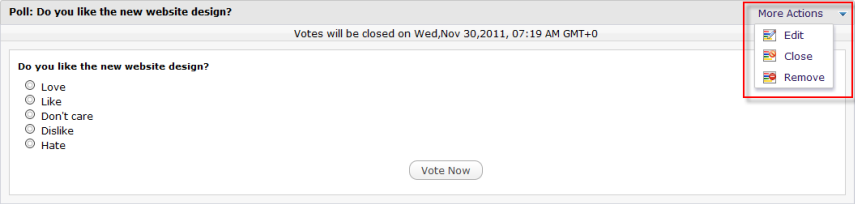
Each topic may have a poll question with pre-defined options for users to select. As a regular user, you can only add a poll question to your own topic. Meanwhile, administrator and moderator can add the poll to any topics.
1. Go to the topic you want to add a poll.
2. Click  on the Action bar, then select Add Poll from the drop-down menu.
3. Enter the poll question and options.
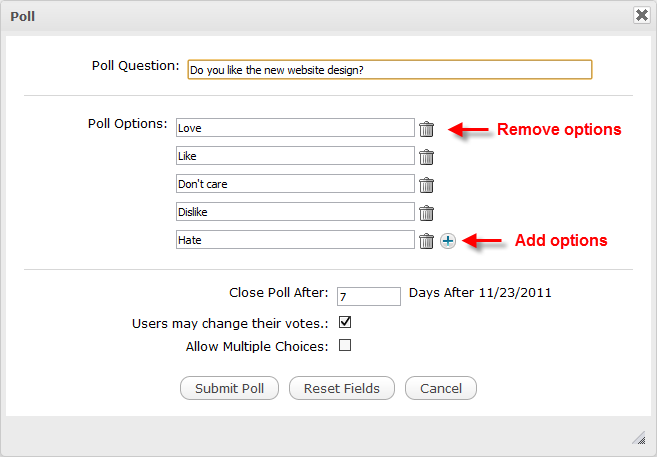
Details:
| Field | Description |
|---|---|
| Poll Question | Question raised for polling that is required. |
| Poll Options | Options which allow users to select as their answers. |
| Close Poll After | Period after which the poll is closed. |
| Users may change their votes | Allow users to change their votes or not. |
| Allow Multiple Choices | Allow users to vote for multiple options or not. |
4. Click Submit Poll to complete. After adding a poll to the topic,  is then displayed in the topics list.
To perform further actions on this poll, simply left-click More Actions on the Poll pane to open the drop-down menu. Here, you can edit, close/reopen or remove the poll by clicking the relevant button.