Modularly developed from the ground up, the JBoss server and container are completely implemented using component-based plug-ins. The modularization effort is supported by the use of JMX, the Java Management Extension API. Using JMX, industry-standard interfaces help manage both JBoss/Server components and the applications deployed on it. Ease of use is still the number one priority, and the JBoss Server architecture sets a new standard for modular, plug-in design as well as ease of server and application management.
This high degree of modularity benefits the application developer in several ways. The already tight code can be further trimmed down to support applications that must have a small footprint. For example, if EJB passivation is unnecessary in your application, simply take the feature out of the server. If you later decide to deploy the same application under an Application Service Provider (ASP) model, simply enable the server's passivation feature for that web-based deployment. Another example is the freedom you have to drop your favorite object to relational database (O-R) mapping tool, such as TOPLink, directly into the container.
This chapter will introduce you to JMX and its role as the JBoss server component bus. You will also be introduced to the JBoss MBean service notion that adds life cycle operations to the basic JMX management component.
The success of the full Open Source J2EE stack lies with the use of JMX (Java Management Extension). JMX is the best tool for integration of software. It prov ides a common spine that allows the user to integrate modules, containers, and plug-ins. Figure 2.1, “The JBoss JMX integration bus and the standard JBoss components” shows the role of JMX as an integration spine or bus into which components plug. Components are declared as MBean services that are then loaded into JBoss. The components may subsequently be administered using JMX.
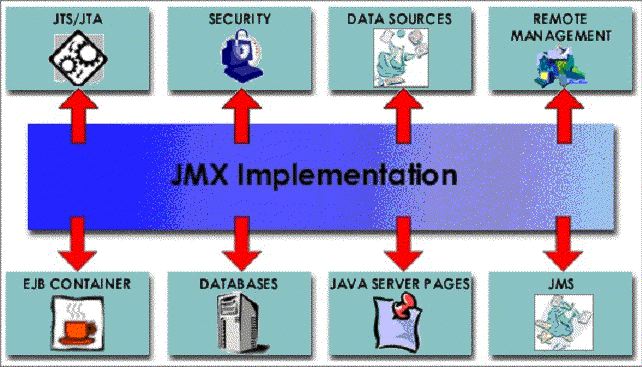
Before looking at how JBoss uses JMX as its component bus, it would help to get a basic overview what JMX is by touching on some of its key aspects.
JMX components are defined by the Java Management Extensions Instrumentation and Agent Specification, v1.2, which is available from the JSR003 Web page at http://jcp.org/en/jsr/detail?id=3. The material in this JMX overview section is derived from the JMX instrumentation specification, with a focus on the aspects most used by JBoss. A more comprehensive discussion of JMX and its application can be found in JMX: Managing J2EE with Java Management Extensions written by Juha Lindfors (Sams, 2002).
JMX is a standard for managing and monitoring all varieties of software and hardware components from Java. Further, JMX aims to provide integration with the large number of existing management standards. Figure 2.2, “The Relationship between the components of the JMX architecture” shows examples of components found in a JMX environment, and illustrates the relationship between them as well as how they relate to the three levels of the JMX model. The three levels are:
Instrumentation, which are the resources to manage
Agents, which are the controllers of the instrumentation level objects
Distributed services, the mechanism by which administration applications interact with agents and their managed objects
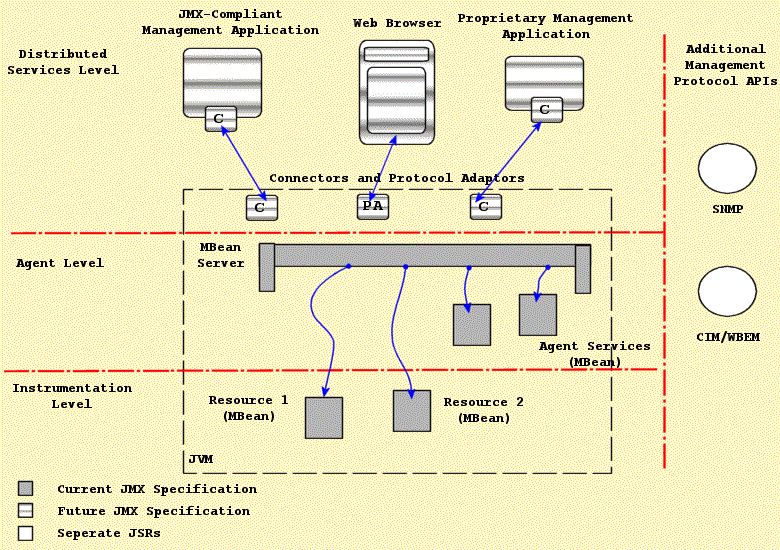
The instrumentation level defines the requirements for implementing JMX manageable resources. A JMX manageable resource can be virtually anything, including applications, service components, devices, and so on. The manageable resource exposes a Java object or wrapper that describes its manageable features, which makes the resource instrumented so that it can be managed by JMX-compliant applications.
The user provides the instrumentation of a given resource using one or more managed beans, or MBeans. There are four varieties of MBean implementations: standard, dynamic, model, and open. The differences between the various MBean types is discussed in Managed Beans or MBeans.
The instrumentation level also specifies a notification mechanism. The purpose of the notification mechanism is to allow MBeans to communicate changes with their environment. This is similar to the JavaBean property change notification mechanism, and can be used for attribute change notifications, state change notifications, and so on.
The agent level defines the requirements for implementing agents. Agents are responsible for controlling and exposing the managed resources that are registered with the agent. By default, management agents are located on the same hosts as their resources. This collocation is not a requirement.
The agent requirements make use of the instrumentation level to define a standard MBeanServer management agent, supporting services, and a communications connector. JBoss provides both an html adaptor as well as an RMI adaptor.
The JMX agent can be located in the hardware that hosts the JMX manageable resources when a Java Virtual Machine (JVM) is available. This is how the JBoss server uses the MBeanServer. A JMX agent does not need to know which resources it will serve. JMX manageable resources may use any JMX agent that offers the services it requires.
Managers interact with an agent's MBeans through a protocol adaptor or connector, as described in the Section 2.1.1.3, “Distributed Services Level” in the next section. The agent does not need to know anything about the connectors or management applications that interact with the agent and its MBeans.
The JMX specification notes that a complete definition of the distributed services level is beyond the scope of the initial version of the JMX specification. This was indicated by the component boxes with the horizontal lines in Figure 2.2, “The Relationship between the components of the JMX architecture”. The general purpose of this level is to define the interfaces required for implementing JMX management applications or managers. The following points highlight the intended functionality of the distributed services level as discussed in the current JMX specification.
Provide an interface for management applications to interact transparently with an agent and its JMX manageable resources through a connector
Exposes a management view of a JMX agent and its MBeans by mapping their semantic meaning into the constructs of a data-rich protocol (for example HTML or SNMP)
Distributes management information from high-level management platforms to numerous JMX agents
Consolidates management information coming from numerous JMX agents into logical views that are relevant to the end user's business operations
Provides security
It is intended that the distributed services level components will allow for cooperative management of networks of agents and their resources. These components can be expanded to provide a complete management application.
This section offers an overview of the instrumentation and agent level components. The instrumentation level components include the following:
MBeans (standard, dynamic, open, and model MBeans)
Notification model elements
MBean metadata classes
The agent level components include:
MBean server
Agent services
An MBean is a Java object that implements one of the standard MBean interfaces and follows the associated design patterns. The MBean for a resource exposes all necessary information and operations that a management application needs to control the resource.
The scope of the management interface of an MBean includes the following:
Attribute values that may be accessed by name
Operations or functions that may be invoked
Notifications or events that may be emitted
The constructors for the MBean's Java class
JMX defines four types of MBeans to support different instrumentation needs:
Standard MBeans: These use a simple JavaBean style naming convention and a statically defined management interface. This is the most common type of MBean used by JBoss.
Dynamic MBeans: These must implement the javax.management.DynamicMBean interface, and they expose their management interface at runtime when the component is instantiated for the greatest flexibility. JBoss makes use of Dynamic MBeans in circumstances where the components to be managed are not known until runtime.
Open MBeans: These are an extension of dynamic MBeans. Open MBeans rely on basic, self-describing, user-friendly data types for universal manageability.
Model MBeans: These are also an extension of dynamic MBeans. Model MBeans must implement the javax.management.modelmbean.ModelMBean interface. Model MBeans simplify the instrumentation of resources by providing default behavior. JBoss XMBeans are an implementation of Model MBeans.
We will present an example of a Standard and a Model MBean in the section that discusses extending JBoss with your own custom services.
JMX Notifications are an extension of the Java event model. Both the MBean server and MBeans can send notifications to provide information. The JMX specification defines the javax.management package Notification event object, NotificationBroadcaster event sender, and NotificationListener event receiver interfaces. The specification also defines the operations on the MBean server that allow for the registration of notification listeners.
There is a collection of metadata classes that describe the management interface of an MBean. Users can obtain a common metadata view of any of the four MBean types by querying the MBean server with which the MBeans are registered. The metadata classes cover an MBean's attributes, operations, notifications, and constructors. For each of these, the metadata includes a name, a description, and its particular characteristics. For example, one characteristic of an attribute is whether it is readable, writable, or both. The metadata for an operation contains the signature of its parameter and return types.
The different types of MBeans extend the metadata classes to be able to provide additional information as required. This common inheritance makes the standard information available regardless of the type of MBean. A management application that knows how to access the extended information of a particular type of MBean is able to do so.
A key component of the agent level is the managed bean server. Its functionality is exposed through an instance of the javax.management.MBeanServer. An MBean server is a registry for MBeans that makes the MBean management interface available for use by management applications. The MBean never directly exposes the MBean object itself; rather, its management interface is exposed through metadata and operations available in the MBean server interface. This provides a loose coupling between management applications and the MBeans they manage.
MBeans can be instantiated and registered with the MBeanServer by the following:
Another MBean
The agent itself
A remote management application (through the distributed services)
When you register an MBean, you must assign it a unique object name. The object name then becomes the unique handle by which management applications identify the object on which to perform management operations. The operations available on MBeans through the MBean server include the following:
Discovering the management interface of MBeans
Reading and writing attribute values
Invoking operations defined by MBeans
Registering for notifications events
Querying MBeans based on their object name or their attribute values
Protocol adaptors and connectors are required to access the MBeanServer from outside the agent's JVM. Each adaptor provides a view via its protocol of all MBeans registered in the MBean server the adaptor connects to. An example adaptor is an HTML adaptor that allows for the inspection and editing of MBeans using a Web browser. As was indicated in Figure 2.2, “The Relationship between the components of the JMX architecture”, there are no protocol adaptors defined by the current JMX specification. Later versions of the specification will address the need for remote access protocols in standard ways.
A connector is an interface used by management applications to provide a common API for accessing the MBean server in a manner that is independent of the underlying communication protocol. Each connector type provides the same remote interface over a different protocol. This allows a remote management application to connect to an agent transparently through the network, regardless of the protocol. The specification of the remote management interface will be addressed in a future version of the JMX specification.
Adaptors and connectors make all MBean server operations available to a remote management application. For an agent to be manageable from outside of its JVM, it must include at least one protocol adaptor or connector. JBoss currently includes a custom HTML adaptor implementation and a custom JBoss RMI adaptor.
The JMX agent services are objects that support standard operations on the MBeans registered in the MBean server. The inclusion of supporting management services helps you build more powerful management solutions. Agent services are often themselves MBeans, which allow the agent and their functionality to be controlled through the MBean server. The JMX specification defines the following agent services:
A dynamic class loading MLet (management applet) service: This allows for the retrieval and instantiation of new classes and native libraries from an arbitrary network location.
Monitor services: These observe an MBean attribute's numerical or string value, and can notify other objects of several types of changes in the target.
Timer services: These provide a scheduling mechanism based on a one-time alarm-clock notification or on a repeated, periodic notification.
The relation service: This service defines associations between MBeans and enforces consistency on the relationships.
Any JMX-compliant implementation will provide all of these agent services. However, JBoss does not rely on any of these standard agent services.
JBoss employs a class loading architecture that facilitates sharing of classes across deployment units and hot deployment of services and applications. Before discussing the JBoss specific class loading model, we need to understand the nature of Java's type system and how class loaders fit in.
Class loading is a fundamental part of all server architectures. Arbitrary services and their supporting classes must be loaded into the server framework. This can be problematic due to the strongly typed nature of Java. Most developers know that the type of a class in Java is a function of the fully qualified name of the class. However the type is also a function of the java.lang.ClassLoader that is used to define that class. This additional qualification of type is necessary to ensure that environments in which classes may be loaded from arbitrary locations would be type-safe.
However, in a dynamic environment like an application server, and especially JBoss with its support for hot deployment are that class cast exceptions, linkage errors and illegal access errors can show up in ways not seen in more static class loading contexts. Let's take a look at the meaning of each of these exceptions and how they can happen.
A java.lang.ClassCastException results whenever an attempt is made to cast an instance to an incompatible type. A simple example is trying to obtain a String from a List into which a URL was placed:
ArrayList array = new ArrayList();
array.add(new URL("file:/tmp"));
String url = (String) array.get(0);

java.lang.ClassCastException: java.net.URL
at org.jboss.chap2.ex0.ExCCEa.main(Ex1CCE.java:16)
The ClassCastException tells you that the attempt to cast the array element to a String failed because the actual type was URL. This trivial case is not what we are interested in however. Consider the case of a JAR being loaded by different class loaders. Although the classes loaded through each class loader are identical in terms of the bytecode, they are completely different types as viewed by the Java type system. An example of this is illustrated by the code shown in Example 2.1, “The ExCCEc class used to demonstrate ClassCastException due to duplicate class loaders”.
Example 2.1. The ExCCEc class used to demonstrate ClassCastException due to duplicate class loaders
package org.jboss.chap2.ex0;

import java.io.File;
import java.net.URL;
import java.net.URLClassLoader;
import java.lang.reflect.Method;

import org.apache.log4j.Logger;

import org.jboss.util.ChapterExRepository;
import org.jboss.util.Debug;

/**
 * An example of a ClassCastException that
 * results from classes loaded through
 * different class loaders.
 * @author Scott.Stark@jboss.org
 * @version $Revision: 1.10 $
 */
public class ExCCEc
{
    public static void main(String[] args) throws Exception
    {
        ChapterExRepository.init(ExCCEc.class);

        String chapDir = System.getProperty("chapter.dir");
        Logger ucl0Log = Logger.getLogger("UCL0");
        File jar0 = new File(chapDir+"/j0.jar");
        ucl0Log.info("jar0 path: "+jar0.toString());
        URL[] cp0 = {jar0.toURL()};
        URLClassLoader ucl0 = new URLClassLoader(cp0);
        Thread.currentThread().setContextClassLoader(ucl0);
        Class objClass = ucl0.loadClass("org.jboss.chap2.ex0.ExObj");
        StringBuffer buffer = new
            StringBuffer("ExObj Info");
        Debug.displayClassInfo(objClass, buffer, false);
        ucl0Log.info(buffer.toString());
        Object value = objClass.newInstance();

        File jar1 = new File(chapDir+"/j0.jar");
        Logger ucl1Log = Logger.getLogger("UCL1");
        ucl1Log.info("jar1 path: "+jar1.toString());
        URL[] cp1 = {jar1.toURL()};
        URLClassLoader ucl1 = new URLClassLoader(cp1);
        Thread.currentThread().setContextClassLoader(ucl1);
        Class ctxClass2 = ucl1.loadClass("org.jboss.chap2.ex0.ExCtx");
        buffer.setLength(0);
        buffer.append("ExCtx Info");
        Debug.displayClassInfo(ctxClass2, buffer, false);
        ucl1Log.info(buffer.toString());
        Object ctx2 = ctxClass2.newInstance();

        try {
            Class[] types = {Object.class};
            Method useValue =
                ctxClass2.getMethod("useValue", types);
            Object[] margs = {value};
            useValue.invoke(ctx2, margs);
        } catch(Exception e) {
            ucl1Log.error("Failed to invoke ExCtx.useValue", e);
            throw e;
        }
    }
}
Example 2.2. The ExCtx, ExObj, and ExObj2 classes used by the examples
package org.jboss.chap2.ex0;

import java.io.IOException;
import org.apache.log4j.Logger;
import org.jboss.util.Debug;

/**
 * A classes used to demonstrate various class
 * loading issues
 * @author Scott.Stark@jboss.org
 * @version $Revision: 1.10 $
 */
public class ExCtx
{
    ExObj value;

    public ExCtx()
        throws IOException
    {
        value = new ExObj();
        Logger log = Logger.getLogger(ExCtx.class);
        StringBuffer buffer = new StringBuffer("ctor.ExObj");
        Debug.displayClassInfo(value.getClass(), buffer, false);
        log.info(buffer.toString());
        ExObj2 obj2 = value.ivar;
        buffer.setLength(0);
        buffer = new StringBuffer("ctor.ExObj.ivar");
        Debug.displayClassInfo(obj2.getClass(), buffer, false);
        log.info(buffer.toString());
    }

    public Object getValue()
    {
        return value;
    }

    public void useValue(Object obj)
        throws Exception
    {
        Logger log = Logger.getLogger(ExCtx.class);
        StringBuffer buffer = new
            StringBuffer("useValue2.arg class");
        Debug.displayClassInfo(obj.getClass(), buffer, false);
        log.info(buffer.toString());
        buffer.setLength(0);
        buffer.append("useValue2.ExObj class");
        Debug.displayClassInfo(ExObj.class, buffer, false);
        log.info(buffer.toString());
        ExObj ex = (ExObj) obj;
    }

    void pkgUseValue(Object obj)
        throws Exception
    {
        Logger log = Logger.getLogger(ExCtx.class);
        log.info("In pkgUseValue");
    }
}
package org.jboss.chap2.ex0;
import java.io.Serializable;
/**
* @author Scott.Stark@jboss.org
* @version $Revision: 1.10 $
*/
public class ExObj
implements Serializable
{
public ExObj2 ivar = new ExObj2();
}package org.jboss.chap2.ex0;
import java.io.Serializable;
/**
* @author Scott.Stark@jboss.org
* @version $Revision: 1.10 $
*/
public class ExObj2
implements Serializable
{
} The ExCCEc.main method uses reflection to isolate the classes that are being loaded by the class loaders ucl0 and ucl1 from the application class loader. Both are setup to load classes from the output/chap2/j0.jar, the contents of which are:
[examples]$ jar -tf output/chap2/j0.jar
...
org/jboss/chap2/ex0/ExCtx.class
org/jboss/chap2/ex0/ExObj.class
org/jboss/chap2/ex0/ExObj2.class
We will run an example that demonstrates how a class cast exception can occur and then look at the specific issue with the example. See Appendix B, Book Example Installation for instructions on installing the examples accompanying the book, and then run the example from within the examples directory using the following command:
[examples]$ ant -Dchap=chap2 -Dex=0c run-example
...
     [java] [ERROR,UCL1] Failed to invoke ExCtx.useValue
     [java] java.lang.reflect.InvocationTargetException
     [java] at sun.reflect.NativeMethodAccessorImpl.invoke0(Native Method)
     [java] at sun.reflect.NativeMethodAccessorImpl.invoke(NativeMethodAccessorImpl.java:39)
     [java] at sun.reflect.DelegatingMethodAccessorImpl.invoke(DelegatingMethodAccessorImpl
.java:25)
     [java] at java.lang.reflect.Method.invoke(Method.java:324)
     [java] at org.jboss.chap2.ex0.ExCCEc.main(ExCCEc.java:58)
     [java] Caused by: java.lang.ClassCastException
     [java] at org.jboss.chap2.ex0.ExCtx.useValue(ExCtx.java:44)
     [java] ... 5 more
Only the exception is shown here. The full output can be found in the logs/chap2-ex0c.log file. At line 55 of ExCCEc.java we are invoking ExcCCECtx.useValue(Object) on the instance loaded and created in lines 37-48 using ucl1. The ExObj passed in is the one loaded and created in lines 25-35 via ucl0. The exception results when the ExCtx.useValue code attempts to cast the argument passed in to a ExObj. To understand why this fails consider the debugging output from the chap2-ex0c.log file shown in Example 2.3, “The chap2-ex0c.log debugging output for the ExObj classes seen”.
Example 2.3. The chap2-ex0c.log debugging output for the ExObj classes seen
[INFO,UCL0] ExObj Info
org.jboss.chap2.ex0.ExObj(113fe2).ClassLoader=java.net.URLClassLoader@6e3914
..java.net.URLClassLoader@6e3914
....file:/C:/Scott/JBoss/Books/AdminDevel/education/books/admin-devel/examples/output/
  chap2/j0.jar
++++CodeSource:
    (file:/C:/Scott/JBoss/Books/AdminDevel/education/books/admin-devel/examples/output/
  chap2/j0.jar <no certificates>)
Implemented Interfaces:
++interface java.io.Serializable(7934ad)
++++ClassLoader: null
++++Null CodeSource

[INFO,ExCtx] useValue2.ExObj class
org.jboss.chap2.ex0.ExObj(415de6).ClassLoader=java.net.URLClassLoader@30e280
..java.net.URLClassLoader@30e280
....file:/C:/Scott/JBoss/Books/AdminDevel/education/books/admin-devel/examples/output/
  chap2/j0.jar
++++CodeSource:
    (file:/C:/Scott/JBoss/Books/AdminDevel/education/books/admin-devel/examples/output/
  chap2/j0.jar <no certificates>)
Implemented Interfaces:
++interface java.io.Serializable(7934ad)
++++ClassLoader: null
++++Null CodeSource
The first output prefixed with [INFO,UCL0] shows that the ExObj class loaded at line ExCCEc.java:31 has a hash code of 113fe2 and an associated URLClassLoader instance with a hash code of 6e3914, which corresponds to ucl0. This is the class used to create the instance passed to the ExCtx.useValue method. The second output prefixed with [INFO,ExCtx] shows that the ExObj class as seen in the context of the ExCtx.useValue method has a hash code of 415de6 and a URLClassLoader instance with an associated hash code of 30e280, which corresponds to ucl1. So even though the ExObj classes are the same in terms of actual bytecode since it comes from the same j0.jar, the classes are different as seen by both the ExObj class hash codes, and the associated URLClassLoader instances. Hence, attempting to cast an instance of ExObj from one scope to the other results in the ClassCastException.
This type of error is common when redeploying an application to which other applications are holding references to classes from the redeployed application. For example, a standalone WAR accessing an EJB. If you are redeploying an application, all dependent applications must flush their class references. Typically this requires that the dependent applications themselves be redeployed.
An alternate means of allowing independent deployments to interact in the presence of redeployment would be to isolate the deployments by configuring the EJB layer to use the standard call-by-value semantics rather than the call-by-reference JBoss will default to for components collocated in the same VM. An example of how to enable call-by-value semantics is presented in Chapter 5, EJBs on JBoss
A java.lang.IllegalAccessException is thrown when one attempts to access a method or member that visibility qualifiers do not allow. Typical examples are attempting to access private or protected methods or instance variables. Another common example is accessing package protected methods or members from a class that appears to be in the correct package, but is really not due to caller and callee classes being loaded by different class loaders. An example of this is illustrated by the code shown in Example 2.5, “Classes demonstrating the need for loading constraints”.
Example 2.4. The ExIAEd class used to demonstrate IllegalAccessException due to duplicate class loaders
package org.jboss.chap2.ex0;

import java.io.File;
import java.net.URL;
import java.net.URLClassLoader;
import java.lang.reflect.Method;

import org.apache.log4j.Logger;

import org.jboss.util.ChapterExRepository;
import org.jboss.util.Debug;

/**
 * An example of IllegalAccessExceptions due to
 * classes loaded by two class loaders.
 * @author Scott.Stark@jboss.org
 * @version $Revision: 1.10 $
 */
public class ExIAEd
{
    public static void main(String[] args) throws Exception
    {
	ChapterExRepository.init(ExIAEd.class);

	String chapDir = System.getProperty("chapter.dir");
	Logger ucl0Log = Logger.getLogger("UCL0");
	File jar0 = new File(chapDir+"/j0.jar");
	ucl0Log.info("jar0 path: "+jar0.toString());
	URL[] cp0 = {jar0.toURL()};
	URLClassLoader ucl0 = new URLClassLoader(cp0);
	Thread.currentThread().setContextClassLoader(ucl0);

	StringBuffer buffer = new
	    StringBuffer("ExIAEd Info");
	Debug.displayClassInfo(ExIAEd.class, buffer, false);
	ucl0Log.info(buffer.toString());

	Class ctxClass1 = ucl0.loadClass("org.jboss.chap2.ex0.ExCtx");
	buffer.setLength(0);
	buffer.append("ExCtx Info");
	Debug.displayClassInfo(ctxClass1, buffer, false);
	ucl0Log.info(buffer.toString());
	Object ctx0 = ctxClass1.newInstance();

	try {
	    Class[] types = {Object.class};
	    Method useValue =
		ctxClass1.getDeclaredMethod("pkgUseValue", types);
	    Object[] margs = {null};
	    useValue.invoke(ctx0, margs);
	} catch(Exception e) {
	    ucl0Log.error("Failed to invoke ExCtx.pkgUseValue", e);
	}
    }
}
The ExIAEd.main method uses reflection to load the ExCtx class via the ucl0 class loader while the ExIEAd class was loaded by the application class loader. We will run this example to demonstrate how the IllegalAccessException can occur and then look at the specific issue with the example. Run the example using the following command:
[examples]$ ant -Dchap=chap2 -Dex=0d run-example
Buildfile: build.xml
...
[java] [ERROR,UCL0] Failed to invoke ExCtx.pkgUseValue
[java] java.lang.IllegalAccessException: Class org.jboss.chap2.ex0.ExIAEd
  can not access a member of class org.jboss.chap2.ex0.ExCtx with modifiers ""
[java] at sun.reflect.Reflection.ensureMemberAccess(Reflection.java:57)
[java] at java.lang.reflect.Method.invoke(Method.java:317)
[java] at org.jboss.chap2.ex0.ExIAEd.main(ExIAEd.java:48)
The truncated output shown here illustrates the IllegalAccessException. The full output can be found in the logs/chap2-ex0d.log file. At line 48 of ExIAEd.java the ExCtx.pkgUseValue(Object) method is invoked via reflection. The pkgUseValue method has package protected access and even though both the invoking class ExIAEd and the ExCtx class whose method is being invoked reside in the org.jboss.chap2.ex0 package, the invocation is seen to be invalid due to the fact that the two classes are loaded by different class loaders. This can be seen by looking at the debugging output from the chap2-ex0d.log file.
[INFO,UCL0] ExIAEd Info
org.jboss.chap2.ex0.ExIAEd(65855a).ClassLoader=sun.misc.Launcher$AppClassLoader@3f52a5
..sun.misc.Launcher$AppClassLoader@3f52a5
...
[INFO,UCL0] ExCtx Info
org.jboss.chap2.ex0.ExCtx(70eed6).ClassLoader=java.net.URLClassLoader@113fe2
..java.net.URLClassLoader@113fe2
...
The ExIAEd class is seen to have been loaded via the default application class loader instance sun.misc.Launcher$AppClassLoader@3f52a5, while the ExCtx class was loaded by the java.net.URLClassLoader@113fe2 instance. Because the classes are loaded by different class loaders, access to the package protected method is seen to be a security violation. So, not only is type a function of both the fully qualified class name and class loader, the package scope is as well.
An example of how this can happen in practice is to include the same classes in two different SAR deployments. If classes in the deployment have a package protected relationship, users of the SAR service may end up loading one class from SAR class loading at one point, and then load another class from the second SAR at a later time. If the two classes in question have a protected access relationship an IllegalAccessError will result. The solution is to either include the classes in a separate jar that is referenced by the SARs, or to combine the SARs into a single deployment. This can either be a single SAR, or an EAR that includes both SARs.
Loading constraints validate type expectations in the context of class loader scopes to ensure that a class X is consistently the same class when multiple class loaders are involved. This is important because Java allows for user defined class loaders. Linkage errors are essentially an extension of the class cast exception that is enforced by the VM when classes are loaded and used.
To understand what loading constraints are and how they ensure type-safety we will first introduce the nomenclature of the Liang and Bracha paper along with an example from this paper. There are two type of class loaders, initiating and defining. An initiating class loader is one that a ClassLoader.loadClass method has been invoked on to initiate the loading of the named class. A defining class loader is the loader that calls one of the ClassLoader.defineClass methods to convert the class byte code into a Class instance. The most complete expression of a class is given by <C,Ld>Li , where C is the fully qualified class name, Ld is the defining class loader, and Li is the initiating class loader. In a context where the initiating class loader is not important the type may be represented by <C,Ld>, while when the defining class loader is not important, the type may be represented by CLi . In the latter case, there is still a defining class loader, it's just not important what the identity of the defining class loader is. Also, a type is completely defined by <C,Ld>. The only time the initiating loader is relevant is when a loading constraint is being validated. Now consider the classes shown in Example 2.5, “Classes demonstrating the need for loading constraints”.
Example 2.5. Classes demonstrating the need for loading constraints
class <C,L1> {
    void f() {
        <Spoofed, L1>L1x = <Delegated, L2>L2
        x.secret_value = 1; // Should not be allowed
    }
}
class <Delegated,L2> {
static <Spoofed, L2>L3 g() {...}
}
}class <Spoofed, L1> {
public int secret_value;
}class <Spoofed, L2> {
private int secret_value;
}The class C is defined by L1 and so L1 is used to initiate loading of the classes Spoofed and Delegated referenced in the C.f() method. The Spoofed class is defined by L1, but Delegated is defined by L2 because L1 delegates to L2. Since Delegated is defined by L2, L2 will be used to initiate loading of Spoofed in the context of the Delegated.g() method. In this example both L1 and L2 define different versions of Spoofed as indicated by the two versions shown at the end of Example 2.5, “Classes demonstrating the need for loading constraints”. Since C.f() believes x is an instance of <Spoofed,L1> it is able to access the private field secret_value of <Spoofed,L2> returned by Delegated.g() due to the 1.1 and earlier Java VM's failure to take into account that a class type is determined by both the fully qualified name of the class and the defining class loader.
Java addresses this problem by generating loader constraints to validate type consistency when the types being used are coming from different defining class loaders. For the Example 2.5, “Classes demonstrating the need for loading constraints” example, the VM generates a constraint SpoofedL1=SpoofedL2 when the first line of method C.f() is verified to indicate that the type Spoofed must be the same regardless of whether the load of Spoofed is initiated by L1 or L2. It does not matter if L1 or L2, or even some other class loader defines Spoofed. All that matters is that there is only one Spoofed class defined regardless of whether L1 or L2 was used to initiate the loading. If L1 or L2 have already defined separate versions of Spoofed when this check is made a LinkageError will be generated immediately. Otherwise, the constraint will be recorded and when Delegated.g() is executed, any attempt to load a duplicate version of Spoofed will result in a LinkageError.
Now let's take a look at how a LinkageError can occur with a concrete example. Example 2.6, “A concrete example of a LinkageError” gives the example main class along with the custom class loader used.
Example 2.6. A concrete example of a LinkageError
package org.jboss.chap2.ex0;
import java.io.File;
import java.net.URL;

import org.apache.log4j.Logger;
import org.jboss.util.ChapterExRepository;
import org.jboss.util.Debug;

/**
 * An example of a LinkageError due to classes being defined by more
 * than one class loader in a non-standard class loading environment.
 *
 * @author Scott.Stark@jboss.org
 * @version $Revision: 1.10 $
 */
public class ExLE
{
    public static void main(String[] args)
	throws Exception
    {
        ChapterExRepository.init(ExLE.class);

        String chapDir = System.getProperty("chapter.dir");
        Logger ucl0Log = Logger.getLogger("UCL0");
        File jar0 = new File(chapDir+"/j0.jar");
        ucl0Log.info("jar0 path: "+jar0.toString());
        URL[] cp0 = {jar0.toURL()};
        Ex0URLClassLoader ucl0 = new Ex0URLClassLoader(cp0);
        Thread.currentThread().setContextClassLoader(ucl0);
        Class ctxClass1  = ucl0.loadClass("org.jboss.chap2.ex0.ExCtx");
        Class obj2Class1 = ucl0.loadClass("org.jboss.chap2.ex0.ExObj2");
        StringBuffer buffer = new StringBuffer("ExCtx Info");
        Debug.displayClassInfo(ctxClass1, buffer, false);
        ucl0Log.info(buffer.toString());
        buffer.setLength(0);
        buffer.append("ExObj2 Info, UCL0");
        Debug.displayClassInfo(obj2Class1, buffer, false);
        ucl0Log.info(buffer.toString());

        File jar1 = new File(chapDir+"/j1.jar");
        Logger ucl1Log = Logger.getLogger("UCL1");
        ucl1Log.info("jar1 path: "+jar1.toString());
        URL[] cp1 = {jar1.toURL()};
        Ex0URLClassLoader ucl1 = new Ex0URLClassLoader(cp1);
        Class obj2Class2 = ucl1.loadClass("org.jboss.chap2.ex0.ExObj2");
        buffer.setLength(0);
        buffer.append("ExObj2 Info, UCL1");
        Debug.displayClassInfo(obj2Class2, buffer, false);
        ucl1Log.info(buffer.toString());

        ucl0.setDelegate(ucl1);
        try {
            ucl0Log.info("Try ExCtx.newInstance()");
            Object ctx0 = ctxClass1.newInstance();
            ucl0Log.info("ExCtx.ctor succeeded, ctx0: "+ctx0);
        } catch(Throwable e) {
            ucl0Log.error("ExCtx.ctor failed", e);
        }
    }
}
package org.jboss.chap2.ex0;
import java.net.URLClassLoader;
import java.net.URL;
import org.apache.log4j.Logger;
/**
* A custom class loader that overrides the standard parent delegation
* model
*
* @author Scott.Stark@jboss.org
* @version $Revision: 1.10 $
*/
public class Ex0URLClassLoader extends URLClassLoader
{
private static Logger log = Logger.getLogger(Ex0URLClassLoader.class);
private Ex0URLClassLoader delegate;
public Ex0URLClassLoader(URL[] urls)
{
super(urls);
}
void setDelegate(Ex0URLClassLoader delegate)
{
this.delegate = delegate;
}
protected synchronized Class loadClass(String name, boolean resolve)
throws ClassNotFoundException
{
Class clazz = null;
if (delegate != null) {
log.debug(Integer.toHexString(hashCode()) +
"; Asking delegate to loadClass: " + name);
clazz = delegate.loadClass(name, resolve);
log.debug(Integer.toHexString(hashCode()) +
"; Delegate returned: "+clazz);
} else {
log.debug(Integer.toHexString(hashCode()) +
"; Asking super to loadClass: "+name);
clazz = super.loadClass(name, resolve);
log.debug(Integer.toHexString(hashCode()) +
"; Super returned: "+clazz);
}
return clazz;
}
protected Class findClass(String name)
throws ClassNotFoundException
{
Class clazz = null;
log.debug(Integer.toHexString(hashCode()) +
"; Asking super to findClass: "+name);
clazz = super.findClass(name);
log.debug(Integer.toHexString(hashCode()) +
"; Super returned: "+clazz);
return clazz;
}
}The key component in this example is the URLClassLoader subclass Ex0URLClassLoader. This class loader implementation overrides the default parent delegation model to allow the ucl0 and ucl1 instances to both load the ExObj2 class and then setup a delegation relationship from ucl0 to ucl1. At lines 30 and 31. the ucl0 Ex0URLClassLoader is used to load the ExCtx and ExObj2 classes. At line 45 of ExLE.main the ucl1 Ex0URLClassLoader is used to load the ExObj2 class again. At this point both the ucl0 and ucl1 class loaders have defined the ExObj2 class. A delegation relationship from ucl0 to ucl1 is then setup at line 51 via the ucl0.setDelegate(ucl1) method call. Finally, at line 54 of ExLE.main an instance of ExCtx is created using the class loaded via ucl0. The ExCtx class is the same as presented in Example 2.2, “The ExCtx, ExObj, and ExObj2 classes used by the examples”, and the constructor was:
public ExCtx()
    throws IOException
{
    value = new ExObj();
    Logger log = Logger.getLogger(ExCtx.class);
    StringBuffer buffer = new StringBuffer("ctor.ExObj");
    Debug.displayClassInfo(value.getClass(), buffer, false);
    log.info(buffer.toString());
    ExObj2 obj2 = value.ivar;
    buffer.setLength(0);
    buffer = new StringBuffer("ctor.ExObj.ivar");
    Debug.displayClassInfo(obj2.getClass(), buffer, false);
    log.info(buffer.toString());
}
Now, since the ExCtx class was defined by the ucl0 class loader, and at the time the ExCtx constructor is executed, ucl0 delegates to ucl1, line 24 of the ExCtx constructor involves the following expression which has been rewritten in terms of the complete type expressions:
<ExObj2,ucl0>ucl0 obj2 = <ExObj,ucl1>ucl0 value * ivar
This generates a loading constraint of ExObj2ucl0 = ExObj2ucl1 since the ExObj2 type must be consistent across the ucl0 and ucl1 class loader instances. Because we have loaded ExObj2 using both ucl0 and ucl1 prior to setting up the delegation relationship, the constraint will be violated and should generate a LinkageError when run. Run the example using the following command:
[examples]$ ant -Dchap=chap2 -Dex=0e run-example
Buildfile: build.xml
...
[java] java.lang.LinkageError: loader constraints violated when linking org/jboss/chap2/ex0/E
xObj2 class
[java] at org.jboss.chap2.ex0.ExCtx.<init>(ExCtx.java:24)
[java] at sun.reflect.NativeConstructorAccessorImpl.newInstance0(Native Method)
[java] at sun.reflect.NativeConstructorAccessorImpl.newInstance(NativeConstructorAccessorImpl
.java:39)
[java] at sun.reflect.DelegatingConstructorAccessorImpl.newInstance(DelegatingConstructorAcce
ssorImpl.java:27)
[java] at java.lang.reflect.Constructor.newInstance(Constructor.java:274)
[java] at java.lang.Class.newInstance0(Class.java:308)
[java] at java.lang.Class.newInstance(Class.java:261)
[java] at org.jboss.chap2.ex0.ExLE.main(ExLE.java:53)
As expected, a LinkageError is thrown while validating the loader constraints required by line 24 of the ExCtx constructor.
Debugging class loading issues comes down to finding out where a class was loaded from. A useful tool for this is the code snippet shown in Example 2.7, “Obtaining debugging information for a Class” taken from the org.jboss.util.Debug class of the book examples.
Example 2.7. Obtaining debugging information for a Class
Class clazz =...;
StringBuffer results = new StringBuffer();

ClassLoader cl = clazz.getClassLoader();
results.append("\n" + clazz.getName() + "(" +
               Integer.toHexString(clazz.hashCode()) + ").ClassLoader=" + cl);
ClassLoader parent = cl;

while (parent != null) {
    results.append("\n.."+parent);
    URL[] urls = getClassLoaderURLs(parent);

    int length = urls != null ? urls.length : 0;
    for(int u = 0; u < length; u ++) {
	results.append("\n...."+urls[u]);
    }

    if (showParentClassLoaders == false) {
	break;
    }
    if (parent != null) {
	parent = parent.getParent();
    }
}

CodeSource clazzCS = clazz.getProtectionDomain().getCodeSource();
if (clazzCS != null) {
    results.append("\n++++CodeSource: "+clazzCS);
} else {
    results.append("\n++++Null CodeSource");
}
The key items are shown in bold. The first is that every Class object knows its defining ClassLoader and this is available via the getClassLoader() method. The defines the scope in which the Class type is known as we have just seen in the previous sections on class cast exceptions, illegal access exceptions and linkage errors. From the ClassLoader you can view the hierarchy of class loaders that make up the parent delegation chain. If the class loader is a URLClassLoader you can also see the URLs used for class and resource loading.
The defining ClassLoader of a Class cannot tell you from what location that Class was loaded. To determine this you must obtain the java.security.ProtectionDomain and then the java.security.CodeSource. It is the CodeSource that has the URL p location from which the class originated. Note that not every Class has a CoPdeSource. If a class is loaded by the bootstrap class loader then its CodeSource will be null. This will be the case for all classes in the java.* and javax.* packages, for example.
Beyond that it may be useful to view the details of classes being loaded into the JBoss server. You can enable verbose logging of the JBoss class loading layer using a Log4j configuration fragment like that shown in Example 2.8, “An example log4j.xml configuration fragment for enabling verbose class loading logging”.
Example 2.8. An example log4j.xml configuration fragment for enabling verbose class loading logging
<appender name="UCL" class="org.apache.log4j.FileAppender">
    <param name="File" value="${jboss.server.home.dir}/log/ucl.log"/>
    <param name="Append" value="false"/>
    <layout class="org.apache.log4j.PatternLayout">
        <param name="ConversionPattern" value="[%r,%c{1},%t] %m%n"/>
    </layout>
</appender>

<category name="org.jboss.mx.loading" additivity="false">
    <priority value="TRACE" class="org.jboss.logging.XLevel"/>
    <appender-ref ref="UCL"/>
</category>
This places the output from the classes in the org.jboss.mx.loading package into the ucl.log file of the server configurations log directory. Although it may not be meaningful if you have not looked at the class loading code, it is vital information needed for submitting bug reports or questions regarding class loading problems.
Now that we have the role of class loaders in the Java type system defined, let's take a look at the JBoss class loading architecture. Figure 2.3, “The core JBoss class loading components”.
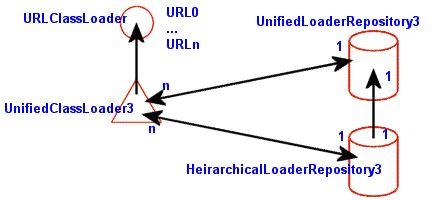
The central component is the org.jboss.mx.loading.UnifiedClassLoader3 (UCL) class loader. This is an extension of the standard java.net.URLClassLoader that overrides the standard parent delegation model to use a shared repository of classes and resources. This shared repository is the org.jboss.mx.loading.UnifiedLoaderRepository3. Every UCL is associated with a single UnifiedLoaderRepository3, and a UnifiedLoaderRepository3 typically has many UCLs. A UCL may have multiple URLs associated with it for class and resource loading. Deployers use the top-level deployment's UCL as a shared class loader and all deployment archives are assigned to this class loader. We will talk about the JBoss deployers and their interaction with the class loading system in more detail latter in Section 2.4.2, “JBoss MBean Services”.
When a UCL is asked to load a class, it first looks to the repository cache it is associated with to see if the class has already been loaded. Only if the class does not exist in the repository will it be loaded into the repository by the UCL. By default, there is a single UnifiedLoaderRepository3 shared across all UCL instances. This means the UCLs form a single flat class loader namespace. The complete sequence of steps that occur when a UnfiedClassLoader3.loadClass(String, boolean) method is called is:
Check the UnifiedLoaderRepository3 classes cache associated with the UnifiedClassLoader3. If the class is found in the cache it is returned.
Else, ask the UnfiedClassLoader3 if it can load the class. This is essentially a call to the superclass URLClassLoader.loadClass(String, boolean) method to see if the class is among the URLs associated with the class loader, or visible to the parent class loader. If the class is found it is placed into the repository classes cache and returned.
Else, the repository is queried for all UCLs that are capable of providing the class based on the repository package name to UCL map. When a UCL is added to a repository an association between the package names available in the URLs associated with the UCL is made, and a mapping from package names to the UCLs with classes in the package is updated. This allows for a quick determination of which UCLs are capable of loading the class. The UCLs are then queried for the requested class in the order in which the UCLs were added to the repository. If a UCL is found that can load the class it is returned, else a java.lang.ClassNotFoundException is thrown.
Another useful source of information on classes is the UnifiedLoaderRepository itself. This is an MBean that contains operations to display class and package information. The default repository is located under a standard JMX name of JMImplementation:name=Default,service=LoaderRepository, and its MBean can be accessed via the JMX console by following its link from the front page. The JMX console view of this MBean is shown in Figure 2.4, “The default class LoaderRepository MBean view in the JMX console”.
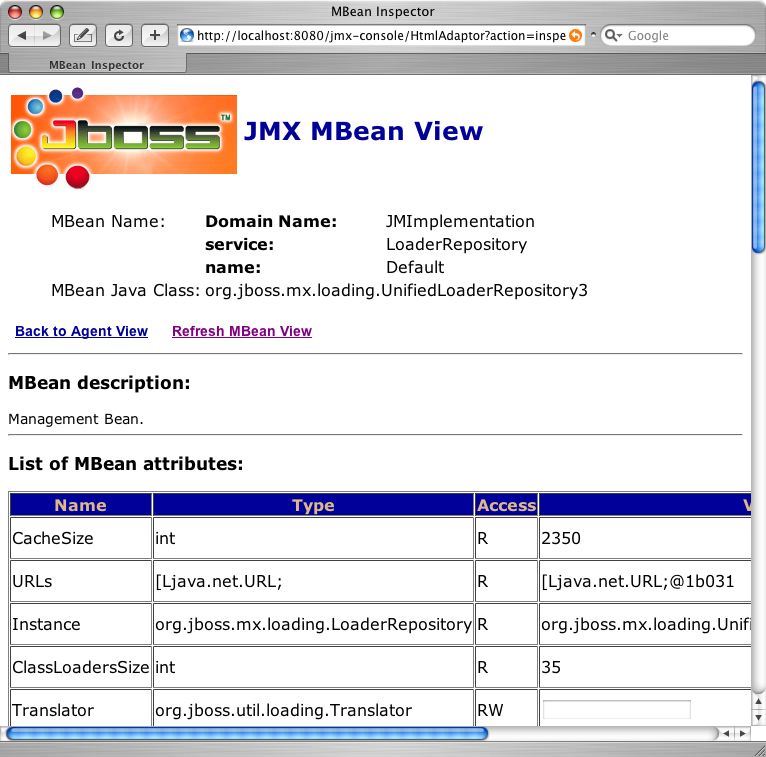
Two useful operations you will find here are getPackageClassLoaders(String) and displayClassInfo(String). The getPackageClassLoaders operation returns a set of class loaders that have been indexed to contain classes or resources for the given package name. The package name must have a trailing period. If you type in the package name org.jboss.ejb., the following information is displayed:
[org.jboss.mx.loading.UnifiedClassLoader3@e26ae7{
  url=file:/private/tmp/jboss-4.0.1/server/default/tmp/deploy/tmp11895jboss-service.xml,
  addedOrder=2}]
This is the string representation of the set. It shows one UnifiedClassLoader3 instance with a primary URL pointing to the jboss-service.xml descriptor. This is the second class loader added to the repository (shown by addedOrder=2). It is the class loader that owns all of the JARs in the lib directory of the server configuration (e.g., server/default/lib).
The view the information for a given class, use the displayClassInfo operation, passing in the fully qualified name of the class to view. For example, if we use org.jboss.jmx.adaptor.html.HtmlAdaptorServlet which is from the package we just looked at, the following description is displayed:

The information is a dump of the information for the Class instance in the loader repository if one has been loaded, followed by the class loaders that are seen to have the class file available. If a class is seen to have more than one class loader associated with it, then there is the potential for class loading related errors.
If you need to deploy multiple versions of an application you need to use deployment based scoping. With deployment based scoping, each deployment creates its own class loader repository in the form of a HeirarchicalLoaderRepository3 that looks first to the UnifiedClassLoader3 instances of the deployment units included in the EAR before delegating to the default UnifiedLoaderRepository3. To enable an EAR specific loader repository, you need to create a META-INF/jboss-app.xml descriptor as shown in Example 2.9, “An example jboss-app.xml descriptor for enabled scoped class loading at the EAR level.”.
Example 2.9. An example jboss-app.xml descriptor for enabled scoped class loading at the EAR level.
<jboss-app>
    <loader-repository>some.dot.com:loader=webtest.ear</loader-repository>
</jboss-app>
The value of the loader-repository element is the JMX object name to assign to the repository created for the EAR. This must be unique and valid JMX ObjectName, but the actual name is not important.
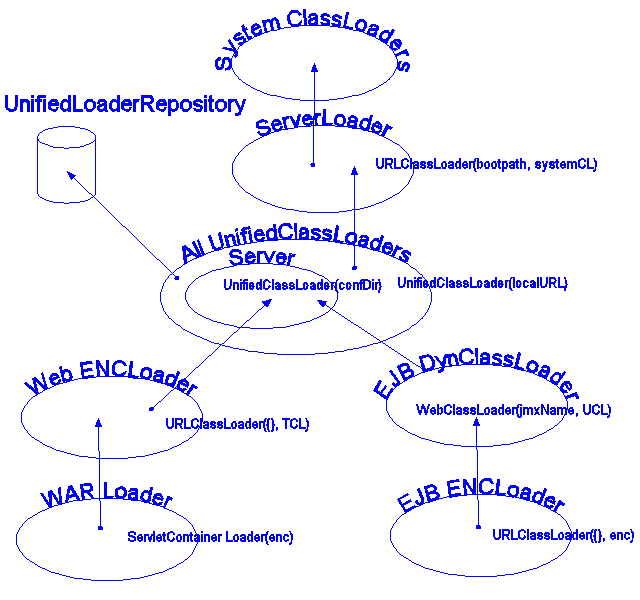
The previous discussion of the core class loading components introduced the custom UnifiedClassLoader3 and UnifiedLoaderRepository3 classes that form a shared class loading space. The complete class loading picture must also include the parent class loader used by UnifiedClassLoader3s as well as class loaders introduced for scoping and other specialty class loading purposes. Figure 2.5, “A complete class loader view” shows an outline of the class hierarchy that would exist for an EAR deployment containing EJBs and WARs.
The following points apply to this figure:
System ClassLoaders: The System ClassLoaders node refers to either the thread context class loader (TCL) of the VM main thread or of the thread of the application that is loading the JBoss server if it is embedded.
ServerLoader: The ServerLoader node refers to the a URLClassLoader that delegates to the System ClassLoaders and contains the following boot URLs:
All URLs referenced via the jboss.boot.library.list system property. These are path specifications relative to the libraryURL defined by the jboss.lib.url property. If there is no jboss.lib.url property specified, it defaults to jboss.home.url + /lib/. If there is no jboss.boot.library property specified, it defaults to jaxp.jar, log4j-boot.jar, jboss-common.jar, and jboss-system.jar.
The JAXP JAR which is either crimson.jar or xerces.jar depending on the -j option to the Main entry point. The default is crimson.jar.
The JBoss JMX jar and GNU regex jar, jboss-jmx.jar and gnu-regexp.jar.
Oswego concurrency classes JAR, concurrent.jar
Any JARs specified as libraries via -L command line options
Any other JARs or directories specified via -C command line options
Server: The Server node represent a collection of UCLs created by the org.jboss.system.server.Server interface implementation. The default implementation creates UCLs for the patchDir entries as well as the server conf directory. The last UCL created is set as the JBoss main thread context class loader. This will be combined into a single UCL now that multiple URLs per UCL are supported.
All UnifiedClassLoader3s: The All UnifiedClassLoader3 node represents the UCLs created by deployers. This covers EARs, jars, WARs, SARs and directories seen by the deployment scanner as well as JARs referenced by their manifests and any nested deployment units they may contain. This is a flat namespace and there should not be multiple instances of a class in different deployment JARs. If there are, only the first loaded will be used and the results may not be as expected. There is a mechanism for scoping visibility based on EAR deployment units that we discussed in Section 2.2.2.4.2, “Scoping Classes”. Use this mechanism if you need to deploy multiple versions of a class in a given JBoss server.
EJB DynClassLoader: The EJB DynClassLoader node is a subclass of URLClassLoader that is used to provide RMI dynamic class loading via the simple HTTP WebService. It specifies an empty URL[] and delegates to the TCL as its parent class loader. If the WebService is configured to allow system level classes to be loaded, all classes in the UnifiedLoaderRepository3 as well as the system classpath are available via HTTP.
EJB ENCLoader: The EJB ENCLoader node is a URLClassLoader that exists only to provide a unique context for an EJB deployment's java:comp JNDI context. It specifies an empty URL[] and delegates to the EJB DynClassLoader as its parent class loader.
Web ENCLoader: The Web ENCLoader node is a URLClassLoader that exists only to provide a unique context for a web deployment's java:comp JNDI context. It specifies an empty URL[] and delegates to the TCL as its parent class loader.
WAR Loader: The WAR Loader is a servlet container specific classloader that delegates to the Web ENCLoader as its parent class loader. The default behavior is to load from its parent class loader and then the WAR WEB-INF classes and lib directories. If the servlet 2.3 class loading model is enabled it will first load from the its WEB-INF directories and then the parent class loader.
In its current form there are some advantages and disadvantages to the JBoss class loading architecture. Advantages include:
Classes do not need to be replicated across deployment units in order to have access to them.
Many future possibilities including novel partitioning of the repositories into domains, dependency and conflict detection, etc.
Disadvantages include:
Existing deployments may need to be repackaged to avoid duplicate classes. Duplication of classes in a loader repository can lead to class cast exceptions and linkage errors depending on how the classes are loaded.
Deployments that depend on different versions of a given class need to be isolated in separate EARs and a unique HeirarchicalLoaderRepository3 defined using a jboss-app.xml descriptor.
XMBeans are the JBoss JMX implementation version of the JMX model MBean. XMBeans have the richness of the dynamic MBean metadata without the tedious programming required by a direct implementation of the DynamicMBean interface. The JBoss model MBean implementation allows one to specify the management interface of a component through a XML descriptor, hence the X in XMBean. In addition to providing a simple mechanism for describing the metadata required for a dynamic MBean, XMBeans also allow for the specification of attribute persistence, caching behavior, and even advanced customizations like the MBean implementation interceptors. The high level elements of the jboss_xmbean_1_2.dtd for the XMBean descriptor is given in Figure 2.6, “The JBoss 1.0 XMBean DTD Overview (jboss_xmbean_1_2.dtd)”.
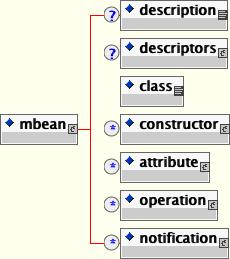
The mbean element is the root element of the document containing the required elements for describing the management interface of one MBean (constructors, attributes, operations and notifications). It also includes an optional description element, which can be used to describe the purpose of the MBean, as well as an optional descriptors element which allows for persistence policy specification, attribute caching, etc.
The descriptors element contains all the descriptors for a containing element, as subelements. The descriptors suggested in the JMX specification as well as those used by JBoss have predefined elements and attributes, whereas custom descriptors have a generic descriptor element with name and value attributes as show in Figure 2.7, “ The descriptors element content model”.
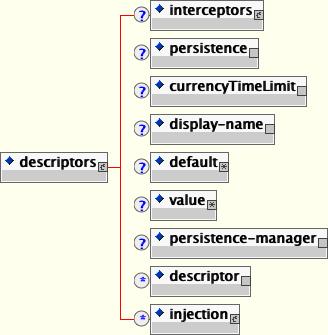
The key descriptors child elements include:
interceptors: The interceptors element specifies a customized stack of interceptors that will be used in place of the default stack. Currently this is only used when specified at the MBean level, but it could define a custom attribute or operation level interceptor stack in the future. The content of the interceptors element specifies a custom interceptor stack. If no interceptors element is specified the standard ModelMBean interceptors will be used. The standard interceptors are:
org.jboss.mx.interceptor.PersistenceInterceptor
org.jboss.mx.interceptor.MBeanAttributeInterceptor
org.jboss.mx.interceptor.ObjectReferenceInterceptor
When specifying a custom interceptor stack you would typically include the standard interceptors along with your own unless you are replacing the corresponding standard interceptor.
Each interceptor element content value specifies the fully qualified class name of the interceptor implementation. The class must implement the org.jboss.mx.interceptor.Interceptor interface. The interceptor class must also have either a no-arg constructor, or a constructor that accepts a javax.management.MBeanInfo.
The interceptor elements may have any number of attributes that correspond to JavaBean style properties on the interceptor class implementation. For each interceptor element attribute specified, the interceptor class is queried for a matching setter method. The attribute value is converted to the true type of the interceptor class property using the java.beans.PropertyEditor associated with the type. It is an error to specify an attribute for which there is no setter or PropertyEditor.
persistence: The persistence element allows the specification of the persistPolicy, persistPeriod, persistLocation, and persistName persistence attributes suggested by the JMX specification. The persistence element attributes are:
persistPolicy: The persistPolicy attribute defines when attributes should be persisted and its value must be one of
Never: attribute values are transient values that are never persisted
OnUpdate: attribute values are persisted whenever they are updated
OnTimer: attribute values are persisted based on the time given by the persistPeriod.
NoMoreOftenThan: attribute values are persisted when updated but no more often than the persistPeriod.
persistPeriod: The persistPeriod attribute gives the update frequency in milliseconds if the perisitPolicy attribute is NoMoreOftenThan or OnTimer.
persistLocation: The persistLocation attribute specifies the location of the persistence store. Its form depends on the JMX persistence implementation. Currently this should refer to a directory into which the attributes will be serialized if using the default JBoss persistence manager.
persistName: The persistName attribute can be used in conjunction with the persistLocation attribute to further qualify the persistent store location. For a directory persistLocation the persistName specifies the file to which the attributes are stored within the directory.
currencyTimeLimit: The currencyTimeLimit element specifies the time in seconds that a cached value of an attribute remains valid. Its value attribute gives the time in seconds. A value of 0 indicates that an attribute value should always be retrieved from the MBean and never cached. A value of -1 indicates that a cache value is always valid.
display-name: The display-name element specifies the human friendly name of an item.
default: The default element specifies a default value to use when a field has not been set. Note that this value is not written to the MBean on startup as is the case with the jboss-service.xml attribute element content value. Rather, the default value is used only if there is no attribute accessor defined, and there is no value element defined.
value: The value element specifies a management attribute's current value. Unlike the default element, the value element is written through to the MBean on startup provided there is a setter method available.
persistence-manager: The persistence-manager element gives the name of a class to use as the persistence manager. The value attribute specifies the class name that supplies the org.jboss.mx.persistence.PersistenceManager interface implementation. The only implementation currently supplied by JBoss is the org.jboss.mx.persistence.ObjectStreamPersistenceManager which serializes the ModelMBeanInfo content to a file using Java serialization.
descriptor: The descriptor element specifies an arbitrary descriptor not known to JBoss. Its name attribute specifies the type of the descriptor and its value attribute specifies the descriptor value. The descriptor element allows for the attachment of arbitrary management metadata.
injection: The injection element describes an injection point for receiving information from the microkernel. Each injection point specifies the type and the set method to use to inject the information into the resource. The injection element supports type attributes:
id: The id attribute specifies the injection point type. The current injection point types are:
MBeanServerType: An MBeanServerType injection point receives a reference to the MBeanServer that the XMBean is registered with.
MBeanInfoType: An MBeanInfoType injection point receives a reference to the XMBean ModelMBeanInfo metadata.
ObjectNameType: The ObjectName injection point receives the ObjectName that the XMBean is registered under.
setMethod: The setMethod attribute gives the name of the method used to set the injection value on the resource. The set method should accept values of the type corresponding to the injection point type.
Note that any of the constructor, attribute, operation or notification elements may have a descriptors element to specify the specification defined descriptors as well as arbitrary extension descriptor settings.
The class element specifies the fully qualified name of the managed object whose management interface is described by the XMBean descriptor.
The constructor element(s) specifies the constructors available for creating an instance of the managed object. The constructor element and its content model are shown in Figure 2.8, “The XMBean constructor element and its content model”.
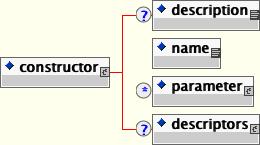
The key child elements are:
description: A description of the constructor.
name: The name of the constructor, which must be the same as the implementation class.
parameter: The parameter element describes a constructor parameter. The parameter element has the following attributes:
description: An optional description of the parameter.
name: The required variable name of the parameter.
type: The required fully qualified class name of the parameter type.
descriptors: Any descriptors to associate with the constructor metadata.
The attribute element(s) specifies the management attributes exposed by the MBean. The attribute element and its content model are shown in Figure 2.9, “The XMBean attribute element and its content model”.
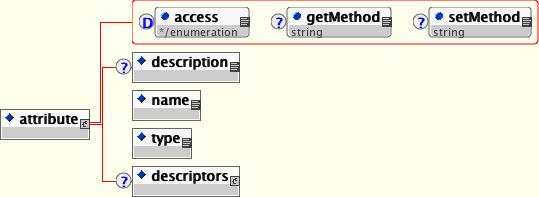
The attribute element supported attributes include:
access: The optional access attribute defines the read/write access modes of an attribute. It must be one of:
read-only: The attribute may only be read.
write-only: The attribute may only be written.
read-write: The attribute is both readable and writable. This is the implied default.
getMethod: The getMethod attribute defines the name of the method which reads the named attribute. This must be specified if the managed attribute should be obtained from the MBean instance.
setMethod: The setMethod attribute defines the name of the method which writes the named attribute. This must be specified if the managed attribute should be obtained from the MBean instance.
The key child elements of the attribute element include:
description: A description of the attribute.
name: The name of the attribute as would be used in the MBeanServer.getAttribute() operation.
type: The fully qualified class name of the attribute type.
descriptors: Any additional descriptors that affect the attribute persistence, caching, default value, etc.
The management operations exposed by the XMBean are specified via one or more operation elements. The operation element and its content model are shown in Figure 2.10, “The XMBean operation element and its content model”.
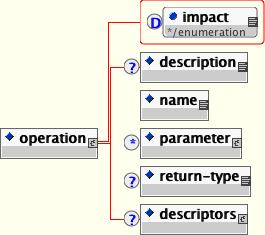
The impact attribute defines the impact of executing the operation and must be one of:
ACTION: The operation changes the state of the MBean component (write operation)
INFO: The operation should not alter the state of the MBean component (read operation).
ACTION_INFO: The operation behaves like a read/write operation.
The child elements are:
description: This element specifies a human readable description of the operation.
name: This element contains the operation's name
parameter: This element describes the operation's signature.
return-type: This element contains a fully qualified class name of the return type from this operation. If not specified, it defaults to void.
descriptors: Any descriptors to associate with the operation metadata.
The notification element(s) describes the management notifications that may be emitted by the XMBean. The notification element and its content model is shown in Figure 2.11, “The XMBean notification element and content model”.
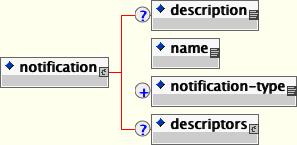
The child elements are:
description: This element gives a human readable description of the notification.
name: This element contains the fully qualified name of the notification class.
notification-type: This element contains the dot-separated notification type string.
descriptors: Any descriptors to associate with the notification metadata.
JBoss includes adaptors that allow access to the JMX MBeanServer from outside of the JBoss server VM. The current adaptors include HTML, an RMI interface, and an EJB.
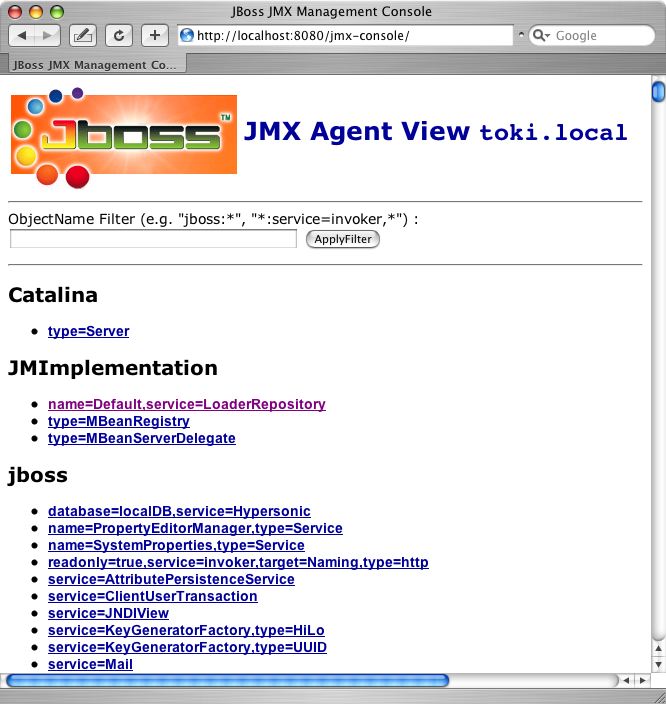
JBoss comes with its own implementation of a JMX HTML adaptor that allows one to view the server's MBeans using a standard web browser. The default URL for the console web application is http://localhost:8080/jmx-console/. If you browse this location you will see something similar to that presented in Figure 2.12, “The JBoss JMX console web application agent view”.
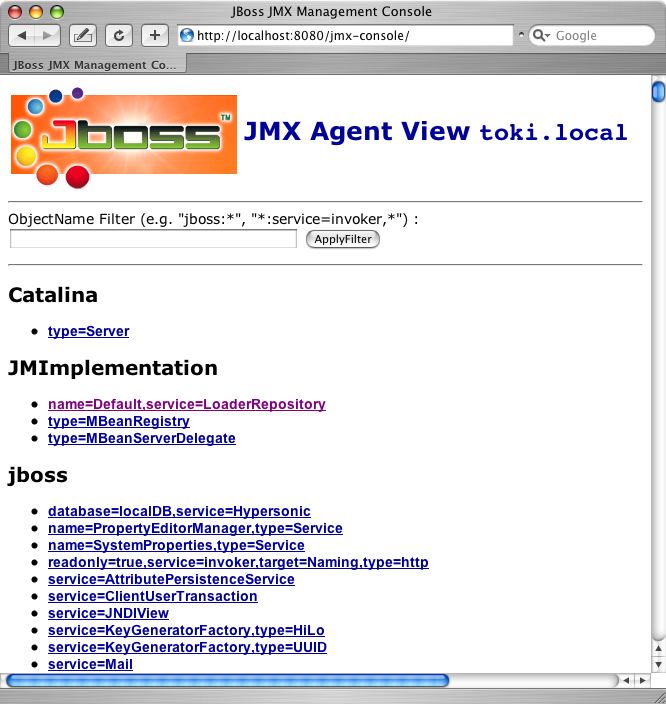
The top view is called the agent view and it provides a listing of all MBeans registered with the MBeanServer sorted by the domain portion of the MBean's ObjectName. Under each domain are the MBeans under that domain. When you select one of the MBeans you will be taken to the MBean view. This allows one to view and edit an MBean's attributes as well as invoke operations. As an example, Figure 2.13, “The MBean view for the "jboss.system:type=Server" MBean” shows the MBean view for the jboss.system:type=Server MBean.
The source code for the JMX console web application is located in the varia module under the src/main/org/jboss/jmx directory. Its web pages are located under varia/src/resources/jmx. The application is a simple MVC servlet with JSP views that utilize the MBeanServer.
Since the JMX console web application is just a standard servlet, it may be secured using standard J2EE role based security. The jmx-console.war that is deployed as an unpacked WAR that includes template settings for quickly enabling simple username and password based access restrictions. If you look at the jmx-console.war in the server/default/deploy directory you will find the web.xml and jboss-web.xml descriptors in the WEB-INF directory and a jmx-console-roles.properties and jmx-console-users.properties file under WEB-INF/classes
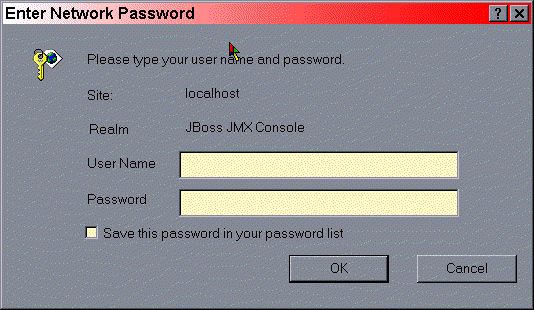
By uncommenting the security sections of the web.xml and jboss-web.xml descriptors as shown in Example 2.10, “The jmx-console.war web.xml descriptors with the security elements uncommented.”, you enable HTTP basic authentication that restricts access to the JMX Console application to the user admin with password admin. The username and password are determined by the admin=admin line in the jmx-console-users.properties file.
Example 2.10. The jmx-console.war web.xml descriptors with the security elements uncommented.
<?xml version="1.0"?>
<!DOCTYPE web-app PUBLIC
          "-//Sun Microsystems, Inc.//DTD Web Application 2.3//EN"
          "http://java.sun.com/dtd/web-app_2_3.dtd">
<web-app>
    <!-- ... -->

    <!-- A security constraint that restricts access to the HTML JMX console
         to users with the role JBossAdmin. Edit the roles to what you want and
         uncomment the WEB-INF/jboss-web.xml/security-domain element to enable
         secured access to the HTML JMX console.
    -->
    <security-constraint>
        <web-resource-collection>
            <web-resource-name>HtmlAdaptor</web-resource-name>
            <description> An example security config that only allows users with
                the role JBossAdmin to access the HTML JMX console web
                application </description>
            <url-pattern>/*</url-pattern>
            <http-method>GET</http-method>
            <http-method>POST</http-method>
        </web-resource-collection>
        <auth-constraint>
            <role-name>JBossAdmin</role-name>
        </auth-constraint>
    </security-constraint>
    <login-config>
        <auth-method>BASIC</auth-method>
        <realm-name>JBoss JMX Console</realm-name>
    </login-config>
    <security-role>
        <role-name>JBossAdmin</role-name>
    </security-role>
</web-app>
Example 2.11. The jmx-console.war jboss-web.xml descriptors with the security elements uncommented.
<?xml version="1.0" encoding="UTF-8"?>
<!DOCTYPE jboss-web
    PUBLIC "-//JBoss//DTD Web Application 2.3//EN"
    "http://www.jboss.org/j2ee/dtd/jboss-web_3_0.dtd">
<jboss-web>
    <!--
        Uncomment the security-domain to enable security. You will
        need to edit the htmladaptor login configuration to setup the
        login modules used to authentication users.
    -->
    <security-domain>java:/jaas/jmx-console</security-domain>
</jboss-web>
Make these changes and then when you try to access the JMX Console URL. You will see a dialog similar to that shown in Figure 2.14, “The JMX Console basic HTTP login dialog.”.
You probably to use the properties files for securing access to the JMX console application. To see how to properly configure the security settings of web applications see Chapter 8, Security on JBoss.
JBoss supplies an RMI interface for connecting to the JMX MBeanServer. This interface is org.jboss.jmx.adaptor.rmi.RMIAdaptor. The RMIAdaptor interface is bound into JNDI in the default location of jmx/invoker/RMIAdaptor as well as jmx/rmi/RMIAdaptor for backwards compatibility with older clients.
Example 2.12, “ A JMX client that uses the RMIAdaptor” shows a client that makes use of the RMIAdaptor interface to query the MBeanInfo for the JNDIView MBean. It also invokes the MBean's list(boolean) method and displays the result.
Example 2.12. A JMX client that uses the RMIAdaptor
public class JMXBrowser
{
    /**
     * @param args the command line arguments
     */
    public static void main(String[] args) throws Exception
    {
        InitialContext ic = new InitialContext();
        RMIAdaptor server = (RMIAdaptor) ic.lookup("jmx/invoker/RMIAdaptor");

        // Get the MBeanInfo for the JNDIView MBean
        ObjectName name = new ObjectName("jboss:service=JNDIView");
        MBeanInfo  info = server.getMBeanInfo(name);
        System.out.println("JNDIView Class: " + info.getClassName());

        MBeanOperationInfo[] opInfo = info.getOperations();
        System.out.println("JNDIView Operations: ");
        for(int o = 0; o < opInfo.length; o ++) {
            MBeanOperationInfo op = opInfo[o];

            String returnType = op.getReturnType();
            String opName     = op.getName();
            System.out.print(" + " + returnType + " " + opName + "(");

            MBeanParameterInfo[] params = op.getSignature();
            for(int p = 0; p < params.length; p++)  {
                MBeanParameterInfo paramInfo = params[p];

                String pname = paramInfo.getName();
                String type  = paramInfo.getType();

                if (pname.equals(type)) {
                    System.out.print(type);
                } else {
                    System.out.print(type + " " + name);
                }

                if (p < params.length-1) {
                    System.out.print(',');
                }
            }
            System.out.println(")");
        }

        // Invoke the list(boolean) op
        String[] sig    = {"boolean"};
        Object[] opArgs = {Boolean.TRUE};
        Object   result = server.invoke(name, "list", opArgs, sig);

        System.out.println("JNDIView.list(true) output:\n"+result);
    }
}
To test the client access using the RMIAdaptor, run the following:
[examples]$ ant -Dchap=chap2 -Dex=4 run-example
...

run-example4:
     [java] JNDIView Class: org.jboss.mx.modelmbean.XMBean
     [java] JNDIView Operations:
     [java]  + java.lang.String list(boolean jboss:service=JNDIView)
     [java]  + java.lang.String listXML()
     [java]  + void create()
     [java]  + void start()
     [java]  + void stop()
     [java]  + void destroy()
     [java]  + void jbossInternalLifecycle(java.lang.String jboss:service=JNDIView)
     [java]  + java.lang.String getName()
     [java]  + int getState()
     [java]  + java.lang.String getStateString()
     [java] JNDIView.list(true) output:
     [java] <h1>java: Namespace</h1>
     [java] <pre>
     [java]   +- XAConnectionFactory (class: org.jboss.mq.SpyXAConnectionFactory)
     [java]   +- DefaultDS (class: javax.sql.DataSource)
     [java]   +- SecurityProxyFactory (class: org.jboss.security.SubjectSecurityProxyFactory)
     [java]   +- DefaultJMSProvider (class: org.jboss.jms.jndi.JNDIProviderAdapter)
     [java]   +- comp (class: javax.naming.Context)
     [java]   +- JmsXA (class: org.jboss.resource.adapter.jms.JmsConnectionFactoryImpl)
     [java]   +- ConnectionFactory (class: org.jboss.mq.SpyConnectionFactory)
     [java]   +- jaas (class: javax.naming.Context)
     [java]   |   +- JmsXARealm (class: org.jboss.security.plugins.SecurityDomainContext)
     [java]   |   +- jbossmq (class: org.jboss.security.plugins.SecurityDomainContext)
     [java]   |   +- HsqlDbRealm (class: org.jboss.security.plugins.SecurityDomainContext)
     [java]   +- timedCacheFactory (class: javax.naming.Context)
     [java] Failed to lookup: timedCacheFactory, errmsg=null
     [java]   +- TransactionPropagationContextExporter (class: org.jboss.tm.TransactionPropag
ationContextFactory)
     [java]   +- StdJMSPool (class: org.jboss.jms.asf.StdServerSessionPoolFactory)
     [java]   +- Mail (class: javax.mail.Session)
     [java]   +- TransactionPropagationContextImporter (class: org.jboss.tm.TransactionPropag
ationContextImporter)
     [java]   +- TransactionManager (class: org.jboss.tm.TxManager)
     [java] </pre>
     [java] <h1>Global JNDI Namespace</h1>
     [java] <pre>
     [java]   +- XAConnectionFactory (class: org.jboss.mq.SpyXAConnectionFactory)
     [java]   +- UIL2ConnectionFactory[link -> ConnectionFactory] (class: javax.naming.Lin
kRef)
     [java]   +- UserTransactionSessionFactory (proxy: $Proxy11 implements interface org.jbos
s.tm.usertx.interfaces.UserTransactionSessionFactory)
     [java]   +- HTTPConnectionFactory (class: org.jboss.mq.SpyConnectionFactory)
     [java]   +- console (class: org.jnp.interfaces.NamingContext)
     [java]   |   +- PluginManager (proxy: $Proxy36 implements interface org.jboss.console.ma
nager.PluginManagerMBean)
     [java]   +- UIL2XAConnectionFactory[link -> XAConnectionFactory] (class: javax.naming
.LinkRef)
     [java]   +- UUIDKeyGeneratorFactory (class: org.jboss.ejb.plugins.keygenerator.uuid.UUID
KeyGeneratorFactory)
     [java]   +- HTTPXAConnectionFactory (class: org.jboss.mq.SpyXAConnectionFactory)
     [java]   +- topic (class: org.jnp.interfaces.NamingContext)
     [java]   |   +- testDurableTopic (class: org.jboss.mq.SpyTopic)
     [java]   |   +- testTopic (class: org.jboss.mq.SpyTopic)
     [java]   |   +- securedTopic (class: org.jboss.mq.SpyTopic)
     [java]   +- queue (class: org.jnp.interfaces.NamingContext)
     [java]   |   +- A (class: org.jboss.mq.SpyQueue)
     [java]   |   +- testQueue (class: org.jboss.mq.SpyQueue)
     [java]   |   +- ex (class: org.jboss.mq.SpyQueue)
     [java]   |   +- DLQ (class: org.jboss.mq.SpyQueue)
     [java]   |   +- D (class: org.jboss.mq.SpyQueue)
     [java]   |   +- C (class: org.jboss.mq.SpyQueue)
     [java]   |   +- B (class: org.jboss.mq.SpyQueue)
     [java]   +- ConnectionFactory (class: org.jboss.mq.SpyConnectionFactory)
     [java]   +- UserTransaction (class: org.jboss.tm.usertx.client.ClientUserTransaction)
     [java]   +- jmx (class: org.jnp.interfaces.NamingContext)
     [java]   |   +- invoker (class: org.jnp.interfaces.NamingContext)
     [java]   |   |   +- RMIAdaptor (proxy: $Proxy35 implements interface org.jboss.jmx.adapt
or.rmi.RMIAdaptor,interface org.jboss.jmx.adaptor.rmi.RMIAdaptorExt)
     [java]   |   +- rmi (class: org.jnp.interfaces.NamingContext)
     [java]   |   |   +- RMIAdaptor[link -> jmx/invoker/RMIAdaptor] (class: javax.naming.L
inkRef)
     [java]   +- HiLoKeyGeneratorFactory (class: org.jboss.ejb.plugins.keygenerator.hilo.HiLo
KeyGeneratorFactory)
     [java]   +- UILXAConnectionFactory[link -> XAConnectionFactory] (class: javax.naming.
LinkRef)
     [java]   +- UILConnectionFactory[link -> ConnectionFactory] (class: javax.naming.Link
Ref)
[java] </pre>JBoss provides a simple command line tool that allows for interaction with a remote JMX server instance. This tool is called twiddle (for twiddling bits via JMX) and is located in the bin directory of the distribution. Twiddle is a command execution tool, not a general command shell. It is run using either the twiddle.sh or twiddle.bat scripts, and passing in a -h(--help) argument provides the basic syntax, and --help-commands shows what you can do with the tool:
[bin]$ ./twiddle.sh -h
A JMX client to 'twiddle' with a remote JBoss server.

usage: twiddle.sh [options] <command> [command_arguments]

options:
    -h, --help                Show this help message
        --help-commands       Show a list of commands
    -H=<command>              Show command specific help
    -c=command.properties     Specify the command.properties file to use
    -D<name>[=<value>]        Set a system property
    --                        Stop processing options
    -s, --server=<url>        The JNDI URL of the remote server
    -a, --adapter=<name>      The JNDI name of the RMI adapter to use
    -q, --quiet               Be somewhat more quiet
By default the twiddle command will connect to the localhost at port 1099 to lookup the default jmx/rmi/RMIAdaptor binding of the RMIAdaptor service as the connector for communicating with the JMX server. To connect to a different server/port combination you can use the -s (--server) option:
[bin]$ ./twiddle.sh -s toki serverinfo -d jboss
[bin]$ ./twiddle.sh -s toki:1099 serverinfo -d jboss
To connect using a different RMIAdaptor binding use the -a (--adapter) option:
[bin]$ ./twiddle.sh -s toki -a jmx/rmi/RMIAdaptor serverinfo -d jboss
To access basic information about a server, use the serverinfo command. This currently supports:
[bin]$ ./twiddle.sh -H serverinfo
Get information about the MBean server

usage: serverinfo [options]

options:
    -d, --domain    Get the default domain
    -c, --count     Get the MBean count
    -l, --list      List the MBeans
    --              Stop processing options
[bin]$ ./twiddle.sh --server=toki serverinfo --count
460
[bin]$ ./twiddle.sh --server=toki serverinfo --domain
jboss
To query the server for the name of MBeans matching a pattern, use the query command. This currently supports:
[bin]$ ./twiddle.sh -H query
Query the server for a list of matching MBeans

usage: query [options] <query>
options:
    -c, --count    Display the matching MBean count
    --             Stop processing options
Examples:
 query all mbeans: query '*:*'
 query all mbeans in the jboss.j2ee domain: query 'jboss.j2ee:*'
[bin]$ ./twiddle.sh -s toki query 'jboss:service=invoker,*'
jboss:readonly=true,service=invoker,target=Naming,type=http
jboss:service=invoker,type=jrmp
jboss:service=invoker,type=local
jboss:service=invoker,type=pooled
jboss:service=invoker,type=http
jboss:service=invoker,target=Naming,type=http
To get the attributes of an MBean, use the get command:
[bin]$ ./twiddle.sh -H get
Get the values of one or more MBean attributes

usage: get [options] <name> [<attr>+]
  If no attribute names are given all readable attributes are retrieved
options:
    --noprefix    Do not display attribute name prefixes
    --            Stop processing options
[bin]$ ./twiddle.sh get jboss:service=invoker,type=jrmp RMIObjectPort StateString
RMIObjectPort=4444
StateString=Started
[bin]$ ./twiddle.sh get jboss:service=invoker,type=jrmp
ServerAddress=0.0.0.0
RMIClientSocketFactoryBean=null
StateString=Started
State=3
RMIServerSocketFactoryBean=org.jboss.net.sockets.DefaultSocketFactory@ad093076
EnableClassCaching=false
SecurityDomain=null
RMIServerSocketFactory=null
Backlog=200
RMIObjectPort=4444
Name=JRMPInvoker
RMIClientSocketFactory=null
To query the MBeanInfo for an MBean, use the info command:
[bin]$ ./twiddle.sh -H info
Get the metadata for an MBean

usage: info <mbean-name>
  Use '*' to query for all attributes
[bin]$ Description: Management Bean.
+++ Attributes:
 Name: ServerAddress
 Type: java.lang.String
 Access: rw
 Name: RMIClientSocketFactoryBean
 Type: java.rmi.server.RMIClientSocketFactory
 Access: rw
 Name: StateString
 Type: java.lang.String
 Access: r-
 Name: State
 Type: int
 Access: r-
 Name: RMIServerSocketFactoryBean
 Type: java.rmi.server.RMIServerSocketFactory
 Access: rw
 Name: EnableClassCaching
 Type: boolean
 Access: rw
 Name: SecurityDomain
 Type: java.lang.String
 Access: rw
 Name: RMIServerSocketFactory
 Type: java.lang.String
 Access: rw
 Name: Backlog
 Type: int
 Access: rw
 Name: RMIObjectPort
 Type: int
 Access: rw
 Name: Name
 Type: java.lang.String
 Access: r-
 Name: RMIClientSocketFactory
 Type: java.lang.String
 Access: rw
+++ Operations:
 void start()
 void jbossInternalLifecycle(java.lang.String java.lang.String)
 void create()
 void stop()
 void destroy()
To invoke an operation on an MBean, use the invoker command:
[bin]$ ./twiddle.sh -H invoke
Invoke an operation on an MBean

usage: invoke [options] <query> <operation> (<arg>)*

options:
    -q, --query-type[=<type>]    Treat object name as a query
    --                           Stop processing options

query type:
    f[irst]    Only invoke on the first matching name [default]
    a[ll]      Invoke on all matching names
[bin]$ ./twiddle.sh invoke jboss:service=JNDIView list true
<h1>java: Namespace</h1>
<pre>
  +- XAConnectionFactory (class: org.jboss.mq.SpyXAConnectionFactory)
  +- DefaultDS (class: javax.sql.DataSource)
  +- SecurityProxyFactory (class: org.jboss.security.SubjectSecurityProxyFactory)
  +- DefaultJMSProvider (class: org.jboss.jms.jndi.JNDIProviderAdapter)
  +- comp (class: javax.naming.Context)
  +- JmsXA (class: org.jboss.resource.adapter.jms.JmsConnectionFactoryImpl)
  +- ConnectionFactory (class: org.jboss.mq.SpyConnectionFactory)
  +- jaas (class: javax.naming.Context)
  |   +- JmsXARealm (class: org.jboss.security.plugins.SecurityDomainContext)
  |   +- jbossmq (class: org.jboss.security.plugins.SecurityDomainContext)
  |   +- HsqlDbRealm (class: org.jboss.security.plugins.SecurityDomainContext)
  +- timedCacheFactory (class: javax.naming.Context)
Failed to lookup: timedCacheFactory, errmsg=null
  +- TransactionPropagationContextExporter (class: org.jboss.tm.TransactionPropagationContext
Factory)
  +- StdJMSPool (class: org.jboss.jms.asf.StdServerSessionPoolFactory)
  +- Mail (class: javax.mail.Session)
  +- TransactionPropagationContextImporter (class: org.jboss.tm.TransactionPropagationContext
Importer)
  +- TransactionManager (class: org.jboss.tm.TxManager)
</pre>
<h1>Global JNDI Namespace</h1>
<pre>
  +- XAConnectionFactory (class: org.jboss.mq.SpyXAConnectionFactory)
  +- UIL2ConnectionFactory[link -> ConnectionFactory] (class: javax.naming.LinkRef)
  +- UserTransactionSessionFactory (proxy: $Proxy11 implements interface org.jboss.tm.usertx.
interfaces.UserTransactionSessionFactory)
  +- HTTPConnectionFactory (class: org.jboss.mq.SpyConnectionFactory)
  +- console (class: org.jnp.interfaces.NamingContext)
  |   +- PluginManager (proxy: $Proxy36 implements interface org.jboss.console.manager.Plugin
ManagerMBean)
  +- UIL2XAConnectionFactory[link -> XAConnectionFactory] (class: javax.naming.LinkRef)
  +- UUIDKeyGeneratorFactory (class: org.jboss.ejb.plugins.keygenerator.uuid.UUIDKeyGenerator
Factory)
  +- HTTPXAConnectionFactory (class: org.jboss.mq.SpyXAConnectionFactory)
  +- topic (class: org.jnp.interfaces.NamingContext)
  |   +- testDurableTopic (class: org.jboss.mq.SpyTopic)
  |   +- testTopic (class: org.jboss.mq.SpyTopic)
  |   +- securedTopic (class: org.jboss.mq.SpyTopic)
  +- queue (class: org.jnp.interfaces.NamingContext)
  |   +- A (class: org.jboss.mq.SpyQueue)
  |   +- testQueue (class: org.jboss.mq.SpyQueue)
  |   +- ex (class: org.jboss.mq.SpyQueue)
  |   +- DLQ (class: org.jboss.mq.SpyQueue)
  |   +- D (class: org.jboss.mq.SpyQueue)
  |   +- C (class: org.jboss.mq.SpyQueue)
  |   +- B (class: org.jboss.mq.SpyQueue)
  +- ConnectionFactory (class: org.jboss.mq.SpyConnectionFactory)
  +- UserTransaction (class: org.jboss.tm.usertx.client.ClientUserTransaction)
  +- jmx (class: org.jnp.interfaces.NamingContext)
  |   +- invoker (class: org.jnp.interfaces.NamingContext)
  |   |   +- RMIAdaptor (proxy: $Proxy35 implements interface org.jboss.jmx.adaptor.rmi.RMIAd
aptor,interface org.jboss.jmx.adaptor.rmi.RMIAdaptorExt)
  |   +- rmi (class: org.jnp.interfaces.NamingContext)
  |   |   +- RMIAdaptor[link -> jmx/invoker/RMIAdaptor] (class: javax.naming.LinkRef)
  +- HiLoKeyGeneratorFactory (class: org.jboss.ejb.plugins.keygenerator.hilo.HiLoKeyGenerator
Factory)
  +- UILXAConnectionFactory[link -> XAConnectionFactory] (class: javax.naming.LinkRef)
  +- UILConnectionFactory[link -> ConnectionFactory] (class: javax.naming.LinkRef)
</pre>With the detached invokers and a somewhat generalized proxy factory capability, you can really talk to the JMX server using the InvokerAdaptorService and a proxy factory service to expose an RMIAdaptor or similar interface over your protocol of choice. We will introduce the detached invoker notion along with proxy factories in Section 2.7, “Remote Access to Services, Detached Invokers”. See Section 2.7.1, “A Detached Invoker Example, the MBeanServer Invoker Adaptor Service” for an example of an invoker service that allows one to access the MBean server using to the RMIAdaptor interface over any protocol for which a proxy factory service exists.
When JBoss starts up, one of the first steps performed is to create an MBean server instance (javax.management.MBeanServer). The JMX MBean server in the JBoss architecture plays the role of a microkernel. All other manageable MBean components are plugged into JBoss by registering with the MBean server. The kernel in that sense is only an framework, and not a source of actual functionality. The functionality is provided by MBeans, and in fact all major JBoss components are manageable MBeans interconnected through the MBean server.
In this section we will describe the JBoss server startup process. A summary of the steps that occur during the JBoss server startup sequence is:
The run start script initiates the boot sequence using the org.jboss.Main.main(String[]) method entry point.
The Main.main method creates a thread group named jboss and then starts a thread belonging to this thread group. This thread invokes the Main.boot method.
The Main.boot method processes the Main.main arguments and then creates an org.jboss.system.server.ServerLoader using the system properties along with any additional properties specified as arguments.
The XML parser libraries, jboss-jmx.jar, concurrent.jar and extra libraries and classpaths given as arguments are registered with the ServerLoader .
The JBoss server instance is created using the ServerLoader.load(ClassLoader) method with the current thread context class loader passed in as the ClassLoader argument. The returned server instance is an implementation of the org.jboss.system.server.Server interface. The creation of the server instance entails:
Creating a java.net.URLClassLoader with the URLs of the jars and directories registered with the ServerLoader . This URLClassLoader uses the ClassLoader passed in as its parent and it is pushed as the thread context class loader.
The class name of the implementation of the Server interface to use is determined by the jboss.server.type property. This defaults to org.jboss.system.server.ServerImpl.
The Server implementation class is loaded using the URLClassLoader created in step 6 and instantiated using its no-arg constructor. The thread context class loader present on entry into the ServerLoader.load method is restored and the server instance is returned.
The server instance is initialized with the properties passed to the ServerLoader constructor using the Server.init(Properties) method.
The server instance is then started using the Server.start() method. The default implementation performs the following steps:
Set the thread context class loader to the class loader used to load the ServerImpl class.
Create an MBeanServer under the jboss domain using the MBeanServerFactory.createMBeanServer(String) method.
Register the ServerImpl and ServerConfigImpl MBeans with the MBean server.
Initialize the unified class loader repository to contain all JARs in the optional patch directory as well as the server configuration file conf directory, for example, server/default/conf. For each JAR and directory an org.jboss.mx.loading.UnifiedClassLoader is created and registered with the unified repository. One of these UnifiedClassLoader is then set as the thread context class loader. This effectively makes all UnifiedClassLoaders available through the thread context class loader.
The org.jboss.system.ServiceController MBean is created. The ServiceController manages the JBoss MBean services life cycle. We will discuss the JBoss MBean services notion in detail in Section 2.4.2, “JBoss MBean Services”.
The org.jboss.deployment.MainDeployer is created and started. The MainDeployer manages deployment dependencies and directing deployments to the correct deployer.
The org.jboss.deployment.JARDeployer is created and started. The JARDeployer handles the deployment of JARs that are simple library JARs.
The org.jboss.deployment.SARDeployer is created and started. The SARDeployer handles the deployment of JBoss MBean services.
The MainDeployer is invoked to deploy the services defined in the conf/jboss-service.xml of the current server file set.
Restore the thread context class loader.
The JBoss server starts out as nothing more than a container for the JMX MBean server, and then loads its personality based on the services defined in the jboss-service.xml MBean configuration file from the named configuration set passed to the server on the command line. Because MBeans define the functionality of a JBoss server instance, it is important to understand how the core JBoss MBeans are written, and how you should integrate your existing services into JBoss using MBeans. This is the topic of the next section.
As we have seen, JBoss relies on JMX to load in the MBean services that make up a given server instance's personality. All of the bundled functionality provided with the standard JBoss distribution is based on MBeans. The best way to add services to the JBoss server is to write your own JMX MBeans.
There are two classes of MBeans: those that are independent of JBoss services, and those that are dependent on JBoss services. MBeans that are independent of JBoss services are the trivial case. They can be written per the JMX specification and added to a JBoss server by adding an mbean tag to the deploy/user-service.xml file. Writing an MBean that relies on a JBoss service such as naming requires you to follow the JBoss service pattern. The JBoss MBean service pattern consists of a set of life cycle operations that provide state change notifications. The notifications inform an MBean service when it can create, start, stop, and destroy itself. The management of the MBean service life cycle is the responsibility of three JBoss MBeans: SARDeployer, ServiceConfigurator and ServiceController.
JBoss manages the deployment of its MBean services via a custom MBean that loads an XML variation of the standard JMX MLet configuration file. This custom MBean is implemented in the org.jboss.deployment.SARDeployer class. The SARDeployer MBean is loaded when JBoss starts up as part of the bootstrap process. The SAR acronym stands for service archive.
The SARDeployer handles services archives. A service archive can be either a jar that ends with a .sar suffix and contains a META-INF/jboss-service.xml descriptor, or a standalone XML descriptor with a naming pattern that matches *-service.xml. The DTD for the service descriptor is jboss-service_4.0.dtd and is shown in Figure 2.15, “The DTD for the MBean service descriptor parsed by the SARDeployer”.
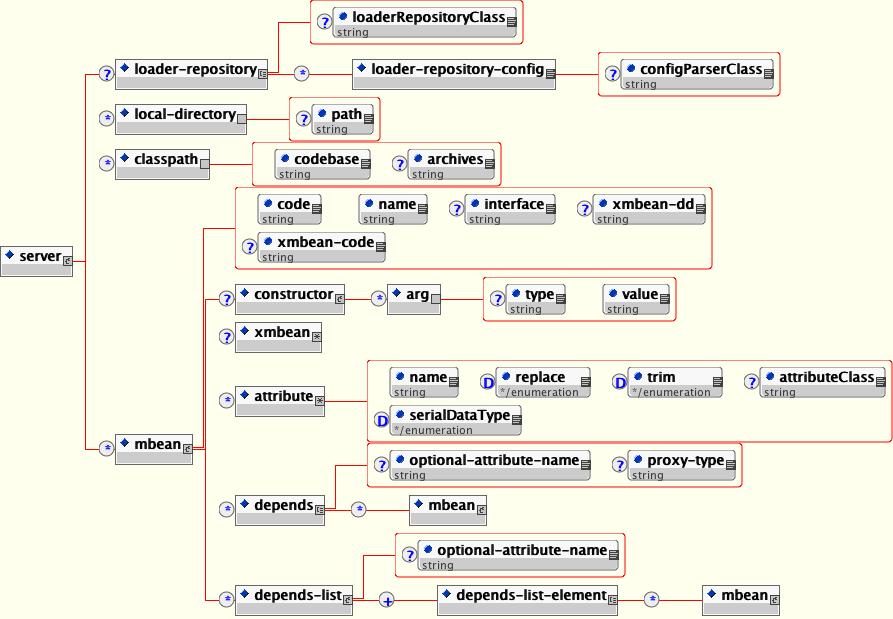
The elements of the DTD are:
loader-repository: This element specifies the name of the UnifiedLoaderRepository MBean to use for the SAR to provide SAR level scoping of classes deployed in the sar. It is a unique JMX ObjectName string. It may also specify an arbitrary configuration by including a loader-repository-config element. The optional loaderRepositoryClass attribute specifies the fully qualified name of the loader repository implementation class. It defaults to org.jboss.mx.loading.HeirachicalLoaderRepository3.
loader-repository-config: This optional element specifies an arbitrary configuration that may be used to configure the loadRepositoryClass. The optional configParserClass attribute gives the fully qualified name of the org.jboss.mx.loading.LoaderRepositoryFactory.LoaderRepositoryConfigParser implementation to use to parse the loader-repository-config content.
local-directory: This element specifies a path within the deployment archive that should be copied to the server/<config>/db directory for use by the MBean. The path attribute is the name of an entry within the deployment archive.
classpath: This element specifies one or more external JARs that should be deployed with the MBean(s). The optional archives attribute specifies a comma separated list of the JAR names to load, or the * wild card to signify that all jars should be loaded. The wild card only works with file URLs, and http URLs if the web server supports the WEBDAV protocol. The codebase attribute specifies the URL from which the JARs specified in the archive attribute should be loaded. If the codebase is a path rather than a URL string, the full URL is built by treating the codebase value as a path relative to the JBoss distribution server/<config> directory. The order of JARs specified in the archives as well as the ordering across multiple classpath element is used as the classpath ordering of the JARs. Therefore, if you have patches or inconsistent versions of classes that require a certain ordering, use this feature to ensure the correct ordering.
mbean: This element specifies an MBean service. The required code attribute gives the fully qualified name of the MBean implementation class. The required name attribute gives the JMX ObjectName of the MBean. The optional xmbean-dd attribute specifies the path to the XMBean resource if this MBean service uses the JBoss XMBean descriptor to define a Model MBean management interface.
constructor: The constructor element defines a non-default constructor to use when instantiating the MBean The arg element specify the constructor arguments in the order of the constructor signature. Each arg has a type and value attribute.
attribute: Each attribute element specifies a name/value pair of the attribute of the MBean. The name of the attribute is given by the name attribute, and the attribute element body gives the value. The body may be a text representation of the value, or an arbitrary element and child elements if the type of the MBean attribute is org.w3c.dom.Element. For text values, the text is converted to the attribute type using the JavaBean java.beans.PropertyEditor mechanism.
server/mbean/depends and server/mbean/depends-list: these elements specify a dependency from the MBean using the element to the MBean(s) named by the depends or depends-list elements. Section 2.4.2.4, “Specifying Service Dependencies”. Note that the dependency value can be another mbean element which defines a nested mbean.
MBean attribute values don't need to be hardcoded literal strings. Service files may contain references to system properties using the ${name} notation, where name is the name of a Java system property. The value of this system property, as would be returned from the call System.getProperty("name"). Multiple properties can be specified separated by commas like ${name1,name2,name3}. If there is no system property named name1, name2 will be tried and then name3. This allows multiple levels of substitution to be used. Finally, a default value can be added using a colon separator. The substitution ${name:default value} would substitute the the text "default value" if the system property name didn't exist. If none of the listed properties exist and no default value is given, no substitution will occur.
When the SARDeployer is asked to deploy a service performs several steps. Figure 2.16, “A sequence diagram highlighting the main activities performed by the SARDeployer to start a JBoss MBean service” is a sequence diagram that shows the init through start phases of a service.
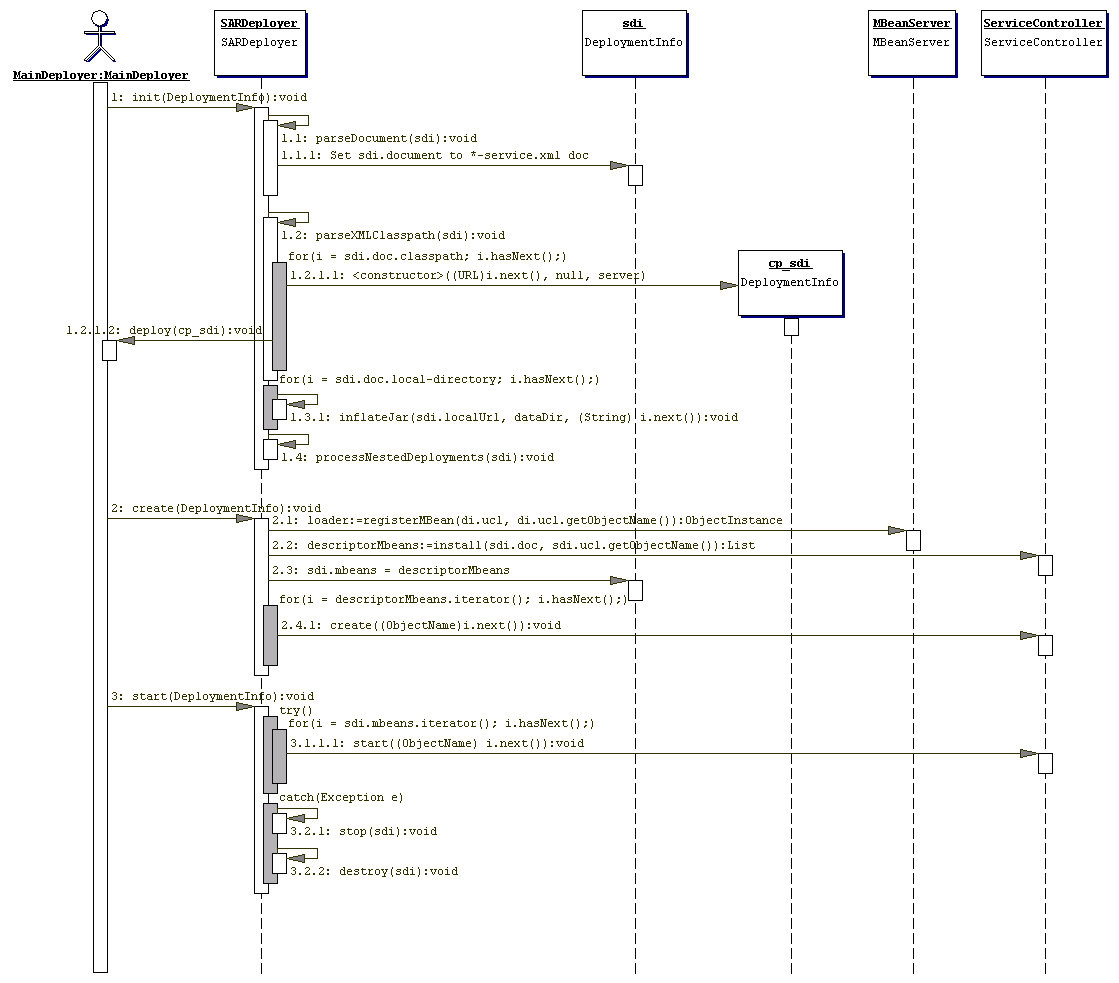
Figure 2.16. A sequence diagram highlighting the main activities performed by the SARDeployer to start a JBoss MBean service
In Figure 2.16, “A sequence diagram highlighting the main activities performed by the SARDeployer to start a JBoss MBean service” the following is illustrated:
Methods prefixed with 1.1 correspond to the load and parse of the XML service descriptor.
Methods prefixed with 1.2 correspond to processing each classpath element in the service descriptor to create an independent deployment that makes the jar or directory available through a UnifiedClassLoader registered with the unified loader repository.
Methods prefixed with 1.3 correspond to processing each local-directory element in the service descriptor. This does a copy of the SAR elements specified in the path attribute to the server/<config>/db directory.
Method 1.4. Process each deployable unit nested in the service a child deployment is created and added to the service deployment info subdeployment list.
Method 2.1. The UnifiedClassLoader of the SAR deployment unit is registered with the MBean Server so that is can be used for loading of the SAR MBeans.
Method 2.2. For each MBean element in the descriptor, create an instance and initialize its attributes with the values given in the service descriptor. This is done by calling the ServiceController.install method.
Method 2.4.1. For each MBean instance created, obtain its JMX ObjectName and ask the ServiceController to handle the create step of the service life cycle. The ServiceController handles the dependencies of the MBean service. Only if the service's dependencies are satisfied is the service create method invoked.
Methods prefixed with 3.1 correspond to the start of each MBean service defined in the service descriptor. For each MBean instance created, obtain its JMX ObjectName and ask the ServiceController to handle the start step of the service life cycle. The ServiceController handles the dependencies of the MBean service. Only if the service's dependencies are satisfied is the service start method invoked.
The JMX specification does not define any type of life cycle or dependency management for MBeans. The JBoss ServiceController MBean introduces this notion. A JBoss MBean is an extension of the JMX MBean in that an MBean is expected to decouple creation from the life cycle of its service duties. This is necessary to implement any type of dependency management. For example, if you are writing an MBean that needs a JNDI naming service to be able to function, your MBean needs to be told when its dependencies are satisfied. This ranges from difficult to impossible to do if the only life cycle event is the MBean constructor. Therefore, JBoss introduces a service life cycle interface that describes the events a service can use to manage its behavior. The following listing shows the org.jboss.system.Service interface:
package org.jboss.system;
public interface Service
{
    public void create() throws Exception;
    public void start() throws Exception;
    public void stop();
    public void destroy();
}
The ServiceController MBean invokes the methods of the Service interface at the appropriate times of the service life cycle. We'll discuss the methods in more detail in the ServiceController section.
JBoss manages dependencies between MBeans via the org.jboss.system.ServiceController custom MBean. The SARDeployer delegates to the ServiceController when initializing, creating, starting, stopping and destroying MBean services. Figure 2.17, “The interaction between the SARDeployer and ServiceController to start a service” shows a sequence diagram that highlights interaction between the SARDeployer and ServiceController.
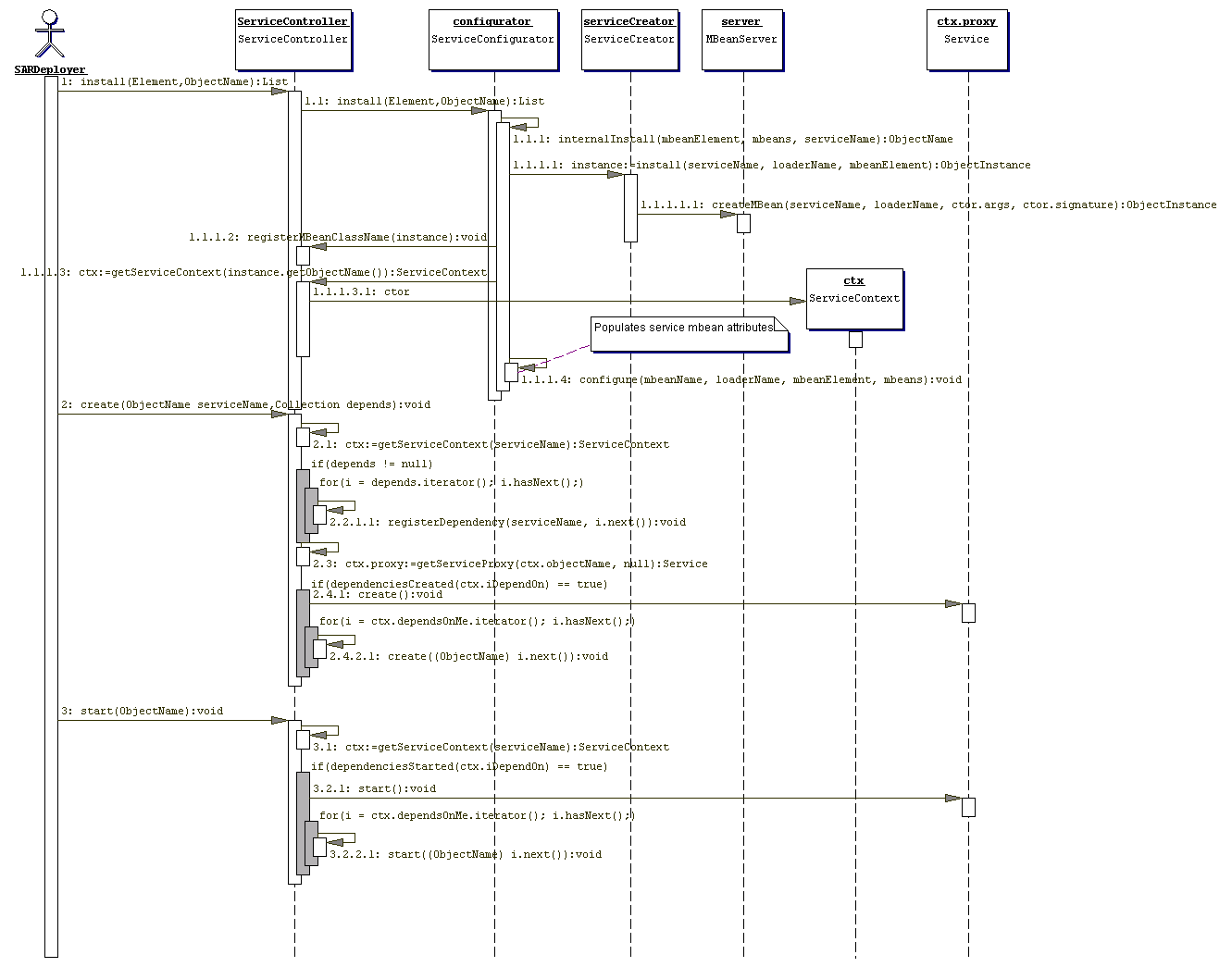
The ServiceController MBean has four key methods for the management of the service life cycle: create, start, stop and destroy.
The create(ObjectName) method is called whenever an event occurs that affects the named services state. This could be triggered by an explicit invocation by the SARDeployer, a notification of a new class, or another service reaching its created state.
When a service's create method is called, all services on which the service depends have also had their create method invoked. This gives an MBean an opportunity to check that required MBeans or resources exist. A service cannot utilize other MBean services at this point, as most JBoss MBean services do not become fully functional until they have been started via their start method. Because of this, service implementations often do not implement create in favor of just the start method because that is the first point at which the service can be fully functional.
The start(ObjectName) method is called whenever an event occurs that affects the named services state. This could be triggered by an explicit invocation by the SARDeployer, a notification of a new class, or another service reaching its started state.
When a service's start method is called, all services on which the service depends have also had their start method invoked. Receipt of a start method invocation signals a service to become fully operational since all services upon which the service depends have been created and started.
The stop(ObjectName) method is called whenever an event occurs that affects the named services state. This could be triggered by an explicit invocation by the SARDeployer, notification of a class removal, or a service on which other services depend reaching its stopped state.
The destroy(ObjectName) method is called whenever an event occurs that affects the named services state. This could be triggered by an explicit invocation by the SARDeployer, notification of a class removal, or a service on which other services depend reaching its destroyed state.
Service implementations often do not implement destroy in favor of simply implementing the stop method, or neither stop nor destroy if the service has no state or resources that need cleanup.
To specify that an MBean service depends on other MBean services you need to declare the dependencies in the mbean element of the service descriptor. This is done using the depends and depends-list elements. One difference between the two elements relates to the optional-attribute-name attribute usage. If you track the ObjectNames of dependencies using single valued attributes you should use the depends element. If you track the ObjectNames of dependencies using java.util.List compatible attributes you would use the depends-list element. If you only want to specify a dependency and don't care to have the associated service ObjectName bound to an attribute of your MBean then use whatever element is easiest. The following listing shows example service descriptor fragments that illustrate the usage of the dependency related elements.
<mbean code="org.jboss.mq.server.jmx.Topic"
       name="jms.topic:service=Topic,name=testTopic">
    <!-- Declare a dependency on the "jboss.mq:service=DestinationManager" and
         bind this name to the DestinationManager attribute -->
    <depends optional-attribute-name="DestinationManager">
        jboss.mq:service=DestinationManager
    </depends>

    <!-- Declare a dependency on the "jboss.mq:service=SecurityManager" and
         bind this name to the SecurityManager attribute -->
    <depends optional-attribute-name="SecurityManager">
        jboss.mq:service=SecurityManager
    </depends>

    <!-- ... -->

    <!-- Declare a dependency on the
         "jboss.mq:service=CacheManager" without
         any binding of the name to an attribute-->
    <depends>jboss.mq:service=CacheManager</depends>
</mbean>

<mbean code="org.jboss.mq.server.jmx.TopicMgr"
       name="jboss.mq.destination:service=TopicMgr">
    <!-- Declare a dependency on the given topic destination mbeans and
         bind these names to the Topics attribute -->
    <depends-list optional-attribute-name="Topics">
        <depends-list-element>jms.topic:service=Topic,name=A</depends-list-element>
        <depends-list-element>jms.topic:service=Topic,name=B</depends-list-element>
        <depends-list-element>jms.topic:service=Topic,name=C</depends-list-element>
    </depends-list>
</mbean>
Another difference between the depends and depends-list elements is that the value of the depends element may be a complete MBean service configuration rather than just the ObjectName of the service. Example 2.13, “An example of using the depends element to specify the complete configuration of a depended on service.” shows an example from the hsqldb-service.xml descriptor. In this listing the org.jboss.resource.connectionmanager.RARDeployment service configuration is defined using a nested mbean element as the depends element value. This indicates that the org.jboss.resource.connectionmanager.LocalTxConnectionManager MBean depends on this service. The jboss.jca:service=LocalTxDS,name=hsqldbDS ObjectName will be bound to the ManagedConnectionFactoryName attribute of the LocalTxConnectionManager class.
Example 2.13. An example of using the depends element to specify the complete configuration of a depended on service.
<mbean code="org.jboss.resource.connectionmanager.LocalTxConnectionManager"
       name="jboss.jca:service=LocalTxCM,name=hsqldbDS">
    <depends optional-attribute-name="ManagedConnectionFactoryName">
        <!--embedded mbean-->
        <mbean code="org.jboss.resource.connectionmanager.RARDeployment"
               name="jboss.jca:service=LocalTxDS,name=hsqldbDS">
            <attribute name="JndiName">DefaultDS</attribute>
            <attribute name="ManagedConnectionFactoryProperties">
                <properties>
                    <config-property name="ConnectionURL"
                                     type="java.lang.String">
                        jdbc:hsqldb:hsql://localhost:1476
                    </config-property>
                    <config-property name="DriverClass" type="java.lang.String">
                        org.hsqldb.jdbcDriver
                    </config-property>
                    <config-property name="UserName" type="java.lang.String">
                        sa
                    </config-property>
                    <config-property name="Password" type="java.lang.String"/>
                </properties>
            </attribute>
            <!-- ... -->
        </mbean>
    </depends>
    <!-- ... -->
</mbean>The ServiceController MBean supports two operations that can help determine which MBeans are not running due to unsatisfied dependencies. The first operation is listIncompletelyDeployed. This returns a java.util.List of org.jboss.system.ServiceContext objects for the MBean services that are not in the RUNNING state.
The second operation is listWaitingMBeans. This operation returns a java.util.List of the JMX ObjectNames of MBean services that cannot be deployed because the class specified by the code attribute is not available.
The URLDeploymentScanner MBean service provides the JBoss hot deployment capability. This service watches one or more URLs for deployable archives and deploys the archives as they appear or change. It also undeploys previously deployed applications if the archive from which the application was deployed is removed. The configurable attributes include:
URLs: A comma separated list of URL strings for the locations that should be watched for changes. Strings that do not correspond to valid URLs are treated as file paths. Relative file paths are resolved against the server home URL, for example, JBOSS_DIST/server/default for the default config file set. If a URL represents a file then the file is deployed and watched for subsequent updates or removal. If a URL ends in / to represent a directory, then the contents of the directory are treated as a collection of deployables and scanned for content that are to be watched for updates or removal. The requirement that a URL end in a / to identify a directory follows the RFC2518 convention and allows discrimination between collections and directories that are simply unpacked archives.
The default value for the URLs attribute is deploy/ which means that any SARs, EARs, JARs, WARs, RARs, etc. dropped into the server/<name>/deploy directory will be automatically deployed and watched for updates.
Example URLs include:
deploy/ scans ${jboss.server.url}/deploy/, which is local or remote depending on the URL used to boot the server
${jboss.server.home.dir}/deploy/ scans ${jboss.server.home.dir)/deploy, which is always local
file:/var/opt/myapp.ear deploys myapp.ear from a local location
file:/var/opt/apps/ scans the specified directory
http://www.test.com/netboot/myapp.ear deploys myapp.ear from a remote location
http://www.test.com/netboot/apps/ scans the specified remote location using WebDAV. This will only work if the remote http server supports the WebDAV PROPFIND command.
ScanPeriod: The time in milliseconds between runs of the scanner thread. The default is 5000 (5 seconds).
URLComparator: The class name of a java.util.Comparator implementation used to specify a deployment ordering for deployments found in a scanned directory. The implementation must be able to compare two java.net.URL objects passed to its compare method. The default setting is the org.jboss.deployment.DeploymentSorter class which orders based on the deployment URL suffix. The ordering of suffixes is: deployer, deployer.xml, sar, rar, ds.xml, service.xml, har, jar, war, wsr, ear, zip, bsh, last.
An alternate implementation is the org.jboss.deployment.scanner.PrefixDeploymentSorter class. This orders the URLs based on numeric prefixes. The prefix digits are converted to an int (ignoring leading zeroes), smaller prefixes are ordered ahead of larger numbers. Deployments that do not start with any digits will be deployed after all numbered deployments. Deployments with the same prefix value are further sorted by the DeploymentSorter logic.
Filter: The class name of a java.io.FileFilter implementation that is used to filter the contents of scanned directories. Any file not accepted by this filter will not be deployed. The default is org.jboss.deployment.scanner.DeploymentFilter which is an implementation that rejects the following patterns:
"#*", "%*", ",*", ".*", "_$*", "*#", "*$", "*%", "*.BAK", "*.old", "*.orig", "*.rej", "*.bak", "*.sh", "*,v", "*~", ".make.state", ".nse_depinfo", "CVS", "CVS.admin", "RCS", "RCSLOG", "SCCS", "TAGS", "core", "tags"
RecursiveSearch: This property indicates whether or not deploy subdirectories are seen to be holding deployable content. If this is false, deploy subdirectories that do not contain a dot (.) in their name are seen to be unpackaged JARs with nested subdeployments. If true, then deploy subdirectories are just groupings of deployable content. The difference between the two views shows is related to the depth first deployment model JBoss supports. The false setting which treats directories as unpackaged JARs with nested content triggers the deployment of the nested content as soon as the JAR directory is deployed. The true setting simply ignores the directory and adds its content to the list of deployable packages and calculates the order based on the previous filter logic. The default is true.
Deployer: The JMX ObjectName string of the MBean that implements the org.jboss.deployment.Deployer interface operations. The default setting is to use the MainDeployer created by the bootstrap startup process.
Writing a custom MBean service that integrates into the JBoss server requires the use of the org.jboss.system.Service interface pattern if the custom service is dependent on other services. When a custom MBean depends on other MBean services you cannot perform any service dependent initialization in any of the javax.management.MBeanRegistration interface methods since JMX has no dependency notion. Instead, you must manage dependency state using the Service interface create and/or start methods. You can do this using any one of the following approaches:
Add any of the Service methods that you want called on your MBean to your MBean interface. This allows your MBean implementation to avoid dependencies on JBoss specific interfaces.
Have your MBean interface extend the org.jboss.system.Service interface.
Have your MBean interface extend the org.jboss.system.ServiceMBean interface. This is a subinterface of org.jboss.system.Service that adds getName(), getState(), getStateString() methods.
Which approach you choose depends on whether or not you want your code to be coupled to JBoss specific code. If you don't, then you would use the first approach. If you don't care about dependencies on JBoss classes, the simplest approach is to have your MBean interface extend from org.jboss.system.ServiceMBean and your MBean implementation class extend from the abstract org.jboss.system.ServiceMBeanSupport class. This class implements the org.jboss.system.ServiceMBean interface. ServiceMBeanSupport provides implementations of the create, start, stop, and destroy methods that integrate logging and JBoss service state management tracking. Each method delegates any subclass specific work to createService, startService, stopService, and destroyService methods respectively. When subclassing ServiceMBeanSupport, you would override one or more of the createService, startService, stopService, and destroyService methods as required
This section develops a simple MBean that binds a HashMap into the JBoss JNDI namespace at a location determined by its JndiName attribute to demonstrate what is required to create a custom MBean. Because the MBean uses JNDI, it depends on the JBoss naming service MBean and must use the JBoss MBean service pattern to be notified when the naming service is available.
Version one of the classes, shown in Example 2.14, “JNDIMapMBean interface and implementation based on the service interface method pattern”, is based on the service interface method pattern. This version of the interface declares the start and stop methods needed to start up correctly without using any JBoss-specific classes.
Example 2.14. JNDIMapMBean interface and implementation based on the service interface method pattern
package org.jboss.chap2.ex1;

// The JNDIMap MBean interface
import javax.naming.NamingException;

public interface JNDIMapMBean
{
    public String getJndiName();
    public void setJndiName(String jndiName) throws NamingException;
    public void start() throws Exception;
    public void stop() throws Exception;
}
package org.jboss.chap2.ex1;

// The JNDIMap MBean implementation
import java.util.HashMap;
import javax.naming.InitialContext;
import javax.naming.Name;
import javax.naming.NamingException;
import org.jboss.naming.NonSerializableFactory;

public class JNDIMap implements JNDIMapMBean
{
    private String jndiName;
    private HashMap contextMap = new HashMap();
    private boolean started;

    public String getJndiName()
    {
        return jndiName;
    }
    public void setJndiName(String jndiName) throws NamingException
    {
        String oldName = this.jndiName;
        this.jndiName = jndiName;
        if (started) {
            unbind(oldName);
            try {
                rebind();
            } catch(Exception e) {
                NamingException ne = new NamingException("Failedto update jndiName");
                ne.setRootCause(e);
                throw ne;
            }
        }
    }

    public void start() throws Exception
    {
        started = true;
        rebind();
    }

    public void stop()
    {
        started = false;
        unbind(jndiName);
    }

    private void rebind() throws NamingException
    {
        InitialContext rootCtx = new InitialContext();
        Name fullName = rootCtx.getNameParser("").parse(jndiName);
        System.out.println("fullName="+fullName);
        NonSerializableFactory.rebind(fullName, contextMap, true);
    }

    private void unbind(String jndiName)
    {
        try {
            InitialContext rootCtx = new InitialContext();
            rootCtx.unbind(jndiName);
            NonSerializableFactory.unbind(jndiName);
        } catch(NamingException e) {
            e.printStackTrace();
        }
    }
}
Version two of the classes, shown in Example 2.14, “JNDIMapMBean interface and implementation based on the service interface method pattern”, use the JBoss ServiceMBean interface and ServiceMBeanSupport class. In this version, the implementation class extends the ServiceMBeanSupport class and overrides the startService and stopService methods. JNDIMapMBean also implements the abstract getName method to return a descriptive name for the MBean. The JNDIMapMBean interface extends the org.jboss.system.ServiceMBean interface and only declares the setter and getter methods for the JndiName attribute because it inherits the service life cycle methods from ServiceMBean. This is the third approach mentioned at the start of the Section 2.4.2, “JBoss MBean Services”.
Example 2.15. JNDIMap MBean interface and implementation based on the ServiceMBean interface and ServiceMBeanSupport class
package org.jboss.chap2.ex2;

// The JNDIMap MBean interface
import javax.naming.NamingException;

public interface JNDIMapMBean extends org.jboss.system.ServiceMBean
{
    public String getJndiName();
    public void setJndiName(String jndiName) throws NamingException;
}
package org.jboss.chap2.ex2;
// The JNDIMap MBean implementation
import java.util.HashMap;
import javax.naming.InitialContext;
import javax.naming.Name;
import javax.naming.NamingException;
import org.jboss.naming.NonSerializableFactory;
public class JNDIMap extends org.jboss.system.ServiceMBeanSupport
implements JNDIMapMBean
{
private String jndiName;
private HashMap contextMap = new HashMap();
public String getJndiName()
{
return jndiName;
}
public void setJndiName(String jndiName)
throws NamingException
{
String oldName = this.jndiName;
this.jndiName = jndiName;
if (super.getState() == STARTED) {
unbind(oldName);
try {
rebind();
} catch(Exception e) {
NamingException ne = new NamingException("Failed to update jndiName");
ne.setRootCause(e);
throw ne;
}
}
}
public void startService() throws Exception
{
rebind();
}
public void stopService()
{
unbind(jndiName);
}
private void rebind() throws NamingException
{
InitialContext rootCtx = new InitialContext();
Name fullName = rootCtx.getNameParser("").parse(jndiName);
log.info("fullName="+fullName);
NonSerializableFactory.rebind(fullName, contextMap, true);
}
private void unbind(String jndiName)
{
try {
InitialContext rootCtx = new InitialContext();
rootCtx.unbind(jndiName);
NonSerializableFactory.unbind(jndiName);
} catch(NamingException e) {
log.error("Failed to unbind map", e);
}
}
}The source code for these MBeans along with the service descriptors is located in the examples/src/main/org/jboss/chap2/{ex1,ex2} directories.
The jboss-service.xml descriptor for the first version is shown below.
<!-- The SAR META-INF/jboss-service.xml descriptor -->
<server>
    <mbean code="org.jboss.chap2.ex1.JNDIMap"
           name="chap2.ex1:service=JNDIMap">
        <attribute name="JndiName">inmemory/maps/MapTest</attribute>
        <depends>jboss:service=Naming</depends>
    </mbean>
</server>
The JNDIMap MBean binds a HashMap object under the inmemory/maps/MapTest JNDI name and the client code fragment demonstrates retrieving the HashMap object from the inmemory/maps/MapTest location. The corresponding client code is shown below.
// Sample lookup code
InitialContext ctx = new InitialContext();
HashMap map = (HashMap) ctx.lookup("inmemory/maps/MapTest");In this section we will develop a variation of the JNDIMap MBean introduced in the preceding section that exposes its management metadata using the JBoss XMBean framework. Our core managed component will be exactly the same core code from the JNDIMap class, but it will not implement any specific management related interface. We will illustrate the following capabilities not possible with a standard MBean:
The ability to add rich descriptions to attribute and operations
The ability to expose notification information
The ability to add persistence of attributes
The ability to add custom interceptors for security and remote access through a typed interface
Let's start with a simple XMBean variation of the standard MBean version of the JNDIMap that adds the descriptive information about the attributes and operations and their arguments. The following listing shows the jboss-service.xml descriptor and the jndimap-xmbean1.xml XMBean descriptor. The source can be found in the src/main/org/jboss/chap2/xmbean directory of the book examples.
<?xml version='1.0' encoding='UTF-8' ?>
<!DOCTYPE server PUBLIC
                     "-//JBoss//DTD MBean Service 3.2//EN"
                     "http://www.jboss.org/j2ee/dtd/jboss-service_3_2.dtd">
<server>
    <mbean code="org.jboss.chap2.xmbean.JNDIMap"
           name="chap2.xmbean:service=JNDIMap"
           xmbean-dd="META-INF/jndimap-xmbean.xml">
        <attribute name="JndiName">inmemory/maps/MapTest</attribute>
        <depends>jboss:service=Naming</depends>
    </mbean>
</server>
<?xml version="1.0" encoding="UTF-8"?>
<!DOCTYPE mbean PUBLIC
"-//JBoss//DTD JBOSS XMBEAN 1.0//EN"
"http://www.jboss.org/j2ee/dtd/jboss_xmbean_1_0.dtd">
<mbean>
<description>The JNDIMap XMBean Example Version 1</description>
<descriptors>
<persistence persistPolicy="Never" persistPeriod="10"
persistLocation="data/JNDIMap.data" persistName="JNDIMap"/>
<currencyTimeLimit value="10"/>
<state-action-on-update value="keep-running"/>
</descriptors>
<class>org.jboss.test.jmx.xmbean.JNDIMap</class>
<constructor>
<description>The default constructor</description>
<name>JNDIMap</name>
</constructor>
<!-- Attributes -->
<attribute access="read-write" getMethod="getJndiName" setMethod="setJndiName">
<description>
The location in JNDI where the Map we manage will be bound
</description>
<name>JndiName</name>
<type>java.lang.String</type>
<descriptors>
<default value="inmemory/maps/MapTest"/>
</descriptors>
</attribute>
<attribute access="read-write" getMethod="getInitialValues"
setMethod="setInitialValues">
<description>The array of initial values that will be placed into the
map associated with the service. The array is a collection of
key,value pairs with elements[0,2,4,...2n] being the keys and
elements [1,3,5,...,2n+1] the associated values. The
"[Ljava.lang.String;" type signature is the VM representation of the
java.lang.String[] type. </description>
<name>InitialValues</name>
<type>[Ljava.lang.String;</type>
<descriptors>
<default value="key0,value0"/>
</descriptors>
</attribute>
<!-- Operations -->
<operation>
<description>The start lifecycle operation</description>
<name>start</name>
</operation>
<operation>
<description>The stop lifecycle operation</description>
<name>stop</name>
</operation>
<operation impact="ACTION">
<description>Put a value into the map</description>
<name>put</name>
<parameter>
<description>The key the value will be store under</description>
<name>key</name>
<type>java.lang.Object</type>
</parameter>
<parameter>
<description>The value to place into the map</description>
<name>value</name>
<type>java.lang.Object</type>
</parameter>
</operation>
<operation impact="INFO">
<description>Get a value from the map</description>
<name>get</name>
<parameter>
<description>The key to lookup in the map</description>
<name>get</name>
<type>java.lang.Object</type>
</parameter>
<return-type>java.lang.Object</return-type>
</operation>
<!-- Notifications -->
<notification>
<description>The notification sent whenever a value is get into the map
managed by the service</description>
<name>javax.management.Notification</name>
<notification-type>org.jboss.chap2.xmbean.JNDIMap.get</notification-type>
</notification>
<notification>
<description>The notification sent whenever a value is put into the map
managed by the service</description>
<name>javax.management.Notification</name>
<notification-type>org.jboss.chap2.xmbean.JNDIMap.put</notification-type>
</notification>
</mbean>You can build, deploy and test the XMBean as follows:
[examples]$ ant -Dchap=chap2 -Dex=xmbean1  run-example
...
run-examplexmbean1:
     [copy] Copying 1 file to /tmp/jboss-4.0.2/server/default/deploy
     [java] JNDIMap Class: org.jboss.mx.modelmbean.XMBean
     [java] JNDIMap Operations:
     [java]  + void start()
     [java]  + void stop()
     [java]  + void put(java.lang.Object chap2.xmbean:service=JNDIMap,java.lang.Object cha
p2.xmbean:service=JNDIMap)
     [java]  + java.lang.Object get(java.lang.Object chap2.xmbean:service=JNDIMap)
     [java]  + java.lang.String getJndiName()
     [java]  + void setJndiName(java.lang.String chap2.xmbean:service=JNDIMap)
     [java]  + [Ljava.lang.String; getInitialValues()
     [java]  + void setInitialValues([Ljava.lang.String; chap2.xmbean:service=JNDIMap)
     [java] handleNotification, event: null
     [java] key=key0, value=value0
     [java] handleNotification, event: javax.management.Notification[source=chap2.xmbean:s
ervice=JNDIMap,type=org.jboss.chap2.xmbean.JNDIMap.put,sequenceNumber=3,timeStamp=10986315
27823,message=null,userData=null]
     [java] JNDIMap.put(key1, value1) successful
     [java] handleNotification, event: javax.management.Notification[source=chap2.xmbean:s
ervice=JNDIMap,type=org.jboss.chap2.xmbean.JNDIMap.get,sequenceNumber=4,timeStamp=10986315
27940,message=null,userData=null]
     [java] JNDIMap.get(key0): null
     [java] handleNotification, event: javax.management.Notification[source=chap2.xmbean:s
ervice=JNDIMap,type=org.jboss.chap2.xmbean.JNDIMap.get,sequenceNumber=5,timeStamp=10986315
27985,message=null,userData=null]
     [java] JNDIMap.get(key1): value1
     [java] handleNotification, event: javax.management.Notification[source=chap2.xmbean:s
ervice=JNDIMap,type=org.jboss.chap2.xmbean.JNDIMap.put,sequenceNumber=6,timeStamp=10986315
27999,message=null,userData=null]
The functionality is largely the same as the Standard MBean with the notable exception of the JMX notifications. A Standard MBean has no way of declaring that it will emit notifications. An XMBean may declare the notifications it emits using notification elements as is shown in the version 1 descriptor. We see the notifications from the get and put operations on the test client console output. Note that there is also an jmx.attribute.change notification emitted when the InitialValues attribute was changed. This is because the ModelMBean interface extends the ModelMBeanNotificationBroadcaster which supports AttributeChangeNotificationListeners.
The other major difference between the Standard and XMBean versions of JNDIMap is the descriptive metadata. Look at the chap2.xmbean:service=JNDIMap in the JMX Console, and you will see the attributes section as shown in Figure 2.18, “The Version 1 JNDIMapXMBean jmx-console view”.
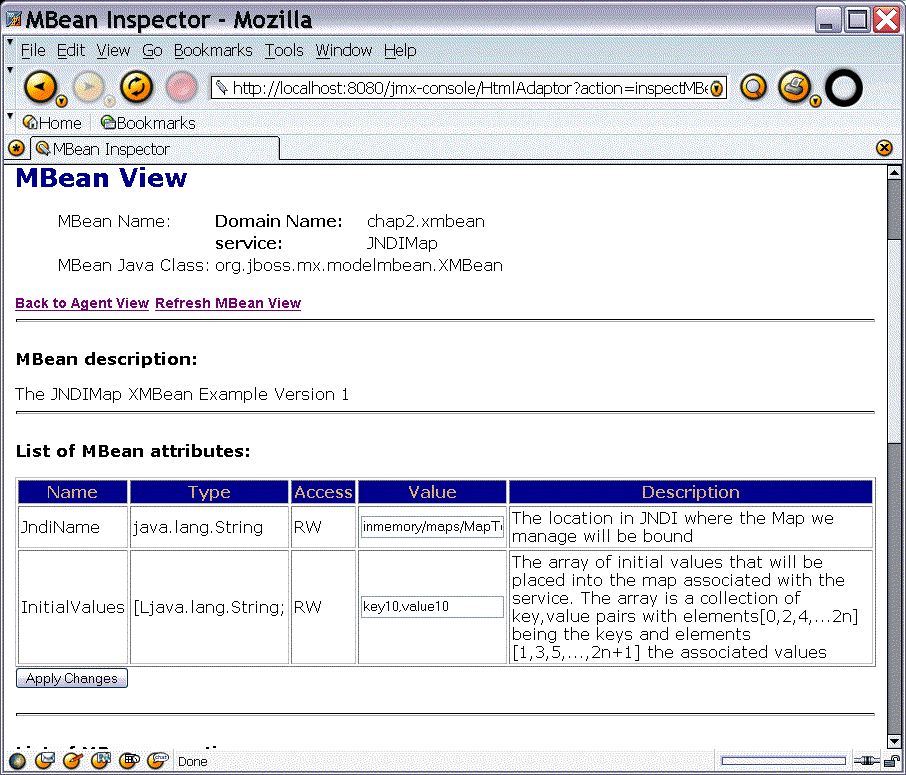
Notice that the JMX Console now displays the full attribute description as specified in the XMBean descriptor rather than MBean Attribute text seen in standard MBean implementations. Scroll down to the operations and you will also see that these now also have nice descriptions of their function and parameters.
In version 2 of the XMBean we add support for persistence of the XMBean attributes. The updated XMBean deployment descriptor is given below.
<?xml version="1.0" encoding="UTF-8"?>
<!DOCTYPE mbean PUBLIC
          "-//JBoss//DTD JBOSS XMBEAN 1.0//EN"
          "http://www.jboss.org/j2ee/dtd/jboss_xmbean_1_0.dtd">
<mbean>
    <description>The JNDIMap XMBean Example Version 2</description>
    <descriptors>
        <persistence persistPolicy="OnUpdate" persistPeriod="10"
            persistLocation="${jboss.server.data.dir}" persistName="JNDIMap.ser"/>
        <currencyTimeLimit value="10"/>
        <state-action-on-update value="keep-running"/>
        <persistence-manager value="org.jboss.mx.persistence.ObjectStreamPersistenceManager"/>
    </descriptors>   <class>org.jboss.test.jmx.xmbean.JNDIMap</class>
    <constructor>
        <description>The default constructor</description>
        <name>JNDIMap</name>
    </constructor>
    <!-- Attributes -->
    <attribute access="read-write" getMethod="getJndiName" setMethod="setJndiName">
        <description>
            The location in JNDI where the Map we manage will be bound
        </description>
        <name>JndiName</name>
        <type>java.lang.String</type>
        <descriptors>
            <default value="inmemory/maps/MapTest"/>
        </descriptors>
    </attribute>
    <attribute access="read-write" getMethod="getInitialValues"
               setMethod="setInitialValues">
        <description>The array of initial values that will be placed into the
            map associated with the service. The array is a collection of
            key,value pairs with elements[0,2,4,...2n] being the keys and
            elements [1,3,5,...,2n+1] the associated values</description>
        <name>InitialValues</name>
        <type>[Ljava.lang.String;</type>
        <descriptors>
            <default value="key0,value0"/>
        </descriptors>
    </attribute>
    <!-- Operations -->
    <operation>
        <description>The start lifecycle operation</description>
        <name>start</name>
    </operation>
    <operation>
        <description>The stop lifecycle operation</description>
        <name>stop</name>
    </operation>
    <operation impact="ACTION">
        <description>Put a value into the nap</description>
        <name>put</name>
        <parameter>
            <description>The key the value will be store under</description>
            <name>key</name>
            <type>java.lang.Object</type>
        </parameter>
        <parameter>
            <description>The value to place into the map</description>
            <name>value</name>
            <type>java.lang.Object</type>
        </parameter>
    </operation>
    <operation impact="INFO">
        <description>Get a value from the map</description>
        <name>get</name>
        <parameter>
            <description>The key to lookup in the map</description>
            <name>get</name>
            <type>java.lang.Object</type>
        </parameter>
        <return-type>java.lang.Object</return-type>
    </operation>
    <!-- Notifications -->
    <notification>
        <description>The notification sent whenever a value is get into the map
            managed by the service</description>
        <name>javax.management.Notification</name>
        <notification-type>org.jboss.chap2.xmbean.JNDIMap.get</notification-type>
    </notification>
    <notification>
        <description>The notification sent whenever a value is put into the map
            managed by the service</description>
        <name>javax.management.Notification</name>
        <notification-type>org.jboss.chap2.xmbean.JNDIMap.put</notification-type>
    </notification>
</mbean>
Build, deploy and test the version 2 XMBean as follows:
[examples]$ ant -Dchap=chap2 -Dex=xmbean2 -Djboss.deploy.conf=rmi-adaptor run-example
...
run-examplexmbean2:
     [java] JNDIMap Class: org.jboss.mx.modelmbean.XMBean
     [java] JNDIMap Operations:
     [java]  + void start()
     [java]  + void stop()
     [java]  + void put(java.lang.Object chap2.xmbean:service=JNDIMap,java.lang.Object cha
p2.xmbean:service=JNDIMap)
     [java]  + java.lang.Object get(java.lang.Object chap2.xmbean:service=JNDIMap)
     [java]  + java.lang.String getJndiName()
     [java]  + void setJndiName(java.lang.String chap2.xmbean:service=JNDIMap)
     [java]  + [Ljava.lang.String; getInitialValues()
     [java]  + void setInitialValues([Ljava.lang.String; chap2.xmbean:service=JNDIMap)
     [java] handleNotification, event: null
     [java] key=key10, value=value10
     [java] handleNotification, event: javax.management.Notification[source=chap2.xmbean:s
ervice=JNDIMap,type=org.jboss.chap2.xmbean.JNDIMap.put,sequenceNumber=7,timeStamp=10986326
93716,message=null,userData=null]
     [java] JNDIMap.put(key1, value1) successful
     [java] handleNotification, event: javax.management.Notification[source=chap2.xmbean:s
ervice=JNDIMap,type=org.jboss.chap2.xmbean.JNDIMap.get,sequenceNumber=8,timeStamp=10986326
93857,message=null,userData=null]
     [java] JNDIMap.get(key0): null
     [java] handleNotification, event: javax.management.Notification[source=chap2.xmbean:s
ervice=JNDIMap,type=org.jboss.chap2.xmbean.JNDIMap.get,sequenceNumber=9,timeStamp=10986326
93896,message=null,userData=null]
     [java] JNDIMap.get(key1): value1
     [java] handleNotification, event: javax.management.Notification[source=chap2.xmbean:s
ervice=JNDIMap,type=org.jboss.chap2.xmbean.JNDIMap.put,sequenceNumber=10,timeStamp=1098632
693925,message=null,userData=null]
There is nothing manifestly different about this version of the XMBean at this point because we have done nothing to test that changes to attribute value are actually persisted. Perform this test by running example xmbean2a several times:
[examples] ant -Dchap=chap2 -Dex=xmbean2a run-example
...
     [java] InitialValues.length=2
     [java] key=key10, value=value10
[examples] ant -Dchap=chap2 -Dex=xmbean2a run-example
...
     [java] InitialValues.length=4
     [java] key=key10, value=value10
     [java] key=key2, value=value2
[examples] ant -Dchap=chap2 -Dex=xmbean2a run-example
...
     [java] InitialValues.length=6
     [java] key=key10, value=value10
     [java] key=key2, value=value2
     [java] key=key3, value=value3
The org.jboss.chap2.xmbean.TestXMBeanRestart used in this example obtains the current InitialValues attribute setting, and then adds another key/value pair to it. The client code is shown below.
package org.jboss.chap2.xmbean;

import javax.management.Attribute;
import javax.management.ObjectName;
import javax.naming.InitialContext;

import org.jboss.jmx.adaptor.rmi.RMIAdaptor;

/**
 *  A client that demonstrates the persistence of the xmbean
 *  attributes. Every time it run it looks up the InitialValues
 *  attribute, prints it out and then adds a new key/value to the
 *  list.
 *
 *  @author Scott.Stark@jboss.org
 *  @version $Revision: 1.10 $
 */
public class TestXMBeanRestart
{
    /**
     * @param args the command line arguments
     */
    public static void main(String[] args) throws Exception
    {
	InitialContext ic = new InitialContext();
	RMIAdaptor server = (RMIAdaptor) ic.lookup("jmx/rmi/RMIAdaptor");

	// Get the InitialValues attribute
	ObjectName name = new ObjectName("chap2.xmbean:service=JNDIMap");
	String[] initialValues = (String[])
	    server.getAttribute(name, "InitialValues");
	System.out.println("InitialValues.length="+initialValues.length);
	int length = initialValues.length;
	for (int n = 0; n < length; n += 2) {
	    String key = initialValues[n];
	    String value = initialValues[n+1];

	    System.out.println("key="+key+", value="+value);
	}
	// Add a new key/value pair
	String[] newInitialValues = new String[length+2];
	System.arraycopy(initialValues, 0, newInitialValues,
			 0, length);
	newInitialValues[length] = "key"+(length/2+1);
	newInitialValues[length+1] = "value"+(length/2+1);

	Attribute ivalues = new
	    Attribute("InitialValues", newInitialValues);
	server.setAttribute(name, ivalues);
    }
}
At this point you may even shutdown the JBoss server, restart it and then rerun the initial example to see if the changes are persisted across server restarts:
[examples]$ ant -Dchap=chap2 -Dex=xmbean2 run-example
...

run-examplexmbean2:
     [java] JNDIMap Class: org.jboss.mx.modelmbean.XMBean
     [java] JNDIMap Operations:
     [java]  + void start()
     [java]  + void stop()
     [java]  + void put(java.lang.Object chap2.xmbean:service=JNDIMap,java.lang.Object cha
p2.xmbean:service=JNDIMap)
     [java]  + java.lang.Object get(java.lang.Object chap2.xmbean:service=JNDIMap)
     [java]  + java.lang.String getJndiName()
     [java]  + void setJndiName(java.lang.String chap2.xmbean:service=JNDIMap)
     [java]  + [Ljava.lang.String; getInitialValues()
     [java]  + void setInitialValues([Ljava.lang.String; chap2.xmbean:service=JNDIMap)
     [java] handleNotification, event: null
     [java] key=key10, value=value10
     [java] key=key2, value=value2
     [java] key=key3, value=value3
     [java] key=key4, value=value4
     [java] handleNotification, event: javax.management.Notification[source=chap2.xmbean:s
ervice=JNDIMap,type=org.jboss.chap2.xmbean.JNDIMap.put,sequenceNumber=3,timeStamp=10986336
64712,message=null,userData=null]
     [java] JNDIMap.put(key1, value1) successful
     [java] handleNotification, event: javax.management.Notification[source=chap2.xmbean:s
ervice=JNDIMap,type=org.jboss.chap2.xmbean.JNDIMap.get,sequenceNumber=4,timeStamp=10986336
64821,message=null,userData=null]
     [java] JNDIMap.get(key0): null
     [java] handleNotification, event: javax.management.Notification[source=chap2.xmbean:s
ervice=JNDIMap,type=org.jboss.chap2.xmbean.JNDIMap.get,sequenceNumber=5,timeStamp=10986336
64860,message=null,userData=null]
     [java] JNDIMap.get(key1): value1
     [java] handleNotification, event: javax.management.Notification[source=chap2.xmbean:s
ervice=JNDIMap,type=org.jboss.chap2.xmbean.JNDIMap.put,sequenceNumber=6,timeStamp=10986336
64877,message=null,userData=null]
     [java] handleNotification, event: javax.management.Notification[source=chap2.xmbean:s
ervice=JNDIMap,type=org.jboss.chap2.xmbean.JNDIMap.put,sequenceNumber=7,timeStamp=10986336
64895,message=null,userData=null]
     [java] handleNotification, event: javax.management.Notification[source=chap2.xmbean:s
ervice=JNDIMap,type=org.jboss.chap2.xmbean.JNDIMap.put,sequenceNumber=8,timeStamp=10986336
64899,message=null,userData=null]
     [java] handleNotification, event: javax.management.Notification[source=chap2.xmbean:s
ervice=JNDIMap,type=org.jboss.chap2.xmbean.JNDIMap.put,sequenceNumber=9,timeStamp=10986336
65614,message=null,userData=null]
You see that the last InitialValues attribute setting is in fact visible.
We have seen how to manage dependencies using the service descriptor depends and depends-list tags. The deployment ordering supported by the deployment scanners provides a coarse-grained dependency management in that there is an order to deployments. If dependencies are consistent with the deployment packages then this is a simpler mechanism than having to enumerate the explicit MBean-MBean dependencies. By writing your own filters you can change the coarse grained ordering performed by the deployment scanner.
When a component archive is deployed, its nested deployment units are processed in a depth first ordering. Structuring of components into an archive hierarchy is yet another way to manage deployment ordering.You will need to explicitly state your MBean dependencies if your packaging structure does not happen to resolve the dependencies. Let's consider an example component deployment that consists of an MBean that uses an EJB. Here is the structure of the example EAR.
output/chap2/chap2-ex3.ear
+- META-INF/MANIFEST.MF
+- META-INF/jboss-app.xml
+- chap2-ex3.jar (archive) [EJB jar]
| +- META-INF/MANIFEST.MF
| +- META-INF/ejb-jar.xml
| +- org/jboss/chap2/ex3/EchoBean.class
| +- org/jboss/chap2/ex3/EchoLocal.class
| +- org/jboss/chap2/ex3/EchoLocalHome.class
+- chap2-ex3.sar (archive) [MBean sar]
| +- META-INF/MANIFEST.MF
| +- META-INF/jboss-service.xml
| +- org/jboss/chap2/ex3/EjbMBeanAdaptor.class
+- META-INF/application.xml
The EAR contains a chap2-ex3.jar and chap2-ex3.sar. The chap2-ex3.jar is the EJB archive and the chap2-ex3.sar is the MBean service archive. We have implemented the service as a Dynamic MBean to provide an illustration of their use.
package org.jboss.chap2.ex3;

import java.lang.reflect.Method;
import javax.ejb.CreateException;
import javax.management.Attribute;
import javax.management.AttributeList;
import javax.management.AttributeNotFoundException;
import javax.management.DynamicMBean;
import javax.management.InvalidAttributeValueException;
import javax.management.JMRuntimeException;
import javax.management.MBeanAttributeInfo;
import javax.management.MBeanConstructorInfo;
import javax.management.MBeanInfo;
import javax.management.MBeanNotificationInfo;
import javax.management.MBeanOperationInfo;
import javax.management.MBeanException;
import javax.management.MBeanServer;
import javax.management.ObjectName;
import javax.management.ReflectionException;
import javax.naming.InitialContext;
import javax.naming.NamingException;

import org.jboss.system.ServiceMBeanSupport;

/**
 *  An example of a DynamicMBean that exposes select attributes and
 *  operations of an EJB as an MBean.
 *  @author Scott.Stark@jboss.org
 *  @version $Revision: 1.10 $
 */
public class EjbMBeanAdaptor extends ServiceMBeanSupport
    implements DynamicMBean
{
    private String helloPrefix;
    private String ejbJndiName;
    private EchoLocalHome home;

    /** These are the mbean attributes we expose
     */
    private MBeanAttributeInfo[] attributes = {
        new MBeanAttributeInfo("HelloPrefix", "java.lang.String",
                               "The prefix message to append to the session echo reply",
                               true, // isReadable
                               true, // isWritable
                               false), // isIs
        new MBeanAttributeInfo("EjbJndiName", "java.lang.String",
                               "The JNDI name of the session bean local home",
                               true, // isReadable
                               true, // isWritable
                               false) // isIs
    };

    /**
     * These are the mbean operations we expose
     */
    private MBeanOperationInfo[] operations;

    /**
     * We override this method to setup our echo operation info. It
     * could also be done in a ctor.
     */
    public ObjectName preRegister(MBeanServer server,
                                  ObjectName name)
        throws Exception
    {
        log.info("preRegister notification seen");

        operations = new MBeanOperationInfo[5];

        Class thisClass = getClass();
        Class[] parameterTypes = {String.class};
        Method echoMethod =
            thisClass.getMethod("echo", parameterTypes);
        String desc = "The echo op invokes the session bean echo method and"
            + " returns its value prefixed with the helloPrefix attribute value";
        operations[0] = new MBeanOperationInfo(desc, echoMethod);

        // Add the Service interface operations from our super class
        parameterTypes = new Class[0];
        Method createMethod =
            thisClass.getMethod("create", parameterTypes);
        operations[1] = new MBeanOperationInfo("The
                JBoss Service.create", createMethod);
        Method startMethod =
            thisClass.getMethod("start", parameterTypes);
        operations[2] = new MBeanOperationInfo("The
                JBoss Service.start", startMethod);
        Method stopMethod =
            thisClass.getMethod("stop", parameterTypes);
        operations[3] = new MBeanOperationInfo("The
                JBoss Service.stop", startMethod);
        Method destroyMethod =
            thisClass.getMethod("destroy", parameterTypes);
        operations[4] = new MBeanOperationInfo("The
                JBoss Service.destroy", startMethod);
        return name;
    }


    // --- Begin ServiceMBeanSupport overides
    protected void createService() throws Exception
    {
        log.info("Notified of create state");
    }

    protected void startService() throws Exception
    {
        log.info("Notified of start state");
        InitialContext ctx = new InitialContext();
        home = (EchoLocalHome) ctx.lookup(ejbJndiName);
    }

    protected void stopService()
    {
        log.info("Notified of stop state");
    }

    // --- End ServiceMBeanSupport overides

    public String getHelloPrefix()
    {
        return helloPrefix;
    }
    public void setHelloPrefix(String helloPrefix)
    {
        this.helloPrefix = helloPrefix;
    }

    public String getEjbJndiName()
    {
        return ejbJndiName;
    }
    public void setEjbJndiName(String ejbJndiName)
    {
        this.ejbJndiName = ejbJndiName;
    }

    public String echo(String arg)
        throws CreateException, NamingException
    {
        log.debug("Lookup EchoLocalHome@"+ejbJndiName);
        EchoLocal bean = home.create();
        String echo = helloPrefix + bean.echo(arg);
        return echo;
    }

    // --- Begin DynamicMBean interface methods
    /**
     *  Returns the management interface that describes this dynamic
     *  resource.  It is the responsibility of the implementation to
     *  make sure the description is accurate.
     *
     * @return the management interface descriptor.
     */
    public MBeanInfo getMBeanInfo()
    {
        String classname = getClass().getName();
        String description = "This is an MBean that uses a session bean in the"
            + " implementation of its echo operation.";
        MBeanInfo[] constructors = null;
        MBeanNotificationInfo[] notifications = null;
        MBeanInfo mbeanInfo = new MBeanInfo(classname,
                                            description, attributes,
                                            constructors, operations,
                                            notifications);
        // Log when this is called so we know when in the
        lifecycle this is used
            Throwable trace = new Throwable("getMBeanInfo trace");
        log.info("Don't panic, just a stack
                trace", trace);
        return mbeanInfo;
    }

    /**
     *  Returns the value of the attribute with the name matching the
     *  passed string.
     *
     * @param attribute the name of the attribute.
     * @return the value of the attribute.
     * @exception AttributeNotFoundException when there is no such
     * attribute.
     * @exception MBeanException wraps any error thrown by the
     * resource when
     * getting the attribute.
     * @exception ReflectionException wraps any error invoking the
     * resource.
     */
    public Object getAttribute(String attribute)
        throws AttributeNotFoundException,
               MBeanException,
               ReflectionException
    {
        Object value = null;
        if (attribute.equals("HelloPrefix")) {
            value = getHelloPrefix();
        } else if(attribute.equals("EjbJndiName")) {
            value = getEjbJndiName();
        } else {
            throw new AttributeNotFoundException("Unknown
                attribute("+attribute+") requested");
        }
        return value;
    }

    /**
     * Returns the values of the attributes with names matching the
     * passed string array.
     *
     * @param attributes the names of the attribute.
     * @return an {@link AttributeList AttributeList} of name
     * and value pairs.
     */
    public AttributeList getAttributes(String[] attributes)
    {
        AttributeList values = new AttributeList();
        for (int a = 0; a < attributes.length; a++) {
            String name = attributes[a];
            try {
                Object value = getAttribute(name);
                Attribute attr = new Attribute(name, value);
                values.add(attr);
            } catch(Exception e) {
                log.error("Failed to find attribute: "+name, e);
            }
        }
        return values;
    }

    /**
     *  Sets the value of an attribute. The attribute and new value
     *  are passed in the name value pair {@link Attribute
     *  Attribute}.
     *
     * @see javax.management.Attribute
     *
     * @param attribute the name and new value of the attribute.
     * @exception AttributeNotFoundException when there is no such
     * attribute.
     * @exception InvalidAttributeValueException when the new value
     * cannot be converted to the type of the attribute.
     * @exception MBeanException wraps any error thrown by the
     * resource when setting the new value.
     * @exception ReflectionException wraps any error invoking the
     * resource.
     */
    public void setAttribute(Attribute attribute)
        throws AttributeNotFoundException,
               InvalidAttributeValueException,
               MBeanException,
               ReflectionException
    {
        String name = attribute.getName();
        if (name.equals("HelloPrefix")) {
            String value = attribute.getValue().toString();
            setHelloPrefix(value);
        } else if(name.equals("EjbJndiName")) {
            String value = attribute.getValue().toString();
            setEjbJndiName(value);
        } else {
            throw new AttributeNotFoundException("Unknown attribute("+name+") requested");
        }
    }

    /**
     * Sets the values of the attributes passed as an
     * {@link AttributeList AttributeList} of name and new
     * value pairs.
     *
     * @param attributes the name an new value pairs.
     * @return an {@link AttributeList AttributeList} of name and
     * value pairs that were actually set.
     */
    public AttributeList setAttributes(AttributeList attributes)
    {
        AttributeList setAttributes = new AttributeList();
        for(int a = 0; a < attributes.size(); a++) {
            Attribute attr = (Attribute) attributes.get(a);
            try {
                setAttribute(attr);
                setAttributes.add(attr);
            } catch(Exception ignore) {
            }
        }
        return setAttributes;
    }

    /**
     *  Invokes a resource operation.
     *
     *  @param actionName the name of the operation to perform.
     *  @param params the parameters to pass to the operation.
     *  @param signature the signartures of the parameters.
     *  @return the result of the operation.
     *  @exception MBeanException wraps any error thrown by the
     *  resource when performing the operation.
     *  @exception ReflectionException wraps any error invoking the
     *  resource.
     */
    public Object invoke(String actionName, Object[] params,
                         String[] signature)
        throws MBeanException,
               ReflectionException
    {
        Object rtnValue = null;
        log.debug("Begin invoke, actionName="+actionName);
        try {
            if (actionName.equals("echo")) {
                String arg = (String) params[0];
                rtnValue = echo(arg);
                log.debug("Result: "+rtnValue);
            } else if (actionName.equals("create")) {
                super.create();
            } else if (actionName.equals("start")) {
                super.start();
            } else if (actionName.equals("stop")) {
                super.stop();
            } else if (actionName.equals("destroy")) {
                super.destroy();
            } else {
                throw new JMRuntimeException("Invalid state,
                don't know about op="+actionName);
            }
        } catch(Exception e) {
            throw new ReflectionException(e, "echo failed");
        }


        log.debug("End invoke, actionName="+actionName);
        return rtnValue;
    }

    // --- End DynamicMBean interface methods

}
Believe it or not, this is a very trivial MBean. The vast majority of the code is there to provide the MBean metadata and handle the callbacks from the MBean Server. This is required because a Dynamic MBean is free to expose whatever management interface it wants. A Dynamic MBean can in fact change its management interface at runtime simply by returning different metadata from the getMBeanInfo method. Of course, some clients may not be happy with such a dynamic object, but the MBean Server will do nothing to prevent a Dynamic MBean from changing its interface.
There are two points to this example. First, demonstrate how an MBean can depend on an EJB for some of its functionality and second, how to create MBeans with dynamic management interfaces. If we were to write a standard MBean with a static interface for this example it would look like the following.
public interface EjbMBeanAdaptorMBean
{
    public String getHelloPrefix();
    public void setHelloPrefix(String prefix);
    public String getEjbJndiName();
    public void setEjbJndiName(String jndiName);
    public String echo(String arg) throws CreateException, NamingException;
    public void create() throws Exception;
    public void start() throws Exception;
    public void stop();
    public void destroy();
}
Moving to lines 67-83, this is where the MBean operation metadata is constructed. The echo(String), create(), start(), stop() and destroy() operations are defined by obtaining the corresponding java.lang.reflect.Method object and adding a description. Let's go through the code and discuss where this interface implementation exists and how the MBean uses the EJB. Beginning with lines 40-51, the two MBeanAttributeInfo instances created define the attributes of the MBean. These attributes correspond to the getHelloPrefix/setHelloPrefix and getEjbJndiName/setEjbJndiName of the static interface. One thing to note in terms of why one might want to use a Dynamic MBean is that you have the ability to associate descriptive text with the attribute metadata. This is not something you can do with a static interface.
Lines 88-103 correspond to the JBoss service life cycle callbacks. Since we are subclassing the ServiceMBeanSupport utility class, we override the createService, startService, and stopService template callbacks rather than the create, start, and stop methods of the service interface. Note that we cannot attempt to lookup the EchoLocalHome interface of the EJB we make use of until the startService method. Any attempt to access the home interface in an earlier life cycle method would result in the name not being found in JNDI because the EJB container had not gotten to the point of binding the home interfaces. Because of this dependency we will need to specify that the MBean service depends on the EchoLocal EJB container to ensure that the service is not started before the EJB container is started. We will see this dependency specification when we look at the service descriptor.
Lines 105-121 are the HelloPrefix and EjbJndiName attribute accessors implementations. These are invoked in response to getAttribute/setAttribute invocations made through the MBean Server.
Lines 123-130 correspond to the echo(String) operation implementation. This method invokes the EchoLocal.echo(String) EJB method. The local bean interface is created using the EchoLocalHome that was obtained in the startService method.
The remainder of the class makes up the Dynamic MBean interface implementation. Lines 133-152 correspond to the MBean metadata accessor callback. This method returns a description of the MBean management interface in the form of the javax.management.MBeanInfo object. This is made up of a description, the MBeanAttributeInfo and MBeanOperationInfo metadata created earlier, as well as constructor and notification information. This MBean does not need any special constructors or notifications so this information is null.
Lines 154-258 handle the attribute access requests. This is rather tedious and error prone code so a toolkit or infrastructure that helps generate these methods should be used. A Model MBean framework based on XML called XBeans is currently being investigated in JBoss. Other than this, no other Dynamic MBean frameworks currently exist.
Lines 260-310 correspond to the operation invocation dispatch entry point. Here the request operation action name is checked against those the MBean handles and the appropriate method is invoked.
The jboss-service.xml descriptor for the MBean is given below. The dependency on the EJB container MBean is highlighted in bold. The format of the EJB container MBean ObjectName is: "jboss.j2ee:service=EJB,jndiName=" + <home-jndi-name> where the <home-jndi-name> is the EJB home interface JNDI name.
<server>
    <mbean code="org.jboss.chap2.ex3.EjbMBeanAdaptor"
           name="jboss.book:service=EjbMBeanAdaptor">
        <attribute name="HelloPrefix">AdaptorPrefix</attribute>
        <attribute name="EjbJndiName">local/chap2.EchoBean</attribute>
        <depends>jboss.j2ee:service=EJB,jndiName=local/chap2.EchoBean</depends>
    </mbean>
</server>
Deploy the example ear by running:
[examples]$ ant -Dchap=chap2 -Dex=3 run-example
On the server console there will be messages similar to the following:
14:57:12,906 INFO  [EARDeployer] Init J2EE application: file:/private/tmp/jboss-4.0.1/server/
default/deploy/chap2-ex3.ear
14:57:13,044 INFO  [EjbMBeanAdaptor] Don't panic, just a stack trace
java.lang.Throwable: getMBeanInfo trace
        at org.jboss.chap2.ex3.EjbMBeanAdaptor.getMBeanInfo(EjbMBeanAdaptor.java:153)
        at org.jboss.mx.server.RawDynamicInvoker.getMBeanInfo(RawDynamicInvoker.java:172)
        at org.jboss.mx.server.RawDynamicInvoker.preRegister(RawDynamicInvoker.java:187)
...
14:57:13,088 INFO  [EjbMBeanAdaptor] preRegister notification seen
14:57:13,093 INFO  [EjbMBeanAdaptor] Don't panic, just a stack trace
java.lang.Throwable: getMBeanInfo trace
        at org.jboss.chap2.ex3.EjbMBeanAdaptor.getMBeanInfo(EjbMBeanAdaptor.java:153)
        at org.jboss.mx.server.RawDynamicInvoker.getMBeanInfo(RawDynamicInvoker.java:172)
        at org.jboss.mx.server.registry.BasicMBeanRegistry.registerMBean(BasicMBeanRegistry.j
ava:207)
...
14:57:13,117 INFO  [EjbMBeanAdaptor] Don't panic, just a stack trace
java.lang.Throwable: getMBeanInfo trace
        at org.jboss.chap2.ex3.EjbMBeanAdaptor.getMBeanInfo(EjbMBeanAdaptor.java:153)
        at org.jboss.mx.server.RawDynamicInvoker.getMBeanInfo(RawDynamicInvoker.java:172)
        at org.jboss.mx.server.registry.BasicMBeanRegistry.registerMBean(BasicMBeanRegistry.j
ava:235)
...
14:57:13,140 WARN  [EjbMBeanAdaptor] Unexcepted error accessing MBeanInfo for null
java.lang.NullPointerException
        at org.jboss.system.ServiceMBeanSupport.postRegister(ServiceMBeanSupport.java:418)
        at org.jboss.mx.server.RawDynamicInvoker.postRegister(RawDynamicInvoker.java:226)
        at org.jboss.mx.server.registry.BasicMBeanRegistry.registerMBean(BasicMBeanRegistry.j
ava:312)
...
14:57:13,203 INFO  [EjbMBeanAdaptor] Don't panic, just a stack trace
java.lang.Throwable: getMBeanInfo trace
        at org.jboss.chap2.ex3.EjbMBeanAdaptor.getMBeanInfo(EjbMBeanAdaptor.java:153)
        at org.jboss.mx.server.RawDynamicInvoker.getMBeanInfo(RawDynamicInvoker.java:172)
        at org.jboss.mx.server.MBeanServerImpl.getMBeanInfo(MBeanServerImpl.java:481)
...
14:57:13,232 INFO  [EjbMBeanAdaptor] Don't panic, just a stack trace
java.lang.Throwable: getMBeanInfo trace
        at org.jboss.chap2.ex3.EjbMBeanAdaptor.getMBeanInfo(EjbMBeanAdaptor.java:153)
        at org.jboss.mx.server.RawDynamicInvoker.getMBeanInfo(RawDynamicInvoker.java:172)
        at org.jboss.mx.server.MBeanServerImpl.getMBeanInfo(MBeanServerImpl.java:481)
...
14:57:13,420 INFO  [EjbModule] Deploying Chap2EchoInfoBean
14:57:13,443 INFO  [EjbModule] Deploying chap2.EchoBean
14:57:13,488 INFO  [EjbMBeanAdaptor] Don't panic, just a stack trace
java.lang.Throwable: getMBeanInfo trace
        at org.jboss.chap2.ex3.EjbMBeanAdaptor.getMBeanInfo(EjbMBeanAdaptor.java:153)
        at org.jboss.mx.server.RawDynamicInvoker.getMBeanInfo(RawDynamicInvoker.java:172)
        at org.jboss.mx.server.MBeanServerImpl.getMBeanInfo(MBeanServerImpl.java:481)
...
14:57:13,542 INFO  [EjbMBeanAdaptor] Don't panic, just a stack trace
java.lang.Throwable: getMBeanInfo trace
        at org.jboss.chap2.ex3.EjbMBeanAdaptor.getMBeanInfo(EjbMBeanAdaptor.java:153)
        at org.jboss.mx.server.RawDynamicInvoker.getMBeanInfo(RawDynamicInvoker.java:172)
        at org.jboss.mx.server.MBeanServerImpl.getMBeanInfo(MBeanServerImpl.java:481)
...
14:57:13,558 INFO  [EjbMBeanAdaptor] Begin invoke, actionName=create
14:57:13,560 INFO  [EjbMBeanAdaptor] Notified of create state
14:57:13,562 INFO  [EjbMBeanAdaptor] End invoke, actionName=create
14:57:13,604 INFO  [EjbMBeanAdaptor] Don't panic, just a stack trace
java.lang.Throwable: getMBeanInfo trace
        at org.jboss.chap2.ex3.EjbMBeanAdaptor.getMBeanInfo(EjbMBeanAdaptor.java:153)
        at org.jboss.mx.server.RawDynamicInvoker.getMBeanInfo(RawDynamicInvoker.java:172)
        at org.jboss.mx.server.MBeanServerImpl.getMBeanInfo(MBeanServerImpl.java:481)
        at org.jboss.mx.server.MBeanServerImpl.isInstanceOf(MBeanServerImpl.java:639)
...
14:57:13,621 INFO  [EjbMBeanAdaptor] Don't panic, just a stack trace
java.lang.Throwable: getMBeanInfo trace
        at org.jboss.chap2.ex3.EjbMBeanAdaptor.getMBeanInfo(EjbMBeanAdaptor.java:153)
        at org.jboss.mx.server.RawDynamicInvoker.getMBeanInfo(RawDynamicInvoker.java:172)
        at org.jboss.mx.server.MBeanServerImpl.getMBeanInfo(MBeanServerImpl.java:481)
        at org.jboss.mx.util.JMXInvocationHandler.<init>(JMXInvocationHandler.java:110)
        at org.jboss.mx.util.MBeanProxy.get(MBeanProxy.java:76)
        at org.jboss.mx.util.MBeanProxy.get(MBeanProxy.java:64)
14:57:13,641 INFO  [EjbMBeanAdaptor] Begin invoke, actionName=getState
14:57:13,942 INFO  [EjbMBeanAdaptor] Begin invoke, actionName=start
14:57:13,944 INFO  [EjbMBeanAdaptor] Notified of start state
14:57:13,951 INFO  [EjbMBeanAdaptor] Testing Echo
14:57:13,983 INFO  [EchoBean] echo, info=echo info, arg=, arg=startService
14:57:13,986 INFO  [EjbMBeanAdaptor] echo(startService) = startService
14:57:13,988 INFO  [EjbMBeanAdaptor] End invoke, actionName=start
14:57:13,991 INFO  [EJBDeployer] Deployed: file:/private/tmp/jboss-4.0.1/server/default/tmp/d
eploy/tmp1418chap2-ex3.ear-contents/chap2-ex3.jar
14:57:14,075 INFO  [EARDeployer] Started J2EE application: file:/private/tmp/jboss-4.0.1/serv
er/default/deploy/chap2-ex3.ear
The stack traces are not exceptions. They are traces coming from line 150 of the EjbMBeanAdaptor code to demonstrate that clients ask for the MBean interface when they want to discover the MBean's capabilities. Notice that the EJB container (lines with [EjbModule]) is started before the example MBean (lines with [EjbMBeanAdaptor]).
Now, let's invoke the echo method using the JMX console web application. Go to the JMX Console (http://localhost:8080/jmx-console) and find the service=EjbMBeanAdaptor in the jboss.book domain. Click on the link and scroll down to the echo operation section. The view should be like that shown in Figure 2.19, “The EjbMBeanAdaptor MBean operations JMX console view”.
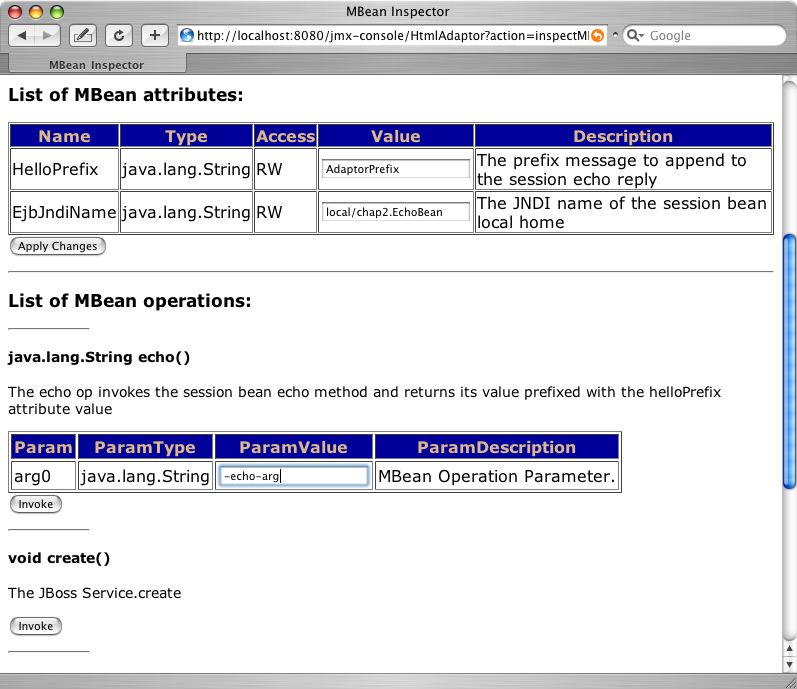
As shown, we have already entered an argument string of -echo-arg into the ParamValue text field. Press the Invoke button and a result string of AdaptorPrefix-echo-arg is displayed on the results page. The server console will show several stack traces from the various metadata queries issues by the JMX console and the MBean invoke method debugging lines:
10:51:48,671 INFO [EjbMBeanAdaptor] Begin invoke, actionName=echo
10:51:48,671 INFO [EjbMBeanAdaptor] Lookup EchoLocalHome@local/chap2.EchoBean
10:51:48,687 INFO [EchoBean] echo, info=echo info, arg=, arg=-echo-arg
10:51:48,687 INFO [EjbMBeanAdaptor] Result: AdaptorPrefix-echo-arg
10:51:48,687 INFO [EjbMBeanAdaptor] End invoke, actionName=echo
JBoss has an extensible deployment architecture that allows one to incorporate components into the bare JBoss JMX microkernel. The MainDeployer is the deployment entry point. Requests to deploy a component are sent to the MainDeployer and it determines if there is a subdeployer capable of handling the deployment, and if there is, it delegates the deployment to the subdeployer. We saw an example of this when we looked at how the MainDeployer used the SARDeployer to deploy MBean services. Among the deployers provided with JBoss are:
AbstractWebDeployer: This subdeployer handles web application archives (WARs). It accepts deployment archives and directories whose name ends with a war suffix. WARs must have a WEB-INF/web.xml descriptor and may have a WEB-INF/jboss-web.xml descriptor.
EARDeployer: This subdeployer handles enterprise application archives (EARs). It accepts deployment archives and directories whose name ends with an ear suffix. EARs must have a META-INF/application.xml descriptor and may have a META-INF/jboss-app.xml descriptor.
EJBDeployer: This subdeployer handles enterprise bean jars. It accepts deployment archives and directories whose name ends with a jar suffix. EJB jars must have a META-INF/ejb-jar.xml descriptor and may have a META-INF/jboss.xml descriptor.
JARDeployer: This subdeployer handles library JAR archives. The only restriction it places on an archive is that it cannot contain a WEB-INF directory.
RARDeployer: This subdeployer handles JCA resource archives (RARs). It accepts deployment archives and directories whose name ends with a rar suffix. RARs must have a META-INF/ra.xml descriptor.
SARDeployer: This subdeployer handles JBoss MBean service archives (SARs). It accepts deployment archives and directories whose name ends with a sar suffix, as well as standalone XML files that end with service.xml. SARs that are jars must have a META-INF/jboss-service.xml descriptor.
XSLSubDeployer: This subdeployer deploys arbitrary XML files. JBoss uses the XSLSubDeployer to deploy ds.xml files and transform them into service.xml files for the SARDeployer. However, it is not limited to just this task.
HARDeployer: This subdeployer deploys hibernate archives (HARs). It accepts deployment archives and directories whose name ends with a har suffix. HARs must have a META-INF/hibernate-service.xml descriptor.
AspectDeployer: This subdeployer deploys AOP archives. It accepts deployment archives and directories whose name ends with an aop suffix as well as aop.xml files. AOP archives must have a META-INF/jboss-aop.xml descriptor.
ClientDeployer: This subdeployer deploys J2EE application clients. It accepts deployment archives and directories whose name ends with a jar suffix. J2EE clients must have a META-INF/application-client.xml descriptor and may have a META-INF/jboss-client.xml descriptor.
BeanShellSubDeployer: This subdeployer deploys bean shell scripts as MBeans. It accepts files whose name ends with a bsh suffix.
The MainDeployer, JARDeployer and SARDeployer are hard coded deployers in the JBoss server core. All other deployers are MBean services that register themselves as deployers with the MainDeployer using the addDeployer(SubDeployer) operation.
The MainDeployer communicates information about the component to be deployed the SubDeployer using a DeploymentInfo object. The DeploymentInfo object is a data structure that encapsulates the complete state of a deployable component.
When the MainDeployer receives a deployment request, it iterates through its registered subdeployers and invokes the accepts(DeploymentInfo) method on the subdeployer. The first subdeployer to return true is chosen. The MainDeployer will delegate the init, create, start, stop and destroy deployment life cycle operations to the subdeployer.
Deployers are the mechanism by which components are brought into a JBoss server. Deployers are also the creators of the majority of UCL instances, and the primary creator is the MainDeployer. The MainDeployer creates the UCL for a deployment early on during its init method. The UCL is created by calling the DeploymentInfo.createClassLoaders() method. Only the topmost DeploymentInfo will actually create a UCL. All subdeployments will add their class paths to their parent DeploymentInfo UCL. Every deployment does have a standalone URLClassLoader that uses the deployment URL as its path. This is used to localize the loading of resources such as deployment descriptors. Figure 2.20, “An illustration of the class loaders involved with an EAR deployment” provides an illustration of the interaction between Deployers, DeploymentInfos and class loaders.
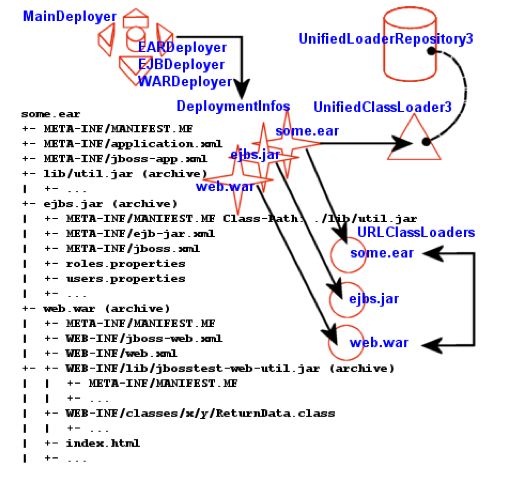
The figure illustrates an EAR deployment with EJB and WAR subdeployments. The EJB deployment references the lib/util.jar utility jar via its manifest. The WAR includes classes in its WEB-INF/classes directory as well as the WEB-INF/lib/jbosstest-web-util.jar. Each deployment has a DeploymentInfo instance that has a URLClassLoader pointing to the deployment archive. The DeploymentInfo associated with some.ear is the only one to have a UCL created. The ejbs.jar and web.war DeploymentInfos add their deployment archive to the some.ear UCL classpath, and share this UCL as their deployment UCL. The EJBDeployer also adds any manifest jars to the EAR UCL.
The WARDeployer behaves differently than other deployers in that it only adds its WAR archive to the DeploymentInfo UCL classpath. The loading of classes from the WAR WEB-INF/classes and WEB-INF/lib locations is handled by the servlet container class loader. The servlet container class loaders delegate to the WAR DeploymentInfo UCL as their parent class loader, but the server container class loader is not part of the JBoss class loader repository. Therefore, classes inside of a WAR are not visible to other components. Classes that need to be shared between web application components and other components such as EJBs, and MBeans need to be loaded into the shared class loader repository either by including the classes into a SAR or EJB deployment, or by referencing a jar containing the shared classes through a manifest Class-Path entry. In the case of a SAR, the SAR classpath element in the service deployment serves the same purpose as a JAR manifest Class-Path.
JBoss has an snmp-adaptor service that can be used to intercept JMX notifications emitted by MBeans, convert them to traps and send them to SNMP managers. In this respect the snmp-adaptor acts as a SNMP agent. Future versions may offer support for full agent get/set functionality that maps onto MBean attributes or operations.
This service can be used to integrate JBoss with higher order system/network management platforms (HP OpenView, for example), making the MBeans visible to those systems. The MBean developer can instrument the MBeans by producing notifications for any significant event (e.g. server coldstart), and adaptor can then be configured to intercept the notification and map it onto an SNMP traps. The adaptor uses the JoeSNMP package from OpenNMS as the SNMP engine.
The SNMP service is configured in snmp-adaptor.sar. This service is only available in the all configuration, so you'll need to copy it to your configuration if you want to use it. Inside the snmp-adaptor.sar directory, there are two configuration files that control the SNMP service.
managers.xml: configures where to send traps. The content model for this file is shown in Figure 2.21, “The schema for the SNMP managers file”.
notifications.xml: specifies the exact mapping of each notification type to a corresponding SNMP trap. The content model for this file is shown in Figure 2.22, “The schema for the notification to trap mapping file”.
The SNMPAgentService MBean is configured in snmp-adaptor.sar/META-INF/jboss-service.xml. The configurable parameters are:
HeartBeatPeriod: The period in seconds at which heartbeat notifications are generated.
ManagersResName: Specifies the resource name of the managers.xml file.
NotificationMapResName: Specifies the resource name of the notications.xml file.
TrapFactoryClassName: The org.jboss.jmx.adaptor.snmp.agent.TrapFactory implementation class that takes care of translation of JMX Notifications into SNMP V1 and V2 traps.
TimerName: Specifies the JMX ObjectName of the JMX timer service to use for heartbeat notifications.
SubscriptionList: Specifies which MBeans and notifications to listen for.
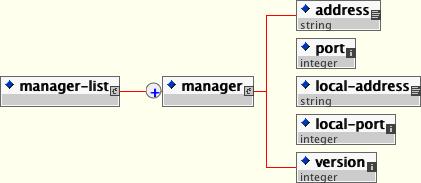
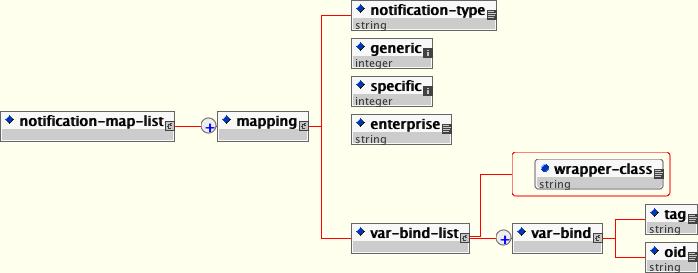
TrapdService is a simple MBean that acts as an SNMP Manager. It listens to a configurable port for incoming traps and logs them as DEBUG messages using the system logger. You can modify the log4j configuration to redirect the log output to a file. SnmpAgentService and TrapdService are not dependent on each other.
In addition to the MBean services notion that allows for the ability to integrate arbitrary functionality, JBoss also has a detached invoker concept that allows MBean services to expose functional interfaces via arbitrary protocols for remote access by clients. The notion of a detached invoker is that remoting and the protocol by which a service is accessed is a functional aspect or service independent of the component. Thus, one can make a naming service available for use via RMI/JRMP, RMI/HTTP, RMI/SOAP, or any arbitrary custom transport.
Let's begin our discussion of the detached invoker architecture with an overview of the components involved. The main components in the detached invoker architecture are shown in Figure 2.23, “The main components in the detached invoker architecture”.
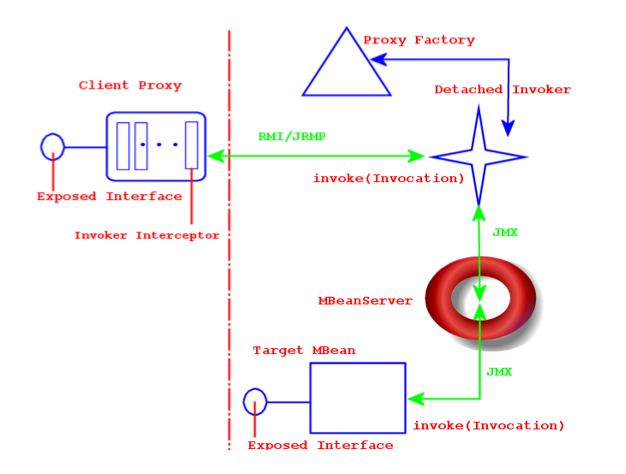
On the client side, there exists a client proxy which exposes the interface(s) of the MBean service. This is the same smart, compile-less dynamic proxy that we use for EJB home and remote interfaces. The only difference between the proxy for an arbitrary service and the EJB is the set of interfaces exposed as well as the client side interceptors found inside the proxy. The client interceptors are represented by the rectangles found inside of the client proxy. An interceptor is an assembly line type of pattern that allows for transformation of a method invocation and/or return values. A client obtains a proxy through some lookup mechanism, typically JNDI. Although RMI is indicated in Figure 2.23, “The main components in the detached invoker architecture”, the only real requirement on the exposed interface and its types is that they are serializable between the client server over JNDI as well as the transport layer.
The choice of the transport layer is determined by the last interceptor in the client proxy, which is referred to as the Invoker Interceptor in Figure 2.23, “The main components in the detached invoker architecture”. The invoker interceptor contains a reference to the transport specific stub of the server side Detached Invoker MBean service. The invoker interceptor also handles the optimization of calls that occur within the same VM as the target MBean. When the invoker interceptor detects that this is the case the call is passed to a call-by-reference invoker that simply passes the invocation along to the target MBean.
The detached invoker service is responsible for making a generic invoke operation available via the transport the detached invoker handles. The Invoker interface illustrates the generic invoke operation.
package org.jboss.invocation;

import java.rmi.Remote;
import org.jboss.proxy.Interceptor;
import org.jboss.util.id.GUID;


public interface Invoker
    extends Remote
{
    GUID ID = new GUID();

    String getServerHostName() throws Exception;

    Object invoke(Invocation invocation) throws Exception;
}
The Invoker interface extends Remote to be compatible with RMI, but this does not mean that an invoker must expose an RMI service stub. The detached invoker service simply acts as a transport gateway that accepts invocations represented as the org.jboss.invocation.Invocation object over its specific transport, unmarshalls the invocation, forwards the invocation onto the destination MBean service, represented by the Target MBean in Figure 2.23, “The main components in the detached invoker architecture”, and marshalls the return value or exception resulting from the forwarded call back to the client.
The Invocation object is just a representation of a method invocation context. This includes the target MBean name, the method, the method arguments, a context of information associated with the proxy by the proxy factory, and an arbitrary map of data associated with the invocation by the client proxy interceptors.
The configuration of the client proxy is done by the server side proxy factory MBean service, indicated by the Proxy Factory component in Figure 2.23, “The main components in the detached invoker architecture”. The proxy factory performs the following tasks:
Create a dynamic proxy that implements the interface the target MBean wishes to expose.
Associate the client proxy interceptors with the dynamic proxy handler.
Associate the invocation context with the dynamic proxy. This includes the target MBean, detached invoker stub and the proxy JNDI name.
Make the proxy available to clients by binding the proxy into JNDI.
The last component in Figure 2.23, “The main components in the detached invoker architecture” is the Target MBean service that wishes to expose an interface for invocations to remote clients. The steps required for an MBean service to be accessible through a given interface are:
Define a JMX operation matching the signature: public Object invoke(org.jboss.invocation.Invocation) throws Exception
Create a HashMap<Long, Method> mapping from the exposed interface java.lang.reflect.Methods to the long hash representation using the org.jboss.invocation.MarshalledInvocation.calculateHash method.
Implement the invoke(Invocation) JMX operation and use the interface method hash mapping to transform from the long hash representation of the invoked method to the java.lang.reflect.Method of the exposed interface. Reflection is used to perform the actual invocation on the object associated with the MBean service that actually implements the exposed interface.
In the section on connecting to the JMX server we mentioned that there was a service that allows one to access the javax.management.MBeanServer via any protocol using an invoker service. In this section we present the org.jboss.jmx.connector.invoker.InvokerAdaptorService and its configuration for access via RMI/JRMP as an example of the steps required to provide remote access to an MBean service.
The InvokerAdaptorService is a simple MBean service that only exists to fulfill the target MBean role in the detached invoker pattern.
Example 2.16. The InvokerAdaptorService MBean
package org.jboss.jmx.connector.invoker;
public interface InvokerAdaptorServiceMBean
    extends org.jboss.system.ServiceMBean
{
    Class getExportedInterface();
    void setExportedInterface(Class exportedInterface);

    Object invoke(org.jboss.invocation.Invocation invocation)
        throws Exception;
}

package org.jboss.jmx.connector.invoker;

import java.lang.reflect.InvocationTargetException;
import java.lang.reflect.Method;
import java.lang.reflect.UndeclaredThrowableException;
import java.util.Collections;
import java.util.HashMap;
import java.util.Map;

import javax.management.MBeanServer;
import javax.management.ObjectName;

import org.jboss.invocation.Invocation;
import org.jboss.invocation.MarshalledInvocation;
import org.jboss.mx.server.ServerConstants;
import org.jboss.system.ServiceMBeanSupport;
import org.jboss.system.Registry;

public class InvokerAdaptorService
    extends ServiceMBeanSupport
    implements InvokerAdaptorServiceMBean, ServerConstants
{
    private static ObjectName mbeanRegistry;

    static {
        try {
            mbeanRegistry = new ObjectName(MBEAN_REGISTRY);
        } catch (Exception e) {
            throw new RuntimeException(e.toString());
        }
    }

    private Map marshalledInvocationMapping = new HashMap();
    private Class exportedInterface;

    public Class getExportedInterface()
    {
        return exportedInterface;
    }

    public void setExportedInterface(Class exportedInterface)
    {
        this.exportedInterface = exportedInterface;
    }

    protected void startService()
        throws Exception
    {
        // Build the interface method map
        Method[] methods = exportedInterface.getMethods();
        HashMap tmpMap = new HashMap(methods.length);
        for (int m = 0; m < methods.length; m ++) {
            Method method = methods[m];
            Long hash = new Long(MarshalledInvocation.calculateHash(method));
            tmpMap.put(hash, method);
        }

        marshalledInvocationMapping = Collections.unmodifiableMap(tmpMap);
        // Place our ObjectName hash into the Registry so invokers can
        // resolve it
        Registry.bind(new Integer(serviceName.hashCode()), serviceName);
    }

    protected void stopService()
        throws Exception
    {
        Registry.unbind(new Integer(serviceName.hashCode()));
    }


    public Object invoke(Invocation invocation)
        throws Exception
    {
        // Make sure we have the correct classloader before unmarshalling
        Thread thread = Thread.currentThread();
        ClassLoader oldCL = thread.getContextClassLoader();

        // Get the MBean this operation applies to
        ClassLoader newCL = null;
        ObjectName objectName = (ObjectName)
            invocation.getValue("JMX_OBJECT_NAME");
        if (objectName != null) {
            // Obtain the ClassLoader associated with the MBean deployment
            newCL = (ClassLoader)
                server.invoke(mbeanRegistry, "getValue",
                              new Object[] { objectName, CLASSLOADER },
                              new String[] { ObjectName.class.getName(),
                                             "java.lang.String" });
        }

        if (newCL != null && newCL != oldCL) {
            thread.setContextClassLoader(newCL);
        }

        try {
            // Set the method hash to Method mapping
            if (invocation instanceof MarshalledInvocation) {
                MarshalledInvocation mi = (MarshalledInvocation) invocation;
                mi.setMethodMap(marshalledInvocationMapping);
            }

            // Invoke the MBeanServer method via reflection
            Method method = invocation.getMethod();
            Object[] args = invocation.getArguments();
            Object value = null;
            try {
                String name = method.getName();
                Class[] sig = method.getParameterTypes();
                Method mbeanServerMethod =
                    MBeanServer.class.getMethod(name, sig);
                value = mbeanServerMethod.invoke(server, args);
            } catch(InvocationTargetException e) {
                Throwable t = e.getTargetException();
                if (t instanceof Exception) {
                    throw (Exception) t;
                } else {
                    throw new UndeclaredThrowableException(t, method.toString());
                }
            }

            return value;
        } finally {
            if (newCL != null && newCL != oldCL) {
                thread.setContextClassLoader(oldCL);
            }
        }
    }
}
Let's go through the key details of this service. The InvokerAdaptorServiceMBean Standard MBean interface of the InvokerAdaptorService has a single ExportedInterface attribute and a single invoke(Invocation) operation. The ExportedInterface attribute allows customization of the type of interface the service exposes to clients. This has to be compatible with the MBeanServer class in terms of method name and signature. The invoke(Invocation) operation is the required entry point that target MBean services must expose to participate in the detached invoker pattern. This operation is invoked by the detached invoker services that have been configured to provide access to the InvokerAdaptorService.
Lines 54-64 of the InvokerAdaptorService build the HashMap<Long, Method> of the ExportedInterface Class using the org.jboss.invocation.MarshalledInvocation.calculateHash(Method) utility method. Because java.lang.reflect.Method instances are not serializable, a MarshalledInvocation version of the non-serializable Invocation class is used to marshall the invocation between the client and server. The MarshalledInvocation replaces the Method instances with their corresponding hash representation. On the server side, the MarshalledInvocation must be told what the hash to Method mapping is.
Line 64 creates a mapping between the InvokerAdaptorService service name and its hash code representation. This is used by detached invokers to determine what the target MBean ObjectName of an Invocation is. When the target MBean name is store in the Invocation, its store as its hashCode because ObjectNames are relatively expensive objects to create. The org.jboss.system.Registry is a global map like construct that invokers use to store the hash code to ObjectName mappings in.
Lines 77-93 obtain the name of the MBean on which the MBeanServer operation is being performed and lookup the class loader associated with the MBean's SAR deployment. This information is available via the org.jboss.mx.server.registry.BasicMBeanRegistry, a JBoss JMX implementation specific class. It is generally necessary for an MBean to establish the correct class loading context because the detached invoker protocol layer may not have access to the class loaders needed to unmarshall the types associated with an invocation.
Lines 101-105 install the ExposedInterface class method hash to method mapping if the invocation argument is of type MarshalledInvocation. The method mapping calculated previously at lines 54-62 is used here.
Lines 107-114 perform a second mapping from the ExposedInterface Method to the matching method of the MBeanServer class. The InvokerServiceAdaptor decouples the ExposedInterface from the MBeanServer class in that it allows an arbitrary interface. This is needed on one hand because the standard java.lang.reflect.Proxy class can only proxy interfaces. It also allows one to only expose a subset of the MBeanServer methods and add transport specific exceptions like java.rmi.RemoteException to the ExposedInterface method signatures.
Line 115 dispatches the MBeanServer method invocation to the MBeanServer instance to which the InvokerAdaptorService was deployed. The server instance variable is inherited from the ServiceMBeanSupport superclass.
Lines 117-124 handle any exceptions coming from the reflective invocation including the unwrapping of any declared exception thrown by the invocation.
Line 126 is the return of the successful MBeanServer method invocation result.
Note that the InvokerAdaptorService MBean does not deal directly with any transport specific details. There is the calculation of the method hash to Method mapping, but this is a transport independent detail.
Now let's take a look at how the InvokerAdaptorService may be used to expose the same org.jboss.jmx.adaptor.rmi.RMIAdaptor interface via RMI/JRMP as seen in Connecting to JMX Using RMI. We will start by presenting the proxy factory and InvokerAdaptorService configurations found in the default setup in the jmx-invoker-adaptor-service.sar deployment. Example 2.17, “The default jmx-invoker-adaptor-server.sar jboss-service.xml deployment descriptor” shows the jboss-service.xml descriptor for this deployment.
Example 2.17. The default jmx-invoker-adaptor-server.sar jboss-service.xml deployment descriptor
<server>
    <!-- The JRMP invoker proxy configuration for the InvokerAdaptorService -->
    <mbean code="org.jboss.invocation.jrmp.server.JRMPProxyFactory"
           name="jboss.jmx:type=adaptor,name=Invoker,protocol=jrmp,service=proxyFactory">
        <!-- Use the standard JRMPInvoker from conf/jboss-service.xml -->
        <attribute name="InvokerName">jboss:service=invoker,type=jrmp</attribute>
        <!-- The target MBean is the InvokerAdaptorService configured below -->
        <attribute name="TargetName">jboss.jmx:type=adaptor,name=Invoker</attribute>
        <!-- Where to bind the RMIAdaptor proxy -->
        <attribute name="JndiName">jmx/invoker/RMIAdaptor</attribute>
        <!-- The RMI compabitle MBeanServer interface -->
        <attribute name="ExportedInterface">org.jboss.jmx.adaptor.rmi.RMIAdaptor</attribute>
        <attribute name="ClientInterceptors">
            <iterceptors>
                <interceptor>org.jboss.proxy.ClientMethodInterceptor</interceptor>
                <interceptor>
                    org.jboss.jmx.connector.invoker.client.InvokerAdaptorClientInterceptor
                </interceptor>
                <interceptor>org.jboss.invocation.InvokerInterceptor</interceptor>
            </iterceptors>
        </attribute>
        <depends>jboss:service=invoker,type=jrmp</depends>
    </mbean>
    <!-- This is the service that handles the RMIAdaptor invocations by routing
         them to the MBeanServer the service is deployed under. -->
    <mbean code="org.jboss.jmx.connector.invoker.InvokerAdaptorService"
           name="jboss.jmx:type=adaptor,name=Invoker">
        <attribute name="ExportedInterface">org.jboss.jmx.adaptor.rmi.RMIAdaptor</attribute>
    </mbean>
</server>
The first MBean, org.jboss.invocation.jrmp.server.JRMPProxyFactory, is the proxy factory MBean service that creates proxies for the RMI/JRMP protocol. The configuration of this service as shown in Example 2.17, “The default jmx-invoker-adaptor-server.sar jboss-service.xml deployment descriptor” states that the JRMPInvoker will be used as the detached invoker, the InvokerAdaptorService is the target mbean to which requests will be forwarded, that the proxy will expose the RMIAdaptor interface, the proxy will be bound into JNDI under the name jmx/invoker/RMIAdaptor, and the proxy will contain 3 interceptors: ClientMethodInterceptor, InvokerAdaptorClientInterceptor, InvokerInterceptor. The configuration of the InvokerAdaptorService simply sets the RMIAdaptor interface that the service is exposing.
The last piece of the configuration for exposing the InvokerAdaptorService via RMI/JRMP is the detached invoker. The detached invoker we will use is the standard RMI/JRMP invoker used by the EJB containers for home and remote invocations, and this is the org.jboss.invocation.jrmp.server.JRMPInvoker MBean service configured in the conf/jboss-service.xml descriptor. That we can use the same service instance emphasizes the detached nature of the invokers. The JRMPInvoker simply acts as the RMI/JRMP endpoint for all RMI/JRMP proxies regardless of the interface(s) the proxies expose or the service the proxies utilize.
The org.jboss.invocation.jrmp.server.JRMPInvoker class is an MBean service that provides the RMI/JRMP implementation of the Invoker interface. The JRMPInvoker exports itself as an RMI server so that when it is used as the Invoker in a remote client, the JRMPInvoker stub is sent to the client instead and invocations use the RMI/JRMP protocol.
The JRMPInvoker MBean supports a number of attribute to configure the RMI/JRMP transport layer. Its configurable attributes are:
RMIObjectPort: sets the RMI server socket listening port number. This is the port RMI clients will connect to when communicating through the proxy interface. The default setting in the jboss-service.xml descriptor is 4444, and if not specified, the attribute defaults to 0 to indicate an anonymous port should be used.
RMIClientSocketFactory: specifies a fully qualified class name for the java.rmi.server.RMIClientSocketFactory interface to use during export of the proxy interface.
RMIServerSocketFactory: specifies a fully qualified class name for the java.rmi.server.RMIServerSocketFactory interface to use during export of the proxy interface.
ServerAddress: specifies the interface address that will be used for the RMI server socket listening port. This can be either a DNS hostname or a dot-decimal Internet address. Since the RMIServerSocketFactory does not support a method that accepts an InetAddress object, this value is passed to the RMIServerSocketFactory implementation class using reflection. A check for the existence of a public void setBindAddress(java.net.InetAddress addr) method is made, and if one exists the RMIServerSocketAddr value is passed to the RMIServerSocketFactory implementation. If the RMIServerSocketFactory implementation does not support such a method, the ServerAddress value will be ignored.
SecurityDomain: specifies the JNDI name of an org.jboss.security.SecurityDomain interface implementation to associate with the RMIServerSocketFactory implementation. The value will be passed to the RMIServerSocketFactory using reflection to locate a method with a signature of public void setSecurityDomain(org.jboss.security.SecurityDomain d). If no such method exists the SecurityDomain value will be ignored.
The org.jboss.invocation.pooled.server.PooledInvoker is an MBean service that provides RMI over a custom socket transport implementation of the Invoker interface. The PooledInvoker exports itself as an RMI server so that when it is used as the Invoker in a remote client, the PooledInvoker stub is sent to the client instead and invocations use the custom socket protocol.
The PooledInvoker MBean supports a number of attribute to configure the socket transport layer. Its configurable attributes are:
NumAcceptThreads: The number of threads that exist for accepting client connections. The default is 1.
MaxPoolSize: The number of server threads for processing client. The default is 300.
SocketTimeout: The socket timeout value passed to the Socket.setSoTimeout() method. The default is 60000.
ServerBindPort: The port used for the server socket. A value of 0 indicates that an anonymous port should be chosen.
ClientConnectAddress: The address that the client passes to the Socket(addr, port) constructor. This defaults to the server InetAddress.getLocalHost() value.
ClientConnectPort: The port that the client passes to the Socket(addr, port) constructor. The default is the port of the server listening socket.
ClientMaxPoolSize: The client side maximum number of threads. The default is 300.
Backlog: The backlog associated with the server accept socket. The default is 200.
EnableTcpNoDelay: A boolean flag indicating if client sockets will enable the TcpNoDelay flag on the socket. The default is false.
ServerBindAddress: The address on which the server binds its listening socket. The default is an empty value which indicates the server should be bound on all interfaces.
TransactionManagerService: The JMX ObjectName of the JTA transaction manager service.
The org.jboss.invocation.iiop.IIOPInvoker class is an MBean service that provides the RMI/IIOP implementation of the Invoker interface. The IIOPInvoker routes IIOP requests to CORBA servants. This is used by the org.jboss.proxy.ejb.IORFactory proxy factory to create RMI/IIOP proxies. However, rather than creating Java proxies (as the JRMP proxy factory does), this factory creates CORBA IORs. An IORFactory is associated to a given enterprise bean. It registers with the IIOP invoker two CORBA servants: anEjbHomeCorbaServant for the bean's EJBHome and an EjbObjectCorbaServant for the bean's EJBObjects.
The IIOPInvoker MBean has no configurable properties, since all properties are configured from the conf/jacorb.properties property file used by the JacORB CORBA service.
The org.jboss.invocation.jrmp.server.JRMPProxyFactory MBean service is a proxy factory that can expose any interface with RMI compatible semantics for access to remote clients using JRMP as the transport.
The JRMPProxyFactory supports the following attributes:
InvokerName: The server side JRMPInvoker MBean service JMX ObjectName string that will handle the RMI/JRMP transport.
TargetName: The server side MBean that exposes the invoke(Invocation) JMX operation for the exported interface. This is used as the destination service for any invocations done through the proxy.
JndiName: The JNDI name under which the proxy will be bound.
ExportedInterface: The fully qualified class name of the interface that the proxy implements. This is the typed view of the proxy that the client uses for invocations.
ClientInterceptors: An XML fragment of interceptors/interceptor elements with each interceptor element body specifying the fully qualified class name of an org.jboss.proxy.Interceptor implementation to include in the proxy interceptor stack. The ordering of the interceptors/interceptor elements defines the order of the interceptors.
The org.jboss.invocation.http.server.HttpInvoker MBean service provides support for making invocations into the JMX bus over HTTP. Unlike the JRMPInvoker, the HttpInvoker is not an implementation of Invoker, but it does implement the Invoker.invoke method. The HttpInvoker is accessed indirectly by issuing an HTTP POST against the org.jboss.invocation.http.servlet.InvokerServlet. The HttpInvoker exports a client side proxy in the form of the org.jboss.invocation.http.interfaces.HttpInvokerProxy class, which is an implementation of Invoker, and is serializable. The HttpInvoker is a drop in replacement for the JRMPInvoker as the target of the bean-invoker and home-invoker EJB configuration elements. The HttpInvoker and InvokerServlet are deployed in the http-invoker.sar discussed in the JNDI chapter in the section entitled Accessing JNDI over HTTP
The HttpInvoker supports the following attributes:
InvokerURL: This is either the http URL to the InvokerServlet mapping, or the name of a system property that will be resolved inside the client VM to obtain the http URL to the InvokerServlet.
InvokerURLPrefix: If there is no invokerURL set, then one will be constructed via the concatenation of invokerURLPrefix + the local host + invokerURLSuffix. The default prefix is http://.
InvokerURLSuffix: If there is no invokerURL set, then one will be constructed via the concatenation of invokerURLPrefix + the local host + invokerURLSuffix. The default suffix is :8080/invoker/JMXInvokerServlet.
UseHostName: A boolean flag if the InetAddress.getHostName() or getHostAddress() method should be used as the host component of invokerURLPrefix + host + invokerURLSuffix. If true getHostName() is used, otherwise getHostAddress() is used.
The org.jboss.proxy.generic.ProxyFactoryHA service is an extension of the ProxyFactoryHA that is a cluster aware factory. The ProxyFactoryHA fully supports all of the attributes of the JRMPProxyFactory. This means that customized bindings of the port, interface and socket transport are available to clustered RMI/JRMP as well. In addition, the following cluster specific attributes are supported:
PartitionObjectName: The JMX ObjectName of the cluster service to which the proxy is to be associated with.
LoadBalancePolicy: The class name of the org.jboss.ha.framework.interfaces.LoadBalancePolicy interface implementation to associate with the proxy.
The RMI/HTTP layer allows for software load balancing of the invocations in a clustered environment. The HA capable extension of the HTTP invoker borrows much of its functionality from the HA-RMI/JRMP clustering. To enable HA-RMI/HTTP you need to configure the invokers for the EJB container. This is done through either a jboss.xml descriptor, or the standardjboss.xml descriptor.
The org.jboss.invocation.http.server.HttpProxyFactory MBean service is a proxy factory that can expose any interface with RMI compatible semantics for access to remote clients using HTTP as the transport.
The HttpProxyFactory supports the following attributes:
InvokerName: The server side MBean that exposes the invoke operation for the exported interface. The name is embedded into the HttpInvokerProxy context as the target to which the invocation should be forwarded by the HttpInvoker.
JndiName: The JNDI name under which the HttpInvokerProxy will be bound. This is the name clients lookup to obtain the dynamic proxy that exposes the service interfaces and marshalls invocations over HTTP. This may be specified as an empty value to indicate that the proxy should not be bound into JNDI.
InvokerURL: This is either the http URL to the InvokerServlet mapping, or the name of a system property that will be resolved inside the client VM to obtain the http URL to the InvokerServlet.
InvokerURLPrefix: If there is no invokerURL set, then one will be constructed via the concatenation of invokerURLPrefix + the local host + invokerURLSuffix. The default prefix is http://.
InvokerURLSuffix: If there is no invokerURL set, then one will be constructed via the concatenation of invokerURLPrefix + the local host + invokerURLSuffix. The default suffix is :8080/invoker/JMXInvokerServlet.
UseHostName: A boolean flag indicating if the InetAddress.getHostName() or getHostAddress() method should be used as the host component of invokerURLPrefix + host + invokerURLSuffix. If true getHostName() is used, otherwise getHostAddress() is used.
ExportedInterface: The name of the RMI compatible interface that the HttpInvokerProxy implements.
Using the HttpProxyFactory MBean and JMX, you can expose any interface for access using HTTP as the transport. The interface to expose does not have to be an RMI interface, but it does have to be compatible with RMI in that all method parameters and return values are serializable. There is also no support for converting RMI interfaces used as method parameters or return values into their stubs.
The three steps to making your object invocable via HTTP are:
Create a mapping of longs to the RMI interface methods using the MarshalledInvocation.calculateHash method. Here for example, is the procedure for an RMI SRPRemoteServerInterface interface:
import java.lang.reflect.Method;
import java.util.HashMap;
import org.jboss.invocation.MarshalledInvocation;

HashMap marshalledInvocationMapping = new HashMap();

// Build the Naming interface method map
Method[] methods = SRPRemoteServerInterface.class.getMethods();
for(int m = 0; m < methods.length; m ++) {
    Method method = methods[m];
    Long hash = new Long(MarshalledInvocation.calculateHash(method));
    marshalledInvocationMapping.put(hash, method);
}
Either create or extend an existing MBean to support an invoke operation. Its signature is Object invoke(Invocation invocation) throws Exception, and the steps it performs are as shown here for the SRPRemoteServerInterface interface. Note that this uses the marshalledInvocationMapping from step 1 to map from the Long method hashes in the MarshalledInvocation to the Method for the interface.
import org.jboss.invocation.Invocation;
import org.jboss.invocation.MarshalledInvocation;

public Object invoke(Invocation invocation)
    throws Exception
{
    SRPRemoteServerInterface theServer = <the_actual_rmi_server_object>;
    // Set the method hash to Method mapping
    if (invocation instanceof MarshalledInvocation) {
        MarshalledInvocation mi = (MarshalledInvocation) invocation;
        mi.setMethodMap(marshalledInvocationMapping);
    }

    // Invoke the Naming method via reflection
    Method method = invocation.getMethod();
    Object[] args = invocation.getArguments();
    Object value = null;
    try {
        value = method.invoke(theServer, args);
    } catch(InvocationTargetException e) {
        Throwable t = e.getTargetException();
        if (t instanceof Exception) {
            throw (Exception) e;
        } else {
            throw new UndeclaredThrowableException(t, method.toString());
        }
    }

    return value;
}
Create a configuration of the HttpProxyFactory MBean to make the RMI/HTTP proxy available through JNDI. For example:
<!-- Expose the SRP service interface via HTTP -->
<mbean code="org.jboss.invocation.http.server.HttpProxyFactory"
       name="jboss.security.tests:service=SRP/HTTP">
    <attribute name="InvokerURL">http://localhost:8080/invoker/JMXInvokerServlet</attribute>
    <attribute name="InvokerName">jboss.security.tests:service=SRPService</attribute>
    <attribute name="ExportedInterface">
        org.jboss.security.srp.SRPRemoteServerInterface
    </attribute>
    <attribute name="JndiName">srp-test-http/SRPServerInterface</attribute>
</mbean>
Any client may now lookup the RMI interface from JNDI using the name specified in the HttpProxyFactory (e.g., srp-test-http/SRPServerInterface) and use the obtain proxy in exactly the same manner as the RMI/JRMP version.