<?xml version="1.0" encoding="UTF-8" standalone="no"?>
<!DOCTYPE html
  PUBLIC "-//W3C//DTD XHTML 1.0 Strict//EN" "http://www.w3.org/TR/xhtml1/DTD/xhtml1-strict.dtd">
<html xmlns="http://www.w3.org/1999/xhtml"><head><title xmlns:diffmk="http://diffmk.sf.net/ns/diff">Chapter 4. BIRT Reports Deployment</title><link rel="stylesheet" href="css/tools_release.css" type="text/css"/><meta xmlns:diffmk="http://diffmk.sf.net/ns/diff" name="generator" content="DocBook XSL Stylesheets V1.72.0"/><link xmlns="" xmlns:diffmk="http://diffmk.sf.net/ns/diff" rel="shortcut icon" type="image/vnd.microsoft.icon" href="images/favicon.ico"/><meta name="keywords" content="JBoss, BIRT, Seam"/><link rel="start" href="index.html" title="Birt Plugin Integration Reference Guide"/><link rel="up" href="index.html" title="Birt Plugin Integration Reference Guide"/><link rel="prev" href="hibernate_datasource.html" title="Chapter 3. Hibernate ODA Data Source"/><script xmlns="" xmlns:diffmk="http://diffmk.sf.net/ns/diff" type="text/javascript" src="script/prototype-1.6.0.2.js"><!--If you see this message, your web browser doesn't support JavaScript or JavaScript is disabled.--></script><script xmlns="" xmlns:diffmk="http://diffmk.sf.net/ns/diff" type="text/javascript" src="script/effects.js"><!--If you see this message, your web browser doesn't support JavaScript or JavaScript is disabled.--></script><script xmlns="" xmlns:diffmk="http://diffmk.sf.net/ns/diff" type="text/javascript" src="script/scriptaculous.js"><!--If you see this message, your web browser doesn't support JavaScript or JavaScript is disabled.--></script><script xmlns="" xmlns:diffmk="http://diffmk.sf.net/ns/diff" type="text/javascript" src="script/toggle.js"><!--If you see this message, your web browser doesn't support JavaScript or JavaScript is disabled.--></script></head><body><div xmlns="" xmlns:diffmk="http://diffmk.sf.net/ns/diff" id="overlay"> </div><p xmlns:diffmk="http://diffmk.sf.net/ns/diff" id="title"><a href="http://www.jboss.org" class="site_href"><strong>JBoss.org</strong></a><a href="http://docs.jboss.org/" class="doc_href"><strong>Community Documentation</strong></a></p><ul xmlns:diffmk="http://diffmk.sf.net/ns/diff" class="docnav"><li class="previous"><a accesskey="p" href="hibernate_datasource.html"><strong>Prev</strong></a></li><li class="next"/></ul><div class="chapter" lang="en-US"><div class="titlepage"><div><div><h2 xmlns="" class="&#xA;&#x9;&#x9;&#x9;title&#xA;&#x9;&#x9;"><a xmlns="http://www.w3.org/1999/xhtml" id="birt_reports_deployment"/>Chapter 4. BIRT Reports Deployment</h2><img xmlns="" xmlns:diffmk="http://diffmk.sf.net/ns/diff" src="images/new.png" alt="updated" class="img_marker"/></div></div></div><p>When everything is configured correctly you will be able to view/render the designed
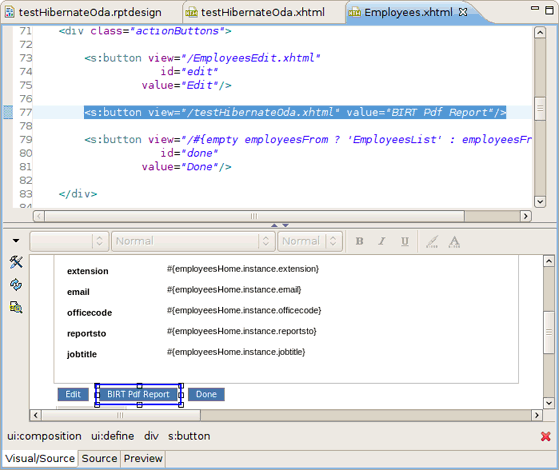
        reports in your Seam (or any other) Web application.</p><p>You can deploy a report by adding an action button to the Seam's CRUD <span class="emphasis"><em>
            <span class="property">.xhtml</span>
        </em></span> file.</p><div class="figure"><a id="d0e1134"/><div class="figure-contents"><div class="mediaobject"><img src="images/birt_reports_deployment/addingActionButton.png" alt="Adding Action Button to the Seam file"/></div></div><p class="title"><b>Figure 4.1. Adding Action Button to the Seam file</b></p></div><br class="figure-break"/><p>As you can see on the figure you should have the <span class="emphasis"><em>
            <span class="property">testHibernateOda.xhtml</span>
        </em></span> file. It's content should be the following:</p><pre xmlns="" xmlns:rf="java:org.jboss.highlight.XhtmlRendererFactory" class="XHTML">&lt;p:birt xmlns:ui="http://java.sun.com/jsf/facelets"
            xmlns:s="http://jboss.com/products/seam/taglib"
            xmlns:p="http://jboss.com/products/seam/birt"
            designType="run"
            format="pdf"
            designName="testHibernateOda.rptdesign"
            title="JBoss Birt Test"&gt;
      
&lt;/p:birt&gt;
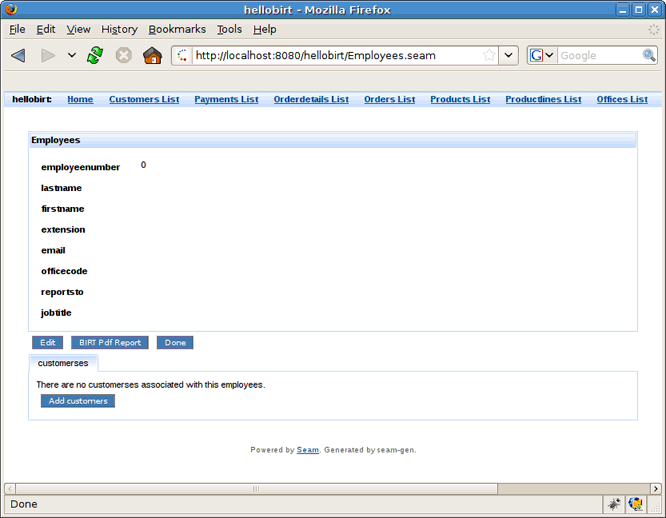
</pre><p>Next run the Seam page with embedded report on the server by right-clicking the file and
        going to <span class="emphasis"><em>
            <span class="property">Run &gt; Run on Server</span>.</em></span></p><div class="figure"><a id="d0e1165"/><div class="figure-contents"><div class="mediaobject"><img src="images/birt_reports_deployment/openingArticlesPage.png" alt="Opening Employees.xhtml Page"/></div></div><p class="title"><b>Figure 4.2. Opening Employees.xhtml Page</b></p></div><br class="figure-break"/><p>After clicking the <span class="emphasis"><em>
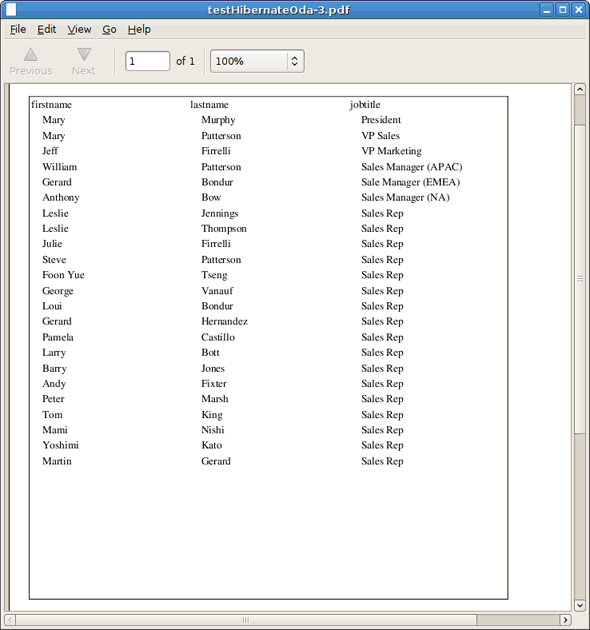
            <span class="property">BIRT PDF Report</span>
        </em></span> button, you should see the following report:</p><div class="figure"><a id="d0e1183"/><div class="figure-contents"><div class="mediaobject"><img src="images/birt_reports_deployment/BirtPDFReport.png" alt="Birt PDF Report"/></div></div><p class="title"><b>Figure 4.3. Birt PDF Report</b></p></div><br class="figure-break"/><p>Thus, a Seam project that includes the BIRT facet can be deployed as any project. If you
        define the Hibernate ODA driver, the JBoss BIRT engine will use JNDI URL that has to be bind
        to either Hibernate Session Factory or Hibernate Entity Manager Factory. If you
        don't specify the JNDI URL property, our engine will try the following JNDI
        URLs:</p><div class="itemizedlist"><ul><li><p>
                <span class="emphasis"><em>java:/&lt;project_name&gt;</em></span>
            </p></li><li><p>
                <span class="emphasis"><em>java:/&lt;project_name&gt;EntityManagerFactory</em></span>
            </p></li></ul></div><p>When creating a Seam EAR project, Hibernate Entity Manager Factory is bound to
            <span class="emphasis"><em>java:/{projectName}EntityManagerFactory</em></span>. All you need to do is
        using the Hibernate Configuration created automatically. You can use default values for the
        Hibernate Configuration and JNDI URL within the BIRT Hibernate Data Source.</p><p>When using a Seam WAR project, neither HSF nor HEMF aren't binded to JNDI by
        default. You has to do this manually. For instance, HSF can be bound to JNDI by adding the
        following property to the <span class="emphasis"><em>
            <span class="property">persistence.xml</span></em></span> file:</p><pre xmlns="" xmlns:rf="java:org.jboss.highlight.XhtmlRendererFactory" class="XHTML">&lt;property name="hibernate.session_factory_name" value="java:/projectname"/&gt;
    </pre><p>And you can use <span class="emphasis"><em>java:/projectname</em></span> as the JNDI URL property when creating a BIRT
        Hibernate Data Source.</p><div xmlns:rf="java:org.jboss.highlight.XhtmlRendererFactory" class="note"><h2>Note:</h2><p>If you want to test this feature using PDE Runtime, you need to add <span class="emphasis"><em>
                <span class="property">osgi.dev=bin</span>
            </em></span> to the <span class="emphasis"><em>
                <span class="property">WebContent/WEB-INF/platform/configuration/config.ini</span>
            </em></span> file.</p></div><p>In conclusion, the main goal of this document is to get you know with a full featureset
        that <span class="property">JBoss BIRT Tools</span> provide. Thus if you have some questions,
        comments or suggestions on the topic, please feel free to ask in the <a xmlns:xlink="http://www.w3.org/1999/xlink" href="http://www.jboss.org/index.html?module=bb&amp;op=viewforum&amp;f=201">JBoss
            Tools Forum</a>. You can also influence on how you want to see JBoss Tools docs in
        future leaving your vote on our page <a xmlns:xlink="http://www.w3.org/1999/xlink" href="http://www.jboss.org/community/docs/DOC-10795">here</a>.</p></div><ul class="docnav"><li class="previous"><a accesskey="p" href="hibernate_datasource.html"><strong>Prev</strong>Chapter 3. Hibernate ODA Data Source</a></li><li class="up"><a accesskey="u" href="#"><strong>Top of page</strong></a></li><li class="home"><a accesskey="h" href="index.html"><strong>Front page</strong></a></li></ul></body></html>