This chapter covers the basics of working with JMX plugin, which is used to manage Java applications through JMX and its RMI Connector.
Requirements to use JMX Tools are the following:
JMX Tools is developed on Eclipse 3.4.x milestones.
JMX Tools requires that Eclipse is run on a JDK 1.5.0 or above (due to dependencies on JMX packages which were introduced in Java 1.5.0)
JBossTools' JMX Tools project is a fork of eclipse-jmx, a project by Jeff Mesnil. It was forked with permission.
Here, we are going to explain how to install the JMX plugins into Eclipse.
JMX Tools is one module of the JBoss Tools project. JMX Tools has no dependency on any other part of JBossTools, and can be downloaded standalone. Even though the JMX Tools have no dependencies, other plugins, such as ASTools, do depend on the JMX Tooling and even extend it.
You can find the JBossTools plugins over at the download pages. The only package you'll need to get is the JMX Tooling, however the AS Tools would give you a more full experience when using JMX with JBoss Servers. You can find further download and installation instructions on the JBoss Wiki in the InstallingJBossTools section.
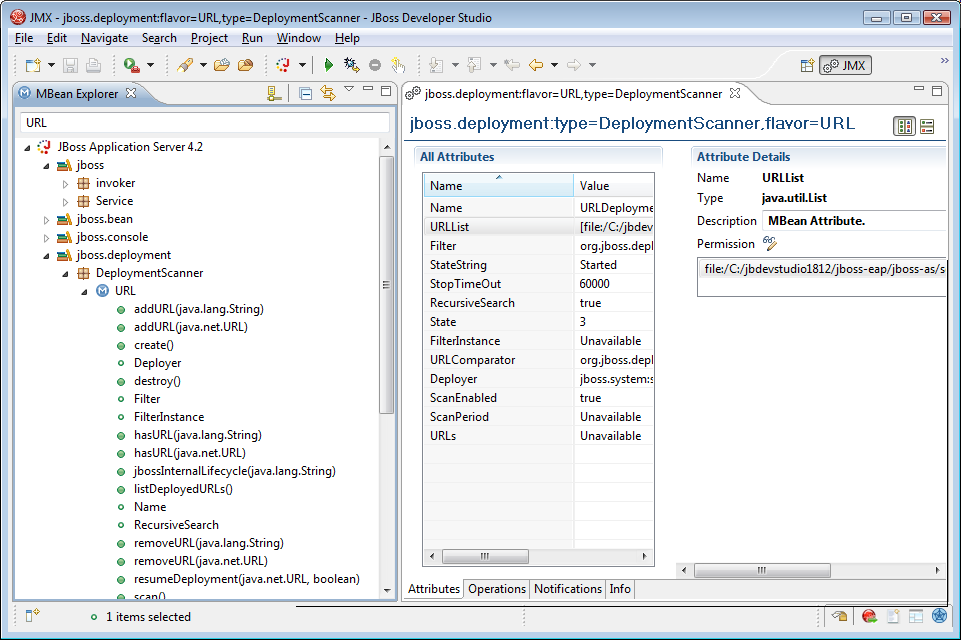
To start using the JMX Tools, it's necessary to open MBean explorer. Go to Window > Show View > Other... and then select MBean Explorer and click OK
The MBean Explorer lists all of the domains, mbeans, attributes, and operations inside a connection. When you double-click on a MBean in the MBean Explorer view, it opens a multi-page editor to manage the MBean. The MBeanEditor is composed of these pages:
Attributes page, to get/set the attributes of the MBean
Operations page, to invoke operations on the MBean
Notifications page, to receive notifications from the MBean
Info page, which displays general information about the MBean